
10 Best Accounting Software for Analytics in 2026, Compared
10 best accounting software for analytics compared on price, reports and forecasting, with real starting prices checked November 2, 2026, sorted by buyer need.
 Shamim Mia, Founder, SerpAstraLast verified November 2, 202614 min read
We compare pricing pages, documentation and public reviews. We never accept payment for rankings.

Key takeaways
- QuickBooks Online is the best all-round pick for most small businesses: real-time profit and loss and the widest reporting choice from $38/month. Xero ($27/month) and Zoho Books ($20/month) are the closest rivals.
- Free plans are real here: Wave's Starter plan and Zoho Books' free plan cover core accounting at $0, but automatic bank feeds and deeper analytics start on paid plans.
- The single most important buying factor is whether the analytics match how you decide: live dashboards and forecasting matter more than the count of canned reports.
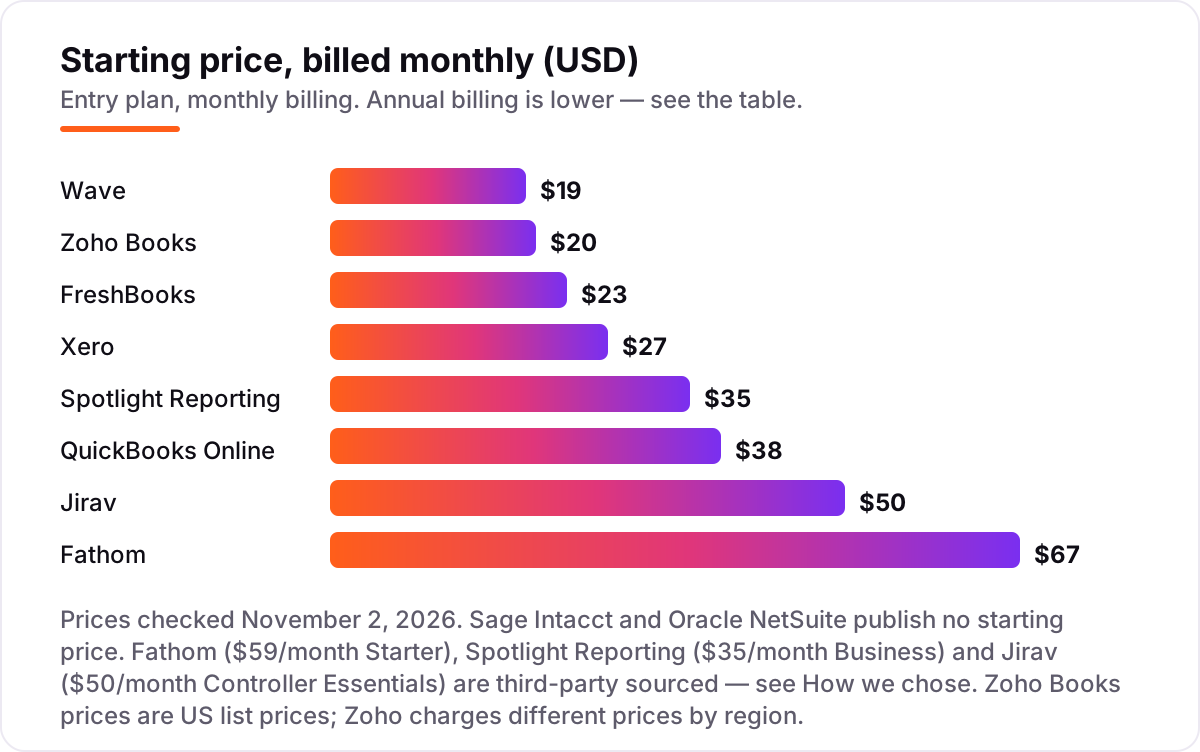
- Every price below was checked on November 2, 2026. Sage Intacct and NetSuite are quote-only, and the Fathom, Spotlight Reporting and Jirav prices are third-party sourced — see How we chose.
On this page
Quick comparison
| Tool | Best for | Starting price | Free plan |
|---|---|---|---|
| QuickBooks Online | Small businesses that want the widest reporting choice and the largest app ecosystem for about $38/month | $38/mo | Yes (1 user) |
| Xero | Small teams that want unlimited users and strong reporting with 800+ integrations for $27/month | $27/mo | No (1st month free) |
| Zoho Books | Budget-conscious small businesses that want 50+ reports and a free plan for $20/month | $20/mo | Yes (under $50K revenue) |
| FreshBooks | Freelancers and service firms that bill by the project and want simple profit reports for $23/month | $23/mo | No (30-day trial) |
| Wave | Solo owners who want free core accounting and basic reports, with Pro at $19/month | $19/mo | Yes (Starter) |
| Sage Intacct | Mid-market finance teams that need dimensional reporting across entities, departments and projects | Custom quote | No |
| Oracle NetSuite | Growing companies that need ERP-wide analytics, multi-entity consolidation and revenue recognition | Custom quote | No |
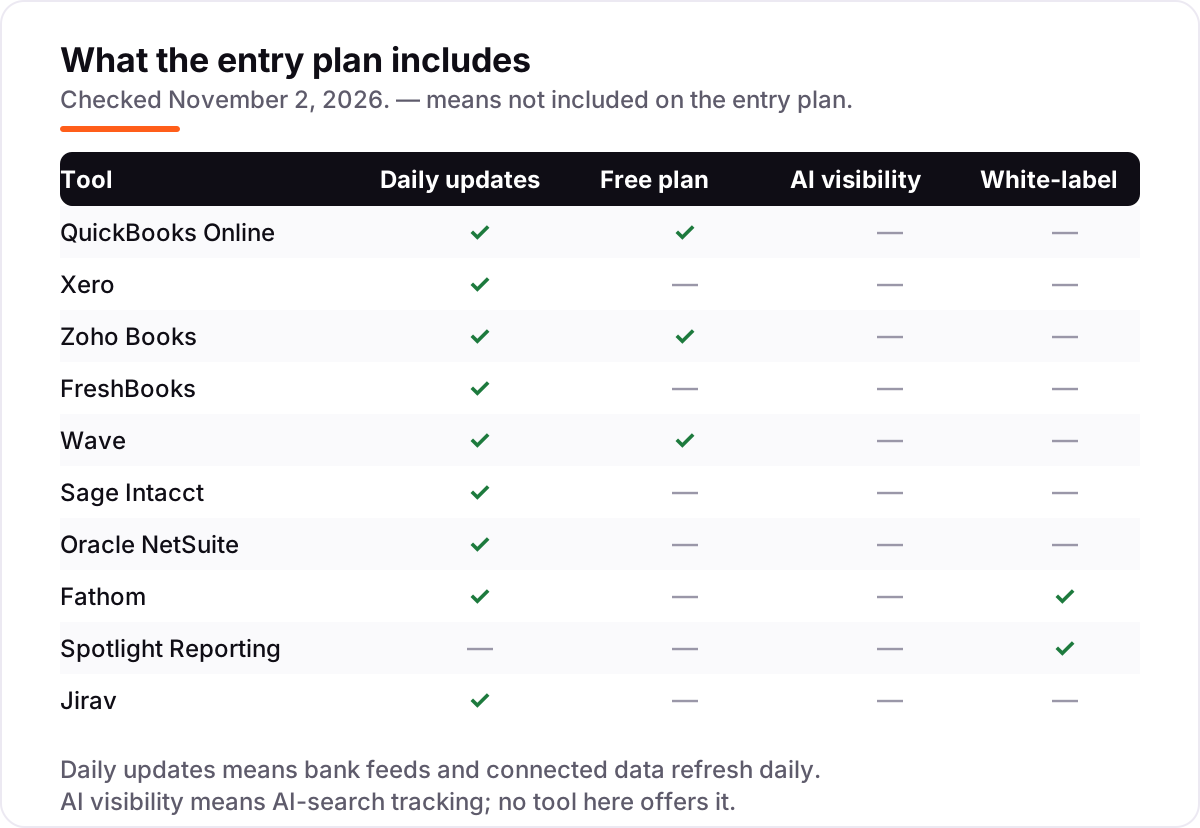
| Fathom | Accountants and CFOs who want KPI dashboards and forecasting on top of QuickBooks or Xero | $67/mo | No (14-day trial) |
| Spotlight Reporting | Advisory firms that turn client numbers into visual, board-ready reports | $35/mo | No (14-day trial) |
| Jirav | Finance teams and fractional CFOs that need driver-based budgets and rolling forecasts | $50/mo | No |
Make one of these tools?
We re-check this list every quarter. Send a correction, request a review, or ask about a clearly labeled sponsored spot.
Request a listingThe best accounting software for analytics

QuickBooks Online
Best for: Small businesses that want the widest reporting choice and the largest app ecosystem for about $38/month
QuickBooks Online is the safe default for a small business that wants analytics without buying a second tool. Simple Start shows profit and loss in real time, Essentials adds KPI dashboards fed by third-party data, and Plus adds budgets, project profitability and inventory tracking. The reporting library covers the standard statements plus management reports you can schedule and send to an accountant.
The catch is the price path. The $38 list price is what you pay after the 50%-off intro period ends, and the user caps are strict — one user on Simple Start, three on Essentials. If your team is larger than that, or you need the advanced reporting in the $340 Advanced plan, budget for the higher tier from the start.
What we like
- Simple Start runs real-time profit and loss, and Essentials adds KPI dashboards fed by third-party data
- Plus adds budgets, project profitability and inventory tracking, with management reports you can schedule
- The largest accounting app ecosystem here, so bank feeds, payroll and industry tools connect without exports
Watch out for
- Reviewers cite frequent price increases, and the user caps are strict: 1 user on Simple Start, 3 on Essentials
- The 50%-off headline price lasts 3 months, then the bill doubles to the $38 list price
Xero
Best for: Small teams that want unlimited users and strong reporting with 800+ integrations for $27/month
Xero suits a small team that wants everyone in the books at once: every plan includes unlimited users, which QuickBooks charges extra for. Core analytics — a business snapshot, short-term cash flow and profit-and-loss trends — come with all plans, and the Established plan adds Analytics Plus with cash flow forecasting up to 90 days and deeper scenario modeling.
The entry plan is the limit to watch. Early allows only 20 invoices and 5 bills a month, so most growing firms land on Growing at $59 a month. Xero also connects to more than 800 third-party apps, which matters when your analytics need data from outside the ledger, such as payroll, inventory or ecommerce.
What we like
- Core analytics — business snapshot, short-term cash flow and P&L trends — are included on every plan
- Unlimited users on all plans, with 800+ third-party app integrations
- Established adds Analytics Plus: cash flow forecasting up to 90 days and deeper scenario modeling
Watch out for
- Early caps at 20 invoices and 5 bills a month, so growing firms move to Growing at $59/month fast
- Reviewers say pricing feels high once add-ons like payroll and Analytics Plus stack up

Zoho Books
Best for: Budget-conscious small businesses that want 50+ reports and a free plan for $20/month
Zoho Books is the cheapest way into serious reporting. The free plan covers core accounting while annual revenue stays under $50,000, and Standard adds automatic bank feeds, scheduled reports and three users for $20 a month per organization — not per user, which keeps the bill low as the team grows. More than 50 reports are included across the plans.
The trade-off is where the deeper analytics live. Advanced analytics, KPI tracking and multi-warehouse inventory sit on Elite at $150 a month, so a business that wants forecasting depth pays far more than the entry price. If you already use Zoho CRM or Zoho Inventory, the shared data makes the reports more useful than the price alone suggests.
What we like
- More than 50 reports included, with scheduled reports from Standard and custom reports higher up
- Priced per organization, not per user — Standard includes 3 users for $20/month
- The top tiers add advanced analytics, KPI tracking and multi-warehouse inventory
Watch out for
- Automatic bank feeds start on Standard, not on the free plan
- Advanced analytics sit on Elite ($150/month), so the cheapest analytics depth costs more than the entry price suggests

FreshBooks
Best for: Freelancers and service firms that bill by the project and want simple profit reports for $23/month
FreshBooks is built for people who bill clients, not for accountants. Invoicing, time tracking and expenses come first, and the profit-and-loss report follows naturally from the work you log. The Plus plan at $43 a month adds the full double-entry set — chart of accounts, general ledger, trial balance and balance sheet — plus accountant access and bank reconciliation.
Lite is honest about its limits: five billable clients, no bank reconciliation and no accountant access, so most real businesses need Plus. FreshBooks also has no inventory tracking on any plan, and each extra team member costs $11 a month. Buy it when invoicing is the job and reporting is secondary; buy QuickBooks or Xero when the reports are the job.
What we like
- Clean profit and loss plus project profitability reports, with time tracking built in
- Plus ($43/month) adds the full double-entry set: chart of accounts, general ledger, trial balance and balance sheet
- Rated 4.5/5 on G2, the highest score in this list, with reviewers praising ease of use most
Watch out for
- Lite caps at 5 billable clients and leaves out bank reconciliation and accountant access
- No inventory tracking on any plan, and each extra team member costs $11/month

Wave
Best for: Solo owners who want free core accounting and basic reports, with Pro at $19/month
Wave is the only tool here with genuinely free core accounting. The Starter plan costs nothing and includes unlimited invoices, bills and bookkeeping records, plus the basic profit-and-loss, balance-sheet and cash-flow reports. For a solo owner who just needs to know whether the month made money, that is enough — and there are no per-user fees to grow into.
Pro at $19 a month adds the automation that makes the free plan practical: automatic bank imports, receipt scanning and automatic transaction categorization. What you do not get is depth — no budgets, no forecasting and no custom report builder — so Wave is a starting point, not a destination, for a business whose reporting needs are growing.
What we like
- The only genuinely free core accounting here: unlimited invoices, bills and bookkeeping records on Starter
- Pro adds automatic bank imports, receipt scanning and transaction categorization for $19/month
- Simple, honest reporting — P&L, balance sheet and cash flow — with no per-user fees
Watch out for
- Reporting is basic next to QuickBooks or Xero: no budgets, no forecasting, no custom report builder
- No payroll in the core plans and no inventory tracking, so growing firms outgrow it

Sage Intacct
Best for: Mid-market finance teams that need dimensional reporting across entities, departments and projects
Sage Intacct is the first tool in this list built for a finance team rather than an owner. Its dimensional chart of accounts tags every transaction by department, location, project or any dimension you define, so the same ledger produces a P&L by department, by project or by entity without exporting to a spreadsheet. Multi-entity consolidation and real-time dashboards come with it.
The price is the barrier: there is no published price, and third-party data puts entry around $9,000 to $12,000 a year before implementation, which typically takes three to six months. Intacct is also the only platform here endorsed by the AICPA. Choose it when your reporting spans entities or departments that small-business tools flatten into one view.
What we like
- Dimensional chart of accounts tags every transaction by department, location and project, so reports slice any way you need
- Built-in dashboards and real-time reporting with multi-entity consolidation
- The only platform here endorsed by the AICPA, with strong audit trails and compliance controls
Watch out for
- Quote-only pricing with annual contracts — third-party data puts entry around $9,000–$12,000 a year before implementation
- Implementation typically takes 3–6 months and adds a large one-off cost on top of the subscription

Oracle NetSuite
Best for: Growing companies that need ERP-wide analytics, multi-entity consolidation and revenue recognition
NetSuite is the only tool here that is an ERP first and an accounting package second. SuiteAnalytics runs real-time dashboards and saved searches across finance, inventory, CRM and ecommerce in one system, and multi-entity consolidation, multi-currency and ASC 606 revenue recognition are built in rather than bolted on. For a company outgrowing QuickBooks, that single system is the point.
The cost matches the scope. Pricing is quote-only, with mid-market deployments typically running $25,000 to $100,000 or more a year plus implementation, and reviewers report a steep learning curve and renewal increases. NetSuite is the right answer when the business needs one system for everything; it is the wrong answer when the question is only which reports to run.
What we like
- SuiteAnalytics gives real-time dashboards and saved searches across finance, inventory, CRM and ecommerce in one system
- Multi-entity consolidation, multi-currency and ASC 606 revenue recognition built in
- The largest review base here — 4,912 G2 reviews — with a mature partner and app ecosystem
Watch out for
- Quote-only pricing, typically $25,000–$100,000+ a year for mid-market deployments, plus implementation
- Reviewers report a steep learning curve and renewal increases that catch teams off guard

Fathom
Best for: Accountants and CFOs who want KPI dashboards and forecasting on top of QuickBooks or Xero
Fathom does not replace your accounting software — it reads it. Connect QuickBooks, Xero or MYOB and Fathom builds KPI dashboards, management reports and three-way forecasts from the live data, with more than 50 financial KPIs, a custom KPI builder and targets and alerts. It imports up to 96 months of history and syncs daily, so the dashboards stay current without manual exports.
Pricing is per company, starting at $67 a month for one company, so an accounting firm with dozens of clients pays per file. Fathom is also included in QuickBooks Online Advanced subscriptions, which makes Advanced a better deal than it first looks. Buy Fathom when the ledger is fine but the reporting on top of it is not.
What we like
- 50+ financial KPIs with custom KPI builder, targets, alerts and trend analysis
- Three-way forecasting with scenario planning, plus consolidations of up to 300 entities on Pro
- Imports up to 96 months of history and syncs daily from QuickBooks, Xero and MYOB
Watch out for
- Priced per company, so a firm with many clients pays per file — the bill scales with the client list
- No bookkeeping of its own: it only works on top of accounting software you already pay for

Spotlight Reporting
Best for: Advisory firms that turn client numbers into visual, board-ready reports
Spotlight Reporting turns a set of accounts into a board pack. Visual reports, KPI scorecards and an AI-written executive summary explain the numbers in plain language, and the same pack consolidates up to 75 organizations with multi-currency and eliminations. Forecasting and dashboards are included, and every plan comes with a dedicated customer success team.
The pricing model suits firms, not single businesses. The $35 Business plan covers one organization, but advisor plans are sold in blocks — Basic covers 20 organizations — so a small firm pays for capacity it may not use. Data also refreshes when you open a report rather than on a live feed. Choose Spotlight when the audience for the numbers is a board, a bank or a client.
What we like
- Visual report packs with charts, KPI scorecards and an AI-written executive summary
- Consolidation of up to 75 organizations with multi-currency and eliminations
- Forecasting and dashboards included, with a dedicated customer success team on every plan
Watch out for
- Advisor plans are priced per block of organizations — a small firm pays for 20 organizations on Basic even with fewer clients
- Data refreshes when you open a report rather than on a live daily feed, so numbers can lag a same-day change

Jirav
Best for: Finance teams and fractional CFOs that need driver-based budgets and rolling forecasts
Jirav replaces the forecasting spreadsheet. Its driver-based models link headcount, pricing and churn to the profit-and-loss statement, balance sheet and cash flow, so changing one assumption updates the whole forecast. Auto Forecast builds a starting forecast from historicals and seasonal trends, and report packages for boards, lenders and executives are ready in a few clicks.
The price needs a careful read. The $50 a month figure is the Controller Essentials plan on Jirav's accounting-firm wholesale list; businesses buying direct face annual contracts reported around $10,000 a year. Reviewers also note a steep learning curve and an average setup of about two months. Buy Jirav when forecasting, not just reporting, is the job.
What we like
- Driver-based models connect headcount, pricing and churn to the P&L, balance sheet and cash flow
- Auto Forecast builds a starting forecast from historicals and seasonal trends in one click
- Report packages for boards, lenders and executives, with templates used by 4,000+ companies and firms
Watch out for
- The $50 figure is the accounting-firm wholesale list; businesses buying direct face annual contracts around $10,000 a year
- Reviewers note a steep learning curve moving from spreadsheets, and setup takes about 2 months on average
Finding the best accounting software for analytics is not about buying the tool with the most reports. It is about buying the tool whose reports answer the questions you actually ask: which customers make money, where cash will be in 90 days, and which product line to grow. This list is organised by what you actually need — free options first, then full suites, then the specialist reporting layers that sit on top — with every starting price checked on November 2, 2026.
What accounting software for analytics actually does
Accounting software for analytics turns the ledger into answers. At the basic level it produces the three statements every business needs — profit and loss, balance sheet and cash flow — and keeps them current as bank feeds sync each day. Above that, the better tools add live dashboards, KPI tracking, budgets with variance reports, and forecasts that project cash forward instead of only reporting the past.
The difference between a report and analytics is the question it answers. A report tells you revenue was $42,000 last month. Analytics tells you which customers produced it, whether the trend is rising or falling, and what happens to cash if the largest customer pays two weeks late. That is why the tools in this list are ranked on the decisions they support, not on the number of reports in the menu.
One number shows how much data now flows through these tools: G2 lists more than 800 third-party integrations for Xero alone, so a modern ledger can pull in payroll, inventory and ecommerce data without manual exports. The analytics are only as good as the data feeding them, which is why bank-feed reliability and integration depth matter as much as any chart.
Free and low-cost options first
If your business is small and your questions are simple — did we make money, who owes us, what is due — you may not need to pay at all. Wave's Starter plan is free and covers real double-entry accounting with the basic statements, and Zoho Books has a free plan while annual revenue stays under $50,000. QuickBooks Online also has a limited free plan with one user and the top three reports.
The free tiers are honest products, but they cap out in the same place: automatic bank feeds, budgets and forecasting start on paid plans. Wave Pro at $19 a month adds the bank auto-import and receipt scanning that make the free plan practical day to day, and Zoho Standard at $20 a month adds bank feeds, scheduled reports and three users.
Start free when the business is new and the books are simple. Upgrade the moment you catch yourself exporting to a spreadsheet to answer a question — that export is the sign the free tier has run out.
Full accounting suites with built-in analytics
The six suites in this list do the bookkeeping and the analytics in one subscription. QuickBooks Online is the widest choice: real-time profit and loss from Simple Start, KPI dashboards from Essentials, and budgets, project profitability and inventory from Plus. Xero matches it on breadth with a different strength — unlimited users and built-in analytics on every plan, plus Analytics Plus forecasting on Established.
Zoho Books is the value pick of the group, with more than 50 reports and per-organization pricing that stays cheap as the team grows. FreshBooks is the narrowest suite here, and proud of it: invoicing and project profitability for service firms, with full double-entry reports only from the $43 Plus plan.
Sage Intacct and Oracle NetSuite sit above the rest on depth and price. Intacct's dimensional reporting slices one ledger by department, project or entity, and NetSuite's SuiteAnalytics runs one system across finance, inventory, CRM and ecommerce. Both are quote-only, both need implementation, and both are overkill until the business outgrows the small-business suites.
Dedicated analytics layers that sit on top
When the ledger is fine but the reporting on top of it is not, a specialist layer is cheaper than switching accounting systems. Fathom connects to QuickBooks, Xero or MYOB and builds KPI dashboards, management reports and three-way forecasts from the live data, with consolidations of up to 300 entities. Spotlight Reporting turns the same data into visual board packs with KPI scorecards and an AI-written executive summary, and consolidates up to 75 organizations. Jirav goes further into planning: driver-based budgets and rolling forecasts that replace the spreadsheet model entirely.
These three are priced differently from the suites, and the difference matters. Fathom and Jirav charge per company, so a firm with many clients pays per file, and Spotlight sells advisor plans in blocks of organizations. A single business pays the headline price; a firm pays a multiple of it. Fathom is also included in QuickBooks Online Advanced subscriptions, which makes Advanced a better deal than its $340 price first suggests.
If your accountant already works in one of these tools, follow their lead: the reporting layer is only useful if the person reading the reports knows how to use it.
Quick comparison: tool type by need
| Buyer | Best pick | Why |
|---|---|---|
| Solo owner, free start | Wave | $0 Starter plan, Pro automation at $19/month |
| Small business, best value | Zoho Books | 50+ reports and 3 users for $20/month per organization |
| Small team, everyone in the books | Xero | Unlimited users and built-in analytics from $27/month |
| Freelancer who bills clients | FreshBooks | Invoicing plus project profitability from $23/month |
| Deeper reporting on existing books | Fathom | KPI dashboards and forecasting from $67/month per company |
| Board-ready packs and consolidation | Spotlight Reporting or Sage Intacct | Visual reports from $35/month; dimensional reporting by quote |
How to choose the best accounting software for analytics
- List the three questions you ask every month. If they are all answered by a profit-and-loss statement, any suite here works. If they need forecasts, KPIs or consolidations, you need a higher plan or a reporting layer.
- Check the plan you would actually buy, not the entry price. Analytics features are often one or two tiers up: bank feeds on Zoho Standard, Analytics Plus on Xero Established, forecasting on Fathom Pro.
- Count users and companies, not just the monthly price. QuickBooks charges by user, Zoho by organization, and Fathom and Jirav by company file. The cheapest headline price is often the most expensive bill.
- Decide suite or layer. If you need bookkeeping too, buy a suite. If the ledger is fine and only the reporting is weak, add Fathom, Spotlight or Jirav instead of switching systems.
- Trial on real data. Every tool here has a free plan or a free trial. Import your real books, run one month-end close, and check the reports against numbers you already know before you pay.
If you publish pages about your services, check the titles with the free SERP snippet preview tool before they go live — the same discipline of checking the numbers before trusting them applies to search results too.
Mistakes to avoid
- Comparing promo prices with list prices. QuickBooks at $19, Xero at $2.70 and FreshBooks at $2.30 are all introductory rates. Budget on the list price — $38, $27 and $23 — because that is what you pay after a few months.
- Buying a suite when a reporting layer would do. Switching accounting systems is expensive and disruptive. If the ledger works, Fathom or Spotlight on top of it costs less than a migration.
- Ignoring what the price counts. One user, one organization and one company file are three different units. A firm with 20 clients pays 20 times the Fathom headline price.
- Trusting a directory price. Fathom's retired Starter plan is listed at $53 on older comparisons and $59 on G2's vendor-supplied pricing page; the current Portfolio plan is $67 a month. Always check the vendor's own page.
- Skipping the migration check. Before you switch, confirm your historical data, chart of accounts and open invoices move across cleanly — a reporting tool cannot fix books that arrived broken.
How we chose
We checked each vendor's own pricing page on November 2, 2026 and recorded the starting price exactly as shown, including the introductory rate where the page lists one. Ratings come from G2, with review counts shown. Three prices are third-party sourced and are labeled as such: Fathom's $67 Portfolio price comes from G2's pricing page, which G2 says is supplied by the vendor — the retired Starter plan is listed at $53–$59 in older comparisons, so confirm it on Fathom's pricing page before budgeting. Spotlight Reporting's $35 Business price comes from the same G2 vendor-supplied source. Jirav's $50 figure is the Controller Essentials plan on Jirav's accounting-firm wholesale list; businesses buying direct face annual contracts. Zoho Books prices are the US list prices; Zoho charges different prices by region. Sage Intacct and Oracle NetSuite publish no starting price, so both are listed as custom quote. We ranked the tools by fit for the most common buyer — a small business owner or finance team that wants better answers from its books — not by brand size. No vendor paid for a place in this list, and none of the links here are affiliate links.
What to do next
Start with the decision path above: list your three monthly questions, check which plan actually answers them, and count users and companies before comparing prices. Then take the free plan or trial of your top pick and run one real month-end close in it. If the reports answer your questions without a spreadsheet export, you have your tool. If your reports show revenue is flat while costs climb, the problem may be visibility rather than bookkeeping — our SEO audit service finds why customers are not finding you. If you'd rather have this set up and read for you, request a free SEO + AI visibility audit and get a ranked fix list in 2 business days.
Rather not run the tools yourself?
Tools show you the data. SerpAstra turns it into higher rankings, more map-pack calls and citations in AI answers.
Get a free SEO + AI visibility audit→Sources we checked (20)
- QuickBooks Online pricing — quickbooks.intuit.com/pricing (checked November 2, 2026)
- QuickBooks Online on G2 — 4.0/5, 3,870 reviews (checked November 2, 2026)
- Xero pricing and analytics — xero.com/us/accounting-software/analytics (checked November 2, 2026)
- Xero on G2 — 4.4/5, 1,736 reviews (checked November 2, 2026)
- Zoho Books pricing — zoho.com/us/books/pricing (checked November 2, 2026)
- Zoho Books on G2 — 4.4/5, 329 reviews (checked November 2, 2026)
- FreshBooks pricing — freshbooks.com/pricing (checked November 2, 2026)
- FreshBooks on G2 — 4.5/5, 981 reviews (checked November 2, 2026)
- Wave pricing — waveapps.com/pricing (checked November 2, 2026)
- Wave on G2 — 4.3/5, 328 reviews (checked November 2, 2026)
- Sage Intacct — sage.com (no published pricing; quote only, checked November 2, 2026)
- Sage Intacct on G2 — 4.3/5, 4,231 reviews (checked November 2, 2026)
- Oracle NetSuite pricing — netsuite.com (no published pricing; quote only, checked November 2, 2026)
- Oracle NetSuite on G2 — 4.1/5, 4,912 reviews (checked November 2, 2026)
- Fathom pricing on G2 (supplied by the vendor) — $67/month Portfolio (checked November 2, 2026)
- Fathom on G2 — 4.7/5, 123 reviews (checked November 2, 2026)
- Spotlight Reporting pricing on G2 (supplied by the vendor) — $35/month Business (checked November 2, 2026)
- Spotlight Reporting on G2 — 4.7/5, 24 reviews (checked November 2, 2026)
- Jirav on G2 — 4.7/5, 195 reviews (checked November 2, 2026)
- Jirav wholesale pricing via Rankite — $50/month Controller Essentials (checked November 2, 2026)
Shamim
Founder of SerpAstra
A full-stack SEO and digital marketer who spends most days on Local SEO for dental practices, AI search visibility and lead generation.
Frequently asked questions
What is the best accounting software for analytics in 2026?
QuickBooks Online is the best all-round pick for most small businesses: real-time profit and loss, KPI dashboards from Essentials and the widest reporting choice, from $38 a month. Xero is the better pick for teams that want unlimited users, and Zoho Books wins on value at $20 a month. Firms that only need deeper reporting should add Fathom instead of switching systems.
How much does accounting software for analytics cost?
Between $0 and $38 a month for small-business tools: Wave and Zoho Books both have free plans, FreshBooks starts at $23, Xero at $27 and QuickBooks Online at $38. Dedicated reporting layers add $35 to $67 a month per company. Sage Intacct and NetSuite are quote-only and typically run into five figures a year, so budget for a sales conversation, not a checkout page.
Is there free accounting software with analytics?
Yes, with limits. Wave's Starter plan is free and includes profit-and-loss, balance-sheet and cash-flow reports, and Zoho Books has a free plan while annual revenue stays under $50,000. QuickBooks Online also has a limited free plan. Free plans cover the basic statements; automatic bank feeds, budgets and forecasting start on paid plans.
QuickBooks Online or Xero: which has better analytics?
QuickBooks Online has the wider reporting library, with management reports and KPI dashboards that grow with the Plus and Advanced plans. Xero answers with built-in analytics on every plan — business snapshot, short-term cash flow and P&L trends — plus unlimited users and more than 800 integrations. Pick QuickBooks for reporting depth and Xero when the whole team needs access.
Do I need a separate reporting tool like Fathom or Jirav?
Only when your accounting software's reports stop answering your questions. If you need KPI dashboards, rolling forecasts or board-ready packs, Fathom ($67 a month per company) and Jirav ($50 a month on the wholesale list) add that layer without replacing your ledger. If the standard profit-and-loss and cash-flow reports are enough, the extra subscription buys little.
What should I check before switching accounting software?
Four things: whether your historical data and chart of accounts migrate cleanly, whether the analytics you rely on exist on the plan you would actually buy, what the price becomes after the introductory discount ends, and whether your accountant already works in the system. Run the old and new tools side by side for one month-end close before you cancel anything.
Free SEO and AI visibility audit
Find out what is holding your rankings back
Send us your site. Within 2 business days you get a written audit, an AI visibility check and a short fix list ranked by impact. Free, with no contract attached.
Request my free audit→Related guides
 SEO & AI Search11 Best Rank Tracking Tools in 2026 (Free and Paid, Compared)11 best rank tracking tools compared on price, keyword limits, update speed and AI visibility. Prices checked on the vendor pricing page, October 31, 2026.Read guide →
 SEO & AI SearchBest SEO Audit Software for 2026: 10 Options Compared by Use Case10 best SEO audit software tools compared on price, crawl depth and AI visibility. Prices checked on vendor pricing pages, November 1, 2026.Read guide →
 AI SearchBest AI SEO tools in 2026: honest picks by jobBest AI SEO tools in 2026, picked by job: Semrush and Ahrefs for research, Surfer and Clearscope for content, Otterly for AI tracking, with 2026 prices.Read guide →