
10 Best Accounting Software for Contractors in 2026, Compared
Compare the 10 best accounting software for contractors on price, job costing, AIA billing and free plans, with every price checked November 7, 2026.
 Shamim Mia, Founder, SerpAstraLast verified November 7, 202614 min read
We compare pricing pages, documentation and public reviews. We never accept payment for rankings.

Key takeaways
- QuickBooks Online is the best fit for most contractors at $38/month, but job costing needs Plus at $140/month; Sage 100 Contractor is the purpose-built alternative, priced by quote.
- Wave and Zoho Books both offer genuinely free plans — Wave with no revenue cap, Zoho Books while annual revenue stays under $50,000.
- Knowify, JobTread and Contractor Foreman are job-costing platforms, not ledgers: they add job costing and AIA billing on top of QuickBooks, so you pay for both tools.
- The single most important buying factor is whether the tool can cost a job: AIA billing, progress billing and WIP reporting decide what you actually pay, not the headline price.
On this page
Quick comparison
| Tool | Best for | Starting price | Free plan |
|---|---|---|---|
| QuickBooks Online | General contractors who want the ledger most US accountants already know, with job costing on Plus | $38/mo | Yes (Free plan) |
| Sage 100 Contractor | Small to midsize general contractors and subcontractors who want one system for accounting, job costing and certified payroll | Custom quote | No |
| Knowify | Trade contractors who bid, run and invoice fixed-price and AIA jobs and want live job costing synced to QuickBooks | $149/mo | No (14-day trial) |
| JobTread | Custom-home builders and remodelers who need tight budget control and one price with every feature included | $199/mo | No (money-back guarantee) |
| Contractor Foreman | Small contractors on a tight budget who want scheduling, estimates, time cards and AIA billing for one flat tier price | $49/mo (annual) | No (30-day trial) |
| Xero | Contractors with a small office team who refuse to pay per seat and want clean bank reconciliation | $27/mo | No (30-day trial) |
| FreshBooks | Subcontractors and service contractors who bill by the hour and want invoicing to lead | $23/mo | No (30-day trial) |
| Zoho Books | Small contractors who want a genuinely free ledger now and the cheapest paid upgrade when revenue passes $50,000 | $15/mo (annual) | Yes (free plan) |
| Wave | Solo contractors and one-person outfits who want real double-entry accounting free, with no invoice or revenue caps | Free; Pro $19/mo | Yes (free) |
| Sage 50 | Contractors who want desktop accounting with inventory and job-related reporting and do not mind a one-user plan | $132/mo | No (30-day trial) |
Make one of these tools?
We re-check this list every quarter. Send a correction, request a review, or ask about a clearly labeled sponsored spot.
Request a listingThe best accounting software for contractors

QuickBooks Online
Best for: General contractors who want the ledger most US accountants already know, with job costing on Plus
QuickBooks Online is the default choice: it is the accounting software most accountants already know, so finding help is easy, and it covers the whole job — invoicing, bills, bank feeds and reporting — in one subscription. Simple Start costs $38 a month for one user, and the price climbs with headcount rather than features: Essentials is $85 for three users, Plus is $140 for five, and Advanced is $340 for 25.
The catch for contractors is that job costing waits for Plus. Simple Start cannot cost a job or track project profitability, so a contractor who bills by the job pays $140 a month, not $38. Payroll is a separate add-on on every plan. Buy QuickBooks Online when you want the standard choice your accountant knows; add Knowify or JobTread for live job costing on top.
What we like
- The software most US accountants already use, so finding help and switching accountants is easy
- Full double-entry accounting with invoicing, progress billing, bank feeds and reporting on every paid plan
- Intuit Intelligence AI features are included on Simple Start, not held for the top tier
- More than 800 integrations cover payroll, payments, inventory and contractor add-ons such as Knowify and JobTread
Watch out for
- Job costing and project profitability wait for Plus at $140/month, so Simple Start cannot cost a job
- Price rises most years — Essentials, Plus and Advanced all went up again for renewals from August 1, 2026
- Hard user caps force upgrades: a second user means Essentials at $85/month, and payroll is a paid add-on

Sage 100 Contractor
Best for: Small to midsize general contractors and subcontractors who want one system for accounting, job costing and certified payroll
Sage 100 Contractor is the only tool here built from the ground up for construction accounting. It puts the ledger, job costing, payroll and project management in one package, with certified payroll, AIA billings and lien waivers among its strengths. Estimates export straight into budgets, proposals, subcontracts and purchase orders, so the number you bid is the number you track.
The price is the hard part: Sage publishes no list price, and third-party estimates put subscriptions at roughly $115 to $200 per user per month, so you need a quote from Sage or a partner before you can budget. Implementation and training cost extra. Buy it when the firm is big enough to run payroll and certified payroll in-house; smaller outfits get the same job costing cheaper from Knowify or JobTread paired with QuickBooks Online.
What we like
- Purpose-built for contractors: job costing, AIA billing, certified payroll and lien waivers in one package
- Estimates export straight into budgets, proposals, subcontracts and purchase orders
- Service management module covers dispatch, service agreements, quotes and work orders
- A long track record with small to midsize contractors, sold through Sage partners who handle setup
Watch out for
- No published price — every quote depends on users, modules and deployment, so budgeting takes a sales call
- Desktop-first design with a heavier implementation and training load than a cloud add-on
- Add-on modules, including Sage Construction Management, are priced separately from the base quote

Knowify
Best for: Trade contractors who bid, run and invoice fixed-price and AIA jobs and want live job costing synced to QuickBooks
Knowify is built for trade contractors — electricians, plumbers, HVAC firms, painters and remodelers — who bid, run and invoice jobs in one place. Core costs $149 a month, or $99 a month billed annually, for one user, and covers estimates, proposals, fixed-price contracts, progress billing and AIA pay applications, with scheduling and time tracking included. Advanced costs $399 a month and adds job costing, project budgets and real-time WIP.
Knowify is the official QuickBooks Online construction partner, with a native two-way sync across QuickBooks Online and Desktop, so you and your bookkeeper work in either system and see the same numbers. The catch is the double subscription — Knowify is not a ledger, so the books still live in QuickBooks. Buy it when AIA billing and live job costing are daily work, not occasional.
What we like
- Native two-way QuickBooks sync, so estimates, time and invoices match the books in real time
- Progress billing and licensed AIA G702/G703 pay applications on every plan
- Change orders, scheduling and time tracking included from the Core plan
- Service Pro add-on adds dispatching, payment processing and equipment history for service work
Watch out for
- Job costing, WIP reporting and project budgets start on Advanced at $399/month, not on Core
- Core covers one user only; extra users cost $29/month each on Core and Advanced
- It is not a ledger itself — the books still live in QuickBooks, so you pay for both tools

JobTread
Best for: Custom-home builders and remodelers who need tight budget control and one price with every feature included
JobTread publishes one price and includes every feature on it: $199 a month billed monthly, or $159 a month billed annually, for one internal user, with extra internal users at $20 a month each on monthly billing. Estimating, budgeting, scheduling, daily logs, change orders and the client portal all come in the single price, and there is no contract or setup fee.
The strength is budget discipline. JobTread is built around the estimate, so costs are tracked against the budget you bid, and overruns show up while the job is still running instead of at close-out. The weakness is the same double subscription as Knowify: JobTread is a project platform, not a ledger, so accounting still runs in QuickBooks. Buy it when budget control on custom homes and remodels is the job.
What we like
- One plan with every feature included — estimating, budgeting, scheduling, daily logs and client portal
- Budget tracking is built around the estimate, so overruns show up while the job is still running
- Customer, subcontractor and vendor portal users are free, as are photo- and log-only field crew
- Annual billing takes 20% off, with no contract and no setup fee
Watch out for
- No free trial — monthly plans carry a 30-day money-back guarantee instead
- Every office login that tracks time counts as a paid internal user, so the bill grows with headcount
- It is a project platform, not a ledger — accounting still runs in QuickBooks, so you pay for both

Contractor Foreman
Best for: Small contractors on a tight budget who want scheduling, estimates, time cards and AIA billing for one flat tier price
Contractor Foreman is the budget play among the all-in-one construction platforms. Plans are priced by user cap rather than by features, so Basic at $49 a month billed annually unlocks the full feature list: scheduling, estimates, daily logs, change orders, time cards, purchase orders, bills and job costing reports. Standard costs $105 a month for up to 3 users, Plus $166 for up to 8, Pro $221 for up to 15, and Unlimited $332.
The limits are the user caps and the annual-only billing on Basic: a solo contractor pays $588 a year up front, and a three-person office pays $105 a month. QuickBooks sync runs through Zapier and starts on Plus, so the cheapest tiers keep the books separate. Pick Contractor Foreman when the budget is tight and one flat tier price matters more than a native accounting sync.
What we like
- Every tier unlocks the full feature list, including Gantt scheduling, RFIs, estimates and time cards
- AIA progress billing and purchase orders included from the Basic plan
- Time cards with GPS tracking on all plans, plus a client portal
- Lifetime rate lock after sign-up, and a 100-day money-back guarantee on annual plans
Watch out for
- Basic covers one user only and is sold on annual billing only — there is no monthly option
- User caps push growing teams up the tiers: 3 users need Standard at $105/month, 8 need Plus at $166
- QuickBooks sync runs through Zapier and starts on Plus, not on the entry plan
Xero
Best for: Contractors with a small office team who refuse to pay per seat and want clean bank reconciliation
Xero's pitch is simple: one flat price per plan and as many users as you like. Early costs $27 a month and covers quotes, 20 invoices and 5 bills a month, with bank reconciliation and receipt capture included. Growing costs $59 a month, removes the invoice and bill caps, and adds automated reconciliation and dashboards; Established costs $97 and adds multi-currency, projects and expense claims.
The limits to watch are the ones on Early: most active contractors outgrow 20 invoices a month quickly, so the real starting price is often Growing at $59. Job costing comes from an add-on such as Knowify or JobTread, and US payroll runs through Gusto at $36 a month plus $6 per person. Choose Xero when several people touch the books and you refuse to pay per seat.
What we like
- Unlimited users on every plan, including Early at $27/month — no per-seat fees at any tier
- Bank reconciliation and Hubdoc receipt capture included from the entry plan
- More than 1,000 app integrations, the widest marketplace in this list
- Single flat price per plan with no annual-billing maze — the monthly price is the price
Watch out for
- Early caps at 20 invoices and 5 bills a month — most active contractors need Growing at $59/month
- No job costing or AIA billing built in; construction costing comes from an add-on such as Knowify or JobTread
- Multi-currency, projects and expense claims wait for Established at $97/month

FreshBooks
Best for: Subcontractors and service contractors who bill by the hour and want invoicing to lead
FreshBooks is built for service businesses that bill for time: invoicing, estimates, expenses and time tracking sit up front, and the accounting sits behind them. Lite costs $23 a month and covers 5 billable clients; Plus costs $43 for 50 clients and adds double-entry reports, bank reconciliation and free accountant access; Premium costs $70 and removes the client cap.
The client cap is the thing that decides your bill. A sixth client moves you from Lite to Plus, and every extra team member costs $11 a month on top of the plan. It has no job costing or AIA billing, so it suits subcontractors who bill hours and materials rather than general contractors running progress billing. Pick FreshBooks when invoicing and time billing are the job; pick QuickBooks Online or Sage 100 Contractor when you need to cost a job.
What we like
- The easiest invoicing in this list: clean invoices, estimates, recurring billing and payment reminders
- Time tracking and expense tracking built in, so billable hours flow straight onto invoices
- Plus adds double-entry reports, bank reconciliation and free accountant access for $43/month
- Rated the easiest tool here to set up, with support reviewers praise most
Watch out for
- Lite covers only 5 billable clients — a sixth client forces Plus at $43/month
- Every extra team member costs $11/month on top of the plan price
- No inventory tracking, no job costing and no AIA billing; bank reconciliation and double-entry reports start on Plus, not Lite

Zoho Books
Best for: Small contractors who want a genuinely free ledger now and the cheapest paid upgrade when revenue passes $50,000
Zoho Books is the value pick in this list because the free plan is a real ledger, not a demo: full double-entry accounting, invoicing and bank reconciliation at $0 while annual revenue stays under $50,000. Standard costs $20 a month for 3 users and 5,000 invoices a year, and Professional costs $50 and adds multi-currency, inventory and project billing.
The catches are ceilings. The free plan stops at 1,000 invoices a year, extra users cost $3 a month each, and there is no payroll module on any Zoho Books plan — payroll is a separate Zoho product. There is no job costing or AIA billing, so a general contractor still needs a costing add-on. Choose Zoho Books when the budget matters most and you already live in the Zoho ecosystem, or when the free plan covers your first year.
What we like
- A real free plan: full double-entry accounting, invoicing and bank reconciliation at $0 while revenue stays under $50,000 a year
- Cheapest paid step up here — Standard is $20/month for 3 users and 5,000 invoices a year
- Deep Zoho ecosystem: CRM, Inventory, Expense and Payroll connect without third-party tools
- Client portal and payment reminders included, so clients can pay from the invoice itself
Watch out for
- Free plan stops at 1,000 invoices a year and only while annual revenue stays under $50,000
- No job costing or AIA billing; multi-currency and inventory wait for Professional at $50/month
- Accountants recommend it less often than QuickBooks Online or Xero, so finding outside help takes more effort

Wave
Best for: Solo contractors and one-person outfits who want real double-entry accounting free, with no invoice or revenue caps
Wave is the only tool here whose free plan has no revenue cap and no invoice cap: Starter costs $0 and includes unlimited estimates, invoices, bills and bookkeeping records, with real double-entry accounting underneath. Pro costs $19 a month, or $190 a year, and adds automatic bank imports, receipt scanning, multi-user access and payment reminders.
The free plan's weakness is manual work. Starter has no automatic bank feed, so every transaction is typed in or uploaded by hand, and that gets old fast past fifty transactions a month. There is no job costing and no multi-currency invoicing at any price, and Wave serves the US and Canada only. Start on Wave when the business is small and the budget is $0; upgrade to Pro the month manual entry starts costing you evenings.
What we like
- The only genuinely free full ledger here: unlimited invoices, bills and bookkeeping records at $0 with no revenue cap
- Pro is a single $19/month upgrade that adds automatic bank imports, receipt scanning and unlimited users
- Payments and payroll are pay-as-you-go add-ons, so a business that only invoices pays nothing at all
- Simple enough for an owner with no accounting background to run the books alone
Watch out for
- Automatic bank imports, receipt scanning and extra users all need Pro at $19/month — Starter means manual entry
- No inventory tracking, no job costing and no multi-currency invoicing at any price
- US and Canada only, and support on the free plan is limited to help articles and community answers
Sage 50
Best for: Contractors who want desktop accounting with inventory and job-related reporting and do not mind a one-user plan
Sage 50 is the desktop option in this list: Pro Accounting costs $132.17 a month for one user and covers invoices, income, expenses and payments with cloud access on top of the desktop software. Premium costs more and adds advanced budgeting, advanced inventory and multi-company consolidation, while Quantum sits above that for larger firms.
The case for Sage 50 is inventory and job-related reporting that the cheaper cloud ledgers here do not offer, plus unlimited support and automatic updates on every plan. The case against it is the price: at $132.17 a month for one user it costs more than QuickBooks Online Plus, which has real job costing, and more than Sage 100 Contractor's estimated per-user range. Pick Sage 50 when the firm wants desktop software with inventory; pick QuickBooks Online when the team needs cloud access for everyone.
What we like
- Desktop reliability with cloud access: invoices, income, expenses and payments in one place
- Inventory tracking and job-related reporting that the cheaper cloud ledgers here do not offer
- Unlimited support and automatic updates included on every plan
- A construction industry edition with features aimed at contractors
Watch out for
- Pro covers one user only, and the subscription needs a minimum one-year commitment
- At $132.17/month it costs more than every general ledger here while offering less job costing than Sage 100 Contractor
- Cloud access is an add-on layer over desktop software, not a cloud-native ledger
The best accounting software for contractors does two jobs at once: it keeps a clean double-entry ledger for the tax return, and it tells you whether each job made money. A general ledger can do the first job well and fail the second, so we ranked the ten tools below by fit for a US contracting business — starting with the purpose-built systems and the ledger most accountants know — and every price was checked on the vendor's own pricing page on November 7, 2026.
How to choose the best accounting software for contractors
- Decide whether you need job costing, not just accounting. A general ledger records what the business spent; job costing records what each job spent. If you bill fixed-price or progress-billing jobs, the ledger alone cannot tell you whether one job made money.
- Check AIA billing before you buy. Commercial clients often require progress billing on the standard G702/G703 forms. Knowify includes licensed AIA pay applications on every plan; Sage 100 Contractor and Contractor Foreman support AIA billing too.
- Count the users who touch the books. QuickBooks Online charges by user tier — one user on Simple Start, three on Essentials — while Xero includes unlimited users at the entry price and Contractor Foreman prices by user cap.
- Watch for the double subscription. Knowify, JobTread and Contractor Foreman are job-costing platforms, not ledgers, so the books still live in QuickBooks. Price the pair, not the add-on alone.
- Check certified payroll if you do public work. Sage 100 Contractor builds certified payroll in; every other tool here handles it through payroll add-ons or not at all.
- Think about who else touches the books. If your accountant already lives in QuickBooks Online, picking anything else means paying them to learn a new system — ask before you buy.
Accounting is one system in your stack, not the whole stack. If the business also needs to be found online, our guide to marketing software for contractors covers the visibility side — and our local SEO service handles the map-pack work that brings in nearby jobs. And before you publish new pages for the services you sell, run your titles through the free SERP snippet preview tool — it shows exactly how the title and description will look in Google.
Whatever you shortlist, try it with real data before you pay. The free plans and trials in this list are long enough to run one genuine month — your invoices, your bank feed, your jobs — and that month tells you more than any review can. Check two things in the trial: that the bank feed reconciles without daily fixing, and that a progress billing run produces the forms your clients actually accept. Every general ledger here gives your accountant access at no extra charge, so there is no reason to buy before they have looked at it.
Accounting software for contractors pricing: what you will actually pay
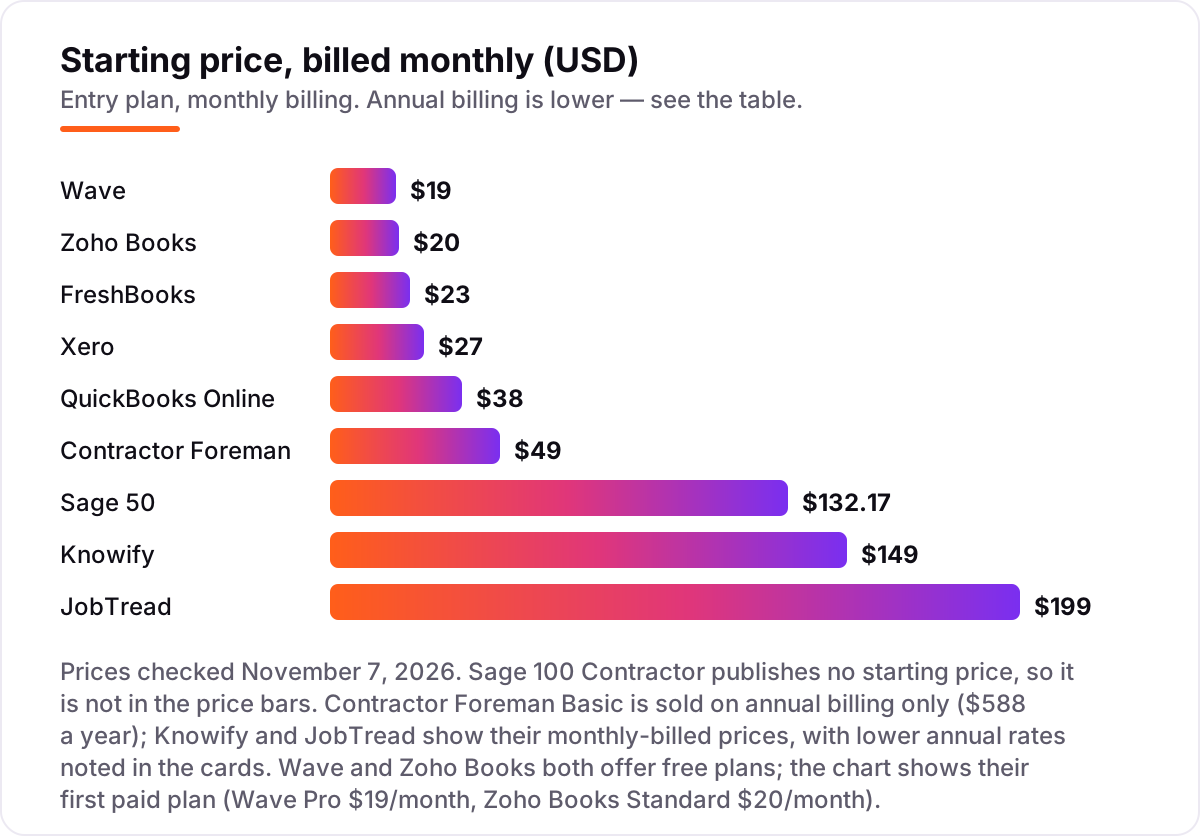
Take a three-person contracting firm that sends about 40 invoices a month and bills jobs on progress billing. On monthly list prices, the subscription costs $19 a month on Wave Pro, $20 on Zoho Books Standard, $23 on FreshBooks Lite, $27 on Xero Early, $38 on QuickBooks Online Simple Start, $49 on Contractor Foreman Basic and $132.17 on Sage 50 Pro. Three of those numbers need adjusting before they are real: FreshBooks Lite covers 5 billable clients, so most firms need Plus at $43 plus two extra seats at $11 each, or $65 a month; Xero Early caps at 20 invoices, so the firm needs Growing at $59; and QuickBooks Online Simple Start has no job costing, so the firm needs Plus at $140.
Over a year, that is $228 on Wave Pro, $240 on Zoho Books Standard, $708 on Xero Growing, $780 on FreshBooks Plus with two extra seats, $1,020 on QuickBooks Online Essentials, $1,586 on Sage 50 Pro and $1,680 on QuickBooks Online Plus. The job-costing platforms sit on top of the ledger, so add QuickBooks Online Simple Start at $456 a year: Contractor Foreman Basic at $588 a year comes to $1,044 with the ledger, Knowify Core at $149 a month comes to $2,244, and JobTread at $239 a month for three users comes to $3,324. Sage 100 Contractor is priced by quote, so it is not in the math.
Three costs sit outside every number above. First, the introductory discounts — 50% off for three months on QuickBooks Online — end, so budget on the list price. Second, payroll: $17–$50 a month plus $4–$7 per person paid, depending on the provider, and certified payroll costs more where it applies. Third, card processing on the invoices you send, which is charged per transaction rather than per month. If you run a general small business rather than a contracting firm, the comparison changes — see our guide to the best accounting software for small businesses.
Annual billing cuts the bill on most tools here: Zoho Books Standard drops from $240 to $180 a year, Wave Pro from $228 to $190, Knowify Core from $1,788 to $1,188, JobTread from $2,388 to $1,908 for one user, and FreshBooks takes 10% off. Xero publishes no annual price, so the monthly figure is the whole story, and Contractor Foreman Basic is sold on annual billing only. One more cost to check before you commit: a second business is a second subscription on every ledger in this list, so an owner with two companies pays double whatever the chart shows.
Know the difference: job-costing platforms vs accounting ledgers
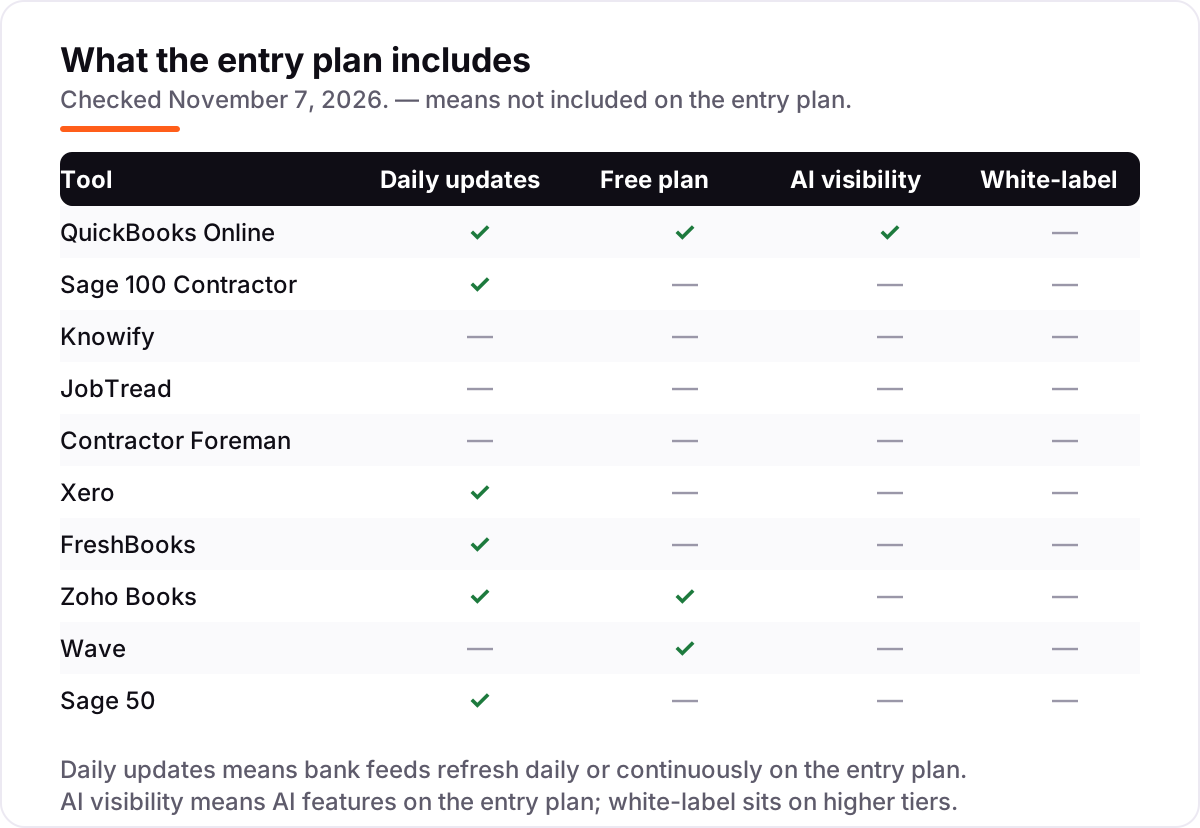
The confusion in this category is between a tool that costs jobs and a tool that keeps the books. Knowify, JobTread and Contractor Foreman are job-costing platforms: they track estimates, budgets, change orders, schedules and progress billing against each job, and they sync the results into QuickBooks. QuickBooks Online, Xero, FreshBooks, Zoho Books, Wave and Sage 50 are accounting ledgers: they keep the double-entry books, reconcile the bank and produce the tax-ready reports, but most of them cannot say whether one job made money.
That distinction decides the budget. A job-costing platform is an add-on to a ledger, not a replacement for one, so the real price is the pair: Knowify Core at $149 a month plus QuickBooks Online Simple Start at $38, or JobTread at $199 plus the same $38. The only tools here that do both jobs in one subscription are Sage 100 Contractor, with accounting and job costing built in, and QuickBooks Online Plus at $140 a month, which adds project profitability to the ledger.
There is a second, quieter confusion: invoicing tools are not accounting software. An invoicing tool sends bills and tracks payments; it does not keep a double-entry ledger, produce a balance sheet, or give your accountant a tax-ready set of books. All six ledgers in this list are full double-entry ledgers, including the free ones, which is what the phrase "accounting software" means here. If a tool only invoices, it belongs in a different list.
Quick comparison: tool type by need
| Buyer | Best pick | Why |
|---|---|---|
| Most contractors | QuickBooks Online | The standard choice accountants know, from $38/month; job costing on Plus at $140/month |
| Certified payroll + AIA in one system | Sage 100 Contractor | Purpose-built for construction, priced by quote |
| Trade contractor on QuickBooks | Knowify | Native two-way QuickBooks sync and licensed AIA billing, from $149/month |
| Custom-home builder watching budgets | JobTread | Every feature on one plan, from $199/month |
| Small contractor on a tight budget | Contractor Foreman | Full platform from $49/month billed annually |
| Solo contractor at $0 | Wave | Free Starter plan, unlimited invoices, Pro is $19/month when you want bank feeds |
Mistakes to avoid
- Budgeting on the promo price. The 50% introductory discount on QuickBooks Online lasts three months. The list price is what you pay in month four, so compare tools on that number.
- Buying a ledger and expecting job costing. QuickBooks Online Simple Start, Xero Early and FreshBooks Lite cannot cost a job. If you bill fixed-price or progress-billing jobs, price Plus, an add-on, or Sage 100 Contractor from the start.
- Paying for the add-on but not the ledger. Knowify, JobTread and Contractor Foreman need QuickBooks underneath. The $149 or $199 a month is only half the bill — add $38 a month for QuickBooks Online Simple Start.
- Ignoring the cap that bites first. A tool can be cheap and still be the wrong buy: Xero Early at $27 is no bargain once you pass 20 invoices a month, and FreshBooks Lite at $23 is no bargain once you pass 5 clients.
- Forgetting certified payroll. Public work often requires certified payroll reports. Only Sage 100 Contractor builds it in here — check before you bid the job, not after you win it.
How we chose
We checked each vendor's own pricing page on November 7, 2026 and recorded the starting price exactly as shown, including the annual-billing figure where the page lists one. Knowify, JobTread and Contractor Foreman prices were verified against fresh search-index reads of the vendors' own pricing pages from late October and early November 2026, since direct page fetches from this machine were blocked; Sage 100 Contractor publishes no price, so it is listed as a custom quote and third-party estimates of roughly $115–$200 per user per month are reported as estimates only, not as a verified price. We ranked the tools by fit for the most common buyer — a US contracting business that bills jobs on progress billing — not by brand size. This list carries no review ratings because the G2 review pages were not opened on November 7, 2026, and we would rather show no rating than a stale or estimated one. No vendor paid for a place in this list, and none of the links here are affiliate links.
What to do next
Start with the free plan or trial of your top pick and run one real month of invoices through it — one live job, with its estimate, change orders and a progress billing run. Check that the bank feed reconciles, the job cost report matches what the job actually spent, and your accountant can get in for free before you commit to a year. If the books are sorted but new customers are not finding you, our monthly SEO service handles the visibility side — or compare providers in our guide to bookkeeping and payroll software for small business. Once your tools are in place, find out what's holding your rankings back.
Your stack only works if people find you
SerpAstra fixes what keeps your site off page one and makes it easy for AI assistants to recommend.
Get a free audit→Sources we checked (10)
- QuickBooks Online pricing — quickbooks.intuit.com/pricing (checked November 7, 2026)
- Sage 100 Contractor product page — sage.com (checked November 7, 2026)
- Knowify pricing — knowify.com/pricing (checked November 7, 2026)
- JobTread pricing — jobtread.com/pricing (checked November 7, 2026)
- Contractor Foreman pricing — contractorforeman.com/pricing (checked November 7, 2026)
- Xero pricing — xero.com/us/pricing-plans (checked November 7, 2026)
- FreshBooks pricing — freshbooks.com/pricing (checked November 7, 2026)
- Zoho Books pricing — zoho.com/us/books/pricing (checked November 7, 2026)
- Wave pricing — waveapps.com/pricing (checked November 7, 2026)
- Sage 50 pricing — sage.com/en-us/products/sage-50/pricing (checked November 7, 2026)
Shamim
Founder of SerpAstra
A full-stack SEO and digital marketer who spends most days on Local SEO for dental practices, AI search visibility and lead generation.
Frequently asked questions
What is the best accounting software for contractors?
QuickBooks Online is the best fit for most contractors: the widest accountant support, full double-entry accounting and job costing on Plus at $140/month. Sage 100 Contractor is the better pick when certified payroll and AIA billing must live in one system. Knowify is the best add-on when QuickBooks is already the ledger.
How much does accounting software for contractors cost?
Entry prices run from $0 to $199 a month. Wave and Zoho Books both have free plans, and the first paid ledgers cost $19–$38 a month. A contractor who needs job costing pays more: QuickBooks Online Plus is $140/month, Knowify Core is $149/month, and JobTread is $199/month, before the ledger underneath.
Do contractors need job costing software or just accounting software?
A general ledger records what the business spent; job costing records what each job spent. A contractor who bills fixed-price or progress-billing jobs needs both, because the ledger alone cannot say whether one job made money. Solo subcontractors who bill by the hour can often manage with a ledger alone.
What is AIA billing, and which tools support it?
AIA billing is progress billing on the standard G702/G703 forms that commercial clients and general contractors require, showing work completed and retainage held. Knowify includes licensed AIA pay applications on every plan, Sage 100 Contractor and Contractor Foreman support AIA billing, and JobTread offers AIA-style billing that is not the licensed form.
Is there free accounting software for contractors?
Yes, with limits. Wave Starter is free with unlimited invoices and no revenue cap, but bank feeds need the $19/month Pro plan. Zoho Books is free while annual revenue stays under $50,000, capped at 1,000 invoices a year. Neither offers job costing or AIA billing, so growing contractors outgrow both.
Can I switch accounting software later?
Yes, but plan the move for your year-end. Export your chart of accounts, customer and vendor lists, open invoices and transaction history from the old tool, then import them into the new one and reconcile the bank before going live. Switching mid-year means running two systems through tax season.
Does accounting software for contractors include payroll?
Usually not, or only as a paid add-on. QuickBooks Online and Wave sell payroll separately, Xero routes US payroll through Gusto, and Zoho Books has no payroll module at all. Sage 100 Contractor is the exception here: payroll, including certified payroll, is built into the system rather than bolted on.
Free SEO and AI visibility audit
Find out what is holding your rankings back
Send us your site. Within 2 business days you get a written audit, an AI visibility check and a short fix list ranked by impact. Free, with no contract attached.
Request my free audit→Related guides
 Accounting, Tax & Finance7 Best Accounting Software for Small Businesses in 2026, ComparedCompare the 7 best accounting software for small businesses on price, free plans, bank feeds and AI features, with every price checked November 2, 2026.Read guide →
 Digital Marketing & Ads7 Best Marketing Software for Contractors in 2026, ComparedCompare the 7 best marketing software for contractors on price, reviews and trade-specific features, with every price checked November 5, 2026.Read guide →
 Accounting, Tax & Finance10 Best Bookkeeping and Payroll Software for Small Business in 2026, ComparedThe 10 best bookkeeping and payroll software for small business, compared on real 2026 prices, per-employee payroll fees and free plans at your headcount.Read guide →