
8 Best AI Chatbot for Customer Service in 2026
8 best AI chatbot for customer service tools compared on price, AI resolution costs and free plans. Prices checked on vendor pricing pages, November 2, 2026.
 Shamim Mia, Founder, SerpAstraLast verified November 2, 202612 min read
We compare pricing pages, documentation and public reviews. We never accept payment for rankings.

Key takeaways
- Intercom's Fin is the top pick for most teams: the strongest autonomous agent, from $29 a seat a month billed annually plus $0.99 per resolved conversation.
- Tidio is the budget pick at $29 a month plus Lyro from $32.50 billed annually ($39 billed monthly), and Freshchat's free plan covers up to 10 agents — the cheapest ways to run a real AI agent.
- The single most important buying factor is how the AI is billed: per seat, per conversation or per resolution changes the monthly total far more than the headline plan price.
- Every price below was checked on the vendor's own pricing page on November 2, 2026, except where noted in How we chose. Ratings are G2, with review counts shown.
On this page
Quick comparison
| Tool | Best for | Starting price | Free plan |
|---|---|---|---|
| Intercom | Small and mid-size teams that want the strongest autonomous AI agent and will pay per resolved conversation | $29/seat/mo (annual) | No (14-day trial) |
| Tidio | Small online stores and service sites that want a working AI agent for the lowest monthly outlay | $24.17/mo (annual) | Yes (50 convos/mo) |
| Freshchat | Small teams that want a free plan for up to 10 agents plus omnichannel messaging and an AI agent | $19/agent/mo (annual) | Yes (up to 10 agents) |
| Zendesk | Growing support teams that need ticketing, a help center and AI agents in one system at scale | $55/agent/mo (annual) | No (14-day trial) |
| HubSpot Service Hub | Teams already running on HubSpot CRM that want support, sales and marketing data in one place | $20/seat/mo | Yes (2 users) |
| LiveChat | Sales-driven teams that want live chat, visitor tracking and an AI agent on one subscription | $19/user/mo (annual) | No (14-day trial) |
| Crisp | Small teams of up to 4 agents that want one flat monthly price instead of per-seat billing | $45/mo | Yes (2 seats) |
| ChatBot | Small businesses that want a dedicated bot builder with no per-seat charges and no coding | $52/mo (annual) | No (14-day trial) |
Make one of these tools?
We re-check this list every quarter. Send a correction, request a review, or ask about a clearly labeled sponsored spot.
Request a listingThe best AI chatbots for customer service

Intercom
Best for: Small and mid-size teams that want the strongest autonomous AI agent and will pay per resolved conversation
Intercom's Fin is the strongest autonomous agent in this list: it reads your help center and connected systems, answers across chat, email and voice, and only charges $0.99 when it actually resolves a conversation. For a team that wants the bot to do real work instead of deflecting with links, Fin's resolution quality is the reason to pay Intercom's seat prices.
The catch is that the bill has two parts that both grow: seats at $29 each billed annually, plus $0.99 for every outcome Fin delivers. A busy month can cost several times the seat price, and the new-customer $19 seat offer does not change the outcome rate. Model the outcome cost on your real volume before you commit; if volume is low, Fin is the cheapest way to buy a genuinely capable agent.
What we like
- Fin AI Agent resolves conversations across chat, email and voice, and you only pay $0.99 when it delivers an outcome
- Fin works on any helpdesk, including Salesforce, Freshdesk and HubSpot, with no seat costs and a minimum monthly commitment
- Procedures let you set guardrails and multi-step actions, so Fin can issue refunds and update records, not just answer FAQs
Watch out for
- The bill has two parts that both grow, seats plus $0.99 per Fin outcome, so a busy month costs several times the seat price
- No free plan, and the $19 seat price seen on the pricing page is a new-customer offer against the standard $29
- Copilot agent-assist is a separate $29 per seat per month add-on

Tidio
Best for: Small online stores and service sites that want a working AI agent for the lowest monthly outlay
Tidio is the cheapest route to a working AI agent for a small store or service site. Lyro answers from your own help content, handles order and delivery questions, and hands off to a human with the full conversation attached when it gets stuck. The free plan includes 50 Lyro conversations, so you can see the resolution rate on your own questions before spending anything.
The pricing catch is the three-meter system: the base plan, the Lyro quota and the Flows visitor allowance are billed separately, and the 50 free Lyro conversations never reset. A site doing 100 AI conversations a month pays the $29 Starter plan plus a Lyro quota on top, which still undercuts Intercom and Zendesk at this volume. Just budget the Lyro tier, not the headline plan price.
What we like
- Lyro AI Agent answers from your own help content and hands off with full context when it cannot resolve a question
- Free plan includes live chat, ticketing and 50 Lyro conversations, so you can test the AI before paying anything
- Strong ecommerce fit, with Shopify and WooCommerce integrations, cart recovery and product recommendations in chat
Watch out for
- Lyro is a separate add-on, so the real AI cost is the base plan plus $32.50 a month billed annually ($39 billed monthly) for 50 AI conversations
- The 50 free Lyro conversations are a one-time lifetime allowance, not a monthly reset
- Branding removal is a paid $20 a month add-on, and Slack and API access need the $300 a month Plus plan

Freshchat
Best for: Small teams that want a free plan for up to 10 agents plus omnichannel messaging and an AI agent
Freshchat is the only tool here that gives a real team a free plan: up to 10 agents get the chat widget, a shared inbox and email without paying. When you are ready for AI, Freddy joins on the $19 Growth plan and answers from your knowledge base, summarizes chats and drafts replies for agents. For a small team that wants omnichannel messaging without a big first invoice, the free plan is genuinely useful, not a demo.
The cost to watch is Freddy's session billing: $49 per 100 sessions after a one-time allowance of 500 free sessions. Sessions count per customer per day, so a store with heavy repeat questions burns through packs faster than the seat price suggests. Still, at three agents the Growth plan costs $57 a month before sessions, which is the lowest paid entry here.
What we like
- Free plan covers up to 10 agents with a chat widget, shared inbox and email, which no other paid tool here matches
- Freddy AI Agent answers, summarizes and drafts replies from your knowledge base on the $19 Growth plan
- One inbox for website chat, email, WhatsApp, Facebook, Instagram and SMS, with a 14-day Enterprise trial
Watch out for
- Freddy AI Agent is metered at $49 per 100 sessions, so AI costs rise with volume on top of the seat price
- The 500 free Freddy sessions are a one-time allowance per account, not a monthly reset
- G2 reviewers cite basic reporting and notification delays at high volume, and the free plan covers website chat and email only

Zendesk
Best for: Growing support teams that need ticketing, a help center and AI agents in one system at scale
Zendesk is the safe pick for a support team that will grow: AI agents come with every Suite plan, the knowledge base and Action Builder let the bot look up orders and take real actions, and the admin controls scale to dozens of agents. Suite Team includes five free automated resolutions per agent a month, so a small team gets some AI use before the per-resolution billing starts.
The honest downside is the stacked bill: $55 per agent billed annually, plus $50 per agent for Copilot if you want agent assist, plus $1.50 per extra resolution. G2 reviewers rate setup the lowest of the suites here, so expect a longer configuration phase. Buy Zendesk when you need the depth and the scale; buy Tidio or Freshchat when you need a bot this month on a small budget.
What we like
- AI agents are included on every Suite plan, with 5 free automated resolutions per agent a month on Suite Team
- Action Builder and the AI knowledge base let the bot take actions like looking up orders, not just answer questions
- The deepest app marketplace and admin controls in this list, built for teams that will scale past 20 agents
Watch out for
- AI costs stack up, with Copilot at $50 per agent a month on top of seats and per-resolution charges beyond the free allowance
- No free plan, and setup scores lowest among the suites here, with G2 reviewers citing complex admin for advanced workflows
- The per-resolution model means the AI bill is hard to predict until you know your real resolution volume

HubSpot Service Hub
Best for: Teams already running on HubSpot CRM that want support, sales and marketing data in one place
HubSpot Service Hub makes sense only if your business already lives in HubSpot: every chat and ticket lands in the same CRM your sales and marketing teams use, so the bot knows the customer before it answers. Starter at $20 a seat covers live chat, ticketing and conversation routing, and it removes HubSpot branding. The free tools cover up to two users, which suits a founder doing support alone.
The catch is the AI itself: the Breeze Customer Agent needs Professional at $90 a seat a month billed annually, plus a $1,500 onboarding fee and HubSpot Credits on top. A three-seat team pays $270 a month before credits, which is more than Zendesk Suite Team for the same seats. Choose HubSpot for the CRM, not for a cheap chatbot.
What we like
- Every ticket, chat and customer record lives in the same CRM your sales and marketing teams already use
- Starter removes HubSpot branding and adds conversation routing and 500 HubSpot Credits at the standard $20 a seat
- Free tools cover live chat and ticketing for up to 2 users, so a tiny team can start without paying
Watch out for
- The AI Customer Agent needs Professional at $90 per seat a month, so real AI chatbot use costs far more than the $20 Starter headline
- Professional and Enterprise carry mandatory onboarding fees of $1,500 and $3,500, and the AI runs on HubSpot Credits on top of seats
- The $7 Starter price is a limited-time new-customer offer against the standard $20, so budget on the standard rate

LiveChat
Best for: Sales-driven teams that want live chat, visitor tracking and an AI agent on one subscription
LiveChat changed shape in 2026: new buyers get the Text plans, and Essential at $19 a user a month billed annually now includes an AI Agent with 10 resolutions a month, plus Copilot reply suggestions on every plan. Visitor tracking and cart previews tie chats to sales, which is why ecommerce teams pick it over a pure helpdesk. The widget is accessible and works across web, in-app, Messenger and SMS.
The limits are the resolution allowance and the per-user math: 10 AI resolutions a month covers a quiet site, but extra packs of 50 cost $49.50, and every person answering chats needs a paid seat. A three-person team pays $57 a month before extra resolutions, which is fair, but a team of ten pays $190. It fits sales-led teams best, not high-volume support.
What we like
- The new Text Essential plan includes an AI Agent with 10 resolutions a month, plus Copilot reply suggestions on every plan
- Visitor tracking, cart previews and chat triggers tie support chats to sales, which the pure helpdesks do not
- Widget meets WCAG 2.2 AA accessibility standards and works across website, in-app, Messenger and SMS
Watch out for
- Essential includes only 10 AI resolutions a month, and extra packs of 50 cost $49.50, so AI use beyond the basics adds up fast
- Per-user pricing with no shared seats means every person answering chats needs a paid seat
- The old LiveChat plans are gone for new buyers, so long-time LiveChat comparisons quoting Team at $49 no longer apply

Crisp
Best for: Small teams of up to 4 agents that want one flat monthly price instead of per-seat billing
Crisp is the flat-rate pick: $45 a month covers the whole workspace, including four seats, so a team of three pays the same as a team of one. The shared inbox pulls live chat, email and social messages together, and MagicBrowse lets an agent see the visitor's screen and guide them through checkout. G2 reviewers rate Crisp's own customer support the best in this list.
The trade-off is AI depth: the Mini chatbot is a rule-based flow builder, and the Hugo AI agent includes only $5 of starter credits a month, so the headline $45 does not buy unlimited AI answers. Mini also caps at four seats and 5,000 contacts, and the free plan has no chatbot at all. Pick Crisp for cheap, flat live chat with simple automation, not for advanced AI.
What we like
- Flat $45 a month per workspace covers 4 seats, so adding a third or fourth agent costs nothing extra
- Shared inbox pulls live chat, email and social messages together, with MagicBrowse cobrowsing built in
- G2 reviewers rate its customer support highest in this list, with 30 all-time mentions of helpful support
Watch out for
- The Mini chatbot is a rule-based flow builder, and the Hugo AI agent includes only $5 of starter credits a month
- Mini covers only 4 seats and 5,000 contacts, so a growing team jumps to Essentials at $95 a month
- The free Basic plan has no chatbot, no triggers and no knowledge base, so it is a trial of the inbox, not the bot

ChatBot
Best for: Small businesses that want a dedicated bot builder with no per-seat charges and no coding
ChatBot is the only tool here that exists purely to build bots: a visual drag-and-drop editor, ready-made templates and AI answers trained on your own content, with no seats to buy and no helpdesk to learn. It plugs straight into LiveChat when a conversation needs a human, and forms and webhooks capture structured details like order numbers. For a small business that wants one bot on its site, the setup is an afternoon's work.
The catch is volume pricing: Starter covers 1,000 chats a month, extra chats cost $0.03 each, and there is no free plan, only a 14-day trial. A busy site can outgrow Starter quickly, and the Team plan at $142 a month is the next step. G2's listing still shows the old $50 Starter price, so trust the vendor page's $52 billed annually, not the directory.
What we like
- Visual drag-and-drop builder with ready-made templates lets a non-technical owner ship a bot in an afternoon
- Flat per-chatbot pricing means adding agents costs nothing, and it plugs straight into LiveChat for human handoff
- AI answers from your own content, with forms, webhooks and offline message capture built into every plan
Watch out for
- No free plan, only a 14-day trial, and the 1,000-chat Starter allowance is easy to outgrow on a busy site
- Extra chats cost $0.03 each, so a traffic spike raises the bill with no warning unless you watch usage
- G2's own listing still shows the old $50 Starter price, and the review base is small at 27 reviews
The best AI chatbot for customer service answers routine questions in seconds, at any hour, and hands the hard ones to a human with the full conversation attached. This list ranks 8 tools by how well they do that job for a typical small or mid-size team, with real prices and the AI usage charges most lists leave out.
How to choose the best AI chatbot for customer service
The wrong way to pick is to compare headline plan prices. The right way is to work through the six factors below, because the billing unit and the knowledge source decide the real cost and the real quality.
- Resolution rate over features. Ask what share of conversations the bot actually resolves, not how many channels it supports.
- Billing unit. Per-seat, per-conversation and per-resolution pricing produce very different monthly totals at the same volume.
- Knowledge source. The bot is only as good as the help center, order data and FAQs it can read, so check what it can access.
- Handoff quality. When the bot gives up, the human should see the whole conversation, not a fresh ticket with no context.
- Free plan or trial. Test the bot on your real questions for two weeks before you pay, and compare its answers with your own.
- Integration with your stack. A chatbot that lives inside your helpdesk or CRM avoids a second inbox and a second login.
One more check before you shortlist: ask each vendor how the bot is trained and what happens to your data. Some tools train only on the content you connect, while others pool conversations across customers, and the privacy page is where that difference shows up. If your customers share order numbers, addresses or account details with the bot, confirm where that data is stored and how long it is kept. A bot that answers well but leaks data is not a bargain.
Before you buy, check that your help content is easy for both customers and AI to find — see our AI search optimization service if your answers are buried where neither can reach them.
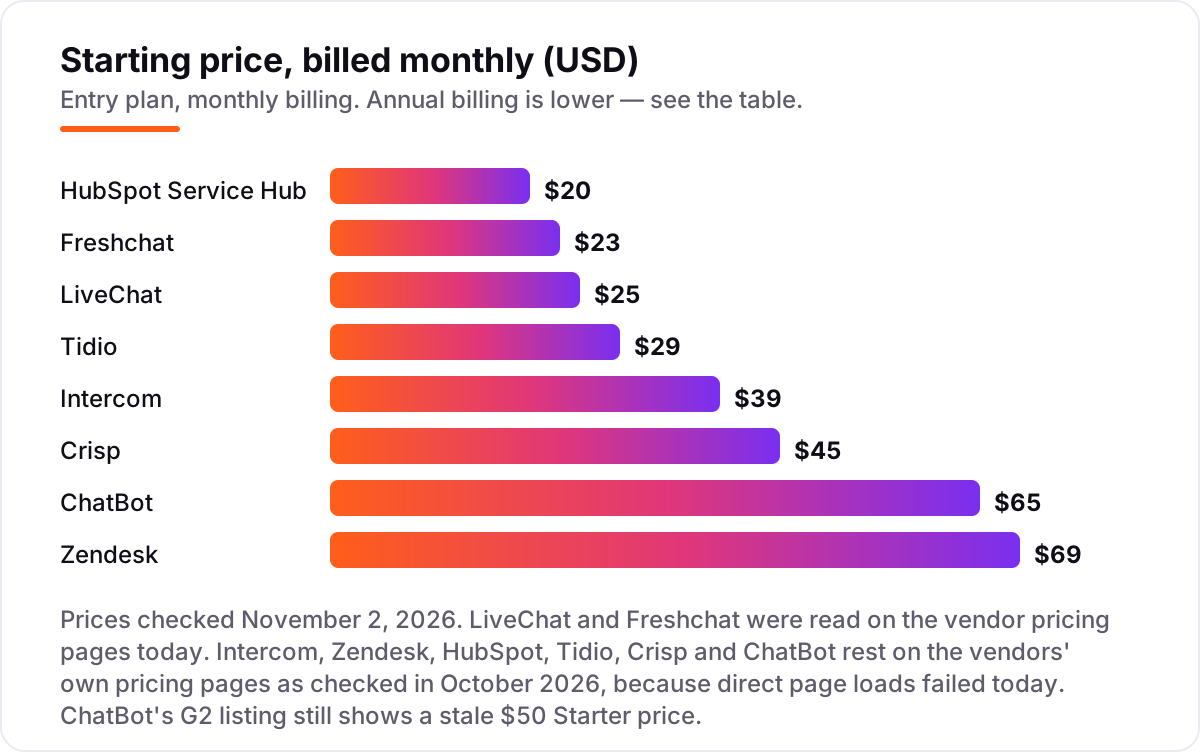
AI chatbot for customer service pricing: what you will actually pay
Every tool in this list has two prices: the seat or plan price, and the AI usage price. The worked example below assumes a 3-agent team with 50 AI-handled conversations a month, on annual billing.
- Tidio: Starter $24.17 plus Lyro for 50 conversations at $32.50, so $56.67 a month.
- ChatBot: Starter $52 a month, flat, and 50 chats sit well inside its 1,000-chat allowance.
- Freshchat: 3 agents on Growth at $57 a month; Freddy sessions cost nothing while the 500 free sessions last, then $49 per 100 sessions.
- LiveChat: 3 users on Essential at $57 a month, including 10 AI resolutions; 40 extra resolutions need one $49.50 pack, so $106.50 a month.
- Intercom: 3 seats at $87 a month plus 50 Fin outcomes at $0.99, so $136.50 a month.
- Zendesk: 3 agents at $165 a month, including 15 free resolutions; 35 extra at $1.50, so $217.50 a month.
- HubSpot: Starter at $60 a month has no AI agent; the AI Customer Agent needs Professional, 3 seats at $90, so $270 a month before credits.
- Crisp: $45 a month flat, with $5 of Hugo AI credits included; heavier AI use costs extra.
Three billing models cover the whole list, and each suits a different volume. Per-resolution billing, used by Intercom and Zendesk, charges only when the bot finishes a conversation, which keeps quiet months cheap and busy months expensive. Per-conversation billing, used by Tidio and Freshchat, charges for every AI session whether or not it resolves anything, so a bot that answers badly still bills you. Flat pricing, used by ChatBot and Crisp, charges the same every month no matter how many chats arrive, which is the easiest to budget and the worst value if volume is low.
The lesson is that the seat price is the floor and the AI usage is the variable. Per-resolution billing is cheapest at low volume, because you pay nothing when the bot does nothing; flat per-chatbot pricing wins once volume is steady and high, because the 51st conversation costs the same as the first. If your bot answers from an FAQ page, mark it up with the free FAQ schema generator so search engines can use the same answers the bot gives your customers.
AI chatbot vs human support team: know the difference
The biggest confusion in this category is the word "replace." Vendors show demos where the bot handles everything, and buyers either expect a support team in a box or assume the bot is a toy. Neither is true. An AI chatbot is a first line: it answers instantly, around the clock, and it is good at the routine half of support — order status, returns, password resets, opening hours, plan details. A human team is the second line: complaints, edge cases, angry customers, and anything where empathy or judgment changes the outcome.
The honest test is what happens when the bot cannot answer. A good chatbot hands the conversation to a human with the full history attached, so the customer never repeats themselves. A bad one opens a fresh ticket, drops the context, and creates more work than it saved. That is why the handoff matters more than the demo: ask every vendor what the human sees when the bot gives up, and run a real failed conversation through the trial before you sign anything.
A bot also needs feeding. It answers from your help center, your product data and your FAQs, so a thin or outdated help center produces confident wrong answers. Before launch, write the 20 questions your team answers most, check the bot against them, and fix the source pages where it gets things wrong. The bot will only ever be as accurate as the content behind it.
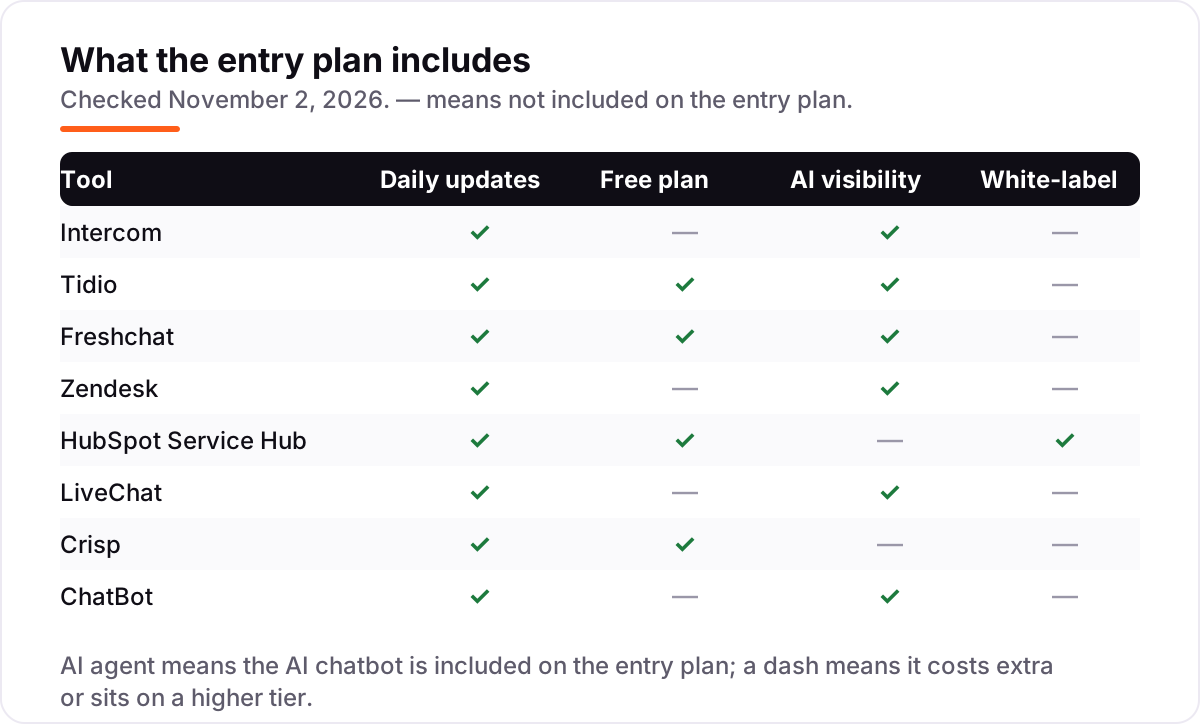
Quick comparison: tool type by need
| Buyer | Best pick | Why |
|---|---|---|
| Small team that wants the smartest AI agent | Intercom | Fin resolves real conversations at $0.99 an outcome |
| Solo site owner on a tight budget | Tidio | $29 a month plus Lyro from $32.50 billed annually, free plan to test |
| Small team that wants a free plan | Freshchat | Up to 10 agents free, Freddy AI from Growth |
| Growing support team that needs scale | Zendesk | AI agents on every Suite plan, deep admin controls |
| Business already on HubSpot | HubSpot Service Hub | Support data joins the CRM, AI agent from Professional |
| Sales-led team that chats to close | LiveChat | AI Agent bundled, visitor tracking and cart previews |
| Small team that hates per-seat pricing | Crisp | $45 a month flat per workspace, 4 seats included |
| Business that wants a standalone bot | ChatBot | Visual builder, flat $52 a month, no seats to buy |
How we chose
We checked each vendor's own pricing page and recorded the starting price exactly as shown, including the annual-billing figure where the page lists one. LiveChat and Freshchat were read directly on their pricing pages on November 2, 2026. For Intercom, Zendesk, HubSpot, Tidio, Crisp and ChatBot, the vendor pricing pages could not be loaded directly on November 2, so those figures rest on the vendors' own pricing pages as recorded in October 2026 checks, and the sources list says so for each one. Ratings come from G2 pages opened on November 2, 2026, with review counts shown. We ranked the tools by fit for the most common buyer — a small or mid-size team that wants routine questions answered without hiring — not by brand size. No vendor paid for a place in this list, and none of the links here are affiliate links.
What to do next
Start with your volume: count the conversations the bot should handle each month, then run the worked example above with your own numbers for your top two picks. Take the free plan or trial of the winner and feed it your 20 most common questions for two weeks, checking its answers against your own. If the resolution rate holds and the handoffs carry full context, you have your tool. Once your tools are in place, find out what's holding your rankings back.
Your stack only works if people find you
SerpAstra fixes what keeps your site off page one and makes it easy for AI assistants to recommend.
Get a free audit→Sources we checked (16)
- Intercom pricing — intercom.com/pricing (checked October 2026; direct page load failed November 2, 2026)
- Intercom (Fin) on G2 — 4.5/5, 3,952 reviews (checked November 2, 2026)
- Tidio pricing — tidio.com/pricing (checked October 2026; direct page load failed November 2, 2026)
- Tidio on G2 — 4.6/5, 1,959 reviews (checked November 2, 2026)
- Freshchat pricing — freshworks.com/live-chat-software/pricing (checked November 2, 2026)
- Freshchat on G2 — 4.4/5, 504 reviews (checked November 2, 2026)
- Zendesk pricing — zendesk.com/pricing (checked October 2026; direct page load failed November 2, 2026)
- Zendesk for Customer Service on G2 — 4.3/5, 7,035 reviews (checked November 2, 2026)
- HubSpot Service Hub pricing — hubspot.com/pricing/service (checked October 2026; direct page load failed November 2, 2026)
- HubSpot Service Hub on G2 — 4.4/5, 2,920 reviews (checked November 2, 2026)
- LiveChat pricing — livechat.com/pricing (checked November 2, 2026)
- LiveChat on G2 — 4.5/5, 810 reviews (checked November 2, 2026)
- Crisp pricing — crisp.chat/en/pricing (checked October 2026; direct page load failed November 2, 2026)
- Crisp on G2 — 4.5/5, 201 reviews (checked November 2, 2026)
- ChatBot pricing — chatbot.com/pricing (checked October 2026; direct page load failed November 2, 2026)
- ChatBot on G2 — 4.5/5, 27 reviews (checked November 2, 2026)
Shamim
Founder of SerpAstra
A full-stack SEO and digital marketer who spends most days on Local SEO for dental practices, AI search visibility and lead generation.
Frequently asked questions
What is the best AI chatbot for customer service?
Intercom's Fin is the strongest autonomous agent in this list, resolving conversations across chat, email and voice for $0.99 per outcome. If your budget is tight, Tidio is the best value: a free plan plus Lyro AI from $32.50 a month billed annually. Teams that need ticketing and scale should look at Zendesk, while HubSpot users should stay inside Service Hub.
How much does an AI chatbot for customer service cost?
Between $19 and $69 a month at the entry level, before AI usage charges. LiveChat Essential starts at $19 a user and Freshchat Growth at $19 an agent, both billed annually. Intercom costs $29 a seat plus $0.99 per Fin outcome, and Zendesk costs $55 an agent plus $1.50 per extra resolution. Always add the AI usage cost to the seat price.
Is there a free AI chatbot for customer service?
Yes, with limits. Freshchat's free plan covers up to 10 agents with live chat and email, and Tidio's free plan includes 50 billable conversations plus 50 one-time Lyro AI conversations. HubSpot's free tools cover live chat for up to 2 users, and Crisp has a free plan with 2 seats. None of the free plans include unlimited AI answers, so expect to pay once volume grows.
What is the difference between an AI chatbot and a human support team?
An AI chatbot answers instantly, around the clock, and handles routine questions like order status, returns and password resets at a fraction of the cost of an agent. A human team handles the rest: complaints, edge cases and anything where empathy or judgment matters. The best setups use both, with the bot resolving the routine half and handing the rest to people with full context.
Do AI chatbots replace human support agents?
No, not for most businesses. Bots resolve the repetitive slice of incoming questions, and humans handle everything else: complaints, edge cases and anything where empathy or judgment matters. Vendors that promise full replacement are selling a demo, not a support operation. Plan your staffing around the bot handling routine volume and your team handling the conversations that need judgment.
How do I choose the right AI chatbot for my business?
Start with your volume and your stack. Count how many conversations the bot should handle each month, then check whether the tool charges per seat, per conversation or per resolution. If you already use a helpdesk or CRM, the chatbot that lives inside it usually wins. Run the free plan or trial on your real questions for two weeks before paying.
Can an AI chatbot work with my existing helpdesk?
Usually, yes. Intercom's Fin runs on Salesforce, Freshdesk and HubSpot as well as Intercom's own helpdesk, and Tidio's Lyro connects to Zendesk and Salesforce. Freshchat pairs with Freshdesk, and ChatBot plugs into LiveChat for human handoff. Check the integration list on the vendor's site before you buy, and test the handoff with a real conversation.
Free SEO and AI visibility audit
Find out what is holding your rankings back
Send us your site. Within 2 business days you get a written audit, an AI visibility check and a short fix list ranked by impact. Free, with no contract attached.
Request my free audit→Related guides
 AI SearchBest AI SEO tools in 2026: honest picks by jobBest AI SEO tools in 2026, picked by job: Semrush and Ahrefs for research, Surfer and Clearscope for content, Otterly for AI tracking, with 2026 prices.Read guide →
 AI SearchHow to get your brand cited in ChatGPT and AI searchA practical guide to earning citations in ChatGPT, Perplexity and Google AI Overviews: crawler access, Bing indexing, answer-first pages and brand signals.Read guide →
 SEO & AI Search10 Best AI Search Optimization Tools in 2026 (Free and Paid, Compared)10 best AI search optimization tools compared on price, AI visibility coverage and content scoring, with real prices checked October 31, 2026.Read guide →