
7 Best AI Platforms for Ad Design in 2026 (Pros, Cons and Pricing)
The 7 best ai platform for ad design options compared on price, AI generation and ad formats, with real 2026 prices checked on each vendor pricing page.
 Shamim Mia, Founder, SerpAstraLast verified November 4, 202615 min read
We compare pricing pages, documentation and public reviews. We never accept payment for rankings.

Key takeaways
- Canva Pro is the best all-rounder for most buyers: Magic Studio AI, the biggest template library and Brand Kit from $12/month billed annually.
- Adobe Express is the cheapest paid entry at $9.99/month, and AdCreative.ai is the only tool here that scores each ad for likely conversion — from $20/month billed annually.
- Free plans exist — Canva, Adobe Express, VistaCreate and Snappa all have one — but AI generation is paid-only on VistaCreate and limited on Adobe Express free.
- The single most important buying factor is what the AI actually does: generation, scoring and automation are three different jobs, and no tool does all three well.
- Every price below comes from the vendor's own pricing page, checked in October or November 2026. Bannerflow publishes no price, so it is listed as a custom quote.
On this page
Quick comparison
| Tool | Best for | Starting price | Free plan |
|---|---|---|---|
| Canva | Small teams and solo marketers who want AI design plus the biggest template library for about $12/month billed annually | $12/mo (annual) | Yes (free plan) |
| Adobe Express | Marketers already in the Adobe world who want Firefly AI and Adobe Stock at the lowest paid entry price here | $9.99/mo | Yes (free plan) |
| AdCreative.ai | Performance marketers who test dozens of ad variants and want a conversion score before spending | $20/mo (annual) | No (7-day trial) |
| Predis.ai | Solo founders and small brands who want AI-generated social ads, captions and scheduling in one place | $230/yr (annual) | No (3-day trial) |
| VistaCreate | Small teams that want AI image generation and animated ads at the lowest annual Pro price | $10/mo (annual) | Yes (free plan) |
| Snappa | Busy marketers who need a finished social graphic in minutes and never want to learn a design tool | $10/mo (annual) | Yes (3 downloads/mo) |
| Bannerflow | Mid-market and enterprise teams producing high volumes of display ads across many markets | Custom quote | No (demo only) |
Make one of these tools?
We re-check this list every quarter. Send a correction, request a review, or ask about a clearly labeled sponsored spot.
Request a listingThe best AI platforms for ad design

Canva
Best for: Small teams and solo marketers who want AI design plus the biggest template library for about $12/month billed annually
Canva Pro is the default pick for most small teams because it covers the whole ad workflow: Magic Studio generates images, copy and designs from a prompt, Magic Resize re-formats one ad to each placement, and the Brand Kit keeps fonts, colours and logos consistent. The template library is the largest here, so a non-designer can start from a finished ad rather than a blank canvas.
The catch is that Canva generates and designs, but it does not judge. There is no conversion score and no link to ad performance, so you need the ad platform's data to know what worked. AI usage limits also vary by feature and are not spelled out on the pricing page. If you want one tool that designs everything fast, start here; if you want the AI to pick winners, look at AdCreative.ai instead.
What we like
- Magic Studio AI generates images, copy and whole designs from a prompt, and Magic Resize re-formats one ad to every placement in a click
- Brand Kit, 1TB of storage and a huge premium stock library keep every ad on-brand
- Free plan is genuinely usable, and the editor is the easiest in this list for non-designers
Watch out for
- Heavy AI use can hit usage limits that vary by feature and are not spelled out on the pricing page
- No conversion scoring or ad-performance prediction — you design the ad, then judge it in the ad platform

Adobe Express
Best for: Marketers already in the Adobe world who want Firefly AI and Adobe Stock at the lowest paid entry price here
Adobe Express is the cheapest paid way into AI ad design, and the cheapest way into Adobe's ecosystem. Premium costs $9.99 a month and adds 250 Firefly generative credits, Adobe Stock photos, Adobe Fonts, Brand Kits and one-click resize. If your team already uses Adobe tools or stock, the workflow feels familiar from day one.
The limits are the credit allowance and the catalogue. The free plan gives only 25 generative credits a month, so serious AI work needs Premium, and the template range is smaller than Canva's. There is also no performance scoring, and Adobe lists no annual price for Premium on its pricing page — some directories quote $99.99 a year, but we could not confirm that on Adobe's own page. Pick it for low cost and Adobe quality; pick Canva for range.
What we like
- 250 Firefly generative credits a month on Premium, with Adobe Fonts and Adobe Stock built in
- One-click resize and Brand Kits make one design fit every ad placement fast
- Cheapest paid entry in this list at $9.99/month, and Premium is included in some Creative Cloud plans
Watch out for
- Free plan gives only 25 generative credits a month, so real AI ad work needs Premium
- No built-in ad performance scoring, and the template range is smaller than Canva's

AdCreative.ai
Best for: Performance marketers who test dozens of ad variants and want a conversion score before spending
AdCreative.ai is built for a different job from the design suites: it generates hundreds of ad variants at once and scores each one for likely conversion before you spend a dollar. Generation is unlimited on every plan and credits are spent only when you download, so you can generate freely and pay only for the creatives you keep. Integrations push winners straight into Meta, Google and LinkedIn campaigns.
The pricing model is the thing to understand before you buy. Starter costs $39 a month billed monthly, or $20 a month billed annually, and covers only 20 downloads a month — test too many variants and the allowance is gone. The jump to Professional at $249 a month is steep, and the 7-day trial needs a card. Choose it when testing volume and conversion scoring matter more than design freedom.
What we like
- Generates hundreds of ad variants at once and scores each one for likely conversion before you spend
- Unlimited generations on every plan — credits are spent only when you download a creative
- Connects to Meta, Google and LinkedIn ad accounts, so winning variants go straight into campaigns
Watch out for
- Starter's 20 download credits a month run out fast if you test many variants
- The jump to Professional ($249/month) is steep, and the 7-day trial needs a card

Predis.ai
Best for: Solo founders and small brands who want AI-generated social ads, captions and scheduling in one place
Predis.ai turns a product link or a short prompt into finished social ads — images, short video ads, captions and hashtags — then publishes and schedules them to ten channels from the same plan. The Core plan costs $32 a month billed monthly and includes 1,300 credits, which Predis.ai says works out to about 325 images, plus competitor analysis that shows what rival accounts are posting.
Two catches matter. Core has no AutoPosting, so scheduled publishing needs Rise at $79 a month, and credit costs vary by content type, so video-heavy months burn the allowance much faster than image months. There is also no permanent free plan any more — only a 3-day trial that needs a card. It is the best pick when one tool must cover creation, captions and scheduling for a single brand.
What we like
- Turns a product link or prompt into images, video ads, captions and hashtags in one workflow
- 1,300 credits a month on Core — about 325 images, per Predis.ai — plus competitor analysis
- Publishes and schedules to 10 channels from the same plan
Watch out for
- Core has no AutoPosting, so scheduled publishing needs Rise ($79/month)
- Credit costs vary by content type, so video-heavy months burn the allowance fast
- No permanent free plan — only a 3-day trial that needs a card

VistaCreate
Best for: Small teams that want AI image generation and animated ads at the lowest annual Pro price
VistaCreate is the budget alternative to Canva that still takes AI seriously. Pro costs $13 a month billed monthly, or $120 a year, and unlocks the AI Image Generator with 100 generations a month, an AI Writer, background and object removal, and 200,000+ templates with 170M+ stock assets. Animated designs and a built-in animation editor come with it, and one Pro plan covers a team of up to ten.
The free Starter plan has no AI tools at all, so you cannot test the AI features without paying or starting the 14-day Pro trial. The template and integration range is also smaller than Canva's, and there is no ad-performance scoring. For a small team that wants AI generation and animated ads at the lowest annual price in this list, it is the value pick.
What we like
- AI Image Generator (100 generations a month), AI Writer and background and object removal all on Pro
- 200,000+ templates and 170M+ stock assets, with animated designs and a built-in animation editor
- Cheapest full-featured Pro plan here at $10/month billed annually, covering a team of up to 10
Watch out for
- Starter has no AI tools at all, so the free plan cannot test the AI features
- Smaller template and integration range than Canva, and no ad-performance scoring

Snappa
Best for: Busy marketers who need a finished social graphic in minutes and never want to learn a design tool
Snappa is the simplest tool in this list, and it knows it. Pre-sized templates cover every social network, so an ad takes minutes, and there is nothing to learn. Pro costs $15 a month billed monthly, or $120 a year, and adds unlimited downloads, background removal, custom fonts and Buffer integrations. The free Starter plan covers three downloads a month.
The trade-off is that Snappa has no generative AI. Background removal is the only AI-style feature, so ad copy and images come from you or your stock library, and there is no scoring or automation beyond resizing. It is the right pick for a busy marketer who needs a clean social graphic fast and never wants to open a design tool. Anyone who wants the AI to write or generate the ad should look at Canva or Predis.ai instead.
What we like
- Fastest way to a finished social ad: pre-sized templates for every network, no learning curve
- Background removal, custom fonts and Buffer integrations on Pro
- Free Starter plan with 3 downloads a month, and Pro has held at $15/month for years
Watch out for
- No generative AI — background removal is the only AI-style feature, so ad copy and images come from you
- 3 downloads a month on the free plan is too few for regular campaigns

Bannerflow
Best for: Mid-market and enterprise teams producing high volumes of display ads across many markets
Bannerflow is the enterprise end of this list. Its Creative Studio builds animated HTML5 display ads once, then localizes them to every market, language and size automatically, and publishes directly to more than 100 ad platforms. Live campaigns can be updated without rebuilding the creative, and dynamic creative optimization swaps copy, prices and images from a live product feed.
Everything about the buying process is enterprise too. Bannerflow publishes no prices — every plan is quoted after a demo — and there is no free plan or free trial. A small team running a few campaigns a month will pay enterprise prices for features it never uses. Choose Bannerflow when your team produces high volumes of display ads across many markets; everyone else gets more value from the self-serve tools above.
What we like
- Builds animated HTML5 display ads once and localizes them to every market and size automatically
- Publishes directly to 100+ ad platforms and updates live campaigns without rebuilding the creative
- Dynamic creative optimization swaps copy, prices and images from a live product feed
Watch out for
- Quote-only pricing with a sales process — no self-serve plan and no free trial
- Overkill below high volume: a small team will pay enterprise prices for features it never uses
What an AI ad design platform actually does
An AI platform for ad design should do more than make a pretty banner. The best ai platform for ad design for your team depends on what you actually need the AI to do: generate the ad from a prompt, score it before you spend, or rebuild it for every size, market and placement automatically. This list covers all three jobs, sorted by fit for the most common buyer — a small marketing team or solo founder running paid social and display ads without a designer on staff.
The category splits into three kinds of AI. Generative tools such as Canva's Magic Studio, Adobe Firefly and VistaCreate's image generator create the ad itself: images, copy, layouts and whole designs from a prompt. Scoring tools such as AdCreative.ai judge the ad, ranking variants by likely conversion before any budget is spent. Automation platforms such as Bannerflow and Predis.ai rebuild and republish ads at scale, localizing them or feeding them from a product catalogue. Most tools do one of these well and the other two badly or not at all, which is why the cheapest plan is rarely the right comparison.
One number shows the scale of the automation end: Bannerflow says its platform publishes to more than 100 advertising platforms, including The Trade Desk, Amazon DSP, Google DV360, Meta and TikTok. That is the difference between a design tool and an ad platform — one makes the creative, the other puts it live everywhere and keeps it updated.
Free options first
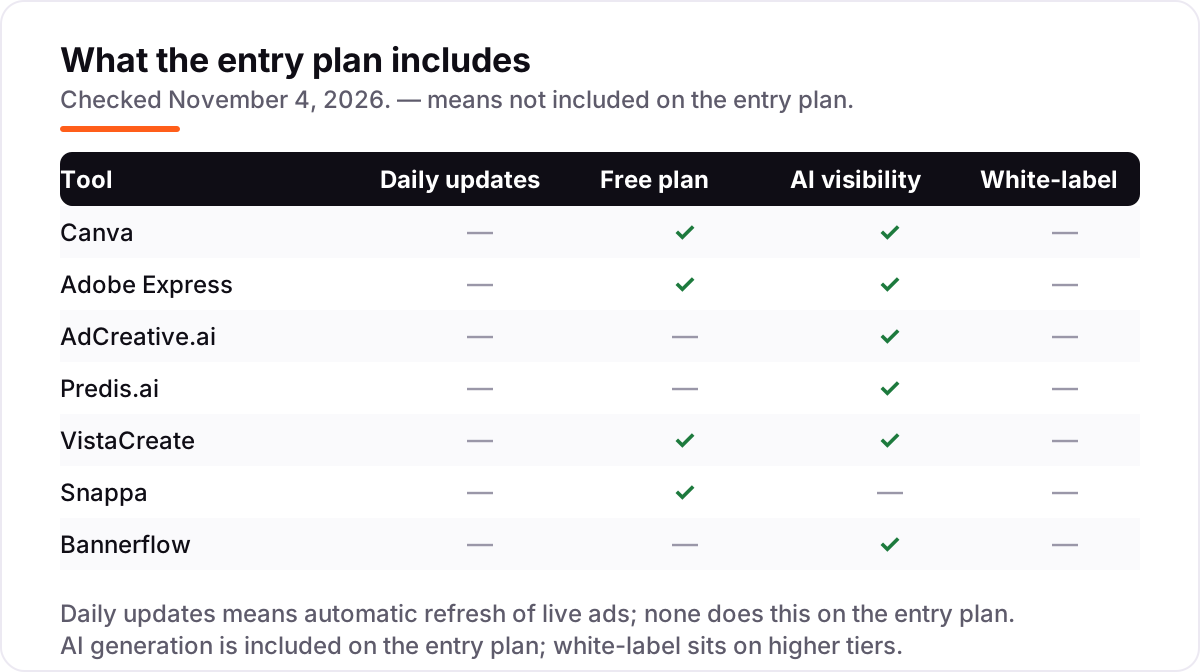
If you run a handful of ads for one brand, you may not need to pay at all. Canva's free plan covers real design work with templates and stock, Adobe Express free gives you 25 generative credits a month, VistaCreate's Starter covers templates and stock, and Snappa's Starter allows three downloads a month. The free tiers are honest products, not demos — but they cap out fast, and the AI features are where the caps bite hardest.
For a single small brand, start with Canva free and upgrade when you need Brand Kit, Magic Resize or heavier AI use. For anything client-facing, skip the free tier: brand controls, unlimited downloads and team seats start on the paid plans. And note the trap: VistaCreate's free plan has no AI tools at all, so it cannot tell you whether its AI is any good — use its 14-day Pro trial for that instead.
All-rounders with AI built in
Canva, Adobe Express and VistaCreate are the generalists in this list: full design editors with AI generation bolted on. They are the right pick when one person makes every kind of creative — social ads, display banners, stories, flyers — and wants templates, stock and brand controls in the same login. Canva has the deepest bench, Adobe Express has the lowest paid price and the Adobe stock library, and VistaCreate has the lowest annual Pro price and the best animation editor.
The shared weakness is measurement. None of the three scores an ad or connects to campaign results, so you design in one tool and learn what worked in another. If your ads already convert and you need volume and polish, that is fine. If your ads do not convert and you do not know why, a scoring tool will teach you more than a bigger template library.
AI that scores and scales your ads
AdCreative.ai and Predis.ai are the specialists. AdCreative.ai generates hundreds of variants and scores each one, which changes the workflow: instead of designing one ad carefully, you generate fifty, keep the ten the AI rates highest, and test those. Predis.ai goes the other way and covers the whole social pipeline — generation, captions, hashtags, scheduling and competitor analysis — from a single prompt or product link.
Both charge in units that need reading before you buy. AdCreative.ai spends a credit only when you download, so generation is free but keeping is not; Predis.ai spends credits on every generation, and video costs far more than images. Work out your real monthly volume first: 20 downloads on AdCreative.ai Starter, or about 325 images on Predis.ai Core, sounds generous until a campaign needs five sizes in four variants.
Enterprise ad production
Bannerflow sits alone at the top of this list, and its price shows it — there is no public price at all. What you pay for is production at a scale the self-serve tools cannot touch: animated HTML5 ads built once and localized to every market, language and size, published directly to more than 100 ad platforms, with live campaign updates and feed-driven personalization that swaps copy and prices while the campaign runs.
That is a different purchase from a $15 design subscription. It comes with a demo, a sales conversation and an annual contract, and it only makes sense when your team produces high volumes of display ads across many markets. If that is not your team, the honest answer is that Bannerflow is not your tool yet — and the six self-serve options above will cover you for a fraction of the cost. When you outgrow them, you will know, because localization and versioning will be eating your week.
Best AI platform for ad design pricing: what you will actually pay
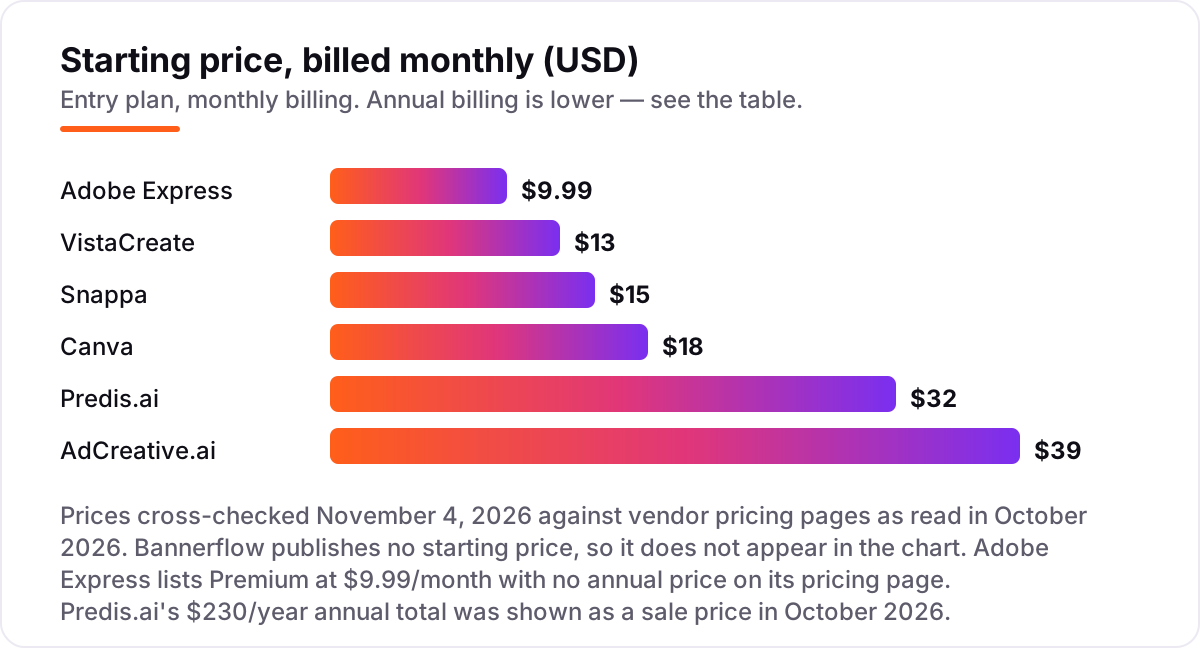
Take a solo marketer making 20 ads a month for one brand, for a year. On monthly billing that costs $119.88 on Adobe Express Premium, $156 on VistaCreate Pro, $216 on Canva Pro, $180 on Snappa Pro, $384 on Predis.ai Core and $468 on AdCreative.ai Starter. Switch to annual billing and the same year costs $120 on VistaCreate or Snappa, $144 on Canva, $230 on Predis.ai as shown on sale, and $240 on AdCreative.ai. Adobe Express lists no annual price, so its $119.88 stays the same either way, and Bannerflow is a custom quote.
The meter matters more than the sticker price. Those 20 ads are unlimited designs on Canva, Adobe Express, VistaCreate and Snappa, but exactly 20 downloads on AdCreative.ai Starter — one more variant and the allowance is gone. Predis.ai Core covers the same 20 ads inside its 1,300 monthly credits, with video costing far more than images. Before you compare prices, work out how many finished ads you need a month, in how many sizes, and what one finished ad costs on each meter.
Know the difference: generation, scoring and automation
Three different AI jobs hide under one label. Generation makes the ad: Canva's Magic Studio, Adobe Firefly and VistaCreate's image generator turn a prompt into images, copy and layouts. Scoring judges the ad: AdCreative.ai ranks variants by likely conversion before any budget is spent. Automation rebuilds and republishes the ad: Predis.ai schedules it across channels, and Bannerflow localizes HTML5 ads to every market and pushes them live to more than 100 platforms.
Most tools do one of these well and the other two badly or not at all. Canva generates beautifully and scores nothing; AdCreative.ai scores well but its design freedom is narrow; Bannerflow automates at a scale no small team needs. Buy the job you actually have: generation for most small teams, scoring when performance is the problem, automation only when volume and markets force it.
Quick comparison: tool type by need
| Buyer | Best pick | Why |
|---|---|---|
| Solo marketer on a budget | Adobe Express or VistaCreate | $9.99/month and $13/month, with real AI generation on the paid plan |
| Small team, best all-rounder | Canva | Magic Studio AI plus the biggest template library from $12/month billed annually |
| Performance testing at volume | AdCreative.ai | Hundreds of variants with a conversion score before you spend |
| Social ads end to end | Predis.ai | Generation, captions, hashtags and scheduling in one workflow |
| Fastest simple social graphic | Snappa | Pre-sized templates and unlimited downloads, no learning curve |
| Enterprise display at scale | Bannerflow | HTML5 ads localized to every market, published to 100+ platforms |
How to choose: a short decision path
- Name the AI job first. Generation, scoring or automation — pick the tool that does your job, not the one with the longest feature list. Canva and Adobe Express generate, AdCreative.ai scores, Bannerflow automates.
- Count your real volume. Ads per month, sizes per ad, brands, seats. AdCreative.ai's 20 downloads and Predis.ai's 1,300 credits look generous until you multiply by variants and sizes.
- Test the AI on your own brand. Run a real product and a real offer through the free plan or trial, not the demo gallery. VistaCreate's free plan has no AI, so use its trial.
- Check the credit math. Some tools charge per download, some per generation, some per image or video. The headline price means nothing until you know what a finished ad costs.
- Decide suite or specialist. If one person makes every creative, buy a generalist. If paid ads are the business, buy the specialist and keep the generalist for everything else.
Before you publish the landing pages your ads point to, run your titles through the free SERP snippet preview tool — it shows exactly how the title and description will look in Google.
Mistakes to avoid
- Comparing monthly prices without checking billing. Annual billing cuts most tools here by 20–50% — AdCreative.ai drops from $39 to $20 a month — and Adobe Express lists no annual price at all.
- Trusting a directory price. Canva Pro is listed as both $15 and $18 a month on third-party pages — $15 was the 2025 price; the vendor's own pricing page now shows $18 a month ($144 a year), which is the number that counts. Always check it before you buy.
- Paying for generation when you need scoring. A prettier ad that does not convert is still a failed ad. If your problem is performance, not production, buy the tool that scores.
- Ignoring what a credit buys. A download, a generation, an image and a video are four different units across these tools, and video costs several times more than images on credit plans.
- Forgetting the trial needs a card. AdCreative.ai and Predis.ai both require a card for their trials, and both convert to paid plans unless you cancel. Set a reminder for the day the trial ends, and check the numbers against how to track your Google ranking so you know what your traffic should be doing.
How we chose
We verified each price against the vendor's own pricing page, using live reads dated October 10 to October 29, 2026, with Canva's price confirmed against the November 4, 2026 check. Two prices carry a caveat: Adobe Express lists Premium at $9.99 a month with no annual price on its pricing page, and Predis.ai's $230-a-year annual total was shown as a sale price in October 2026. Bannerflow publishes no starting price, so it is listed as a custom quote rather than a number. No ratings appear in this list: the review-site pages could not be opened for verification on November 4, 2026, so every rating was omitted rather than estimated. We ranked the tools by fit for the most common buyer — a small team or solo marketer running paid social and display ads without a designer — not by brand size. No vendor paid for a place in this list, and none of the links here are affiliate links. If you want help turning ad traffic into rankings and AI citations, see our AI search optimization service.
What to do next
Start with the decision path above: name the AI job, count your volume, and test the AI on your own brand before you pay. Then take the free plan or trial of your top pick and make five real ads for a real campaign — if the workflow saves you an afternoon and the ads look on-brand, you have your tool. Once your tools are in place, find out what's holding your rankings back.
Your stack only works if people find you
SerpAstra fixes what keeps your site off page one and makes it easy for AI assistants to recommend.
Get a free audit→Sources we checked (8)
- Canva pricing — canva.com/pricing (cross-checked November 4, 2026)
- Adobe Express pricing — adobe.com/express/pricing (cross-checked November 4, 2026)
- AdCreative.ai pricing — adcreative.ai (cross-checked November 4, 2026)
- Predis.ai pricing — predis.ai/pricing (cross-checked November 4, 2026)
- VistaCreate pricing — create.vista.com/plans (cross-checked November 4, 2026)
- Snappa pricing — snappa.com/pricing (cross-checked November 4, 2026)
- Bannerflow pricing — bannerflow.com/pricing (cross-checked November 4, 2026)
- Bannerflow creative automation platforms 2026 — bannerflow.com/blog (cross-checked November 4, 2026)
Shamim
Founder of SerpAstra
A full-stack SEO and digital marketer who spends most days on Local SEO for dental practices, AI search visibility and lead generation.
Frequently asked questions
What is the best AI platform for ad design in 2026?
Canva Pro is the best all-rounder for most buyers: Magic Studio AI, the biggest template library and Brand Kit from $12/month billed annually. If you run paid ads at volume and want the AI to score variants before you spend, AdCreative.ai is the better pick. Adobe Express is the cheapest paid entry at $9.99/month.
How much does an AI platform for ad design cost?
Between $9.99 and $39 a month at the entry level. Adobe Express Premium is $9.99, VistaCreate Pro is $13 and Canva Pro is $18 and Snappa Pro is $15 on monthly billing. AdCreative.ai Starter is $39 monthly or $20 billed annually, Predis.ai Core is $32 monthly, and Bannerflow is quote-only.
Is there a free AI platform for ad design?
Yes, with limits. Canva, Adobe Express, VistaCreate and Snappa all have free plans. But free does not mean full AI: VistaCreate's Starter has no AI tools at all, Adobe Express free gives only 25 generative credits a month, and Snappa has no generative AI on any plan. Predis.ai has no permanent free plan, only a 3-day trial.
Can AI really design ads that convert?
AI can generate strong ad variants fast, but generation and conversion are different jobs. Only AdCreative.ai in this list scores each creative for likely conversion before you spend. The other tools design the ad; the ad platform's own data still decides what worked. Treat any AI score as a shortlist, not a guarantee.
What is the difference between Canva and AdCreative.ai?
Canva is a design suite: it generates and lays out ads, resizes them for every placement and keeps them on-brand, from $12/month billed annually. AdCreative.ai is a performance tool: it generates hundreds of variants and scores them for likely conversion, from $20/month billed annually. Many teams use both — Canva to design, AdCreative.ai to test.
Do I need an enterprise platform like Bannerflow?
Only at volume. Bannerflow earns its quote-only price when you produce animated HTML5 ads across many markets, languages and sizes, and need live campaign updates and feed-driven personalization. Below that volume, Canva or AdCreative.ai cover the same jobs for $12–$39 a month with no sales process.
Free SEO and AI visibility audit
Find out what is holding your rankings back
Send us your site. Within 2 business days you get a written audit, an AI visibility check and a short fix list ranked by impact. Free, with no contract attached.
Request my free audit→Related guides
 StrategyHow to track your Google ranking (and what the numbers actually mean)Track your Google ranking the right way: Search Console, free checkers and rank trackers explained, and what average position and CTR really mean today.Read guide →
 AI SearchBest AI SEO tools in 2026: honest picks by jobBest AI SEO tools in 2026, picked by job: Semrush and Ahrefs for research, Surfer and Clearscope for content, Otterly for AI tracking, with 2026 prices.Read guide →
 AI SearchHow to get your brand cited in ChatGPT and AI searchA practical guide to earning citations in ChatGPT, Perplexity and Google AI Overviews: crawler access, Bing indexing, answer-first pages and brand signals.Read guide →