
8 Best AI Tools for Content Creators in 2026 (Free and Paid, Compared)
The 8 best ai tools for content creators, compared on price, free plans and strengths — writing, design, video. Prices checked on vendor sites, Nov 2, 2026.
 Shamim Mia, Founder, SerpAstraLast verified November 2, 202611 min read
We compare pricing pages, documentation and public reviews. We never accept payment for rankings.

Key takeaways
- Canva Pro ($18/month), ChatGPT Plus ($20/month) and Claude Pro ($20/month) cover design, drafting and long-form writing for $58 a month combined — the cheapest capable stack in this list.
- The single most important buying factor is the monthly allowance: most of these tools cap words, video minutes or AI credits, so check the cap against how much you actually publish each month.
- Free plans are real but thin — Canva, ChatGPT, Claude, Grammarly and Descript all have one, yet the useful AI features start on the paid plans.
- Every price below was checked on the vendor's own pricing page on November 2, 2026, except Canva's, which comes from third-party reads of its pricing page. Ratings are G2, except Copy.ai, which has no rating shown.
On this page
Quick comparison
| Tool | Best for | Starting price | Free plan |
|---|---|---|---|
| Canva | Solo creators and small teams who need social graphics, presentations and short video in one place without learning design software | $12/mo (annual) | Yes (free plan) |
| ChatGPT | Solo creators who want one AI assistant for drafting, brainstorming, scripts, images and research | $20/mo | Yes (free plan) |
| Claude | Creators who write long-form content — blogs, scripts, newsletters — and care most about draft quality | $17/mo (annual) | Yes (free plan) |
| Grammarly | Bloggers, newsletter writers and freelancers who want every draft checked for grammar, tone and clarity as they write | $12/mo (annual) | Yes (free plan) |
| Descript | YouTubers and podcasters who edit video or audio by editing the transcript | $16/mo (annual) | Yes (60 min/mo) |
| Jasper | Marketing teams and agencies that need on-brand blog posts, campaigns and SEO content at volume | $59/mo (annual) | No (7-day trial) |
| Pictory | Bloggers and small teams turning written posts into captioned social videos without editing skill | $25/mo (annual) | No (14-day trial) |
| Copy.ai | Small marketing teams that need fast short-form copy — ads, emails, product descriptions — for up to 5 seats | $24/mo (annual) | No (free trial) |
Make one of these tools?
We re-check this list every quarter. Send a correction, request a review, or ask about a clearly labeled sponsored spot.
Request a listingThe best ai tools for content creators

Canva
Best for: Solo creators and small teams who need social graphics, presentations and short video in one place without learning design software
Canva is the everyday design tool for creators because it covers the whole visual workflow — social graphics, thumbnails, presentations, docs and short video — in one editor you can learn in an afternoon. Pro adds Brand Kit, Magic Resize and background remover, so a post that used to take an hour in a design app becomes a ten-minute template job, and everything you make stays on-brand without rework.
The catch is the monthly AI allowance: heavy AI image or video generation burns through it, and the $100-a-month AI Pass add-on is where the extra capacity lives. Templates are also so widely used that a default design can look generic, so budget a few minutes per post to customize. For most creators, though, Canva is the first subscription to buy and the last one to cancel.
What we like
- The broadest tool here: graphics, presentations, docs, websites and short video in one editor
- Brand Kit, Magic Resize and background remover keep every asset on-brand in one click
- Free plan is genuinely usable, and Pro adds 1TB of storage plus the full template and stock library
Watch out for
- The monthly AI allowance is capped, and heavy AI image or video generation needs the $100/month AI Pass add-on
- Templates are so widely used that designs can look generic unless you customize them
- Precise design control is limited — no vector editing or print-ready CMYK export

ChatGPT
Best for: Solo creators who want one AI assistant for drafting, brainstorming, scripts, images and research
ChatGPT Plus is the all-rounder in this list because one subscription covers drafting, brainstorming, scripts, image generation, voice and research. Projects keep recurring work organized, scheduled tasks run research on a timetable, and custom GPTs can be trained on your tone or your brand rules. For a solo creator, it replaces three or four single-purpose subscriptions.
The price never drops: there is no annual billing option, so Plus costs $20 a month whether you pay monthly or yearly. Outputs also need fact-checking, because the model can state wrong facts with total confidence. And the usage limits are described in vague terms like Expanded rather than as fixed numbers, so heavy users should test their real workload during the first month.
What we like
- The widest single toolbox: chat, image generation, voice, file analysis, deep research and custom GPTs
- Projects, scheduled tasks and memory keep recurring content work organized in one place
- Free plan covers everyday chat, so you can test it properly before paying
Watch out for
- No annual billing option, so the $20/month price never drops for a yearly commitment
- Outputs can be confidently wrong on facts, so every claim needs checking before publishing
- Usage limits on the paid plan are described in words like Expanded rather than as fixed numbers

Claude
Best for: Creators who write long-form content — blogs, scripts, newsletters — and care most about draft quality
Claude Pro is the writer's pick because its long-form drafts need the least rewriting. It holds the thread of a long article or script, follows a style guide you paste into a Project, and handles documents with up to 1M tokens of context depending on the model. For bloggers and newsletter writers, that means fewer revision rounds per piece.
It is not the tool for everything. Answers can run longer than asked, so short-form copy needs trimming, and there is no image generation on the scale of ChatGPT. Usage limits also reset on rolling five-hour and weekly windows, which can interrupt a long work session. Pair Claude with Canva and you have writing plus design for $35 a month on annual billing.
What we like
- The strongest long-form writing in this list, with a clean interface and Projects for organizing drafts
- Handles long documents well, with up to 1M tokens of context depending on the model
- Pro includes Claude Code, task scheduling and access to more models
Watch out for
- Answers can run longer than asked, so short-form copy needs extra editing
- Usage limits reset on rolling five-hour and weekly windows, which can interrupt a long work session
- No image generation on the scale of ChatGPT, and no built-in publishing or scheduling

Grammarly
Best for: Bloggers, newsletter writers and freelancers who want every draft checked for grammar, tone and clarity as they write
Grammarly is the editor in this list, not a writer: it checks grammar, tone and clarity in real time wherever you type — browser, email, docs and desktop. Pro adds full-sentence rewrites, tone adjustment, and plagiarism and AI-text detection, plus 2,000 AI prompts a month. It is the tool that catches the errors an AI draft hides and the typos you miss at midnight.
Watch the billing cycle: Pro costs $30 a month on monthly billing but $12 a month on annual billing, so the same plan is two and a half times cheaper if you commit for a year. The free plan covers basic checks, and its 100 AI prompts a month are enough to test the AI features. If you write every day, the annual plan is the obvious buy.
What we like
- Works everywhere you write — browser, email, docs and desktop — with real-time corrections
- Full-sentence rewrites, tone adjustment and plagiarism and AI-text detection on Pro
- Free plan is enough for basic checks, so the upgrade decision is easy to test
Watch out for
- Monthly billing costs $30, two and a half times the $12 annual rate — the billing cycle matters more than the plan
- Suggestions can push sentences toward the same polished tone and miss a casual or creative voice
- The 2,000 AI prompts a month on Pro run out fast if you generate a lot of text

Descript
Best for: YouTubers and podcasters who edit video or audio by editing the transcript
Descript turns video editing into document editing: it transcribes your recording, and deleting a sentence from the transcript deletes it from the video. Studio Sound cleans up room noise, filler-word removal cuts the ums, and Eye Contact fixes a wandering gaze — all in one click. Underlord, the AI co-editor, drafts clips, show notes and social posts from the same recording.
The entry Hobbyist plan caps at 10 media hours and 400 AI credits a month, so a channel publishing weekly will outgrow it fast. 4K export and AI video generation also need the Creator plan at $35 a month. If you only publish a few videos a month, Hobbyist is the cheapest honest way into transcript editing — and the free plan's 60 minutes are enough to test it.
What we like
- Edit video by editing the transcript — delete a sentence and the clip follows
- Studio Sound, filler-word removal and Eye Contact clean up recordings in one click
- Underlord, the AI co-editor, drafts clips, show notes and social posts from your recording
Watch out for
- Hobbyist caps at 10 media hours and 400 AI credits a month, so a busy channel outgrows it fast
- 4K export and AI video generation need Creator ($35/month), not the entry plan
- The blade and cut-smoothing tools are less precise than a traditional video editor

Jasper
Best for: Marketing teams and agencies that need on-brand blog posts, campaigns and SEO content at volume
Jasper is the marketing suite in this list, built for teams that publish blog posts and campaigns at volume. Brand Voices, Knowledge assets and Audiences keep every draft on-brand without re-prompting, and the Canvas workspace runs 100+ marketing agents for campaigns, SEO and GEO content. It is the only tool here with GEO and AI Optimization features that track how your brand shows up in AI answers.
At $69 a month it costs more than three times ChatGPT Plus, and it only writes — no images, video or design. There is no free plan, only a 7-day trial, so you commit before you know whether the voice fits. And the first draft still reads generic without human editing. Jasper earns its price when a team publishes constantly; for a solo creator, ChatGPT and Claude cover the same ground for less.
What we like
- Brand Voices, Knowledge assets and Audiences keep every draft on-brand without re-prompting
- Canvas workspace plus 100+ marketing agents for campaigns, SEO and GEO content
- GEO and AI Optimization features track how your brand shows up in AI answers
Watch out for
- At $69/month it costs more than three times ChatGPT Plus, and it only writes — no images, video or design
- No free plan, only a 7-day trial, so you commit before you know whether the voice fits
- Output still reads generic on first pass and needs human editing to sound like a person wrote it

Pictory
Best for: Bloggers and small teams turning written posts into captioned social videos without editing skill
Pictory is the repurposer in this list: paste a script or a blog URL, and it builds a captioned video from 5 million Getty and Storyblocks clips with an ElevenLabs AI voiceover. Auto-captions and 1080p export come with the Starter plan, and the whole workflow takes minutes instead of hours in an editor. It is the fastest way to turn a written archive into social video.
The 200-video-minute monthly cap on Starter is the real limit — a team posting daily will hit it. Stock footage is also matched by keywords, so clips can miss the point of the script and need manual swaps, and the AI voices still lack emotion and emphasis control. For turning a weekly blog post into a few social clips, though, Pictory does the job from $25 a month on annual billing.
What we like
- Turns a script, blog URL or long recording into a captioned video in minutes
- Bundles 5 million Getty and Storyblocks clips plus ElevenLabs AI voices on Starter
- Auto-captions, 1080p export and one brand kit included from the entry plan
Watch out for
- Starter caps at 200 video minutes a month, and the credit pool does not renew monthly on annual plans
- Stock footage is matched by keywords, so clips can miss the point of the script and need manual swaps
- AI voices sound better than they used to but still lack emotion and emphasis control

Copy.ai
Best for: Small marketing teams that need fast short-form copy — ads, emails, product descriptions — for up to 5 seats
Copy.ai is the short-form pick: the entry Chat plan covers 5 seats with unlimited words in chat and unlimited chat projects, plus 90+ templates for ads, emails, social posts and product descriptions. Workflows and CRM integrations automate the repetitive go-to-market copy a small team produces every week. For a team that writes a lot of short copy, the per-seat cost is low.
Long-form blog writing is not its strength — drafts read generic and need heavy editing, and Claude or Jasper do that job better. There is no free plan on the current pricing page, only a free trial, and the old $49 Starter plan is gone. Trustpilot reviewers also report billing and refund problems, so pay monthly and keep records until you trust the account.
What we like
- Unlimited words in chat and unlimited chat projects on the entry Chat plan, for 5 seats
- 90+ templates for ads, emails, social posts and product descriptions
- Workflows and CRM integrations automate repetitive go-to-market copy tasks
Watch out for
- No free plan on the current pricing page, only a free trial, and the old $49 Starter plan is gone
- Long-form blog writing is not its strength; drafts read generic and need heavy editing
- Trustpilot reviewers report billing and refund problems, so pay monthly and keep records
The best ai tools for content creators in 2026 are no longer one magic app — they are a stack, and the right stack depends on what you publish most. This list compares eight tools that are actively sold today, with prices checked on each vendor's own pricing page on November 2, 2026, so you can pick the one or two that cover your format and skip the rest.
How to choose the best ai tools for content creators
Start with the format you publish most. If you write blogs and newsletters, a writing assistant is the core buy: Claude for long-form drafts, ChatGPT for range, Jasper when a team needs brand-governed output. If you make social graphics and thumbnails, Canva is the core buy and everything else is a supplement. If you publish video or podcasts, Descript is the editor and Pictory is the repurposer. Buying a tool for a format you rarely publish is the most common waste in this category.
Then check the monthly allowance, because that is where the real price hides. Most of these tools cap words, video minutes, media hours or AI credits per month, and the cap decides whether the entry plan is enough. Descript Hobbyist gives you 10 media hours a month, Pictory Starter gives you 200 video minutes, Grammarly Pro gives you 2,000 AI prompts, and Canva's monthly AI allowance runs out fast if you generate a lot of images. Estimate your monthly output before you buy, and compare it to the cap — not to the headline price.
Check the billing cycle next, because the same plan can cost two and a half times more on monthly billing. Grammarly Pro is $30 a month billed monthly but $12 a month billed annually, and Jasper Pro drops from $69 to $59. ChatGPT Plus is the exception: it has no annual billing option, so it costs $20 a month either way. If you are sure you will use a tool for a year, pay annually; if you are not sure, pay monthly for two months and switch.
Finally, try the free plan or trial with real work. Five of the eight tools here have permanent free plans, and the other three have free trials. Run your actual workflow for a week — draft a real post, design a real thumbnail, edit a real video — and check the output against your standards before you commit. A tool that feels fast in a demo can still produce drafts you would never publish.
Quick comparison: tool type by need
| Buyer | Best pick | Why |
|---|---|---|
| Solo creator, design first | Canva | $18/month, graphics, video and docs in one editor |
| Solo creator, writing first | ChatGPT or Claude | $20/month each, drafting plus research or long-form quality |
| Video and podcast creator | Descript | $24/month, transcript editing and AI cleanup |
| Editor for everything you write | Grammarly | $30/month, real-time checks in every app |
| Marketing team at volume | Jasper | $69/month, brand voices and GEO tracking |
| Blog-to-video repurposing | Pictory | $29/month, script or URL into captioned video |
AI tools for content creators pricing: what you will actually pay
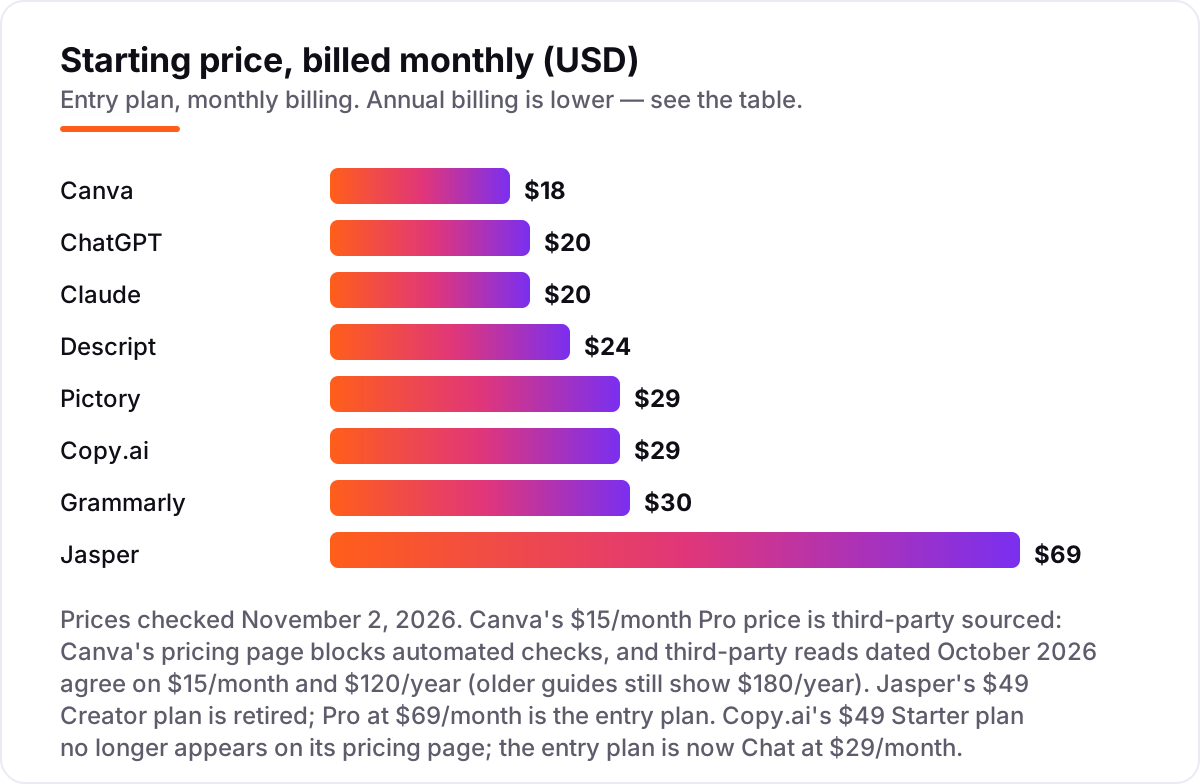
Here is what a typical solo creator pays for a three-tool stack. Canva Pro at $18 a month, ChatGPT Plus at $20 a month and Grammarly Pro at $30 a month come to $68 a month, or $816 a year, on monthly billing. Switch all three to annual billing and the total falls to $528 a year: Canva at $144 a year, ChatGPT at $240 a year because it has no annual option, and Grammarly at $144 a year. That is $288 a year saved by changing nothing but the billing cycle.
Buying all eight tools on monthly billing costs $239 a month, or $2,868 a year. Buying all eight on annual billing costs $2,220 a year — a $648 saving. Nobody needs all eight, though: the realistic stack is two or three tools. A writer's stack of Claude Pro and Grammarly Pro costs $50 a month on monthly billing, or $344 a year on annual billing. A video creator's stack of Descript Hobbyist and Canva Pro costs $42 a month, or $336 a year on annual billing. Pick the stack that matches your format, and let the annual price decide the billing cycle.
Two warnings before you buy. First, the entry plan is not always the plan you end up on: Canva's AI allowance runs out and the AI Pass add-on costs $100 a month, Descript's 4K export needs the $35-a-month Creator plan, and Jasper's Business plan is a custom quote. Second, a few of these tools still show old prices on third-party directories — Canva's old $180-a-year figure and Jasper's retired $49 Creator plan both still appear in search results. The prices in this guide come from the vendors' own pricing pages, checked November 2, 2026.
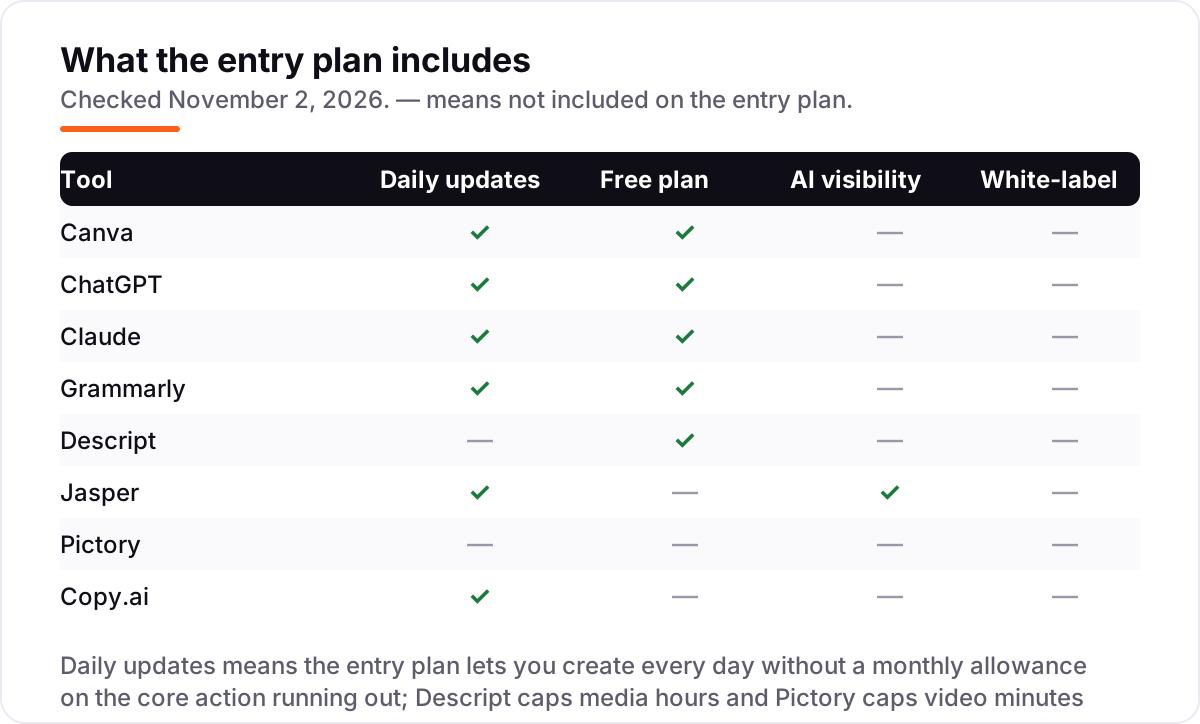
AI writing assistants vs AI content suites: know the difference
The eight tools in this list split into two camps, and the difference decides which one you buy first. The AI writing assistants — ChatGPT, Claude, Jasper and Copy.ai — take a prompt and return text. They draft, rewrite, brainstorm and summarize, and their quality depends on the model and the instructions you give. They do not design, edit video or publish anything. If your main job is words on a page, start here.
The AI content suites — Canva, Descript and Pictory — take your content and turn it into something else. Canva turns an idea into a design, Descript turns a recording into an edited video, and Pictory turns a blog post into a captioned social clip. They are production tools, not drafting tools, and their value is measured in hours saved rather than words written. If your main job is publishing finished assets, start here.
Grammarly sits across both camps: it does not draft and it does not produce assets, but it checks everything the other tools make. That is why it pairs with almost any stack — it is the only tool here that improves the output of every other tool on the list.
One feature only one tool in this list has is AI visibility: Jasper's GEO and AI Optimization features track how your brand shows up in AI answers. If that matters to your business, read our guide to getting cited in ChatGPT and consider our AI search optimization service — the rest of these tools create content, they do not track whether AI engines quote it.
How we chose
We checked each vendor's own pricing page on November 2, 2026 and recorded the starting price exactly as shown, including the annual-billing figure where the page lists one. Three prices needed a note. Canva's pricing page blocks automated checks, so its $18-a-month Pro price comes from third-party reads of the page dated November 2026, which agree on $18 a month and $144 a year — older guides still show $120 a year. Grammarly's page defaults to annual billing and shows $12 a month; the $30 monthly figure comes from Grammarly's own support price list. ChatGPT's $20 a month is confirmed by OpenAI's help center, which states Plus is billed monthly with no annual option. Ratings come from G2, except Copy.ai, whose G2 product page now redirects — so no rating is shown for it rather than a stale one. We ranked the tools by fit for the most common buyer — a solo creator or small team publishing blog, social and video content — not by brand size. No vendor paid for a place in this list, and none of the links here are affiliate links.
What to do next
Start with your format: pick the writing assistant or the content suite that matches what you publish most, try its free plan or trial with real work for a week, and check the monthly allowance against your actual output before you pay. Then add the second tool only when the first one is earning its keep. Before you publish the new pages you create, run your titles through the free SERP snippet preview tool — it shows exactly how the title and description will look in Google. Once your tools are in place, find out what's holding your rankings back.
Your stack only works if people find you
SerpAstra fixes what keeps your site off page one and makes it easy for AI assistants to recommend.
Get a free audit→Sources we checked (15)
- Canva pricing — canva.com/pricing (checked November 2, 2026; price from third-party reads dated October 2026)
- Canva on G2 — 4.7/5, 7,811 reviews (checked November 2, 2026)
- ChatGPT pricing — chatgpt.com/pricing (checked November 2, 2026)
- ChatGPT on G2 — 4.6/5, 3,909 reviews (checked November 2, 2026)
- Claude pricing — claude.com/pricing (checked November 2, 2026)
- Claude on G2 — 4.7/5, 1,107 reviews (checked November 2, 2026)
- Grammarly pricing — grammarly.com/plans (checked November 2, 2026)
- Grammarly on G2 — 4.7/5, 14,105 reviews (checked November 2, 2026)
- Descript pricing — descript.com/pricing (checked November 2, 2026)
- Descript on G2 — 4.6/5, 933 reviews (checked November 2, 2026)
- Jasper pricing — jasper.ai/pricing (checked November 2, 2026)
- Jasper on G2 — 4.7/5, 1,319 reviews (checked November 2, 2026)
- Pictory pricing — pictory.ai/pricing (checked November 2, 2026)
- Pictory on G2 — 4.6/5, 82 reviews (checked November 2, 2026)
- Copy.ai pricing — copy.ai/pricing (checked November 2, 2026)
Shamim
Founder of SerpAstra
A full-stack SEO and digital marketer who spends most days on Local SEO for dental practices, AI search visibility and lead generation.
Frequently asked questions
What is the best AI tool for content creators in 2026?
For most creators, Canva Pro at $18 a month is the best first buy — it covers design, thumbnails and short video in one place. Pair it with ChatGPT Plus at $20 for drafting and ideas, or Claude Pro at $20 if you write long-form content. That two-tool stack costs $38 a month and covers almost everything a solo creator publishes.
How much do AI tools for content creators cost?
Between $18 and $69 a month at the entry level on monthly billing, or $12 to $59 a month on annual billing. Canva Pro is the cheapest at $18 a month, Jasper Pro the most expensive at $69. ChatGPT Plus has no annual option, so it stays $20 a month either way. All eight tools in this list were priced from their own pricing pages on November 2, 2026.
Is there a free AI tool for content creators?
Yes, with limits. Canva, ChatGPT, Claude, Grammarly and Descript all have permanent free plans, and Jasper, Pictory and Copy.ai offer free trials. The free plans are useful for basic work — Canva's free tier covers simple designs, ChatGPT's free tier covers everyday chat — but the useful AI features start on the paid plans.
ChatGPT vs Claude: which is better for content creators?
ChatGPT is the better all-rounder: it drafts, generates images, does voice and research, and has custom GPTs. Claude is the better writer for long-form work — blogs, scripts and newsletters — with stronger drafts that need less rewriting. If you buy one, pick ChatGPT for range; if you write long-form every day, Claude is worth the same $20.
Do I need Jasper, or is ChatGPT enough?
For a solo creator, ChatGPT is enough. Jasper earns its $69 a month when a team publishes constantly and needs every draft on-brand without re-prompting — its Brand Voices, Knowledge assets and GEO tracking are team features. If you are one person with one blog, spend the difference on Canva and Grammarly instead.
What is the best AI video tool for creators on a budget?
Descript Hobbyist at $24 a month is the best value if you edit your own recordings — transcript editing, Studio Sound and filler-word removal in one tool. Pictory Starter at $29 is the better pick if you want to turn written posts into captioned social videos without editing. Canva Pro at $18 also covers basic short video.
Can AI tools replace a human editor?
No. AI drafts are fast, but they invent facts, repeat phrases and miss your voice. Grammarly catches grammar and tone problems, and ChatGPT or Claude can rewrite a draft, but a human still needs to check facts, cut repetition and decide what the audience actually needs. Treat AI as a first-draft machine, not a publisher.
Free SEO and AI visibility audit
Find out what is holding your rankings back
Send us your site. Within 2 business days you get a written audit, an AI visibility check and a short fix list ranked by impact. Free, with no contract attached.
Request my free audit→Related guides
 AI SearchBest AI SEO tools in 2026: honest picks by jobBest AI SEO tools in 2026, picked by job: Semrush and Ahrefs for research, Surfer and Clearscope for content, Otterly for AI tracking, with 2026 prices.Read guide →
 SEO & AI SearchBest AI Writing Tools for SEO in 2026: 7 Picks Ranked by What You Need7 best ai writing tools for seo compared on price, live scoring, and drafting power. Prices checked on each vendor pricing page, November 1, 2026.Read guide →
 SEO & AI Search11 Best AI Tools for SEO Optimization in 2026, Compared11 best ai tools for seo optimization compared on price, content scoring and AI visibility, with prices verified November 1, 2026, sorted by use case.Read guide →