
12 Best AI Tools for Video Content Creation in 2026, Compared
12 best AI tools for video content creation compared with real prices, free plans and G2 ratings, so you can pick the right video maker without overpaying.
 Shamim Mia, Founder, SerpAstraLast verified November 2, 202612 min read
We compare pricing pages, documentation and public reviews. We never accept payment for rankings.

Key takeaways
- Descript is the best all-round pick for most creators: transcript-based editing, Studio Sound and 4K from $24 a month billed monthly ($16 billed annually). HeyGen has the highest G2 score (4.8/5) for avatar video, and Runway is the cheapest way into generative video at $15 a month.
- The single most important buying factor is the meter, not the sticker price: credits, minutes or media hours decide what a plan really produces each month, and most tools charge extra when you regenerate footage.
- Free plans are real but watermarked everywhere except CapCut, which exports free video with no watermark. Pictory is the only tool here with no free plan at all — just a 14-day trial.
- Every price below was checked on the vendor's own pricing page on November 2, 2026, except VEED and Lumen5, whose pricing pages render client-side. Their figures come from the vendors' own published pages and G2's vendor-provided pricing. Ratings are G2, except CapCut, which has no G2 page.
On this page
Quick comparison
| Tool | Best for | Starting price | Free plan |
|---|---|---|---|
| Descript | Solo creators and podcasters who edit talking-head video and want to cut by editing a transcript | $16/mo (annual) | Yes (60 min/mo) |
| HeyGen | Marketers and trainers who need a realistic AI presenter speaking in many languages without filming | $24/mo (annual) | Yes (3 videos/mo) |
| Synthesia | L&D and internal comms teams turning scripts into presenter-led training videos in many languages | $19/mo | Yes (10 min/mo) |
| Runway | Creators and small marketing teams generating short cinematic clips and ads from text or images | $12/mo (annual) | Yes (125 credits) |
| Pictory | Bloggers and marketers turning articles, scripts or long recordings into captioned social videos | $25/mo (annual) | No (14-day trial) |
| InVideo | Solo creators and small teams who want prompt-to-video plus a full timeline editor in one subscription | $10/mo (annual) | Yes (watermarked) |
| Veed | Creators and small teams editing talking-head and social video in the browser with fast auto-subtitles | $9/mo (annual) | Yes (10 min/mo) |
| Kapwing | Small teams collaborating in the browser on social video, subtitles and repurposing | $16/mo (annual) | Yes (watermarked) |
| OpusClip | Podcasters and YouTubers turning long videos into captioned vertical clips for Shorts, Reels and TikTok | $15/mo | Yes (60 credits/mo) |
| CapCut | Short-form creators on TikTok, Reels and Shorts who want the most capable free editor available | $15/mo (annual) | Yes (free editor) |
| Fliki | Faceless YouTube and training creators turning scripts into narrated videos with realistic AI voices | $21/mo (annual) | Yes (3 credits/mo) |
| Lumen5 | Marketing teams turning blog posts and articles into branded social videos without editing skills | $19/mo (annual) | Yes (5 videos/mo) |
Make one of these tools?
We re-check this list every quarter. Send a correction, request a review, or ask about a clearly labeled sponsored spot.
Request a listingThe best ai tools for video content creation

Descript
Best for: Solo creators and podcasters who edit talking-head video and want to cut by editing a transcript
Descript is the only editor here where the transcript is the timeline: record a video, get a transcript, and cut by deleting sentences instead of scrubbing a playhead. Studio Sound, filler-word removal and Eye Contact run on the entry plan, so a talking-head video can go from raw recording to publishable cut in one window, with no separate audio pass.
The trade-off is the meter. The Hobbyist plan includes 10 media hours and 400 AI credits a month, and both caps matter if you publish weekly. Teams pay per editor, and 4K plus full AI video generation need the Creator plan. If you edit yourself and talk to camera, start here; if you need avatars or generated footage, look at HeyGen or Runway instead.
What we like
- Edit video by editing the transcript: delete a sentence and the video cut follows, with no timeline scrubbing
- Studio Sound, filler-word removal and Eye Contact run on the entry plan, plus 400 AI credits a month
- 10 media hours a month and watermark-free 1080p exports from $16/month billed annually
Watch out for
- Per-person pricing: a three-editor team pays three subscriptions, and Creator is needed for 4K and full AI video generation
- Two meters to watch: media hours and AI credits both cap monthly, and top-ups only start on Creator

HeyGen
Best for: Marketers and trainers who need a realistic AI presenter speaking in many languages without filming
HeyGen makes the most lifelike AI presenters in this list: pick one of 700-plus stock avatars, paste a script, and get a studio-quality presenter video in 175-plus languages, with lip-sync translation that keeps your voice in the new language. Avatar V, its newest model, adds emotion and movement, and Video Agent builds B-roll and presenter shots from a single prompt.
The catch is the credit meter. Creator includes 600 credits a month, and Avatar V burns 48 credits a minute, so the plan buys about 12 minutes of top-quality avatar video — fine for short promos, tight for training courses. Unused credits roll over for a month, and annual billing lets them accumulate all year. For a few polished presenter videos a month, it is the best avatar tool here.
What we like
- Highest-rated avatar tool in this list at 4.8/5 on G2, with 700+ stock avatars and 175+ languages
- Avatar V and Video Agent generate presenter video and B-roll from a prompt, with lip-sync translation
- Unused credits roll over for one month on monthly billing and accumulate all year on annual billing
Watch out for
- Credit costs vary by model: Avatar V burns 48 credits a minute, so 600 credits buy about 12 minutes of top-quality avatar video
- Creator cannot buy credit top-ups mid-month, and 4K export needs Pro from $49/month

Synthesia
Best for: L&D and internal comms teams turning scripts into presenter-led training videos in many languages
Synthesia is the cheapest route to a presenter-led video: Starter costs $19 a month and includes downloads, logo removal, 125-plus avatars and AI dubbing across 140-plus languages. Every plan adds a 10-minute monthly allowance on top of its credits, so Starter covers about 22 minutes of finished video a month — enough for a short course or a weekly update.
The meter is the limit. Starter's 1,250 credits buy about 12 extra minutes beyond the free allowance, and interactive video, quizzes and API access start on Pro at $89 a month. The page also shows no annual rate for Starter, so budget on the monthly figure. If you make training videos at scale, it is the value pick; for the most lifelike avatars, HeyGen wins.
What we like
- Cheapest avatar-video entry here at $19/month, with downloads and logo removal from Starter
- 125+ stock avatars, 140+ languages, AI dubbing and a screen recorder on the entry plan
- Every plan includes a 10-minute monthly allowance, so Starter covers about 22 minutes a month in total
Watch out for
- Minutes are the meter: Starter's 1,250 extra credits buy only about 12 more minutes of video a month
- Interactive video, quizzes and API access start on Pro ($89/month); the page shows no annual rate for Starter

Runway
Best for: Creators and small marketing teams generating short cinematic clips and ads from text or images
Runway is the only tool here that generates the footage itself: describe a shot or upload a still image and Gen-4.5 returns a short cinematic clip, with music, voice and sound effects included. Every model is on the entry plan, there is no watermark from Standard, and 4K upscaling is included — so a small team can make ad clips without a shoot.
The limit is seconds, not minutes. Standard includes 625 credits a month, which Runway says is about 52 seconds of Gen-4.5 or 104 seconds of Gen-4 Turbo, and credits never roll over. Failed generations cost credits too, and faces and hands can still come out warped. Buy it for short clips and B-roll, not for full-length video.
What we like
- Access to every AI video and image model on the entry plan, including Gen-4.5, plus 4K upscaling
- 625 credits a month: about 52 seconds of Gen-4.5 or 104 seconds of Gen-4 Turbo, per Runway's own figures
- No watermark from Standard, with music, voice and sound-effect generation included
Watch out for
- Credits burn fast: a few failed generations can eat the whole month's allowance, and Standard credits never roll over
- Standard caps at 3 projects and 5 parallel generations, and human hands and faces can still come out warped

Pictory
Best for: Bloggers and marketers turning articles, scripts or long recordings into captioned social videos
Pictory is the fastest way to turn written content into video: paste a blog URL or a script and get a captioned, narrated video in about two minutes, drawing on Getty and Storyblocks footage, with Veo 3.1 video generation and ElevenLabs voices on every plan. Starter covers up to 30 minutes of video a month with automatic subtitles and 1080p export.
Two things to know before paying. There is no free plan, only a 14-day trial, and the AI picks stock footage by keyword, so scenes often miss the script's point and need a manual swap. Annual plans also grant all credits up front. If you publish blog content every week and want it on social video, start here; if you need presenter video, look at Synthesia.
What we like
- Paste a blog URL and get a captioned, narrated video in about two minutes, with Getty and Storyblocks footage built in
- Every plan includes all AI models: Veo 3.1 video, ElevenLabs voices and stock avatars, from Starter
- Up to 30 minutes of video a month on Starter, with automatic subtitles and 1080p export
Watch out for
- No free plan, only a 14-day trial, and the AI matches stock footage by keyword, so clips often miss the script's point
- Annual plans grant all credits up front, so a cancelled year still leaves the credits spent

InVideo
Best for: Solo creators and small teams who want prompt-to-video plus a full timeline editor in one subscription
InVideo pairs a prompt-to-video generator with a full timeline editor in one subscription, so a video can start from a sentence and finish in a proper edit. Starter includes 400 credits, multiplayer editing and 200 GB of storage, and frontier models like Seedance and Nano Banana Pro are included without a separate subscription. At $10 a seat a month billed annually, it has the cheapest annual rate in this list.
Watch the credits, not the subscription price. A single long video can cost far more in generation credits than the plan suggests, and unused credits never roll over. G2 reviewers also report confusing thread-based navigation and weak iPad support. If you want one tool that goes from prompt to finished edit, it is the best value here; for pure generation, Runway is deeper.
What we like
- Cheapest annual rate in this list at $10/seat a month, with 400 credits and the full timeline editor on Starter
- Frontier models included: Seedance, Nano Banana Pro and GPT image models, without a separate subscription
- Multiplayer editing and 200 GB of storage from the entry plan
Watch out for
- Credits are the real price: a single long video can cost far more than the subscription suggests, and unused credits never roll over
- G2 reviewers report confusing thread-based project navigation and weak iPad support

Veed
Best for: Creators and small teams editing talking-head and social video in the browser with fast auto-subtitles
VEED is a browser editor built for captioned social video: paste a recording, get subtitles in 50-plus languages in seconds, then cut, add B-roll and export at 1080p without a watermark from the Lite plan. AI avatars, voice cloning and text-based editing are included, and at $9 a month billed annually it has the lowest annual entry price in this list.
It is an editor first and a generator second: the generation controls are thinner than Runway's or HeyGen's, and long or high-resolution projects can slow the browser down. 4K export needs the Business plan. If your videos start from real footage and need captions fast, VEED is the pick; if they start from a prompt, look elsewhere in this list.
What we like
- One of the best auto-subtitle engines here, with 12 hours of subtitles a month on Lite and 50+ languages
- Browser-based editor with AI avatars, voice cloning and text-based editing, plus 1080p watermark-free export
- Lowest annual entry in this list at $9 a month, with stock media included
Watch out for
- Long or high-resolution projects can slow the browser editor down, and 4K export needs the Business plan
- AI video generation is a smaller part of VEED than editing: generation controls are thinner than Runway's or HeyGen's

Kapwing
Best for: Small teams collaborating in the browser on social video, subtitles and repurposing
Kapwing is the most collaborative browser editor here: a shared workspace, Brand Kit, custom fonts and 4K export come with the Pro plan, and one pool of 1,000 AI credits a month covers auto-subtitling, dubbing, lip sync and AI clip generation. Templates for every social format mean a video can be sized for Shorts, Reels and TikTok in one pass.
The warnings are in the fine print. There is no free trial of paid plans and no refunds, so test the free tier thoroughly before paying. G2's 3.9 out of 5 is the lowest score in this list, with reviewers reporting stalled exports and slow support. If your team edits together in the browser, it is the pick; if you edit alone, Descript or VEED costs less.
What we like
- Shared workspace, Brand Kit, custom fonts and 4K export on Pro, with 1,000 AI credits a month
- Auto-subtitling, dubbing, lip sync and AI clip generation draw on one credit pool, so one subscription covers the workflow
- Browser-based with templates for every social format and no software to install
Watch out for
- No free trial of paid plans and a no-refund policy, so test the free tier thoroughly before paying
- G2's 3.9/5 is the lowest score in this list, with reviewers reporting stalled exports and slow support

OpusClip
Best for: Podcasters and YouTubers turning long videos into captioned vertical clips for Shorts, Reels and TikTok
OpusClip turns long videos into short ones: upload a podcast or a talk, and it finds the strongest moments, cuts them into captioned vertical clips and scores each one for virality. One credit equals one minute of source video, so Starter's 150 credits process about two and a half hours of footage a month, and the clips post straight to YouTube, TikTok and Instagram.
The clips are first drafts. The AI sometimes chops too aggressively and captions need a manual pass, and Starter exports 9:16 only with no social scheduler — both need Pro at $29 a month. There is also no annual billing option, so the monthly price is the price. If you publish long-form video and want Shorts and Reels from it, this is the tool for the job.
What we like
- Finds the strongest moments in a long video, adds captions and a Virality Score, and posts to YouTube, TikTok and Instagram
- One credit equals one minute of source video, so the cost of a month's clipping is easy to predict
- Watermark removal and the editor start at $15/month, the joint-cheapest paid entry in this list
Watch out for
- Starter exports 9:16 clips only and has no social scheduler: both need Pro at $29/month
- Clips are first drafts: the AI sometimes chops too aggressively and captions need a manual pass

CapCut
Best for: Short-form creators on TikTok, Reels and Shorts who want the most capable free editor available
CapCut is the default short-form editor for TikTok, Reels and Shorts, and its free plan is the strongest in this list: a full editor with auto-captions, background removal and templates at $0, with exports that carry no watermark. Pro adds 1,400 AI credits a month, 1 TB of cloud storage and 4K export, syncing across desktop, mobile and web.
The price moved in 2026: Pro now costs $19.99 a month, or $179.99 a year, and many older pages still quote the old $9.99 figure, which now buys only the mobile-only Standard plan. AI credits also run out fast on the free plan, and ByteDance ownership is a deal-breaker for some organisations. If you make short-form video, start with the free plan — it may be all you need.
What we like
- The strongest free plan in this list: a full editor with auto-captions, background removal and templates at $0
- Pro adds 1,400 AI credits a month, 1 TB of cloud storage and 4K export, with desktop, mobile and web sync
- Template and effect library tracks TikTok trends faster than any desktop editor here
Watch out for
- Pro cost more than doubled in 2026: $89.99 a year became $179.99, and many older pages still quote the old $9.99 price
- AI credits run out fast on the free plan, and ByteDance ownership is a deal-breaker for some organisations

Fliki
Best for: Faceless YouTube and training creators turning scripts into narrated videos with realistic AI voices
Fliki is a voice-first tool: paste a script, a blog post or a slide deck and it builds a narrated, captioned video with one of 1,000-plus AI voices in 80-plus languages, including 500 ultra-realistic voices and a voice clone on Standard. Standard's 180 credits make roughly 60 to 90 minutes of finished video a month, per Fliki's own FAQ, with commercial rights included.
Credits are charged when you edit and preview, not just on export, so experimenting eats the monthly allowance. AI video generation is also pricey in credits — about 72 seconds of Kling a month at the cheapest rate — and the editor is thinner than Descript's. If your videos are narrated and faceless, Fliki is the pick; if they are edited, look at Descript.
What we like
- 1,000+ AI voices in 80+ languages, with 500 ultra-realistic voices and a voice clone on Standard
- Script, blog post, PPT or idea in, narrated captioned video out, with commercial rights included
- Standard's 180 credits make roughly 60-90 minutes of finished video a month, per Fliki's own FAQ
Watch out for
- Credits are charged when you edit and preview, not just on export, so experimenting eats the monthly allowance
- AI video generation is pricey in credits: 72 seconds of Kling a month at the cheapest rate, and the editor is thinner than Descript's

Lumen5
Best for: Marketing teams turning blog posts and articles into branded social videos without editing skills
Lumen5 is built for marketers who never want to touch a timeline: paste a blog URL and a storyboarded draft appears in minutes, with stock footage matched to each scene and templates sized for every social format. Basic includes unlimited videos, no Lumen5 branding, custom colours and fonts and 1,000-plus AI voices.
The export quality is the catch. Basic exports at 720p only; 1080p starts at Starter, which costs $79 a month — the steepest jump in this list. The AI also picks visuals by keyword, so scenes often need manual swapping, and rendering can be slow. If you turn articles into social video every week, start here; if you need 1080p on the entry plan, Pictory or VEED cost less.
What we like
- Fastest blog-to-video workflow here for marketers: paste a URL and a storyboarded draft appears in minutes
- Unlimited videos and no Lumen5 branding from Basic, with custom colours, fonts and 1,000+ AI voices
- 50M+ stock photos and footage on Starter, with templates sized for every social format
Watch out for
- Basic exports at 720p only: 1080p starts at Starter ($79/month), the steepest jump in this list
- The AI picks visuals by keyword, so scenes often need manual swapping, and rendering can be slow
These 12 best AI tools for video content creation cover every way to make video without a camera crew: avatar presenters, script-to-video, generative clips, AI editing and long-to-short repurposing. They are ranked by fit for a creator or small team publishing video every week, with the price checked on each vendor's own pricing page on November 2, 2026.
How to choose the best ai tools for video content creation
- Start from the footage, not the feature list. If you already film yourself, an editor like Descript or VEED is the buy. If you never film, an avatar tool like HeyGen or Synthesia, or a script-to-video tool like Pictory or Fliki, fits better. If you have no footage at all, Runway generates it.
- Read the meter before the price. Every tool here meters something: Descript meters media hours and AI credits, HeyGen and Runway meter credits, Synthesia meters minutes. The $15 plan that buys 52 seconds of generated video is a different deal from the $15 plan that processes two and a half hours of source footage.
- Check the free plan's watermark and export limit. All free plans except CapCut watermark exports, and most cap minutes or credits hard. A free plan is a real test drive, not a production tier.
- Match the tool to the video length. Avatar and script-to-video tools shine at 2 to 10 minute videos; generative tools like Runway work in seconds; OpusClip is built for turning hour-long recordings into clips. Buying the wrong length is the most expensive mistake in this list.
- Try it with your real script. Every tool here has a free plan or a trial. Run one of your own scripts through it and watch the finished video before paying — the demo reels always look better than your first render.
Before you publish the videos you make, check how they will rank: our guide to video SEO covers titles, chapters and transcripts, and the free SERP snippet preview tool shows exactly how your title and description will look in Google.
Quick comparison: tool type by need
| Buyer | Best pick | Why |
|---|---|---|
| Solo creator editing talking-head video | Descript | Cut by transcript, Studio Sound, 4K from $24/month |
| Training or internal comms at scale | Synthesia | Presenter video in 140+ languages from $19/month |
| Lifelike presenter in many languages | HeyGen | Best avatars here, 4.8/5 on G2, from $29/month |
| Short cinematic clips from a prompt | Runway | Every model included, no watermark, from $15/month |
| Blog posts into social video | Pictory or Lumen5 | Paste a URL, get a captioned video in minutes |
| Prompt-to-video with a full editor | InVideo | Generator plus timeline editor, $10/seat billed annually |
| Browser editing with great subtitles | VEED | Fast auto-subtitles, 1080p, $9/month billed annually |
| Team editing in the browser | Kapwing | Shared workspace and Brand Kit from $16/month billed annually |
| Long video into Shorts and Reels | OpusClip | Finds the best moments, adds captions, from $15/month |
| Free short-form editing | CapCut | Full editor at $0, no watermark on free exports |
| Faceless narrated video | Fliki | 1,000+ realistic voices, commercial rights, from $28/month |
AI tools for video content creation pricing: what you will actually pay
Take a small team publishing one 2-minute avatar video a week, about 8 minutes a month. On Synthesia Starter at $19 a month, the 10-minute free allowance plus about 12 extra minutes from its credits covers the workload with room to spare. The same team generating 30 seconds of cinematic B-roll a month pays $15 on Runway Standard, which includes about 52 seconds of Gen-4.5. And a podcaster cutting four hour-long episodes into clips pays $15 on OpusClip Starter, which processes 150 minutes of source video — but the scheduler and 16:9 export need Pro at $29 a month.
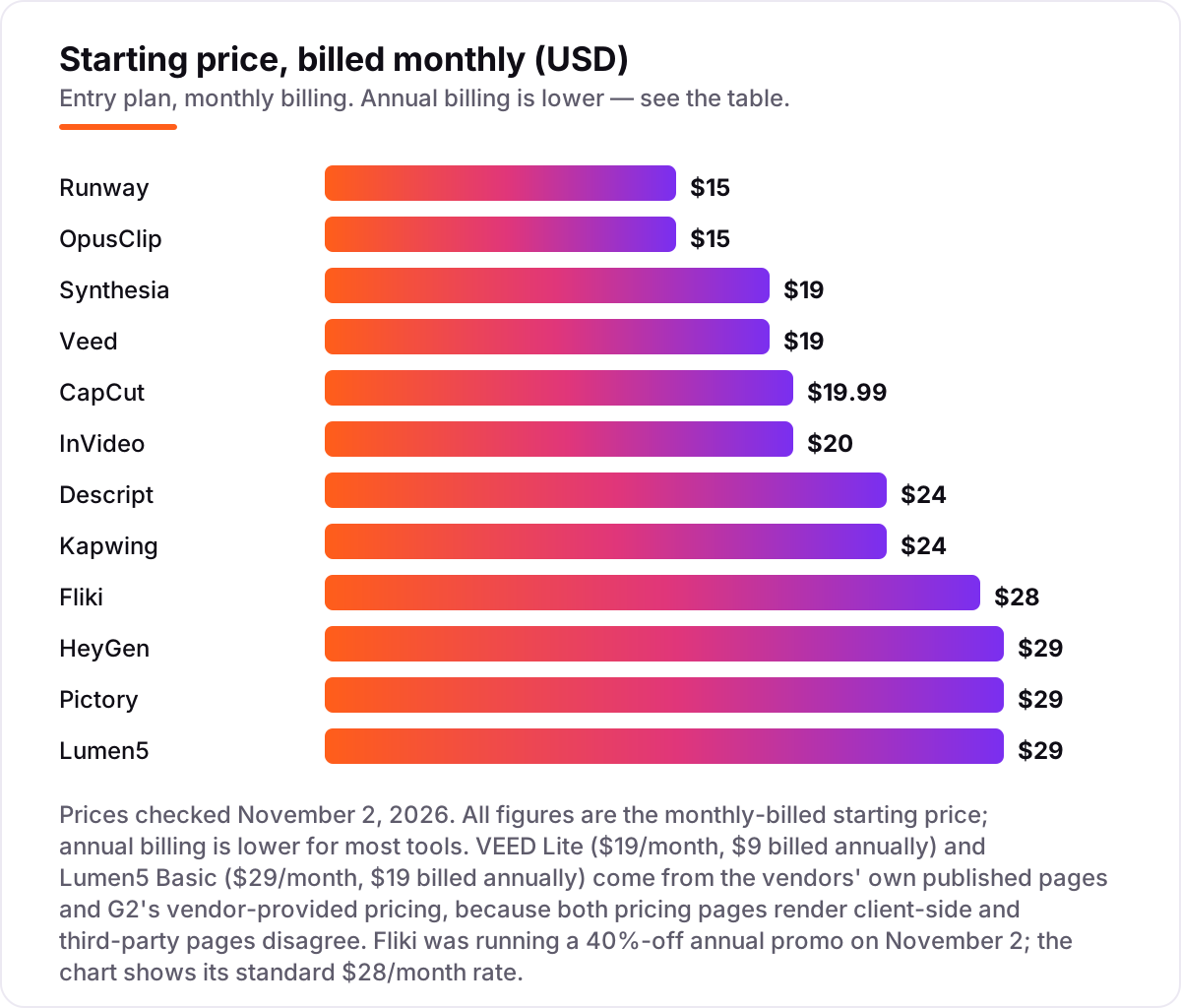
Three rules follow from the numbers. First, compare the meter, not the price: $15 buys seconds on Runway and hours on OpusClip. Second, annual billing cuts 15 to 50 percent off the monthly rate on most tools here — VEED drops from $19 to $9 a month — but OpusClip has no annual option and Synthesia shows no annual rate for Starter. Third, budget for regeneration: a prompt that needs three tries costs three times the credits, and most tools do not refund failed generations.
Know the difference: generated video, avatar video and AI editing
"AI video tool" means three different things, and buying the wrong one is the costliest mistake in this list. Generative video, like Runway, creates new footage from a text prompt or a still image — the camera never runs. Avatar video, like HeyGen and Synthesia, puts a digital presenter in front of the camera: you write the script, the avatar delivers it in 140-plus languages. Script-to-video tools like Pictory, Fliki and Lumen5 assemble stock footage, voiceover and captions around your words without generating new scenes.
AI-assisted editing is the third kind, and it starts from footage you already shot. Descript cuts by transcript and cleans the audio, VEED and Kapwing add subtitles and resize for social, and CapCut packages the whole short-form workflow. OpusClip sits in its own corner: it watches a long video and pulls out the short clips worth posting.
The practical rule: if you have footage, buy an editor; if you have a script, buy an avatar or script-to-video tool; if you have neither, buy a generator. Mixing them up means paying twice — once for the tool that does not fit, and again for the one that does.
How we chose
We checked each vendor's own pricing page on November 2, 2026 and recorded the starting price exactly as shown, including the annual-billing figure where the page lists one. Two exceptions: VEED's and Lumen5's pricing pages render client-side, so their prices come from the vendors' own published pages and G2's vendor-provided pricing instead, and are marked as such in the sources. Fliki was running a 40%-off annual promo on November 2; the prices shown are its standard rates. Ratings come from G2 pages opened on November 2, 2026. CapCut has no G2 page — its G2 slug returns a 404 and its Trustpilot page was blocked — so it carries no rating here. We ranked the tools by fit for the most common buyer — a creator or small team publishing video every week — not by brand size. No vendor paid for a place in this list, and none of the links here are affiliate links.
What to do next
Pick the row in the comparison table that matches the video you make most, then take that tool's free plan or trial and run one of your own scripts through it. If the finished video looks good and the meter covers your monthly output, you have your tool. If the videos are for a business site, our AI search optimization service can make sure they actually get found.
Once your tools are in place, find out what's holding your rankings back.
Your stack only works if people find you
SerpAstra fixes what keeps your site off page one and makes it easy for AI assistants to recommend.
Get a free audit→Sources we checked (27)
- Descript pricing — descript.com/pricing (checked November 2, 2026)
- Descript on G2 — 4.6/5, 933 reviews (checked November 2, 2026)
- HeyGen pricing — heygen.com/pricing (checked November 2, 2026)
- HeyGen on G2 — 4.8/5, 1,975 reviews (checked November 2, 2026)
- HeyGen credit rates — lumalabs.ai/news/heygen-pricing (Avatar V 48 credits per minute, checked November 2, 2026)
- Synthesia pricing — synthesia.io/pricing (checked November 2, 2026)
- Synthesia on G2 — 4.6/5, 2,857 reviews (checked November 2, 2026)
- Runway pricing — runway.com/pricing (checked November 2, 2026)
- Runway on G2 — 4.1/5, 106 reviews (checked November 2, 2026)
- Pictory pricing — pictory.ai/pricing (checked November 2, 2026)
- Pictory on G2 — 4.6/5, 82 reviews (checked November 2, 2026)
- InVideo pricing — invideo.io/pricing (checked November 2, 2026)
- InVideo on G2 — 4.2/5, 183 reviews (checked November 2, 2026)
- VEED pricing — veed.io/pricing (checked November 2, 2026; page renders client-side, figures from VEED's own blog)
- VEED Lite pricing — veed.io/learn/veed-vs-capcut (VEED's own blog, Lite $19/month, $9 billed annually, checked November 2, 2026)
- VEED on G2 — 4.6/5, 2,192 reviews (checked November 2, 2026)
- Kapwing pricing — kapwing.com/pricing (checked November 2, 2026)
- Kapwing on G2 — 3.9/5, 40 reviews (checked November 2, 2026)
- OpusClip pricing — opus.pro/pricing (checked November 2, 2026)
- OpusClip on G2 — 4.6/5, 124 reviews (checked November 2, 2026)
- CapCut pricing — capcut.com/pricing (checked via third-party reports of the vendor page, November 2, 2026)
- CapCut Pro price history — fluxnote.io/guides/capcut-pro-pricing-2026 (Pro $89.99/year to $179.99/year, checked November 2, 2026)
- Fliki pricing — fliki.ai/pricing (checked November 2, 2026)
- Fliki AI video credit costs — zebracat.ai/post/fliki-replace-editor (72 seconds of Kling per month on Standard, checked November 2, 2026)
- Fliki on G2 — 4.7/5, 179 reviews (checked November 2, 2026)
- Lumen5 pricing — lumen5.com/pricing (checked November 2, 2026; page renders client-side, figures from third-party reads of the vendor page and G2 vendor pricing)
- Lumen5 on G2 — 4.5/5, 69 reviews (checked November 2, 2026)
Shamim
Founder of SerpAstra
A full-stack SEO and digital marketer who spends most days on Local SEO for dental practices, AI search visibility and lead generation.
Frequently asked questions
What is the best AI tool for video content creation in 2026?
Descript is the best all-round pick for most creators: transcript editing, Studio Sound and 4K from $24 a month. HeyGen has the highest G2 score (4.8/5) for avatar video, Runway is the best for generated clips, and CapCut has the strongest free plan. Pick by the kind of video you make most, not by the feature list.
How much do AI video tools cost?
Entry plans run $15 to $29 a month, with annual billing 15 to 50 percent lower. The subscription is only half the cost: credits, minutes or media hours decide how much video a plan really produces, and regenerating footage costs credits every time. Budget for the meter, not just the sticker price.
Is there a free AI video tool?
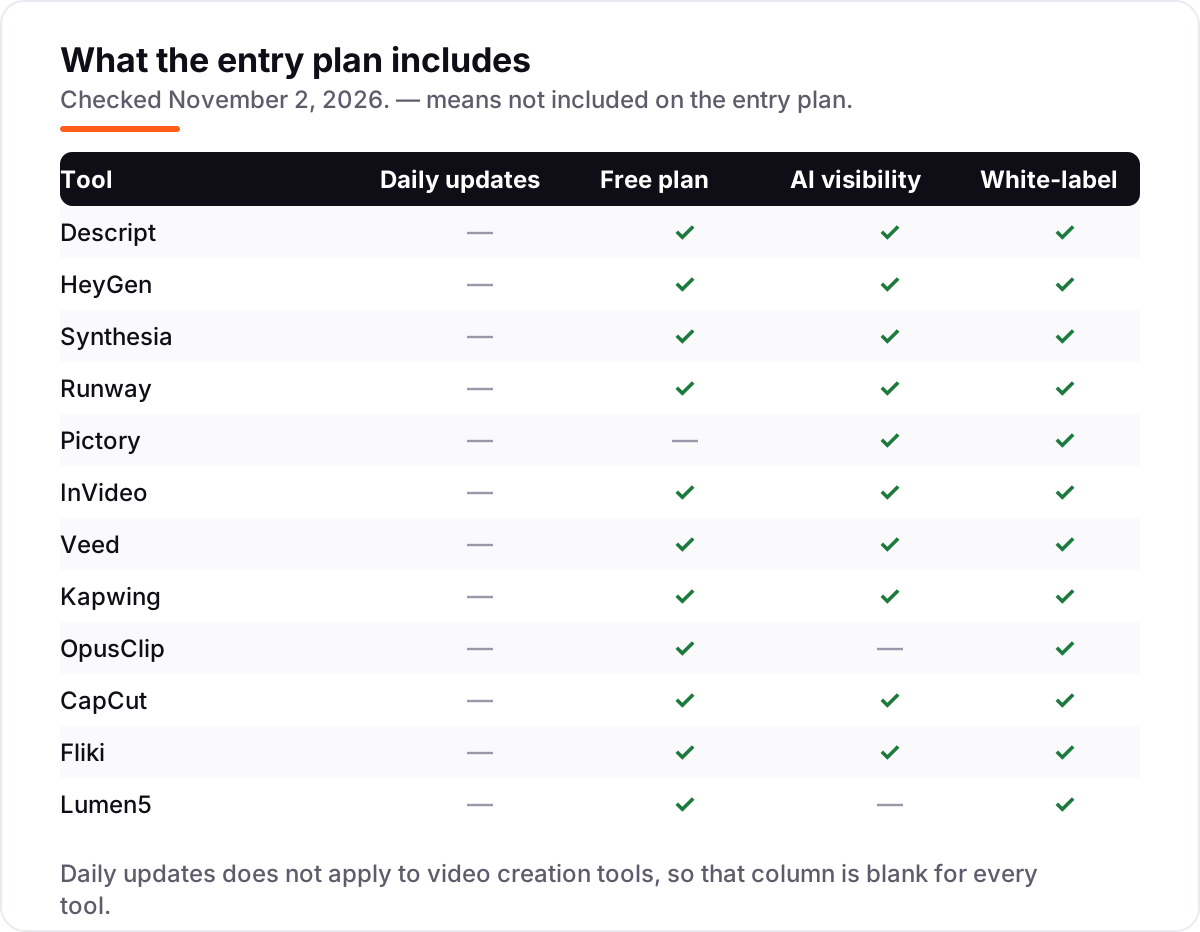
Yes. CapCut has the strongest free plan in this list, with a full editor and no watermark on exports. Descript, HeyGen, Synthesia, Runway, VEED, Kapwing, OpusClip, Fliki and Lumen5 all have free plans too, but they watermark exports and cap minutes or credits. Pictory is the only tool here with no free plan, just a 14-day trial.
What is the difference between AI video generation and AI video editing?
Generation creates footage from a prompt or an image — Runway and HeyGen do this. Editing improves footage you already shot: Descript cuts by transcript, VEED adds subtitles, Kapwing resizes for social. Script-to-video tools like Pictory and Fliki sit in between, assembling stock and voiceover around your words.
Do free plans remove the watermark?
No, with one exception. Every free plan in this list watermarks exports except CapCut, whose free exports carry no watermark. Descript, HeyGen, Synthesia, VEED, Kapwing, OpusClip, Fliki and Lumen5 all add a watermark or a branded outro on their free tiers. Paying the entry plan removes it everywhere.
Which AI video tool is best for YouTube?
For faceless channels, Fliki turns scripts into narrated video with realistic voices, and OpusClip cuts long recordings into Shorts. For talking-head channels, Descript edits by transcript and cleans the audio in one pass. If you need a presenter without filming, HeyGen's avatars are the most lifelike in this list.
Can I use AI video tools for commercial work?
Yes on every paid plan in this list, though the details vary. Fliki includes commercial rights on Standard, and Pictory's Starter covers commercial use. Free plans usually do not, and some tools charge extra for the right to use AI-generated footage in ads. Check the plan's licence terms before you publish client work.
Free SEO and AI visibility audit
Find out what is holding your rankings back
Send us your site. Within 2 business days you get a written audit, an AI visibility check and a short fix list ranked by impact. Free, with no contract attached.
Request my free audit→Related guides
 ContentVideo SEO: how to rank videos on Google and YouTubeVideo SEO explained: how to rank videos on Google and YouTube with titles, thumbnails, chapters, transcripts and the signals each platform actually rewards.Read guide →
 SEO & AI Search11 Best AI Tools for SEO Optimization in 2026, Compared11 best ai tools for seo optimization compared on price, content scoring and AI visibility, with prices verified November 1, 2026, sorted by use case.Read guide →
 AI SearchBest AI SEO tools in 2026: honest picks by jobBest AI SEO tools in 2026, picked by job: Semrush and Ahrefs for research, Surfer and Clearscope for content, Otterly for AI tracking, with 2026 prices.Read guide →