
10 Best Analytics for iOS App in 2026: Free and Paid Apps Ranked
The 10 best analytics for ios app teams, compared on price, free plans and iOS SDKs. Real starting prices checked November 2, 2026, with free options first.
 Shamim Mia, Founder, SerpAstraLast verified November 2, 202611 min read
We compare pricing pages, documentation and public reviews. We never accept payment for rankings.

Key takeaways
- Firebase Analytics is free and Apple App Analytics comes with your developer account, so most small iOS teams should start with those two before paying for anything. Mixpanel Growth starts at $0 for the first 1M events a month.
- The single most important buying factor is your billing unit: events, sessions, users and conversions price the same app very differently, so compare plans on your own monthly volume, not the headline price.
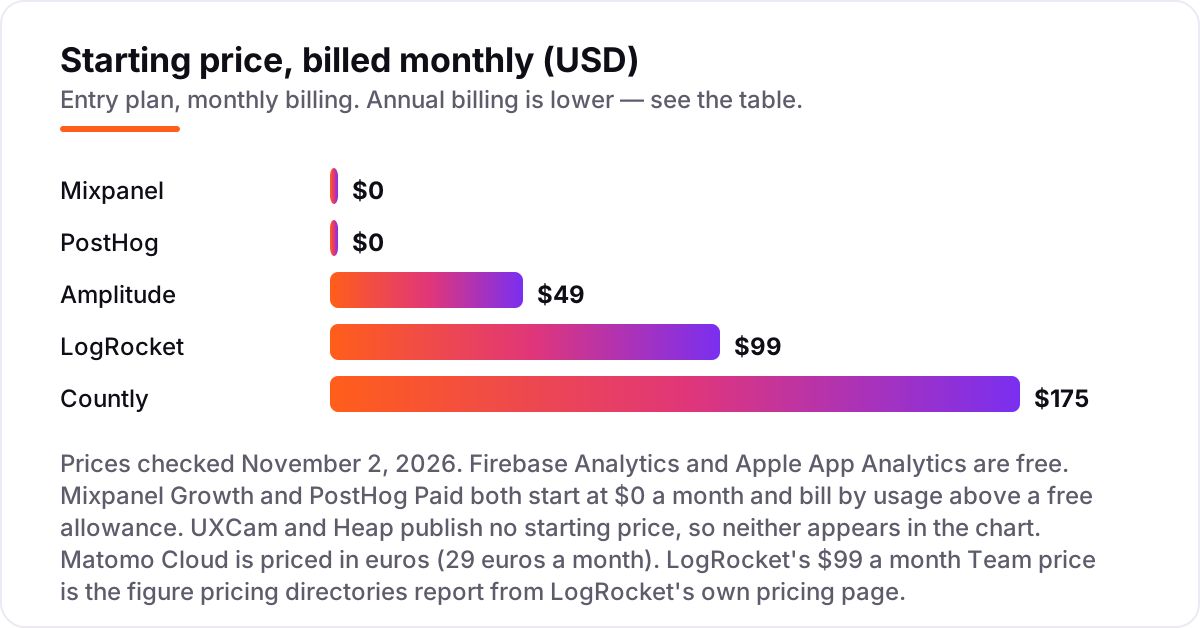
- Amplitude Plus is the cheapest flat-rate paid plan here at $49/month billed annually, while Countly Flex starts at $175/month and Matomo Cloud at €29/month.
- UXCam and Heap publish no starting price, and LogRocket's $99/month Team price is the figure pricing directories report from its own pricing page.
On this page
Quick comparison
| Tool | Best for | Starting price | Free plan |
|---|---|---|---|
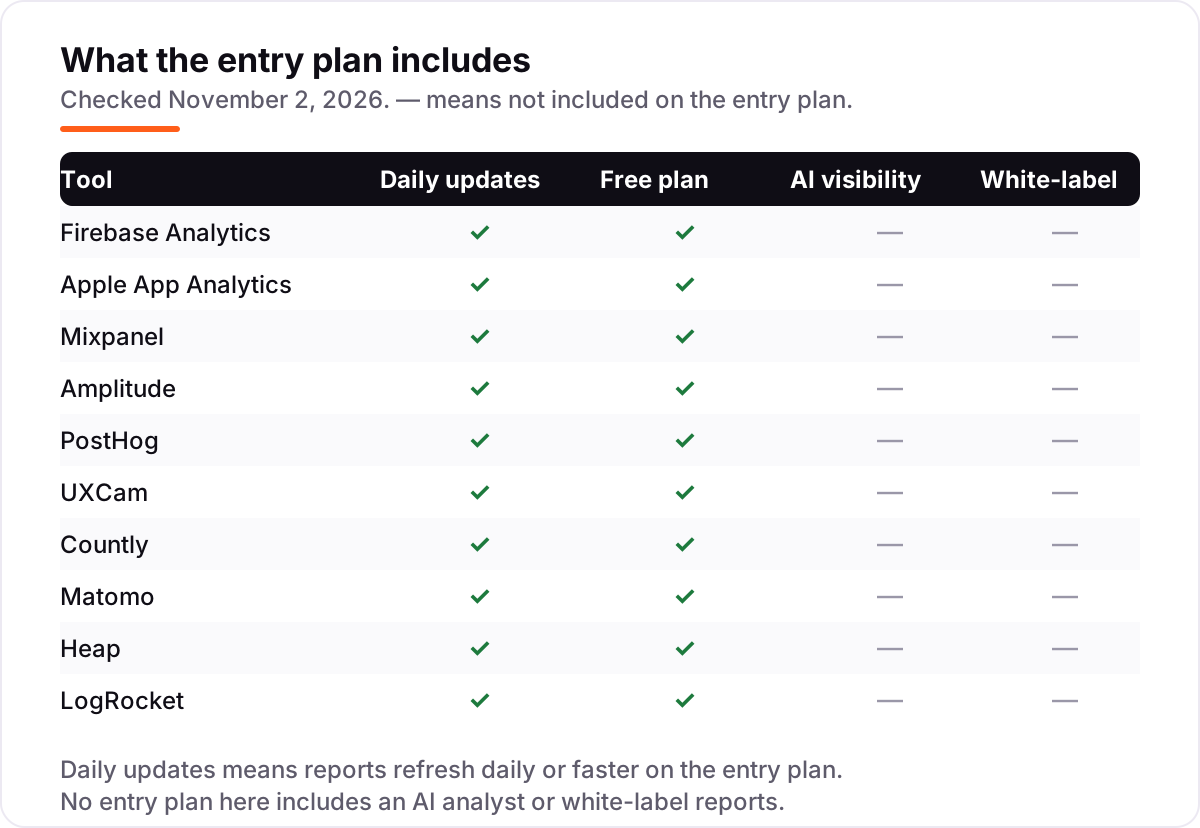
| Firebase Analytics | Indie iOS developers who want free, unlimited event reporting inside Google's ecosystem | Free | Yes (free) |
| Apple App Analytics | Any developer with an app on the App Store who needs store and retention data with no SDK | Free | Yes (with dev account) |
| Mixpanel | Small product teams tracking up to 1M events a month who need funnels and retention | $0/mo (Growth) | Yes (1M events) |
| Amplitude | Growing iOS teams that want behavioural cohorts and a flat-rate paid plan | $49/mo (annual) | Yes (Starter) |
| PostHog | Developer-led iOS teams that want analytics, replay, flags and experiments in one open-source platform | $0/mo base | Yes (1M events) |
| UXCam | Mobile product teams that need session replay and heatmaps to see why users drop off | Custom quote | Yes (3,000 sessions) |
| Countly | Privacy-focused iOS teams that want to self-host or own their analytics data | $175/mo | Yes (self-hosted) |
| Matomo | Privacy-regulated iOS teams that want full data ownership with a managed cloud option | €29/mo | Yes (self-hosted) |
| Heap | iOS teams that want autocapture so they can define events after the data arrives | Custom quote | Yes (10,000 sessions) |
| LogRocket | iOS teams that need session replay tied to crashes and network logs to debug issues | $99/mo | Yes (1,000 sessions) |
Make one of these tools?
We re-check this list every quarter. Send a correction, request a review, or ask about a clearly labeled sponsored spot.
Request a listingThe best analytics for ios app

Firebase Analytics
Best for: Indie iOS developers who want free, unlimited event reporting inside Google's ecosystem
Firebase Analytics is the default starting point for most iOS apps because it costs nothing and covers the basics well. Google Analytics for Firebase collects first opens, screen views, app updates and in-app purchases automatically once the SDK is in, and it reports on up to 500 distinct custom events with no sampling. For an indie developer or a small team, that is a complete picture of retention and conversion without a subscription.
The trade-off is depth. There is no session replay and no heatmap, so when a funnel drops you know where it happened but not what the user saw. Exporting raw events to BigQuery also needs the pay-as-you-go Blaze plan. Start here, and pay for a second tool only when you can name the question Firebase cannot answer.
What we like
- Free with unlimited reporting on up to 500 distinct events, with no event-volume charges
- Automatic collection of first open, app update, screen view and in-app purchase events on iOS
- Deep links into Crashlytics, Remote Config, A/B Testing and Cloud Messaging in the same console
Watch out for
- No session replay or heatmaps, so you cannot watch how a single user moves through the app
- Raw event export to BigQuery needs the pay-as-you-go Blaze plan, not the free Spark plan
- Reporting is event-based only, with no built-in revenue or subscription analytics

Apple App Analytics
Best for: Any developer with an app on the App Store who needs store and retention data with no SDK
Apple App Analytics answers a different question from the rest of this list: how is the App Store treating your app. Impressions, product page views, downloads, sessions and retention come straight from Apple with no SDK and no code, and the 2026 redesign added monetisation and cohort views. Peer benchmarks show how your download and conversion rates compare with apps in your category.
The limits are just as clear. Apple reports only what happens in the store and in broad usage, and only for users who opted in to share analytics, so there are no custom in-app events and no per-screen funnels. It is also gated behind the $99-a-year Developer Program. Use it alongside an in-app tool, never instead of one.
What we like
- No SDK to install: impressions, downloads, sessions and retention come straight from Apple
- Peer benchmarks compare your downloads and conversion against apps in your category
- Sales, proceeds and subscription reports sit next to the usage data in App Store Connect
Watch out for
- No custom in-app events, so you cannot track what users do past the install
- Usage data covers only users who opted in to share analytics with developers
- Requires a paid Apple Developer Program membership ($99 a year) to publish at all

Mixpanel
Best for: Small product teams tracking up to 1M events a month who need funnels and retention
Mixpanel is the strongest free tier in this list for a team that wants real product analytics. The free plan covers 1M events a month with funnels, retention, flows and cohorts, and Growth starts at $0 with the same first million free, charging $0.28 per 1,000 events after that. The iOS SDK is mature, seats are unlimited, and 10,000 session replays a month come with the free plan.
The catch is instrumentation. Mixpanel captures nothing automatically, so every event needs a track call in your Swift code, and a question you forgot to instrument cannot be answered from old data. Costs also climb fast with volume, and group analytics is a paid add-on. Pick Mixpanel when your team will instrument carefully and your event volume is modest.
What we like
- Growth starts at $0 a month with the first 1M events free, then $0.28 per 1,000 events
- Funnels, retention, flows and cohorts with unlimited seats on every plan
- A dedicated iOS SDK with Swift support, plus session replay included on the free plan
Watch out for
- No auto-capture: every event needs an explicit track call in your Swift code
- Costs scale steeply with event volume, and group analytics is a paid add-on on Growth
- The free plan caps saved reports at 5 per user, which bites before the event limit does

Amplitude
Best for: Growing iOS teams that want behavioural cohorts and a flat-rate paid plan
Amplitude is the pick for teams that have outgrown free tiers and want a predictable bill. Plus starts at $49 a month billed annually and covers up to 300,000 monthly tracked users or 25 million events, with behavioural cohorts, custom dashboards and audience syncs included. The free Starter plan is generous too, with 10,000 monthly tracked users, session replay and unlimited feature flags.
Billing is by user, not by event, so a month with many one-time users costs more even if those users barely tap anything. Growth and Enterprise are custom quote only, which makes the next step up hard to budget. Choose Amplitude when you want cohort analysis on a flat rate and your user count is stable.
What we like
- Plus starts at $49 a month billed annually, covering up to 300,000 MTUs or 25M events
- Behavioural cohorts, custom dashboards and audience syncs included on Plus
- Free Starter covers 10,000 MTUs with session replay and unlimited feature flags
Watch out for
- Plus is billed by monthly tracked users, so a spike in users raises the bill even if events stay flat
- Growth and Enterprise are custom quote only, with no public per-unit rate past Plus
- Session replay is capped at 10,000 sessions a month on Plus

PostHog
Best for: Developer-led iOS teams that want analytics, replay, flags and experiments in one open-source platform
PostHog is the only tool here that tries to replace the whole stack. Product analytics, session replay, feature flags, experiments, surveys and error tracking share one event stream, and the paid plan has a $0 base price with the first 1M events a month free. It is open source, self-hosting is an option, and there are no seat fees, so a small developer-led team can run it without a procurement conversation.
The bill is the hard part. Each product is metered on its own, and events from identified users carry an extra person-profiles charge, so the monthly total is difficult to forecast until you know your real volume. If your team likes owning its stack and reading docs, PostHog is the best value here; if you want one flat number, look at Amplitude instead.
What we like
- Paid plan has a $0 a month base price: the first 1M events a month are free, then $0.00005 per event
- One platform for product analytics, session replay, feature flags, experiments and surveys
- Open source with a self-hosted option, unlimited team members and no seat fees
Watch out for
- Every product is metered separately, so replay, flags and surveys each add their own bill
- Events from identified users carry an extra person-profiles charge on top of the event rate
- Usage-based billing is hard to forecast until you know your real event volume

UXCam
Best for: Mobile product teams that need session replay and heatmaps to see why users drop off
UXCam is built mobile-first, and it shows in the details. The native iOS SDK records sessions, heatmaps and gestures, and the timeline flags rage taps, UI freezes and crashes automatically, so a drop in a funnel comes with the recording that explains it. The free plan covers 3,000 sessions a month with unlimited user licences, which is enough to test it on a real release.
The paid plans are the problem: UXCam publishes no dollar prices, so you cannot budget an upgrade without a sales conversation. The free plan also excludes heatmaps, funnels, data exports and integrations, which are the features most teams actually want. Choose UXCam when watching real sessions matters more than dashboards, and get the quote before you commit.
What we like
- Built mobile-first, with a native iOS SDK for session replay, heatmaps and gesture tracking
- Rage taps, UI freezes and crashes are flagged automatically on the session timeline
- Free plan covers 3,000 sessions a month with unlimited user licences
Watch out for
- Paid plans are custom quote only, so you cannot budget the upgrade without a sales conversation
- The free plan excludes heatmaps, funnels, data exports and third-party integrations
- Pricing is per session, so a chatty app that relaunches often burns the allowance fast

Countly
Best for: Privacy-focused iOS teams that want to self-host or own their analytics data
Countly is the choice for teams that want to own their data. The open-source core can be self-hosted free, and the managed Flex cloud starts at $175 a month for 5,000 monthly active users and 5 million data points, on a dedicated private cloud rather than shared infrastructure. Push notifications, crash reporting and A/B testing sit in the same platform, so one SDK covers analytics and engagement.
It is also the priciest flat starting price in this list, and the intelligence and adaptivity suites are paid add-ons on top of the tier price. The free Lite edition is non-commercial only, so a business shipping a paid app cannot use it as its production analytics. Pick Countly when data ownership or privacy rules the decision, not when price does.
What we like
- Flex Tier 5K costs $175 a month for 5,000 monthly active users and 5M data points
- Open-source core with a dedicated managed private cloud, not shared multi-tenant hosting
- Push notifications, crash reporting and A/B testing sit in the same platform as analytics
Watch out for
- Flex starts at $175 a month, the highest flat starting price in this list
- Advanced suites for intelligence and adaptivity are paid add-ons on top of the tier price
- Self-hosting Lite is free but non-commercial only, and you run the servers yourself

Matomo
Best for: Privacy-regulated iOS teams that want full data ownership with a managed cloud option
Matomo is the privacy-first suite, and the only one here with a genuinely free full product. The On-Premise Community edition is open source with unlimited users and hits, while Cloud Business starts at €29 a month for up to 50,000 hits with data stored in Frankfurt. Funnels, heatmaps, session recordings and A/B testing are included in the cloud plans, so it can replace a separate replay tool.
Cloud billing is per hit, so an event-heavy iOS app pays more than the headline tier suggests, and the iOS SDK needs manual event setup with no autocapture. The 21-day cloud trial is short for a proper evaluation. Choose Matomo when privacy regulation or data ownership drives the decision and you are comfortable hosting or paying per hit.
What we like
- Cloud Business starts at €29 a month for up to 50,000 hits, with data stored in Frankfurt
- On-Premise Community edition is free and open source, with unlimited users and hits
- Funnels, heatmaps, session recordings and A/B testing are included in Cloud plans
Watch out for
- Cloud pricing is per hit, so event-heavy iOS apps pay more than the headline tier suggests
- The iOS SDK needs manual event setup; there is no autocapture of every tap
- Premium features such as heatmaps and session recordings cost extra on some plans

Heap
Best for: iOS teams that want autocapture so they can define events after the data arrives
Heap is the only tool here that records first and asks questions later. Autocapture logs every tap, swipe, page view and form change with no manual event code, and events can be defined retroactively, so a question you think of today can be answered from last month's data. The free plan covers 10,000 sessions a month with core charts and single sign-on.
The paid plans are quote-only, which makes Heap the hardest tool in this list to budget. The free plan keeps only six months of history, and session replay is an add-on on the higher tiers rather than part of the base product. Pick Heap when your team will not instrument events by hand and you can live with a sales conversation for pricing.
What we like
- Autocapture records every tap, swipe and screen view with no manual event code
- Events can be defined retroactively, so a question asked today can use last month's data
- Free plan covers 10,000 sessions a month with core analytics charts and SSO
Watch out for
- Paid plans are custom quote only, so the real cost is unknown until you talk to sales
- The free plan keeps only 6 months of data history and caps at 10,000 sessions a month
- Session replay is an add-on on Pro and Premier, not part of the base plans

LogRocket
Best for: iOS teams that need session replay tied to crashes and network logs to debug issues
LogRocket is the debugging pick rather than the reporting pick. The Team plan starts at $99 a month for 10,000 sessions, pairing session replay with console logs, network requests and JavaScript errors on one timeline, so a crash report comes with the recording of the session that caused it. Native mobile SDKs cover iOS and Android, and funnels and retention sit in the same tool.
Session-based billing is the risk: a high-traffic app can exhaust 10,000 sessions in days, and the bill then climbs by session volume. Performance monitoring and advanced reporting need the custom-priced Professional plan. Choose LogRocket when your team spends its time fixing what users hit, not just counting them.
What we like
- Team starts at $99 a month for 10,000 sessions, with session replay and error tracking
- Replays pair with console logs, network requests and JavaScript errors on one timeline
- Native mobile SDKs cover iOS and Android, with funnels and retention in the same tool
Watch out for
- Team is session-based, so high-traffic apps exhaust the 10,000-session allowance quickly
- Performance monitoring and advanced reporting need the custom-priced Professional plan
- The $99 a month Team price is the figure pricing directories report from LogRocket's own pricing page
The best analytics for ios app teams is not the tool with the longest feature list. It is the one that answers, for your app, which screens keep people and which ones lose them, at a price your event volume can carry.
How to choose the best analytics for ios app
Start with what you need to learn, not with the price. These five factors decide most purchases in this category, and they matter in this order.
- Start free, then pay for a question. Firebase Analytics and Apple App Analytics together cover retention, conversion and store performance at $0. Pay for a second tool only when you can name the question neither one answers.
- Match the billing unit to your app. Events, sessions, monthly tracked users and conversions price the same app very differently. An app with few users who tap constantly is cheap on a per-user plan and expensive on a per-event plan.
- Check the free allowance against real volume. 1M free events a month sounds large until a chatty app fires dozens of events per session. Count your events per session before you trust any free tier.
- Decide whether you need replay. Funnels tell you where users drop off; only replay and heatmaps show you why. If your problem is a confusing screen, a replay tool beats a bigger dashboard.
- Check data ownership and privacy. Self-hosted tools such as Countly and Matomo keep the data on your servers, which matters under strict privacy rules, while cloud tools hold it for you.
Run the free plan before you pay. Every tool in this list except Apple App Analytics has a free plan or a free trial, and two weeks on a real release tells you more than any comparison page: your real events per session, your real session count, and whether the reports answer the questions you actually ask. Set a reminder for the day a trial ends, and check the numbers against App Store Connect before you commit, so you know the tool is counting what Apple counts.
Quick comparison: tool type by need
| Buyer | Best pick | Why |
|---|---|---|
| Indie developer, zero budget | Firebase Analytics | Free, unlimited reporting on up to 500 events |
| Store performance with no SDK | Apple App Analytics | Free with App Store Connect, no code needed |
| Small team that needs funnels | Mixpanel or PostHog | Both start at $0 with 1M free events a month |
| Flat-rate paid plan with cohorts | Amplitude | Plus from $49/month billed annually |
| Watching real sessions and heatmaps | UXCam or LogRocket | Mobile-first replay, or replay tied to crash logs |
| Privacy rules or data ownership | Countly or Matomo | Self-host free, or managed cloud from €29/month |
Analytics for ios app pricing: what you will actually pay
Take a small app with about 5,000 monthly users. Firebase Analytics costs $0 and Apple App Analytics costs $0 beyond the $99-a-year Developer Program, so the honest starting point for that app is free. If the app generates more than 1M events a month, Mixpanel Growth charges $0.28 per 1,000 events above the first free million, while PostHog charges $0.00005 per event above its first free million, so the two usage-based bills diverge as volume grows.
For a flat monthly number, Amplitude Plus is $49 a month billed annually for up to 300,000 monthly tracked users, LogRocket Team is $99 a month for 10,000 sessions, and Countly Flex Tier 5K is $175 a month for 5,000 monthly active users. Matomo Cloud Business is €29 a month for up to 50,000 hits. UXCam and Heap give no number to compare until you request a quote, so budget a week for that conversation before you plan around either one.
One more cost hides in the free tiers: data retention. Heap's free plan keeps six months of history, Firebase keeps its event data while the project lives, and several paid plans charge more for longer retention, so check the retention line before you compare two headline prices.
In-app analytics vs App Store analytics: know the difference
The biggest confusion in this category is treating store analytics and in-app analytics as the same job. They are not. App Store analytics, which is what Apple App Analytics does, measures the storefront: how many people saw your listing, tapped it, installed the app and came back. In-app analytics, which is what Firebase, Mixpanel, Amplitude and the rest do, measures behaviour inside the app: which screens people open, where they drop out of onboarding, and which features they return to.
You need both, and the free pair covers both: Apple App Analytics for the store, Firebase Analytics for the app. A drop in installs is a store problem, fixed on the listing; a drop after install is a product problem, fixed in the app.
A third job is attribution: which ad or campaign brought each install. That is what mobile measurement partners do, and none is in this list, because attribution answers a paid-acquisition question, not a product question. If you are not running paid installs yet, an attribution tool adds cost without adding answers; add one when ad spend starts, not before. If the data shows the store page is the weak spot rather than the app, our SEO audit looks at the pages that send people to the store. Paying for an attribution tool before you know which side is broken is the most common waste of money in this category.
How we chose
We checked each vendor's own pricing page on November 2, 2026 and recorded the starting price exactly as shown, including the free allowance and the billing unit behind it. Two prices need a note. LogRocket's $99 a month Team price is the figure pricing directories report from LogRocket's own pricing page; we could not load that page directly on November 2, so treat it as third-party sourced, not vendor-verified. Matomo's pricing page localises its currency by visitor, and the figure we use is €29 a month for Cloud Business; older directories still list €22, which is stale, while $29 is the same tier priced in dollars. We also left Smartlook out entirely: Cisco ended sales of Smartlook on May 31, 2026, so it is no longer an actively sold product. No ratings appear in this list because we could not open the G2 review pages on November 2, 2026, and we show no rating rather than an unverified figure. We ranked the tools by fit for the most common buyer, a small iOS team shipping its first analytics setup, not by brand size. No vendor paid for a place in this list, and none of the links here are affiliate links.
What to do next
Install Firebase Analytics and open Apple App Analytics first, since both are free and together they cover the store and the app. Run them on a real release for two weeks, count your events per session, and only then compare the paid plans on your own volume. For the web pages that support your app, the free SERP snippet preview tool shows how your titles will look in Google. Once your tools are in place, find out what's holding your rankings back.
Your stack only works if people find you
SerpAstra fixes what keeps your site off page one and makes it easy for AI assistants to recommend.
Get a free audit→Sources we checked (11)
- Firebase Analytics — firebase.google.com/products/analytics (checked November 2, 2026)
- Apple App Analytics — developer.apple.com/app-store/app-analytics (checked November 2, 2026)
- Mixpanel pricing — mixpanel.com/pricing (checked November 2, 2026)
- Amplitude pricing — amplitude.com/pricing (checked November 2, 2026)
- PostHog pricing — posthog.com/pricing (checked November 2, 2026)
- UXCam plans — uxcam.com (checked November 2, 2026)
- Countly pricing — countly.com/pricing (checked November 2, 2026)
- Countly Flex pricing — flex.countly.com/pricing.html (checked November 2, 2026)
- Matomo pricing — matomo.org/pricing (checked November 2, 2026)
- Heap pricing — heap.io/pricing (checked November 2, 2026)
- LogRocket pricing, third-party directory — trustradius.com/products/logrocket/pricing (checked November 2, 2026)
Shamim
Founder of SerpAstra
A full-stack SEO and digital marketer who spends most days on Local SEO for dental practices, AI search visibility and lead generation.
Frequently asked questions
What is the best analytics for iOS app developers in 2026?
Firebase Analytics, for most teams. It is free, reports on up to 500 distinct events with no sampling, and plugs into Crashlytics and Remote Config. Add Apple App Analytics, which is free with your developer account, for store and retention data. Pay for Mixpanel or Amplitude only when you need funnels, cohorts or retention analysis Firebase cannot do.
How much does iOS app analytics cost?
From $0 to about $175 a month at the entry level. Firebase and Apple App Analytics are free, Mixpanel and PostHog start at $0 and bill by usage, and Amplitude Plus is $49 a month billed annually. Countly Flex starts at $175 a month, Matomo Cloud at €29 a month, and LogRocket Team at $99 a month. UXCam and Heap publish no starting price.
Is there a free analytics tool for iOS apps?
Yes, several. Firebase Analytics is free with unlimited reporting on up to 500 events, and Apple App Analytics is free with App Store Connect. Mixpanel's free plan covers 1M events a month, PostHog's covers 1M events, and Amplitude's Starter covers 10,000 monthly tracked users. Free plans fit small apps; paid plans start when volume or features outgrow them.
What is the difference between Firebase Analytics and Apple App Analytics?
Firebase tracks what users do inside your app, with custom events, funnels and retention, and it needs its SDK installed. Apple App Analytics tracks what happens in the App Store: impressions, downloads, sessions and retention, with no SDK and no custom events. Most teams run both, since they answer different questions.
Do I need an SDK to track iOS app analytics?
For in-app behaviour, yes, with one exception. Mixpanel, Amplitude, PostHog, UXCam, Countly, Matomo and LogRocket all need their SDK in your app to record events or sessions, and Heap needs its snippet for autocapture. Apple App Analytics is the exception: it needs no SDK because Apple already has the store and usage data.
What should I check before paying for iOS analytics?
Check the billing unit first: events, sessions, users and conversions price the same app very differently. Then check the free allowance against your real monthly volume, whether session replay and exports cost extra, and how long data is kept. Run the free plan on a real release for two weeks before you pay.
Which tool is best for session replay on iOS?
UXCam, for mobile-first replay with heatmaps, rage taps and crash flags on the timeline. LogRocket is the pick when replays must pair with logs and crash data for debugging. Mixpanel and PostHog include replay allowances on their free plans, while Heap sells replay as an add-on on its higher tiers.
Free SEO and AI visibility audit
Find out what is holding your rankings back
Send us your site. Within 2 business days you get a written audit, an AI visibility check and a short fix list ranked by impact. Free, with no contract attached.
Request my free audit→Related guides
 StrategyHow to track your Google ranking (and what the numbers actually mean)Track your Google ranking the right way: Search Console, free checkers and rank trackers explained, and what average position and CTR really mean today.Read guide →
 AI SearchBest AI SEO tools in 2026: honest picks by jobBest AI SEO tools in 2026, picked by job: Semrush and Ahrefs for research, Surfer and Clearscope for content, Otterly for AI tracking, with 2026 prices.Read guide →
 SEO & AI Search10 Best AI Search Optimization Tools in 2026 (Free and Paid, Compared)10 best AI search optimization tools compared on price, AI visibility coverage and content scoring, with real prices checked October 31, 2026.Read guide →