
12 Best Analytics Software in 2026: Pricing, Features and Pros & Cons
The 12 best analytics software tools for 2026, compared on price, free plans and what each one measures, with every price checked on the pricing page.
 Shamim Mia, Founder, SerpAstraLast verified November 2, 202612 min read
We compare pricing pages, documentation and public reviews. We never accept payment for rankings.

Key takeaways
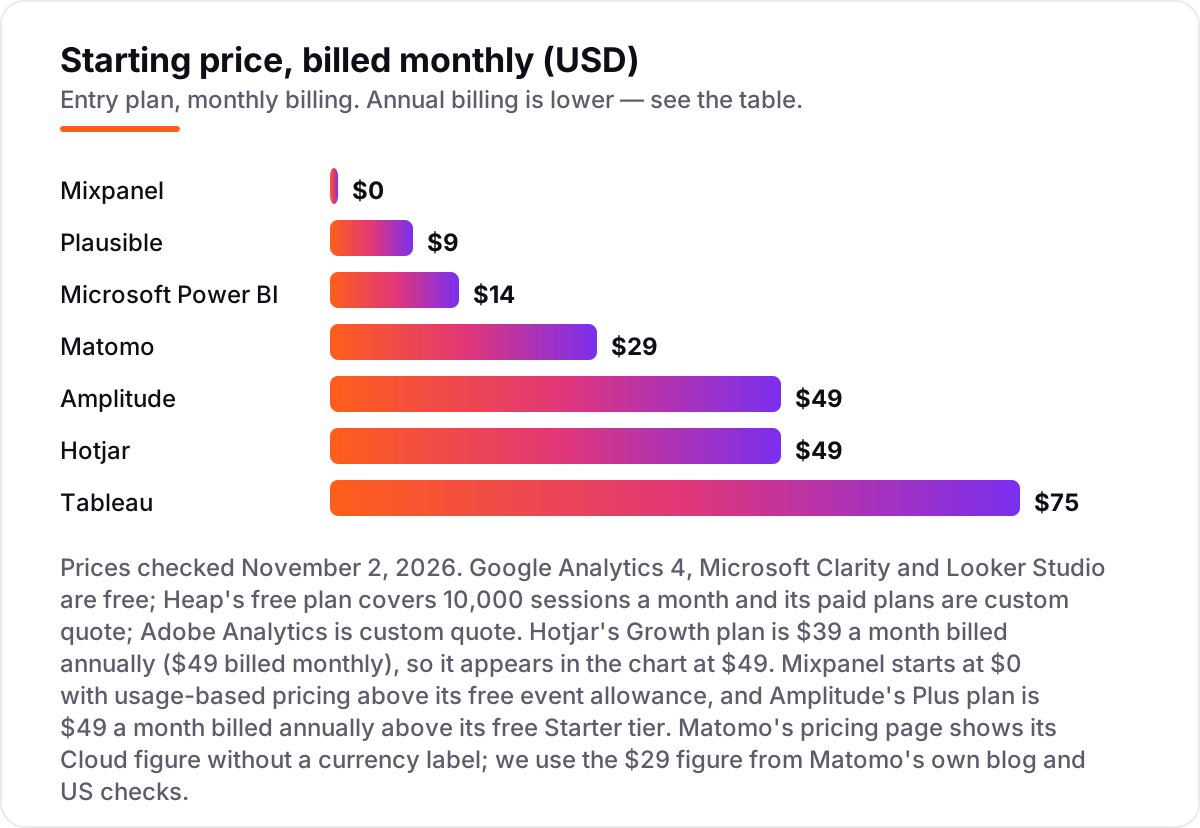
- Google Analytics 4 is free and the default starting point; Mixpanel (from $0) and Amplitude (free Starter; Plus $49/month billed annually) lead product analytics, and Plausible ($9/month) is the best privacy-first paid option.
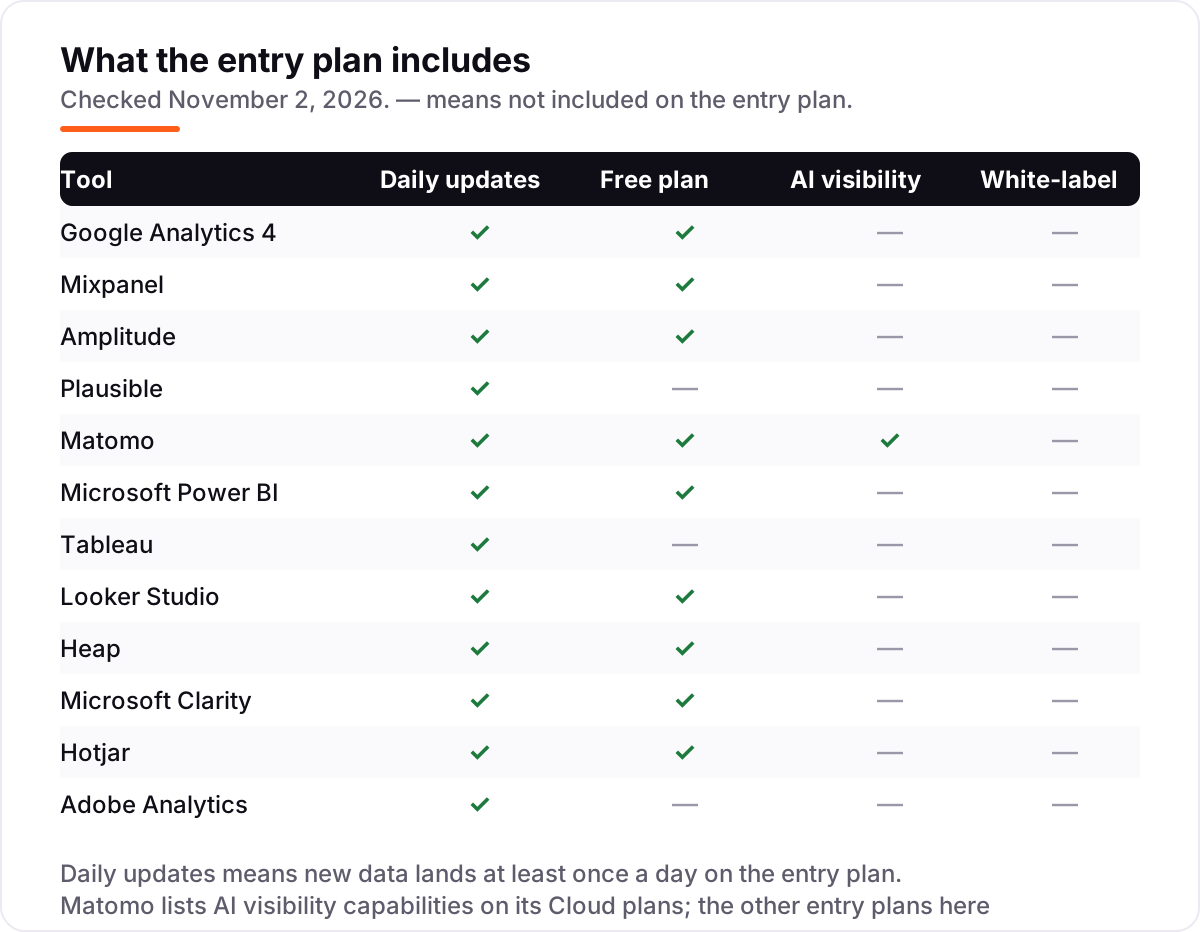
- Six of the 12 tools cost nothing to start: GA4, Clarity and Looker Studio are free, and Mixpanel, Amplitude and Heap have free plans.
- The single most important buying factor is the meter: pageviews, events, sessions or seats decide the real bill, not the headline price.
- Power BI Pro at $14/user/month is the cheapest serious BI here; Tableau Creator costs $75/user/month and bills annually.
- Every price below was checked on the vendor's own pricing page on November 2, 2026, and every rating is a G2 score with the review count shown.
On this page
Quick comparison
| Tool | Best for | Starting price | Free plan |
|---|---|---|---|
| Google Analytics 4 | Small businesses and marketing teams that want free, full-featured website and app analytics | Free | Yes (free) |
| Mixpanel | Product and growth teams at SaaS companies tracking funnels, retention and feature usage | $0/mo (usage-based) | Yes (1M events) |
| Amplitude | Mid-market product teams that need deep behavioral cohorts and experimentation | $49/mo (annual) | Yes (2M events) |
| Plausible | Small blogs, content sites and marketing sites that want privacy-first analytics without a cookie banner | $9/mo | No (30-day trial) |
| Matomo | Privacy-focused organizations that want full data ownership and optional self-hosting | $29/mo | Yes (self-hosted) |
| Microsoft Power BI | Teams already on Microsoft 365 that need shareable dashboards without enterprise BI prices | $14/user/mo | Yes (Desktop only) |
| Tableau | Data teams that need polished, interactive dashboards and deep visual exploration | $75/user/mo | No (trial only) |
| Looker Studio | Small marketing teams on Google Workspace that need free client-ready dashboards | Free | Yes (free) |
| Heap | Product teams that want every click captured automatically, without manual event tagging | Free | Yes (10k sessions) |
| Microsoft Clarity | Website owners who want free heatmaps and session recordings with no session caps | Free | Yes (free forever) |
| Hotjar | Small teams that want heatmaps, recordings and surveys in one behavior-analytics tool | $39/mo (annual) | Yes (200k sessions) |
| Adobe Analytics | Large enterprises with dedicated analytics teams and multi-channel data to unify | Custom quote | No |
Make one of these tools?
We re-check this list every quarter. Send a correction, request a review, or ask about a clearly labeled sponsored spot.
Request a listingThe best analytics software

Google Analytics 4
Best for: Small businesses and marketing teams that want free, full-featured website and app analytics
Google Analytics 4 is the default analytics tool for most websites, and for good reason: it costs nothing, measures websites and apps in one property, and connects natively to Google Ads, Search Console and BigQuery. Real-time reports show what is happening right now, while explorations let you build funnels, paths and cohorts without paying for a premium plan.
The trade-off is complexity. GA4's event-based model takes time to learn, exploration data is capped at 14 months, and large properties hit sampling above 10 million events. For most small businesses those limits never bite, which is why GA4 leads this list.
What we like
- Free with no traffic-based fee, and it measures websites and apps in one property
- Native integrations with Google Ads, Search Console and BigQuery for deeper analysis
- Predictive metrics and audiences built in, plus real-time reports and explorations
Watch out for
- Exploration data is capped at 14 months and reports sample above 10 million events
- Steep learning curve: GA4's event-based model confuses teams used to Universal Analytics

Mixpanel
Best for: Product and growth teams at SaaS companies tracking funnels, retention and feature usage
Mixpanel is built for product questions: which features people use, where they drop out of a funnel, and whether they come back. Funnels, retention and flows answer those questions directly, and the free plan covers 1 million events a month with unlimited seats, so a small team can start without spending anything.
Costs scale with event volume, not seats, so a busy product can reach hundreds of dollars a month quickly. Setup also takes engineering time: most events need manual tracking. But for SaaS teams that live in their product data, Mixpanel is the strongest free starting point here.
What we like
- Funnels, retention and flows built for product questions, not just pageviews
- Free plan covers 1M events a month with unlimited seats, so small teams start free
- Session replay, experiments and feature flags available in the same platform
Watch out for
- Costs scale steeply with event volume: heavy products can reach thousands a month
- Most events need manual tracking setup, which takes engineering time to maintain

Amplitude
Best for: Mid-market product teams that need deep behavioral cohorts and experimentation
Amplitude goes deeper than Mixpanel on behavioral analysis: cohorts, funnels and retention with unlimited seats, plus session replay, feature flags and experimentation in the same platform. Its free Starter plan covers 2 million events a month, double Mixpanel's allowance, which makes it the most generous free product-analytics tier in this list.
Like Mixpanel, Amplitude charges by event volume, so the bill is hard to forecast as usage grows. The event taxonomy also needs real effort before the insights pay off. But for mid-market teams that need deep behavioral data, Amplitude is the best free start available.
What we like
- Behavioral cohorts, funnels and retention with unlimited seats on every plan
- Session replay, feature flags and experimentation bundled into the platform
- Largest review base of any product analytics tool here, at 4.5/5 on G2
Watch out for
- Usage-based pricing is hard to forecast: costs rise with event volume, not seats
- Advanced setup and event taxonomy take real effort before the insights pay off

Plausible
Best for: Small blogs, content sites and marketing sites that want privacy-first analytics without a cookie banner
Plausible is the privacy-first option: a sub-1KB tracking script, no cookies, and no consent banner needed for most sites under GDPR. The dashboard fits on one screen, showing visitors, sources, goals and top pages, with data hosted in the EU and a Google Analytics import for switching.
There is no free plan, only a 30-day trial, and Plausible has no session replay or user-level journeys. Funnels, revenue attribution and the Stats API need the $19 a month Business plan. For blogs and content sites that want simple, honest numbers, though, it is the cleanest tool here.
What we like
- Cookieless by default, so most sites need no consent banner under GDPR
- Sub-1KB tracking script that does not slow pages down
- One-screen dashboard with goals, Google Analytics import and EU data hosting
Watch out for
- No free plan, and no session replay or user-level journeys
- Funnels, revenue attribution and the Stats API need the $19/month Business plan

Matomo
Best for: Privacy-focused organizations that want full data ownership and optional self-hosting
Matomo is the closest thing to a GA4 replacement that you fully own: self-host it for free, or use EU-hosted Cloud from $29 a month, with no data sampling and no data shared with a vendor. Heatmaps, session recordings, A/B testing and a tag manager come in the same platform, and a cookieless mode keeps it GDPR-friendly.
Self-hosting means you maintain the server, updates and backups — work GA4 never asks for. Heatmaps and recordings also cost extra as premium plugins on the self-hosted edition. But for organizations that must own their data, Matomo is the strongest option in this list.
What we like
- Full data ownership: self-host or use EU-hosted Cloud, with no data sampling
- Heatmaps, session recordings, A/B testing and tag manager in one platform
- Cookieless tracking mode and GDPR compliance built in, not bolted on
Watch out for
- Self-hosting needs server maintenance, updates and backups that GA4 never asks for
- Premium plugins for heatmaps and recordings cost extra on the self-hosted edition

Microsoft Power BI
Best for: Teams already on Microsoft 365 that need shareable dashboards without enterprise BI prices
Power BI is the cheapest serious BI tool in this list at $14 per user a month, and it is included in Microsoft 365 E5. Hundreds of connectors, DAX modeling and native Excel and Azure integration mean most teams can connect their data without extra tools, and dashboards publish to the whole organization from one workspace.
The catch is that every viewer needs a paid licence too, so costs multiply as dashboards spread. DAX also has a steep learning curve, and the Copilot AI features need a paid Fabric capacity. For teams already on Microsoft 365, though, Power BI is the obvious BI pick.
What we like
- Cheapest serious BI in this list: $14 per user a month, included in Microsoft 365 E5
- Hundreds of connectors, DAX modeling and native Excel and Azure integration
- Publish and share dashboards across the organization from one workspace
Watch out for
- Every viewer needs a paid licence too, so costs multiply as dashboards spread
- DAX has a steep learning curve, and Copilot AI needs a paid Fabric capacity

Tableau
Best for: Data teams that need polished, interactive dashboards and deep visual exploration
Tableau makes the most polished interactive dashboards in this list: drag-and-drop visual exploration with no coding, plus Tableau Pulse for AI-surfaced insights and a connector library for almost any data source. Data teams that live in dashboards will find nothing here that matches it for depth and presentation.
It is also the most expensive BI tool here. Every deployment needs at least one $75 a month Creator licence, contracts are annual only, and advanced features take real learning. For teams that need beautiful, deep dashboards and can afford the seats, Tableau is worth it.
What we like
- Best-in-class interactive dashboards: drag-and-drop visual exploration with no coding
- Tableau Pulse surfaces insights without manual report building
- Huge community, training resources and connector library for almost any source
Watch out for
- Every deployment needs at least one $75/month Creator licence, and costs scale per seat
- Annual contracts only, and reviewers cite a steep learning curve for advanced features

Looker Studio
Best for: Small marketing teams on Google Workspace that need free client-ready dashboards
Looker Studio is Google's free dashboard tool: unlimited reports and viewers, native connectors for Analytics, Ads and Sheets, and shareable live dashboards with scheduled email delivery. For small marketing teams on Google Workspace, it turns GA4 data into client-ready reports without spending anything.
Non-Google sources usually need paid partner connectors, from about $29 a month, and the tool slows down on large datasets. Modeling is also thin next to Power BI or Tableau. But as a free dashboard layer on top of Google data, Looker Studio is still hard to beat.
What we like
- Free for creators and viewers, with native Google Analytics, Ads and Sheets connectors
- Shareable live dashboards with scheduled email delivery built in
- Pro adds team workspaces, an SLA and Gemini features for $9 per user a month
Watch out for
- Non-Google sources usually need paid partner connectors, from about $29 a month
- Slow with large datasets, and modeling is thin next to Power BI or Tableau

Heap
Best for: Product teams that want every click captured automatically, without manual event tagging
Heap's trick is autocapture: it records every click, tap and form interaction automatically, so you can define events retroactively instead of tagging them in advance. The free plan covers 10,000 sessions a month with core analytics, unlimited enrichment and SSO, which is enough for most small products to start.
Paid pricing is not published: Growth starts with an estimate after signup, and Pro and Premier need a sales conversation. Autocapture also stores everything, so data volume grows fast as usage scales. For teams that want product analytics without a tracking plan, Heap is the easiest start.
What we like
- Autocapture records every interaction, so you can define events retroactively
- Free plan includes core analytics, unlimited enrichment and SSO
- Sense AI assistant speeds up analysis, with session replay on Pro as an add-on
Watch out for
- No published paid prices: Growth starts with an estimate after signup, Pro and Premier need sales
- Autocapture stores everything, so costs and data volume grow fast as usage scales

Microsoft Clarity
Best for: Website owners who want free heatmaps and session recordings with no session caps
Microsoft Clarity is free forever, with no paid tier and no traffic limits: unlimited sessions, recordings and heatmaps, plus dead-click and rage-click analysis and Copilot AI summaries of sessions. It installs with one script through Tag Manager and integrates natively with Google Analytics.
Recordings are kept only 30 days, so Clarity cannot show long-term trends. It also has no surveys or feedback widgets — it covers recordings, heatmaps and basic funnels, and nothing more. Pair it with GA4 and you get behavior context for free, which is why it ranks here.
What we like
- Free forever with unlimited sessions, recordings and heatmaps — no paid tier exists
- Dead-click and rage-click heatmaps plus Copilot AI summaries of sessions
- Native Google Analytics integration and a one-script install via Tag Manager
Watch out for
- Recordings are kept only 30 days, so long-term trend analysis is out
- No surveys or feedback widgets: Clarity only covers recordings, heatmaps and basic funnels

Hotjar
Best for: Small teams that want heatmaps, recordings and surveys in one behavior-analytics tool
Hotjar combines heatmaps, recordings, funnels and surveys in one dashboard, and it is the easiest behavior tool in this list to set up: one tracking script and a simple interface that small teams learn in a day. The free plan covers 200,000 sessions a month with replays and heatmaps included.
Hotjar is now sold as Contentsquare Experience Analytics, and surveys have moved to a separate Voice of Customer product, so the brand you sign up under has changed. Advanced features like journeys and impact quantification need the paid Growth plan. For teams that want behavior data without a learning curve, Hotjar is the friendliest pick.
What we like
- Heatmaps, recordings, funnels and surveys in one dashboard, with an easy setup
- Generous free plan: 200,000 sessions a month with replays and heatmaps
- One-script installation and a simple dashboard that small teams can learn in a day
Watch out for
- Hotjar is now sold as Contentsquare Experience Analytics, and surveys are a separate Voice of Customer product
- Advanced features like journeys and impact quantification need the paid Growth plan

Adobe Analytics
Best for: Large enterprises with dedicated analytics teams and multi-channel data to unify
Adobe Analytics is the deepest analysis tool in this list: Analysis Workspace offers unlimited segmentation and ad-hoc analysis, with real-time data, advanced attribution and Customer Journey Analytics for cross-channel work. Enterprise governance and Adobe Experience Cloud integrations complete the picture for large organizations.
It is also the hardest to buy and run. Pricing is quote-only with no self-serve option, implementation needs specialists, and the learning curve is steep. For any team without a dedicated analyst, Adobe is overkill — but for enterprises that need this depth, nothing else here matches it.
What we like
- Analysis Workspace is the deepest ad-hoc analysis tool in this list, with unlimited segmentation
- Real-time data, advanced attribution and Customer Journey Analytics for cross-channel work
- Enterprise governance, data controls and integrations across Adobe Experience Cloud
Watch out for
- Quote-only pricing with no self-serve option, and implementation needs specialists
- Steep learning curve and long implementation: overkill for any team without a dedicated analyst
The best analytics software for your team depends on what you need to measure: website traffic, product usage, or business data in dashboards. This list covers all 12 tools ranked by fit for the most common buyer — a small business or team that wants reliable numbers without an enterprise contract — including the best app analytics tools for product teams, with every price checked on the vendor's own pricing page on November 2, 2026.
How to choose the best analytics software
Start with the meter, because that decides the real bill. Pageview tools like Plausible charge by traffic, event tools like Mixpanel and Amplitude charge by usage, and BI tools like Power BI and Tableau charge per seat. A tool that looks cheap at $9 a month can cost ten times more once your traffic grows, and a free plan that looks generous can end at exactly the volume where your product takes off. Work out your current volume first — pageviews, events or seats — then compare plans at that volume, not at the headline price.
Then check these four things:
- What you measure. Website traffic needs web analytics (GA4, Plausible, Matomo); product usage needs product analytics (Mixpanel, Amplitude, Heap); reporting and dashboards need BI (Power BI, Tableau, Looker Studio). Most teams need one from each group, not three tools that do the same job.
- Free tier limits. Six tools in this list cost nothing to start, but free allowances end fast: 1 million events on Mixpanel, 2 million on Amplitude, 10,000 sessions on Heap. Check what happens when you cross the limit — some tools stop collecting data, others start billing.
- Data ownership. If you cannot send user data to a US vendor, Matomo's self-hosted edition or EU-hosted Cloud is the only option here that keeps data fully yours. Plausible hosts data in the EU too, while GA4 and Clarity store data under Google and Microsoft terms.
- Behavior data. Pageviews tell you what happened; heatmaps and recordings tell you why. If that matters, Clarity is free forever and Hotjar's free plan covers 200,000 sessions a month, so there is no reason to buy behavior analytics before you have tried it free.
If you came here looking for the best apps data analytics, the product analytics tools in this list — Mixpanel, Amplitude and Heap — are the ones to compare first.
If you need help turning analytics into action, a free SEO audit shows what the numbers mean for your rankings.
Analytics software pricing: what you will actually pay
The headline price is rarely the real bill. A five-person team that wants dashboards for everyone pays 5 × $14 = $70 a month on Power BI Pro, but the same five people on Tableau Standard cost one Creator at $75 plus four Viewers at $15 each, which is $135 a month — and Tableau bills annually. Add Plausible at $9 a month for the website traffic, and the full stack is $79 a month on Power BI or $144 on Tableau.
Event-based tools work differently. A product sending 1.5 million events a month pays nothing on Amplitude's free plan, which covers 2 million events, but about $120 a month on Mixpanel's Growth plan, billed annually, because its free allowance ends at 1 million events. The same usage can cost $0 or $120 depending on which free tier you picked, so always price the tools at your real volume.
Before you buy anything, tag your campaigns with our free UTM builder so the traffic you measure is actually attributed to the right channel.
Web analytics vs product analytics vs BI: know the difference
Web analytics (GA4, Plausible, Matomo, Clarity) counts pageviews and sessions: where visitors come from, what they read, and where they leave. Product analytics (Mixpanel, Amplitude, Heap) tracks what signed-in users do inside your app: feature usage, funnels, retention and cohorts. BI tools (Power BI, Tableau, Looker Studio) do not collect data at all — they connect to your sources and turn the numbers into dashboards and reports. Hotjar sits between the first two: it watches behavior on your site, not product usage inside an app.
The confusion costs money. Teams buy a BI tool and wonder why it shows no data — it needs a source. Teams buy Mixpanel and wonder why it cannot show pageviews — it needs events. Most teams need one tool from each group: a web tool for the site, a product tool if they run an app, and a BI tool for reporting. If you only have a website, GA4 plus Clarity covers the first two jobs for free, and Looker Studio adds the dashboards, also free.
Quick comparison: tool type by need
| Buyer | Best pick | Why |
|---|---|---|
| Small business, just need website numbers | Google Analytics 4 | Free, full-featured, integrates with Ads |
| SaaS product team | Mixpanel | Funnels and retention from $0 |
| Privacy-first content site | Plausible | Cookieless, no banner, $9/month |
| Must own your data | Matomo | Self-hosted free or Cloud from $29 |
| Microsoft 365 team needing dashboards | Power BI | $14/user/month, Excel native |
| Beautiful executive dashboards | Tableau | Best visuals, from $75 Creator |
| Free heatmaps and recordings | Microsoft Clarity | Free forever, no limits |
Mistakes to avoid
- Buying a BI tool before you have data to report. Power BI and Tableau connect to sources; they do not collect anything. Set up GA4 or Mixpanel first, then buy the dashboard tool.
- Comparing monthly prices without checking the meter. Plausible charges by pageviews, Mixpanel by events, Power BI by seats. The cheapest headline price can be the most expensive bill at your volume.
- Trusting a directory price. Power BI still shows $10 on several directories; Microsoft raised Pro to $14 on April 1, 2025. Always check the vendor's own page.
- Paying for heatmaps when Clarity is free. Clarity gives unlimited recordings and heatmaps for $0. Buy Hotjar only if you need its surveys, funnels or journeys.
- Installing analytics and never checking it. Set a weekly 15-minute review: top pages, top sources, one funnel. A tool you never open is a cost, not an asset.
How we chose
We checked every price on the vendor's own pricing page on November 2, 2026, and every rating on the tool's G2 page the same day; review counts are shown so you can judge how much weight to give each score. Three prices needed extra care. Mixpanel starts at $0 with usage-based pricing, and Amplitude's Plus plan is $49 a month billed annually, so the $120 a month figure for Mixpanel at 1.5 million events comes from Mixpanel's own pricing calculator as reported by third-party checks, not from a published price list. Matomo's pricing page shows its Cloud figure without a currency label, so we use the $29 figure from Matomo's own blog and US checks; regional pages report €29 or £17 for the same tier. Hotjar now sells through Contentsquare's pricing page, which lists Growth at $39 a month billed annually ($49 billed monthly), shown as €39 on the vendor's EU page.
Two vendor pages — Mixpanel and Amplitude pricing — were checked through search-engine copies of the vendor pages after direct page loads failed that morning, and both copies confirm the $0 starting price. We ranked the tools by fit for the most common buyer — a small or mid-size business or team — not by brand size. No vendor paid for a place in this list, and none of the links here are affiliate links.
What to do next
Pick one tool from each type you need — a web analytics tool, a product tool if you run an app, and a dashboard tool for reporting — and run them in parallel with whatever you use today for two weeks before switching. Start free: GA4 and Clarity cost nothing, and Mixpanel, Amplitude and Heap all have free plans, so you can compare real data before spending anything. Once your tools are in place, find out what's holding your rankings back.
Your stack only works if people find you
SerpAstra fixes what keeps your site off page one and makes it easy for AI assistants to recommend.
Get a free audit→Sources we checked (24)
- Google Analytics 4 pricing — marketingplatform.google.com/about/analytics (checked November 2, 2026)
- Google Analytics on G2 — 4.5/5, 6,863 reviews (checked November 2, 2026)
- Mixpanel pricing — mixpanel.com/pricing (checked November 2, 2026)
- Mixpanel on G2 — 4.5/5, 1,371 reviews (checked November 2, 2026)
- Amplitude pricing — amplitude.com/pricing (checked November 2, 2026)
- Amplitude on G2 — 4.5/5, 2,976 reviews (checked November 2, 2026)
- Plausible pricing — plausible.io (checked November 2, 2026)
- Plausible on G2 — 4.9/5, 6 reviews (checked November 2, 2026)
- Matomo pricing — matomo.org/pricing (checked November 2, 2026)
- Matomo on G2 — 4.2/5, 96 reviews (checked November 2, 2026)
- Microsoft Power BI pricing — microsoft.com/power-platform/products/power-bi/pricing (checked November 2, 2026)
- Microsoft Power BI on G2 — 4.5/5, 1,658 reviews (checked November 2, 2026)
- Tableau pricing — tableau.com/en-gb/pricing/cloud (checked November 2, 2026)
- Tableau on G2 — 4.4/5, 3,786 reviews (checked November 2, 2026)
- Looker Studio pricing — cloud.google.com/looker-studio (checked November 2, 2026)
- Looker Studio (Data Studio) on G2 — 4.4/5, 476 reviews (checked November 2, 2026)
- Heap pricing — heap.io/pricing (checked November 2, 2026)
- Heap on G2 — 4.4/5, 1,097 reviews (checked November 2, 2026)
- Microsoft Clarity pricing — clarity.microsoft.com (checked November 2, 2026)
- Microsoft Clarity on G2 — 4.5/5, 55 reviews (checked November 2, 2026)
- Hotjar (Contentsquare Experience Analytics) pricing — contentsquare.com/pricing (checked November 2, 2026)
- Hotjar on G2 — 4.3/5, 345 reviews (checked November 2, 2026)
- Adobe Analytics pricing — adobe.com/analytics/adobe-analytics.html (checked November 2, 2026)
- Adobe Analytics on G2 — 4.2/5, 1,245 reviews (checked November 2, 2026)
Shamim
Founder of SerpAstra
A full-stack SEO and digital marketer who spends most days on Local SEO for dental practices, AI search visibility and lead generation.
Frequently asked questions
What is the best analytics software in 2026?
For most small businesses, Google Analytics 4: it is free, measures websites and apps, and connects to Google Ads. Product teams should start with Mixpanel or Amplitude, both free up to 1–2 million events a month. Teams that need dashboards should look at Power BI at $14 per user a month.
How much does analytics software cost?
It ranges from free to custom quote. GA4, Clarity and Looker Studio are free, Plausible starts at $9 a month, Power BI at $14 per user, Matomo Cloud at $29, and Tableau Creator at $75 per user. Mixpanel and Amplitude start free and charge by event volume; Adobe Analytics is quote-only, with industry estimates from $50,000 a year.
Is there a free analytics software?
Yes. Google Analytics 4, Microsoft Clarity and Looker Studio are completely free, and Mixpanel, Amplitude and Heap offer free plans with real limits: 1 million events, 2 million events and 10,000 sessions a month. Plausible and Matomo Cloud have no free tier, though Matomo's self-hosted edition is free.
What are the best apps data analytics tools for a small team?
Mixpanel and Amplitude lead for app and product analytics, both free to start with generous event allowances. Heap is the easiest option if you want every click captured without manual tagging. Pair any of them with GA4 for website traffic and Clarity for free heatmaps and recordings.
What is the difference between web analytics and product analytics?
Web analytics counts pageviews and sessions: where visitors come from and what they read. Product analytics tracks what signed-in users do inside your app: feature usage, funnels, retention and cohorts. Most teams with an app need both, and GA4 plus Mixpanel covers the two jobs for free.
Can analytics software track AI search visibility?
Most tools in this list cannot track brand mentions in AI search answers. Matomo is the exception: it lists AI visibility capabilities on its Cloud plans. For dedicated AI search tracking, you need a specialized AI visibility tool rather than a general analytics platform.
How do I switch analytics tools without losing data?
Run the new tool in parallel with the old one for at least two weeks so you have overlapping data to compare. Export historical reports from the old tool before you cancel, and use Plausible's Google Analytics import or GA4's BigQuery export to keep your history usable.
Free SEO and AI visibility audit
Find out what is holding your rankings back
Send us your site. Within 2 business days you get a written audit, an AI visibility check and a short fix list ranked by impact. Free, with no contract attached.
Request my free audit→Related guides
 StrategyHow to track your Google ranking (and what the numbers actually mean)Track your Google ranking the right way: Search Console, free checkers and rank trackers explained, and what average position and CTR really mean today.Read guide →
 SEO & AI SearchBest SEO Audit Software for 2026: 10 Options Compared by Use Case10 best SEO audit software tools compared on price, crawl depth and AI visibility. Prices checked on vendor pricing pages, November 1, 2026.Read guide →
 SEO & AI SearchBest Local SEO Tools for 2026: 11 Picks Ranked by What You Need11 best local SEO tools with real prices checked November 1, 2026 — from $14/month trackers to quote-only enterprise platforms, sorted by what you need.Read guide →