
10 Best Apps for Writing a Book in 2026: Free and Paid Apps Ranked
Compare the 10 best app for writing a book picks on price, free plans and formatting, with every price checked November 4, 2026, and ranked by use case.
 Shamim Mia, Founder, SerpAstraLast verified November 4, 202612 min read
We compare pricing pages, documentation and public reviews. We never accept payment for rankings.

Key takeaways
- Scrivener is the best fit for most novelists at $59.99 one-time, with Reedsy Studio free and Atticus at $147 one-time as the best draft-to-publish pair.
- Four of the ten apps cost nothing to start: Reedsy Studio, Google Docs, Novlr and LivingWriter all have free plans, though LivingWriter's free plan covers one book only.
- The single most important buying factor is the payment model: one-time licences stop billing, while subscriptions keep charging for as long as you write.
- Every price below was checked on the vendor's own pricing page on November 4, 2026, except where noted in How we chose. No ratings are shown because the G2 review pages could not be opened that day.
On this page
Quick comparison
| Tool | Best for | Starting price | Free plan |
|---|---|---|---|
| Scrivener | Novelists and nonfiction authors drafting long, complex manuscripts on Mac or Windows | $59.99 once | No (30-day trial) |
| Reedsy Studio | First-time authors who want a free path from first draft to formatted ebook and print files | Free | Yes (free core) |
| Atticus | Self-published authors who want to draft and format ebooks and print books in one app | $147 once | No (money-back only) |
| Dabble | Fiction writers who want cloud drafting with a visual plot grid on any device | $180/yr (annual) | No (14-day trial) |
| Google Docs | Authors who co-write with an editor or beta readers and need free real-time collaboration | Free | Yes (free) |
| Ulysses | Mac, iPad and iPhone writers who want a calm Markdown desk with iCloud sync | $39.99/yr | No (free trial) |
| Novlr | New authors who need goals, streaks and sprints to finish a first draft | $96/yr (annual) | Yes (2 projects) |
| Plottr | Outliners who plan a novel or series on a visual timeline before drafting | $60/yr | No (30-day trial) |
| LivingWriter | Authors who want outlining, drafting and AI help in one cloud app on every device | $149/yr (annual) | Yes (first book) |
| Microsoft Word | Writers who already pay for Microsoft 365 and want the familiar word processor for a book | $99.99/yr | Yes (web version) |
Make one of these tools?
We re-check this list every quarter. Send a correction, request a review, or ask about a clearly labeled sponsored spot.
Request a listingThe best apps for writing a book

Scrivener
Best for: Novelists and nonfiction authors drafting long, complex manuscripts on Mac or Windows
Scrivener is the app most novelists end up in, because a novel is not one long document but dozens of scenes that move. The binder holds chapters, research and notes beside the manuscript, the corkboard turns scenes into index cards you can reorder by dragging, and snapshots save a version before every rewrite. Compile then turns the whole project into Word, PDF, EPUB or a print-ready file.
The price is the honest advantage: $59.99 once per desktop platform, with no subscription and free updates inside Scrivener 3. The catches are real too. A licence covers one platform, so Mac plus Windows costs $95.98 as a bundle, syncing between devices runs through Dropbox, and Compile takes an afternoon to learn. Buy it when the book is long and the structure matters.
What we like
- Binder, corkboard and outliner keep a whole novel organised in movable sections, not one long document
- One-time licence with no subscription, and minor updates inside Scrivener 3 are free
- Snapshots save a version of a scene before every rewrite, so no draft is ever lost
- Compile exports to Word, PDF, EPUB and print-ready files from the same manuscript
Watch out for
- One licence covers one desktop platform only, so Mac plus Windows costs $95.98 as a bundle
- Syncing between devices runs through Dropbox, and there is no native cloud sync or web version
- Compile, the export system, has a real learning curve before a manuscript comes out clean

Reedsy Studio
Best for: First-time authors who want a free path from first draft to formatted ebook and print files
Reedsy Studio is the free option that goes furthest: it is a browser app where you draft in chapters, invite an editor to comment with tracked changes, and export a typeset EPUB and a print-ready PDF when the book is done. The core writing, formatting and export features are free, and Reedsy says they will stay free, so a first novel can go from blank page to a file KDP accepts without spending anything.
The trade-off is control. The app runs in the browser only, with no offline mode and no desktop app, and formatting means three templates and four trim sizes rather than the open-ended control Atticus offers. Planning boards and advanced goals need the paid Craft or Outline add-ons. Start here if the budget is zero and the book is a standard novel or memoir.
What we like
- Core writing, formatting and export are free, and Reedsy says they will stay free
- Exports a typeset EPUB and a print-ready PDF ready for KDP or IngramSpark
- Real-time collaboration with tracked changes, comments and a read-only preview link
- Chapter management, front and back matter toggles and goal tracking included free
Watch out for
- Browser-only, with no offline mode and no native desktop or mobile app
- Only three export templates and four trim sizes, so formatting control is limited
- Planning boards and advanced goals need the paid Craft or Outline add-ons

Atticus
Best for: Self-published authors who want to draft and format ebooks and print books in one app
Atticus was built by authors who were tired of paying twice: once for drafting software and again for a formatter. It combines a clean chapter-by-chapter editor with genuinely professional formatting, offering 17 chapter themes, 1,500 fonts and custom theme building, then exports EPUB and print-ready PDF files with proper headings, drop caps and front matter. One payment covers unlimited books on Windows, Mac, Linux and Chromebook.
The price is $147 once, with all future updates included and a 30-day money-back guarantee. That pays for itself on the first book if you would otherwise hire a formatter, but it is a lot to spend when all you need is somewhere to write. Drafting is good but shallower than Scrivener, and updates have slowed. Buy it when you publish your own books and want the formatting done in-house.
What we like
- One-time $147 covers unlimited books on Windows, Mac, Linux and Chromebook, with all future updates
- 17 chapter themes, 1,500 fonts and custom theme building for professional-looking interiors
- One-click export to EPUB and print-ready PDF, with live ebook and paperback previews
- Built-in cloud sync, so no Dropbox juggling between devices
Watch out for
- $147 upfront is steep if all you need is somewhere to write a first draft
- Drafting tools are good but not as deep as Scrivener's binder and outliner
- No free trial, only a 30-day money-back guarantee, and updates have slowed

Dabble
Best for: Fiction writers who want cloud drafting with a visual plot grid on any device
Dabble is what Scrivener would look like if it lived in the cloud and looked modern. The Plot Grid maps plotlines against chapters so you can see the whole story structure while you draft, story notes stay attached to scenes, and everything syncs automatically across web and desktop. Goals, stats, focus mode and versioning come with the entry Writer plan, and co-authoring lets a writing partner work in the same manuscript.
Writer costs $19 a month, or $15 a month billed annually, which is $180 a year. That is the catch: three years of Writer costs $540, against $59.99 once for Scrivener, and there is no ebook or print formatting, so publishing still needs another app. Grammar checks and track changes wait for the $29-a-month Author plan. Pick Dabble when plotting in the cloud matters more than owning the software.
What we like
- Plot Grid maps plotlines against chapters, with story notes and character profiles beside the draft
- Cloud sync across web and desktop apps, with co-authoring and writing-group sharing
- Versioning, goals and stats, focus mode and dark mode on the entry Writer plan
- Manuscripts stay readable and exportable forever, even after a subscription ends
Watch out for
- No real ebook or print formatting, so publishing still needs Atticus or Reedsy Studio
- Subscription-only, and three years of Writer costs far more than Scrivener's one-time licence
- Grammar checks and track changes wait for the $29-a-month Author plan

Google Docs
Best for: Authors who co-write with an editor or beta readers and need free real-time collaboration
Google Docs is the simplest way to write a book with other people. It is free with a Google account, saves every keystroke automatically, and lets an editor or beta reader comment, suggest changes and edit at the same time as you. Version history records every change, so a bad edit can be undone weeks later, and the file opens on any device in a browser, with voice typing and offline mode through Chrome.
The limit is structure. A novel is one long document, so chapters need separate files or a single giant document, and there is no corkboard, plot grid or story bible, and no book-specific export or formatting. Exports to Word, PDF and EPUB cover the move to another app when the draft is done. Use Docs when collaboration is the job and the manuscript is straightforward.
What we like
- Free with a Google account, with autosave and version history on every document
- The best free collaboration here: comments, suggestions and simultaneous editing
- Works on any device in a browser, with voice typing and offline mode via Chrome
- Exports to Word, PDF and EPUB, so a manuscript moves anywhere
Watch out for
- One long document per file, so a novel needs manual chapter files or a single giant doc
- No corkboard, plot grid or story bible, and no book-specific export or formatting
- Offline work needs the Chrome extension set up in advance, and large manuscripts slow down

Ulysses
Best for: Mac, iPad and iPhone writers who want a calm Markdown desk with iCloud sync
Ulysses is the quietest desk in this list. A three-pane layout holds your library, your manuscript and your editor, and Markdown keeps formatting out of your way while you write. Writing goals show a small ring that fills as you hit a daily chapter target, files sync over iCloud, and the app publishes straight to WordPress, Ghost and Medium. Built-in grammar and style checking covers more than 20 languages.
The subscription is $5.99 a month or $39.99 a year, covering all your Apple devices with Family Sharing for up to five household members. The catch is the platform wall: Ulysses runs on Mac, iPad and iPhone only, with no Windows, Android or web version, and the app turns read-only if the subscription lapses. Pick it when you live on Apple devices and want the calmest place to write.
What we like
- Clean three-pane Markdown desk with a library, writing goals and a typewriter mode
- One subscription covers Mac, iPad and iPhone, with iCloud sync and Family Sharing
- Built-in grammar and style checking in more than 20 languages
- Publishes straight to WordPress, Ghost and Medium, and exports to Word, PDF and EPUB
Watch out for
- Apple-only, so a move to Windows means exporting the whole library
- Subscription-only at $39.99 a year, and the app turns read-only if the subscription lapses
- No corkboard or plot grid, and no built-in book formatting for publishing

Novlr
Best for: New authors who need goals, streaks and sprints to finish a first draft
Novlr is built around a belief that finishing a book is a habit problem, not a software problem. Writing goals, streak tracking, sprints and analytics sit front and centre, alongside a plot grid for planning and notes pinned beside the manuscript. Focus and typewriter modes keep the page quiet, and the free plan covers two projects with sync, which is enough to test the workflow seriously before paying.
Starter costs $8 a month billed annually, which is $96 a year, with ten projects and 30-day version history. Studio at $16 a month adds unlimited projects, a proofreader and priority support. The grammar checker sits on Studio, the app runs in a browser with only brief offline cover, and Novlr has committed to never adding generative AI. Choose it when daily momentum is what your first draft is missing.
What we like
- Goals, streaks, sprints and detailed analytics keep a daily writing habit visible
- Notes and a planning grid sit beside the manuscript, with focus and typewriter modes
- Free plan covers two projects with sync, enough to test the workflow seriously
- Writer-owned co-operative that has committed to never adding generative AI
Watch out for
- Browser-only, with only brief offline cover if the connection drops
- Grammar and style checking sits on the $16-a-month Studio plan, not Starter
- The free plan covers two projects, so a series writer outgrows it fast

Plottr
Best for: Outliners who plan a novel or series on a visual timeline before drafting
Plottr does one thing and refuses to do anything else: it helps you plan the book before you write it. Scene cards sit on a colour-coded timeline with one row per plotline, so arcs and subplots stay visible across a novel or series. More than 30 templates cover the Hero's Journey, Three Act structure and other frameworks, and outlines export to Word and Scrivener, so the plan drops straight into your drafting app.
The base plan costs $60 a year or $150 for a lifetime licence, with a 30-day free trial. Pro at $9.99 a month adds the web app, cloud sync and real-time collaboration, which the base plan lacks. Plottr is a companion, not a replacement: you still need a writing app for the manuscript itself. Buy it when the outline is where your books usually fall apart.
What we like
- Colour-coded timeline with one row per plotline, plus character arcs and subplots
- 30-plus story templates, from the Hero's Journey to Three Act structure, across a series
- Exports outlines to Word and Scrivener, so the plan drops straight into the drafting app
- Lifetime licence available at $150, so the base plan can be a one-time buy
Watch out for
- A plotting tool, not a writing app: there is no manuscript editor, so drafting happens elsewhere
- Base plan saves files locally with no cloud sync; sync and collaboration need Pro
- No refunds after purchase, so the 30-day trial is the only safe test

LivingWriter
Best for: Authors who want outlining, drafting and AI help in one cloud app on every device
LivingWriter combines the visual organisation of a plotting tool with a full drafting environment and an AI writing assistant. Boards arrange chapters, scenes, characters and research in one view, story structure templates cover everything from the Hero's Journey to screenplay formats, and the AI assistant helps with outlining, revision and breaking through blocks. It syncs across web, desktop, iOS and Android, and integrates with Google Drive, Grammarly and Canva.
The free plan covers your first book with basic PDF export, a genuine way to test the workflow. Pro costs $19.99 a month or $149 a year, and Pro + AI at $199 a year adds unlimited AI requests. The free plan exports PDF only, there is no Linux app, and AI help costs extra. Pick it for one cloud app covering planning, drafting and AI help.
What we like
- Planning board with chapters, scenes, characters, places and objects in one view
- Story structure templates from the Hero's Journey to screenplay formats
- AI assistant helps with outlining, revision and breaking through blocks
- Syncs across web, Windows, Mac, iOS and Android, with Google Drive and Grammarly integrations
Watch out for
- The free plan covers the first book only and exports PDF only
- Pro costs $19.99 a month on monthly billing, more than Dabble Writer, Novlr Starter or Ulysses
- No Linux app, and the AI assistant is an extra cost on top of the writing tools

Microsoft Word
Best for: Writers who already pay for Microsoft 365 and want the familiar word processor for a book
Microsoft Word is the app every editor, agent and publisher already accepts, a real advantage when the manuscript leaves your desk. Track changes, OneDrive autosave and version history protect the file, and the same files open on Windows, Mac, web, iOS and Android. Microsoft 365 Personal adds 1 TB of storage and Copilot AI help.
Personal costs $9.99 a month or $99.99 a year, up from $69.99 before the 2025 price rise, so the familiar app now costs as much as a dedicated writing tool. As a book app it is thin: no binder, corkboard, plot grid or story bible, and a long manuscript in one file gets slow, with navigation by headings alone. Use Word when the book must pass through editors who work in Word, not when structure is the problem.
What we like
- The format every editor, agent and publisher already accepts, with track changes built in
- OneDrive autosave and version history, plus 1 TB of cloud storage on Personal
- Copilot AI help is included in Microsoft 365 Personal since the 2025 repricing
- Runs on Windows, Mac, web, iOS and Android, with the same files everywhere
Watch out for
- A general word processor, with no binder, corkboard, plot grid or story bible
- A long manuscript in one file gets slow, and navigation relies on headings alone
- Desktop Word needs the $99.99-a-year subscription; the free web version is cut down
The best app for writing a book depends on how you write, not on which logo is most famous. We compared 10 apps — from free tools to one-time purchases and subscriptions — and ranked them by fit for a first-time novelist, with every price checked on the vendor's own page on November 4, 2026. If you want the best app for writing a book free, start with Reedsy Studio or Google Docs: both cost nothing and can carry a full manuscript from first draft to finished file. The paid apps earn their price in structure, plotting or formatting, not in typing.
Before you pick, run your working title through the free SERP snippet preview tool — a book title that reads well in search results also reads well on a cover. The rest of this guide sorts the ten apps by what they actually do: draft, plan, collaborate or format.
How to choose the best app for writing a book
- Start with the payment model. One-time licences (Scrivener, Atticus, Plottr lifetime) stop billing; subscriptions (Dabble, Ulysses, Novlr, LivingWriter, Microsoft 365) charge for as long as you write.
- Match the app to the stage. Planning belongs to Plottr or Dabble's Plot Grid, drafting to Scrivener or Ulysses, collaboration to Google Docs, and formatting to Atticus or Reedsy Studio.
- Check the platform before you pay. Ulysses is Apple-only, Scrivener is per-platform, and Plottr's base plan has no cloud sync.
- Count the exports. A book needs EPUB and print-ready PDF for self-publishing; Word and PDF are enough if an editor handles the rest.
- Try the trial on your real manuscript. Every paid app here has a free trial or a money-back guarantee, so draft one chapter before committing.
If the book supports your business, our monthly SEO service builds the audience while you write, so the launch has readers waiting.
Book writing app pricing: what you will actually pay
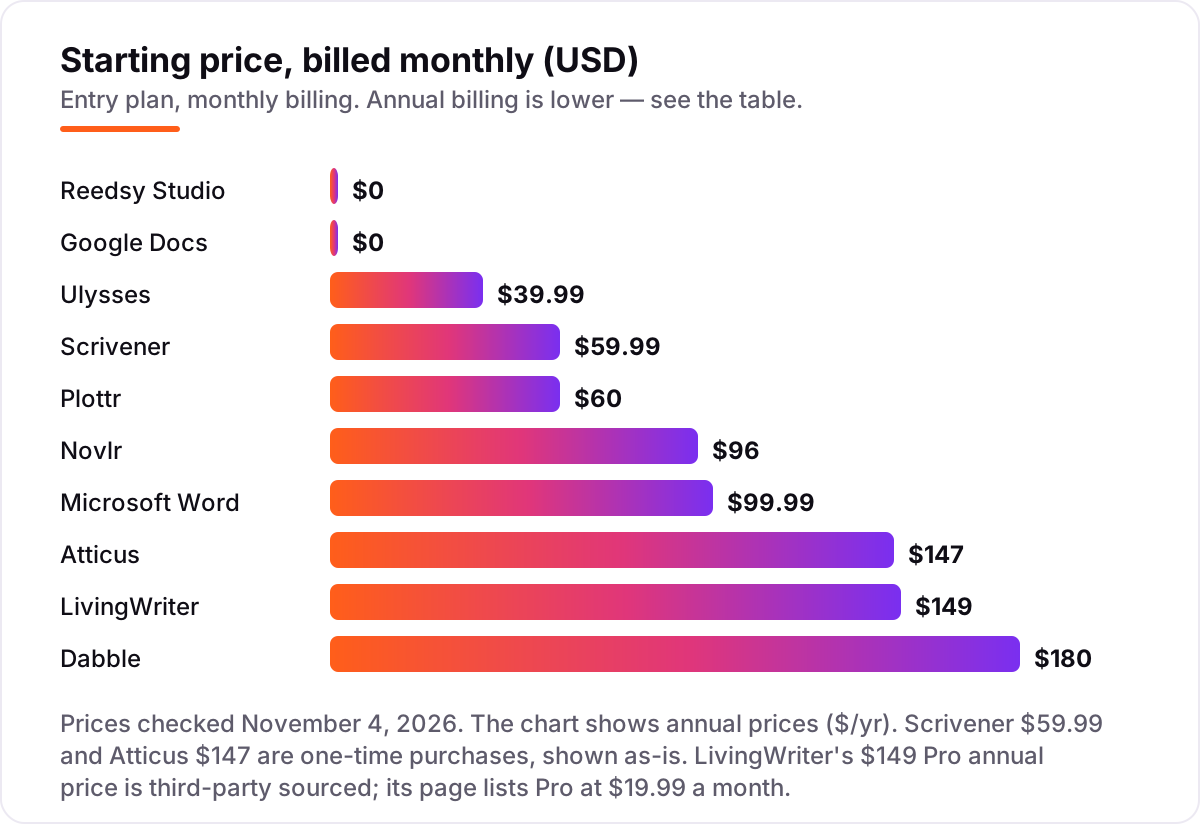
Take a novelist who writes one book a year for three years. On Scrivener, the bill is $59.99 once, and nothing more. On Reedsy Studio it is $0. On Ulysses it is $39.99 a year, or $119.97 over three years. On Dabble Writer it is $180 a year, or $540 over three years. On Novlr Starter it is $96 a year, or $288. On Microsoft 365 Personal it is $99.99 a year, or $299.97. On Plottr it is $60 a year, or $180 — or $150 once for the lifetime licence. On LivingWriter Pro it is $149 a year, or $447. On Atticus it is $147 once.
Two costs sit outside those numbers. First, the pairing: Scrivener plus Atticus costs $206.99 once and covers drafting through to a publishable file, while a subscription pair such as Dabble plus Atticus costs $180 a year plus $147 once. Second, the platform tax: Scrivener on both Mac and Windows costs $95.98 as a bundle, and the iOS app is another $23.99.
Annual billing is the cheapest way to pay where it exists: Dabble Writer drops from $19 to $15 a month, and Ulysses from $5.99 a month to $39.99 a year. The free plans are real but capped: Novlr covers two projects, LivingWriter covers one book, and Google Docs and Reedsy Studio are free without a project cap.
Know the difference: drafting apps vs formatting apps
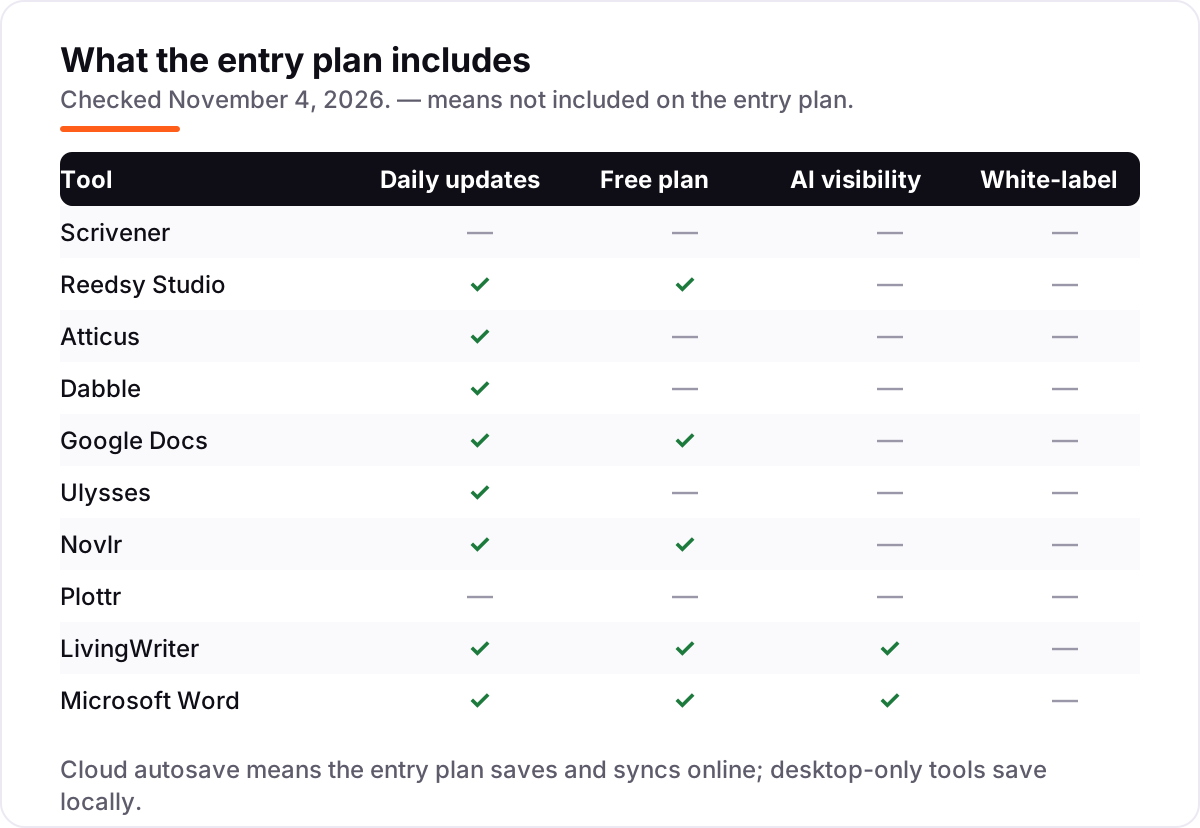
The confusion in this category is between writing the book and publishing it. A drafting app — Scrivener, Ulysses, Dabble, Novlr, Google Docs — is where the words get written and organised. A formatting app — Atticus, Reedsy Studio, Vellum — turns the finished manuscript into the EPUB and print-ready PDF files that stores and printers accept.
Most apps here do one of those jobs well and the other barely or not at all. Scrivener drafts brilliantly and exports serviceable files through Compile; Atticus formats beautifully but drafts more shallowly; Plottr does neither, because it plans. Google Docs and Word draft and collaborate, but neither formats a book. The expensive mistake is buying a formatting app to write in, or a drafting app and then discovering at publication that you still need a formatter. Decide which job you are buying for, and check the export list before you pay.
Quick comparison: tool type by need
| Buyer | Best pick | Why |
|---|---|---|
| First novel, $0 budget | Reedsy Studio | Free writing, formatting and export |
| Serious novelist, one purchase | Scrivener | $59.99 once, binder and corkboard |
| Self-publisher, draft to print | Atticus | $147 once, formatting included |
| Cloud drafting with plotting | Dabble | $180/year, Plot Grid and sync |
| Co-writing with an editor | Google Docs | Free, real-time comments |
| Apple-only writer | Ulysses | $39.99/year, calm Markdown desk |
| Habit and goals | Novlr | Free for 2 projects, $96/year Starter |
| Planner before drafter | Plottr | $60/year, timelines and templates |
Mistakes to avoid
- Buying a subscription for a book you will write once. A $19-a-month app costs $228 in year one; Scrivener costs $59.99 once.
- Paying for formatting before the draft exists. Atticus earns its $147 at publication, not at chapter one.
- Ignoring the platform lock. Ulysses is Apple-only, and a Scrivener licence covers one desktop platform.
- Trusting a directory price. Plottr still shows $25 and $39 a year on older directories; the vendor's pricing page says $60.
- Forgetting the export test. Draft one chapter, export it, and check the file opens cleanly in Word or on your e-reader before committing.
How we chose
We checked each vendor's own pricing page on November 4, 2026 and recorded the starting price exactly as shown, including the annual-billing figure where the page lists one. Dabble and Novlr were opened directly that day; Microsoft 365, Reedsy Studio, LivingWriter, Atticus and Scrivener were read from the vendor's own pages as crawled in the last two days, most recently on November 4, 2026. Dabble's page loaded in its annual-billing view that day ($15 a month, $180 a year); the $19 monthly-billing figure is from the same page as read in October 2026. Two prices rest on older reads because the vendor pages could not be opened that day: Ulysses at $39.99 a year, from its pricing page as read on October 26, 2026 and corroborated by its App Store listing, and Plottr at $60 a year, from its pricing page as read on October 7, 2026. Scrivener's store shows prices only at checkout, so the $59.99 figure is the price in Literature & Latte's own press notes and on the Mac App Store listing. LivingWriter's $149 Pro annual price is third-party sourced; its page lists Pro at $19.99 a month. This list carries no review ratings because the G2 review pages could not be opened on November 4, 2026, and we would rather show no rating than a stale or estimated one. We ranked the tools by fit for the most common buyer — a first-time novelist — not by brand size. No vendor paid for a place in this list, and none of the links here are affiliate links.
What to do next
Start with the free tier or trial of your top pick and draft one real chapter in it: check the exports open cleanly, the sync works on your devices, and the structure fits how you think. If the book stalls, switch to the app built for your block — Novlr for momentum, Plottr for planning, Atticus for formatting. If the book supports your business, compare options in our guide to AI writing tools for SEO. Once your tools are in place, find out what's holding your rankings back.
Your stack only works if people find you
SerpAstra fixes what keeps your site off page one and makes it easy for AI assistants to recommend.
Get a free audit→Sources we checked (12)
- Scrivener store — literatureandlatte.com/store/scrivener (checked November 4, 2026)
- Scrivener press notes — literatureandlatte.com (checked November 4, 2026)
- Reedsy Studio FAQ — reedsy.com (checked November 4, 2026)
- Atticus — atticus.io (checked November 4, 2026)
- Dabble pricing — dabblewriter.com/pricing (checked November 4, 2026)
- Google Docs — docs.google.com (checked November 4, 2026)
- Ulysses pricing — ulysses.app/pricing (checked November 4, 2026)
- Ulysses on the App Store — apps.apple.com (checked November 4, 2026)
- Novlr pricing — novlr.org/pricing (checked November 4, 2026)
- Plottr — plottr.com (checked November 4, 2026)
- LivingWriter pricing — livingwriter.com/pricing (checked November 4, 2026)
- Microsoft 365 plans — microsoft.com (checked November 4, 2026)
Shamim
Founder of SerpAstra
A full-stack SEO and digital marketer who spends most days on Local SEO for dental practices, AI search visibility and lead generation.
Frequently asked questions
What is the best app for writing a book?
Scrivener is the best fit for most novelists: a binder, corkboard and snapshots for organising a long manuscript, for $59.99 once. If the budget is zero, Reedsy Studio is the best free pick, with writing, formatting and export included. Self-publishers who format their own books should look at Atticus, which drafts and formats for $147 once.
What is the best app for writing a book free?
Reedsy Studio is the best app for writing a book free: the core writing, formatting and export features cost nothing, and the finished EPUB and print-ready PDF are ready for KDP or IngramSpark. Google Docs is the best free choice for co-writing, with real-time comments and suggestions. Novlr's free plan covers two projects with goals and streaks.
How much does it cost to write a book with an app?
From $0 to about $180 a year at the entry level. Reedsy Studio and Google Docs are free, Ulysses costs $39.99 a year, Plottr $60 a year, and Dabble Writer $180 a year. One-time licences are cheaper over time: Scrivener costs $59.99 once and Atticus $147 once, so a three-year Scrivener user pays $59.99 in total, not $59.99 a year.
Is Scrivener or Atticus better for self-publishing?
They do different jobs, and many authors use both. Scrivener is the better drafting app, with a binder, corkboard and snapshots for a long manuscript, at $59.99 once. Atticus is the better formatting app, with 17 chapter themes and one-click EPUB and print-ready PDF export, at $147 once. Together they cost $206.99 once and cover drafting through to a publishable file.
Can I write a book in Google Docs?
Yes, and many first novels are written there, because it is free, autosaves everything and makes sharing with an editor or beta readers easy. The limits show up on long books: one long document per file, no corkboard or plot grid, and no book formatting. When the draft is done, export to Word or EPUB and finish in Scrivener or Reedsy Studio.
Do I need a separate app for plotting?
Not always, but it helps when the story has multiple plotlines or a series arc. Dabble builds its Plot Grid into the drafting app, so planning and writing stay together. Plottr is a dedicated plotting tool at $60 a year, with timelines and templates, and it exports outlines to Word and Scrivener. If your story is linear, Scrivener's corkboard is usually enough.
Free SEO and AI visibility audit
Find out what is holding your rankings back
Send us your site. Within 2 business days you get a written audit, an AI visibility check and a short fix list ranked by impact. Free, with no contract attached.
Request my free audit→Related guides
 SEO & AI SearchBest AI Writing Tools for SEO in 2026: 7 Picks Ranked by What You Need7 best ai writing tools for seo compared on price, live scoring, and drafting power. Prices checked on each vendor pricing page, November 1, 2026.Read guide →
 Companies & Services10 Best Book Review Writing Services in 2026Compare the 10 best book review writing service picks for indie authors, with one-time prices from $59 to $579 and turnaround times, checked November 4, 2026.Read guide →
 Companies & Services10 Best Content Writing Companies in 2026Compare the 10 best content writing company picks on per-word prices, managed plans and agency retainers, with every price checked November 4, 2026.Read guide →