
9 Best Apps for Plumbers in 2026: Free and Paid Apps Ranked
Compare the 9 best apps for plumbers on price, scheduling, dispatch and payments, with every price checked November 7, 2026 and quotes explained.
 Shamim Mia, Founder, SerpAstraLast verified November 7, 202614 min read
We compare pricing pages, documentation and public reviews. We never accept payment for rankings.

Key takeaways
- Jobber is the best fit for most plumbing shops at $49/month; Housecall Pro follows at $79/month for solo operators, and Kickserv is the cheapest team price at $60/month for five users.
- Five of the nine tools publish no price at all — ServiceTitan, FieldEdge, Workiz, FieldPulse and Simpro are all quote-only, so budget on the user-reported ranges in this guide, not on a list price.
- The single most important buying factor is how the price scales with headcount: per-user pricing punishes hiring, flat-rate pricing rewards it, and per-technician pricing only makes sense past ten techs.
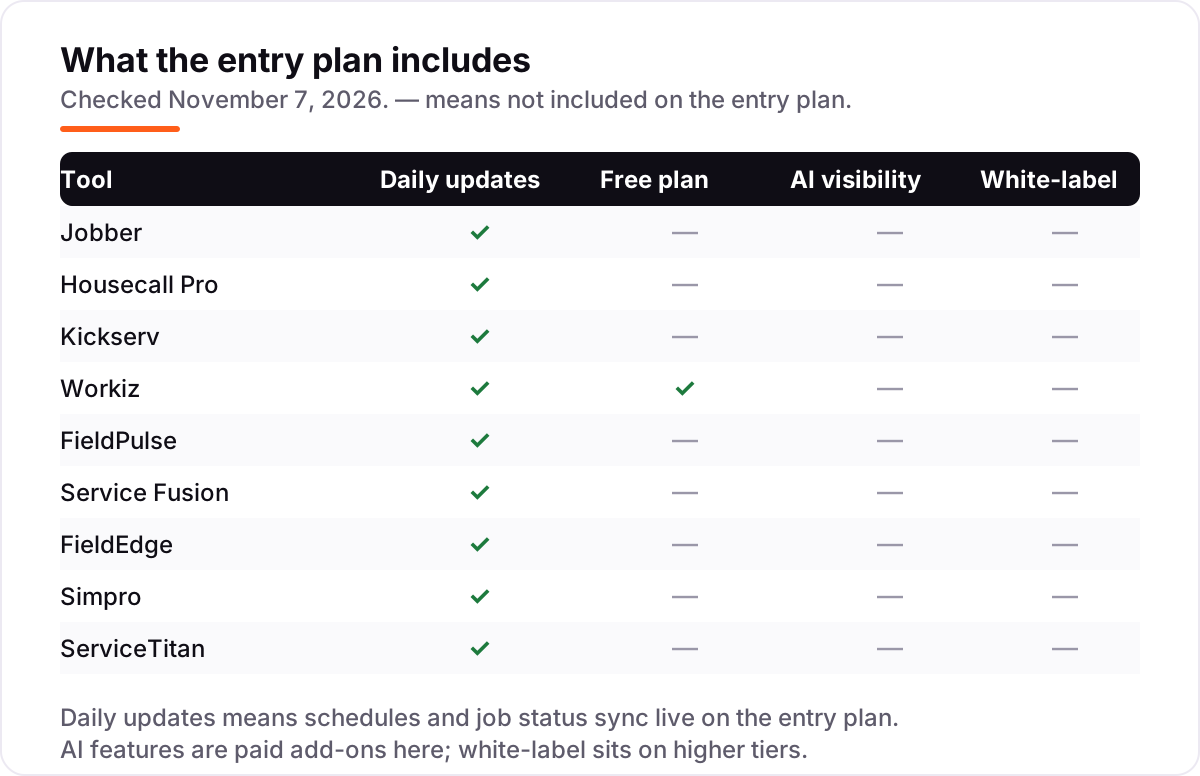
- Workiz is the only tool here with a free plan — Lite covers two users — while Jobber, Housecall Pro and Kickserv offer 14- to 30-day free trials instead.
On this page
Quick comparison
| Tool | Best for | Starting price | Free plan |
|---|---|---|---|
| Jobber | Solo plumbers and small crews that want quoting, scheduling, invoicing and payments in one app | $49/mo | No (14-day trial) |
| Housecall Pro | Solo plumbers who want online booking, a price book and card payments from day one | $79/mo | No (14-day trial) |
| Kickserv | Small plumbing teams that want five seats and dispatch tools for one flat price | $60/mo | No (30-day trial) |
| Workiz | Plumbing shops that miss calls and want an AI dispatcher answering the phone | Custom quote | Yes (free plan) |
| FieldPulse | Growing plumbing crews that need project management and job costing alongside scheduling | Custom quote | No (demo only) |
| Service Fusion | Larger plumbing teams that want one flat bill no matter how many techs join | $245/mo | No (demo only) |
| FieldEdge | Plumbing shops that run QuickBooks Desktop and want the deepest sync available | Custom quote | No (demo only) |
| Simpro | Plumbing firms doing commercial work, projects and maintenance contracts | Custom quote | No (demo only) |
| ServiceTitan | Large plumbing operations with 10 or more technicians and a full office team | Custom quote | No (demo only) |
Make one of these tools?
We re-check this list every quarter. Send a correction, request a review, or ask about a clearly labeled sponsored spot.
Request a listingThe best apps for plumbers

Jobber
Best for: Solo plumbers and small crews that want quoting, scheduling, invoicing and payments in one app
Jobber is the default choice for a small plumbing shop for a reason: it covers the whole job — online booking, quotes, scheduling, invoicing and card payments — in one subscription, and the setup is the easiest in this list. Core costs $49 a month for one user, and the price climbs with headcount rather than features: Connect is $99 a month billed annually, Grow is $149.
The trade-off is what Core leaves out. GPS tracking and QuickBooks Online sync need Connect, job costing and two-way texting need Grow, and the AI Receptionist, Marketing Suite and Pipeline are paid add-ons. Buy Jobber when you want the standard choice that a new hire already knows; buy Housecall Pro when online booking matters most, or Kickserv when five seats for $60 a month beats one seat for $49.
What we like
- The easiest setup here: most plumbers are booking jobs the same day they sign up, with no implementation project
- Online booking, quotes, scheduling, invoicing and card payments in one subscription, with a mobile app for the field
- Transparent published pricing with a 14-day free trial — no demo or sales call needed to see the price
- Jobber Payments collects card payments in the field at 2.9% plus 30 cents a transaction
Watch out for
- Core covers one user and leaves out GPS tracking and QuickBooks Online sync — both need Connect at $99/month billed annually
- Job costing, two-way texting and quote follow-ups wait for Grow at $149/month billed annually
- Marketing Suite, Pipeline and the AI Receptionist are paid add-ons on Core, Connect and Grow

Housecall Pro
Best for: Solo plumbers who want online booking, a price book and card payments from day one
Housecall Pro is built for the solo plumber who wants customers to book themselves: online booking from Google or your own site, scheduling and dispatch, estimates, invoicing and card payments in one app. Basic costs $79 a month for one user, and the price climbs with the crew: Essentials is $189 for up to five users, and MAX is $329 for eight.
The limits to watch are the ones on Basic: no QuickBooks Online sync and no GPS tracking, so most working shops land on Essentials. Route optimization, service plans and the open API wait for MAX, and add-ons such as AI answering cost extra. Choose Housecall Pro when online booking and a price book matter most; choose Jobber when you want the cheaper entry price and the easier setup.
What we like
- Online booking from Google or your own site, so customers can book without a phone call
- A price book and job costing on the entry plan, which most rivals hold for higher tiers
- Card payments from 2.59% with a 14-day trial of the top MAX plan, no credit card required
- Review management built in, so finished jobs can turn into Google reviews
Watch out for
- Basic covers one user and leaves out QuickBooks Online sync and GPS tracking — both need Essentials at $189/month
- Route optimization, service plans and the open API wait for MAX at $329/month
- Card processing and add-ons sit on top of the subscription, so the plan price is not the whole bill

Kickserv
Best for: Small plumbing teams that want five seats and dispatch tools for one flat price
Kickserv wins on team value: the cheapest plan covers five users, not one, so a small crew pays $60 a month for the whole team instead of $49 per person. Start includes scheduling, dispatch, estimates, invoicing, online payments, time and expense tracking and QuickBooks Online sync, and annual billing drops it to $48 a month.
The catch is the shape of the plans. There is no single-user option, so a solo plumber pays for five seats, and dispatch mapping and GPS check-ins wait for Run at $119 a month. QuickBooks Desktop sync costs another $50 a month on top. Pick Kickserv when the crew is three to five people and the budget is fixed; pick Jobber when the shop is one person and the entry price matters most.
What we like
- Five users included on the cheapest plan — the lowest published per-team price in this list
- QuickBooks Online sync on Start, so invoices and payments flow to the books without retyping
- Automated email and text reminders and more than 20 business reports on the entry plan
- Annual billing takes 20% off, dropping Start to $48/month
Watch out for
- No single-user plan: a solo plumber pays for five seats whether they need them or not
- Dispatch mapping and GPS check-ins wait for Run at $119/month billed monthly
- QuickBooks Desktop sync costs another $50/month on top of the plan

Workiz
Best for: Plumbing shops that miss calls and want an AI dispatcher answering the phone
Workiz is the AI-answering pick: its Genius suite answers calls, texts and emails, books jobs into the calendar and reschedules them, so a missed call stops being a lost job. The free Lite plan covers two users with scheduling, invoicing, estimates and online payments, which makes it the only free start in this list.
The catch is the price tag — or the lack of one. Workiz stopped publishing plan prices in 2026, so every paid plan is a sales quote, and the phone system and AI answering are sold separately as add-ons. Third-party listings put paid tiers anywhere from $187 to $275 a month, and they disagree with each other — another reason to get the quote in writing. Buy Workiz when missed calls cost more than software; buy Jobber when you want a price on the page.
What we like
- Genius Answering, an AI dispatcher, answers calls, texts and emails and books jobs when the office is busy
- A free Lite plan for up to two users, so a solo plumber can start at $0
- Call tracking, recording and two-way texting built into the platform, not bolted on
- Real-time dispatching with route planning and a client portal on paid plans
Watch out for
- No published prices since 2026 — every paid plan is quote-only, so budgeting means a sales call
- The phone system and AI answering are sold separately as add-ons on every plan
- Service plans and inventory management wait for the top tier, which is quote-only

FieldPulse
Best for: Growing plumbing crews that need project management and job costing alongside scheduling
FieldPulse is the highest-rated tool in this list at 4.7 out of 5 on G2, and the rating is earned on support: reviewers praise the team behind it more than any feature. It covers scheduling, work orders, estimates, invoicing and project management, with custom workflows that fit how a plumbing crew actually runs a job.
The frustration is the price. FieldPulse publishes no rates at all — every plan is a custom quote, with third-party reports putting it near $90 per user a month — a figure FieldPulse itself says it has not verified. Dynamic Proposals, the pricebook and GPS fleet tracking are paid add-ons. Choose FieldPulse when support and project management matter most; choose Service Fusion when you want the same breadth on a published flat rate.
What we like
- The highest G2 rating in this list at 4.7/5, with reviewers praising support most
- Project management, QuickBooks sync and custom fields included
- Custom workflows and forms that fit how a plumbing crew actually runs jobs
- A mobile app built for the field, with scheduling, work orders and invoicing on the phone
Watch out for
- Every plan is quote-only — the vendor publishes no price, so the bill is set per account
- Dynamic Proposals, pricebook and GPS fleet tracking are paid add-ons, not included
- Seat-based pricing means the bill grows with every hire, unlike flat-rate rivals

Service Fusion
Best for: Larger plumbing teams that want one flat bill no matter how many techs join
Service Fusion sells one thing no rival here matches: a flat rate with unlimited users. Starter costs $245 a month whether the crew is three people or thirty, Plus is $382 and Pro is $627, and month-to-month billing means no contract. The QuickBooks sync covers Online and Desktop two-way, which reviewers rate as its strongest integration.
The price is the problem for a small shop: $245 a month is steep when the crew is one plumber, and there is no free trial — the only way in is a sales demo. Nine features, including GPS fleet tracking and the ServiceCall.ai dispatcher, sit outside the base plans with no published price. Pick Service Fusion when the team is growing fast and hiring must never raise the bill.
What we like
- Unlimited users on every plan — hiring a tenth plumber never changes the bill
- Month-to-month billing with no contract, and annual billing saves 15%
- Two-way QuickBooks sync for Online and Desktop, which reviewers rate as its strongest integration
- Estimates, invoicing, payment processing and text alerts on the entry plan
Watch out for
- The entry price is steep for a solo plumber: $245/month before any add-on
- No free trial — the only way in is a sales demo
- Nine features, including GPS fleet tracking and ServiceCall.ai, sit outside the base plans with no published price

FieldEdge
Best for: Plumbing shops that run QuickBooks Desktop and want the deepest sync available
FieldEdge is the old hand in this list: built for HVAC, plumbing and electrical contractors for over 30 years, with a dispatch board, a flat-rate pricebook and the deepest QuickBooks integration here, including QuickBooks Desktop and Sage Intacct through its proprietary Live Link sync. Pricing is per user and quote-only, with user reports at about $100 per office user and $125 per technician.
The trade-offs are the sales process and the contract. There is no free trial, setup takes about five weeks of onboarding, and the 12-month contract is strict. Reviewers also flag support and app bugs, and GPS tracking and review management need third-party tools. Choose FieldEdge when the books run on QuickBooks Desktop; choose Jobber or Housecall Pro when you want a price on the page and a trial today.
What we like
- The deepest QuickBooks integration here, including QuickBooks Desktop and Sage Intacct, with a proprietary Live Link sync
- A flat-rate pricebook and dispatch board on the entry Select tier
- Built for the trades for over 30 years, with service agreements and equipment tracking on higher tiers
- Strong dispatch and scheduling for crews of 3 to 20 technicians
Watch out for
- No published pricing and no free trial — every plan is a sales quote with a 12-month contract
- Per-user pricing means office staff and technicians each add about $100–$125/month
- Setup takes about five weeks of onboarding, and reviewers flag support and app bugs

Simpro
Best for: Plumbing firms doing commercial work, projects and maintenance contracts
Simpro is built for the plumbing firm that does commercial work, not just house calls: estimating with take-offs, a maintenance planner that forecasts labor a year out, inventory, and GPS fleet tracking with geofencing. It handles projects, service work and maintenance contracts in one system, with good, better, best tiered quoting and manager approval before a quote goes out.
The price is the hurdle. Simpro publishes no rates — pricing is modular and quote-based, with user reports at about $30 per user a month and implementation fees of $5,000 to $15,000 for smaller firms. There is no free trial and no quick test drive. Pick Simpro when commercial projects and maintenance contracts are the business; pick Jobber when residential jobs are the whole book.
What we like
- Estimating with take-offs and a maintenance planner that forecasts labor a year out
- GPS fleet tracking with geofencing and IoT asset monitoring included in the build
- Handles commercial projects, service work and maintenance contracts in one system
- Good, better, best tiered quoting built in, with manager approval before quotes go out
Watch out for
- Quote-based pricing throughout, with implementation fees reported at $5,000–$15,000 for smaller firms
- No free trial and a sales-led setup, so there is no quick way to test it
- Modular pricing means the final bill depends on which modules you add

ServiceTitan
Best for: Large plumbing operations with 10 or more technicians and a full office team
ServiceTitan is the most powerful platform in this list and the most expensive: dispatch, pricebooks, call tracking, marketing attribution, payroll and reporting in one system, built for operations with ten or more technicians. Pricing is per technician and quote-only, with user reports at roughly $245 to $500 per tech a month and implementation fees of $5,000 to $50,000.
The power comes with a long setup — implementation runs into weeks, with a separate fee on top — and a strict 12-month minimum contract. Marketing Pro, Dispatch Pro and the other Pro modules are priced separately on top of the base plan. Buy ServiceTitan when the operation is big enough to use it; buy Jobber or Housecall Pro when the shop is small and the software should pay for itself in the first month.
What we like
- The deepest platform here: dispatch, pricebooks, call tracking, marketing attribution and payroll in one system
- Marketing Pro ties ad spend to booked revenue, so you can see which ads fill the schedule
- Configurable workflows and commission tracking built for multi-crew operations
- Mobile estimates on the Essentials tier let technicians quote and close on site
Watch out for
- Quote-only pricing at roughly $245–$500 per technician a month, with implementation fees of $5,000–$50,000
- A 12-month minimum contract and a setup that runs into weeks, with its own implementation fee
- Far more system than a small shop needs — solo plumbers pay enterprise prices for features they will not use
The best apps for plumbers do more than book appointments: they run the whole job, from the first call to the paid invoice. We ranked the nine tools below by fit for the most common buyer — a plumbing shop with one to five technicians — starting with the cheapest published prices and ending with the enterprise platforms, and every price was checked on November 7, 2026.
How to choose the best apps for plumbers
- Count heads before you count features. Jobber Core covers one user at $49/month; a three-person crew needs Connect at $149/month billed annually. Housecall Pro Basic is one user too — a crew starts on Essentials at $149/month billed annually. The per-person price is the real price.
- Check the QuickBooks sync. If the books run on QuickBooks, the sync matters more than any feature list: FieldEdge has the deepest QuickBooks Desktop sync, Service Fusion covers Online and Desktop, and Jobber and Housecall Pro sync QuickBooks Online from their mid tiers.
- Test the mobile app on a real job. The office sees the schedule; the plumber sees the app. Check that estimates, photos, invoices and payments all work one-handed on a phone, with no signal in a basement.
- Ask what the price excludes. Five tools here publish no price, and the four that do still charge card processing (about 2.6–2.9% plus 30 cents) and sell add-ons — AI answering, GPS tracking and pricebooks are usually extra.
- Match the tool to the size you are, not the size you dream of. A solo plumber does not need ServiceTitan's per-technician pricing or Simpro's maintenance planner; a ten-tech shop will outgrow Kickserv's Start plan fast.
Software is one system in the stack. If the phones are not ringing, the problem is visibility, not dispatch — our local SEO service covers how plumbing businesses show up on Google Maps and in AI answers. And before you list the services you offer, check that customers can find and review you: the free Google review link generator builds a one-tap link that turns finished jobs into reviews.
Whatever you shortlist, run it on real jobs before you pay. The trials in this list run 14 to 30 days — long enough to book, dispatch, invoice and get paid for a genuine week of work. Check two things in the trial: that the mobile app survives a full day in the field, and that the invoice lands in QuickBooks without retyping. Every tool here that publishes a price also publishes a trial, so there is no reason to buy before the crew has used it.
Apps for plumbers pricing: what you will actually pay
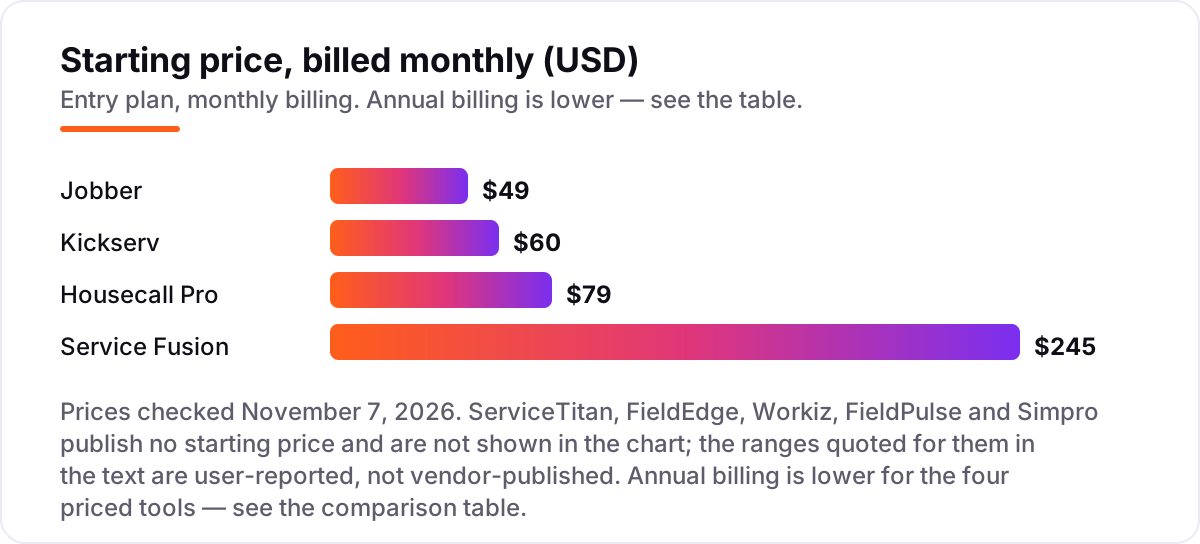
Take a three-person plumbing shop — an owner and two technicians — and price it on annual billing, the cheaper way to buy all four published tools. On list prices, the subscription costs $48 a month on Kickserv Start, $149 on Jobber Connect for up to five users, $149 on Housecall Pro Essentials, and $208 on Service Fusion Starter. Two of those numbers need adjusting before they are real: Jobber Core looks cheaper at $29 a month billed annually, but it covers one user and leaves out GPS tracking and QuickBooks sync, so a three-person crew lands on Connect; Housecall Pro Basic at $59 a month billed annually covers one user too, so the crew starts on Essentials.
Over a year, that is $576 on Kickserv, $1,788 on Jobber, $1,788 on Housecall Pro and $2,496 on Service Fusion. The same three people and the same jobs cost $576 a year at the cheap end and $2,496 at the dear end — a $1,920 gap that comes from user caps and bundled seats, not from features.
Then the quote-only tools, on user-reported figures. Simpro runs about $90 a month for three users, FieldPulse about $270, and FieldEdge about $350 for one office user and two technicians. Workiz quotes paid plans, so there is no list price to put in the math; third-party listings put its paid tiers anywhere from $187 to $275 a month. ServiceTitan is in another league: Essentials at roughly $300–$400 per technician puts two technicians at $600–$800 a month, or $7,200–$9,600 a year, before the $5,000-plus implementation fee.
Three costs sit outside every number above. First, card processing: about 2.59% on Housecall Pro and 2.9% plus 30 cents on Jobber, charged per payment rather than per month. Second, the add-ons — AI answering, GPS fleet tracking and flat-rate pricebooks are sold separately on most tools here. Third, the contract: FieldEdge and ServiceTitan both run 12-month minimums, so the quote you sign is the bill for a year. If you run a plumbing business rather than a general trade shop, the visibility tools differ too — see our guide to SEO for plumbers.
Annual billing cuts the bill on the four published tools: Jobber Core drops from $49 to $29 a month, Housecall Pro Basic from $79 to $59, Kickserv Start from $60 to $48, and Service Fusion Starter from $245 to $208. Jobber's annual discount is the largest of the four at 41%; Kickserv takes 20% off and Service Fusion 15% for paying the year up front.
Know the difference: field service software vs a booking app
The confusion in this category is between a booking app and field service software. A booking app — Square Appointments, Calendly, a Google Form — takes appointments and sends reminders. That is the whole job. Field service software runs the job itself: dispatch, a pricebook, estimates, invoicing, payments and the customer history, in one place. A booking app cannot tell you what a customer paid last year, which parts are on the truck, or whether a job made money.
There is a second, quieter confusion: per-user pricing versus flat-rate pricing. Jobber, Housecall Pro, FieldPulse, FieldEdge and Simpro all charge by the seat or the technician, so the bill grows every time you hire. Kickserv charges a flat rate per team size — $60 for five users, $119 for ten — and Service Fusion charges one flat rate with unlimited users, so the bill never moves. A three-person shop pays less on per-user pricing; a fifteen-person shop almost always pays less on a flat rate. Work the math at the headcount you will have in a year, not the one you have today.
A third distinction worth knowing is quote-only versus published pricing. Four tools in this list print their prices; five do not. A quote-only price is not a secret — it is a sales conversation, and the number depends on team size, modules and contract length. Treat the user-reported ranges in this guide as a budgeting aid, and get the written quote before you compare.
Quick comparison: tool type by need
| Buyer | Best pick | Why |
|---|---|---|
| Solo plumber on a budget | Jobber | Core is $49/month with a 14-day trial, and the free Workiz Lite plan covers two users |
| Small team that wants five seats cheap | Kickserv | Start is $60/month for five users, the lowest team price here |
| Shop that misses calls | Workiz | Genius AI answering books jobs when nobody picks up the phone |
| Growing crew that needs projects | FieldPulse | Highest-rated at 4.7/5, with project management and job costing |
| Big team that hires constantly | Service Fusion | One flat $245/month with unlimited users, so hiring never raises the bill |
| Large operation, 10+ techs | ServiceTitan | Deepest dispatch and marketing tools, priced per technician by quote |
Mistakes to avoid
- Budgeting on the one-user price. Core at $49 and Basic at $79 cover one person. A crew of three pays $149 a month billed annually on Jobber Connect or Housecall Pro Essentials — price the seats, not the headline.
- Buying a quote-only tool without a written quote. Five tools here publish no price. A demo without a written total — subscription, implementation, add-ons — is not a price.
- Forgetting card processing. Card payments cost about 2.59–2.9% plus 30 cents per transaction on top of every subscription here. A shop taking $20,000 a month by card pays roughly $500–$600 a month in processing alone.
- Choosing a tool without the QuickBooks sync you need. If the books run on QuickBooks Desktop, only FieldEdge and Service Fusion sync it properly. Buying anything else means retyping every invoice.
- Skipping the mobile test. The office loves the dashboard; the plumber lives in the app. Run the trial on real jobs and check estimates, photos and payments work with one hand and no signal.
How we chose
We checked each vendor's own pricing page and recorded the starting price exactly as shown, including the annual-billing figure where the page lists one. Kickserv, Service Fusion and FieldPulse were read direct from the vendors' own pricing pages on November 7, 2026; Jobber and Housecall Pro were verified from fresh search-index copies of their pricing pages, crawled within the last four days and cross-checked against independent reads from October 2026. One third-party page read on November 3, 2026 lists Kickserv Start at $75 a month billed monthly; the vendor's own page read on November 7 shows $60 a month, corroborated by multiple October reads, so we use $60. Five tools publish no price — ServiceTitan, FieldEdge, Workiz, FieldPulse and Simpro — so they are listed as custom quote, with user-reported ranges shown only as budgeting guides and labelled as such. Ratings come from G2 product pages crawled within the last four days. We ranked the tools by fit for the most common buyer — a plumbing shop with one to five technicians — not by brand size. No vendor paid for a place in this list, and none of the links here are affiliate links.
What to do next
Start with the free plan or trial of your top pick and run one real week of jobs through it. Check that the mobile app survives a day in the field, that invoices land in QuickBooks without retyping, and that the price you were quoted matches the invoice. If the jobs are sorted but new customers are not finding you, our monthly SEO service handles the visibility side — or compare providers in our guide to SEO companies for small business. Once your tools are in place, find out what's holding your rankings back.
Your stack only works if people find you
SerpAstra fixes what keeps your site off page one and makes it easy for AI assistants to recommend.
Get a free audit→Sources we checked (18)
- Jobber pricing — getjobber.com/pricing (checked November 7, 2026)
- Housecall Pro pricing — housecallpro.com/pricing (checked November 7, 2026)
- Kickserv pricing — kickserv.com/pricing (checked November 7, 2026)
- Workiz pricing — workiz.com/pricing-plans (checked November 7, 2026)
- FieldPulse pricing — fieldpulse.com/pricing (checked November 7, 2026)
- Service Fusion pricing — servicefusion.com/pricing (checked November 7, 2026)
- FieldEdge pricing — fieldedge.com/pricing (checked November 7, 2026)
- Simpro pricing — simprogroup.com/pricing (checked November 7, 2026)
- ServiceTitan pricing — servicetitan.com/pricing (checked November 7, 2026)
- Jobber reviews — G2 (checked November 7, 2026)
- Housecall Pro reviews — G2 (checked November 7, 2026)
- Kickserv reviews — G2 (checked November 7, 2026)
- Workiz reviews — G2 (checked November 7, 2026)
- FieldPulse reviews — G2 (checked November 7, 2026)
- Service Fusion reviews — G2 (checked November 7, 2026)
- FieldEdge reviews — G2 (checked November 7, 2026)
- Simpro reviews — G2 (checked November 7, 2026)
- ServiceTitan reviews — G2 (checked November 7, 2026)
Shamim
Founder of SerpAstra
A full-stack SEO and digital marketer who spends most days on Local SEO for dental practices, AI search visibility and lead generation.
Frequently asked questions
What is the best app for plumbers?
Jobber is the best fit for most plumbing shops: the easiest setup, transparent pricing from $49/month, and scheduling, invoicing and payments in one app. Housecall Pro suits solo operators who want online booking, Kickserv suits small teams on a budget, and ServiceTitan suits operations with ten or more technicians.
How much does plumbing software cost per month?
Published prices run from $49 to $245 a month for a small shop. Jobber Core is $49, Housecall Pro Basic $79, Kickserv Start $60 for five users, and Service Fusion Starter $245 with unlimited users. Five tools publish no price, and user reports put them at roughly $90 to $800 a month for a three-person shop.
Is there a free app for plumbers?
Workiz has a free Lite plan for up to two users, with scheduling, invoicing and online payments. Jobber, Housecall Pro and Kickserv offer free trials of 14 to 30 days instead. No other tool in this list has a free plan — ServiceTitan, FieldEdge, FieldPulse, Simpro and Service Fusion all start with a demo.
Do plumbers need field service software or just a booking app?
A booking app takes appointments; field service software runs the whole job — dispatch, pricebook, estimates, invoicing, payments and customer history. A solo plumber with a handful of regulars can manage on a booking app, but any shop with two or more technicians needs dispatch and job tracking to stay organized.
Which plumbing app works best with QuickBooks?
FieldEdge has the deepest QuickBooks integration, including QuickBooks Desktop and Sage Intacct. Service Fusion syncs both QuickBooks Online and Desktop two-way. Jobber and Housecall Pro sync QuickBooks Online from their mid tiers, and Kickserv includes QuickBooks Online sync on its Start plan.
Can I switch plumbing software later?
Yes, but plan the move for a quiet week. Export your customer list, job history, open invoices and pricebook from the old tool, then import them into the new one and reconcile the books before going live. Quote-only tools take weeks to set up, so start the switch before the old contract renews.
Free SEO and AI visibility audit
Find out what is holding your rankings back
Send us your site. Within 2 business days you get a written audit, an AI visibility check and a short fix list ranked by impact. Free, with no contract attached.
Request my free audit→Related guides
 Local SEOSEO for plumbers: rank in the map pack and get more callsSEO for plumbers: win the map pack and get more calls with emergency pages, service pages patients trust, reviews, and calls that become booked jobs today.Read guide →
 Digital Marketing & Ads7 Best Marketing Software for Contractors in 2026, ComparedCompare the 7 best marketing software for contractors on price, reviews and trade-specific features, with every price checked November 5, 2026.Read guide →
 SEO & AI SearchBest Local SEO Tools for 2026: 11 Picks Ranked by What You Need11 best local SEO tools with real prices checked November 1, 2026 — from $14/month trackers to quote-only enterprise platforms, sorted by what you need.Read guide →