
11 Best Auto Link Building Tools in 2026 (Free and Paid, Compared)
11 best auto link building tools compared on price, automation and outreach features, with real prices checked on the vendor pricing page, November 1, 2026.
 Shamim Mia, Founder, SerpAstraLast verified November 1, 202614 min read
We compare pricing pages, documentation and public reviews. We never accept payment for rankings.

Key takeaways
- Pitchbox is the strongest all-in-one outreach platform at $300/month ($210 billed annually); BuzzStream is the cheapest full outreach CRM at $49/month; Respona sells finished placements from $100 each instead of software seats.
- The single most important buying factor is whether someone on your team will do the outreach every week: software only saves time if the campaigns actually get sent and followed up.
- Free plans exist — Hunter finds 50 emails a month free, Postaga has a free plan and Ahrefs Free covers basic research — but real campaigns start around $29–$49/month.
- Every price below was checked on the vendor's own pricing page on November 1, 2026, except Linkody and LinkAssistant, whose prices come from third-party reads of their pricing pages. Ratings are G2, with review counts shown.
On this page
Quick comparison
| Tool | Best for | Starting price | Free plan |
|---|---|---|---|
| Pitchbox | SEO agencies and in-house teams running outreach at scale across multiple clients | $210/mo (annual) | No (trial after demo) |
| BuzzStream | Small teams that want the cheapest full outreach CRM with link monitoring | $49/mo | No (14-day trial) |
| Respona | Businesses with budget but no outreach capacity that want finished placements | $100/placement | No |
| Postaga | Solo link builders and small SaaS teams that want AI-built campaigns | $84/mo (annual) | Yes (free plan) |
| Semrush | Teams already paying for Semrush who want prospecting and outreach in the same login | $117.33/mo (annual) | Yes (free account) |
| Ahrefs | SEOs who already use Ahrefs and need Link Intersect prospect lists | $29/mo | Yes (free plan) |
| Hunter | Solo SEOs and small teams that need verified contact emails for outreach | $34/mo (annual) | Yes (50 credits) |
| Mailshake | Small teams that want simple automated sequences with warmup included | $25/user/mo (annual) | No |
| Majestic | Link specialists who judge prospects by Trust Flow before pitching | $41.67/mo (annual) | No |
| Linkody | Freelancers and small agencies that need daily checks on links already earned | $11.20/mo (annual) | No (30-day trial) |
| LinkAssistant | Solo SEOs who want desktop link prospecting and outreach for one annual fee | $99/yr | Yes (free version) |
Make one of these tools?
We re-check this list every quarter. Send a correction, request a review, or ask about a clearly labeled sponsored spot.
Request a listingThe best auto link building tools
Pitchbox
Best for: SEO agencies and in-house teams running outreach at scale across multiple clients
Pitchbox is the deepest outreach workflow in this list, and it shows in the campaign setup: prospect lists pull live Ahrefs, Semrush, Moz and Majestic metrics, sequences run with conditional follow-ups, and every reply lands in an SEO-focused inbox where the link status is tracked to the end. The AI Campaign Assistant drafts the first version of a campaign, and the Automation Builder handles repetitive steps without a separate tool.
The price is the honest limitation. Pro costs $300 a month with a one-year commitment, and the trial only opens after a demo, so small teams should weigh it against BuzzStream at $49. Buy Pitchbox when outreach is a daily job across several clients; for one site and a few campaigns a month, the cheaper tools here do the same job with less overhead.
What we like
- Prospecting, sequences, follow-ups, inbox and link monitoring in one platform, with Ahrefs, Semrush, Moz and Majestic metrics on every prospect
- AI Campaign Assistant and AI personalization on every plan, plus an Automation Builder with 400 actions a month on Pro
- 2,000 outreach emails a month and 600,000 data credits a year on Pro, with unlimited users from Advanced
Watch out for
- Highest entry price here at $300/month, and every plan requires a one-year commitment even on monthly billing
- No free plan — a free trial is only available after booking a demo
- Reviewers note the learning curve: task assignment and team reports take time to understand

BuzzStream
Best for: Small teams that want the cheapest full outreach CRM with link monitoring
BuzzStream is the relationship memory for outreach: every contact, thread and template lives in one place, so two people on a team never pitch the same editor twice. The BuzzMarker browser extension adds prospects while you browse, and link monitoring watches 1,000 links from the Starter plan, flagging the day a link disappears or switches to nofollow.
The catch sits on the entry plan: Starter has no bulk send and no automated follow-ups, so real campaigns start at Growth for $174 a month, and there is no email verification built in. The interface also feels dated next to newer tools. Even so, at $49 a month Starter is the cheapest way to run an organized outreach CRM, and small teams that send in small batches may never need the upgrade.
What we like
- Full relationship history for every contact and thread, so a team never pitches the same editor twice
- Link monitoring on 1,000 links from Starter, with open, click and reply tracking on every email
- Cheapest full outreach CRM here at $49/month, with a 14-day free trial on every tier
Watch out for
- Starter has no bulk send and no automated follow-ups — real campaigns need Growth at $174/month
- No email verification built in, so addresses must be verified in another tool
- Reviewers call the interface dated and note it has changed little in years

Respona
Best for: Businesses with budget but no outreach capacity that want finished placements
Respona is the hands-off option in this list: instead of selling software seats, it sells finished placements. You pick the publisher tier — Starter at $100 per placement on DR 20+ sites up to Elite at $500 on DR 60+ — and its team handles the content, the outreach and the publishing, with a 28-day standard turnaround or a 14-day express option for an extra fee.
Volume discounts start at 10% for $3,000 a month and reach 60% at the highest spend, which makes it workable for agencies buying links at scale. The trade-off is control and cost: ten Authority placements cost $2,400 a month before discounts, and paid links must carry sponsored or nofollow attributes under Google's spam policies. Buy placements when you have budget and no outreach capacity; run software when you have the time.
What we like
- Pay only for placements that go live, with prices tied to publisher authority from $100 (DR 20+) to $500 (DR 60+)
- Content, outreach and publishing handled end to end, with 28-day standard turnaround and a 14-day express option
- Volume discounts from 10% at $3,000/month to 60% at the highest spend
Watch out for
- It is a managed service, not software you operate — you cannot run your own campaigns on the headline plans
- Ten Authority-tier placements cost $2,400 a month before discounts, so costs scale fast
- Buying placements means buying links, and Google's spam policies require paid links to carry sponsored or nofollow attributes

Postaga
Best for: Solo link builders and small SaaS teams that want AI-built campaigns
Postaga is the most automated cheap option here. Paste a URL and its AI suggests campaign types — skyscraper, guest post, resource page, podcast pitching — then finds the opportunities, pulls the contacts and drafts a personalized sequence for each one. The built-in CRM inbox keeps every reply threaded, so the whole campaign runs from one screen without a separate inbox tool.
Pro costs $84 a month billed annually and covers 10,000 emails, 2,000 contacts and five users, while the free plan covers 500 emails a month for testing. The limits to watch are the 2,000-contact ceiling, which pushes multi-client agencies to the $250-a-month Agency plan, and contact finding that sometimes returns generic info@ addresses. For a solo link builder running a few campaigns, it is the fastest start in this list.
What we like
- AI suggests campaign types from your URL — skyscraper, guest post, resource page, podcast — then finds prospects and drafts sequences
- Free plan covers 500 emails a month, and Pro includes 10,000 emails, 2,000 contacts and 5 users for $84/month billed annually
- Built-in CRM inbox keeps every reply threaded without a separate inbox tool
Watch out for
- The 2,000-contact ceiling on Pro pushes multi-client agencies to the $250/month Agency plan
- Contact finding sometimes returns generic info@ addresses, and Hunter integration is the workaround
- The free plan caps at 3 campaigns and 50 opportunity searches

Semrush
Best for: Teams already paying for Semrush who want prospecting and outreach in the same login
Semrush's Link Building Tool turns the suite's data into outreach: it builds prospect lists from your keywords and competitors, scores each one with an Authority Score, and sends templated follow-up sequences through Gmail or IMAP without leaving the platform. The Monitor tab then tracks whether each acquired link stays live, breaks or disappears, and Backlink Audit flags risky links for disavowal.
It is the right pick when the suite is already paid for: the same $139.95-a-month login covers keyword research, audits, PPC and rank tracking alongside outreach. As a first link building tool it is expensive, extra users start at $45 a month, and AI visibility tracking is a separate toolkit from $99 a month per domain. Buy Semrush for the research depth; buy a dedicated outreach tool if links are the only job.
What we like
- Link Building Tool finds prospects, scores them and runs outreach from inside the suite, alongside a 27-billion-plus keyword database
- Backlink Audit and Backlink Analytics track new and lost links, so monitoring is included
- Free account exists, and the same login covers audits, keyword research and PPC
Watch out for
- Outreach is one module in a $139.95/month suite — a dedicated outreach tool costs less if you only need links
- Extra users start at $45/month and white-label reports are paid add-ons
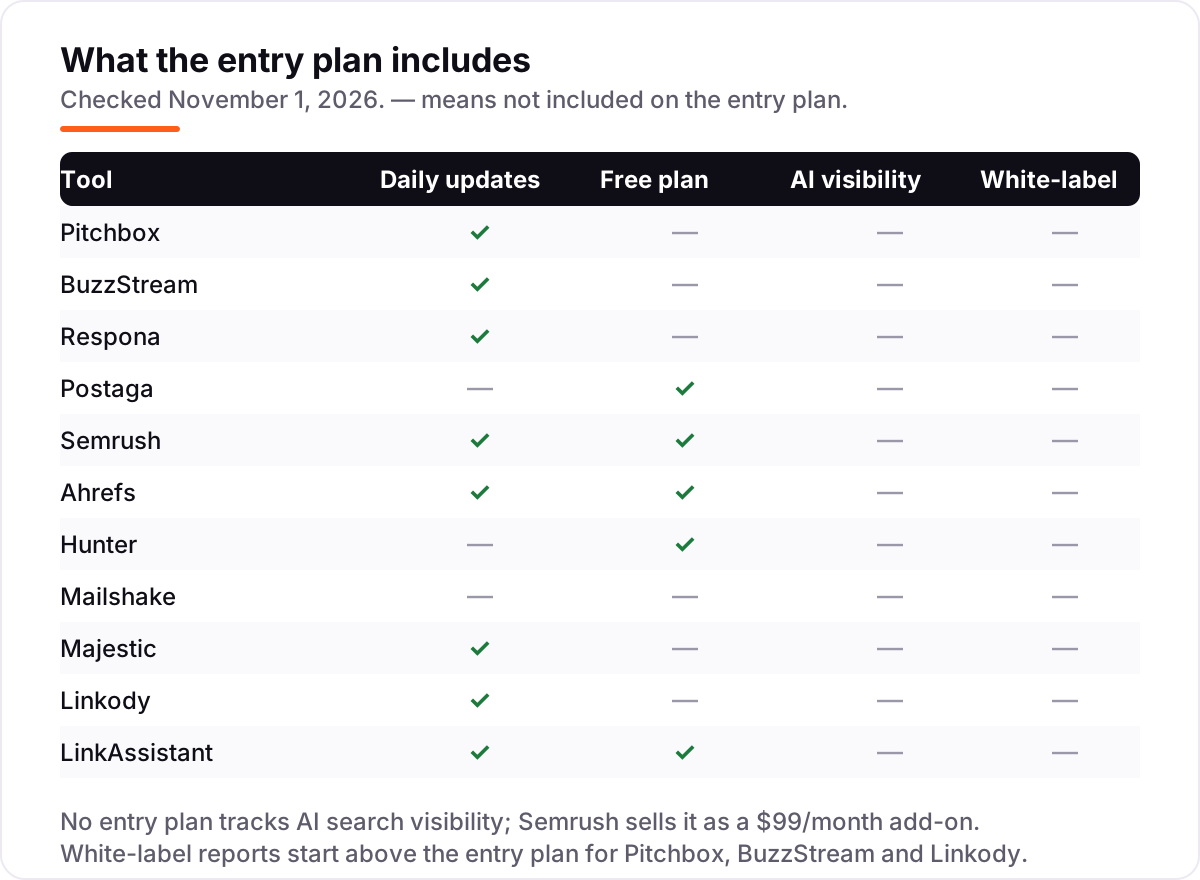
- AI visibility tracking is a separate toolkit from $99/month per domain, not included in the SEO plan

Ahrefs
Best for: SEOs who already use Ahrefs and need Link Intersect prospect lists
Ahrefs is the prospecting source behind most of the outreach in this list. Link Intersect shows which sites link to your competitors but not to you, and Content Explorer finds pages worth pitching, all backed by one of the largest backlink indexes and a 110-billion-keyword database. Starter costs $29 a month, the cheapest paid entry here, and the free plan for verified site owners covers basic Site Explorer and Site Audit.
What Ahrefs does not do is send anything: there is no outreach module, so every prospect it finds still needs a sending tool like Pitchbox, BuzzStream or Hunter. Starter also covers only 50 tracked keywords with capped report credits, and there is no free trial. Use Ahrefs to find the targets and a dedicated tool to pitch them — that two-tool stack is how most link builders work.
What we like
- Link Intersect shows who links to competitors but not to you — the fastest way to build a prospect list
- One of the largest backlink indexes, with a 110-billion-keyword database behind the research
- Starter at $29/month is the cheapest paid entry in this list
Watch out for
- Ahrefs finds prospects but sends no outreach — you still need a sending tool
- Starter covers only 50 tracked keywords and caps report credits, so heavy prospecting needs Lite at $129/month
- No free trial, and no AI visibility on Starter

Hunter
Best for: Solo SEOs and small teams that need verified contact emails for outreach
Hunter is the contact layer that outreach tools depend on. Domain Search lists the emails behind a prospect's site, the Verifier checks them at half a credit each, and Sequences sends the pitch with follow-ups from the same login — all on one shared credit pool, with unlimited team members on every plan. The free plan covers 50 credits a month, enough to test a real campaign before paying.
Starter costs $49 a month billed monthly, or $34 billed annually, for 2,000 credits and three connected email accounts. The limitation is the credit math: finding plus verifying a contact costs 1.5 credits, so 2,000 credits cover roughly 1,300 verified contacts a month, and credits do not roll over. Hunter also finds contacts; it does not discover link prospects, so pair it with Ahrefs or Semrush for the list itself.
What we like
- Domain Search, Email Finder and Verifier share one credit pool, and you only pay when an email is found
- Free plan includes 50 credits a month and Sequences with 500 recipients, so you can test real outreach
- Unlimited team members on every plan, with AI Writing Assistant from Starter
Watch out for
- 2,000 credits on Starter disappear fast once verification at 0.5 credit each enters the picture
- It finds contacts and sends sequences, but it does not discover link prospects for you
- Credits reset monthly and do not roll over

Mailshake
Best for: Small teams that want simple automated sequences with warmup included
Mailshake keeps outreach simple: automated sequences, A/B testing and lead tracking in a short plan list, with unlimited email warmup and verification on every plan — two features other tools charge extra for. Starter costs $29 per user a month for 1,500 sends, Email Outreach at $49 removes the send cap and adds a second email account, and Sales Engagement at $99 adds LinkedIn automation and a power dialer.
The trade-offs are the per-user billing and the lack of a trial: a five-person team pays five times the headline price, and you pay before you test anything. Starter also allows only one email address per user, so inbox rotation needs extra seats. Mailshake fits small teams that want straightforward sequences with deliverability handled; agencies sending at volume will outgrow the per-user math.
What we like
- Unlimited warmup and email verification on every plan, with A/B testing and automated sequences from Starter
- Simple per-user pricing: $29 a month for 1,500 sends, with unlimited sends from Email Outreach at $49
- Sales Engagement adds LinkedIn automation and a power dialer for multichannel outreach
Watch out for
- No free trial — you pay before you test the tool
- Starter allows one email address per user, so inbox rotation needs extra seats
- Priced per user, so a five-person team pays five times the headline price

Majestic
Best for: Link specialists who judge prospects by Trust Flow before pitching
Majestic is the quality check before you pitch. Trust Flow scores how trustworthy a prospect's links look, Citation Flow scores how many there are, and Topical Trust Flow scores relevance to your topic — three numbers that separate a good prospect from a busy one. The Fresh Index updates daily, Lite covers 1 million analysis units, and Pro adds the Historic Index for looking back years.
Lite costs $49.99 a month, or $41.67 billed annually, with prices excluding VAT and the page showing pounds to UK visitors. Majestic does no outreach at all — no prospecting lists, no sequences, no sending — so it belongs next to a sending tool, not instead of one. There is also no free plan, only a 7-day money-back guarantee. Use it to qualify the list; use Pitchbox or BuzzStream to work it.
What we like
- Trust Flow and Citation Flow separate link quality from volume, and Topical Trust Flow scores relevance by topic
- Historic Index on Pro reaches back years, which helps with due diligence and penalty recovery
- Fresh Index updates daily, with 1 million analysis units on Lite
Watch out for
- Backlinks only — no prospecting lists, no outreach and no email sending
- The pricing page localizes currency, so US buyers should confirm the dollar figure at checkout
- 7-day money-back guarantee instead of a free trial, and no free plan

Linkody
Best for: Freelancers and small agencies that need daily checks on links already earned
Linkody watches the links you already earned. It checks every tracked link daily and emails you when one is gained, lost or switched to nofollow, with anchor text, follow status and Moz metrics on one dashboard. A built-in disavow file generator turns a bad link into a disavow entry without a spreadsheet, and the Webmaster plan covers two domains and 500 links for $14.90 a month.
That is the job: Linkody finds no new prospects and sends no outreach, so it pairs with a prospecting tool rather than replacing one. The Webmaster limits are tight for agencies — two domains and 500 links — and its index is smaller than Ahrefs or Majestic. For a freelancer who wants to know the day a link disappears, it is the cheapest safety net in this list, with a 30-day free trial.
What we like
- Checks every tracked link daily and emails you when a link is gained, lost or switched to nofollow
- Built-in disavow file generator, plus anchor text, follow status and Moz metrics on one dashboard
- Cheapest paid entry here at $14.90 a month, with a 30-day free trial
Watch out for
- Monitoring only — it finds no new prospects and sends no outreach
- Webmaster covers 2 domains and 500 links, so multi-client work needs a higher tier
- Smaller index and fewer metrics than Ahrefs or Majestic

LinkAssistant
Best for: Solo SEOs who want desktop link prospecting and outreach for one annual fee
LinkAssistant is the desktop option for link builders who would rather pay once a year than monthly. It offers more than ten prospecting methods — guest posting, broken link building, competitor backlink gaps, reviews and directories — then finds the contacts, sends templated outreach and verifies each live link from one workflow. The free version covers the basics, and the Professional license costs $99 a year.
The trade-off is the desktop format: there is no cloud workspace, so teams cannot share campaigns in a browser, and the link data comes from its own index rather than Ahrefs or Majestic. White-label reports and scheduled reporting need the Enterprise tier. For a solo SEO who works from one machine and wants the full workflow for one annual fee, it is the cheapest complete option here.
What we like
- 10+ prospecting methods, from guest posting and broken link building to competitor backlink gaps
- Finds contacts, sends templated outreach and verifies live links in one desktop workflow
- One annual license with no monthly per-seat billing, and a free version to test
Watch out for
- Desktop software, not cloud — no shared team workspace or browser-based access
- Link data comes from its own index, not Ahrefs or Majestic, so metrics differ from the suites
- White-label reports and scheduled reporting need the Enterprise tier
What the best auto link building tools actually do
The best auto link building tools take the repetitive half of link building off your hands: finding sites worth pitching, finding the right contact, sending the pitch, following up, and checking whether the link went live. You still decide the strategy — which pages to promote, which sites are worth a link, and what the pitch says — but the tool does the searching, sending and tracking that eats hours every week.
Automation matters because link building is a volume job done well or not at all. One good link rarely moves a ranking; a steady flow of relevant links does, and that flow needs dozens of pitches a week. LinkAssistant, one of the desktop tools in this list, says its index crawls 7.1 billion pages a day to feed its prospecting — the scale of data behind even a small link building campaign is far beyond manual searching.
The tools in this list split by the job they automate: outreach platforms that send the emails, suites that find the prospects, contact finders that supply the emails, and monitors that watch the links after they go live. Most buyers need two of those jobs covered, not one, which is why the cheapest useful setup is usually a pair of tools rather than a single subscription.
Free options first
If you are building links for one site, start free. Hunter finds and verifies 50 emails a month at no cost, Postaga's free plan sends 500 emails a month across three campaigns, Ahrefs Free covers basic backlink research for verified site owners, and LinkAssistant has a free version for testing its prospecting. That combination finds prospects, finds contacts and sends pitches without spending anything.
The free tiers cap out fast — Hunter's 50 credits cover roughly 33 verified contacts, and Postaga's free plan stops at 50 opportunity searches — but they are honest products, not demos. Upgrade when the campaign volume passes the limit, not before. For anything client-facing, skip the free tier: the reporting and white-label features start on the paid plans.
Outreach platforms, suites and monitoring tools
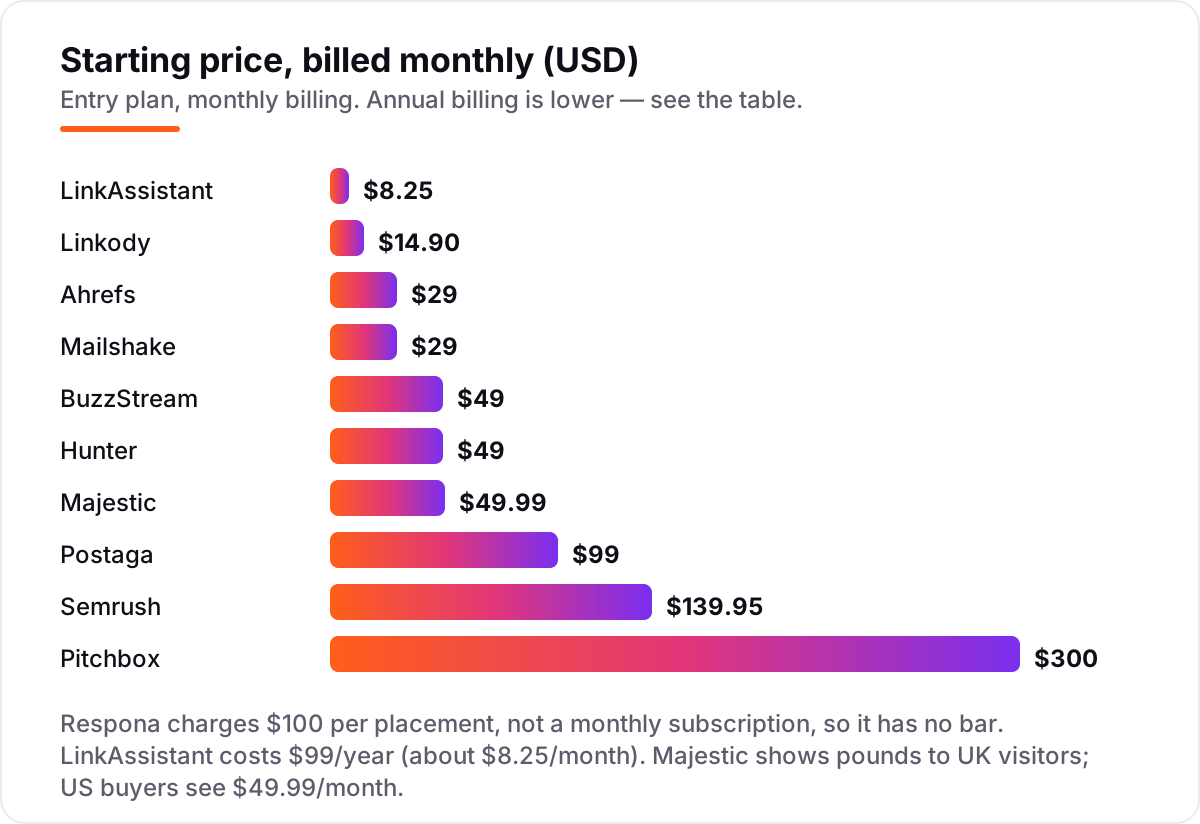
The 11 tools in this list fall into four groups. The outreach platforms — Pitchbox, BuzzStream, Postaga and Mailshake — run the campaigns: prospect lists, sequences, follow-ups and replies in one place. Pitchbox is the deepest and the priciest; Postaga is the most automated at the lowest price; BuzzStream is the cheapest CRM; Mailshake is the simplest sender.
The suites and research tools — Semrush, Ahrefs and Majestic — find the prospects and judge them. Semrush also sends the outreach; Ahrefs and Majestic do not, so they pair with a sending tool. Hunter supplies the contact emails the other tools need. Linkody and LinkAssistant close the loop: Linkody watches the links you already earned, and LinkAssistant runs the whole workflow from one desktop for a single annual fee.
Managed placements vs do-it-yourself outreach
The biggest confusion in this category is the difference between software and a service. Pitchbox, BuzzStream and the rest sell software: you run the campaigns, you write the pitches, you follow up. Respona now sells a service: its team does the content, outreach and publishing, and you pay per placement that goes live. The two are priced differently for a reason — software costs $29 to $300 a month, while ten Authority placements from Respona cost $2,400 a month before discounts.
The service route also carries a rule the software route does not: a paid placement is a paid link, and Google's spam policies require paid links to carry sponsored or nofollow attributes. Earned outreach links do not carry that requirement, because nothing was paid for them. If you buy placements, insist on the attribute and on pre-approving the domains; if you run software, the links you earn are yours to keep without that condition.
Choose the service when you have budget and no outreach capacity, and the software when you have the time. Either way, the links still need to come from real sites with real traffic — a placement on a site nobody reads is worth little, however it was bought. Our guide to white-hat link building for local businesses explains how to judge a prospect before you pitch it, and our monthly SEO service runs this whole workflow for clients who would rather not run the tools themselves.
Quick comparison: tool type by need
| Buyer | Best pick | Why |
|---|---|---|
| Solo site owner, first campaign | Postaga or Hunter | AI-built campaigns from $84/month billed annually; Hunter free for 50 credits |
| Small agency, best all-in-one | Pitchbox | Deepest workflow, 2,000 emails a month from $210/month billed annually |
| Small team on a budget | BuzzStream | Cheapest outreach CRM at $49/month, with link monitoring |
| No time for outreach | Respona | Finished placements from $100 each, guaranteed to go live |
| Already paying for a suite | Semrush or Ahrefs | Prospecting and outreach inside the login you own |
| Need contact emails only | Hunter | Find and verify emails from $34/month billed annually |
| Sending simple sequences | Mailshake | Sequences with warmup from $25/user/month billed annually |
| Judging prospect quality | Majestic | Trust Flow and Topical Trust Flow from $41.67/month billed annually |
| Watching links already earned | Linkody | Daily checks from $11.20/month billed annually |
| One annual fee, desktop workflow | LinkAssistant | Full workflow for $99 a year |
How to choose: a short decision path
- Decide who does the work. No time on your team means Respona's managed placements; time but no budget means Postaga or Hunter; a team doing outreach daily means Pitchbox or BuzzStream.
- Count your monthly pitches. Under 100 pitches a month, the free plans and the $29–$49 tools cover you. Over 1,000, the per-email and per-contact limits decide — Pitchbox Pro covers 2,000 emails and Postaga Pro covers 10,000.
- Check what you already pay for. If Semrush or Ahrefs is already in the budget, use its prospecting before buying another tool — Ahrefs Link Intersect alone replaces a prospecting subscription.
- Verify the sending limits. Starter plans hide the real cost: BuzzStream Starter has no bulk send, Mailshake Starter allows one email address, and Hunter Starter covers about 1,300 verified contacts. Read the limits, not the headline price.
- Try before you pay. Every tool here has a free plan or a free trial except Mailshake and Respona's managed service. Run a real campaign for two weeks and check the reply rate before committing. Before you publish new pages to earn links to, run your titles through the free SERP snippet preview tool — it shows exactly how the title and description will look in Google.
Mistakes to avoid
- Comparing monthly prices without checking billing. The annual price is usually 15–30% lower, and Pitchbox requires a one-year commitment on every plan even when you pay monthly.
- Ignoring what counts as a unit. Some tools charge per email sent, others per contact found, others per placement. A 1,000-prospect campaign costs very different amounts depending on which unit the tool counts.
- Paying for a suite when you only need outreach. A dedicated outreach tool at $49–$99 a month beats a $139.95 suite you only use for links.
- Trusting a directory price. Pitchbox still shows $165 on G2's pricing tile and in several roundups, but the vendor's own pricing page lists Pro at $300 a month ($210 billed annually); BuzzStream still shows $24 in older roundups, but the live price is $49. Always check the vendor's own page.
- Buying placements without the attribute. Paid links must carry sponsored or nofollow attributes under Google's spam policies — a placement without them puts the linking site and yours at risk.
How we chose
We checked each vendor's own pricing page on November 1, 2026 and recorded the starting price exactly as shown, including the annual-billing figure where the page lists one. Two exceptions: Linkody's pricing page returned a 404 on both paths we tried, and LinkAssistant publishes no pricing page, so their prices come from third-party reads of their pricing pages and are flagged in the sources. Ratings come from G2 pages opened the same day; four tools have no rating because G2 rate-limited our requests or has no page for them. We ranked the tools by fit for the most common buyer — a small agency or in-house team running outreach every week — not by brand size. No vendor paid for a place in this list, and none of the links here are affiliate links.
What to do next
Start with the decision path above: decide who does the work, count your pitches, and check what you already pay for. Then take the free plan or trial of your top pick and run a real campaign for two weeks — if the replies come in and the links go live, you have your tool. If you'd rather have this set up and read for you, request a free SEO + AI visibility audit and get a ranked fix list in 2 business days.
Rather not run the tools yourself?
Tools show you the data. SerpAstra turns it into higher rankings, more map-pack calls and citations in AI answers.
Get a free SEO + AI visibility audit→Sources we checked (18)
- Pitchbox pricing — pitchbox.com/pricing (checked November 1, 2026)
- Pitchbox on G2 — 4.7/5, 99 reviews (checked November 1, 2026)
- BuzzStream pricing — buzzstream.com/pricing (checked November 1, 2026)
- BuzzStream on G2 — 4.2/5, 165 reviews (checked November 1, 2026)
- Respona pricing — respona.com/pricing (checked November 1, 2026)
- Respona on G2 — 4.8/5, 203 reviews (checked November 1, 2026)
- Postaga pricing — postaga.com/pricing (checked November 1, 2026)
- Semrush pricing — semrush.com/prices (checked November 1, 2026)
- Semrush on G2 — 4.4/5, 4,304 reviews (checked November 1, 2026)
- Ahrefs pricing — ahrefs.com/pricing (checked November 1, 2026)
- Ahrefs on G2 — 4.5/5, 723 reviews (checked November 1, 2026)
- Hunter pricing — hunter.io/pricing (checked November 1, 2026)
- Mailshake pricing — mailshake.com/pricing (checked November 1, 2026)
- Majestic pricing — majestic.com/plans-pricing (checked November 1, 2026)
- Majestic on G2 — 4.3/5, 73 reviews (checked November 1, 2026)
- Linkody pricing — $14.90/month Webmaster per third-party reads of the pricing page; linkody.com/pricing returned 404 on November 1, 2026
- Linkody on G2 — 4.5/5, 4 reviews (checked November 1, 2026)
- LinkAssistant product page — link-assistant.com/linkassistant (checked November 1, 2026; $99/year standalone price per third-party directories, no pricing page published)
Shamim
Founder of SerpAstra
A full-stack SEO and digital marketer who spends most days on Local SEO for dental practices, AI search visibility and lead generation.
Frequently asked questions
What is the best auto link building tool in 2026?
Pitchbox is the best all-in-one outreach platform: prospecting, sequences, inbox and link monitoring in one place from $300/month ($210 billed annually). BuzzStream is the best value at $49/month for small teams. If you have no time for outreach at all, Respona sells finished placements from $100 each instead of software.
How much does auto link building software cost?
Entry prices run from $14.90 a month for Linkody monitoring to $300 a month for Pitchbox. Most buyers land between $29 and $99 a month: Ahrefs Starter at $29, Mailshake at $29 per user, BuzzStream and Hunter at $49, Postaga at $99. Remember that Respona charges per placement, not per month, so it sits outside that range.
Is there a free auto link building tool?
Yes, with limits. Hunter finds and verifies 50 emails a month free, Postaga has a free plan with 500 emails a month, Ahrefs Free covers basic backlink research for verified site owners, and LinkAssistant has a free version. Free plans work for one small site; once you run regular campaigns, a paid plan is cheaper than the time manual outreach costs.
Is buying links through a tool safe?
It depends on how the link is bought. Earned outreach links are safe: you pitch, the editor chooses to link. Paid placements are different — Google's spam policies require paid links to carry sponsored or nofollow attributes, and a placement without them puts both sites at risk. If you buy placements, insist on the attribute and on pre-approving every domain.
Pitchbox vs BuzzStream: which should I choose?
Choose Pitchbox if outreach is a daily job across several clients: it has the deepest workflow, AI personalization and 2,000 emails a month on Pro. Choose BuzzStream if you are a small team on a budget: it costs $49 a month and keeps every relationship in one CRM. Note that BuzzStream Starter has no bulk send, so real campaigns need Growth at $174 a month.
Do I still need Ahrefs or Semrush if I buy an outreach tool?
Usually yes, for the prospecting. Outreach tools send the pitches, but Ahrefs Link Intersect and Semrush's prospecting find the sites worth pitching in the first place. The common stack is Ahrefs or Semrush for the list, Hunter for the contact emails, and Pitchbox or BuzzStream for the sending. One tool rarely covers all three jobs well.
What should I check before paying for a link building tool?
Four things: whether the plan requires a commitment — Pitchbox locks you in for a year on every plan; what counts as a unit, since some tools charge per email, others per contact and Respona per placement; whether the entry plan includes bulk sending and follow-ups, which BuzzStream Starter does not; and whether a free plan or trial lets you run a real campaign first.
Free SEO and AI visibility audit
Find out what is holding your rankings back
Send us your site. Within 2 business days you get a written audit, an AI visibility check and a short fix list ranked by impact. Free, with no contract attached.
Request my free audit→Related guides
 Link BuildingWhite-hat link building for local businessesPractical, white-hat ways for local businesses to earn links: partners, community work, local media and useful content, plus the tactics to avoid.Read guide →
 StrategyHow many backlinks do I need to rank?How many backlinks do you need to rank? No fixed number — count referring domains against the pages beating you. Ranges by difficulty, and a safe pace.Read guide →
 On-PageInternal linking: a practical guide for small sitesHow to plan internal links on a small website: which pages to link, how to write anchor text, and a simple routine that keeps your site easy to crawl.Read guide →