
12 Best Content Analytics Software in 2026, Compared
Compare the 12 best content analytics software options for 2026, with real starting prices, free plans and G2 ratings — from free GA4 to Parse.ly.
 Shamim Mia, Founder, SerpAstraLast verified November 2, 202610 min read
We compare pricing pages, documentation and public reviews. We never accept payment for rankings.

Key takeaways
- Google Analytics 4 is free and fits most sites, Parse.ly and Chartbeat are the publisher picks (both custom quote), and HubSpot Content Hub starts at $20/month per seat for teams already on HubSpot.
- The single most important buying factor is whether the tool measures reading, not just visits: engaged time and scroll depth tell you which content works.
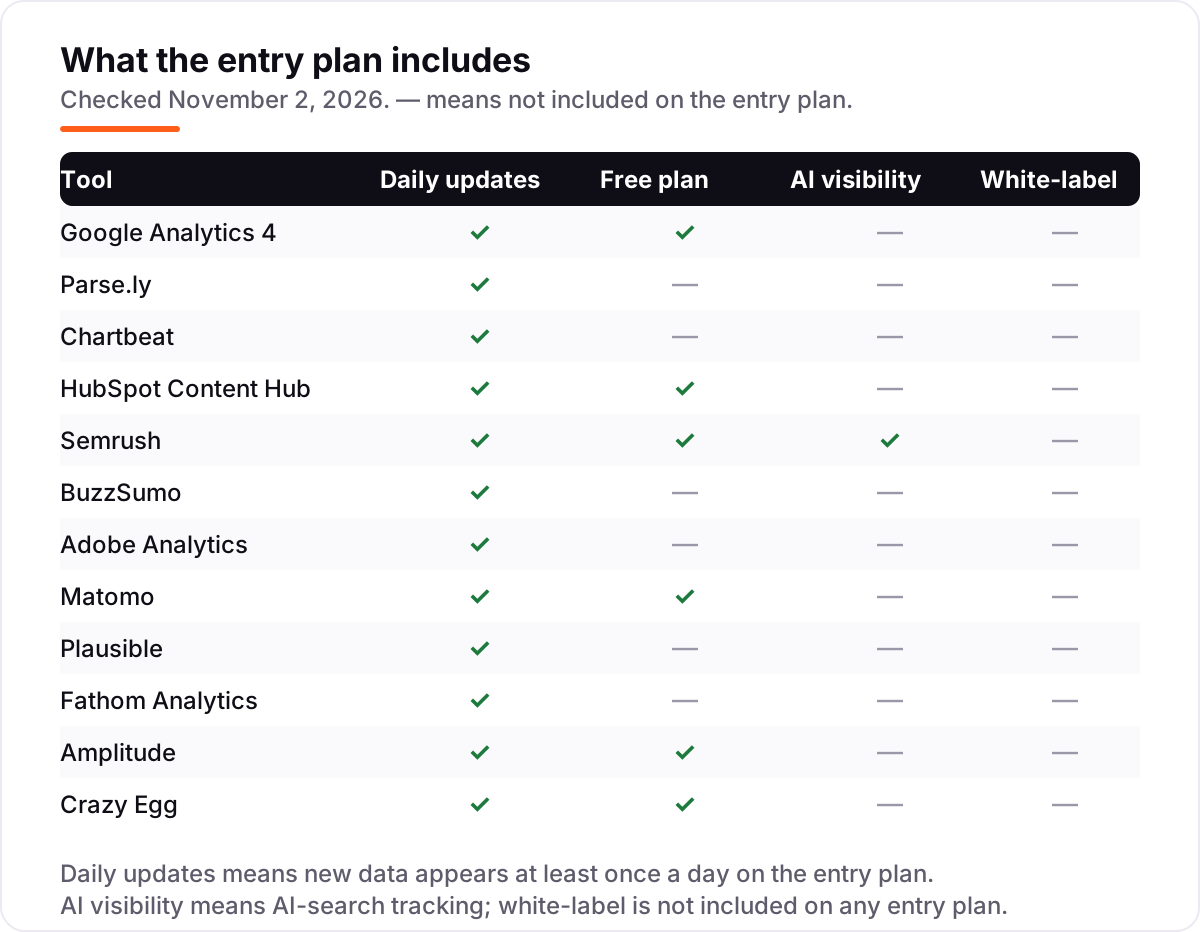
- Free plans exist — GA4 is free, Matomo self-hosted is free, and Semrush, HubSpot, Amplitude and Crazy Egg all have free tiers — but paid plans start at $9–$29 a month.
- Every price below was checked on the vendor's own pricing page on November 2, 2026, except Parse.ly, Chartbeat and Adobe Analytics, which publish no prices. Ratings are G2, checked the same day.
On this page
Quick comparison
| Tool | Best for | Starting price | Free plan |
|---|---|---|---|
| Google Analytics 4 | Publishers and content teams who want free page-level performance data for any site | Free | Yes (free) |
| Parse.ly | Newsrooms and publishers whose editors need real-time readership by author, section and story | Custom quote | No (demo only) |
| Chartbeat | Newsrooms that run a homepage and need to see which stories are trending right now | Custom quote | No (demo only) |
| HubSpot Content Hub | Marketing teams already on HubSpot who want content, CMS and analytics in one login | $20/mo per seat | Yes (free tools) |
| Semrush | SEO and content teams that want content analytics plus keyword research and audits in one suite | $117.33/mo (annual) | Yes (10 keywords) |
| BuzzSumo | Content marketers who plan topics by what already earns shares and links | $199/mo (annual) | No (30-day trial) |
| Adobe Analytics | Enterprise teams that need deep journey and attribution analysis across web and app | Custom quote | No (demo only) |
| Matomo | Privacy-focused teams that want to own their analytics data outright | €29/mo (Cloud) | Yes (self-hosted) |
| Plausible | Small sites and bloggers who want a simple privacy-friendly dashboard | $9/mo | No (30-day trial) |
| Fathom Analytics | Small businesses that want fast privacy-first analytics without a learning curve | $15/mo | No (7-day trial) |
| Amplitude | Product and growth teams that want content tied to user behavior and retention | $49/mo (annual) | Yes (Starter) |
| Crazy Egg | Marketers who want to see exactly where readers click, scroll and stop on a page | $29/mo (annual) | Yes (free plan) |
Make one of these tools?
We re-check this list every quarter. Send a correction, request a review, or ask about a clearly labeled sponsored spot.
Request a listingThe best content analytics software

Google Analytics 4
Best for: Publishers and content teams who want free page-level performance data for any site
Google Analytics 4 is the free starting point for almost every content team, and for most small publishers it is all you need. The standard version costs nothing and reports which pages, topics and authors earn traffic, how long readers stay, and which pieces lead to sign-ups or sales. Real-time reports show what is being read right now, and the Search Console link adds the queries behind the visits.
The trade-off is the learning curve. GA4's interface hides the good reports behind setup work — events, conversions and explorations take time to configure — and large sites hit data sampling. It also measures sessions and pageviews, not true reading time, so pair it with a scroll-depth setup or a dedicated content tool if engaged time is the number you report on.
What we like
- Free with no pageview cap on the standard version, and real-time reports show what is being read right now
- Content reports show which pages, topics and authors earn traffic and lead to sign-ups or sales
- Links to Search Console, BigQuery and Looker Studio for queries, raw data and custom dashboards
Watch out for
- The interface is hard to learn, and events, conversions and explorations take setup work
- Large sites hit data sampling, and there is no true engaged-time metric like Parse.ly's
- EU privacy rules need consent setup before data collection is compliant

Parse.ly
Best for: Newsrooms and publishers whose editors need real-time readership by author, section and story
Parse.ly is built for newsrooms, and it shows in the metric that matters: engaged time. Editors see which stories are being read right now, which authors and sections perform, and how each article contributes to subscriptions or other conversions. The dashboard is made for a newsroom wall — simple, live, and readable at a glance — and the API feeds the data into the CMS.
There is no published price and no free plan, so every deal starts with a sales call, and small publishers will find that a real barrier. Parse.ly also tracks article views rather than clicks inside a page, so galleries and interactive pieces need Google Analytics alongside it. Buy it when editorial decisions run on live readership data, not when you only need monthly traffic totals.
What we like
- Real-time dashboard shows engaged time per article, not just pageviews
- Author and section reporting shows which writers and topics perform
- Conversion tracking ties stories to subscriptions and other goals
- API feeds readership data into the CMS and other tools
Watch out for
- No published price and no free plan — every deal starts with a sales call
- Tracks article views, not clicks inside a page, so galleries need Google Analytics alongside it

Chartbeat
Best for: Newsrooms that run a homepage and need to see which stories are trending right now
Chartbeat is the real-time companion for publishers that live on the homepage. Its dashboard shows which stories are trending up or down, how far readers scroll, and which headlines hold attention after the click. The Heads Up Display puts that data inside the CMS, so editors can act on it without opening another tab.
Like Parse.ly, Chartbeat publishes no pricing and offers no free plan — expect a sales conversation and an enterprise-style contract. Reviewers also note that historical analysis and exports are less flexible than the live views. Chartbeat is the pick when the homepage is the product and the newsroom needs to react in minutes, not when you want a cheap monthly subscription.
What we like
- Real-time dashboard and Heads Up Display show trending stories inside the CMS
- Engaged-time metric shows reading, not just clicks
- Headline testing optimizes for engagement after the click
- Historical dashboard tracks content performance over the long term
Watch out for
- No published pricing and no free plan — expect a sales process
- Reviewers note historical analysis and data exports are less flexible than the live views

HubSpot Content Hub
Best for: Marketing teams already on HubSpot who want content, CMS and analytics in one login
HubSpot Content Hub is the content analytics choice for teams already living in HubSpot. Content performance sits next to the CMS, the CRM and email data, so you can see which blog posts and landing pages actually produce contacts and deals — not just pageviews. The AI writer drafts and remixes content, and built-in SEO recommendations flag what each page is missing.
The catch is the per-seat price. Starter is $20 a seat a month, and a growing team pays for every seat; the features most marketers want, like advanced reporting, sit on Professional at $500 a month. New customers get a promo — $7 a month billed annually, or $10 billed monthly — but it ends after the first term. Pick it if HubSpot is already your home; skip it if you only need analytics.
What we like
- Content analytics sit next to the CMS, CRM and email data, so posts tie to contacts and deals
- AI writer drafts and remixes content, with SEO recommendations on every page
- Free Content Hub tools let small teams start before paying
Watch out for
- Per-seat pricing climbs fast as the team grows — five seats cost $100 a month
- Advanced reporting needs Professional at $500 a month
- The new-customer promo ends after the first term, then the standard $20 applies

Semrush
Best for: SEO and content teams that want content analytics plus keyword research and audits in one suite
Semrush pairs content analytics with the deepest research data in this list. The SEO plan tracks 500 keywords daily, audits the site, and shows which pages win traffic and why, drawing on a keyword database Semrush puts at more than 27 billion keywords. Its AI search tracking shows how your brand appears in AI answers, and Position Tracking goes down to ZIP-code level.
It is also the priciest way into this list among the suites, and the extras add up: additional users start at $45 a month and white-label reports are paid add-ons. The free account tracks only 10 keywords, so it is a trial in practice. Buy Semrush when you need the research behind the content numbers, not when you only want to know which posts get read.
What we like
- Content Analytics shows which pages win traffic and why, on a 27-billion-plus keyword database
- 500 keywords tracked daily on the entry SEO plan, down to ZIP-code level
- AI search tracking shows brand mentions in AI answers
Watch out for
- Highest entry price among the suites here, and extra users start at $45 a month
- White-label reports are paid add-ons, not included
- The free account caps at 10 tracked keywords, so meaningful tracking needs a paid plan

BuzzSumo
Best for: Content marketers who plan topics by what already earns shares and links
BuzzSumo answers the question before you write: what is already earning shares, links and engagement on this topic? The Content Analyzer breaks down the top-performing content by format, network and length, Trending Feeds surface stories as they take off, and the Question Analyzer finds the exact questions readers are asking. After publishing, the same data shows how your piece compares.
The entry price is the honest problem: $199 a month puts it out of reach for solo creators, and the best features — full historical data, backlink analysis and advanced filters — need the higher tiers. Data is also thin for new or niche topics. BuzzSumo earns its price for teams that publish every day and plan by evidence; occasional bloggers will get less from it.
What we like
- Content Analyzer shows engagement by topic, format and network before you write
- Trending Feeds surface stories as they take off
- Question Analyzer finds the exact questions readers are asking
Watch out for
- $199 a month is steep for solo creators and small teams
- Full historical data, backlink analysis and advanced filters need higher tiers
- Data is thin for new or niche topics

Adobe Analytics
Best for: Enterprise teams that need deep journey and attribution analysis across web and app
Adobe Analytics is the enterprise depth pick. Analysis Workspace lets analysts segment any audience, attribute conversions across channels, and follow the full journey from first article to purchase. It handles web and app data at large volumes, and it plugs into Adobe Target and the rest of Experience Cloud for testing and personalization.
Everything about it is enterprise-sized, including the effort. G2 reviewers report implementations taking around three months, and the interface rewards trained analysts more than casual users. There is no published price and no self-serve plan — pricing is quoted on server calls. Choose Adobe when you have an analytics team and a large site; smaller teams will move faster on a lighter tool.
What we like
- Analysis Workspace with segmentation and attribution across web and app
- Real-time reporting that handles large volumes
- Integrates with Adobe Target and the rest of Experience Cloud
Watch out for
- Steep learning curve — G2 reviewers report implementations taking around three months
- Enterprise pricing with no self-serve option and no published price
- Interface feels dated next to newer tools, per reviewers

Matomo
Best for: Privacy-focused teams that want to own their analytics data outright
Matomo is the privacy-first alternative for teams that want to own their analytics outright. You host it yourself for free, or pay €29 a month for Cloud Business with 50,000 hits, and either way there is no data sampling — the numbers are the real numbers. Heatmaps, session recordings and funnels come included, and the platform is open source in 46 languages.
The trade-offs are the ones G2 reviewers name most: the interface is less intuitive than Google Analytics, and self-hosted setup needs technical work. Cloud pricing climbs with traffic, and reviewers say the entry Cloud tier limits how many websites you can add. Pick Matomo when data ownership and privacy law compliance decide the purchase; pick GA4 when you want zero setup.
What we like
- No data sampling and full data ownership, hosted by you or in Matomo Cloud
- Heatmaps, session recordings and funnels included
- GDPR-friendly with no cookie banner needed in many setups, and open source in 46 languages
Watch out for
- Cloud pricing climbs with traffic, and reviewers say the entry tier limits website count
- Self-hosted setup needs technical work
- Interface is less intuitive than Google Analytics, per G2 reviewers

Plausible
Best for: Small sites and bloggers who want a simple privacy-friendly dashboard
Plausible is the simplest analytics tool in this list. A lightweight script tracks the essentials — pages, referrers, goals, funnels and revenue — on one clean dashboard, with no cookie banner and no personal data collected. Setup takes minutes, Google Analytics data imports in one click, and the $9 Starter plan covers 10,000 pageviews on one site.
What you give up is depth. There are no heatmaps or session recordings, so you cannot see how readers move inside a page, and the G2 rating rests on only 6 reviews — the thinnest evidence in this list. The price also rises with traffic, so a fast-growing site should check the next tier before committing. Plausible fits bloggers and small sites that want honest numbers without the noise.
What we like
- Lightweight script that does not slow pages down
- Single-page dashboard with goals, funnels and revenue attribution
- GDPR compliant with no cookie banner, and one-click GA4 import
Watch out for
- G2 rating rests on only 6 reviews — the thinnest evidence in this list
- No heatmaps or session recordings for in-page behavior
- Price rises with traffic beyond 10,000 pageviews

Fathom Analytics
Best for: Small businesses that want fast privacy-first analytics without a learning curve
Fathom is built around one idea: analytics should be fast to read. The whole dashboard fits on a single page — traffic, sources, campaigns, events and conversions — and it loads instantly. It is privacy-first, compliant with GDPR, CCPA and ePrivacy, and the $15 plan covers 100,000 pageviews across 50 sites, which suits small businesses with several properties.
The limits match the simplicity. There is no free plan, only a 7-day trial, and no custom dashboards or deep custom reports for teams that want to slice data their own way. Event setup can also be fiddly for non-technical users, per G2 reviewers. Fathom is the right pick when you want a quick daily check on several sites, not a research platform.
What we like
- One-page dashboard that loads fast and is easy to read
- Privacy-first with GDPR, CCPA and ePrivacy compliance
- Event tracking and campaign UTM reports included; support praised by G2 reviewers
Watch out for
- No free plan — only a 7-day trial
- No custom dashboards or deep custom reports
- Event setup is fiddly for non-technical users, per reviewers

Amplitude
Best for: Product and growth teams that want content tied to user behavior and retention
Amplitude connects content to what users do next. Funnels, retention charts and behavioral cohorts show whether readers who find an article come back, sign up or buy — the question pageviews alone cannot answer. Session replay and experimentation sit in the same login, and the free Starter plan lets small teams start without paying. Plus covers 300,000 monthly tracked users or 25 million events.
The pricing needs care. The $49 rate is for annual billing, and once you outgrow Plus the Growth and Enterprise tiers are custom quote with event-based pricing. Reviewers also warn that keeping the event taxonomy clean takes ongoing work, and a messy setup produces messy answers. Amplitude fits product and growth teams; pure publishers will get more from Parse.ly or Chartbeat.
What we like
- Funnels, retention and cohorts show what content keeps users coming back
- Session replay and experimentation in the same login
- Free Starter plan, and Plus covers 300,000 MTUs or 25 million events
Watch out for
- $49 is the annual-billing rate; Growth and Enterprise are custom quote
- Keeping the event taxonomy clean takes ongoing work
- Costs climb fast with event volume, so budgets need monitoring

Crazy Egg
Best for: Marketers who want to see exactly where readers click, scroll and stop on a page
Crazy Egg shows what readers actually do on the page. Heatmaps reveal where they click, scrollmaps show how far they read, and session recordings catch the exact moment they hesitate or leave. A/B testing is built in, so you can test a new headline or layout against the old one without another tool. There is even a free plan covering heatmaps, surveys and basic analytics.
Crazy Egg is a behavior tool, not a traffic suite: it will not replace Google Analytics for sessions, sources and conversions, and its reporting is page-level rather than site-wide. The $29 Starter rate is also for annual billing. Use Crazy Egg alongside a traffic tool — GA4 for the numbers, Crazy Egg for the why behind them — and it earns its place fast.
What we like
- Heatmaps, scrollmaps and confetti reports show exactly how readers use a page
- Session recordings catch the moment readers hesitate or leave
- A/B testing built in, with a free plan for the basics
Watch out for
- $29 is the annual-billing rate
- Page-level behavior reporting, not a full traffic suite like GA4
- Recording limits and snapshot management need attention on larger sites
This list is for content marketers and publishers who want to know which articles, videos and pages actually earn attention — not just visits. We ranked the 12 best content analytics software options by fit for that buyer, with every starting price checked on November 2, 2026.
How to choose the best content analytics software
Six factors decide the right tool. Work through them before you compare prices.
- Measure reading, not just visits. Engaged time, scroll depth and shares tell you whether content worked; pageviews alone do not.
- Decide real-time or daily. Newsrooms need live dashboards; most marketers are fine with data that refreshes once a day.
- Check the free tier first. GA4 and Matomo self-hosted cost nothing, and several paid tools have free plans worth testing before you pay.
- Mind the privacy law. If your audience is in the EU, a GDPR-friendly tool without a cookie banner saves consent headaches.
- Count what the price covers. Per-seat, per-pageview and per-event pricing all punish different kinds of growth — check yours.
- Ask where the data goes. A tool that feeds your CMS, CRM or reporting stack is worth more than a prettier dashboard alone.
Quick comparison: tool type by need
| Buyer | Best pick | Why |
|---|---|---|
| Solo blogger or small site | Google Analytics 4 or Plausible | Free, or $9/month for a simple privacy-first dashboard |
| Newsroom or publisher | Parse.ly or Chartbeat | Real-time engaged time by story, author and section |
| Team already on HubSpot | HubSpot Content Hub | Content, CMS and CRM analytics in one login from $20/seat |
| SEO and content in one suite | Semrush | Content analytics plus keyword research and audits |
| Planning by what earns shares | BuzzSumo | Engagement data by topic, format and network |
| Privacy-first team | Matomo, Plausible or Fathom | Own your data or skip cookies, from free to $15/month |
| Product and growth team | Amplitude | Content tied to retention, funnels and cohorts |
| Seeing how readers use a page | Crazy Egg | Heatmaps and recordings from $29/month |
| Enterprise scale | Adobe Analytics | Journeys and attribution across web and app |
Content analytics software pricing: what you will actually pay
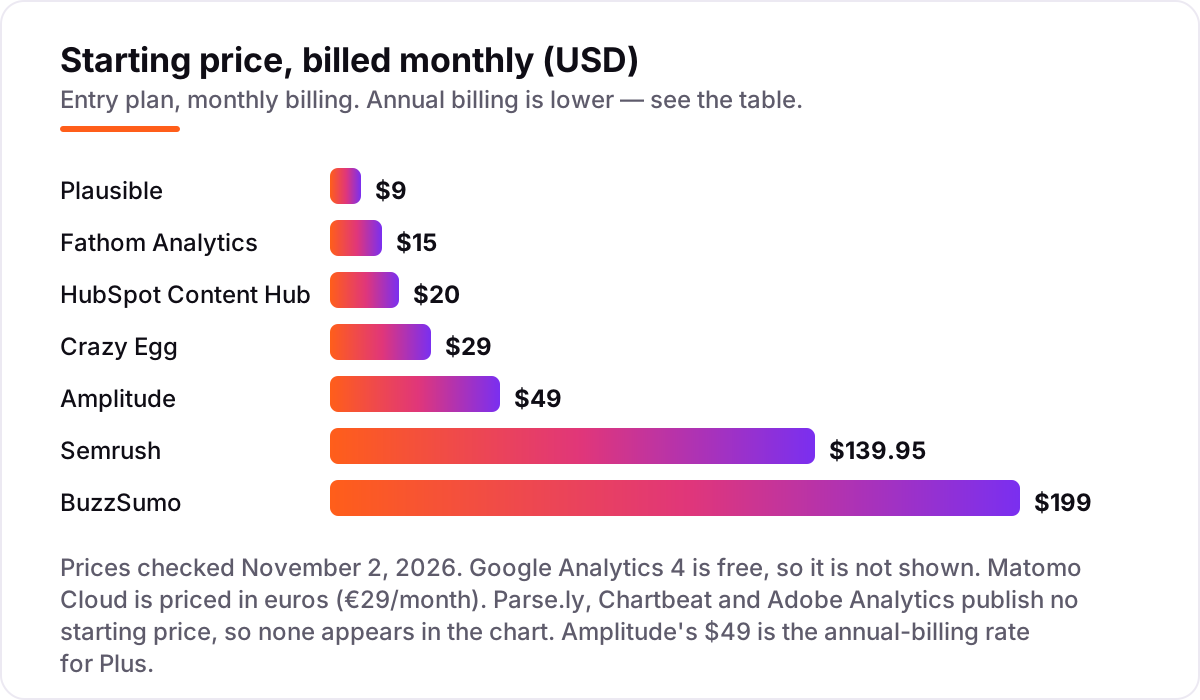
Take a five-person content team. On HubSpot Content Hub Starter, five seats at $20 a month cost $100 a month, or $1,200 a year. The same team on BuzzSumo Content Creation pays $239 a month billed monthly — $2,868 a year — or $199 a month on annual billing, $2,388 a year, saving $480. A solo blogger pays far less: Plausible Starter is $9 a month ($108 a year) and Fathom is $15 a month ($180 a year, or $150 on annual billing). The free tiers are worth trying first: GA4 costs nothing, and the trials on Plausible, Fathom and BuzzSumo run 7 to 30 days. The publisher tools and Adobe Analytics do not publish prices, so budget for a sales conversation, not a checkout page. And remember the billing trap: Amplitude's $49 and Crazy Egg's $29 are annual-billing rates, so the monthly-billed price is higher.
Before you pay for any of these, check the content itself with the free readability checker — clear writing is the cheapest analytics win there is.
Content analytics vs web analytics: know the difference
Web analytics counts visits: sessions, pageviews, bounce rate, sources. Content analytics asks what happened during the visit: how long someone actually read, how far they scrolled, whether they shared it, and whether the article led to a sign-up or a sale. Google Analytics 4 does both at a basic level — it reports pageviews and, with setup, engaged time — but its heart is still traffic. Parse.ly and Chartbeat are built the other way round: their core metric is engaged time per story, and pageviews are secondary. Product analytics, like Amplitude, goes one step further and ties content to behavior after the visit: retention, funnels and feature use. The confusion costs money when teams buy a web analytics tool and expect reading insight, or buy a publisher tool and expect keyword research. Pick the category that matches the question you ask most: how many people came, how well they read, or what they did next.
How we chose
We checked every price on November 2, 2026, on the vendor's own pricing page or, where a page would not load, on the vendor-supplied pricing shown on the tool's G2 profile. Parse.ly, Chartbeat and Adobe Analytics publish no prices, so they are listed as custom quote. Amplitude's $49 is the annual-billing rate for its Plus plan; Matomo's Cloud Business costs €29 a month in euros, and the same tier lists at $29 in US dollars. Ratings are G2, read on each product's G2 reviews page on November 2, 2026. We ranked the tools by fit for the most common buyer — a content marketer or publisher who wants to know which content earns attention — not by brand size. No vendor paid for a place in this list.
What to do next
Start with the free option that fits: GA4 for any site, or a trial of Plausible or Fathom if you want a simpler dashboard. Run it for two weeks, then check which five articles earned the most engaged time — that shortlist is your next content plan. If the numbers show pages that rank but do not convert, our SEO audit service finds why. Once your tools are in place, find out what's holding your rankings back.
Your stack only works if people find you
SerpAstra fixes what keeps your site off page one and makes it easy for AI assistants to recommend.
Get a free audit→Sources we checked (24)
- Google Analytics 4 pricing — marketingplatform.google.com/about/analytics (checked November 2, 2026)
- Google Analytics on G2 — 4.5/5, 6,885 reviews (checked November 2, 2026)
- Parse.ly — parsely.com (no pricing published; checked November 2, 2026)
- Parse.ly on G2 — 4.4/5, 149 reviews (checked November 2, 2026)
- Chartbeat — chartbeat.com (no pricing published; checked November 2, 2026)
- Chartbeat on G2 — 4.4/5, 69 reviews (checked November 2, 2026)
- HubSpot Content Hub pricing — hubspot.com/pricing/content (checked November 2, 2026)
- HubSpot Content Hub on G2 — 4.5/5, 2,205 reviews (checked November 2, 2026)
- Semrush pricing — semrush.com/prices (checked November 2, 2026)
- Semrush on G2 — 4.4/5, 4,304 reviews (checked November 2, 2026)
- BuzzSumo pricing — vendor-supplied Content Creation $199 on G2 (checked November 2, 2026)
- BuzzSumo on G2 — 4.5/5, 107 reviews (checked November 2, 2026)
- Adobe Analytics — business.adobe.com (no pricing published; checked November 2, 2026)
- Adobe Analytics on G2 — 4.2/5, 1,255 reviews (checked November 2, 2026)
- Matomo pricing — matomo.org blog, Cloud Business €29/month (checked November 2, 2026)
- Matomo on G2 — 4.2/5, 96 reviews (checked November 2, 2026)
- Plausible pricing — plausible.io/pricing (checked November 2, 2026)
- Plausible on G2 — 4.9/5, 6 reviews (checked November 2, 2026)
- Fathom pricing — usefathom.com/pricing (checked November 2, 2026)
- Fathom on G2 — 4.7/5, 22 reviews (checked November 2, 2026)
- Amplitude pricing — amplitude.com/pricing (checked November 2, 2026)
- Amplitude on G2 — 4.4/5, 3,092 reviews (checked November 2, 2026)
- Crazy Egg pricing — crazyegg.com blog, Starter $29/month (checked November 2, 2026)
- Crazy Egg on G2 — 4.2/5, 128 reviews (checked November 2, 2026)
Shamim
Founder of SerpAstra
A full-stack SEO and digital marketer who spends most days on Local SEO for dental practices, AI search visibility and lead generation.
Frequently asked questions
What is the best content analytics software in 2026?
Google Analytics 4 is the best starting point for most sites because it is free and covers traffic, sources and conversions. Publishers should look at Parse.ly or Chartbeat for real-time engaged time, and teams already on HubSpot get the most from Content Hub. The right pick depends on whether you need traffic totals, reading quality or revenue attribution.
How much does content analytics software cost?
Entry prices run from free to $199 a month. GA4 is free, Plausible starts at $9, Fathom at $15 and Crazy Egg at $29 a month on annual billing. Semrush starts at $139.95 and BuzzSumo at $199 a month. Parse.ly, Chartbeat and Adobe Analytics publish no prices, so expect a custom quote and a sales conversation.
Is there a free content analytics tool?
Yes. Google Analytics 4 is free with no pageview cap, Matomo is free when you host it yourself, and Semrush, HubSpot, Amplitude and Crazy Egg all have free plans or free tiers. Free plans work for a single small site, but they cap pageviews, keywords or features, so growing sites usually move to a paid plan within months.
What is the difference between content analytics and web analytics?
Web analytics counts visits: sessions, pageviews and sources. Content analytics measures what happened during the visit: engaged time, scroll depth, shares and whether the article led to a sign-up or sale. GA4 does both at a basic level, while Parse.ly and Chartbeat specialize in reading quality and Amplitude ties content to later user behavior.
Can content analytics show which articles make money?
Yes, once goals are set up. GA4, HubSpot and Matomo track which articles lead to sign-ups, purchases or other conversions, and Parse.ly ties stories to subscriptions. The key is defining the conversion first — a sale, a trial or an email signup — then reading the reports by article instead of by traffic total.
Do I need Parse.ly or Chartbeat if I already use Google Analytics?
Only if your newsroom makes decisions in real time. GA4 tells you what happened yesterday; Parse.ly and Chartbeat show what is being read right now, by story and author, inside the CMS. For most blogs and business sites, GA4 plus a heatmap tool like Crazy Egg covers the same ground for far less money.
Free SEO and AI visibility audit
Find out what is holding your rankings back
Send us your site. Within 2 business days you get a written audit, an AI visibility check and a short fix list ranked by impact. Free, with no contract attached.
Request my free audit→Related guides
 SEO & AI Search10 Best Content Optimization Tools for Beginners in 2026, Compared10 best content optimization tools for beginners compared on price, free plans and live scoring, with prices checked on each vendor's page November 1, 2026.Read guide →
 StrategyHow to track your Google ranking (and what the numbers actually mean)Track your Google ranking the right way: Search Console, free checkers and rank trackers explained, and what average position and CTR really mean today.Read guide →
 AI SearchBest AI SEO tools in 2026: honest picks by jobBest AI SEO tools in 2026, picked by job: Semrush and Ahrefs for research, Surfer and Clearscope for content, Otterly for AI tracking, with 2026 prices.Read guide →