
10 Best Customer Analytics Software in 2026, Compared
10 best customer analytics software tools compared on price, free plans and fit, from Mixpanel and Amplitude to free GA4, with prices checked November 2, 2026.
 Shamim Mia, Founder, SerpAstraLast verified November 2, 202611 min read
We compare pricing pages, documentation and public reviews. We never accept payment for rankings.

Key takeaways
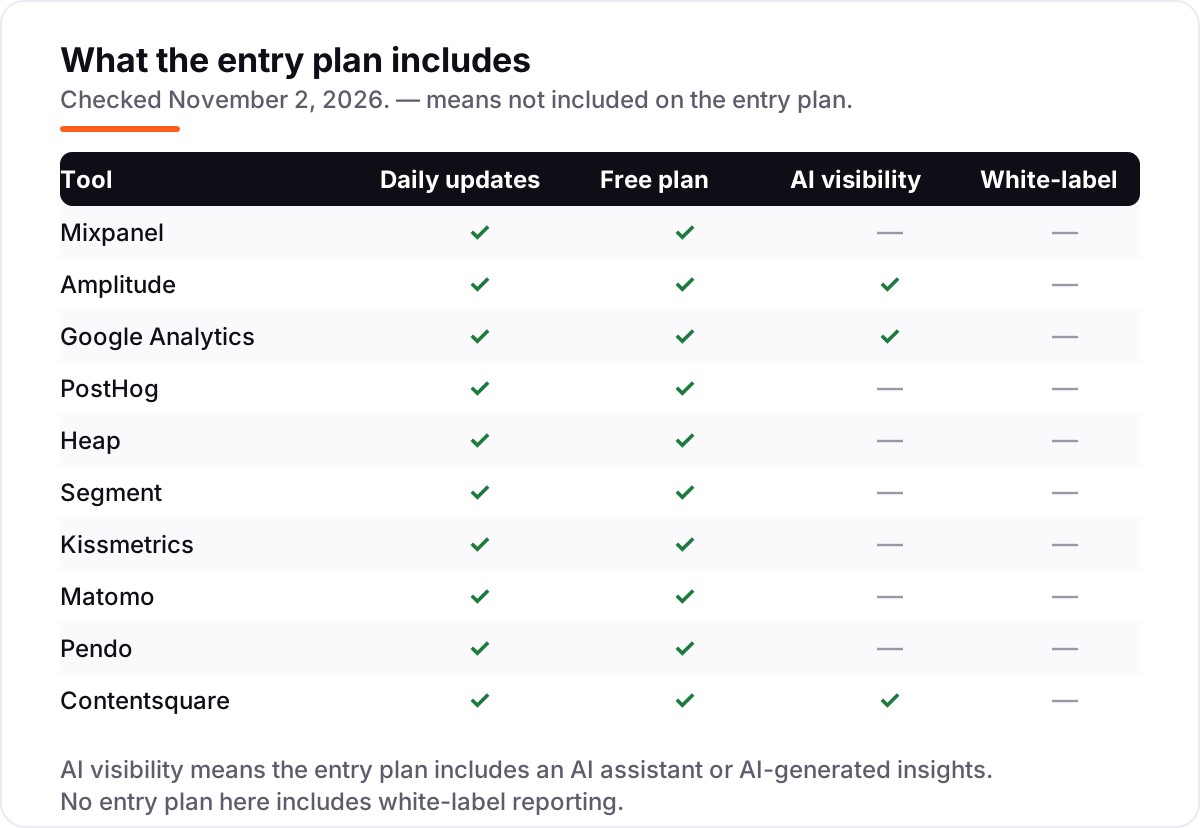
- Mixpanel, Amplitude and Google Analytics are the short-list for most buyers: Mixpanel starts at $0 with 1M free events a month, Amplitude Plus starts at $49 a month billed annually, and GA4 is free.
- The single most important buying factor is the billing unit: events, sessions, users and hits price the same team very differently, so model your own volume before comparing sticker prices.
- Free plans are genuinely usable here: GA4 is free without event limits, Mixpanel and PostHog each give away 1M events a month, and Heap covers 10,000 sessions a month.
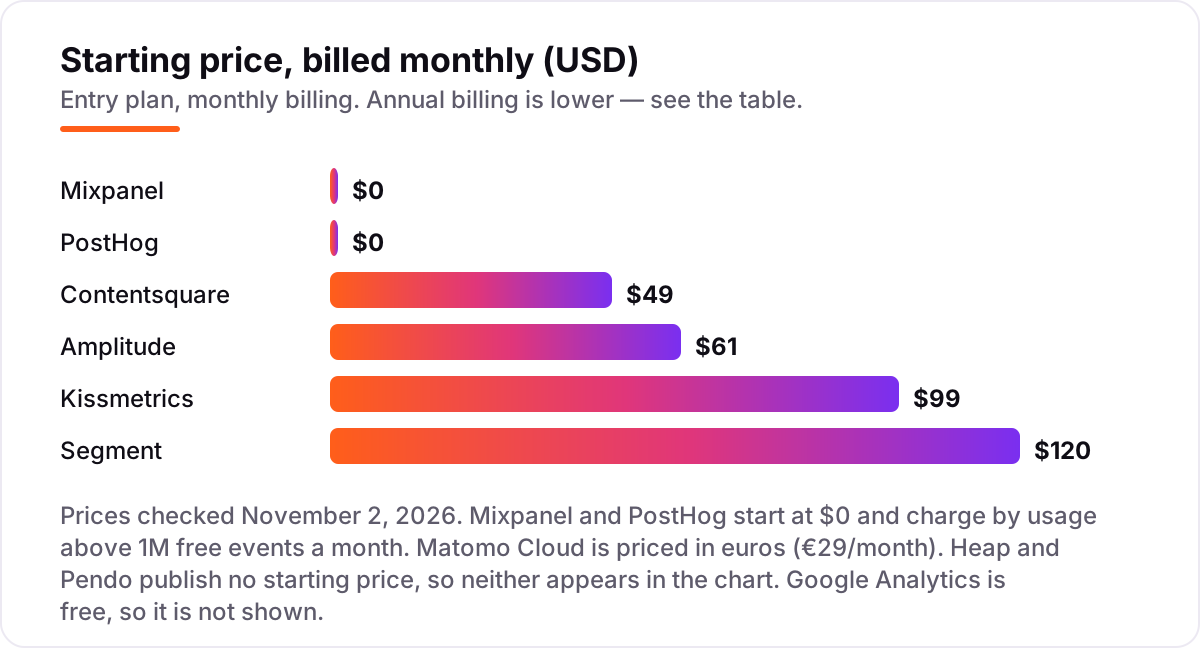
- Heap and Pendo publish no starting price, and Mixpanel and PostHog charge by usage above a free allowance, so the price chart shows only the six tools with a monthly figure.
- Every price below was checked on the vendor's own pricing page on November 2, 2026, except where noted in How we chose. Ratings are G2, with review counts shown.
On this page
Quick comparison
| Tool | Best for | Starting price | Free plan |
|---|---|---|---|
| Mixpanel | Product and growth teams at SaaS startups that want funnels, retention and cohorts without paying until they pass 1M events a month | $0 (usage-based) | Yes (1M events) |
| Amplitude | Product and growth teams that want funnels, retention, experimentation and AI agents in one suite | $49/mo (annual) | Yes (Starter) |
| Google Analytics | Website and app owners who need the free baseline for traffic, sources and key events | Free | Yes (free) |
| PostHog | Engineering-led teams that want analytics, replay, flags and experiments behind one login | $0 (usage-based) | Yes (1M events) |
| Heap | Small product teams that want analytics without writing tracking code first | Custom quote | Yes (10k sessions) |
| Segment | Teams running three or more tools that all need the same clean customer data | $120/mo | Yes (1,000 MTUs) |
| Kissmetrics | Marketers who need to tie campaigns to revenue per person, not just total conversions | $99/mo | Yes (100k events) |
| Matomo | Privacy-conscious teams and regulated industries that want to own their analytics data | €29/mo | Yes (self-hosted) |
| Pendo | Mid-market product teams that want analytics, in-app guides and surveys in one contract | Custom quote | Yes (500 MAUs) |
| Contentsquare | Ecommerce and marketing teams that need to see where customers get stuck and fix the journey | $39/mo (annual) | Yes (200k sessions) |
Make one of these tools?
We re-check this list every quarter. Send a correction, request a review, or ask about a clearly labeled sponsored spot.
Request a listingThe best customer analytics software

Mixpanel
Best for: Product and growth teams at SaaS startups that want funnels, retention and cohorts without paying until they pass 1M events a month
Mixpanel is the default first pick for product teams because the free plan is genuinely usable: 1 million events a month, 10,000 session replays and the core funnels, retention and flow reports. The Growth plan keeps the same first million events free and then charges $0.28 per 1,000 events, so a small product can run for months before the first invoice, and the bill grows with usage.
The catch is that the meter never stops. At 10 million events monthly the list-rate bill is about $2,520, and session replay, feature flags and group analytics can add more, so price the next volume tier before you commit. Mixpanel tracks only the events you instrument yourself — there is no autocapture — so budget engineering time for setup. For a team that knows its events, it is the sharpest tool here.
What we like
- Free plan covers 1M events a month plus 10,000 session replays, with core funnels, retention and flows
- Growth keeps the first 1M events free and then charges $0.28 per 1,000 events, so the bill follows usage, not seats
- Unlimited saved reports and cohorts on Growth, with data modeling, group analytics and multi-touch attribution
Watch out for
- The meter never stops: about $2,520 a month at 10M events on list rates, before replay, flags and group analytics add-ons
- No autocapture — every event needs hand-written tracking code, so setup takes engineering time

Amplitude
Best for: Product and growth teams that want funnels, retention, experimentation and AI agents in one suite
Amplitude is the deepest product analytics suite in this list, and the free Starter plan is the most generous way in: product analytics, session replay, feature flags and web experimentation without paying. Plus starts at $49 a month billed annually and covers up to 300,000 monthly tracked users or 25 million events, adding unlimited analytics, behavioral cohorts and custom audience syncs.
The step up from Plus is the problem: Growth and Enterprise are custom-quoted with no self-serve path, so a team that outgrows Plus negotiates blind. Amplitude also prices on monthly tracked users, which means one active user costs the same whether they trigger one event or five hundred. Buy it when funnels, retention and experimentation need to live in one place; start on the free plan and let usage decide.
What we like
- Free Starter plan includes product analytics, session replay, feature flags and web experimentation
- Plus covers up to 300,000 monthly tracked users or 25M events a month with unlimited analytics and behavioral cohorts
- AI agents are available on every plan, with 500 prompts a month on Starter
Watch out for
- Growth and Enterprise are custom-quoted with no self-serve path, so outgrowing Plus means negotiating blind
- Prices on monthly tracked users, so one active user costs the same whether they trigger one event or five hundred

Google Analytics
Best for: Website and app owners who need the free baseline for traffic, sources and key events
Google Analytics 4 is the only tool here that is free at any traffic level, and it is the baseline every other tool gets compared against: traffic, sources, pages, key events, audiences and explorations, with Search Console and Google Ads built in. For a site that mainly needs to know where visitors come from and what they do, GA4 answers the question for $0.
The limits are retention and depth. Exploration data keeps for 14 months at most, reports sample above 10 million events per query, and there is no session replay, no heatmap and no autocaptured funnel — you define events and audiences yourself. Analytics 360 lifts those limits for a reported starting price around $50,000 a year — an enterprise conversation. Start with GA4, and add a product analytics tool when you need to follow individual users.
What we like
- Free at any traffic level, with traffic, sources, pages, key events, audiences and explorations
- Search Console and Google Ads integrations are built in, with automated insights and predictive metrics
- The default baseline every other tool is compared against, so reports are easy to share
Watch out for
- Exploration data keeps for 14 months at most, and reports sample above 10M events per query
- No session replay, heatmaps or autocaptured funnels — events and audiences must be defined by hand

PostHog
Best for: Engineering-led teams that want analytics, replay, flags and experiments behind one login
PostHog is the all-in-one pick for engineering-led teams: product analytics, session replay, feature flags, experiments, surveys and error tracking behind one login, with the code open source and a self-hosted option. The hosted free tier covers 1 million analytics events, 5,000 session recordings and 1 million feature flag requests every month, and past that you pay per unit with no seats, minimums or contracts.
The billing needs care because each product has its own meter and its own free allowance, so a bill that starts with analytics grows as you switch on replay, flags and surveys — set a billing limit per product on day one. PostHog also charges extra for events from identified users through person profiles. For a small team that wants the whole stack free until it scales, nothing else here matches it.
What we like
- Free tier covers 1M analytics events, 5,000 session recordings and 1M feature flag requests every month
- Analytics, replay, flags, experiments, surveys and error tracking in one platform, with no seats or minimums
- Open source with a self-hosted option, and per-product billing limits to cap spend
Watch out for
- Each product has its own meter and free allowance, so the bill grows as replay, flags and surveys are switched on
- Events from identified users cost extra through person-profile charges on top of the base event rate

Heap
Best for: Small product teams that want analytics without writing tracking code first
Heap is the easiest tool in this list to start with because it captures everything automatically: every click, form submit and pageview is recorded without hand-written tracking code, and you define events retroactively from the data already collected. The free plan covers 10,000 sessions a month with core charts, six months of history and single sign-on, which is enough to prove the concept on a small product.
Paid plans are quote-only — Heap's pricing page lists Free, Growth, Pro and Premier with no numbers, and G2 lists Growth from $3,600 a year — so budgeting starts with a sales conversation. Growth adds the Sense AI assistant, unlimited users and reports and 12 months of history; session replay is a paid add-on on Pro. Choose Heap when autocapture matters more than a published price.
What we like
- Autocapture records every click, form submit and pageview with no hand-written tracking code
- Events can be defined retroactively from data already collected, so no history is lost
- Free plan covers 10,000 sessions a month with core charts, six months of history and single sign-on
Watch out for
- Paid plans are quote-only, so budgeting starts with a sales conversation, not a number
- Session replay is a paid add-on on Pro, and advanced features need the higher tiers

Segment
Best for: Teams running three or more tools that all need the same clean customer data
Segment is the plumbing, not the dashboard: it collects customer data once and routes it to every tool in this list, plus your warehouse, so each destination gets clean, consistent events. The free plan covers 1,000 monthly tracked users and two sources, and Team starts at $120 a month for 10,000 users with unlimited sources, a public API and a million reverse ETL records.
Segment does not analyze anything itself — you still need Mixpanel, Amplitude or GA4 to see the funnels — so it is an extra subscription on top of an analytics tool, not a replacement for one. The Business plan and the full customer data platform are custom-quoted, and Twilio is folding Segment's pages into twilio.com, so expect the buying experience to keep changing. Buy it when three or more tools need the same customer data.
What we like
- Collects customer data once and routes it to 700-plus destinations, so every tool sees the same events
- Team covers 10,000 monthly tracked users with unlimited sources, a public API and 1M reverse ETL records
- Free plan needs no credit card, and Team adds $10 per 1,000 users beyond the allowance
Watch out for
- Segment analyzes nothing itself — an analytics tool on top is still required, so it is an extra subscription
- Business plan and the full customer data platform are custom-quoted, and Segment pages are moving to twilio.com

Kissmetrics
Best for: Marketers who need to tie campaigns to revenue per person, not just total conversions
Kissmetrics is the person-first analytics tool: every event is tied to an individual, so funnels, cohorts and revenue reports answer who converted, not just how many. The free plan covers 100,000 events a month, and Growth starts at $99 a month from 500,000 events, with the per-event price falling as volume grows and 20% off on annual billing.
The trade-off is scope: Kissmetrics is narrower than Mixpanel or Amplitude, with no session replay, no heatmaps and no feature flags, and reviewers note a steeper learning curve and an interface that shows its age. Setup needs developer help to instrument events properly. Pick it when tying marketing campaigns to revenue per person is the job — its Performance report puts campaign, signup and revenue on the same person.
What we like
- Person-based tracking ties every event to an individual, so funnels and cohorts answer who converted
- Free up to 100,000 events a month, and Growth starts at $99 a month from 500,000 events
- Performance report puts campaign, signup and revenue on the same person, by first and last click
Watch out for
- Narrower than Mixpanel or Amplitude: no session replay, heatmaps or feature flags
- Reviewers note a steeper learning curve and an interface that shows its age

Matomo
Best for: Privacy-conscious teams and regulated industries that want to own their analytics data
Matomo is the privacy-first pick and the only open-source tool here: the On-Premise edition is free to self-host with unlimited users and hits, and you choose where the data lives, which suits regulated industries and European buyers. Cloud Business starts at €29 a month for 50,000 hits and adds heatmaps, session recordings, A/B testing and funnels with a 21-day trial.
Self-hosting is the catch — you own the server, the upgrades and the maintenance — and the premium plugins that add funnels and heatmaps cost extra on the free edition. Cloud pricing is shown in euros on the EU page and in dollars on the US page, so the same tier shows as €29 or $29 depending on locale. Choose Matomo when data ownership matters more than a managed setup.
What we like
- On-Premise edition is free and open source, with unlimited users and hits and full data ownership
- Cloud Business adds heatmaps, session recordings, A/B testing and funnels, hosted in Frankfurt
- No cookies needed for basic tracking, which suits privacy rules and consent banners
Watch out for
- Self-hosting means owning the server, upgrades and maintenance on the free edition
- Cloud pricing is shown in euros and varies by region — another October 2026 check listed €29 for the same 50,000 hits

Pendo
Best for: Mid-market product teams that want analytics, in-app guides and surveys in one contract
Pendo combines product analytics with in-app guides and sentiment surveys, so one tool can show where users struggle and then guide them past it. The free plan covers 500 monthly active users with analytics, guides, NPS surveys and roadmaps, and paid plans add session replay from Core and the Pendo Listen feedback module and orchestration at the top tier.
Every paid plan is a custom quote on an annual contract, and procurement data from Vendr puts the median contract at about $48,500 a year — this is an enterprise-priced tool, not a startup one. Features are also gated by tier: session replay needs Core, sentiment needs the top tier. Buy Pendo when guides and analytics must live together; buy Mixpanel or Amplitude when analytics alone is the job.
What we like
- One tool for analytics, in-app guides and sentiment surveys, so insight and action live together
- Free plan covers 500 monthly active users with analytics, guides, NPS surveys and roadmaps
- Leo AI assistant answers product questions in plain language on paid plans
Watch out for
- Every paid plan is a custom quote on an annual contract — procurement data puts the median near $48,500 a year
- Features are gated by tier: session replay needs Core, sentiment surveys need the top tier

Contentsquare
Best for: Ecommerce and marketing teams that need to see where customers get stuck and fix the journey
Contentsquare is the experience analytics pick: session replays, zone-based heatmaps, funnels and frustration signals that show where customers get stuck, plus the Sense AI analyst that explains the friction in plain language. It is also where Hotjar now lives — Hotjar's heatmaps and recordings are sold as Contentsquare Experience Analytics since the merger.
The free plan covers 200,000 sessions a month with one month of data, and Growth starts at $49 a month billed monthly, or $39 billed annually, for 7,000 sessions with 13 months of history — but the price climbs steeply with session volume, reaching $739 a month at 200,000 sessions. Pro and Enterprise are quote-only. Pick it when fixing the journey matters more than counting the events.
What we like
- Zone-based heatmaps, session replay, funnels and frustration signals show where customers get stuck
- Sense AI analyst explains friction in plain language, and Growth adds 13 months of data
- Free plan covers 200,000 sessions a month, and Hotjar now lives here as Experience Analytics
Watch out for
- Price climbs steeply with session volume, reaching $739 a month at 200,000 sessions
- Pro and Enterprise are quote-only, and the price depends on the session allowance chosen
The best customer analytics software shows you what customers actually do — which features they use, where they drop off, and which campaigns bring the buyers, not just the clicks. This list ranks 10 tools for a small or mid-sized team, from free GA4 and usage-priced Mixpanel to quote-only enterprise platforms, with every starting price checked on November 2, 2026.
How to choose the best customer analytics software
- Start with the billing unit. Events, sessions, users and hits price the same team very differently. Count your volume in the vendor's unit before you compare sticker prices — 1M events is not 1M sessions.
- Autocapture or instrumentation. Heap captures everything automatically; Mixpanel and Kissmetrics need every event coded by hand. Autocapture starts faster, but hand-instrumented events are cleaner.
- Size the free tier. GA4 is free without limits, Mixpanel and PostHog give away 1M events a month, and Heap covers 10,000 sessions. If your volume fits the free tier, you may never pay.
- Decide what you need to see. Funnels and retention need a product analytics tool; replays and heatmaps need Contentsquare or Heap; traffic and sources need GA4. One tool rarely covers all three.
- Check data retention. Free plans can cap history at six months, and GA4 explorations keep 14 months. If you need year-on-year comparisons, the retention limit decides the plan.
- Tag campaigns consistently. Analytics can only attribute what it can see — the free UTM builder keeps campaign tags clean so revenue lands on the right source.
Customer analytics software pricing: what you will actually pay
Take a product doing 2 million events a month. On PostHog the first 1M events are free and the second million costs 1M times $0.00005, which is $50 a month. On Mixpanel Growth the first 1M events are free and the second million costs 1,000 times $0.28, which is $280 a month at list rate. Kissmetrics lists $299 a month at 2M events on its own pricing table, and Amplitude Plus is a flat $49 a month billed annually inside its 25M-event allowance. Same volume, four very different bills — the billing unit and the free allowance matter more than the headline price.
The flat-priced tools are simpler to budget: Segment Team is $120 a month for 10,000 monthly tracked users, Contentsquare Growth is $49 a month billed monthly for 7,000 sessions, and Matomo Cloud is €29 a month for 50,000 hits. Heap and Pendo publish no starting price, so their cost is a sales conversation, and Google Analytics is free. Before you commit to any of them, run the numbers at your own volume — and check whether the price you are quoted is monthly or annual billing, because the two can differ by 20%.
Customer analytics vs product analytics: know the difference
Customer analytics covers the whole journey: the ad click, the landing page, the signup, the feature use, the renewal and the support ticket. Product analytics covers only the middle of that journey — what happens inside the product: funnels, retention, feature adoption. Web analytics like GA4 cover the front of it: traffic, sources and pages. None of them is a replacement for the others, which is why teams often run two: GA4 for traffic plus Mixpanel or Amplitude for behavior.
The confusion that costs money is buying a product analytics tool and expecting it to explain marketing, or buying a customer data platform like Segment and expecting it to show a single chart. Segment moves the data; it analyzes nothing. And an experience analytics tool like Contentsquare explains why customers leave, but it will not tell you which campaign brought them. Match the tool to the question: traffic, behavior, journey or plumbing — then buy the one that answers it. If the question is visibility instead — whether AI answers recommend you at all — our AI search optimization service covers that side.
Quick comparison: tool type by need
| Buyer | Best pick | Why |
|---|---|---|
| Small SaaS team, wants to start free | Mixpanel | $0 to 1M events a month, then $0.28 per 1,000 events |
| Needs the deepest suite in one login | Amplitude | Plus $49/month billed annually, experimentation included |
| Website traffic and sources, no budget | Google Analytics | GA4 is free at any traffic level |
| Engineering team, wants the whole stack | PostHog | $0 to 1M events, replay and flags included |
| Hates writing tracking code | Heap | Autocapture, free to 10,000 sessions a month |
| Three or more tools need the same data | Segment | Team $120/month for 10,000 monthly tracked users |
| Marketing tied to revenue per person | Kissmetrics | Growth $99/month, person-based revenue reports |
| Privacy-first or regulated industry | Matomo | Cloud €29/month, self-hosted free, data stays yours |
| Guides plus analytics in one contract | Pendo | Free to 500 MAUs, paid plans custom-quoted |
| Fixing where customers get stuck | Contentsquare | Growth $49/month, replays and heatmaps |
How we chose
We checked each vendor's own pricing page on November 2, 2026 and recorded the starting price exactly as shown. Two prices could not be fetched directly — the Mixpanel and Amplitude pricing pages failed to load in our browser — so those two figures are corroborated from multiple independent sources that quote the vendor pricing pages, and the $61-a-month monthly rate for Amplitude Plus comes from the same sources. The Matomo Cloud price is €29 a month from Matomo's own site; older directories still list €22, which is stale. Heap and Pendo publish no starting price, so no price is shown for them; the Heap $3,600-a-year figure and the Pendo $48,500-a-year median come from G2 and Vendr, not the vendors, and are noted as such where they appear. The Analytics 360 figure of about $50,000 a year is reseller-reported, not published by Google. Ratings are G2, with review counts shown. We ranked the tools by fit for the most common buyer — a small or mid-sized team that wants to understand its customers — not by brand size. No vendor paid for a place in this list, and none of the links here are affiliate links.
What to do next
Start with the decision path above: count your volume in the vendor's billing unit, pick autocapture or instrumentation, and check the free tier against your real numbers. Then take the free plan or trial of your top pick and run it alongside GA4 for two weeks — if the funnels answer questions GA4 cannot, you have your tool. Once your tools are in place, find out what's holding your rankings back.
Your stack only works if people find you
SerpAstra fixes what keeps your site off page one and makes it easy for AI assistants to recommend.
Get a free audit→Sources we checked (20)
- Mixpanel pricing — mixpanel.com/pricing (checked November 2, 2026)
- Mixpanel on G2 — 4.5/5, 1,371 reviews (checked November 2, 2026)
- Amplitude pricing — amplitude.com/pricing (checked November 2, 2026)
- Amplitude on G2 — 4.5/5, 2,977 reviews (checked November 2, 2026)
- Google Analytics — marketingplatform.google.com/about/analytics (checked November 2, 2026)
- Google Analytics on G2 — 4.5/5, 6,863 reviews (checked November 2, 2026)
- PostHog pricing — posthog.com/pricing (checked November 2, 2026)
- PostHog on G2 — 4.5/5, 1,054 reviews (checked November 2, 2026)
- Heap pricing — heap.io/pricing (checked November 2, 2026)
- Heap on G2 — 4.4/5, 1,097 reviews (checked November 2, 2026)
- Segment (Twilio Connections) pricing — twilio.com/en-us/products/connections/pricing (checked November 2, 2026)
- Segment on G2 — 4.5/5, 567 reviews (checked November 2, 2026)
- Kissmetrics pricing — kissmetrics.io/pricing (checked November 2, 2026)
- Kissmetrics on G2 — 4.1/5, 168 reviews (checked November 2, 2026)
- Matomo pricing — matomo.org/pricing (checked November 2, 2026)
- Matomo on G2 — 4.2/5, 96 reviews (checked November 2, 2026)
- Pendo pricing — pendo.io/pricing (checked November 2, 2026)
- Pendo on G2 — 4.4/5, 1,808 reviews (checked November 2, 2026)
- Contentsquare pricing — contentsquare.com/pricing (checked November 2, 2026)
- Contentsquare on G2 — 4.4/5, 641 reviews (checked November 2, 2026)
Shamim
Founder of SerpAstra
A full-stack SEO and digital marketer who spends most days on Local SEO for dental practices, AI search visibility and lead generation.
Frequently asked questions
What is the best customer analytics software in 2026?
Mixpanel is the best starting point for most teams: a free plan with 1M events a month, funnels and retention, and usage pricing from $0. Amplitude suits teams that want the deepest suite with experimentation included, and Google Analytics is the free baseline every site should run. Enterprises that need guides and surveys in one contract should look at Pendo.
How much does customer analytics software cost?
From $0 to about $120 a month at the entry level for tools with a published price. Mixpanel and PostHog start at $0 and charge by usage, Contentsquare Growth starts at $49 a month, Amplitude Plus at $49 billed annually, Kissmetrics at $99 and Segment Team at $120. Heap and Pendo are quote-only, and Google Analytics is free.
Is there a free customer analytics software?
Yes, with limits. Google Analytics 4 is free at any traffic level. Mixpanel and PostHog each give away 1M events a month, Heap covers 10,000 sessions a month, and Amplitude has a free Starter plan. Free plans work for a small site or product; once event or session volume grows past the allowance, a paid plan is cheaper than losing the data.
What is the difference between customer analytics and product analytics?
Customer analytics covers the whole journey — marketing, website, product and support — while product analytics covers only what happens inside the product: funnels, retention and feature use. Web analytics like GA4 cover traffic and sources. Most tools here are product analytics tools used as customer analytics; Segment is the data plumbing that feeds them all.
Mixpanel vs Amplitude: which is better?
Mixpanel is cheaper to start and easier to price: a free plan to 1M events, then $0.28 per 1,000 events, with no seat fees. Amplitude is the deeper suite, with experimentation, feature flags and AI agents on the free Starter plan, but Growth and Enterprise are custom-quoted. Both score 4.5 out of 5 on G2. Pick Mixpanel for cost control, Amplitude for breadth.
Do I need a customer data platform like Segment as well?
Only when three or more tools need the same customer data. Segment collects events once and routes them everywhere, which keeps definitions consistent. With one analytics tool, it is an extra $120 a month for plumbing you do not need. Add it when a second or third destination — a warehouse, an email tool, an ads platform — needs the same events.
What should I check before paying for customer analytics software?
Four things: which unit you are billed on — events, sessions, users or hits — and what your volume is in that unit; how big the free tier is and what happens when you pass it; how long data is kept, since free plans can cap history at six months; and whether the tool captures data automatically or needs every event instrumented by hand.
Free SEO and AI visibility audit
Find out what is holding your rankings back
Send us your site. Within 2 business days you get a written audit, an AI visibility check and a short fix list ranked by impact. Free, with no contract attached.
Request my free audit→Related guides
 StrategyHow to track your Google ranking (and what the numbers actually mean)Track your Google ranking the right way: Search Console, free checkers and rank trackers explained, and what average position and CTR really mean today.Read guide →
 AI SearchBest AI SEO tools in 2026: honest picks by jobBest AI SEO tools in 2026, picked by job: Semrush and Ahrefs for research, Surfer and Clearscope for content, Otterly for AI tracking, with 2026 prices.Read guide →
 SEO & AI Search12 Best Platforms for Accurate AI Search Data in 2026, ComparedThe best platform for accurate AI search data: 12 tools compared on price, prompt coverage and how each proves its numbers. Prices checked October 31, 2026.Read guide →