
10 Best Digital Analytics Software in 2026, Compared
10 best digital analytics software options compared on price, free plans and AI features, with every starting price checked on November 2, 2026.
 Shamim Mia, Founder, SerpAstraLast verified November 2, 202612 min read
We compare pricing pages, documentation and public reviews. We never accept payment for rankings.

Key takeaways
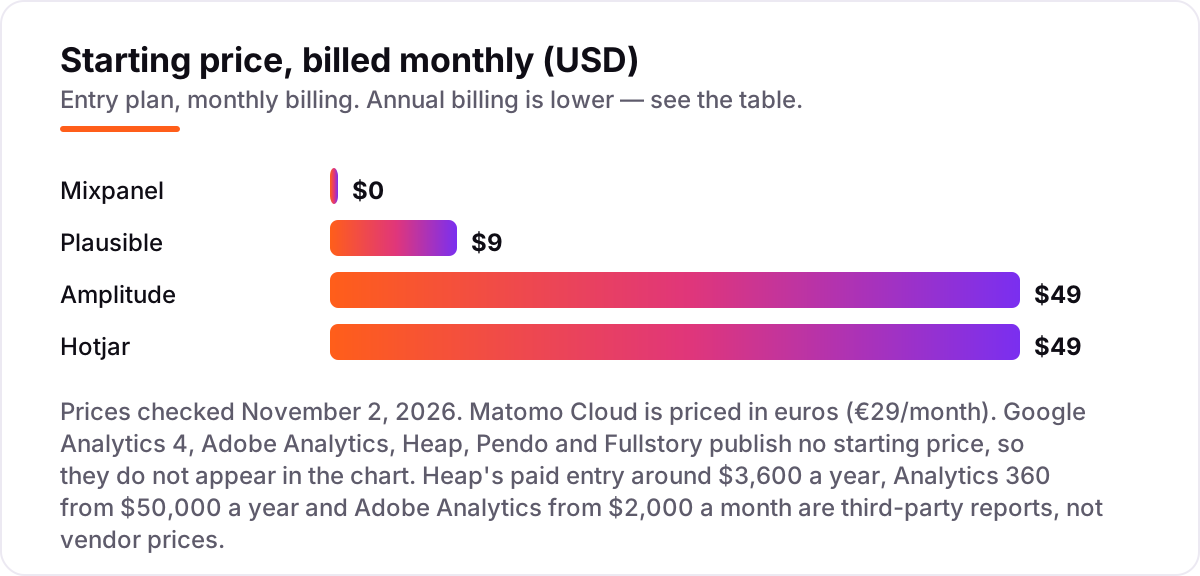
- Google Analytics 4 is free and covers most sites; Mixpanel (free for the first 1M events a month, then from $140 at 1.5M) and Plausible from $9/month are the best starting points for product and privacy-first analytics.
- Five of the ten tools publish no starting price — Adobe Analytics, Heap, Pendo, Fullstory and GA4's 360 tier all need a quote or are free to start.
- The single most important buying factor is the unit you are billed on: events, sessions, pageviews, hits or MAUs change the real cost far more than the headline price.
- Every price below was checked on the vendor's own pricing page on November 2, 2026, except where noted as a third-party report. Ratings are G2, with review counts shown.
On this page
Quick comparison
| Tool | Best for | Starting price | Free plan |
|---|---|---|---|
| Google Analytics 4 | Marketing teams and site owners who want standard web and app analytics free, at any traffic level | Free | Yes (free) |
| Mixpanel | Product teams that want event-based analytics priced on volume, with a generous free tier | $0/mo | Yes (1M events) |
| Amplitude | Product-led SaaS teams that want analytics, experimentation and session replay in one platform | $49/mo (annual) | Yes (2M events) |
| Plausible | Small blogs, content sites and marketing sites that want simple, cookieless analytics | $9/mo | No (30-day trial) |
| Matomo | Teams that need full data ownership and privacy compliance, with the option to self-host free | €29/mo | Yes (self-hosted) |
| Heap | Product teams that want every click captured automatically, with no manual event tagging | Free (10K sessions) | Yes (10K sessions) |
| Pendo | SaaS teams that want product analytics plus in-app guides, surveys and feedback in one platform | Free (Pendo Free) | Yes (Pendo Free) |
| Hotjar | Small sites and CRO teams that want heatmaps and session recordings to see why visitors leave | $39/mo (annual) | Yes (35 sessions/day) |
| Fullstory | Mid-market UX and product teams that need pixel-perfect session replay with frustration signals | Free (30K sessions) | Yes (30K sessions) |
| Adobe Analytics | Enterprises already on Adobe Experience Cloud that need governed, multi-channel analytics at scale | Custom quote | No (demo via sales) |
Make one of these tools?
We re-check this list every quarter. Send a correction, request a review, or ask about a clearly labeled sponsored spot.
Request a listingThe best digital analytics software

Google Analytics 4
Best for: Marketing teams and site owners who want standard web and app analytics free, at any traffic level
Google Analytics 4 is the starting point for most sites because it costs nothing and answers the basic questions: where visitors come from, which pages they read, and which actions they take. The standard property is free at any traffic level, with no seat count and no event cap that triggers an invoice, and it plugs straight into Google Ads, Search Console and Looker Studio.
The limits are real but manageable. Exploration data is sampled once a query needs more than 10 million events, retention caps at 14 months, and the interface takes time to learn. If you outgrow those limits, Analytics 360 raises them on a custom contract reported from $50,000 a year. For most small and mid-size sites, the free tier is the whole answer.
What we like
- Free at any traffic level, with traffic, source, page and key-event reports plus a daily BigQuery export of 1 million events
- Deep integration with Google Ads, Search Console and Looker Studio, so campaign and site data sit in one place
- The default analytics install almost every agency and freelancer already knows, so hiring and handover are easy
Watch out for
- Exploration data is sampled above 10 million events per query on the standard property, and retention caps at 14 months
- Setup and event configuration take real work, and consent banners cost some traffic data in the EU

Mixpanel
Best for: Product teams that want event-based analytics priced on volume, with a generous free tier
Mixpanel is built for product teams who think in events, not pageviews: every signup, upgrade and feature click becomes a funnel, a retention curve or a cohort. The free plan covers 1 million events a month with 10,000 session replays, which is enough for an early-stage product to learn from real usage before paying anything.
Growth starts free for the first 1M events a month, then $140 a month at 1.5M events ($120 billed annually), and adds unlimited saved reports, behavioral cohorts and group analytics. The catch is the meter: the price follows event volume, so a product that grows from 1 million to 10 million events a month will see the bill climb well past the entry figure. Check your event count before you compare prices.
What we like
- Event-based pricing from $0 on Growth, with the first 1M events free and no seat charges
- Funnels, retention, cohorts and flows in one place, with a free plan that covers 1M events a month
- Unlimited saved reports and dashboards on Growth, plus a pricing calculator that shows the bill before you buy
Watch out for
- The bill scales with event volume, so a busy product can jump from $0 to hundreds a month as usage grows
- Session replay and advanced cohorts sit behind higher usage or the Enterprise plan, not the entry Growth plan

Amplitude
Best for: Product-led SaaS teams that want analytics, experimentation and session replay in one platform
Amplitude is the broadest product platform in this list. The free Starter plan covers 2 million events a month and already includes session replay, unlimited feature flags and web experimentation, with unlimited seats on every plan. For a product-led SaaS team, that means analytics, experiments and in-product guides live in one login instead of three subscriptions.
The trade-off is pricing clarity. Amplitude charges by event volume, so Plus starts at $49 a month billed annually for up to 300,000 monthly tracked users, and Growth and Enterprise are custom quotes. Budget by your event volume, and confirm the quote before you commit.
What we like
- Free Starter covers 2M events a month with session replay, unlimited feature flags and web experimentation
- One platform for analytics, experimentation, feature management, guides and surveys, with unlimited seats on every plan
- Behavioral cohorts, custom audiences and an AI agent that answers product questions in plain language
Watch out for
- Paid Growth and Enterprise plans are sales-led with custom event-based pricing, so there is no fixed price to budget against
- The platform is broad enough that small teams can find setup and the 100-plus feature grid slow to learn

Plausible
Best for: Small blogs, content sites and marketing sites that want simple, cookieless analytics
Plausible is the simplest tool in this list, and that is the point. One script under 1KB tracks pageviews, referrals and goals without cookies or personal data, so most sites can drop the consent banner entirely. Starter costs $9 a month for up to 10,000 pageviews, and every plan includes unlimited sites and team members.
What you give up is depth. There is no session replay, no heatmaps and no funnel or revenue attribution on Starter — those live on the Business plan. Plausible is the right pick for a blog, a content site or a marketing site that wants honest traffic numbers without the weight of GA4. It is not a product analytics tool.
What we like
- A sub-1KB tracking script with no cookies and no personal data, so most sites need no consent banner
- Every plan includes unlimited sites and team members with all features, and pricing rises only with pageviews
- Open-source Community Edition can be self-hosted free, and the cloud service is hosted in the EU
Watch out for
- No funnels, journeys or revenue attribution on Starter — those need the Business plan
- Lightweight by design, so there is no session replay, no heatmaps and no deep product analytics

Matomo
Best for: Teams that need full data ownership and privacy compliance, with the option to self-host free
Matomo is the pick when data ownership matters more than convenience. The open-source On-Premise version is free to self-host with unlimited users and hits, and the hosted Cloud version starts at €29 a month for 50,000 hits with data stored in the EU. Either way, you own 100% of the data and there is no sampling.
Cloud Business is the deeper package: heatmaps, session recordings, funnels and A/B testing are included, where the self-hosted version sells them as paid plugins. Watch the billing unit — a hit includes events and downloads as well as pageviews, so a media-heavy site will use its allowance faster than the pageview count suggests.
What we like
- You own 100% of the data, with EU hosting on Cloud and a free open-source version you can run on your own server
- Cloud Business includes heatmaps, session recordings, funnels and A/B testing with no extra plugin fees
- No data sampling, with custom reports, customer journeys and ecommerce tracking built in
Watch out for
- Self-hosting needs a server and maintenance, and performance can suffer on large datasets
- Cloud pricing is per hit, and hits include events and downloads as well as pageviews, so the bill grows faster than pageviews alone

Heap
Best for: Product teams that want every click captured automatically, with no manual event tagging
Heap solves the oldest analytics problem: the event you forgot to tag. One snippet autocaptures every click, tap and form fill, so you can define events retroactively instead of waiting weeks for a new release to collect data. The free plan covers 10,000 sessions a month with core analytics and six months of history.
The catch is the quote. Growth, Pro and Premier are all custom-priced by session volume, and third-party directories put the paid entry around $3,600 a year — a figure Heap itself does not publish. Heap is now part of Contentsquare, so expect the sales conversation to cover the wider Contentsquare suite as well.
What we like
- Autocapture records every click, tap and form fill from one snippet, so events can be defined retroactively
- Free plan covers 10,000 sessions a month with core analytics, SSO and unlimited enrichment sources
- Growth adds the Sense AI assistant, unlimited users and reports, and 12 months of data history
Watch out for
- Paid plans are custom-quoted by session volume, so there is no published price to budget against
- Advanced features such as account analytics, report alerts and session replay need the Pro plan or an add-on

Pendo
Best for: SaaS teams that want product analytics plus in-app guides, surveys and feedback in one platform
Pendo closes the loop most analytics tools leave open: it shows what users do, asks them why, and lets you guide them inside the product — all in one platform. Analytics, in-app guides, surveys, feedback and session replay sit together, and pricing is by monthly active users rather than by application, so one subscription covers every app you track.
The entry point is Pendo Free, a free-forever version for getting started. Paid plans are custom-quoted by MAU volume, with Base covering analytics and guides, Core adding session replay and Plus adding the full journey toolkit. Reviewers warn of a learning curve during setup, so budget implementation time as well as the quote.
What we like
- Analytics, in-app guides, surveys and session replay in one platform, so you can act on what you measure without a second tool
- Pricing is by monthly active users, not by application, so one subscription covers every app you track
- Retroactive analytics with no manual event tagging, plus a free-forever tier to start on
Watch out for
- Paid pricing is custom-quoted by MAU volume, with no published starting price for the Base plan
- Reviewers note a learning curve and manual tagging effort during setup, especially for advanced features

Hotjar
Best for: Small sites and CRO teams that want heatmaps and session recordings to see why visitors leave
Hotjar answers the question GA4 cannot: why did the visitor leave? Heatmaps show where people click and how far they scroll, and session recordings show the hesitation, the rage-click and the abandoned form in full. The free Basic plan includes unlimited heatmaps for up to 35 daily sessions, which is enough for a small site to find its biggest leak.
Growth costs $49 a month billed monthly ($39 billed annually) and adds segmentation, filters and the Events API. One thing to know before you buy: Hotjar is now part of Contentsquare, and hotjar.com/pricing redirects to Contentsquare pricing, so the buying experience is Contentsquare's, not the old standalone Hotjar checkout.
What we like
- Unlimited heatmaps on the free plan, with session recordings that show exactly where visitors hesitate or rage-click
- Surveys and incoming feedback widgets are built in, so qualitative answers sit next to the behavior data
- Setup takes minutes with one snippet, and the free plan is genuinely usable for a small site
Watch out for
- Hotjar is now sold as part of Contentsquare, and its pricing page redirects to Contentsquare pricing
- The free plan covers only 35 daily sessions, and funnels, frustration scores and console tracking need Business or Scale

Fullstory
Best for: Mid-market UX and product teams that need pixel-perfect session replay with frustration signals
Fullstory is the deepest session replay tool in this list. The free plan alone covers 30,000 sessions a month with 12 months of retention and 10 user seats — more than most teams need to evaluate it properly. Paid plans add heatmaps, funnels, journeys and the StoryAI summaries, and the replay is pixel-perfect, with frustration signals flagging the exact moment a user struggles.
The honest limitation is scope. Fullstory is a behavioral data platform, not a standalone analytics suite, so most teams run it next to GA4 or a product analytics tool — a second subscription. And paid pricing is custom-quoted, with third-party reports putting Business contracts from around $10,000 a year.
What we like
- The most generous free plan here: 30,000 sessions a month with 12 months of retention and 10 user seats
- Pixel-perfect session replay with frustration signals, so support and UX teams can watch the exact moment a user struggles
- Autocapture with no manual tagging, plus heatmaps, funnels and journeys on the paid plans
Watch out for
- Paid plans are custom-quoted, with third-party reports putting Business contracts from around $10,000 a year
- Most teams run it alongside a separate product analytics tool, which adds a second subscription to the stack

Adobe Analytics
Best for: Enterprises already on Adobe Experience Cloud that need governed, multi-channel analytics at scale
Adobe Analytics is the enterprise end of this list. It is sold in three tiers — Select, Prime and a top tier — priced by server-call volume on a custom annual contract, with unlimited seats and reports on every tier. If your company already runs Adobe Experience Cloud, the integrations across web, app and offline data are the reason to choose it over a standalone tool.
For everyone else, it is the wrong starting point. There is no published price and no self-serve signup, industry estimates start around $2,000 a month, and implementation is a project with dedicated analysts. Small and mid-size teams get 90% of the value from GA4 plus one of the cheaper tools in this list, at a fraction of the cost.
What we like
- Governed analytics across web, app and offline data, with unlimited seats and reports on every tier
- Deep segmentation, 25 months of data retention, and integrations across the whole Adobe Experience Cloud
- Prime and the top tier add AI features such as anomaly detection, contribution analysis and algorithmic attribution
Watch out for
- No published price — every tier is a custom quote, and industry estimates start around $2,000 a month
- Implementation is a project, not a signup, and the learning curve is steep for teams without dedicated analysts
How to choose the best digital analytics software
The best digital analytics software for your team depends on what you measure and what you are billed for. This list covers web analytics, product analytics and behavior tools, and they bill on different units — events, sessions, pageviews, hits or monthly active users — so the same traffic can cost $9 or $68 a month depending on the meter. Start with the decision below, then check the cards.
- Decide what you measure first. Web traffic and campaigns need a web analytics tool such as GA4, Plausible or Matomo. In-product behavior — signups, feature use, retention — needs a product analytics tool such as Mixpanel, Amplitude, Heap or Pendo.
- Find your billing unit before you compare prices. Mixpanel bills events, Heap and Fullstory bill sessions, Plausible bills pageviews, Matomo bills hits and Pendo bills monthly active users. Count your volume in that unit first.
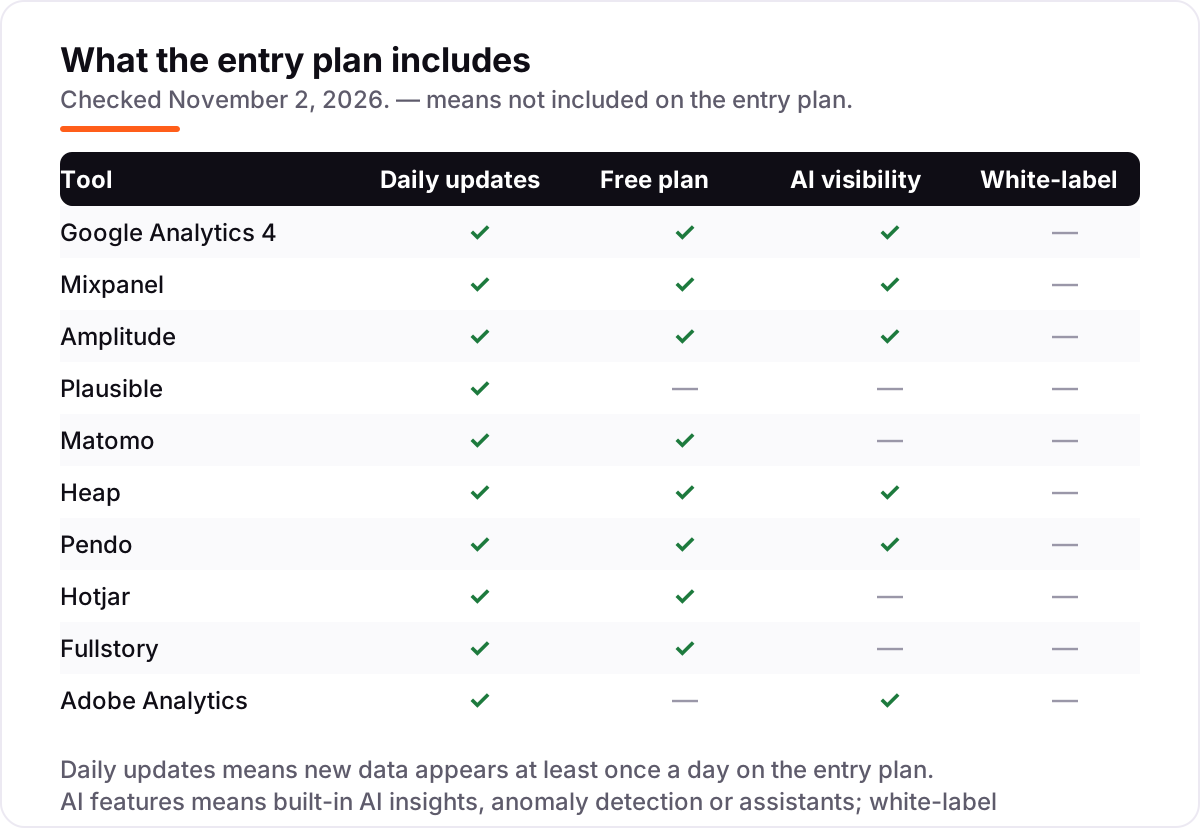
- Start free, then pay for the limit you hit. GA4 is free, and Mixpanel, Amplitude, Heap, Pendo and Fullstory all have free plans. Pay only when you outgrow the free allowance, not before.
- Check the privacy rules for your audience. EU sites need cookieless tracking or EU hosting — Plausible and Matomo are built for that, while GA4 needs consent configuration.
- Match the tool to the question. If you need to know why visitors leave, you need heatmaps and recordings from Hotjar or Fullstory, not another dashboard of pageviews.
- Confirm the quote for anything custom. Six tools in this list publish no starting price. Get the quote in writing, including what happens when you exceed the contracted volume.
Free plans deserve a closer look than the headline suggests. A free plan that covers 1 million events sounds generous until you realize your product already sends 2 million, and a free plan capped at 35 sessions a day stops recording before lunch on a busy site. Check the free allowance against your real volume, not your hoped-for volume, and check how long the free data is kept — Fullstory keeps free data for 12 months, Heap for 6, and several others for much less.
Pricing: what you will actually pay
Take a small marketing site with 8,000 pageviews a month and a product with 500,000 events a month. Plausible Starter at $9 a month covers the site, and Mixpanel's free plan covers the product's first 1 million events — $9 a month total, or $108 a year. When the product passes 1 million events, Mixpanel Growth bills by usage — from $140 a month at 1.5M events ($120 billed annually) — so the same stack costs $149 a month, or $1,788 a year.
Add Contentsquare Growth at $49 a month billed monthly ($39 billed annually) for heatmaps and session recordings, and the stack is $198 a month, or $2,376 a year. A team that needs the deeper session replay of Fullstory or the governed reporting of Adobe Analytics leaves published pricing entirely — Fullstory's paid plans are custom-quoted, with third-party reports putting Business contracts from around $10,000 a year.
The lesson is the meter, not the sticker price. Pageviews, events, sessions, hits and monthly active users are different units, and the same traffic can cost $9 or $198 depending on what you measure. Before you buy, count your volume in the tool's own unit and check what the next tier costs. Tag your campaigns with the free UTM builder first, so the traffic you pay to measure is tagged cleanly from day one.
Annual billing changes the math further. Mixpanel's Growth plan is $120 a month billed annually at 1.5M events ($140 billed monthly), and several tools in this list discount annual payment by roughly two months — but a few, including GA4's free tier and the custom-quoted tools, have no annual option to compare against. Never compare a monthly price from one vendor with an annual price from another; convert both to the same billing period first, and check whether the annual plan locks you into a volume you may outgrow mid-year.
Web analytics vs product analytics: know the difference
The biggest buyer confusion in this category is the split between web analytics and product analytics, and buying the wrong kind is the most expensive mistake you can make. Web analytics tools — GA4, Plausible, Matomo — track visits, pages, traffic sources and campaigns. They answer where visitors came from and which pages they read. Product analytics tools — Mixpanel, Amplitude, Heap, Pendo — track what individual users do inside the product: which features they use, where they drop out of onboarding, and whether they come back next week.
A third group, the behavior tools — Hotjar and Fullstory — show why visitors act the way they do, with heatmaps and session recordings. They do not replace either of the first two groups; they explain them. Most companies end up with one web analytics tool, one product analytics tool, and one behavior tool, which is why the worked example above stacks three tools instead of one.
If you only buy one tool, buy the one that matches your main question. A content site or a local business needs web analytics. A SaaS product needs product analytics. And if your rankings depend on how visitors behave on the page, our AI search optimization service uses exactly this behavior data to find what is holding pages back.
Data ownership is the other split worth understanding before you commit. GA4, Mixpanel, Amplitude, Heap, Pendo, Hotjar, Fullstory and Adobe Analytics all store your data on their own servers, under their own terms. Matomo and Plausible are the exceptions: Matomo can be self-hosted free so the data never leaves your server, and Plausible's cloud service is hosted in the EU with no cookies and no personal data. If your clients or your regulator ask where the data lives, that answer matters more than any feature comparison.
Quick comparison: tool type by need
| Buyer | Best pick | Why |
|---|---|---|
| Marketing site on a budget | Google Analytics 4 | Free at any traffic level, with Ads and Search Console built in |
| Product team, best value | Mixpanel | 1M free events a month, Growth from $0 (paid usage from $140/month at 1.5M events) |
| Product-led SaaS, one platform | Amplitude | Analytics, experimentation and replay free up to 2M events |
| Privacy-first small site | Plausible or Matomo | Cookieless tracking from $9/month, or self-hosted free |
| Seeing why visitors leave | Hotjar or Fullstory | Heatmaps and replay with generous free plans |
| Enterprise on Adobe's stack | Adobe Analytics | Governed multi-channel analytics, custom quote |
How we chose
We checked each vendor's own pricing page on November 2, 2026 and recorded the starting price exactly as shown, including the billing unit it is priced on. Ratings come from G2, with review counts shown, except that Plausible's G2 rating rests on only 4 reviews. Five tools publish no starting price — Adobe Analytics, Heap, Pendo, Fullstory and GA4's 360 tier — and where we quote a figure for one of those, it is a third-party report, not a vendor price: Heap's paid entry around $3,600 a year, Analytics 360 from $50,000 a year and Adobe Analytics from $2,000 a month. Amplitude's Plus plan is $49 a month billed annually ($61 billed monthly) above its free Starter tier. Hotjar is now sold as part of Contentsquare and its pricing page redirects there. We ranked the tools by fit for the most common buyer — a small or mid-size marketing or product team measuring one website and one product — not by brand size. No vendor paid for a place in this list, and none of the links here are affiliate links.
What to do next
Start with the decision path above: decide whether you need web analytics, product analytics or behavior data, count your volume in the tool's own billing unit, and try the free plan of your top pick for two weeks. If the numbers match what you see in Search Console and the reports make sense to a non-analyst, you have your tool. Once your tools are in place, find out what's holding your rankings back.
Your stack only works if people find you
SerpAstra fixes what keeps your site off page one and makes it easy for AI assistants to recommend.
Get a free audit→Sources we checked (20)
- Google Analytics pricing — marketingplatform.google.com/about/analytics (checked November 2, 2026)
- Google Analytics on G2 — 4.5/5, 6,840 reviews (checked November 2, 2026)
- Mixpanel pricing — mixpanel.com/pricing (checked November 2, 2026)
- Mixpanel on G2 — 4.5/5, 1,366 reviews (checked November 2, 2026)
- Amplitude pricing — amplitude.com/pricing (checked November 2, 2026)
- Amplitude on G2 — 4.5/5, 2,929 reviews (checked November 2, 2026)
- Plausible pricing — plausible.io/pricing (checked November 2, 2026)
- Plausible on G2 — 4.5/5, 4 reviews (checked November 2, 2026)
- Matomo pricing — matomo.org/pricing (checked November 2, 2026)
- Matomo on G2 — 4.2/5, 96 reviews (checked November 2, 2026)
- Heap pricing — heap.io/pricing (checked November 2, 2026)
- Heap on G2 — 4.4/5, 1,097 reviews (checked November 2, 2026)
- Pendo pricing — pendo.io/pricing (checked November 2, 2026)
- Pendo on G2 — 4.4/5, 1,808 reviews (checked November 2, 2026)
- Hotjar pricing — hotjar.com/pricing (checked November 2, 2026; redirects to Contentsquare pricing)
- Hotjar on G2 — 4.3/5, 345 reviews (checked November 2, 2026)
- Fullstory pricing — fullstory.com/pricing (checked November 2, 2026)
- Fullstory on G2 — 4.5/5, 1,049 reviews (checked November 2, 2026)
- Adobe Analytics — business.adobe.com/products/analytics (checked November 2, 2026)
- Adobe Analytics on G2 — 4.2/5, 1,217 reviews (checked November 2, 2026)
Shamim
Founder of SerpAstra
A full-stack SEO and digital marketer who spends most days on Local SEO for dental practices, AI search visibility and lead generation.
Frequently asked questions
What is the best digital analytics software in 2026?
Google Analytics 4 is the best starting point for most sites because it is free and covers traffic, sources and conversions. Product teams should look at Mixpanel from $0 (free for the first 1M events), and privacy-conscious sites at Plausible from $9/month. Enterprises already on Adobe's stack should consider Adobe Analytics.
How much does digital analytics software cost?
From $0 to a custom enterprise quote. GA4 is free, Plausible starts at $9/month and Mixpanel Growth is free for the first 1M events. Five of the ten tools here publish no starting price — Adobe Analytics, Heap, Pendo, Fullstory and GA4's 360 tier — so the real cost is a quote based on your volume.
Is there a free digital analytics software?
Yes, several. GA4 is free at any traffic level, Mixpanel covers 1M events a month free, Amplitude covers 2M events free, and Fullstory covers 30,000 sessions a month free. Matomo is free to self-host. Free plans work for small sites; once volume grows, a paid plan is cheaper than the time lost to manual checks.
What is the difference between web analytics and product analytics?
Web analytics measures visits, pages and traffic sources — GA4, Plausible and Matomo are web analytics tools. Product analytics measures what users do inside the product: signups, feature use, retention and churn — Mixpanel, Amplitude, Heap and Pendo are product analytics tools. Most companies need one of each, not one or the other.
Do I need session replay or heatmaps?
If you run an ecommerce store, a SaaS product or any page where conversions matter, yes. Heatmaps show where visitors click and scroll, and recordings show where they hesitate or rage-click. Hotjar's free plan covers 35 daily sessions and Fullstory's free plan covers 30,000 sessions a month, so you can test both free.
Which digital analytics tool is best for privacy and GDPR?
Plausible and Matomo are the strongest picks. Plausible uses no cookies and collects no personal data, so most sites need no consent banner. Matomo lets you own 100% of the data, host it in the EU, and self-host free. GA4 can be configured for privacy, but it shares data with Google by default.
Free SEO and AI visibility audit
Find out what is holding your rankings back
Send us your site. Within 2 business days you get a written audit, an AI visibility check and a short fix list ranked by impact. Free, with no contract attached.
Request my free audit→Related guides
 AI SearchBest AI SEO tools in 2026: honest picks by jobBest AI SEO tools in 2026, picked by job: Semrush and Ahrefs for research, Surfer and Clearscope for content, Otterly for AI tracking, with 2026 prices.Read guide →
 SEO & AI Search11 Best Rank Tracking Tools in 2026 (Free and Paid, Compared)11 best rank tracking tools compared on price, keyword limits, update speed and AI visibility. Prices checked on the vendor pricing page, October 31, 2026.Read guide →
 SEO & AI Search8 Best Enterprise SEO Tools in 2026 (Free and Paid, Compared)8 best enterprise seo tools compared on price, scale and AI visibility, from $29/month suites to custom enterprise platforms. Prices checked November 1, 2026.Read guide →