
8 Best Document Management Software for Law Firms in 2026, Compared
Compare the 8 best document management software for law firms on price, security and matter filing, with every price checked November 7, 2026.
 Shamim Mia, Founder, SerpAstraLast verified November 7, 202613 min read
We compare pricing pages, documentation and public reviews. We never accept payment for rankings.

Key takeaways
- NetDocuments and iManage Work are the enterprise standards for a dedicated legal DMS, both custom-quoted; LexWorkplace is the published-price dedicated DMS at $395 a month for three users, and Clio Manage starts at $49 per user a month.
- Most small firms do not need a standalone DMS: Clio Manage, MyCase and PracticePanther bundle documents with billing, calendaring and a client portal from $49 to $60 per user a month.
- The single most important buying factor is how documents get into the matter: automatic email filing and version control matter more than storage size, which every tool here includes in bulk.
- Three tools publish no price at all — NetDocuments, iManage Work and Filevine — so budget them by written quote and ask what implementation and migration cost on top.
On this page
Quick comparison
| Tool | Best for | Starting price | Free plan |
|---|---|---|---|
| NetDocuments | Mid-size and large firms that want the most widely used cloud DMS with matter workspaces and deep security | Custom quote | No |
| iManage Work | Large firms that live in email and need documents and inbox managed together with strict governance | Custom quote | No |
| LexWorkplace | Small and mid-size firms of 5 to 100 people that want a real legal DMS without an enterprise project | $395/mo | No (free trial) |
| Clio Manage | Law firms of nearly any size that want the largest integration ecosystem with documents in one hub | $49/user/mo | No (free trial) |
| MyCase | Small firms that want documents, billing and a client portal in one friendly system | $60/user/mo | No (free trial) |
| PracticePanther | Small and mid-size firms that want an easy all-in-one platform with every tier published | $59/user/mo | No (7-day trial) |
| Smokeball | Small firms that want document automation and automatic time tracking from document work | $49/user/mo | No (free trial) |
| Filevine | Personal injury, mass tort and other high-volume practices that need documents inside the case workflow | Custom quote | No |
Make one of these tools?
We re-check this list every quarter. Send a correction, request a review, or ask about a clearly labeled sponsored spot.
Request a listingThe best document management software for law firms

NetDocuments
Best for: Mid-size and large firms that want the most widely used cloud DMS with matter workspaces and deep security
NetDocuments is the most widely used cloud document management system in large law firms, and it shows in the design: everything lives in matter workspaces, so pleadings, discovery, correspondence and email sit in one place with consistent permissions. Versioning, check-in and check-out, and a full audit trail come built in, which matters when several lawyers work on the same document at once.
Security is the reason firms pay the enterprise price: encryption, data loss prevention, ethical walls and compliance certifications are aimed squarely at legal work, and search covers the text inside documents. The price is quoted per firm through a reseller, and implementation is a separate project, so get the migration cost in writing before you sign. Buy it when the firm is large enough that governance, not convenience, is the buying reason.
What we like
- Matter-centric workspaces keep every document, email and version in one place
- Strong security and compliance: encryption, ethical walls and audit trails
- Powerful full-text search across the content inside documents
- Cloud-native, so there is no server to maintain and remote access just works
Watch out for
- No published price — every firm is quoted through a reseller, so budgeting starts with a sales call
- Implementation and migration are a separate project with separate fees
- Reviewers report storage limits and cost increases at renewal

iManage Work
Best for: Large firms that live in email and need documents and inbox managed together with strict governance
iManage Work is the other enterprise standard, used by many of the world's largest firms, and it manages documents and email together — important, because much of a firm's knowledge lives in inboxes. Matter workspaces, version control, security policies and workflow tools are mature, and the governance features, including ethical walls and need-to-know security, are among the best available.
AI features now help with search, summarisation and document classification, and integrations cover Office, Outlook, document comparison and e-signature tools. The system scales to tens of thousands of users. The trade-off is complexity and cost: it needs skilled administration, implementation is a project, and pricing is quoted per firm. Smaller firms will find LexWorkplace or Clio easier to adopt.
What we like
- Documents and email managed together in one system, not two
- Matter workspaces with version control, security policies and workflows
- Governance features, including ethical walls and need-to-know security, are among the best available
- Scales to tens of thousands of users, which is why the biggest firms trust it
Watch out for
- No published price — quoted per firm, usually through a reseller partner
- Needs skilled administration and a planned implementation
- Too heavy and too costly for most small firms

LexWorkplace
Best for: Small and mid-size firms of 5 to 100 people that want a real legal DMS without an enterprise project
LexWorkplace is a cloud DMS built specifically for law firms that find the enterprise platforms too heavy or too expensive. It organises documents by matter, manages email alongside files through an Outlook add-in, and offers a clean interface that lawyers actually enjoy using. Search, versioning and permissions cover the daily needs of a small or mid-size firm without a thick manual.
The price is the clearest: Core costs $395 a month for three users and 1,000 GB of storage, with each extra user at $50 a month, and Advanced is $595 with 2,000 GB, OCR and document compare. That flat base makes the bill easy to predict, but the price is per firm, not per user, so a solo lawyer pays the same $395 as a three-person firm. The ecosystem is smaller than NetDocuments or iManage, with fewer integrations.
What we like
- Built for law firms, with matter-centric folders and email management included
- Clean, modern interface that lawyers actually enjoy using
- Document AI is included on Core, not held for the top tier
- Published flat pricing makes the bill easy to predict
Watch out for
- Flat $395 base means a solo lawyer pays the same as a three-person firm
- Smaller integration ecosystem than NetDocuments or iManage
- Email management needs Microsoft Exchange — it does not work with Google Workspace

Clio Manage
Best for: Law firms of nearly any size that want the largest integration ecosystem with documents in one hub
Clio Manage is the most widely used practice management platform for law firms, and its document features are a solid part of the package. Documents attach to matters and contacts, with versioning, sharing, e-signatures and a client portal, plus deep Office and Google Workspace integrations, while the wider platform covers time tracking, billing, calendaring and trust accounting.
The ecosystem is the advantage: hundreds of integrations connect document tools, accounting, intake and research apps. The catch is the quote wall — only Starter carries a public price, at $49 per user a month, and Core, Signature and Elite are priced by sales. Document management alone does not match NetDocuments or iManage for governance, but as an all-in-one hub with good documents, Clio is hard to beat.
What we like
- Largest legal practice management ecosystem, with hundreds of integrations
- Documents plus billing, calendaring, trust accounting and a client portal in one subscription
- Deep Office and Google Workspace integrations
- The default choice most firms already know, so hiring and help are easy to find
Watch out for
- Only Starter carries a public price — Core, Signature and Elite are quote-only
- Document features are good but not as deep as a dedicated DMS
- Costs rise as you add features and add-ons

MyCase
Best for: Small firms that want documents, billing and a client portal in one friendly system
MyCase combines practice management with document management, which suits small firms that want one subscription instead of two. Cases, contacts, calendars, billing and documents live together, documents are stored without a storage cap, and a client portal lets clients view documents, pay bills and message the firm securely. The interface is friendly enough that staff adopt it quickly.
Basic costs $60 per user a month billed monthly, or $50 billed annually, with Pro at $100 and Advanced at $130 on annual billing — a steep jump, and the AI assistants and open API wait for Advanced. Accounting is another $39 per user a month as an add-on. A dedicated DMS goes deeper on security and search, so a growing firm may eventually outgrow MyCase's document features, but for a small firm it is excellent value.
What we like
- Practice management and documents in one system, with unlimited document storage
- Client portal lets clients view documents, pay bills and message the firm securely
- Every tier published with both billing cycles, so the real price is visible before you buy
- Trust accounting, online payments and invoicing included from Basic
Watch out for
- Pro and Advanced are steep jumps: $100 and $130 per user a month on annual billing
- AI assistants and the open API wait for Advanced at $130
- Accounting is a $39 per user a month add-on, not part of the subscription

PracticePanther
Best for: Small and mid-size firms that want an easy all-in-one platform with every tier published
PracticePanther is an all-in-one platform for small and mid-size firms, combining document management with billing, calendaring, CRM and a client portal. Documents attach to matters, with sharing, e-signatures and integrations with Office, Google Drive and popular legal tools, and the interface is clean enough that setup is quick and staff need little training.
It publishes every tier: Solo is $59 per user a month billed monthly, or $49 billed annually, Essential is $69, Business is $89 and Business Pro is $114 on annual billing, with trust accounting and full accounting reserved for Business Pro. Depth is the limit — firms with complex governance or large-scale search needs will outgrow it — but for a small firm moving off shared drives, it brings order without a steep learning curve.
What we like
- Easy to use: clean interface, quick setup and little training needed
- Documents, billing, calendaring, CRM and a client portal in one place
- All four tiers published with both billing cycles — no quote wall
- Trust account ledger and reconciliation included from Solo
Watch out for
- Full trust and operating accounting wait for Business Pro at $114 per user a month
- Less depth than a dedicated DMS on governance and large-scale search
- Advanced features sit on higher tiers, so the entry price buys the basics

Smokeball
Best for: Small firms that want document automation and automatic time tracking from document work
Smokeball is a practice management platform with strong document features, built for small law firms. Its standout is automatic time and activity tracking: work on a document, email or matter is captured as you go, which makes billing more accurate and less of a chore, and document automation with templates and precedent libraries speeds up routine drafting.
Documents are organised by matter, with versioning, sharing and e-signature support, and the platform integrates with Office and common legal tools. The price needs care: Bill starts at $49 per user a month but covers billing only, Boost is $89, and the full document platform is Grow, which is quoted. Check which tier carries the document features you need before you compare the $49 figure with anything else.
What we like
- Automatic time and activity tracking captures work on documents and email as you go
- Strong document automation with templates and precedent libraries
- Rated the highest in this list on G2 at 4.7 out of 5
- Hands-on onboarding that helps small firms get running quickly
Watch out for
- Bill at $49 covers billing only — the full document platform is Grow, which is quoted
- Grow and Prosper+ pricing is not published, so the real price needs a quote
- Availability is strongest in the US and Australia, so firms elsewhere should check coverage

Filevine
Best for: Personal injury, mass tort and other high-volume practices that need documents inside the case workflow
Filevine organises everything around the case, with documents, tasks, deadlines, messages and notes in one timeline. That case-centric design suits personal injury, mass tort and other high-volume practices, where a file's documents, medical records and correspondence need to be visible together and easy to find.
Customisation is deep: firms can build their own workflows, document templates, task sequences and reports, and the platform supports e-signatures, texting and client portals. That flexibility comes with setup effort, and pricing is quoted rather than published, so budget conversations happen after a demo — and a free standalone tool, LOIS Explore, is not a Filevine trial. Buy it when documents belong inside a case workflow, not in a separate library.
What we like
- Case-centric design puts documents, tasks, deadlines and messages in one timeline
- Deep customisation: firms build their own workflows, templates and reports
- Suits high-volume practices where medical records and correspondence pile up fast
- E-signatures, texting and client portals included in the platform
Watch out for
- No published price — every package is custom built and quoted per firm
- Deep customisation takes real setup effort before the system pays off
- No free trial; the free LOIS Explore tool is not a Filevine trial
The best document management software for law firms puts every document, email and version inside the matter it belongs to, with permissions and an audit trail a shared drive can never give you. We ranked the eight tools below by fit for the most common buyer — a firm moving off shared drives and email attachments — starting with the dedicated document systems and ending with the practice platforms that bundle documents with billing. Every price was checked on November 7, 2026, and three tools in this list publish no price at all.
How to choose the best document management software for law firms
- Decide dedicated DMS or practice platform first. NetDocuments, iManage Work and LexWorkplace exist to manage documents; Clio Manage, MyCase, PracticePanther, Smokeball and Filevine bundle documents with billing, calendaring and intake. Small firms usually need the bundle; large firms often run both.
- Check how email gets filed. Most of a firm's knowledge lives in inboxes, so automatic filing from Outlook matters more than storage size. iManage Work and LexWorkplace file email into the matter; the practice platforms vary by tier.
- Ask about the quote wall. NetDocuments, iManage Work and Filevine publish no price, and Clio Manage publishes only its Starter tier. Get the written quote, the implementation cost and the renewal terms before you compare.
- Count the real users, not the lawyers. Per-user pricing means every paralegal, assistant and billing clerk is a paid seat. LexWorkplace is the exception: its $395 base covers three users, then $50 a month per extra user.
- Test the migration, not the demo. A painful move off shared drives can wipe out the productivity gain, so trial the system with your own folders and your messiest matter before you commit.
Good software alone does not fill a calendar, so once the documents are sorted, check how the firm shows up where clients search: our local SEO service covers Google Maps and AI answers for law firms. And before the firm asks clients for reviews, the free Google review link generator builds a one-tap link that makes leaving a review easy.
Whatever you shortlist, try it with real files before you pay. The free trials in this list are long enough to run one genuine matter — your documents, your emails, your templates — and that matter tells you more than any review can. Check two things in the trial: that email files itself into the right matter without daily fixing, and that version control never loses a draft. Every tool here is cloud-based, so there is no server to buy; the cost is the subscription, the seats and the migration.
Document management software for law firms pricing: what you will actually pay
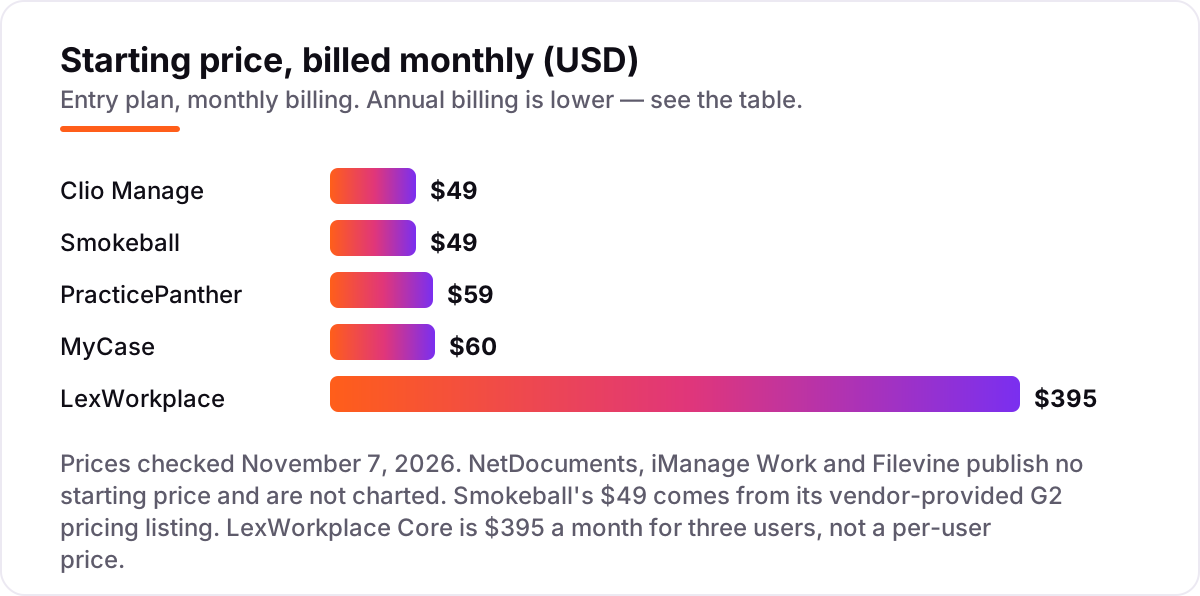
Take a ten-person firm. On list prices, the subscription costs $490 a month on Clio Manage Starter (10 × $49), $490 a month on Smokeball Bill (10 × $49) — but Bill covers billing only, not documents — $500 a month on MyCase Basic billed annually (10 × $50) or $600 billed monthly, and $490 a month on PracticePanther Solo billed annually (10 × $49) or $590 billed monthly. LexWorkplace Core costs $745 a month for ten users: the $395 base covers three, and seven extra users at $50 each add $350.
Over a year, that is $5,880 on Clio Manage Starter, MyCase Basic billed annually $6,000, PracticePanther Solo billed annually $5,880, and LexWorkplace Core $8,940. The same ten people cost $5,880 a year at the cheap end and $8,940 on the dedicated DMS — a $3,060 gap that comes from LexWorkplace's flat base, not from features. NetDocuments, iManage Work and Filevine cannot be priced here at all: each is quoted per firm, and the quote is the only number that counts.
Three costs sit outside every number above. First, the quote-only tools: implementation and migration are quoted separately and are often the largest first-year line after the subscription, so get them in the written quote. Second, the tier jump: MyCase Advanced is $130 per user a month on annual billing, and PracticePanther Business Pro is $114, so the features you actually need may sit two tiers above the starting price. Third, add-ons: MyCase Accounting is $39 per user a month, and NetDocuments charges separately for storage beyond the base and for add-ons such as ndOffice, ndMail and OCR.
Annual billing cuts the bill on the practice platforms: MyCase Basic drops from $600 to $500 a month, and PracticePanther Solo from $590 to $490. Clio publishes one price, so there is no annual figure to compare, and LexWorkplace bills month to month at the published rates. One more cost to check before you commit: a second office is not a second subscription on most of these tools, but storage beyond the included amount is a separate line on NetDocuments and LexWorkplace, so price the document volume, not just the headcount.
Know the difference: a dedicated DMS vs practice management software
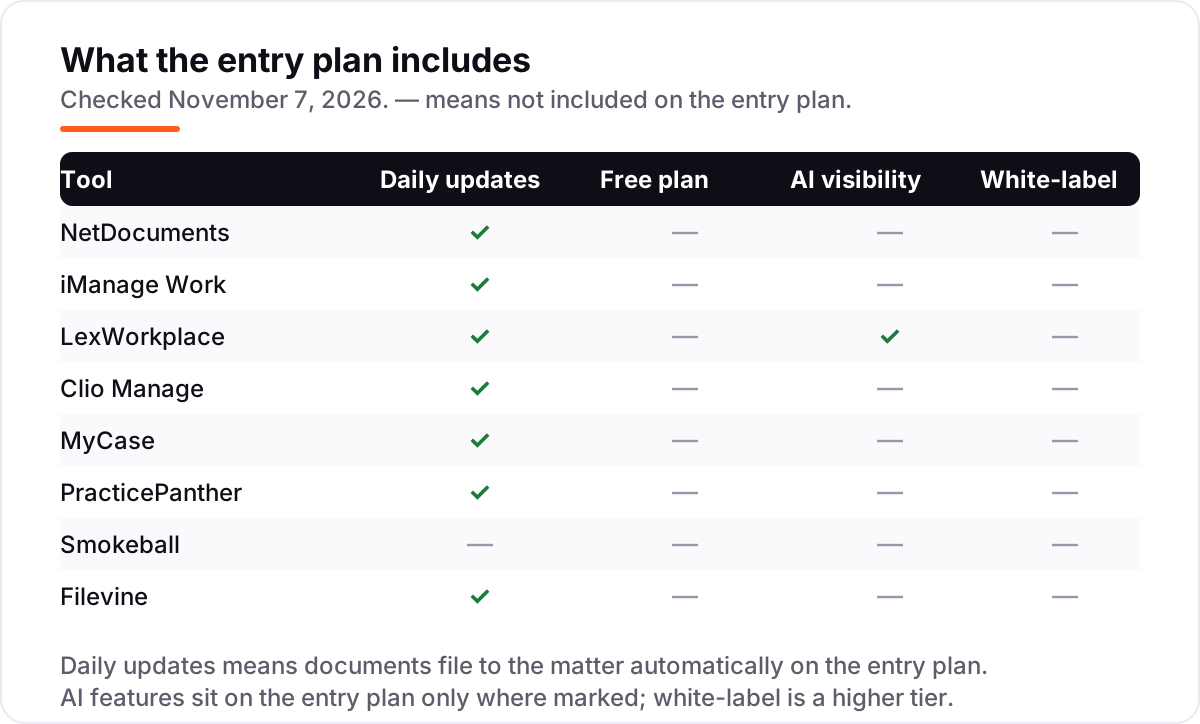
The confusion in this category is between a tool that manages documents and a platform that runs the firm. A dedicated DMS — NetDocuments, iManage Work, LexWorkplace — exists to store, organise and secure documents and email by matter, with version control, permissions, ethical walls and audit trails as the core job. Practice management software — Clio Manage, MyCase, PracticePanther, Smokeball, Filevine — does that too, but its core job is wider: billing, calendaring, time tracking, client intake and trust accounting, with documents as one feature among many.
That split decides the buy. A small firm that picks a dedicated DMS still needs billing and calendaring from somewhere else, so it ends up paying for two systems. A large firm that picks a practice platform alone finds the document features too shallow for its governance needs — no ethical walls, weaker audit trails — and ends up adding a DMS anyway. The honest answer for most firms under about 50 people is the practice platform first, and a dedicated DMS only when governance, not convenience, becomes the reason to buy.
There is a second, quieter confusion: cloud storage is not a DMS. Google Drive, OneDrive and Dropbox store files and sync them, but they do not organise by matter, file email automatically, keep versions with an audit trail, or enforce who may see which client file. All eight tools in this list do those things, which is what the phrase "document management software for law firms" means here. If a tool only stores files, it belongs in a different list.
Quick comparison: tool type by need
| Buyer | Best pick | Why |
|---|---|---|
| Large firm needing governance | NetDocuments | Matter workspaces, ethical walls and audit trails; custom quote |
| Large firm living in email | iManage Work | Documents and email managed together; custom quote |
| Small or mid-size firm wanting a real DMS | LexWorkplace | Dedicated DMS with a published price: $395/month for 3 users |
| Most firms wanting one hub | Clio Manage | The largest ecosystem with solid documents, from $49/user/month |
| Small firm wanting documents plus billing | MyCase | Documents, billing and a client portal, $60/user/month billed monthly |
| High-volume case work | Filevine | Documents inside the case timeline; custom quote |
Mistakes to avoid
- Budgeting on the $49 figure without checking the tier. Smokeball Bill at $49 covers billing only; the full document platform is Grow, which is quoted. Clio Starter at $49 is the real entry price, but the features you need may sit on a quoted tier above it.
- Buying a dedicated DMS when the firm needs billing too. NetDocuments and iManage Work do not run billing, calendaring or intake, so a small firm that buys one still pays for a second system.
- Ignoring the migration. The move off shared drives is the hardest part of the switch: folder mapping, email history and training. Get the implementation cost and timeline in the written quote, not in a sales call.
- Paying per user for people who only read files. Per-user pricing means every seat costs the same, so count paralegals, assistants and billing staff, not just lawyers — and ask which roles can be read-only or free.
- Forgetting storage and add-ons. NetDocuments charges for storage beyond the base and for add-ons such as OCR, and LexWorkplace charges $40 a month per extra 100 GB. Price the document volume, not just the headcount.
How we chose
We checked each vendor's own pricing page on November 7, 2026 and recorded the starting price exactly as shown, including the annual-billing figure where the page lists one. Direct page loads from our server failed that day, so the Clio, MyCase and PracticePanther prices were verified from fresh search-index crawls of the vendors' own pricing pages, corroborated by several independent reads of those pages from October and November 2026; Smokeball's $49 starting price comes from Smokeball's own vendor-provided pricing listing on G2, since the vendor's pricing page could not be opened, and third-party sources disagree on it. NetDocuments, iManage Work and Filevine publish no price, so they are listed as custom quote rather than estimated. LexWorkplace carries no review rating because no G2 or Capterra review page for it could be verified; the other seven ratings come from G2 pages crawled within the last few days. No vendor paid for a place in this list, and none of the links here are affiliate links.
What to do next
Start with the free trial or demo of your top pick and run one real matter through it. Check that email files itself into the right matter, that version control never loses a draft, and that the people who only read files do not need paid seats. If the documents are sorted but new clients are not finding the firm, our local SEO service handles the visibility side — or compare providers in our guide to SEO companies for law firms. Once your tools are in place, find out what's holding your rankings back.
Your stack only works if people find you
SerpAstra fixes what keeps your site off page one and makes it easy for AI assistants to recommend.
Get a free audit→Sources we checked (15)
- NetDocuments — netdocuments.com (checked November 7, 2026)
- iManage Work — imanage.com (checked November 7, 2026)
- LexWorkplace pricing — lexworkplace.com/legal-document-management-software-cost (checked November 7, 2026)
- Clio pricing — clio.com/pricing (checked November 7, 2026)
- MyCase pricing — mycase.com/pricing (checked November 7, 2026)
- PracticePanther pricing — practicepanther.com/pricing (checked November 7, 2026)
- Smokeball pricing, vendor-provided — g2.com/products/smokeball/pricing (checked November 7, 2026)
- Filevine pricing — filevine.com/pricing (checked November 7, 2026)
- NetDocuments reviews — G2 (checked November 7, 2026)
- iManage Work reviews — G2 (checked November 7, 2026)
- Clio Manage reviews — G2 (checked November 7, 2026)
- MyCase reviews — G2 (checked November 7, 2026)
- PracticePanther reviews — G2 (checked November 7, 2026)
- Smokeball reviews — G2 (checked November 7, 2026)
- Filevine reviews — G2 (checked November 7, 2026)
Shamim
Founder of SerpAstra
A full-stack SEO and digital marketer who spends most days on Local SEO for dental practices, AI search visibility and lead generation.
Frequently asked questions
What is the best document management software for law firms?
For a large firm, NetDocuments or iManage Work: both are enterprise standards with matter workspaces, ethical walls and audit trails, and both are custom-quoted. For most small and mid-size firms, Clio Manage at $49 per user a month is the safer default, and LexWorkplace at $395 a month for three users is the best dedicated DMS with a published price.
How much does document management software for a law firm cost?
Published starting prices run from $49 to $60 per user a month on the practice platforms, and $395 a month for three users on LexWorkplace. NetDocuments, iManage Work and Filevine publish no price, so expect a quote — and budget separately for implementation and migration, which vendors quote on top of the subscription.
Is there a free document management option for law firms?
No tool in this list has a free plan. Clio Manage, MyCase, PracticePanther, Smokeball and LexWorkplace all offer free trials, and Filevine offers LOIS Explore as a free standalone tool — but that is not a Filevine trial. NetDocuments and iManage Work offer demos only, so the only way to test them is through the vendor.
What is the difference between a DMS and practice management software?
A dedicated DMS such as NetDocuments, iManage Work or LexWorkplace exists to store, organise and secure documents and email by matter. Practice management software such as Clio Manage, MyCase and PracticePanther does that too, but it also runs billing, calendaring, time tracking and client intake. Small firms usually need the second kind; large firms often run both.
Do I need a dedicated DMS, or is Clio Manage enough?
Clio Manage is enough for most firms under about 50 people: documents attach to matters with versioning, sharing and e-signatures, and the wider platform covers billing and intake. You need a dedicated DMS when governance is the buying reason — ethical walls, need-to-know security, deep audit trails — or when the document count makes shared-drive chaos a daily cost.
How long does it take to switch to a new document system?
A small firm moving to Clio Manage, MyCase or PracticePanther can be running in days, since setup is mostly importing matters and documents. A dedicated DMS takes longer: NetDocuments and iManage Work need a planned migration, folder mapping and training, so expect weeks, and get the implementation timeline and cost in the written quote before signing.
What security features should a law firm DMS have?
Look for encryption in transit and at rest, matter-level permissions, ethical walls that keep the wrong eyes off a file, a full audit trail of who opened or changed each document, and version control so no draft is ever lost. Check where data is hosted, whether the vendor holds recognised compliance certifications, and how quickly you can export everything if you leave.
Free SEO and AI visibility audit
Find out what is holding your rankings back
Send us your site. Within 2 business days you get a written audit, an AI visibility check and a short fix list ranked by impact. Free, with no contract attached.
Request my free audit→Related guides
 Digital Marketing & AdsBest Legal Marketing Software for 2026: 7 Options Compared by Use CaseCompare the 7 best legal marketing software options for 2026 on price, intake, automation and reviews, with prices checked November 4, 2026.Read guide →
 SEO & AI Search9 Best SEO Companies for Law Firms in 20269 best SEO companies for law firms compared on price, focus and fit, with starting prices checked November 1, 2026 and ranked by fit for your firm.Read guide →
 Local SEOLocal SEO for law firms: a practical client-growth guideLocal SEO for law firms: a practical guide to categories, review benchmarks, practice-area pages and citations that turn searches into signed clients.Read guide →