
8 Best Document Management Software for Small Law Firm in 2026, Compared
Compare the 8 best document management software for small law firm on price, matter filing and email management, with every price checked November 7, 2026.
 Shamim Mia, Founder, SerpAstraLast verified November 7, 202612 min read
We compare pricing pages, documentation and public reviews. We never accept payment for rankings.

Key takeaways
- NetDocuments and iManage are the dedicated legal document management systems, but both price by quote; Clio starts at $49 per user a month, PracticePanther Solo at $59 a month billed monthly ($49 annual), and SharePoint at $7 per user a month on annual billing.
- The single most important buying factor is whether you need a true DMS or practice management with documents included — that choice, not the price, splits this list in two.
- LexWorkplace is the only small-firm DMS with a published flat price: $395 a month for 3 users, with $50 a month per extra user and AI included on every plan.
- Four of the eight tools publish no starting price, so budget for written quotes plus migration — LexWorkplace charges $1,495 for a vendor-run migration of up to 250 GB.
On this page
Quick comparison
| Tool | Best for | Starting price | Free plan |
|---|---|---|---|
| NetDocuments | Small firms that need a dedicated legal DMS with matter filing, version control and email management | Custom quote | No |
| iManage | Ambitious small firms in corporate or IP work whose matters resemble big-law files | Custom quote | No |
| Clio | Small firms that want one system for cases, documents and bills | $49/mo | No (7-day trial) |
| Smokeball | Small firms doing repeatable, document-heavy work such as real estate, estate planning and family law | Custom quote | No |
| LexWorkplace | Small firms that know they need a true DMS, want it cloud-based and simple, and do not need a practice suite | $395/mo | No (7-day trial) |
| Filevine | Growing plaintiff and litigation firms whose bottleneck is case throughput | Custom quote | No |
| PracticePanther | Solos and very small firms that want documents, billing and intake in one affordable place | $59/mo | No (7-day trial) |
| Microsoft SharePoint | Cost-conscious firms already on Microsoft 365 that will design and police their own matter libraries | $7/mo (annual) | No (1-month trial) |
Make one of these tools?
We re-check this list every quarter. Send a correction, request a review, or ask about a clearly labeled sponsored spot.
Request a listingThe best document management software for small law firm

NetDocuments
Best for: Small firms that need a dedicated legal DMS with matter filing, version control and email management
NetDocuments is the cloud document management system most associated with law firms. Documents live in workspaces organised by client and matter, every version is kept, and ndMail files email into the same structure, so the record of a matter is complete. Security is a core part of the pitch: ethical walls, data loss prevention and compliance certifications that stand up to client security questionnaires.
The trade-off is depth against weight. A two-lawyer firm pays for governance it may never switch on, and pricing is quoted per user after a sales conversation, so you cannot budget from the website. Migration and implementation are scoped the same way. Buy NetDocuments when clients or courts demand formal document governance, or when the firm handles volume litigation or transactional records that folders cannot hold.
What we like
- Matter-centric filing built for law firms, with version control on every document
- ndMail files email into the same matter structure as documents
- Ethical walls and data loss prevention stand up to client security questionnaires
- Cloud-native platform used by more than 7,000 legal teams, per the vendor
Watch out for
- Pricing is by quote only — there is no published per-user rate to budget from
- More governance than a two-lawyer firm may ever switch on
- Migration and implementation are scoped by sales, so rollout cost is unknown until you ask

iManage
Best for: Ambitious small firms in corporate or IP work whose matters resemble big-law files
iManage powered document management at large firms for decades, and now sells the same matter-based discipline as a cloud service. Its search, workspaces and email filing are the benchmark other systems are measured against, and its security tooling watches for unusual access to sensitive matters. The platform also carries knowledge and security products around the core DMS.
The trade-off is pedigree against fit. The platform was designed for firms with IT staff, and its pricing and onboarding assume it: there is no published price, and implementation is a separate one-time fee. iManage fits ambitious small firms in corporate or IP work whose clients and matters resemble big law more than a main-street practice.
What we like
- The benchmark for legal search, matter workspaces and email filing
- Security tooling watches for unusual access to sensitive matters
- Long dominant in large law, now delivered as a cloud service
- Knowledge and security products sit around the core DMS
Watch out for
- No published price anywhere on the vendor site — every figure comes from a quote
- Enterprise heritage shows in setup: expect a one-time implementation fee on top of licences
- Built for firms with IT staff, so a solo practice may find the platform heavy

Clio is the most popular practice management platform for small firms, and its document handling covers the daily reality for many of them: unlimited document storage tied to matters, templates, e-signatures and a client portal. For a firm whose pain is organisation rather than records governance, Clio solves it inside the tool it already uses for billing.
The trade-off is breadth against document depth. There is no legal-grade email filing or the versioning rigour of NetDocuments, and only the $49 Starter price is published — Core, Signature and Elite are quoted by sales. Clio fits small firms that want one system for cases, documents and bills and do not face formal DMS requirements from clients.
What we like
- Unlimited document storage tied to matters, with templates and e-signatures
- Legal accounting built in, including trust and operating account reconciliation
- More than 400,000 legal professionals use Clio, per the vendor
- Huge app ecosystem and 24/5 live support on every plan
Watch out for
- Only the $49 Starter price is published — Core, Signature and Elite are quoted by sales
- Document features are lighter than a true DMS, with no legal-grade email filing
- AI features are included only from Core up, not on the Starter plan

Smokeball
Best for: Small firms doing repeatable, document-heavy work such as real estate, estate planning and family law
Smokeball's difference is automation: thousands of forms and precedents that fill themselves from matter data, so a letter or filing takes minutes instead of an afternoon. Documents are organised inside the matter, and the software tracks the time you spend producing them, which firms often fail to bill. E-signature and e-filing sit in the same workflow.
The trade-off is automation value against generality. The form library pays off only where it covers your practice area and jurisdiction, so test your own documents in the trial before you commit. Smokeball fits small firms doing repeatable, document-heavy work such as real estate, estate planning and family law.
What we like
- Large library of automated court forms and letters that fill from matter data
- Automatic time tracking tied to the document work you actually do
- Matter files organise documents by type, with e-signature and e-filing
- Trusted by more than 34,000 legal professionals, per the vendor
Watch out for
- Pricing is by quote — the pricing page shows plans but no per-user rates
- The form library pays off only where it covers your practice area and jurisdiction
- Some parts of the product still show its Windows heritage

LexWorkplace
Best for: Small firms that know they need a true DMS, want it cloud-based and simple, and do not need a practice suite
LexWorkplace exists because small firms told the market that NetDocuments and iManage felt oversized. It delivers the DMS essentials in the cloud: matter workspaces, versioning, full-text search and email filing, without an enterprise sales process. It is the closest thing on this list to a DMS sized for a five-to-fifty-person firm, and LexWorkplace AI is included on every plan.
The trade-off is fit against ecosystem. The integration catalogue and third-party support world are smaller than the big platforms, and the flat $395 a month covers only 3 users — a solo pays the same as a three-lawyer firm. LexWorkplace fits small firms that know they need a true DMS, want it cloud-based and simple, and do not need the surrounding practice management suite.
What we like
- Purpose-built DMS for small and mid-size firms, with matter filing and version control
- LexWorkplace AI is included on every plan, with answers cited to the source document
- Email management and full-text search included, with OCR on the Advanced plan
- Billed month to month, with no long-term contract
Watch out for
- Flat $395 a month for 3 users is steep for a solo — the per-user cost only falls as the firm grows
- Smaller vendor than NetDocuments, with a smaller integration catalogue
- Onboarding is a separate one-time fee: $1,495 for a vendor-run migration up to 250 GB

Filevine
Best for: Growing plaintiff and litigation firms whose bottleneck is case throughput
Filevine runs the case rather than the library: documents live inside each case alongside medical records, communications, deadlines and settlement tracking. For personal injury and other document-heavy plaintiff work, that case-centred view matches how the team actually works, and texting and intake tools sit beside the documents.
The trade-off is workflow against records control. Version discipline and email filing trail the dedicated DMS tools, and there is no published price — every package is custom built and quoted. Filevine fits growing plaintiff and litigation firms whose bottleneck is case throughput, not library governance.
What we like
- Case management with documents inside the case file, beside medical records and deadlines
- Strong for plaintiff and high-volume practices, with settlement tracking
- Texting and intake tools sit beside documents
- Deadline and task automation keep large caseloads moving
Watch out for
- No published price — every package is custom built and quoted per firm
- Document governance is lighter than a dedicated DMS
- Setup is customised through implementation partners, which takes time

PracticePanther
Best for: Solos and very small firms that want documents, billing and intake in one affordable place
PracticePanther is the simple, transparent option: published tiers from $49 per user a month, with matters, documents, billing and a client portal in one clean interface. Documents attach to matters with basic versioning, which covers a small firm's daily needs, and every plan includes unlimited data storage and native e-payments.
The trade-off is simplicity against document power. There is no email management or enterprise search, and the Solo plan covers one user only — a team needs Essential at $69 per user a month, and full trust accounting waits for Business Pro. PracticePanther fits solos and very small firms that want everything in one affordable place.
What we like
- Published per-user pricing on all four plans, with no sales call needed to see the price
- Documents, billing, intake and a client portal in one clean interface
- Unlimited data storage on every plan, with native e-payments
- 7-day free trial with no credit card required
Watch out for
- Solo covers one user only — a team pays Essential at $69 or more per user a month
- Document management is basic filing, not a full DMS
- Full trust accounting waits for Business Pro at $114 per user a month

Microsoft SharePoint
Best for: Cost-conscious firms already on Microsoft 365 that will design and police their own matter libraries
SharePoint is the option already in the building. Microsoft 365 Business Basic costs $7 per user a month on annual billing, and SharePoint brings document libraries, permissions, version history and retention policies. With a disciplined matter library design, it serves small firms well at near-zero added cost, and Word and Outlook integration is native.
The trade-off is price against legal fit. SharePoint knows nothing about clients, matters or ethical walls until you build that structure, and it will happily reproduce folder chaos in the cloud. SharePoint fits cost-conscious firms with Microsoft 365 already deployed and someone willing to design and police the library structure.
What we like
- Included in Microsoft 365 plans many firms already pay for, from $7 per user a month
- Strong permissions, version history and retention policies
- Word and Outlook integration is native, and co-authoring works well
- 1 TB of OneDrive storage per user on Business Basic
Watch out for
- No legal-specific features: matter structure, ethical walls and email filing must be built by you
- Web and mobile Office apps only on Business Basic — desktop Word needs the Standard plan
- A poor setup reproduces the folder chaos you were trying to escape
The best document management software for small law firm buyers is not the most powerful system on the market — it is the one your firm will actually use every day. We ranked the eight tools below by fit for a firm of one to ten lawyers, starting with the two dedicated legal document management systems, then the practice platforms that include documents, and ending with the Microsoft option most firms already pay for. Every price was checked on the vendor's own pricing page on November 7, 2026; where a vendor publishes no price, we say so instead of guessing.
How to choose the best document management software for small law firm
- Start with the confidentiality duties, not the features. Your state bar's ethics guidance on cloud storage, plus any client outside-counsel guidelines, set the floor: encryption in transit and at rest, access controls per matter, audit trails, and a vendor that will sign a data agreement.
- Decide which kind of tool you need. If clients or courts demand formal document governance, buy a DMS such as NetDocuments or LexWorkplace. If the real problem is that documents, bills and deadlines live in five places, a practice platform such as Clio or Smokeball fixes more pain per dollar.
- Count the users, not the headline price. LexWorkplace Core is a flat $395 a month for 3 users, so a solo pays the same as a three-lawyer firm. PracticePanther Solo covers one user only, and Clio's $49 Starter is the only Clio price published at all.
- Test migration honestly. Your existing files are the project, so ask each vendor how it imports a decade of folders and what it costs — LexWorkplace publishes $1,495 for up to 250 GB, while the quote-only vendors will not give you a number until you talk to sales.
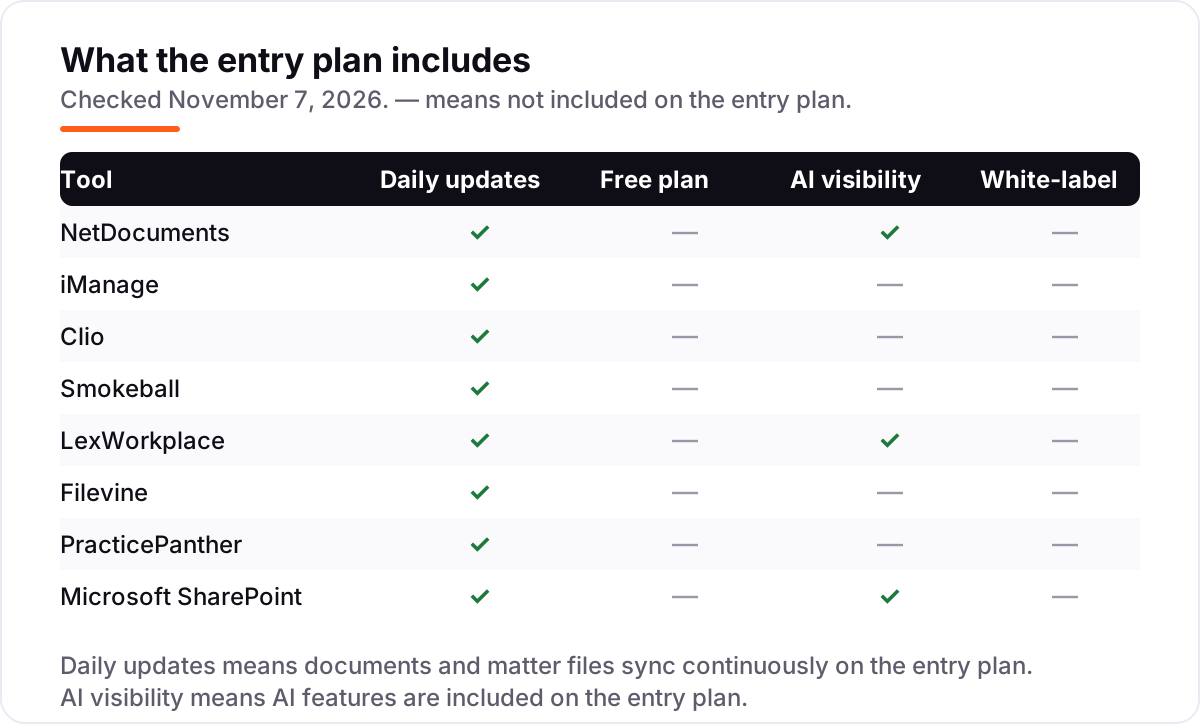
- Check what the entry plan leaves out. AI features are included on LexWorkplace's entry plan and on Clio only from Core up; full trust accounting on PracticePanther waits for Business Pro at $114 per user a month.
Document management is one system in your stack, not the whole stack. If the firm also needs to be found online, our local SEO service covers the visibility side for law firms. And before you publish new pages for the practice areas you sell, run your titles through the free SERP snippet preview tool — it shows exactly how the title and description will look in Google.
Whatever you shortlist, pilot it with one practice group before you move the whole firm. The trials in this list run 7 days on Clio, LexWorkplace and PracticePanther and a month on SharePoint — long enough to test your own documents, your own matter structure and your own email filing, which is the only test that matters. Measure retrieval time against the old shared drive, and only then roll the firm over.
Document management software for small law firm pricing: what you will actually pay
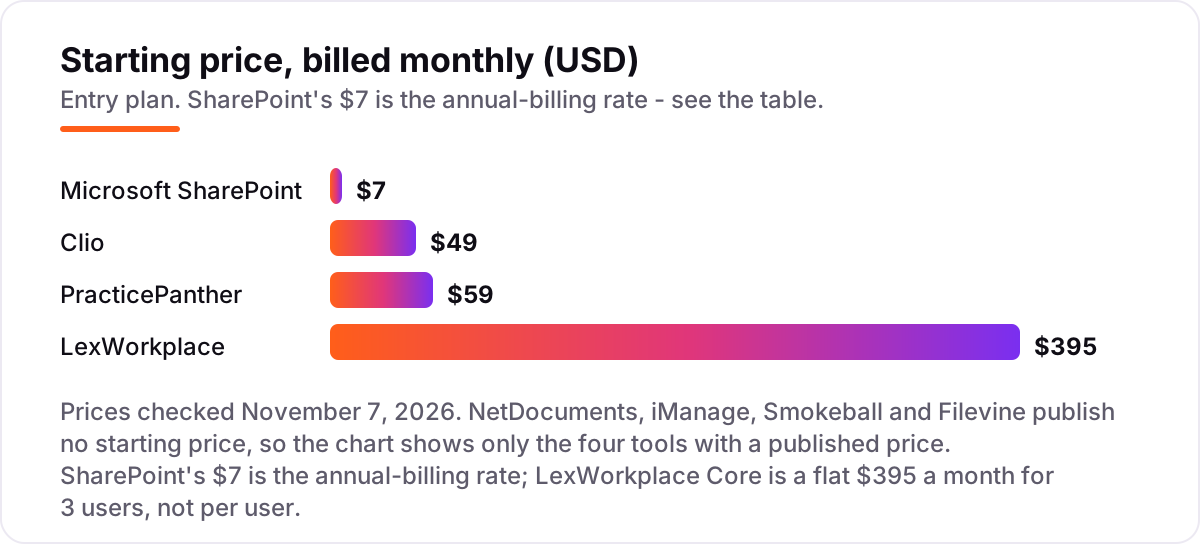
Take a five-lawyer firm. On list prices, the subscription costs $35 a month on SharePoint (5 users at $7, billed annually), $245 a month on Clio Starter (5 users at $49), $345 a month on PracticePanther Essential (5 users at $69, billed annually) and $495 a month on LexWorkplace Core ($395 flat for 3 users, plus 2 extra users at $50 each). Over a year, that is $420 on SharePoint, $2,940 on Clio, $4,140 on PracticePanther Essential and $5,940 on LexWorkplace.
Two of those numbers need adjusting before they are real. PracticePanther's Solo plan at $59 a month covers one user only, so a five-lawyer firm cannot buy it at all — Essential is the real starting point. And SharePoint's $7 is the annual-billing rate; the monthly-billing figure is higher, so a firm that will not commit to a year should get the monthly figure in writing before budgeting.
The other four tools cannot be priced from a website at all. NetDocuments, iManage, Smokeball and Filevine all price by quote, so the honest budget for them is a written quote plus migration — and migration is often the largest single line. LexWorkplace is the only vendor here that publishes a migration price: $1,495 for a vendor-run move of up to 250 GB, with larger firms starting at $3,995. If your firm is weighing a quote-only DMS against a published-price tool, get the quote and the migration price in the same conversation, or the comparison is meaningless.
Know the difference: a document management system vs practice management software
The confusion in this category is between a tool that governs documents and a tool that runs the firm. A DMS governs documents: matter filing, versions, email management, search and access control. Practice management runs the firm: cases, calendars, billing and intake, with document storage included. Small firms often start with practice management and add a DMS when volume or client demands require it — Clio and PracticePanther are the first kind of buy, NetDocuments and LexWorkplace the second.
There is a second, quieter confusion: a shared drive is not a DMS. SharePoint, Google Drive and a Windows file server all store files, but none of them knows what a matter is, keeps a version history tied to it, or files your email against it — until you build that structure yourself. SharePoint can be turned into a workable DMS for a disciplined small firm, but the discipline has to come from the firm, not the software.
A third distinction worth knowing is price transparency versus price. The cheapest tools on this list are the ones that publish a price: SharePoint at $7, Clio at $49 and PracticePanther at $59. The quote-only tools may or may not cost more — you cannot know until you ask — but the asking itself is a cost: a sales cycle, a demo, a scoping call and a written quote, all before you can compare them with anything else. If a vendor will not publish a price, make them earn the extra effort with a feature no published-price tool has.
Quick comparison: tool type by need
| Buyer | Best pick | Why |
|---|---|---|
| Firm that faces client security questionnaires | NetDocuments | Matter filing, versioning and ethical walls, priced by quote |
| Ambitious small firm, corporate or IP work | iManage | Deepest legal pedigree in the list, priced by quote |
| Most small firms, one system for everything | Clio | Cases, documents and bills from $49/user/month |
| Repeatable, document-heavy work | Smokeball | Automated forms that fill from matter data, priced by quote |
| Small firm that needs a true DMS, simply | LexWorkplace | $395/month flat for 3 users, AI included |
| Cost-conscious firm already on Microsoft 365 | Microsoft SharePoint | $7/user/month billed annually, already in the building |
Mistakes to avoid
- Budgeting on a price that is not published. Four tools here have no starting price at all. A per-user figure quoted in a roundup is a third-party estimate, not a vendor price — get the written quote before you compare.
- Buying a DMS when practice management would do. If the pain is documents, bills and deadlines living in five places, Clio or PracticePanther fixes more of it per dollar than NetDocuments ever will.
- Buying practice management when clients demand a DMS. If a client security questionnaire asks about version control, ethical walls and audit trails, a practice platform's basic filing will not pass it.
- Ignoring migration until after you sign. Your existing files are the project. A vendor-run migration costs $1,495 for up to 250 GB at LexWorkplace; the quote-only vendors will scope it separately, and it is often the largest single line.
- Letting folders move to the cloud unchanged. SharePoint reproduces whatever structure you give it. Moving a messy shared drive into SharePoint gives you a messy cloud drive, not a DMS — design the matter libraries first.
How we chose
We checked each vendor's own pricing page on November 7, 2026 and recorded the starting price exactly as shown, or recorded "custom quote" where the vendor publishes no price: NetDocuments, iManage, Smokeball and Filevine publish no starting price, and Clio publishes only its $49 Starter price, with higher tiers quoted by sales. SharePoint's $7 is Microsoft 365 Business Basic on annual billing; Microsoft's pricing page did not render the price in the copy we read on November 7, 2026, so that figure is taken from Microsoft's July 2026 pricing announcement as reported by independent price checks. Ratings come from fresh copies of the G2 review pages, checked November 7, 2026; LexWorkplace has no G2 rating, so none is shown for it. We ranked the tools by fit for the most common buyer — a firm of one to ten lawyers — not by brand size. No vendor paid for a place in this list, and none of the links here are affiliate links.
What to do next
Start with the trial or demo of your top pick and run one real matter through it — your documents, your email filing, your matter structure. Check that a colleague can find a file in under a minute and that the version history is right before you commit to a year. If the documents are sorted but new clients are not finding the firm, our local SEO service handles the visibility side — or compare providers in our guide to SEO companies for law firms. Once your tools are in place, find out what's holding your rankings back.
Your stack only works if people find you
SerpAstra fixes what keeps your site off page one and makes it easy for AI assistants to recommend.
Get a free audit→Sources we checked (15)
- NetDocuments pricing — netdocuments.com/pricing (checked November 7, 2026)
- iManage — imanage.com (no pricing page published; quote only, checked November 7, 2026)
- Clio pricing — clio.com/pricing (checked November 7, 2026)
- Smokeball pricing — smokeball.com/pricing (checked November 7, 2026)
- LexWorkplace pricing — lexworkplace.com/pricing (checked November 7, 2026)
- Filevine pricing — filevine.com/pricing (checked November 7, 2026)
- PracticePanther pricing — practicepanther.com/pricing (checked November 7, 2026)
- Microsoft 365 business plans — microsoft.com (checked November 7, 2026)
- NetDocuments reviews — G2 (checked November 7, 2026)
- iManage Work reviews — G2 (checked November 7, 2026)
- Clio Manage reviews — G2 (checked November 7, 2026)
- Smokeball reviews — G2 (checked November 7, 2026)
- Filevine reviews — G2 (checked November 7, 2026)
- PracticePanther reviews — G2 (checked November 7, 2026)
- Microsoft SharePoint reviews — G2 (checked November 7, 2026)
Shamim
Founder of SerpAstra
A full-stack SEO and digital marketer who spends most days on Local SEO for dental practices, AI search visibility and lead generation.
Frequently asked questions
What is the best document management software for small law firm?
NetDocuments is the best dedicated DMS for a small firm that faces formal document governance demands, while Clio is the best fit for most small firms because it covers cases, documents and billing from $49 per user a month. LexWorkplace is the best small-firm DMS with a published price, at $395 a month flat.
How much does document management software for a small law firm cost?
Published prices run from $7 per user a month for SharePoint on annual billing, through $49 for Clio Starter and $59 for PracticePanther Solo billed monthly, to $395 a month flat for LexWorkplace Core. NetDocuments, iManage, Smokeball and Filevine publish no starting price, so budget for written quotes plus migration.
Is there a free document management option for a small law firm?
There is no genuinely free legal DMS in this list. LexWorkplace has a free Starter tier, but only for firms already on Uptime Manage or Cloud. SharePoint is effectively free for firms already paying for Microsoft 365, and Clio, LexWorkplace and PracticePanther all offer 7-day free trials.
What is the difference between a DMS and practice management software?
A DMS governs documents: matter filing, versions, email management, search and access control. Practice management runs the firm: cases, calendars, billing and intake, with document storage included. Small firms often start with practice management and add a DMS when volume or client demands require it.
Can SharePoint work as a law firm DMS?
It can for a small firm willing to design matter libraries, permissions and retention rules and enforce them. It lacks legal-specific features such as email filing by matter and ethical wall tooling, so most firms that grow past a handful of lawyers move to a legal DMS.
Is cloud storage ethical for client files?
Generally yes, with due diligence. US state bars that have addressed cloud computing allow it when the lawyer takes reasonable care: a reputable vendor, encryption, access controls and a plan to retrieve data if the vendor fails. Check your own bar's opinions, because the duty is yours, not the vendor's.
How do I move a decade of files into a new DMS?
Treat migration as the project, not an afterthought. Ask each vendor how it imports folders, what it costs and how long it takes, and pilot with one practice group before moving the whole firm. LexWorkplace publishes its price: $1,495 for a vendor-run migration up to 250 GB, with larger firms starting at $3,995.
Free SEO and AI visibility audit
Find out what is holding your rankings back
Send us your site. Within 2 business days you get a written audit, an AI visibility check and a short fix list ranked by impact. Free, with no contract attached.
Request my free audit→Related guides
 SEO & AI Search9 Best SEO Companies for Law Firms in 20269 best SEO companies for law firms compared on price, focus and fit, with starting prices checked November 1, 2026 and ranked by fit for your firm.Read guide →
 Local SEOLocal SEO for law firms: a practical client-growth guideLocal SEO for law firms: a practical guide to categories, review benchmarks, practice-area pages and citations that turn searches into signed clients.Read guide →
 Digital Marketing & AdsBest Legal Marketing Software for 2026: 7 Options Compared by Use CaseCompare the 7 best legal marketing software options for 2026 on price, intake, automation and reviews, with prices checked November 4, 2026.Read guide →