
10 Best Feedback Analytics Software in 2026, Compared
The 10 best feedback analytics software tools for 2026, compared on real prices, free plans, and NPS, CSAT and CES tracking. Prices checked November 2, 2026.
 Shamim Mia, Founder, SerpAstraLast verified November 2, 202612 min read
We compare pricing pages, documentation and public reviews. We never accept payment for rankings.

Key takeaways
- SurveyMonkey is the safest default for most teams: Team Advantage starts at $30/user/month billed annually, with 50,000 responses a year; Typeform starts at $39/month and Delighted at $19/month.
- The single most important buying factor is the response allowance: every tool here prices by responses or seats, so count how many answers you need a month before comparing sticker prices.
- Free plans exist — Delighted gives 25 responses a month free and Qualaroo 50 — but a serious program starts around $19–$39/month.
- Enterprise suites Qualtrics and Medallia are quote-only; every other tool here publishes its price.
- Every price below was checked on the vendor's own pricing page on November 2, 2026. Ratings are G2, with review counts shown.
On this page
Quick comparison
| Tool | Best for | Starting price | Free plan |
|---|---|---|---|
| SurveyMonkey | Small teams running regular NPS and CSAT surveys who need templates, logic and 50,000 responses a year | $30/user/mo (annual) | Yes (Basic plan) |
| Typeform | Marketing and product teams whose surveys must feel premium and lift completion rates | $28/mo (annual) | Yes (10 responses/mo) |
| Delighted | Small ecommerce and SaaS teams that want simple NPS, CSAT and CES surveys by email and SMS | $19/mo | Yes (25 responses/mo) |
| Qualaroo | Product and UX teams that want in-context microsurveys (Nudges) on their website or in their app | $19.99/mo (annual) | Yes (50 responses) |
| Survicate | Product teams running website, in-product and email surveys with AI analysis of the answers | $89/mo | Yes (25 responses/mo) |
| Alchemer | Mid-market teams that need advanced survey logic, workflows and reporting without enterprise pricing | $55/user/mo | No (7-day trial) |
| Nicereply | Support teams measuring CSAT, NPS and CES inside Zendesk, Intercom or Help Scout | $59/mo (annual) | No (14-day trial) |
| Userback | Product teams collecting visual feedback, bug reports and surveys through one on-site widget | $29/mo (annual) | Yes (2 seats) |
| Qualtrics | Enterprise CX teams running always-on experience programs across channels | $420/mo (annual) | Yes (free account) |
| Medallia | Large enterprises unifying feedback from every channel into one experience platform | Custom quote | No (demo only) |
Make one of these tools?
We re-check this list every quarter. Send a correction, request a review, or ask about a clearly labeled sponsored spot.
Request a listingThe best feedback analytics software

SurveyMonkey
Best for: Small teams running regular NPS and CSAT surveys who need templates, logic and 50,000 responses a year
SurveyMonkey is the default choice for a reason: it is the most recognized name in surveys, and its library of expert-certified templates means a team can launch a solid NPS or CSAT survey in an afternoon rather than a week. Team Advantage adds the parts a program needs — shared libraries, user roles, centralized billing — and 50,000 responses a year is a generous allowance for most small teams.
The pricing catch is the three-seat minimum. Team Advantage costs $30 per user per month billed annually, so the smallest team pays $90 a month, or $1,080 a year, before any overage. Solo users should look at the individual Advantage plan instead, and check the response cap before a big launch: extra answers cost $0.15 each.
What we like
- Team Advantage includes 50,000 responses a year shared across the team, with shared libraries and collaboration
- Expert-certified templates, skip logic, branching, A/B testing and real-time analysis with cross-tabs
- More than 200 integrations, including Salesforce, Slack and Microsoft Teams
Watch out for
- Individual plan prices are not shown on the public pricing page until you create an account
- Extra responses cost $0.15 each beyond the plan allowance, so a big launch can add up
- The free Basic plan caps surveys at 10 questions and only 40 viewable responses per survey

Typeform
Best for: Marketing and product teams whose surveys must feel premium and lift completion rates
Typeform sells the experience of answering, not the act of building. Its one-question-at-a-time format, with smooth transitions and full brand control, keeps respondents moving through long surveys that would stall in a grid of questions. For lead capture and research where completion rates directly affect revenue, that format is worth paying for.
The catch is volume. Basic costs $28 a month billed annually but caps at 100 responses a month, and your forms still carry the Typeform logo. Removing the branding needs Plus at $56 a month billed annually, and the drop-off analysis that shows where people abandon a form needs Business at $91. Budget by responses, not by plan name.
What we like
- One-question-at-a-time conversational format that keeps respondents moving through long surveys
- Basic includes logic and branching, payments, file uploads and webhooks for $28/month billed annually
- Plus ($56/month billed annually) removes Typeform branding and adds 1,000 responses a month
Watch out for
- Basic caps at 100 responses a month and keeps the Typeform logo on every form
- Monthly billing costs about 40% more than annual billing on every plan
- Drop-off analysis and conversion tracking need the Business plan ($91/month billed annually)

Delighted
Best for: Small ecommerce and SaaS teams that want simple NPS, CSAT and CES surveys by email and SMS
Delighted does one thing and does it well: short NPS, CSAT and CES surveys sent by email or SMS, with a single question and a follow-up box. Because the ask is tiny, response rates are high, and the dashboard turns the answers into trends, segments and alerts without any setup. It is the fastest way for a small team to start tracking satisfaction.
The limit is the response cap. Starter costs $19 a month but allows only 50 responses, so a list of a few hundred customers outgrows it in a month or two. Growth at $39 covers 100 responses, and the premium integrations most teams eventually want — Salesforce, Segment, HubSpot — sit on Advanced at $149. Start here, but price the next tier before you commit.
What we like
- One-question NPS, CSAT and CES surveys by email, SMS, web, link and in-app
- Unlimited surveys on every plan, with 35+ integrations including Slack, Shopify and Zendesk
- AI analysis of open-text comments, with trends and alerts on paid plans
Watch out for
- Starter caps at 50 responses a month, so a growing list outgrows it fast
- Survey logic and customization are thinner than SurveyMonkey or Alchemer
- Premium integrations such as Salesforce and Segment need the Advanced plan ($149/month)

Qualaroo
Best for: Product and UX teams that want in-context microsurveys (Nudges) on their website or in their app
Qualaroo's Nudge is a microsurvey that appears while someone is using your website, app or prototype, which is the whole point: you ask the question at the moment the experience happens, not days later in an email. The answers are fresher, completion rates are higher, and the built-in AI writes your questions and reads the open-text answers for sentiment.
The pricing is the most confusing in this list. The page shows Essentials at $19.99 a month billed annually, struck through from $39.99, so the monthly rate is really $39.99 and the $19.99 figure is a promotional annual rate. Confirm the checkout price before you buy, and note that NPS Nudges and advanced targeting need the $49.99 Business plan.
What we like
- Nudges appear while people use your website or app, so answers reflect the moment
- Unlimited responses on every paid plan, with an AI survey creator and IBM Watson sentiment analysis
- Business adds heatmaps, session replay, prototype testing and A/B testing in the same subscription
Watch out for
- Only 48 G2 reviews, a far smaller reviewer base than the survey giants in this list
- Advanced targeting, mobile Nudge and NPS Nudges need the Business plan ($49.99/month)
- The pricing page shows a promotional $19.99 rate, so confirm the checkout price before you buy

Survicate
Best for: Product teams running website, in-product and email surveys with AI analysis of the answers
Survicate covers more channels than any other self-serve tool here: website pop-ups, in-product prompts, mobile SDK surveys, email and link surveys, all feeding one dashboard. Its Research Hub goes further, pulling app reviews, support tickets and call transcripts next to the survey answers, so the feedback you already have stops living in separate tools.
The Starter plan is a trial in all but name: $89 a month for 100 responses and only two active surveys, with overage charges beyond the cap. Most product teams will land on Growth, which starts at $56 a month billed annually and adds the AI Research Assistant, branding removal and the integrations that make the data useful.
What we like
- Website, in-product, mobile SDK, email and link surveys in one plan
- Research Hub aggregates app reviews, support tickets and call transcripts next to survey answers
- AI Research Assistant summarizes open-text feedback, and Growth starts at $56/month billed annually
Watch out for
- Starter caps at 2 active surveys and 100 responses a month
- Overage charges apply on Starter once you pass the response cap
- Branding removal, AI insights and advanced integrations need the Growth plan or above

Alchemer
Best for: Mid-market teams that need advanced survey logic, workflows and reporting without enterprise pricing
Alchemer sits in the middle of this list on purpose: more powerful than the simple NPS tools, far cheaper than the enterprise suites. Collaborator includes 25 question types, advanced logic and piping, and virtually unlimited responses, so a research-minded team can build the survey it actually wants instead of the survey the plan allows.
The catch is the seat math. Collaborator costs $55 per user per month, so a four-person team pays $220 a month, and Professional and Full Access cap at three users each before the quote-only Business Platform takes over. G2 reviewers also report steep price rises at renewal, so get the renewal terms in writing before you sign.
What we like
- 25 question types with advanced logic, piping and branching on the entry plan
- Virtually unlimited responses with no per-response charges on any self-serve tier
- 64 integrations including Salesforce, Tableau, SPSS and Google Sheets, plus closed-loop workflows
Watch out for
- Per-seat pricing: a 4-person team pays $220/month on Collaborator before any add-on
- API access needs a Business Platform quote, not a self-serve plan
- G2 reviewers report steep price rises at renewal once you outgrow the self-serve tiers

Nicereply
Best for: Support teams measuring CSAT, NPS and CES inside Zendesk, Intercom or Help Scout
Nicereply is built for one workflow: measuring satisfaction inside the support inbox. Its one-click surveys embed in email signatures and post-resolution emails, so customers rate the interaction without opening a link, and the answers land in a real-time feed with agent-level CSAT, CES and NPS analytics. For a support team, that placement beats a prettier survey every time.
The pricing follows volume, not features. Starter costs $59 a month billed annually but covers only 100 responses and three users, and every plan has the same features — the difference is the response allowance. A team that resolves thousands of tickets a month should price Growth at $239 before assuming Starter will do.
What we like
- One-click surveys embedded in support email signatures and post-resolution emails
- Real-time rating feed with agent-level CSAT, CES and NPS analytics
- Every plan includes all integrations (Zendesk, Front, Help Scout, Pipedrive) and unlimited active surveys
Watch out for
- Starter caps at 100 responses a month and 3 users
- No free plan, only a 14-day trial
- Pricing rises with response volume, not features, so a heavy support month costs more

Userback
Best for: Product teams collecting visual feedback, bug reports and surveys through one on-site widget
Userback collects feedback where the problem actually is: a widget on your site or in your product that lets users attach a screenshot or a video with voice to their report. Product teams get annotated visual feedback, bug reports and surveys in one inbox, and reporters need no seat — only your team pays, which keeps the bill flat as reviewers grow.
Two limits decide whether it fits. Surveys and session replay sit on Business at $79 a month billed annually, not on the $29 Team plan, and the free plan keeps feedback visible for only seven days. If you need surveys and visual feedback in one tool, budget for Business; if you only need annotated bug reports, Team is enough.
What we like
- Screenshot and video feedback with annotations, straight from the page where the problem is
- Session replay and in-app surveys on Business, plus a feature-request portal add-on
- Flat per-organization pricing: clients and reporters who only leave feedback are free
Watch out for
- Surveys and session replay need the Business plan ($79/month billed annually), not Team
- The free plan keeps feedback visible for only 7 days
- Business caps at 25 projects, so agencies with many client sites outgrow it

Qualtrics
Best for: Enterprise CX teams running always-on experience programs across channels
Qualtrics is the enterprise standard for a reason: no other tool here matches its depth. Text iQ reads open-text answers for themes and sentiment, Stats iQ runs the statistics, and closed-loop workflows route detractors to the right owner automatically. For a global CX program with thousands of responses a week, that depth is the product.
The honest caveat is that the $420-a-month figure buys the self-service Strategic Research plan, not the Customer Experience suite — that is quote-only, with annual contracts and implementations measured in months. Small teams should treat Qualtrics as a research tool at that price, and get a real CX quote before assuming it fits the budget.
What we like
- The deepest XM platform here: surveys, Text iQ, Stats iQ, closed-loop workflows and 500+ question types
- Panels, quotas, carry-forward and piped text for serious research methodology
- Runs in 100+ languages with enterprise governance, SSO and a 500+ integration ecosystem
Watch out for
- Customer Experience pricing is quote-only, with annual contracts and no self-serve checkout
- Reviewers cite a steep learning curve and implementations measured in months
- The free account caps at 500 total responses, so it is a trial in practice, not a program

Medallia
Best for: Large enterprises unifying feedback from every channel into one experience platform
Medallia is built for companies that hear from customers everywhere at once: surveys, contact-centre calls, chats, social posts and in-store signals all land in one platform, and Medallia Athena turns the pile into recommended actions. Its G2 scores for feedback management are the highest among the enterprise suites in this list, and large, complex organisations are its home turf.
There is no published price to compare, and that is the point: Medallia prices in annual tiers based on Experience Data Records, and every deal goes through sales. Third-party contract data puts typical deals in the five-figure range a year, which is why this tool only makes sense once the self-serve options on this list genuinely cannot cover your channels.
What we like
- Captures surveys, calls, chats, social and in-store signals in one platform
- Medallia Athena AI recommends actions from feedback instead of only reporting scores
- The strongest feedback-management scores among the enterprise suites on G2
Watch out for
- No published price: every deal is a custom annual quote priced by Experience Data Records
- Implementation is measured in months, not days, with a real learning curve
- Overkill and over-budget below enterprise scale, where the self-serve tools do the same job
Finding the best feedback analytics software comes down to one question: how do you turn the answers customers give you into decisions you can act on? The ten tools in this list all collect feedback — surveys, NPS scores, in-product prompts — and then analyse it, so you can see which issues cost you customers and which fixes matter most. They are ranked by fit for the most common buyer: a small or mid-size team running an always-on feedback program, not an enterprise research department. Prices are the entry paid plan on each vendor's own pricing page, checked November 2, 2026.
How to choose the best feedback analytics software
Six factors decide the right pick. Get these right and the tool almost chooses itself. Start by counting how many answers you will collect in a typical month, because every tool in this list meters volume somehow — per response, per seat, or both — and the cheapest sticker price can become the most expensive bill once your list grows.
- Count responses first. Every tool here meters answers — per month, per year or per seat — so estimate how many responses you will collect before you compare prices.
- Pick your channels. Email and link surveys cover most teams; in-product prompts and support-email surveys need a different tool.
- Check the analysis, not just the collection. Open-text answers are useless without themes, sentiment or AI summaries — check what the entry plan actually analyses.
- Mind the seat math. SurveyMonkey and Alchemer charge per user, so a five-person team pays five times the headline price.
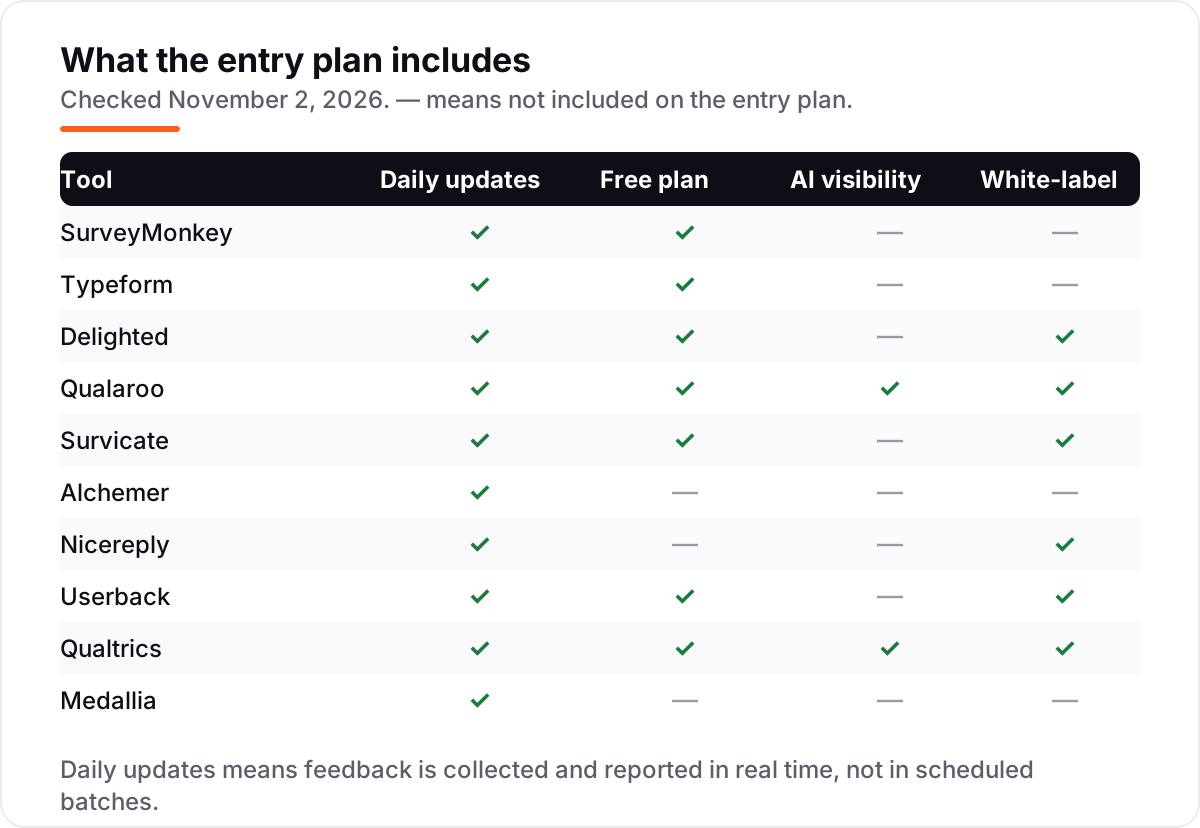
- Test the free plan. Seven tools here have one; run a real survey on it before you pay.
- Check the integrations. Feedback only helps when it reaches your CRM, helpdesk or Slack — confirm the integration you need is on the plan you will buy.
Feedback analytics software pricing: what you will actually pay
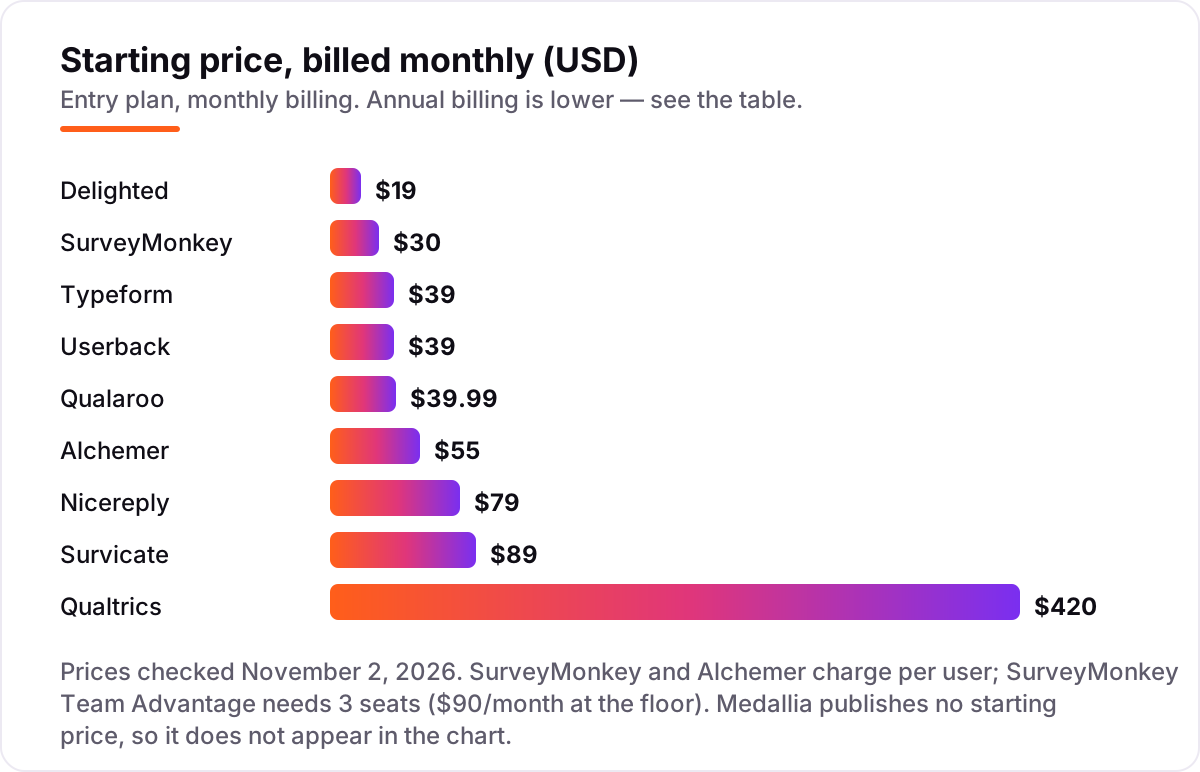
Take a five-person team collecting 500 responses a month. On SurveyMonkey Team Advantage that is five seats at $30 each, or $150 a month billed annually — $1,800 a year — with 50,000 responses a year in the allowance, so volume is never the problem. On Delighted the same 500 responses need the Premium plan at $249 a month, because Starter covers only 50 and Growth only 100. Typeform Business, at $91 a month billed annually, covers 10,000 responses, so it is cheaper than Delighted at this volume despite the higher sticker price. And Qualaroo Essentials, at $19.99 a month billed annually, allows unlimited responses, which makes it the cheapest way to collect 500 answers — if in-product microsurveys fit how you work. The same 500 responses cost anywhere from $19.99 to $249 a month, which is why the tool matters more than the volume. Alchemer shows the seat trap clearly: Collaborator at $55 per user means the same five-person team pays $275 a month before any add-on.
Annual billing is the other lever, and it is worth real money here. Typeform Basic drops from $39 to $28 a month, Nicereply Starter from $79 to $59, and Userback Team from $39 to $29 when you pay yearly — roughly a 25–30% discount on each. The catch is the commitment: you pay twelve months up front, and the response caps still apply, so an annual plan on the wrong tier locks you into a limit you will outgrow. Start monthly, confirm the volume, then switch to annual billing once the tier is right.
Surveys vs. always-on feedback: know the difference
Survey tools and always-on feedback platforms look similar — both ask customers questions — but they solve different problems. A survey tool sends a questionnaire on a schedule: a quarterly NPS email, a post-purchase survey, a market-research study. You choose the moment, you choose the audience, and you get a clean dataset to analyse. An always-on platform listens continuously: a Nudge appears when a user finishes a task, a CSAT survey fires when a ticket closes, a feedback button sits on every page. You do not choose the moment — the customer's behaviour does.
The confusion comes from the overlap: SurveyMonkey can trigger surveys, and Qualaroo can send email surveys. The difference is what each one is built around. If your program is a calendar of campaigns with a start and an end, buy the survey tool — it will have the better builder, logic and analysis for that job. If your program never ends and the feedback should arrive the moment something happens, buy the always-on platform. Most growing teams end up with one of each: a survey tool for the quarterly NPS and an always-on tool for the daily signal.
One more distinction matters when you compare prices: survey tools usually meter responses, while always-on tools often meter seats, projects or pageviews. A survey tool looks cheap until a big campaign blows past the response cap; an always-on tool looks expensive until you realise the reporters are free and only your team pays. Compare the bill for your actual volume and team size, not the headline number.
Quick comparison: tool type by need
| Buyer | Best pick | Why |
|---|---|---|
| Small team, first feedback program | SurveyMonkey | Templates, logic and 50,000 responses a year from $30/user/month |
| Surveys that must feel premium | Typeform | Conversational format that lifts completion, from $39/month |
| Simple NPS and CSAT by email | Delighted | One-question surveys from $19/month, free plan included |
| In-product microsurveys | Qualaroo | Nudges inside the product from $19.99/month billed annually |
| Website and in-product surveys with AI summaries | Survicate | Multi-channel surveys plus a research hub, from $89/month |
| Advanced logic and workflows | Alchemer | 25 question types and workflows from $55/user/month |
| Support-team CSAT | Nicereply | One-click surveys inside support email from $59/month billed annually |
| Visual product feedback | Userback | Screenshots, video and surveys from $29/month billed annually |
| Enterprise experience management | Qualtrics or Medallia | Full XM platforms; Qualtrics self-service from $420/month, Medallia by quote |
How we chose
We checked each vendor's own pricing page on November 2, 2026 and recorded the starting price exactly as shown, including the annual-billing figure where the page lists one. Two prices needed extra care. Delighted's pricing page loads its prices by script, so the $19 Starter figure could not be read directly; it is corroborated by several independent sources citing delighted.com, and older directories still show a previous $17 figure. SurveyMonkey's individual plan prices are not shown until you create an account, so the card uses the published Team Advantage rate of $30 per user per month. Medallia publishes no price at all, so its card says so. Ratings come from G2 pages opened on November 2, 2026, except Userback, whose G2 page could not be opened that day, so its card shows no rating. We ranked the tools by fit for the most common buyer — a small or mid-size team running an always-on feedback program — not by brand size. No vendor paid for a place in this list, and none of the links here are affiliate links.
What to do next
Start with the response count: how many answers will you collect in a typical month, and how many people need a seat? Then take the free plan or trial of your top pick and run one real survey end to end — send it, read the answers, and check whether the analysis tells you what to fix. If the feedback points at search problems, such as slow pages or thin content, our SEO audit service finds the fixes. And once you know your scores, turn promoters into reviews with the free Google review link generator. Once your tools are in place, find out what's holding your rankings back.
Your stack only works if people find you
SerpAstra fixes what keeps your site off page one and makes it easy for AI assistants to recommend.
Get a free audit→Sources we checked (20)
- SurveyMonkey pricing — surveymonkey.com/pricing (checked November 2, 2026)
- SurveyMonkey on G2 — 4.4/5, 23,901 reviews (checked November 2, 2026)
- Typeform pricing — typeform.com/pricing (checked November 2, 2026)
- Typeform on G2 — 4.5/5, 1,017 reviews (checked November 2, 2026)
- Delighted pricing — delighted.com/pricing (checked November 2, 2026; figure corroborated by sources citing delighted.com)
- Delighted on G2 — 4.7/5, 60 reviews (checked November 2, 2026)
- Qualaroo pricing — qualaroo.com/pricing (checked November 2, 2026)
- Qualaroo on G2 — 4.3/5, 48 reviews (checked November 2, 2026)
- Survicate pricing — survicate.com/pricing (checked November 2, 2026)
- Survicate on G2 — 4.6/5, 213 reviews (checked November 2, 2026)
- Alchemer pricing — alchemer.com/plans-pricing (checked November 2, 2026)
- Alchemer on G2 — 4.4/5, 962 reviews (checked November 2, 2026)
- Nicereply pricing — nicereply.com/pricing (checked November 2, 2026)
- Nicereply on G2 — 4.5/5, 431 reviews (checked November 2, 2026)
- Userback pricing — userback.io/pricing (checked November 2, 2026)
- Qualtrics pricing — qualtrics.com/buy-online (checked November 2, 2026)
- Qualtrics Customer Experience on G2 — 4.3/5, 751 reviews (checked November 2, 2026)
- Medallia pricing — medallia.com/pricing (checked November 2, 2026; no published prices)
- Medallia Customer Experience on G2 — 4.5/5, 210 reviews (checked November 2, 2026)
- Customer feedback analytics pricing table — dimensionlabs.io (Vendr median contract data for Medallia, checked October 26, 2026)
Shamim
Founder of SerpAstra
A full-stack SEO and digital marketer who spends most days on Local SEO for dental practices, AI search visibility and lead generation.
Frequently asked questions
What is the best feedback analytics software?
SurveyMonkey is the best default for most teams: Team Advantage starts at $30/user/month billed annually and covers 50,000 responses a year. If you want the prettiest surveys, pick Typeform; for the simplest NPS tracking, Delighted at $19/month. Enterprise teams should get quotes from Qualtrics and Medallia instead.
How much does feedback analytics software cost?
Between $19 and $420 a month at the entry level. Delighted starts at $19, Qualaroo at $19.99 billed annually, Typeform at $28 billed annually, and SurveyMonkey Team Advantage at $30 per user. Enterprise suites are quote-only: Qualtrics publishes one self-service price of $420 a month, and Medallia publishes no price at all.
Is there free feedback analytics software?
Yes, with tight limits. Delighted is free for 25 responses a month, Qualaroo for 50, Survicate for 25, and Typeform for 10. SurveyMonkey has a free Basic plan, and Qualtrics offers a free account with 500 total responses. Free plans work for a pilot; a live program outgrows them within weeks.
What is the difference between NPS, CSAT and CES?
NPS asks how likely customers are to recommend you, on a 0–10 scale, and sorts them into promoters, passives and detractors. CSAT asks how satisfied they were with one interaction, usually on a 1–5 scale. CES asks how easy the interaction was. Most teams track NPS over time and CSAT after each support contact.
Should I choose a survey tool or an always-on feedback platform?
Choose a survey tool such as SurveyMonkey or Typeform when you run scheduled campaigns — quarterly NPS, post-purchase surveys, market research. Choose an always-on platform such as Qualaroo, Survicate or Nicereply when feedback should arrive continuously, triggered by what the customer just did. Many teams run one of each.
What should I check before paying for feedback analytics software?
Four things: how many responses the plan includes and what counts as one, whether the price is per user or flat, whether AI analysis and branding removal are included or paid extras, and whether the price is monthly or annual billing. All four vary widely — the comparison table at the top shows the starting price and free plan for each tool.
Free SEO and AI visibility audit
Find out what is holding your rankings back
Send us your site. Within 2 business days you get a written audit, an AI visibility check and a short fix list ranked by impact. Free, with no contract attached.
Request my free audit→Related guides
 SEO & AI Search11 Best AI Tools for SEO Optimization in 2026, Compared11 best ai tools for seo optimization compared on price, content scoring and AI visibility, with prices verified November 1, 2026, sorted by use case.Read guide →
 SEO & AI SearchBest Local SEO Tools for 2026: 11 Picks Ranked by What You Need11 best local SEO tools with real prices checked November 1, 2026 — from $14/month trackers to quote-only enterprise platforms, sorted by what you need.Read guide →
 SEO & AI SearchBest SEO Audit Software for 2026: 10 Options Compared by Use Case10 best SEO audit software tools compared on price, crawl depth and AI visibility. Prices checked on vendor pricing pages, November 1, 2026.Read guide →