
11 Best Financial Analytics Software in 2026, Compared
11 best financial analytics software options compared on price, planning depth and reporting, with prices checked on the vendor's own page on November 2, 2026.
 Shamim Mia, Founder, SerpAstraLast verified November 2, 202611 min read
We compare pricing pages, documentation and public reviews. We never accept payment for rankings.

Key takeaways
- Datarails is the best fit for most mid-market finance teams: Excel-native planning, consolidation and reporting, priced by custom quote. Cube is the only FP&A platform here with published pricing, from $1,500/month.
- Seven of the 11 tools publish no starting price at all, so budget for a sales conversation before you can compare them on cost.
- The cheapest ways in are Microsoft Power BI Pro at $14/user/month and Zoho Analytics Basic at $30/month, while Fathom starts at $67/month for portfolio oversight.
- The single most important buying factor is where your numbers live: if your team plans in Excel, pick an Excel-native tool; if your data lives in Microsoft 365 or Zoho, pick the BI tool that already connects to it.
- Every price below was checked on the vendor's own pricing page on November 2, 2026. No ratings are shown because the review pages could not be opened today.
On this page
Quick comparison
| Tool | Best for | Starting price | Free plan |
|---|---|---|---|
| Datarails | Mid-market finance teams that live in Excel and want automated consolidation, reporting and planning without leaving spreadsheets | Custom quote | No (demo) |
| Cube | Mid-market finance teams that plan in Excel or Google Sheets and want published pricing and fast setup | $1,500/mo | No (demo) |
| Vena | Mid-market finance teams that want Excel-native budgeting, forecasting and workflow with a governed database behind it | Custom quote | No (demo) |
| Planful | Mid-size to large finance teams that need budgeting, forecasting, consolidation and close in one governed platform | Custom quote | No (demo) |
| Prophix | Mid-market finance teams that want planning, consolidation and reporting with a spreadsheet-style interface | Custom quote | No (free trial) |
| Anaplan | Large enterprises that need connected planning across finance, sales, supply chain and HR on one platform | Custom quote | No (demo) |
| Workday Adaptive Planning | Mid-size to large companies, including Workday customers, that need driver-based planning, workforce planning and scenario modeling | Custom quote | No (30-day trial) |
| Jirav | Small to mid-size businesses and CPA firms that need budgeting, forecasting and KPI dashboards without enterprise complexity | Custom quote | No (demo) |
| Fathom | Accounting firms and small businesses that need polished management reports, KPI dashboards and cash flow forecasts | $67/mo | No (14-day trial) |
| Microsoft Power BI | Finance teams that already use Microsoft 365 and need dashboards and financial reporting on top of their existing data | $14/user/mo | Yes (free account) |
| Zoho Analytics | Small businesses and Zoho users that need low-cost dashboards and financial reporting with a built-in AI assistant | $30/mo | Yes (2 users) |
Make one of these tools?
We re-check this list every quarter. Send a correction, request a review, or ask about a clearly labeled sponsored spot.
Request a listingThe best financial analytics software

Datarails
Best for: Mid-market finance teams that live in Excel and want automated consolidation, reporting and planning without leaving spreadsheets
Datarails is the strongest all-round pick for a mid-market finance team because it removes the worst part of spreadsheet planning without removing the spreadsheet. Your team keeps working in Excel, while Datarails pulls actuals from the ERP and accounting systems, consolidates entities and produces board-ready reports. Cash management, spend control and month-end close sit in the same workspace, so the monthly routine stops being a copy-and-paste exercise.
The price is the honest catch: there is no published figure, and third-party estimates put typical deals in the tens of thousands a year. You will also need to plan an implementation project, not a self-serve signup. If your team plans in Excel and wants that workflow governed rather than replaced, start here; if you want a published price before the first sales call, look at Cube instead.
What we like
- Stays inside Excel while a governed database consolidates the numbers behind it
- Automated data consolidation from QuickBooks, NetSuite, Xero, Sage Intacct and 200+ other sources
- AI assistant plus cash management, spend control and month-end close in one workspace
Watch out for
- No published pricing, so you cannot budget without a sales conversation
- Excel-native design means teams that want to leave spreadsheets behind will find the workflow familiar rather than new
- Implementation and onboarding are a real project, not a same-day setup

Cube
Best for: Mid-market finance teams that plan in Excel or Google Sheets and want published pricing and fast setup
Cube earns the second spot because it is the only dedicated FP&A platform in this list that prints its prices: Go starts at $1,500 a month and Pro at $2,800 a month, both published on the vendor's own site. It is spreadsheet-native, so planning happens in Excel or Google Sheets with live two-way sync, and AI forecasting builds driver-based projections from your own history.
The trade-off is the entry cost. At $1,500 a month before implementation fees, Cube is a serious commitment for a small team, and it does not sell outside the US and Canada. If you are a startup, Fathom or Zoho Analytics will do the reporting job for far less; if you are a mid-market team that plans in spreadsheets, Cube is the most transparent way in.
What we like
- The only FP&A platform here with published pricing: Go from $1,500/month, Pro from $2,800/month
- Spreadsheet-native planning in Excel and Google Sheets with two-way sync
- AI-powered forecasting and scenario planning, with apps for Slack and Microsoft Teams
Watch out for
- Entry price of $1,500/month is steep for startups and very small teams
- Sold in the US and Canada only, so teams elsewhere cannot buy it
- Implementation and onboarding fees sit on top of the subscription

Vena
Best for: Mid-market finance teams that want Excel-native budgeting, forecasting and workflow with a governed database behind it
Vena is the classic Excel-native planning platform: your team builds budgets and forecasts in Excel, while Vena's database adds version control, workflow approvals and an audit trail underneath. It covers the full cycle from budgeting and forecasting through reporting and account reconciliation, which is why it shows up in so many mid-market shortlists. The Complete plan adds the AI layer, Vena Insights, plus premium support and a sandbox environment.
Two honest caveats. There is no published price, so the first real number comes from a sales quote, and implementation is a multi-month project rather than a quick setup. The AI features also sit on the higher plan, so budget for Complete if anomaly detection and AI commentary matter to you. Pick Vena when Excel is non-negotiable and governance is the gap.
What we like
- Excel stays the planning interface, with a governed database, workflow and audit trail behind it
- Covers budgeting, forecasting, reporting and account reconciliation in one platform
- Two plans, Professional and Complete, with Complete adding Vena Insights, premium support and a sandbox
Watch out for
- No published pricing, so budgeting starts with a sales conversation
- Setup is complex and time-consuming, with a five-month typical implementation reported by reviewers
- AI features (Vena Insights) sit on the Complete plan, not the entry Professional plan

Planful
Best for: Mid-size to large finance teams that need budgeting, forecasting, consolidation and close in one governed platform
Planful suits a finance team that has outgrown spreadsheet consolidation and wants one governed platform for the whole cycle: structured planning, multi-entity consolidation, close management, reporting and scenario modeling. Its 200-plus connectors pull data from ERP, CRM and HCM systems, and Planful Predict adds machine-learning forecasting and anomaly detection on top. For a mid-size to large company running complex models across entities, that breadth is the point.
The cost is entirely quote-based, and the subscription is only part of the bill: implementation, data preparation, training and ongoing administration all add up. Dashboards are also the weakest-rated area in reviews. Choose Planful when consolidation and governance drive the decision; choose Cube or Datarails when the team wants to stay closer to spreadsheets.
What we like
- One cloud platform for structured planning, consolidation, close, reporting and scenario modeling
- Planful Predict adds ML forecasting and anomaly detection to planning workflows
- 200-plus pre-built connectors for ERP, CRM and HCM systems
Watch out for
- No published pricing, so every deal starts with a scoped quote
- Implementation, training and administration add real cost on top of the subscription
- Dashboard capabilities draw mixed reviewer feedback next to newer tools

Prophix
Best for: Mid-market finance teams that want planning, consolidation and reporting with a spreadsheet-style interface
Prophix One is the friendliest of the unified mid-market platforms: planning, consolidation, close, reporting and analytics in one cloud product, with a spreadsheet-style interface that finance users pick up quickly. Pre-built templates and drag-and-drop workflows get a team productive without heavy training, and the reporting depth covers departmental cost reports and salary variance analysis that controllers actually use. A free trial is available, which is rare in this category.
The price is quote-only, and third-party estimates put implementation at roughly 0.7 to 1.3 times the first-year subscription, so the first-year total is far above the license alone. Customers also report renewal increases above the category norm, so cap the escalator in your first contract. Pick Prophix when ease of use matters as much as depth.
What we like
- Prophix One unifies planning, consolidation, close, reporting and analytics in one cloud platform
- Spreadsheet-style interface with pre-built templates and drag-and-drop workflows
- Strong reporting depth, including departmental cost reports and salary variance analysis
Watch out for
- No published pricing, so you cannot compare costs without a quote
- Implementation runs 0.7 to 1.3 times the first-year subscription, per third-party estimates
- Renewal prices have risen faster than the category norm, per customer reports

Anaplan
Best for: Large enterprises that need connected planning across finance, sales, supply chain and HR on one platform
Anaplan is the enterprise end of this list. Its connected planning platform links finance, sales, supply chain and workforce models, so a change in one plan flows through the others in real time. The Hyperblock engine handles the modeling that spreadsheets cannot: territory design, quota allocation, incentive compensation across thousands of payees and driver-based financial forecasting. For a large enterprise planning as one company, nothing else here matches its scale.
The cost matches the scale. There is no published price, the vendor treats pricing as confidential, and implementations run for months with certified model builders or a partner firm. Contracts are non-cancelable with seats fixed mid-term. Anaplan is the right pick for enterprise connected planning and the wrong pick for almost anyone smaller.
What we like
- Connected planning links finance, sales, supply chain and workforce models in real time
- Hyperblock engine handles territory, quota, incentive and driver-based forecasting at enterprise scale
- A 250-plus certified partner network supports large deployments
Watch out for
- No published pricing, and the vendor classifies pricing as confidential information
- Implementations span months and need certified modeling expertise or a partner
- Contracts are non-cancelable and non-refundable, with seat counts fixed mid-term

Workday Adaptive Planning
Best for: Mid-size to large companies, including Workday customers, that need driver-based planning, workforce planning and scenario modeling
Workday Adaptive Planning is the native-cloud planning tool for companies that want driver-based models without spreadsheet chaos: unlimited versions, unlimited what-if scenarios and machine learning that builds predictive forecasts and flags anomalies. It connects to any ERP or general ledger, so it works for companies that do not run Workday Financial Management, and the 30-day free trial is the only trial among the enterprise platforms here.
Pricing is quote-only, and the quote is built from a forecast of seats and modules, which is exactly where buyers overspend: first-quote modeler counts often run well above the number of people still building models a year later. Size the quote on verified requirements, and fix rates for later seat additions.
What we like
- Native-cloud planning with driver-based models, unlimited versions and unlimited what-if scenarios
- Machine learning creates predictive forecasts and flags anomalies in the plan
- Connects to any ERP or general ledger, and a 30-day free trial lets you test it first
Watch out for
- No published pricing; both Adaptive Planning editions are listed as pricing varies
- Quote sizing depends on a forecast of seats and modules, which is where overspend usually comes from
- Full value needs model administration skill in-house or from a partner

Jirav
Best for: Small to mid-size businesses and CPA firms that need budgeting, forecasting and KPI dashboards without enterprise complexity
Jirav is the small-business end of real FP&A: budgeting, forecasting, reporting and dashboards built on three-statement pro forma models, so a hiring plan shows its effect on cash and on the balance sheet at once. Autoforecast generates forecasts from historicals and seasonality in one click, and the integrations cover the accounting stack small companies actually run: QuickBooks, Xero, NetSuite, Sage Intacct and Gusto. CPA firms use it to deliver advisory work to clients.
The price is the problem for comparison shopping. Jirav publishes no starting price, and third-party sources disagree with each other about the entry figure, so we list it as a custom quote rather than print a number we cannot verify. Expect a five-figure annual contract. If you need published pricing at this size, Fathom is the cheaper and clearer buy.
What we like
- Three-statement pro forma modeling with driver-based forecasts across profit and loss, balance sheet and cash flow
- Autoforecast builds forecasts from historicals and seasonality with one click
- Connects to QuickBooks, Xero, NetSuite, Sage Intacct, Gusto, Excel and Google Sheets
Watch out for
- No published starting price on the vendor site, so the entry cost needs a sales conversation
- Third-party figures disagree with each other, so budget for a five-figure annual contract
- Workforce planning is thinner than in the enterprise platforms

Fathom
Best for: Accounting firms and small businesses that need polished management reports, KPI dashboards and cash flow forecasts
Fathom is the tool accountants name first when a client asks for a monthly report pack that does not take a day to build. It connects to the accounting file, maps the chart of accounts and produces branded management reports with charts, KPIs and AI-written commentary, plus three-way cash flow forecasting out to five years. The Portfolio tier covers 100 companies for $67 a month with a whole-client-base dashboard, and Fathom is also included in QuickBooks Online Advanced subscriptions.
The pricing structure is the catch: Fathom charges per company, so a single business pays relatively more than a firm spreading the cost across clients, and the full Pro feature set sits at the higher tiers. It is reporting and analysis, not full FP&A planning, so driver-based budgeting lives elsewhere. Buy Fathom when the monthly report pack is the job.
What we like
- Branded management reports with charts, KPIs and AI-written commentary clients actually read
- Three-way cash flow forecasting out to five years across profit and loss, balance sheet and cash flow
- Portfolio tier covers 100 companies for $67/month with a whole-client-base dashboard
Watch out for
- Priced per company, so a single business pays relatively more than a firm with many clients
- Reporting and analysis only — driver-based budgeting lives in fuller FP&A platforms
- The full Pro feature set is the expensive tier; Portfolio is a lighter oversight view

Microsoft Power BI
Best for: Finance teams that already use Microsoft 365 and need dashboards and financial reporting on top of their existing data
Power BI is the cheapest way into financial dashboards in this list, and for many teams it is already paid for: Pro costs $14 per user a month when paid yearly, Desktop is free for building reports locally, and Pro is included in Microsoft 365 E5 and Office 365 E5. Pro refreshes data up to 8 times a day; Premium Per User at $24 a month raises that to 48 refreshes with 100 GB models.
Watch the seat math. Below F64 capacity, every viewer needs a paid seat, so a dashboard shared with 50 people costs 50 licenses, not one. Copilot AI also needs a separate license, and the 1 GB model cap on Pro pushes heavy models to Premium Per User. Buy Power BI when reporting is the job; buy an FP&A tool when you need to plan.
What we like
- Pro at $14/user/month is the cheapest paid seat in this list, and Desktop is free
- 8 scheduled refreshes a day on Pro, 48 on Premium Per User
- Included in Microsoft 365 E5 and Office 365 E5, so many teams already own it
Watch out for
- Every viewer needs a paid seat below F64 capacity, so audience growth drives the bill
- Copilot AI needs a separate Microsoft 365 Copilot license, not just Pro
- 1 GB model limit on Pro; larger models need Premium Per User at $24/user/month

Zoho Analytics
Best for: Small businesses and Zoho users that need low-cost dashboards and financial reporting with a built-in AI assistant
Zoho Analytics is the budget pick for small businesses that want real dashboards without a sales call: Basic costs $30 a month billed monthly or $24 a month billed annually, covers 2 users and half a million rows, and includes unlimited reports and dashboards. The free plan covers 2 users and 10,000 rows, enough to test it on a real dataset. Ask Zia, the built-in AI assistant, is included on every plan.
The limits are the row caps and the ecosystem. Basic runs out of rows fast on a busy ledger, extra users cost $6.40 a month each on annual billing, and white-label branding needs the Premium plan. Outside the Zoho suite, judge it on its connectors to your accounting system. For a small team that wants affordable reporting with AI included, it is the cheapest serious option here.
What we like
- Basic at $30/month billed monthly ($24/month billed annually) with unlimited reports and dashboards
- Ask Zia, the built-in AI assistant, is included on all plans with tiered features
- Free plan covers 2 users and 10,000 rows, and the vendor says the product is used by more than 100,000 businesses
Watch out for
- Row caps bite fast: Basic covers 0.5 million rows for 2 users
- White-label branding needs Premium or above, not the Basic plan
- Deepest value sits inside the Zoho ecosystem; outside it, connectors matter more
The best financial analytics software turns your accounting data into decisions: budgets you can defend, forecasts you can trust and reports a board will actually read. This list covers 11 tools, from Excel-native FP&A platforms to low-cost dashboard tools, ranked by fit for the most common buyer — a mid-market finance team — with every price checked on the vendor's own page on November 2, 2026.
How to choose the best financial analytics software
- Start with the spreadsheet question. If your team plans in Excel, pick an Excel-native tool like Datarails, Cube or Vena; forcing the team out of spreadsheets is the most common reason these projects fail.
- Count entities and users before you count features. Quote-based pricing scales with both, so a three-entity company and a thirty-entity group get very different numbers from the same vendor.
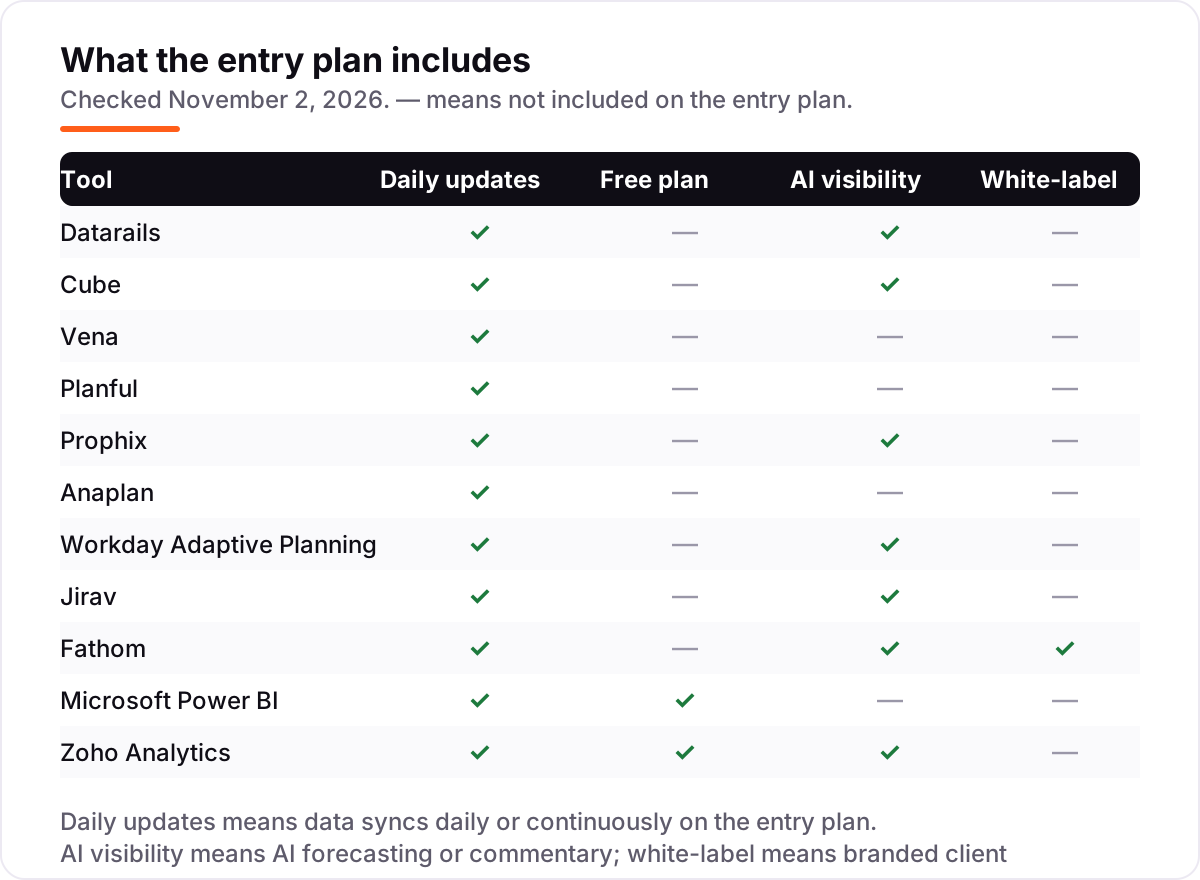
- Check the data connections first. Your accounting system, ERP and payroll must sync daily without middleware, or the forecasts will be stale on arrival.
- Ask where the AI lives. Some tools include AI forecasting on the entry plan; others hold it for a higher tier or a separate module, and the price gap is large.
- Price the implementation, not just the license. Onboarding, data mapping and training often cost as much as the first year of licenses in this category.
- Trial it with real month-end data. A demo with sample data hides the mapping work; a trial with your own chart of accounts shows it. Finance teams comparing platforms should also read our guide to the best SEO platform for finance before shortlisting vendors.
Financial analytics software pricing: what you will actually pay
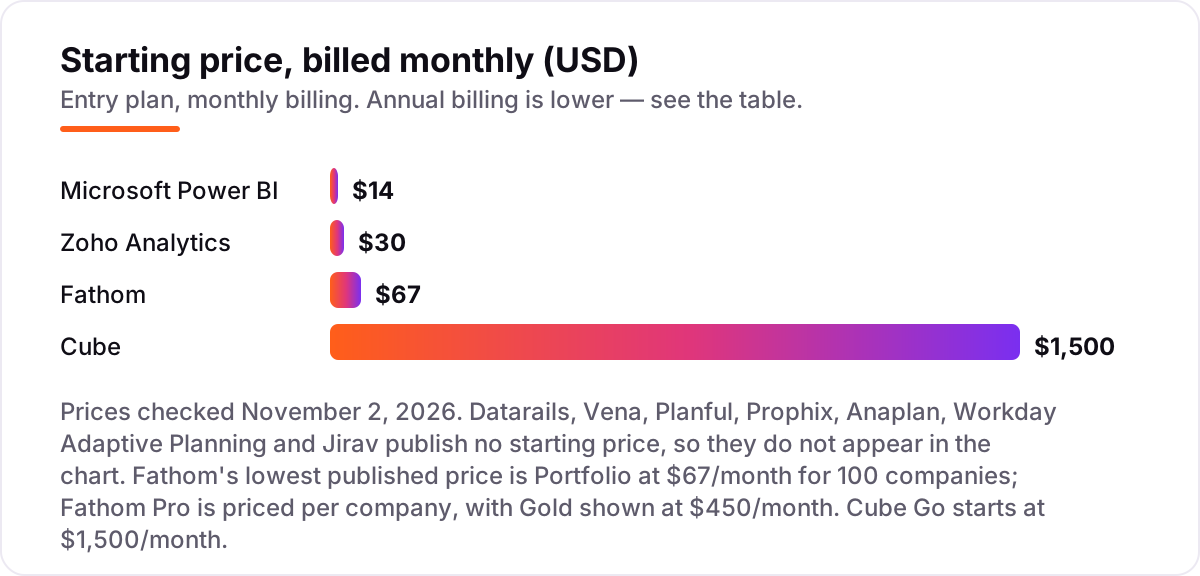
Seven of the 11 tools here publish no starting price, so the first number most buyers see is a quote, not a price list. The four with published prices show the range: Microsoft Power BI Pro costs $14 per user a month, Zoho Analytics Basic costs $30 a month, Fathom Portfolio costs $67 a month for 100 companies, and Cube Go starts at $1,500 a month.
Take a five-person finance team as a worked example, using only the published prices above. Cube Go costs $1,500 a month, which is $18,000 a year before implementation fees. Add Power BI Pro for the same five people to share dashboards and the bill rises by $70 a month, or $840 a year, for a combined $18,840 a year. The same team on Zoho Analytics Basic instead of Cube would pay $30 a month, or $360 a year, but would get dashboards and reporting rather than full planning, forecasting and consolidation. Budget the same way you would budget any other growth spend: if you want an outside read on whether your site earns its keep, our monthly SEO service starts with a free audit.
Financial analytics vs BI vs FP&A: know the difference
The biggest confusion in this category is the vocabulary, because vendors use the three terms as if they were the same product. Financial analytics is the umbrella: any software that turns financial data into insight. FP&A software is the planning half — budgets, forecasts, scenarios and consolidation, built for the finance team that owns the numbers. BI tools are the reporting half — dashboards and visualizations built on data that already exists, for anyone who needs to see it.
The practical test is simple. If the job is deciding what the numbers should be next quarter, you need FP&A software: Datarails, Cube, Vena, Planful, Prophix, Anaplan, Workday Adaptive Planning or Jirav. If the job is showing what the numbers already are, a BI tool is enough: Power BI or Zoho Analytics. Fathom sits between the two — it reports and forecasts cash flow, but it does not do driver-based budgeting. Most mid-market teams end up with one of each: an FP&A platform to plan, and a BI tool to share the results.
Quick comparison: tool type by need
| Buyer | Best pick | Why |
|---|---|---|
| Mid-market finance team, Excel-native | Datarails | Planning, consolidation and reporting without leaving Excel, custom quote |
| Mid-market team that wants a published price | Cube | Go from $1,500/month with spreadsheet-native planning |
| Mid-size company needing one governed platform | Planful or Prophix | Planning, consolidation and close together, custom quote |
| Large enterprise, connected planning | Anaplan or Workday Adaptive Planning | Cross-department models at enterprise scale, custom quote |
| Small business or CPA firm, reporting first | Fathom or Jirav | Management reports and forecasts without enterprise complexity |
| Team on a tight budget, dashboards only | Microsoft Power BI or Zoho Analytics | Pro at $14/user/month and Basic at $30/month with free plans |
How we chose
We checked each vendor's own pricing page on November 2, 2026 and recorded the starting price exactly as shown, or as a custom quote where the vendor publishes no price — which is the case for seven of the eleven tools. Cube's prices come from the vendor's own site, Fathom's from its pricing page, Power BI's from Microsoft's pricing page and Zoho's from Zoho's pricing page. No ratings are shown: the G2 review pages could not be opened today, so rather than print stale scores we left the rating line off every card. Jirav's third-party price figures disagree with each other, so we list it as a custom quote rather than print a number we cannot verify. We ranked the tools by fit for the most common buyer — a mid-market finance team that plans, forecasts and reports every month — not by brand size. No vendor paid for a place in this list, and none of the links here are affiliate links.
What to do next
Start with the spreadsheet question: if your team plans in Excel, trial Datarails, Cube or Vena; if it reports more than it plans, start with Power BI or Zoho Analytics on a free plan. Run the trial on your real month-end data, and ask every quote-based vendor for implementation costs in writing before you compare totals. If you publish your findings or a pricing page of your own, check how it will look in search with the free SERP snippet preview tool. Once your tools are in place, find out what's holding your rankings back.
Your stack only works if people find you
SerpAstra fixes what keeps your site off page one and makes it easy for AI assistants to recommend.
Get a free audit→Sources we checked (12)
- Datarails — no published pricing; custom quote (checked November 2, 2026)
- Cube pricing — Go from $1,500/month, Pro from $2,800/month, on the vendor blog (checked November 2, 2026)
- Vena — no published pricing; custom quote (checked November 2, 2026)
- Planful — no published pricing; custom quote (checked November 2, 2026)
- Prophix — no published pricing; custom quote (checked November 2, 2026)
- Anaplan — no published pricing; custom quote (checked November 2, 2026)
- Workday Adaptive Planning — no published pricing; custom quote, 30-day free trial (checked November 2, 2026)
- Jirav — no published starting price; custom quote (checked November 2, 2026)
- Fathom pricing — Portfolio $67/month for 100 companies; Pro Gold $450/month (checked November 2, 2026)
- Microsoft Power BI pricing — Pro $14.00/user/month, paid yearly (checked November 2, 2026)
- Zoho Analytics pricing — Basic US$24/month billed annually, US$30 billed monthly (checked November 2, 2026)
- Zoho Analytics update — pricing unchanged, used by more than 100,000 businesses (checked November 2, 2026)
Shamim
Founder of SerpAstra
A full-stack SEO and digital marketer who spends most days on Local SEO for dental practices, AI search visibility and lead generation.
Frequently asked questions
What is the best financial analytics software in 2026?
Datarails is the best fit for most mid-market finance teams: Excel-native planning, consolidation and reporting in one governed platform. Cube is the best option with published pricing, from $1,500/month. Small businesses should start with Fathom for reporting or Zoho Analytics for dashboards.
How much does financial analytics software cost?
From $14/user/month for Microsoft Power BI Pro to $1,500/month for Cube Go, with most FP&A platforms priced by custom quote. Seven of the 11 tools here publish no starting price at all, so expect a sales conversation and budget for implementation on top of the subscription.
Is there free financial analytics software?
Yes, with limits. Zoho Analytics has a free plan for 2 users and 10,000 rows, and Power BI Desktop is free for building reports locally. Fathom, Workday Adaptive Planning and Prophix offer free trials, but none of the FP&A platforms here has a permanent free plan.
What is the difference between financial analytics software and BI tools?
Financial analytics is the umbrella term: it covers planning tools (FP&A) and reporting tools (BI). FP&A software builds budgets, forecasts and scenarios. BI tools like Power BI and Zoho Analytics turn finished data into dashboards. Many teams need one of each, not one instead of the other.
Do I need FP&A software or just dashboards?
If you only report on numbers that already exist, dashboards are enough, and Power BI or Zoho Analytics will do. If you build budgets, run scenarios or forecast cash, you need FP&A software like Datarails, Cube or Jirav. Reporting shows what happened; planning decides what happens next.
What should I check before buying financial analytics software?
Four things: whether the vendor publishes a price or quotes by scope, what implementation and onboarding will cost, whether your data sources connect without middleware, and whether AI features sit on the entry plan or a higher tier. All four vary widely, and the comparison table at the top shows the starting price for each tool.
Can financial analytics software replace Excel?
It can replace spreadsheet chaos, but most tools in this list keep Excel in the loop on purpose. Datarails, Cube and Vena plan inside Excel with a governed database behind it. Only the BI tools and Anaplan move planning fully out of spreadsheets, and that change takes real training.
Free SEO and AI visibility audit
Find out what is holding your rankings back
Send us your site. Within 2 business days you get a written audit, an AI visibility check and a short fix list ranked by impact. Free, with no contract attached.
Request my free audit→Related guides
 SEO & AI Search8 Best SEO Platforms for Finance in 2026 (Pros, Cons and Pricing)8 best SEO platform for finance options compared on price, YMYL content tools, branch tracking and AI visibility. All prices checked November 1, 2026.Read guide →
 Pricing & HiringHow much does SEO cost in 2026? A plain pricing guideWhat SEO costs in 2026, how hourly, project, retainer and performance pricing work, what drives the price up or down, and how to set a budget that holds up.Read guide →
 SEO & AI SearchBest SEO Audit Software for 2026: 10 Options Compared by Use Case10 best SEO audit software tools compared on price, crawl depth and AI visibility. Prices checked on vendor pricing pages, November 1, 2026.Read guide →