
Best Free Keyword Tools for 2026: 10 Picks Ranked by What You Need
The best free keyword tool for your budget: 10 free keyword tools compared on free limits, volume data and upgrade prices, checked November 1, 2026.
 Shamim Mia, Founder, SerpAstraLast verified November 1, 202616 min read
We compare pricing pages, documentation and public reviews. We never accept payment for rankings.

Key takeaways
- Google Keyword Planner is the free starting point for most people: real Google volume data at $0, with the catch that non-advertisers see volume ranges, not exact numbers. Ahrefs' free Keyword Generator is the fastest no-account check, and Ubersuggest's free tier plus its $29/month Individual plan is the cheapest full workflow.
- The single most important buying factor is what the free tier actually shows you: exact volumes and difficulty scores sit behind paid plans almost everywhere, so pick the free tool whose limit you will not hit.
- Free plans are real products here, not demos — Google Trends and WordStream are free with no account or paywall at all — but most cap daily searches, so keep two free tools in rotation.
- Every price below was checked on the vendor's own pricing page on November 1, 2026. Ratings are G2, with review counts shown; tools without a G2 product page show no rating.
On this page
Quick comparison
| Tool | Best for | Starting price | Free plan |
|---|---|---|---|
| Google Keyword Planner | Small business owners and bloggers starting keyword research who want real Google search volume data at no cost | Free | Yes (free) |
| Ahrefs | Bloggers and small-site owners who want a fast keyword check with difficulty labels and no account | $29/mo | Yes (no account) |
| Ubersuggest | Solo site owners who want free keyword ideas plus audits and rank tracking in one budget tool | $29/mo | Yes (3 searches/day) |
| Google Trends | Content planners and small businesses who need to know whether interest in a topic is rising, seasonal or fading | Free | Yes (free) |
| WordStream | Advertisers and small businesses who want exact search volumes and competitor keyword ideas without signing up | Free | Yes (free) |
| KeywordTool.io | Bloggers and YouTube creators who need long-tail keyword ideas from Google, YouTube, Amazon and app stores | $69/mo (annual) | Yes (no volume data) |
| AnswerThePublic | Bloggers and content marketers who plan articles and FAQs around the exact questions people ask | $20/mo | Yes (3 searches/day) |
| Mangools | Bloggers and small-site owners who want keyword difficulty scores and low-competition keywords on a small budget | $37.70/mo (annual) | Yes (free lifetime) |
| Semrush | Small teams and content marketers who want keyword research plus audits, backlinks and AI visibility in one subscription | $117.33/mo (annual) | Yes (10 reports/day) |
| Moz Pro | Small in-house teams that want keyword research with Domain Authority metrics in a beginner-friendly suite | $49/mo | Yes (10 queries/mo) |
Make one of these tools?
We re-check this list every quarter. Send a correction, request a review, or ask about a clearly labeled sponsored spot.
Request a listingThe best free keyword tools

Google Keyword Planner
Best for: Small business owners and bloggers starting keyword research who want real Google search volume data at no cost
Google Keyword Planner is the default free starting point because its numbers come from Google itself. It lives inside Google Ads and does two jobs: it finds new keyword ideas from a seed term, a website URL or a product category, and it shows average monthly searches, competition and top-of-page bid ranges for the terms you already have. You need a Google Ads account, but you do not need to run ads or spend anything.
The catch is precision. Accounts without recent ad spend see broad volume ranges such as 1K–10K instead of exact monthly figures, which is fine for sizing a topic but useless for choosing between two similar keywords. Pair it with a second free tool for exact numbers, and remember the competition column measures advertisers bidding, not organic difficulty.
What we like
- Search volume and forecasts come straight from Google's own auction data, not a third-party estimate
- Discovers new keywords from a seed term, a URL or a product category, with competition and top-of-page bid ranges
- Free to use with no ad spend — create a Google Ads account, skip campaign creation and open the tool
Watch out for
- Accounts without active ad spend see broad volume ranges (1K–10K) instead of exact monthly figures
- Built for advertisers, so the competition column measures ad competition, not how hard a keyword is to rank for organically

Ahrefs
Best for: Bloggers and small-site owners who want a fast keyword check with difficulty labels and no account
Ahrefs' free Keyword Generator is the fastest free keyword check in this list: no account, no daily search limit, and up to 100 ideas per search, each with a difficulty label and a search volume range. It covers Google, Bing, YouTube and Amazon from the same search box, so one seed word gives you ideas for blog posts, videos and product pages at once.
The trade-off is precision. You get ranges instead of exact monthly volumes, and the list stops at 100 ideas. For exact numbers, traffic potential and the full Keywords Explorer you need a paid plan, starting at $29/month on Starter. Use the generator to shortlist topics fast, then verify the shortlist in Keyword Planner or WordStream before you write.
What we like
- No account and no daily search limit on the free generator — type a seed word and get up to 100 ideas
- Every idea carries a difficulty label (easy, medium or hard) and a search volume range
- Covers Google, Bing, YouTube and Amazon from the same search box
Watch out for
- Volume is shown as a range, not an exact number, and the idea list is capped at 100 per search
- The full Keywords Explorer with exact volumes and traffic potential needs a paid plan from $29/month

Ubersuggest
Best for: Solo site owners who want free keyword ideas plus audits and rank tracking in one budget tool
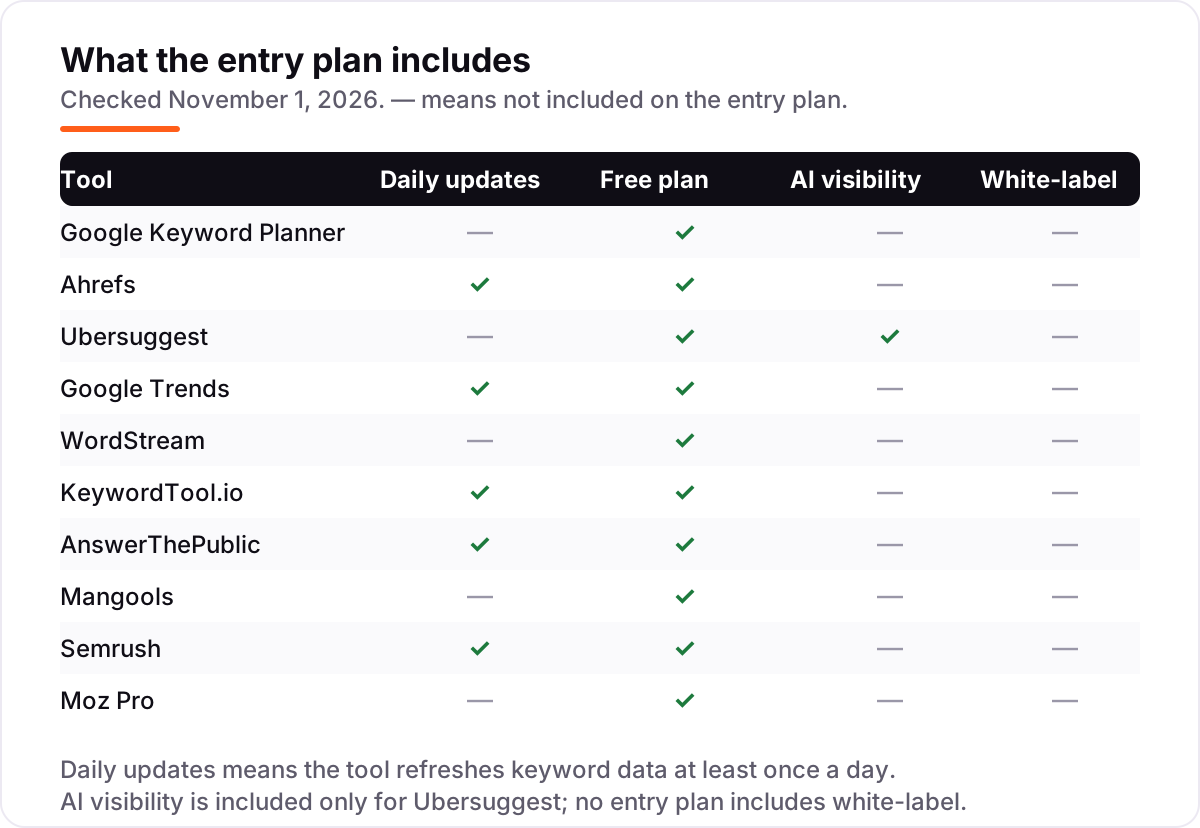
Ubersuggest is the cheapest route to a full keyword workflow. The free account gives 3 searches a day, one project and 25 tracked keywords, which covers a single small site. The $29/month Individual plan adds 20,000 keyword suggestions a month, a weekly site audit and AI visibility tracking for ChatGPT, and a one-time lifetime plan from $290 removes the monthly bill entirely.
The compromise is data depth. G2 reviewers like the price and the ease of use but note the volume and difficulty figures can be less accurate than the bigger suites, and the keyword database is smaller. For a solo owner doing their own SEO, that is a fair trade; for client work where every number gets quoted, verify key volumes in Keyword Planner first.
What we like
- Free account gives 3 searches a day, one project and 25 tracked keywords — enough for a single small site
- Individual plan adds 20,000 keyword suggestions a month, a site audit and AI visibility tracking for ChatGPT
- A one-time lifetime plan is available from $290, which no other tool here offers
Watch out for
- G2 reviewers note search volume and difficulty figures can be less accurate than the bigger suites
- The free tier caps at 3 searches a day, and the 7-day trial of paid plans needs a card — set a reminder before it ends

Google Trends
Best for: Content planners and small businesses who need to know whether interest in a topic is rising, seasonal or fading
Google Trends answers the question the other free tools ignore: timing. It compares up to five topics over time, by region, back to 2004, on a 0–100 scale where 100 is the peak. A term with steady volume can still be a bad bet if interest peaked three years ago, and a seasonal term looks dead in the wrong month.
The rising related queries are the most useful part — they show the exact phrasing gaining interest right now, which is often the best source of new article angles. Trends shows no search counts and no data for very low-volume terms, so pair it with Keyword Planner for volumes. It is free, needs no account and has no search limit.
What we like
- Compares up to five topics side by side, by region and by time range back to 2004
- Related queries and rising searches surface the exact phrasing that is gaining interest right now
- Free with no account, no search limit and no paywall anywhere in the tool
Watch out for
- Shows relative interest on a 0–100 scale, not search counts — it cannot tell you how many searches a term gets
- Low-volume niche terms often show no data at all, and the data is a sample of searches, not the full log

WordStream
Best for: Advertisers and small businesses who want exact search volumes and competitor keyword ideas without signing up
WordStream's Free Keyword Tool is the quiet bargain of this list: exact search volumes, competition and estimated CPC, unlimited runs, and a competitor's URL as the seed — all free. Its data comes through the Google keyword research API, and it is the only free tool here that shows concrete volumes instead of ranges without asking you to sign up.
The cost is convenience, not money. Only the first 25 keywords show on screen; the full list arrives as a CSV by email. It was built for PPC, so treat the competition column as ad competition rather than organic difficulty. Use it for idea lists, exact volumes and competitor checks, and use a difficulty score elsewhere before you commit.
What we like
- Shows concrete search volumes rather than ranges, plus competition and estimated CPC for every suggestion
- Accepts a competitor's URL and returns the keywords that site could target
- Free to run as many times as you like, with industry and country filters
Watch out for
- Only the first 25 keywords show on screen — the full list arrives as a CSV by email
- Built for PPC, so the competition column measures ad competition, not organic ranking difficulty

KeywordTool.io
Best for: Bloggers and YouTube creators who need long-tail keyword ideas from Google, YouTube, Amazon and app stores
KeywordTool.io mines autocomplete instead of a database: one seed word returns hundreds of long-tail suggestions from Google, YouTube, Bing, Amazon, eBay, Instagram and the app stores. The free version shows the suggestions — including questions and prepositions — but no volume, CPC or competition data, which makes it a brainstorming tool rather than a planning tool until you pay.
The paid plans are the priciest entry in this list at $89/month for Pro Basic, and there is no free trial, only a 30-day money-back guarantee. G2 reviewers also note the volume figures can differ from Google Keyword Planner. Pick it when the job is breadth — YouTube or Amazon phrases a suite would never surface — not when you need exact volumes.
What we like
- Mines autocomplete from Google, YouTube, Bing, Amazon, eBay, Instagram and the app stores — the widest platform spread here
- Free version returns hundreds of long-tail suggestions per search, including questions and prepositions
- Bulk search volume analysis on paid plans checks thousands of keywords at once
Watch out for
- Search volume, CPC, competition and trend data all sit behind paid plans starting at $89/month
- G2 reviewers note volume figures can differ from Google Keyword Planner, and there is no free trial

AnswerThePublic
Best for: Bloggers and content marketers who plan articles and FAQs around the exact questions people ask
AnswerThePublic turns a seed keyword into a visual map of the questions, prepositions and comparisons people type around it — the raw material for FAQs, article angles and content clusters. Type one topic and you see how real people phrase it, which is exactly what you need when a blank page is the problem rather than a missing volume number.
The free tier gives 3 searches a day with no card required, which covers occasional planning but not a full content calendar. The $20/month Starter plan adds volume data, CSV exports and listening alerts that flag new questions on your topics. G2 reviewers praise the ease of use but note results can repeat the same question with different question words attached.
What we like
- Turns one seed keyword into a visual map of questions, prepositions and comparisons people actually type
- Free tier gives 3 searches a day with no card required
- Paid plans add search volume data, CSV exports and listening alerts for new questions on your topics
Watch out for
- The free tier is thin — 3 searches a day and no volume data or exports
- G2 reviewers note results can repeat the same question with different question words attached

Mangools
Best for: Bloggers and small-site owners who want keyword difficulty scores and low-competition keywords on a small budget
Mangools is built around KWFinder, which scores every keyword for difficulty and surfaces the low-competition terms a small site can actually rank for. That focus is the whole point: a new blog cannot win head-on terms, so the tool steers you toward phrases with real volume and weak competition. Every plan includes the same five tools — KWFinder, SERP analysis, rank tracking, backlink checks and an AI search watcher — with only the limits changing.
The permanent free plan has low daily limits, so it suits occasional checks rather than daily research, and rank tracking updates weekly on Basic. The $37.70/month annual price is the cheapest suite entry here after Ubersuggest. Pick Mangools when difficulty scores matter more than database size.
What we like
- KWFinder scores every keyword for difficulty and surfaces low-competition terms a small site can actually rank for
- Five tools in every plan, including SERP analysis, backlink checks and an AI search watcher
- Permanent free plan plus a 10-day Free+ trial with higher limits
Watch out for
- The free plan's daily limits are low, and rank tracking updates weekly on Basic — daily updates need the Agency plan
- Backlink data is basic next to Ahrefs — 100,000 backlink rows a month on Basic and no link index of its own

Semrush
Best for: Small teams and content marketers who want keyword research plus audits, backlinks and AI visibility in one subscription
Semrush's free account is the deepest in this list: 10 reports a day from a keyword database Semrush puts at more than 27 billion keywords, across keyword research, domain analytics and site audit. The Keyword Magic Tool adds difficulty, search intent and SERP features to every idea, and the same login covers rank tracking, backlinks and AI visibility when you upgrade.
The free reports cap at 10 rows each, so a full content plan takes several days of free reports or a paid plan. At $139.95/month the entry SEO plan is also the priciest way in among the suites here. Use the free account to learn the workflow and to research one site; pay when ten reports a day stops being enough.
What we like
- Keyword Magic Tool holds a 27-billion-plus keyword database with difficulty, intent and SERP features
- Free account gives 10 reports a day across keyword research, domain analytics and site audit
- Bundles keyword research with rank tracking, site audits, backlinks and AI visibility in one login
Watch out for
- Highest entry price among the suites here, and the free account caps each report at 10 rows
- Extra users start at $45/month, and the AI visibility toolkit needs the $199/month Starter plan

Moz Pro
Best for: Small in-house teams that want keyword research with Domain Authority metrics in a beginner-friendly suite
Moz Pro is the friendliest suite in this list, and it owns Domain Authority — the 0–100 site-strength score that appears in countless client reports. Keyword Explorer pairs keyword ideas with difficulty, volume, organic CTR and a priority score that weighs all three, so a newer SEO gets a ranked shortlist instead of a raw dump of suggestions.
The free account is the thinnest here: 10 Keyword Explorer queries a month, which covers one planning session and little more. The $49/month Starter plan is the cheapest suite entry in this list, but no annual price is published for it. Buy Moz for the learning curve and the metrics; buy a dedicated free tool if you research keywords every day.
What we like
- Keyword Explorer pairs keyword ideas with difficulty, volume, organic CTR and priority scores
- Domain Authority and Page Authority are built into every plan, so keyword picks tie to metrics clients recognize
- Rated the easiest full SEO suite to learn, with extensive training resources for newer SEOs
Watch out for
- The free account allows only 10 Keyword Explorer queries a month — the thinnest free tier in this list
- No annual price is published for the Starter plan, and the keyword database is smaller than Semrush or Ahrefs
A good keyword list decides whether a page gets found or sits unread, and the best free keyword tool for most people costs nothing at all. This guide ranks 10 free keyword tools by what you actually get without paying — the free limits, the volume data and the upgrade price when you outgrow the free tier — so you can pick one and start researching today.
What a free keyword tool actually does
A free keyword tool turns one topic into a list of phrases real people type into search, with a rough sense of how often each phrase gets searched. The good ones add a difficulty read — how hard the phrase is to rank for — and group the ideas by question, comparison or related term so you can see the angles worth writing about. People searching for the best keyword search software usually mean the same thing, and the free tools in this list cover that job without a subscription.
The reason the list matters is how much content never gets found. Ahrefs studied around 14 billion pages in its Content Explorer index and found that 96.55% of them get zero organic traffic from Google, with another 1.94% getting between one and ten visits a month. The study names three main reasons: no search demand for the topic, no backlinks, and a mismatch with what searchers want. A keyword tool fixes the first of those before you write a word: it shows you whether anyone searches for a topic at all.
Free tools differ from paid ones in three ways. They cap how many searches you can run, they hide exact numbers behind ranges or behind a paywall, and they rarely track rankings over time. What they do well is the first step: ideas, rough volumes and difficulty signals. Start there, and pay only when a free limit is the thing slowing you down.
Start with Google's own free tools
Two of the ten tools here come from Google, and they are the right first stop for most people. Google Keyword Planner is the only free source of volume data that comes from Google's own auction records rather than a third-party estimate. It shows average monthly searches, competition and top-of-page bid ranges, and it can generate ideas from a competitor's URL — paste a rival's homepage and see what Google thinks that site targets. The trade-off is precision: without recent ad spend you see ranges like 1K–10K, not exact counts. That is still enough to size a topic and to compare two broad ideas, and it costs nothing beyond a free Google Ads account.
Google Trends answers a different question: timing. It compares up to five topics over time, by region, back to 2004, on a 0–100 scale where 100 is the peak. A term with steady volume can still be a bad bet if interest peaked three years ago, and a seasonal term looks dead in the wrong month. Trends also surfaces rising related queries — the exact phrasing gaining interest right now — which is often the best source of new article angles. Our guide to keyword research for local businesses shows how to pair Trends timing with local search data when the audience is a city, not the whole country.
Use the two together: Planner sizes the demand, Trends checks the direction. Neither tool charges anything, neither needs a card, and neither has a search limit. If you only ever use two free tools, use these two.
Free tiers of the paid suites
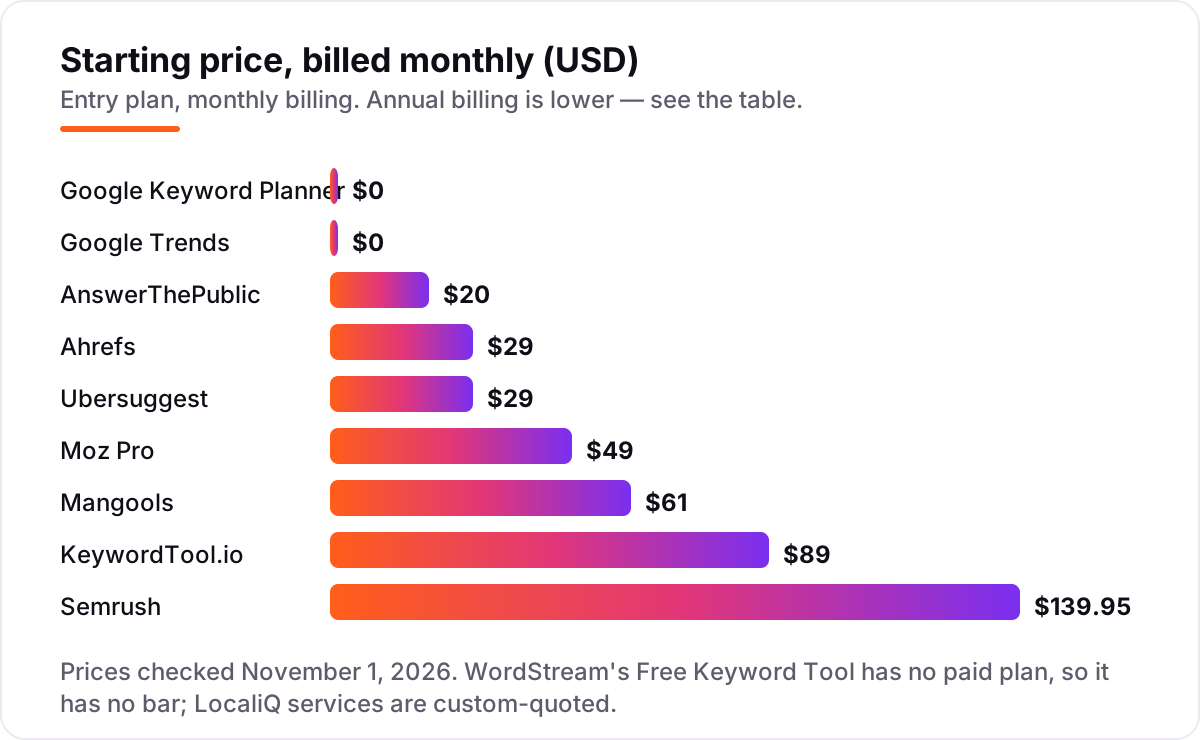
The big paid suites all run a free tier, and the differences between them are the whole buying decision. Ahrefs' free Keyword Generator is the most generous for quick checks: no account, no daily limit, up to 100 ideas per search, each with a difficulty label and a volume range, across Google, Bing, YouTube and Amazon. The price is precision — ranges, not exact numbers — and the full Keywords Explorer starts at $29/month on the Starter plan.
Ubersuggest is the cheapest route to a full workflow. The free account gives 3 searches a day, one project and 25 tracked keywords, and the $29/month Individual plan adds 20,000 keyword suggestions a month, a weekly site audit and AI visibility tracking for ChatGPT. It is also the only tool here with a lifetime option, from $290 one-time. G2 reviewers like the price and the ease of use but note the volume and difficulty figures can be less accurate than the bigger suites.
Semrush's free account is the deepest: 10 reports a day from a database Semrush puts at more than 27 billion keywords, across keyword research, domain analytics and site audit. The catch is the $139.95/month entry price when the free reports run out, and a 10-row cap on each free report. Moz's free account is the thinnest — 10 Keyword Explorer queries a month — but it comes with the Domain Authority metrics clients already recognize, and the $49/month Starter plan is the cheapest suite entry here. Mangools sits between the two: a permanent free plan with low daily limits, and $37.70/month billed annually for five tools including KWFinder's difficulty scores. If keyword research is the part you keep postponing, our monthly SEO service covers it as part of ongoing optimization.
Question and long-tail specialists
Some free tools do one job better than any suite. AnswerThePublic turns a seed keyword into a visual map of the questions, prepositions and comparisons people type around it — the raw material for FAQs, article angles and content clusters. The free tier gives 3 searches a day; the $20/month Starter plan adds volume data, CSV exports and listening alerts that flag new questions on your topics. G2 reviewers praise the ease of use but note the free tier is thin and results can repeat the same question with different question words.
KeywordTool.io mines autocomplete instead of a database: one seed word returns hundreds of long-tail suggestions from Google, YouTube, Bing, Amazon, eBay, Instagram and the app stores. The free version shows the suggestions but no volume, CPC or competition data — those start at $89/month on Pro Basic, the highest entry price in this list. It is the right pick when the job is breadth, for example finding YouTube or Amazon phrases a suite would never surface.
WordStream's Free Keyword Tool is the quiet bargain of the list: exact search volumes, competition and estimated CPC, unlimited runs, and a competitor URL as the seed — all free. The only cost is the first 25 keywords show on screen and the full list arrives as a CSV by email. It was built for PPC, so treat the competition column as ad competition, not organic difficulty, and use it for idea lists and exact volumes.
Quick comparison: tool type by need
| Buyer | Best pick | Why |
|---|---|---|
| Just starting out, no budget | Google Keyword Planner | Real Google volume data at $0, with ranges instead of exact numbers |
| Fastest check, no account | Ahrefs | 100 ideas per search with difficulty labels, no sign-up |
| One cheap tool for everything | Ubersuggest | Free tier plus audits, tracking and AI visibility from $29/month |
| Is this topic rising or fading? | Google Trends | Free timing and comparison data back to 2004 |
| Exact volumes, no sign-up | WordStream | Concrete volumes and CPC free, full list by email |
| Questions and article angles | AnswerThePublic | Visual question maps, 3 free searches a day |
| Long-tail ideas everywhere | KeywordTool.io | Autocomplete suggestions from Google, YouTube and Amazon |
| Low-competition keywords | Mangools | Difficulty scores and a free lifetime plan |
| Deepest free reports | Semrush | 10 free reports a day from a 27-billion-keyword database |
| Easiest suite to learn | Moz Pro | Keyword Explorer plus Domain Authority, 10 free queries a month |
How to choose the best free keyword tool: a short decision path
- Start with the two Google tools. Run your seed terms through Keyword Planner for volume ranges and Google Trends for timing before you open anything else. If Planner shows a range and Trends shows a falling line, drop the topic.
- Pick your free workhorse by limit, not by brand. If you research daily, Ahrefs' generator has no daily cap. If you research in bursts, Ubersuggest's 3 searches a day or AnswerThePublic's 3 a day will run out fast — keep a second free tool ready.
- Check what the free tier hides. Exact volumes and difficulty scores are the two things free tiers hide most. WordStream shows exact volumes free; Mangools and Ahrefs show difficulty free. If you need both, that is the point to pay.
- Match the tool to the job. Questions go to AnswerThePublic, YouTube and Amazon phrases go to KeywordTool.io, competitor keywords go to WordStream's URL input, and timing goes to Trends. No single free tool does all four well.
- Try the upgrade path before you need it. Run your real keyword list through the free tier for a week, then check the paid price — Ubersuggest from $29/month, Mangools from $37.70 billed annually — and the free trial terms before the free limit blocks a deadline. Before you publish pages for the keywords you pick, check the page's keyword usage with the free keyword density checker.
Mistakes to avoid
- Trusting a volume range as an exact number. Keyword Planner shows 1K–10K to non-advertisers. That range can hide a tenfold difference — cross-check with WordStream's exact volumes or Ahrefs' ranges before you commit to a topic.
- Paying for volume data you can get free. WordStream shows exact search volumes at no cost. Before you pay $89/month for KeywordTool.io Pro, check whether the free tools already give you the numbers you need.
- Using ad competition as ranking difficulty. Keyword Planner and WordStream measure how many advertisers bid on a term. A high-competition keyword can still be easy to rank for organically — use a difficulty score from Ahrefs, Mangools or Moz instead.
- Burning the free tier on one session. AnswerThePublic and Ubersuggest both cap free searches at 3 a day. Batch your seed terms, run them in one sitting, and keep a second free tool for the rest of the day.
- Skipping Trends and publishing into a fading topic. A keyword with steady volume can still be past its peak. A 5-year Trends chart takes thirty seconds and stops you writing for a topic nobody searches for any more.
How we chose
We checked each vendor's own pricing page on November 1, 2026 and recorded the starting price exactly as shown, including the annual-billing figure where the page lists one. Two prices rest on more than a direct page read: Ubersuggest's page was running a promotional rate in late-October reads, so we list its standard $29/month Individual price from the page's own comparison range; AnswerThePublic's $20/month Starter price comes from its pricing page as read in September and October 2026, since the live page would not load for us on the check date. Ratings come from G2, with review counts shown; Google Keyword Planner, Google Trends and WordStream have no G2 product page, so they show no rating. We ranked the tools by fit for the most common buyer — a small business owner or blogger doing keyword research without a budget — not by brand size. No vendor paid for a place in this list, and none of the links here are affiliate links.
What to do next
Start with the two Google tools: size your topics in Keyword Planner, check the direction in Trends, and keep the shortlist small — five to ten keywords you can actually write for. Then run the shortlist through the free tier of one specialist: Ahrefs' generator for difficulty labels, AnswerThePublic for questions, or WordStream for exact volumes. If a free limit blocks you mid-week, that is the signal to pay — Ubersuggest at $29/month or Mangools at $37.70/month billed annually are the cheapest upgrades here. If you'd rather have this set up and read for you, request a free SEO + AI visibility audit and get a ranked fix list in 2 business days.
Rather not run the tools yourself?
Tools show you the data. SerpAstra turns it into higher rankings, more map-pack calls and citations in AI answers.
Get a free SEO + AI visibility audit→Sources we checked (19)
- Google Keyword Planner — ads.google.com/home/tools/keyword-planner/ (checked November 1, 2026)
- Ahrefs pricing — ahrefs.com/pricing/ (checked November 1, 2026)
- Ahrefs Free Keyword Generator — ahrefs.com/keyword-generator (checked November 1, 2026)
- Ahrefs search traffic study — 96.55% of pages get zero Google traffic (checked November 1, 2026)
- Ahrefs on G2 — 4.5/5, 723 reviews (checked November 1, 2026)
- Ubersuggest pricing — app.neilpatel.com/en/pricing (checked November 1, 2026)
- Ubersuggest on G2 — 4.2/5, 160 reviews (checked November 1, 2026)
- Google Trends — trends.google.com (checked November 1, 2026)
- WordStream Free Keyword Tool — wordstream.com/keywords (checked November 1, 2026)
- KeywordTool.io pricing — keywordtool.io/pricing (checked November 1, 2026)
- Keyword Tool on G2 — 4.5/5, 19 reviews (checked November 1, 2026)
- AnswerThePublic pricing — answerthepublic.com/pricing (checked November 1, 2026)
- AnswerThePublic on G2 — 4.5/5, 38 reviews (checked November 1, 2026)
- Mangools pricing — mangools.com/plans-and-pricing (checked November 1, 2026)
- Mangools on G2 — 4.7/5, 97 reviews (checked November 1, 2026)
- Semrush pricing — semrush.com/prices/ (checked November 1, 2026)
- Semrush on G2 — 4.4/5, 4,304 reviews (checked November 1, 2026)
- Moz Pro pricing — moz.com/products/pro/pricing (checked November 1, 2026)
- Moz Pro on G2 — 4.3/5, 608 reviews (checked November 1, 2026)
Shamim
Founder of SerpAstra
A full-stack SEO and digital marketer who spends most days on Local SEO for dental practices, AI search visibility and lead generation.
Frequently asked questions
What is the best free keyword tool in 2026?
Google Keyword Planner is the best free starting point for most people, because its volume data comes from Google itself and it costs nothing. For a fast check with no account, Ahrefs' free Keyword Generator is quicker. If you also want audits and rank tracking, Ubersuggest's free tier is the best all-rounder.
Is Google Keyword Planner really free?
Yes. You need a free Google Ads account, but you do not need to run ads or spend anything — create the account, skip campaign creation and open the tool. The catch is precision: accounts without recent ad spend see broad volume ranges such as 1K–10K instead of exact monthly figures.
Which free keyword tool shows search volume?
WordStream's Free Keyword Tool shows exact search volumes free, with no sign-up for the first 25 keywords. Google Keyword Planner shows volumes free too, but as ranges unless the account has ad spend. Ahrefs' free generator shows volume ranges, while KeywordTool.io's free version shows no volume data at all.
What is the best free keyword tool with no sign-up?
Three tools in this list need no account at all: Ahrefs' free Keyword Generator, Google Trends and WordStream's Free Keyword Tool. Ahrefs gives difficulty labels, Trends gives timing and comparisons, and WordStream gives exact volumes. Use all three and you cover most keyword research without creating an account.
Can I do keyword research without paying anything?
Yes, by combining free tools. Use Keyword Planner for volume ranges, Trends for timing, Ahrefs' generator for difficulty labels and AnswerThePublic for questions. The limits are daily search caps and hidden exact numbers, so batch your research into focused sessions and keep two free tools in rotation.
What is the difference between Keyword Planner and a paid keyword tool?
Keyword Planner gives volume ranges and ad competition from Google's own data, free. Paid tools add exact volumes, keyword difficulty scores, competitor keyword gaps, rank tracking and historical data. Pay when a free limit — usually the daily search cap or missing difficulty scores — is the thing slowing your work down.
How many keywords should I target per page?
One primary keyword per page, plus a handful of close variants and questions that share the same intent. A keyword tool helps you find those variants: check the volume and difficulty of each, pick the primary with real demand you can rank for, and use the variants as subheadings and FAQ questions on the same page.
Free SEO and AI visibility audit
Find out what is holding your rankings back
Send us your site. Within 2 business days you get a written audit, an AI visibility check and a short fix list ranked by impact. Free, with no contract attached.
Request my free audit→Related guides
 On-PageKeyword research for local businesses, step by stepA practical, step-by-step keyword research process for local businesses: find what customers search, map terms to pages, and skip vanity keywords.Read guide →
 AI SearchBest AI SEO tools in 2026: honest picks by jobBest AI SEO tools in 2026, picked by job: Semrush and Ahrefs for research, Surfer and Clearscope for content, Otterly for AI tracking, with 2026 prices.Read guide →
 ContentHow to write SEO content that ranks (and reads like a human wrote it)How to write SEO content that ranks: match search intent, structure before sentences, write like a person, and use AI honestly. A practical guide for 2026.Read guide →