
11 Best Free SEO Keyword Research Tools in 2026, Compared
11 best free SEO keyword research tools compared with real prices and free limits — Google Keyword Planner, Ahrefs, Semrush, Moz and more, sorted by need.
 Shamim Mia, Founder, SerpAstraLast verified November 1, 202617 min read
We compare pricing pages, documentation and public reviews. We never accept payment for rankings.

Key takeaways
- Google Keyword Planner is the best free starting point — Google's own volume data for $0 — with the Ahrefs Free Keyword Generator (150 ideas per search) and Semrush's free account (10 reports a day) covering difficulty and depth.
- Free tiers are capped hard: 3 searches a day at Ubersuggest and AnswerThePublic, 5 lookups a day at KWFinder and 10 queries a month at Moz — plan your research around the cap.
- The single most important buying factor is what the free tier hides: volume without difficulty, or difficulty without volume, is only half the answer.
- Volume is a range on free accounts and an estimate everywhere else — compare keywords inside one tool instead of across tools.
- Every price below was checked on the vendor's own pricing page on November 1, 2026.
On this page
Quick comparison
| Tool | Best for | Starting price | Free plan |
|---|---|---|---|
| Google Keyword Planner | Bloggers and small businesses who want Google's own search-volume data without paying anything | $0 | Yes |
| Ahrefs | Solo SEOs and bloggers who want fast keyword ideas with volume and difficulty, no account needed | $29/mo | Yes (generator) |
| Semrush | Small teams that want a free taste of the deepest keyword database before paying for a suite | $117.33/mo (annual) | Yes (10 reports/day) |
| Ubersuggest | Beginners and small business owners who want simple keyword scores and competitor ideas for $29/month or free | $29/mo | Yes (3 searches/day) |
| Moz | Beginners who want a difficulty score they can read at a glance, plus Domain Authority on every result | $49/mo | Yes (10 queries/mo) |
| AnswerThePublic | Content writers and bloggers who need the exact questions people ask around a topic | $13.33/mo (annual) | Yes (3 searches/day) |
| KeywordTool.io | SEOs who mine autocomplete for long-tail keywords across Google, YouTube, Bing and Amazon | $69/mo (annual) | Yes (suggestions) |
| KWFinder | Bloggers hunting low-difficulty long-tail keywords they can actually rank for | $37.70/mo (annual) | Yes (5 lookups/day) |
| Google Trends | Anyone checking whether interest in a keyword is rising, falling or seasonal before writing about it | $0 | Yes |
| Google Search Console | Site owners who want keyword ideas from the actual searches that already bring them traffic | $0 | Yes |
| WordStream | Small businesses and PPC beginners who want keyword ideas with volume and CPC from a URL or seed word | $0 | Yes |
Make one of these tools?
We re-check this list every quarter. Send a correction, request a review, or ask about a clearly labeled sponsored spot.
Request a listingThe best free SEO keyword research tools

Google Keyword Planner
Best for: Bloggers and small businesses who want Google's own search-volume data without paying anything
Keyword Planner is the starting point for most free keyword research because its numbers come from Google itself. You type a seed word or a URL and get keyword ideas with monthly search-volume ranges, competition levels and a forecast of clicks and cost. It is the only tool here where the data is not an estimate from a third party, which is why paid tools are often checked against it.
The limits are real. Volume shows as a range rather than an exact figure for accounts without ad spend, and there is no difficulty score, so you cannot tell from Planner alone whether you can win a keyword. Use it to build the first list and check volumes, then take the shortlist to a tool that scores difficulty.
What we like
- Search-volume estimates come straight from Google, so they are the reference other tools are judged against
- Free with a Google Ads account — no ad spend is required to run keyword ideas
- Forecasts show expected clicks, impressions and cost for a keyword before you target it
Watch out for
- Volume is shown as a range, not an exact number, for accounts without ad spend
- No keyword difficulty score, no competitor keyword data and no question or long-tail suggestions

Ahrefs
Best for: Solo SEOs and bloggers who want fast keyword ideas with volume and difficulty, no account needed
Ahrefs' free Keyword Generator is the fastest way to turn one idea into a list. Enter a seed keyword and you get 150 ideas — the top 100 keywords plus 50 questions — with search volume and a difficulty score for each, drawn from a database Ahrefs puts at more than 8 billion keywords. It works across Google, Bing, YouTube and Amazon, and it needs no account for a quick check.
The free version is a one-time lookup, not a workspace: only the top 10 related ideas show volume, there are no keyword lists and no exports, and daily searches are rate-limited. When the free generator runs out, the $29 Starter plan is the cheapest paid route into the full Keywords Explorer — but most bloggers will get a long way on the generator alone.
What we like
- Free Keyword Generator returns 150 ideas per search — 100 keywords plus 50 questions — with volume and difficulty
- Covers Google, Bing, YouTube and Amazon from one search box, with no account needed
- Difficulty scores come from one of the largest keyword databases, so they hold up when you upgrade
Watch out for
- Only the top 10 related ideas show volume without a paid plan, and daily searches are rate-limited
- No keyword lists, no tracking and no exports on the free generator

Semrush
Best for: Small teams that want a free taste of the deepest keyword database before paying for a suite
Semrush's free account is a small window into the largest keyword database in this list — more than 27 billion keywords. You get 10 reports a day across the suite, which covers Keyword Magic Tool lookups, domain overviews and keyword gap checks against competitors. That is enough to research one topic properly and to see which keywords your rivals rank for that you do not.
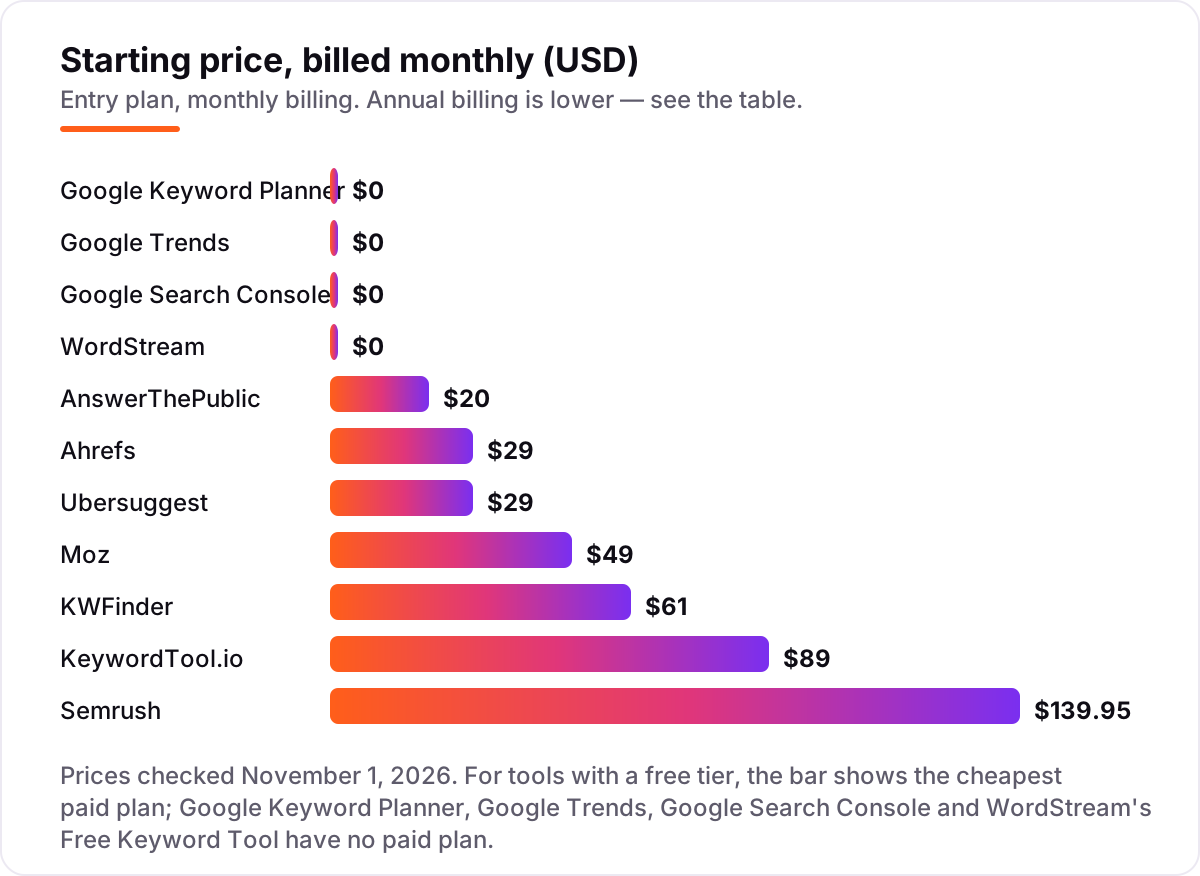
Ten reports a day runs out fast in a real research session, and full keyword research needs the SEO plan at $139.95 a month billed monthly — the highest entry price here. Semrush makes sense as a free tool when you want a deep look at one or two topics; as a paid tool it only pays off if you also use its audits, tracking and backlink data.
What we like
- Keyword Magic Tool draws on a 27-billion-plus keyword database, the largest in this list
- Free account gives 10 reports a day across the suite, including keyword and domain lookups
- Keyword Gap and position tracking show which keywords competitors rank for and you do not
Watch out for
- The free account caps at 10 reports a day, so a real research session burns through it fast
- Full keyword research needs the SEO plan at $139.95/month, the highest entry price here

Ubersuggest
Best for: Beginners and small business owners who want simple keyword scores and competitor ideas for $29/month or free
Ubersuggest is the friendliest tool in this list for beginners. The free account gives 3 searches a day, and the Chrome extension adds about 40 free lookups a day on top, which is more generous than any other free tier here. Each search returns keyword ideas with volume, difficulty and content ideas, plus a look at the sites already ranking for the term.
The data is thinner than Ahrefs or Semrush — backlink rows and tracked keywords are capped low — and rank tracking updates weekly on every plan. The Individual plan at $29 a month is the cheapest paid upgrade in this list, and the $290 lifetime option removes the monthly bill. Start free, and pay only when three searches a day stop being enough.
What we like
- Free account gives 3 searches a day, and the Chrome extension adds about 40 free lookups a day
- Individual plan is $29/month and adds 20,000 keyword suggestions a month and AI Search Visibility on ChatGPT
- Lifetime option from $290 one-time removes the monthly bill entirely
Watch out for
- Free account allows only 3 searches a day, which covers one quick check, not a research session
- Keyword data is thinner than Ahrefs or Semrush, and rank tracking updates weekly on every plan

Moz
Best for: Beginners who want a difficulty score they can read at a glance, plus Domain Authority on every result
Moz Keyword Explorer is the easiest difficulty read in this list. Every keyword gets a volume estimate, a difficulty score, an organic click-through estimate and an opportunity score in one clean view, and Domain Authority sits next to every result so you can judge whether your site can win the term. A free Moz account includes 10 Keyword Explorer queries a month plus the free MozBar extension.
Ten queries a month runs out in a single session, so the free tier is for occasional checks, not research. The Starter plan at $49 a month adds 150 keyword queries a month and 50 tracked keywords, which is still tight for regular work. Moz is the right pick when you want the clearest possible answer to one question: can I rank for this?
What we like
- Keyword Explorer scores every keyword for volume, difficulty, organic CTR and opportunity in one view
- Free Moz account includes 10 Keyword Explorer queries a month plus the free MozBar extension
- Domain Authority on every result makes it easy to judge whether a keyword is winnable for your site
Watch out for
- Free account allows only 10 Keyword Explorer queries a month, so it runs out in a single session
- Starter covers only 50 tracked keywords and 150 keyword queries a month — regular research needs Standard

AnswerThePublic
Best for: Content writers and bloggers who need the exact questions people ask around a topic
AnswerThePublic answers a different question from every other tool here: not how many people search a keyword, but what they actually ask about it. Type a seed word and you get a visual map of who, what, where, when, why and how questions drawn from autocomplete data, which is exactly the raw material for article outlines and FAQ sections.
The free plan gives 3 searches a day with no signup, but it shows no search-volume or CPC data, so you still need another tool to check whether a question is worth targeting. Paid plans start at $20 a month for Starter — the old $9 and $11 prices quoted in older reviews are gone. Use it for ideas, then verify the numbers elsewhere.
What we like
- Turns one seed keyword into a visual map of who, what, where, when, why and how questions
- Free plan needs no signup for 3 searches a day — enough to outline one article
- Question data comes from autocomplete, so it mirrors the exact phrasing people type
Watch out for
- Free plan allows only 3 searches a day and shows no search-volume or CPC data
- Paid plans start at $20/month, and the old $9 and $11 entry prices quoted in older reviews are gone

KeywordTool.io
Best for: SEOs who mine autocomplete for long-tail keywords across Google, YouTube, Bing and Amazon
KeywordTool.io mines autocomplete, so it finds the long-tail phrases people actually type — including the ones Google's own planner hides. The free version returns 750 or more suggestions per search across Google, YouTube, Bing, Amazon and other platforms, with dedicated tabs for questions, prepositions and comparisons, and no account is needed to run a search.
The catch is that the free version shows suggestions only: no search volume, no CPC and no competition data, so you cannot rank the list without paying. Pro Basic starts at $89 a month, which is steep for a suggestions-only tool. Use the free version to expand a seed word into hundreds of long-tail ideas, then check volumes in Keyword Planner or Ahrefs.
What we like
- Free version returns 750 or more suggestions per search from Google autocomplete, with no account needed
- One search covers Google, YouTube, Bing, Amazon, Instagram and more, including Questions tabs
- Pro adds search volume, CPC, competition and bulk analysis across all supported platforms
Watch out for
- Free version shows keyword suggestions but no search volume, CPC or competition data
- Pro Basic at $89/month is steep for a tool that does keyword suggestions only

KWFinder
Best for: Bloggers hunting low-difficulty long-tail keywords they can actually rank for
KWFinder is built around one job: finding long-tail keywords a small site can actually rank for. Its Keyword Difficulty score is the clearest in this list for beginners, and every result shows search volume, trend, CPC and the pages currently ranking, with local research across about 65,000 locations. The free plan gives 5 lookups a day.
Five lookups a day is enough for one topic, not a content plan, and KWFinder cannot be bought on its own — it comes with the full Mangools suite, starting at $61 a month billed monthly. Keyword data also runs about a month behind. Pick KWFinder when your main problem is not finding keywords, but finding ones you can win.
What we like
- Keyword Difficulty score is built for beginners: one number that says how hard a keyword is to win
- Free plan gives 5 lookups a day with 15 related and 5 competitor keywords per lookup
- Local research covers about 65,000 locations, so it works for city-level keyword targeting
Watch out for
- Free plan allows only 5 keyword lookups a day, and KWFinder cannot be bought on its own
- Keyword data runs about a month behind, so current-month volumes are not shown

Google Trends
Best for: Anyone checking whether interest in a keyword is rising, falling or seasonal before writing about it
Google Trends answers the question the other free tools skip: is interest in this keyword rising or fading? You can compare up to five terms and see relative interest over time, by region and by season, with no account and no limits. Trending searches and breakout terms surface topics while interest is still climbing, which is when a new article has the best chance.
Trends shows relative interest on a 0 to 100 scale, not absolute search volume, so it cannot tell you how many searches a keyword gets. There is no difficulty score and no competitor data. Use it as a filter after you have a list: check the trend line before you invest a week in a topic that peaked two years ago.
What we like
- Free with no account: compare up to five keywords and see interest over time, by region and by season
- Trending searches and breakout terms surface topics while interest is still rising
- Related queries reveal the phrasing people use around a topic, which feeds content outlines
Watch out for
- Shows relative interest on a 0–100 scale, not absolute search volume
- No keyword difficulty, no competitor data and no suggestions beyond related topics

Google Search Console
Best for: Site owners who want keyword ideas from the actual searches that already bring them traffic
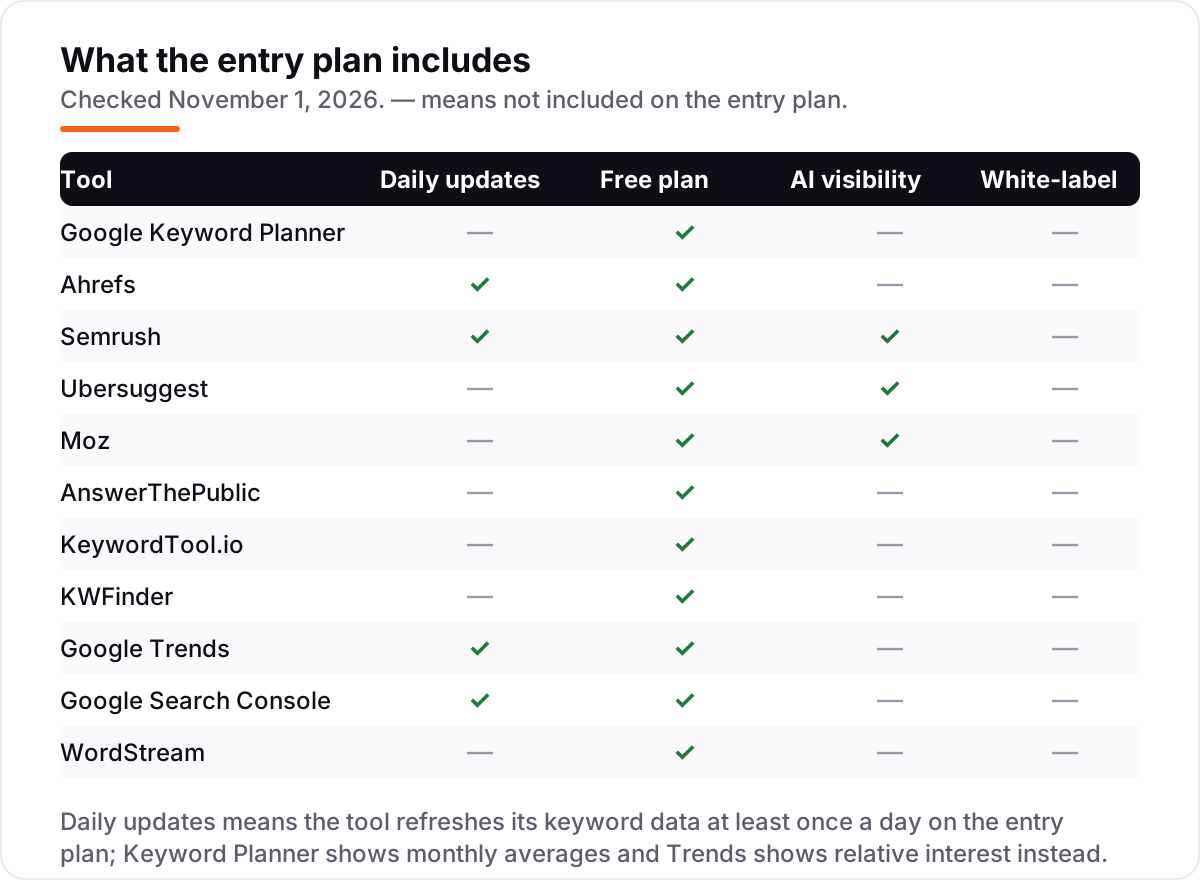
Search Console is the only tool here whose keyword data is not an estimate: it shows the exact queries that already bring your site impressions and clicks, with average position for each. It is free for any verified site, with 16 months of history and no usage caps, and it updates daily.
The limit is scope: it only shows keywords your site already ranks for, so it cannot discover new topics. There are no difficulty scores and no competitor data. Its best use is finding near-miss keywords — queries where you sit on page two — because moving those to page one is usually the cheapest traffic you will ever win.
What we like
- Shows the exact queries that already bring your site impressions and clicks, with position data
- Free for any verified site, with 16 months of history and no usage caps
- Reveals near-miss keywords — queries where you rank on page two — that are the cheapest wins to chase
Watch out for
- Only shows keywords your site already ranks for — it cannot discover new topics
- No difficulty scores and no competitor keyword data

WordStream
Best for: Small businesses and PPC beginners who want keyword ideas with volume and CPC from a URL or seed word
WordStream's Free Keyword Tool is the only free tool here that starts from a competitor's URL instead of a seed word. Paste a homepage and it returns keyword suggestions with search volume, competition and CPC, or enter a keyword and filter the results by industry so the numbers match your niche. The first 25 keywords show on screen, and the full list arrives by email as a CSV.
It was built for Google Ads, so the competition column measures ad competition, not how hard a keyword is to rank for organically — do not use it as a difficulty score. There is no tracking, audit or backlink tool behind it. Use it for a fast competitor peek and a first keyword list, then verify difficulty elsewhere.
What we like
- Free with no signup: enter a keyword or a competitor URL and see the first 25 suggestions with volume and CPC
- Industry filters tune suggestions and numbers to your niche instead of generic averages
- Data draws on Google and Bing keyword APIs, and the full list is emailed free as a CSV
Watch out for
- Built for Google Ads, so the competition column measures ad competition, not organic difficulty
- Full keyword list arrives by email, and there is no rank tracking, audit or backlink tool behind it
What a keyword research tool actually does
The best free SEO keyword research tools answer three questions before you write a word: what do people search for, how often, and how hard is it to rank for? A keyword research tool turns a seed word into a list of related searches with a monthly volume estimate and a difficulty score, so you can pick topics that bring traffic instead of guessing. That matters because organic search is still the largest traffic channel on the web — BrightEdge research puts organic search at 53.3% of all trackable website traffic, ahead of paid search, social and email combined.
The tools in this list are organised by what you actually need: free Google tools first, then the free tiers of the paid suites, then the specialists for questions and long-tail ideas. Every tool here has a free tier or is free outright. The paid prices are shown so you know what the upgrade costs when the free cap runs out — and the free caps are the honest story of this list, because they decide how far $0 actually gets you.
Best free SEO keyword research tools from Google
Google gives away three keyword tools, and they cover three different jobs. Keyword Planner gives you volume straight from Google, Trends tells you whether interest is rising or falling, and Search Console shows the exact queries that already bring your site traffic. Together they are the strongest free starting stack in this list, and they cost nothing beyond a Google account.
Start here before you open any paid tool. Build the first list in Planner, check the trend line in Trends, then open Search Console and look for the queries where you already sit on page two. Those near-misses are usually the cheapest traffic you will ever win, and no third-party tool can show them to you because the data is yours alone. If your business serves a local area, our guide to keyword research for local businesses shows how to narrow this same stack down to city-level terms.
Free tiers of the paid suites
Ahrefs, Semrush, Moz, Ubersuggest and KWFinder all sell paid suites, and all five give away a slice for free. The slices differ in useful ways: Ahrefs gives the most ideas per search with no account, Semrush gives the deepest data in 10 reports a day, Moz gives the clearest difficulty read in 10 queries a month, Ubersuggest gives the friendliest interface with 3 searches a day, and KWFinder gives the best low-competition filter with 5 lookups a day.
The pattern to notice is that every free tier hides one half of the answer. Ahrefs shows volume for only the top 10 ideas, Moz runs out in a day, Semrush runs out in a session. That is by design — the free tier is a sample, not a workflow. Use two free tools together so each one covers what the other hides: Planner for volume plus the Ahrefs generator for difficulty is the combination most small sites should start with.
Question and long-tail specialists
Volume and difficulty tell you which keywords to target, but they do not tell you what to write. That is the job of the specialists in this group. AnswerThePublic maps the questions people ask around a topic, KeywordTool.io mines autocomplete for hundreds of long-tail variations, and WordStream pulls keyword ideas from a competitor's URL. Use them after you have a shortlist, not before — they expand a topic you have already chosen.
These three are also where the free caps bite hardest. Three searches a day at AnswerThePublic covers one article outline, and KeywordTool.io shows suggestions without volume, so you will be switching back to Planner or Ahrefs to check the numbers. That switching is normal: no single free tool does the whole job, and the workflow in this guide is built around using two or three together.
Quick comparison: tool type by need
| Buyer | Best pick | Why |
|---|---|---|
| New blogger, zero budget | Google Keyword Planner | Google's own volume data, free |
| Fast ideas with difficulty | Ahrefs Free Keyword Generator | 150 ideas per search, no account |
| Deepest free research | Semrush free account | 10 full reports a day |
| Question-based content | AnswerThePublic | Question maps, 3 free searches a day |
| Long-tail keywords you can win | KWFinder | Difficulty score built for small sites |
| Keywords you already rank for | Google Search Console | Real queries and positions, free |
How to choose: a short decision path
- Start with your own data. Open Search Console and list the queries where you rank on page two. Those are your cheapest wins, and they need no tool at all.
- Build the list in Keyword Planner. Take one seed word per topic and pull the ideas with volume ranges. Keep anything with volume and drop anything with no data.
- Score difficulty before you commit. Run the shortlist through the Ahrefs generator or Moz's free queries and drop anything with a difficulty your site cannot win yet.
- Add the questions people ask. Spend one of your three daily AnswerThePublic searches on the winning keyword and build the article outline from the questions it returns.
- Check the trend line. Before you write, look the keyword up in Google Trends. If interest peaked two years ago, pick a rising alternative from your list instead.
Once the keyword is chosen, check the page before you publish: the free keyword density checker shows whether the keyword appears often enough in the draft, and our guide to how to track your Google ranking explains how to watch the page climb afterwards. If you want the whole process done for you, our SEO audit service includes keyword research as part of the audit.
Mistakes to avoid
- Comparing volume numbers across tools. Each tool estimates volume differently, so the same keyword gets a different number everywhere. Compare keywords inside one tool, not across tools.
- Chasing high volume and ignoring difficulty. A keyword with 10,000 searches a month is useless if the top 10 results are all sites with far more authority than yours. A 500-search keyword you can win beats one you cannot.
- Trusting a directory price. AnswerThePublic still shows $9 and $11 entry prices on several directories; the live pricing page says Starter is $20 a month. Always check the vendor's own page.
- Burning the free cap on one seed word. Three searches a day sounds generous until you spend all three on variations of the same topic. Write the seed list first, then spend the searches.
- Skipping Search Console. The queries you already rank for on page two are the cheapest traffic available, and no third-party tool can show them to you.
How we chose
We checked each vendor's own pricing page on November 1, 2026 and recorded the starting price exactly as shown, including the annual-billing figure where the page lists one. Ratings are not shown in this post: review pages could not be opened for verification on the check date, and we do not publish a score we could not open. We ranked the tools by fit for the most common buyer — a blogger or small business doing keyword research without a budget — not by brand size. No vendor paid for a place in this list, and none of the links here are affiliate links.
What to do next
Start with the free Google stack: pull your near-miss keywords from Search Console, build the list in Keyword Planner and check the trend line in Trends. Then score the shortlist in the Ahrefs generator and outline the article from AnswerThePublic's questions. If you'd rather have this set up and read for you, request a free SEO + AI visibility audit and get a ranked fix list in 2 business days.
Rather not run the tools yourself?
Tools show you the data. SerpAstra turns it into higher rankings, more map-pack calls and citations in AI answers.
Get a free SEO + AI visibility audit→Sources we checked (12)
- Google Keyword Planner — ads.google.com (checked November 1, 2026)
- Ahrefs pricing — ahrefs.com/pricing (checked November 1, 2026)
- Semrush pricing — semrush.com/prices (checked November 1, 2026)
- Ubersuggest — neilpatel.com/ubersuggest (checked November 1, 2026)
- Moz Pro pricing — moz.com/products/pro/pricing (checked November 1, 2026)
- AnswerThePublic pricing — answerthepublic.com/pricing (checked November 1, 2026)
- KeywordTool.io pricing — keywordtool.io/pricing (checked November 1, 2026)
- Mangools pricing — mangools.com/plans-and-pricing (checked November 1, 2026)
- Google Trends — trends.google.com (checked November 1, 2026)
- Google Search Console — search.google.com/search-console (checked November 1, 2026)
- WordStream Free Keyword Tool — wordstream.com/keywords (checked November 1, 2026)
- BrightEdge research — organic search drives 53.3% of all trackable website traffic
Shamim
Founder of SerpAstra
A full-stack SEO and digital marketer who spends most days on Local SEO for dental practices, AI search visibility and lead generation.
Frequently asked questions
What is the best free SEO keyword research tool?
Google Keyword Planner is the best free starting point because its volume data comes from Google itself. Pair it with the Ahrefs Free Keyword Generator for difficulty scores and AnswerThePublic for question ideas. That combination covers volume, difficulty and topics without paying anything.
Is Google Keyword Planner really free?
Yes. Keyword Planner is free inside a Google Ads account, and you do not need to run ads or spend anything to use it. You do need to create the account and complete the setup, and volume shows as a range rather than an exact number for accounts without ad spend.
Can I do keyword research without paying for a tool?
Yes, for most small sites. Combine Keyword Planner for volume, the Ahrefs generator for difficulty, Search Console for the queries you already rank for and Google Trends to check whether interest is rising. Paid plans only become necessary when you research dozens of topics a month or need bulk data and exports.
What is the difference between search volume and keyword difficulty?
Search volume is how many times a month people search a keyword; difficulty is how hard it is to rank for it. A keyword with 10,000 searches and high difficulty is usually a worse target for a small site than one with 500 searches and low difficulty. The best free tools show both numbers side by side so you can compare them.
Which free keyword tool shows the questions people ask?
AnswerThePublic. It turns a seed keyword into a map of who, what, where, when, why and how questions from autocomplete data, free for 3 searches a day. The Questions tab in KeywordTool.io does similar work, and the Ahrefs generator includes 50 questions per search.
How many keywords should I research before writing?
Start with 5 to 10 keywords per article: one primary keyword, two or three close variants and a few related long-tail phrases. Researching more than that before writing usually wastes time. Pick the primary keyword first, check its volume and difficulty, then outline the article around the questions people ask about it.
Do free keyword tools show accurate search volume?
Mostly, with limits. Google Keyword Planner shows Google's own data but as a range for free accounts. Third-party tools estimate volume from clickstream data and their own indexes, so their numbers differ from each other. Treat volume as a relative guide — compare keywords within one tool — rather than an exact count.
Free SEO and AI visibility audit
Find out what is holding your rankings back
Send us your site. Within 2 business days you get a written audit, an AI visibility check and a short fix list ranked by impact. Free, with no contract attached.
Request my free audit→Related guides
 On-PageKeyword research for local businesses, step by stepA practical, step-by-step keyword research process for local businesses: find what customers search, map terms to pages, and skip vanity keywords.Read guide →
 StrategyHow to track your Google ranking (and what the numbers actually mean)Track your Google ranking the right way: Search Console, free checkers and rank trackers explained, and what average position and CTR really mean today.Read guide →
 AI SearchBest AI SEO tools in 2026: honest picks by jobBest AI SEO tools in 2026, picked by job: Semrush and Ahrefs for research, Surfer and Clearscope for content, Otterly for AI tracking, with 2026 prices.Read guide →