
10 Best General Contractor Estimating Software in 2026, Compared
Compare the 10 best general contractor estimating software tools on price, takeoff, AI features and cost databases, with every price checked November 7, 2026.
 Shamim Mia, Founder, SerpAstraLast verified November 7, 202613 min read
We compare pricing pages, documentation and public reviews. We never accept payment for rankings.

Key takeaways
- STACK is the best fit for most GCs at $299/user/month, with Buildxact at $199/month for residential work and Contractor Foreman at $49/month for the tightest budgets.
- Almost no estimating vendor publishes pricing: five of the ten tools here are quote-only or annual-only, so budget on the per-seat annual cost, not a monthly headline.
- The single most important buying factor is whether the tool prices the work or only measures it: takeoff-only tools still need Excel or a cost database to produce a bid.
- Free plans are rare and small: STACK's free plan covers one project a month, and Buildxact's free Go plan is the only other free start here.
On this page
Quick comparison
| Tool | Best for | Starting price | Free plan |
|---|---|---|---|
| STACK | General contractors who want cloud takeoff, estimating and preconstruction in one system | $299/user/mo | Yes (free plan) |
| Buildxact | Small residential GCs and remodelers who want estimating through invoicing in one tool | $199/mo | Yes (free Go plan) |
| PlanSwift | Estimators who think in Excel and want fast digital takeoff on Windows without relearning everything | $2,000/yr per seat | No (14-day trial) |
| Bluebeam Revu | Teams that need PDF takeoff plus markup and review on the same plans everyone already uses | $260/user/yr | No (14-day trial) |
| Clear Estimates | Residential remodelers who want fast estimates from local material and labor cost data | $79/mo | No (30-day trial) |
| Kreo | Small contractors and quantity surveyors who want AI takeoff cheaply, including 3D and BIM | $100/user/mo | No (7-day trial) |
| Contractor Foreman | Small GCs on a tight budget who want estimating plus scheduling, invoicing and daily logs in one login | $49/mo | No (30-day trial) |
| Sage Estimating | Commercial GCs standardizing on trade-specific cost databases inside the Sage accounting world | Custom quote | No (demo only) |
| DESTINI Estimator | Mid-size to large GCs estimating from concept budgets through detailed bids on complex projects | Custom quote | No (demo only) |
| HCSS HeavyBid | Heavy civil contractors bidding DOT and infrastructure work with pay items and crews | Custom quote | No (demo only) |
Make one of these tools?
We re-check this list every quarter. Send a correction, request a review, or ask about a clearly labeled sponsored spot.
Request a listingThe best general contractor estimating software

STACK
Best for: General contractors who want cloud takeoff, estimating and preconstruction in one system
STACK moves takeoff and estimating into the browser, so the estimator at home and the project manager in the office work on the same live estimate. Premium costs $299 per user per month on annual billing, or $349 billed monthly, and adds unlimited projects and measurements, a prebuilt item and assembly library, plan overlay, symbol search and AI Takeoffs. Pro costs $349 a month billed annually and adds worksheet-style labor and material estimating, a regional BNi cost library and proposal generation.
The free plan is the honest test: one active project a month, 300 plan pages and 50 measurements, with seven days of Pro at sign-up. The catch is the 12-month term and the per-seat math: three estimators commit to more than $10,000 a year. Buy STACK when the whole team needs one live system.
What we like
- Cloud takeoff with AI detection of doors, windows, rooms and walls from plans
- Free plan covers one active project a month, so a small GC can try real work first
- Prebuilt item and assembly library plus plan overlay and symbol search on Premium
- Integrates with ERP and accounting systems, and a separate field product covers build and operate
Watch out for
- $299 per user per month adds up fast: three estimators cost nearly $900 a month
- Paid plans run on 12-month terms, so there is no month-to-month option
- AI takeoff and the regional cost library sit on the higher Pro tier, not Premium

Buildxact
Best for: Small residential GCs and remodelers who want estimating through invoicing in one tool
Buildxact is built for the residential contractor who does everything: takeoffs run on plans, bills of quantities generate automatically, supplier price lists update costs, and the estimate flows into scheduling and invoicing without retyping. Foundation costs $199 a month, or $169 billed annually, and every plan includes unlimited users. Pro costs $399 and Master $599, adding job management depth and the full Blu AI toolset.
The free Go plan covers limited estimating and proposals, so a small builder can test the workflow before paying. The limit is scale: large commercial projects with complex assemblies will outgrow it, and accounting sync starts on Pro. Pick Buildxact when one affordable tool should carry the job from first measurement to final invoice.
What we like
- One flat price covers unlimited users on every plan, so adding staff costs nothing extra
- Digital takeoff feeds estimates, quotes, schedules, purchase orders and invoices without retyping
- Live dealer and supplier price lists keep material costs current in the estimate
- Blu AI assistant reviews estimates for missed items and drafts estimates from plans
Watch out for
- Not built for large commercial work: complex assemblies and deep customization outgrow it
- Accounting sync with QuickBooks and Xero starts on Pro at $399/month
- Blu AI tools beyond the Assembly Assistant are paid add-ons of $99-$149/month on lower plans

PlanSwift
Best for: Estimators who think in Excel and want fast digital takeoff on Windows without relearning everything
PlanSwift has been the takeoff tool of record for small and mid-size contractors for years, and the formula is simple: measure quantities digitally on PDF plans, and the numbers flow into Excel-based estimating templates the estimator already understands. Essential costs $2,000 per seat per year and Core costs $3,000, with discounted pricing for additional seats. The learning curve is gentle because the estimating logic stays in a spreadsheet.
The trade-off is modernity. Cloud collaboration and mobile access are limited compared with STACK or Buildxact, the interface shows its age, and the product runs on Windows only. For an estimator who wants digital takeoff without abandoning Excel workflows, PlanSwift remains the comfortable choice.
What we like
- Familiar Excel-based estimating: quantities flow into templates the estimator already uses
- Point-and-click takeoff is fast to learn, with trade assemblies for quick counts
- Perpetual-license era user base means deep trade knowledge and ready-made assemblies
- 14-day trial lets an estimator run a real bid before paying for a seat
Watch out for
- Windows only: Mac users must run Windows through Boot Camp or Parallels
- AI takeoff (Takeoff BOOST) sits on Core at $3,000/year, not the $2,000 Essential plan
- Cloud collaboration and mobile access are limited next to browser-based rivals

Bluebeam Revu
Best for: Teams that need PDF takeoff plus markup and review on the same plans everyone already uses
Bluebeam Revu is the PDF tool the construction industry standardized on. Markup, measurement and takeoff happen on the plans themselves, with collaboration across the team in real time through Studio Sessions. Basics costs $260 per user per year, Core $330 and Complete $440, and Max is $590 at an introductory price. All plans are billed annually, per named user.
For takeoff-first workflows its measurement tools are fast and accurate, and the 14-day trial unlocks the Complete plan. The limit is depth: Revu is not a full estimating system, so quantities come out of Bluebeam and into Excel or a dedicated platform for pricing. Most GCs end up pairing it with an estimating tool, and that combination works well.
What we like
- The PDF tool the construction industry standardized on, so subs and owners already use it
- Fast measurement and markup with Studio collaboration across the team in real time
- Per-user annual pricing is the cheapest entry here at $260 a year for Basics
- Mix plans across users: estimators can sit on Core while reviewers stay on Basics
Watch out for
- Basics measures length and area only: counts and perimeter need Core at $330/year
- Not a full estimating system: quantities still go to Excel or another platform for pricing
- AI drawing review and comparison sit on Max at $590/year, an introductory price locked only through 2027

Clear Estimates
Best for: Residential remodelers who want fast estimates from local material and labor cost data
Clear Estimates is less about takeoff speed and more about accurate costs. Pick a template for a kitchen, bath or addition, enter dimensions, and it calculates labor and material costs using local pricing for your zip code, updated quarterly. Standard runs $79 a month flat with every feature included and no per-user pricing, and Pro at $119 a month adds CRM integrations and AI estimating from blueprints and photos.
The 30-day free trial gives you room to run a real bid through it, and the QuickBooks sync works on every plan. The limits are scope: there is no scheduling or job management, and labor pricing can miss on unusual work. Pick Clear Estimates when the cost database matters more than takeoff automation.
What we like
- Built-in cost database covers material and labor pricing for 400 US regions, updated quarterly
- 15,000 preloaded parts and 60-plus job templates turn dimensions into a priced proposal fast
- Flat $79/month with no per-user pricing, so the whole team can estimate for one price
- Syncs with QuickBooks Online and Desktop on every plan
Watch out for
- AI estimating from blueprints and photos sits on Pro at $119/month, not Standard
- Labor costs can run inaccurate for unusual scopes, and some materials are missing from the database
- No scheduling or job management: it estimates and proposes, then hands the job to another tool

Kreo
Best for: Small contractors and quantity surveyors who want AI takeoff cheaply, including 3D and BIM
Kreo brings AI takeoff to contractors who cannot justify enterprise pricing. Automated detection and measurement work across 2D and 3D workflows, and a chat-based interface lets estimators refine results conversationally. Essential costs $100 per user per month, Pro $175 and Business $250, all billed once a year. Pro covers up to four users; teams of five or more move to Business.
The 7-day free trial covers every plan, and pilot programs of one to three months let a team prove Kreo on live tenders before committing to a year. The honest catch is that the AI tools that make Kreo special start on Pro, so the $100 plan is manual takeoff only. For a small contractor curious about AI takeoff, Kreo is the low-risk experiment.
What we like
- Browser-based takeoff for PDF, DWG and DXF files, with 2D and 3D measurement in one place
- Auto Measure completes a full sheet takeoff in minutes, with the estimator checking the result
- Caddie AI answers drawing questions and refines takeoffs by chat or voice
- Guests who only view and comment are free, so clients and supervisors cost nothing
Watch out for
- AI takeoff tools (Auto Measure, Auto Count, Caddie AI) start on Pro at $175/user/month, not Essential
- Every plan is billed once a year, so there is no monthly subscription to cancel
- Newer and smaller than the established players, with limited independent accuracy testing

Contractor Foreman
Best for: Small GCs on a tight budget who want estimating plus scheduling, invoicing and daily logs in one login
Contractor Foreman is not a dedicated takeoff engine. It is an all-in-one platform where estimating sits alongside scheduling, time tracking, invoicing, change orders and a client portal. Basic costs $49 a month for one user on annual billing, Standard $105 for up to three users, Plus $166 for eight, Pro $221 for fifteen and Unlimited $332, and every tier includes estimates, bid management and invoicing.
The value is real: free private training on paid tiers, unlimited projects, no per-project fees and a price-lock guarantee. The limits are the user caps, which push growing teams up the tiers quickly, and an interface reviewers describe as busy. Pick it when the budget is tight and one login should cover the whole job.
What we like
- Cheapest entry here at $49/month, with estimates, scheduling, daily logs and invoicing included
- Plans are priced by user caps rather than feature gates, so low tiers still get the full module list
- Free private training sessions on paid tiers, plus implementation help and a price-lock guarantee
- Unlimited projects with no per-project fees, and a 100-day money-back guarantee
Watch out for
- Basic covers one user, so a growing team climbs the tiers quickly on user caps alone
- Estimating depth is basic next to dedicated tools: no bid history analytics or accuracy tracking
- Interface reviewers describe as busy, with dozens of modules competing for attention

Sage Estimating
Best for: Commercial GCs standardizing on trade-specific cost databases inside the Sage accounting world
Sage Estimating is the professional estimator's platform, built on more than 30 years in commercial construction. Flexible assemblies, customizable cost databases and formula-based calculations let estimating teams standardize formats and reuse historical data. AI-powered takeoff tools, including eTakeoff Dimension, trace vector PDFs and cut takeoff time, and BidMatrix levels subcontractor bids in the cloud.
It is expensive relative to the takeoff tools, requires real training, and makes the most sense for companies already using Sage products, since estimates flow straight into Sage 300, Sage 100 Contractor or Sage Intacct. Pricing is quote-based: Sage publishes no starting price, and the $365 per user per month figure in third-party directories is not a vendor price. For a commercial estimating department standardizing its cost data, it is the deep option.
What we like
- Deep trade-specific cost databases with RSMeans pricing keep material and labor costs current
- AI-powered takeoff tools, including eTakeoff Dimension, cut takeoff time against manual methods
- Estimates flow into Sage 300, Sage 100 Contractor and Sage Intacct without rekeying
- Cloud-based bid leveling compares subcontractor bids side by side on bid day
Watch out for
- Quote-only pricing, and third-party directories report around $365/user/month, which Sage does not publish
- Requires real training, and makes the most sense for firms already running Sage 300 or Sage 100
- Interface shows its age next to cloud-native rivals, and onboarding takes real effort

DESTINI Estimator
Best for: Mid-size to large GCs estimating from concept budgets through detailed bids on complex projects
DESTINI Estimator, from Beck Technology, covers the complete preconstruction workflow that general contractors actually run. Conceptual estimating builds early budgets from minimal design information, then the same estimate refines into detailed assemblies, subcontractor pricing and bid-day management as the project develops. Value engineering and scenario modeling help owners compare options.
Historical cost analysis feeds actual project data back into future estimates, which is how estimating departments get smarter over time, and the cloud architecture keeps distributed teams on the same current estimate. Pricing is quote-based, and the depth suits mid-size to large GCs rather than small shops. Ask for a demo and a quote sized to your project volume.
What we like
- Conceptual estimating builds early budgets from minimal design, then refines into detailed assemblies
- Historical cost analysis feeds actual project data back into future estimates
- Value engineering and scenario modeling help owners compare options before committing
- Cloud collaboration keeps distributed estimating teams on the same current estimate
Watch out for
- Quote-only pricing with no published starting price, so budgeting needs a sales conversation
- Enterprise-grade depth is overkill for small shops and needs a real implementation effort
- G2 has only one unscored review, so there is almost no public reviewer evidence to check

HCSS HeavyBid
Best for: Heavy civil contractors bidding DOT and infrastructure work with pay items and crews
Heavy civil estimating is its own discipline, with DOT pay items, quantity breakdowns and bid analysis that building-construction tools handle poorly. HCSS HeavyBid is the category standard for it: estimators who bid highway, bridge and infrastructure work get workflows built around how those bids actually work, from takeoff through bid-day analysis. More than 3,000 HeavyBid customers use it, and 43 of the ENR top 50 heavy civil contractors run HCSS.
For a general building contractor it is the wrong tool. For heavy civil it is close to mandatory, with three levels fitting firms from $100,000 jobs to multi-billion-dollar joint ventures. Pricing is quote-based and enterprise-grade, and implementation typically runs two to four days on site. If your work is DOT and infrastructure, HeavyBid belongs on every shortlist.
What we like
- Purpose-built for heavy civil: DOT pay items, quantity breakdowns and bid analysis done properly
- Historical cost database turns every past bid, won or lost, into pricing for the next one
- Three levels fit firms from $100,000 jobs to multi-billion-dollar joint ventures
- Support from the Sugar Land, Texas, headquarters is the thing reviewers praise most
Watch out for
- Quote-based enterprise pricing, and reviewers report roughly 5% annual price increases
- Built for heavy civil: a general building contractor will find most of it irrelevant
- Implementation runs two to four days on site, and the desktop product is the deep one
The best general contractor estimating software has to handle the whole messy middle of preconstruction: measuring quantities from plans, pricing them from a cost database, and turning the result into a bid a GC can defend. We ranked the ten tools below by fit for the most common buyer — a US general contractor bidding building work — starting with cloud takeoff platforms and ending with the heavy civil standard, and every price was checked on November 7, 2026.
How to choose the best general contractor estimating software
- Separate takeoff from estimating. Some tools measure quantities, some price them, and a few do both. Decide whether you want one system or a takeoff-plus-pricing pair before you shortlist anything.
- Count the seats, not the headline. STACK, Kreo and PlanSwift charge per estimator, while Buildxact and Clear Estimates charge one flat price for the whole team. A $49 tool for one user can cost more than a $199 flat plan once three people use it.
- Check the cost database. A takeoff tool without current material and labor prices still leaves you pricing from spreadsheets. Ask whose database it is, how often it updates, and whether it covers your region.
- Match the tool to the work. Residential GCs need estimate-to-invoice flow, commercial departments need deep assemblies and bid leveling, and heavy civil needs DOT pay items. The wrong category fit wastes more money than the wrong price.
- Test it on a live bid. Every tool here offers a free plan or a trial of 7 to 30 days. Run one real bid through it, including a plan revision, before you sign a 12-month term.
Estimating is one system in your stack, not the whole stack. If the business also needs to be found online, our guide to marketing software for contractors covers the visibility side, and a local SEO audit shows how your firm shows up on Google Maps and in AI answers. And before you publish new service pages, run your business details through the free local business schema generator — it builds the structured data that helps Google understand a contractor's services and service area.
Whatever you shortlist, try it with real drawings before you pay. The free plans and trials in this list are long enough to run one genuine bid — your plans, your cost codes, your subs — and that bid tells you more than any review can. Check two things in the trial: that a revised plan set does not force you to redo the whole takeoff, and that the estimate exports cleanly into your accounting system. Every tool here either exports to Excel or syncs with QuickBooks or Sage, so there is no reason to buy before you have seen that export work.
General contractor estimating software pricing: what you will actually pay
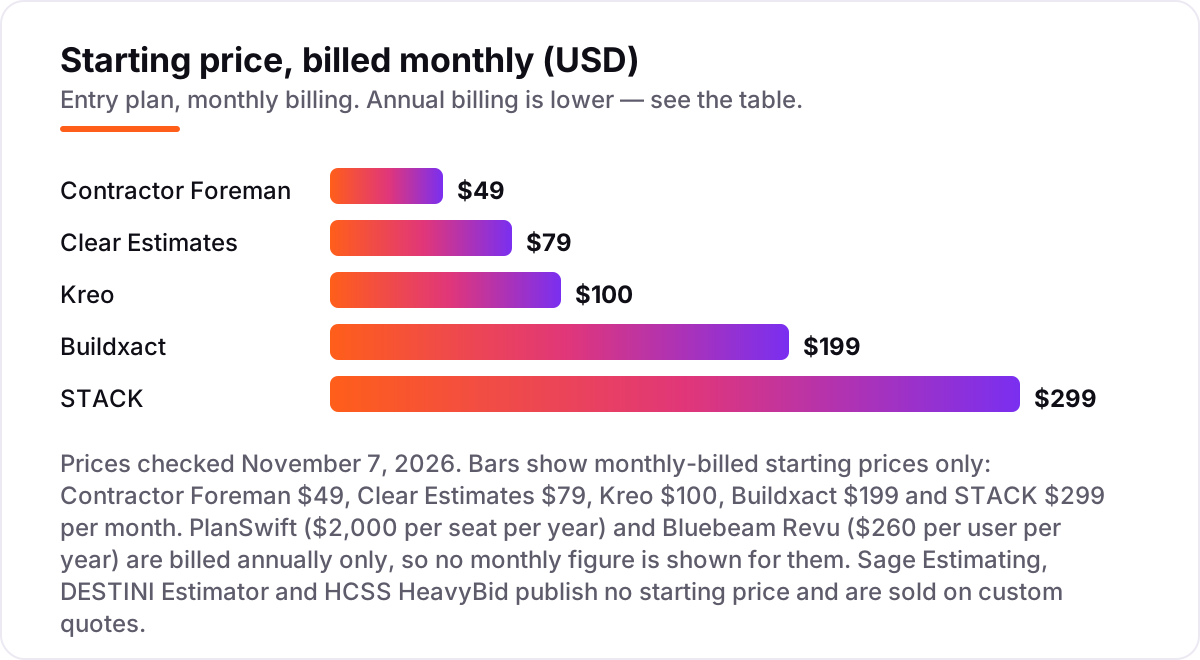
Take a GC with three estimators bidding building work. On list prices, the subscription costs $49 a month on Contractor Foreman Basic, except Basic covers one user, so three estimators need Standard at $105 a month. Clear Estimates is a flat $79 a month for the whole team. Kreo Essential is $100 per user a month, so $300 for three. Buildxact Foundation is a flat $199 a month with unlimited users. STACK Premium is $299 per user a month billed annually, so $897 for three.
Annual-only seats change the math but not the order. PlanSwift Essential is $2,000 per seat per year, so $6,000 a year for three. Bluebeam Revu Core is $330 per user per year, so $990 a year for three, though Core is the tier with counts and perimeter — Basics at $260 a year cannot count. Over a year, that is $948 on Clear Estimates, $990 on Bluebeam Core, $1,260 on Contractor Foreman Standard, $2,028 on Buildxact Foundation billed annually, $3,600 on Kreo Essential, $6,000 on PlanSwift Essential and $10,764 on STACK Premium.
Three costs sit outside every number above. First, the 12-month terms: STACK, Kreo and Buildxact all sell annual commitments, so the first year is the full year, not a month-to-month test. Second, the AI add-ons: Kreo's AI takeoff starts on Pro at $175 per user, Buildxact's Blu tools beyond the Assembly Assistant cost $99 to $149 a month each, and Bluebeam's AI sits on Max at $590 a year. Third, the quote-only platforms: Sage Estimating, DESTINI Estimator and HCSS HeavyBid need a sales conversation, and implementation and training are priced on top. If the firm also needs to win work online, not just price it, see our guide to SEO for home services.
Know the difference: takeoff vs estimating
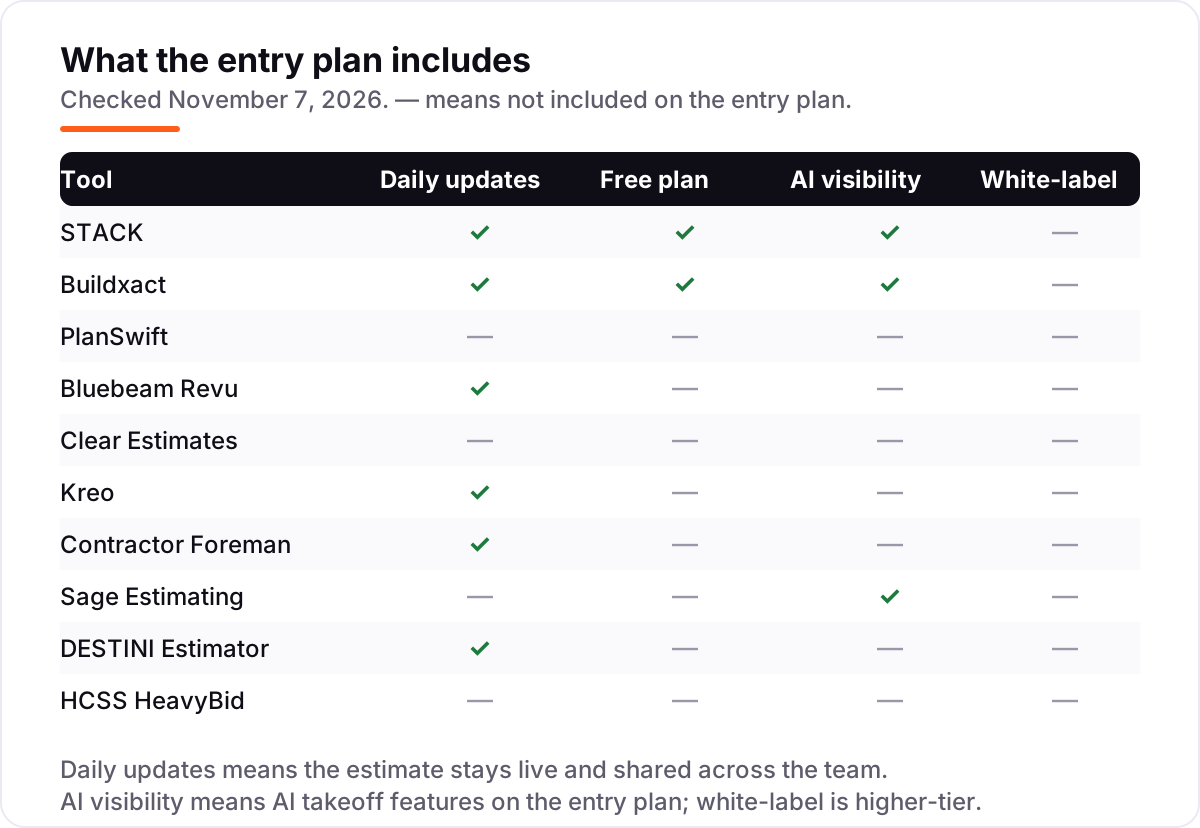
The confusion in this category is between measuring and pricing. Takeoff measures quantities from plans: how many square feet of drywall, how many linear feet of pipe, how many doors. Estimating prices those quantities using labor rates, material costs, subcontractor quotes and a cost database, then adds markup and produces the bid. A tool can be excellent at one and useless at the other.
That is why so many GCs end up with a pair. Bluebeam Revu measures beautifully and prices nothing, so its quantities go to Excel or Sage Estimating. PlanSwift measures and prices in Excel templates, which is takeoff plus a spreadsheet, not a cost database. STACK Pro, Buildxact and Clear Estimates try to do both in one place, with different depth: STACK leans on takeoff, Clear Estimates leans on the cost database, and Buildxact splits the difference for residential work.
There is a second, quieter confusion: a quote is not an estimate. A quote is the price you send the client; an estimate is the costed breakdown behind it. Tools that only produce quotes, like the simple proposal apps in the remodeling world, do not keep a cost database, track actuals against the estimate, or feed the next bid. All ten tools in this list keep a real estimate behind the proposal, which is what the phrase "estimating software" means here.
Quick comparison: tool type by need
| Buyer | Best pick | Why |
|---|---|---|
| Most general contractors | STACK | Cloud takeoff plus preconstruction in one live system, from $299/user/month |
| Small residential GCs | Buildxact | Estimating through invoicing for a flat $199/month with unlimited users |
| Excel-based estimators | PlanSwift | Quantities flow into Excel templates, $2,000 per seat per year |
| Teams that live in PDFs | Bluebeam Revu | Industry-standard markup and takeoff from $260 per user per year |
| Remodelers who need local costs | Clear Estimates | Cost database for 400 regions at a flat $79/month |
| Heavy civil and DOT work | HCSS HeavyBid | Purpose-built DOT pay-item workflows, priced by quote |
Mistakes to avoid
- Budgeting on the monthly headline. Most tools here sell 12-month terms or annual-only seats. Multiply the per-seat price by your estimator count and by twelve before you compare anything.
- Buying takeoff when you needed pricing. A fast measurement tool still leaves you pricing from spreadsheets if it has no cost database. Check whose database it is and how often it updates before you buy.
- Ignoring the AI tier. The AI takeoff that sold you the demo often sits a tier up: Kreo Pro at $175, PlanSwift Core at $3,000 a year, Bluebeam Max at $590 a year. Price the tier with the AI, not the entry tier.
- Skipping the plan-revision test. Real projects revise drawings constantly, and re-doing takeoffs on every revision is the hidden cost of a weak tool. Run a revised plan set through the trial and watch what survives.
- Forgetting the estimate after bid day. An estimate should become the budget, and actuals should feed the next estimate. If the tool cannot export to your accounting system, that loop stays manual.
How we chose
We checked each vendor's own pricing page on November 7, 2026 and recorded the starting price exactly as shown, including the annual-billing figure where the page lists one. STACK's $299 figure was verified against a fresh search-index crawl of STACK's own pricing page, since the page did not load directly for us that day. Sage Estimating, DESTINI Estimator and HCSS HeavyBid publish no starting price and are listed as custom quotes; the $365 per user per month figure for Sage Estimating comes from third-party directories, not from Sage, and is not presented as a vendor price. Ratings come from fresh G2 review pages checked the same day. Clear Estimates and DESTINI Estimator show no rating because their G2 profiles hold only a single review each, and we would rather show no rating than a meaningless one. No vendor paid for a place in this list, and none of the links here are affiliate links.
What to do next
Start with the free plan or trial of your top pick and run one real bid through it, including a plan revision and an export to your accounting system. Check that the quantities survive the revision and the estimate matches what your team would price by hand before you commit to a year. If estimating is sorted but new projects are not finding you, compare providers in our guide to SEO for plumbers or check how local contractors get found. Once your tools are in place, find out what's holding your rankings back.
Your stack only works if people find you
SerpAstra fixes what keeps your site off page one and makes it easy for AI assistants to recommend.
Get a free audit→Sources we checked (18)
- STACK pricing — stackct.com/takeoff-and-estimate-pricing (checked November 7, 2026)
- Buildxact pricing — buildxact.com/us/pricing (checked November 7, 2026)
- PlanSwift pricing — planswift.com/pricing (checked November 7, 2026)
- Bluebeam Revu pricing — bluebeam.com/pricing (checked November 7, 2026)
- Clear Estimates pricing — clearestimates.com/pricing (checked November 7, 2026)
- Kreo pricing — kreo.net/pricing (checked November 7, 2026)
- Contractor Foreman pricing — contractorforeman.com/pricing (checked November 7, 2026)
- Sage Estimating — sage.com preconstruction (checked November 7, 2026)
- DESTINI Estimator — beck-technology.com/destini-estimator (checked November 7, 2026)
- HCSS HeavyBid — hcss.com/products/construction-estimating-software (checked November 7, 2026)
- STACK Takeoff & Estimate reviews — G2 (checked November 7, 2026)
- Buildxact reviews — G2 (checked November 7, 2026)
- PlanSwift reviews — G2 (checked November 7, 2026)
- Bluebeam reviews — G2 (checked November 7, 2026)
- Kreo reviews — G2 (checked November 7, 2026)
- Contractor Foreman reviews — G2 (checked November 7, 2026)
- Sage Estimating reviews — G2 (checked November 7, 2026)
- HCSS reviews — G2 (checked November 7, 2026)
Shamim
Founder of SerpAstra
A full-stack SEO and digital marketer who spends most days on Local SEO for dental practices, AI search visibility and lead generation.
Frequently asked questions
What is the best estimating software for a general contractor?
STACK is the best fit for most general contractors: cloud takeoff, estimating and preconstruction in one system from $299/user/month, with a free plan for trying real work. Buildxact at $199/month suits residential GCs, and PlanSwift at $2,000 a seat a year suits Excel-based estimators.
How much does general contractor estimating software cost?
Published prices run from $49/month for Contractor Foreman to $299/user/month for STACK Premium, with annual-only seats at $260 a year for Bluebeam and $2,000 a year for PlanSwift. Sage Estimating, DESTINI Estimator and HCSS HeavyBid are quote-only, so budget on a sales conversation, not a list price.
Is there free estimating software for general contractors?
Only in a limited form. STACK has a free Takeoff and Estimate plan covering one active project a month, and Buildxact has a free Go plan for limited estimating and proposals. Every other tool here offers a free trial of 7 to 30 days instead, with no permanent free plan.
What is the difference between takeoff software and estimating software?
Takeoff measures quantities from plans: lengths, areas and counts. Estimating prices those quantities using labor rates, material costs and a cost database, then builds the bid. Some tools do both; Bluebeam and PlanSwift lean toward takeoff, while Sage Estimating and Clear Estimates lean toward pricing.
Do I need a cost database, or is takeoff enough?
Takeoff alone is not enough to bid. You still need prices for every quantity, and a maintained cost database supplies them with local labor and material rates. Clear Estimates includes one for 400 regions, Sage Estimating uses RSMeans data, and STACK Pro adds a regional cost library. Without one, you price from spreadsheets.
Can I switch estimating software later?
Yes, but plan the move between bid cycles, not during one. Export your cost database, assemblies and templates from the old tool, then rebuild them in the new one and run one real bid through both systems before going live. Switching mid-bid means running two systems through the deadline.
Free SEO and AI visibility audit
Find out what is holding your rankings back
Send us your site. Within 2 business days you get a written audit, an AI visibility check and a short fix list ranked by impact. Free, with no contract attached.
Request my free audit→Related guides
 Digital Marketing & Ads7 Best Marketing Software for Contractors in 2026, ComparedCompare the 7 best marketing software for contractors on price, reviews and trade-specific features, with every price checked November 5, 2026.Read guide →
 Local SEOSEO for home services: plumbers, electricians and roofersSEO for home services: how plumbers, electricians and roofers win the map pack, emergency searches and service-area pages — and turn calls into booked jobs.Read guide →
 Local SEOSEO for plumbers: rank in the map pack and get more callsSEO for plumbers: win the map pack and get more calls with emergency pages, service pages patients trust, reviews, and calls that become booked jobs today.Read guide →