
8 Best HVAC Load Calculation Apps in 2026: Free and Paid Apps Ranked
Compare the 8 best hvac load calculation app picks for 2026 on price, ACCA Manual J approval and field use, with prices checked November 8, 2026.
 Shamim Mia, Founder, SerpAstraLast verified November 8, 202613 min read
We compare pricing pages, documentation and public reviews. We never accept payment for rankings.

Key takeaways
- Cool Calc is the best overall pick at $59/month (or $45 for one project); Wrightsoft Right-Suite Universal follows at $900/year for full design work, and Elite Rhvac costs $599 once with no subscription.
- Two tools in this list are completely free: LoadCalc.net runs a whole-house block load in the browser, and BuildSolver returns a whole-house Manual J number in about 90 seconds.
- The single most important buying factor is whether your permit office requires ACCA-approved software — only Cool Calc, Wrightsoft and Elite Rhvac qualify, and a free estimator will not pass.
- Watch the billing shape, not just the number: per-user seats, per-project fees and one-time licences change what three technicians actually cost.
On this page
Quick comparison
| Tool | Best for | Starting price | Free plan |
|---|---|---|---|
| Cool Calc | Small residential shops that want an ACCA-recognized Manual J report without buying desktop software | $59/mo | Yes (free basic calc) |
| Wrightsoft Right-Suite Universal | Design-build shops that size systems, design ducts and write proposals from one drawing | $900/yr | No |
| Elite Rhvac | Contractors who want ACCA-approved desktop software they buy once and own outright | $599 once | No |
| HVAC Load Plus | Technicians who need a quick block load on an iPhone for small commercial or residential jobs | $24.99 once | No |
| AirMatch | Sales-led HVAC shops that want the load calculation built into the proposal and financing flow | $99/mo | No (7-day trial) |
| HVAC Load Calculator | Technicians who want a free phone app for quick Manual J sizing checks on the job | Free; $14.99/mo | Yes (free app) |
| LoadCalc.net | Contractors and homeowners who want a free whole-house block load with no account and no install | Free | Yes (free) |
| BuildSolver | Contractors who want a fast free sizing number for the quote, before ordering a permit-grade load | Free | Yes (free) |
Make one of these tools?
We re-check this list every quarter. Send a correction, request a review, or ask about a clearly labeled sponsored spot.
Request a listingThe best hvac load calculation apps

Cool Calc
Best for: Small residential shops that want an ACCA-recognized Manual J report without buying desktop software
Cool Calc is the easiest way into a permit-grade load calculation: it runs ACCA-recognized Manual J, S and D in any browser, and you can build a project free before paying anything. Geometry comes from a phone LiDAR scan, a floor-plan upload or a satellite trace, and the tool returns room-by-room loads, equipment selection and basic duct sizing.
Pro costs $59 per user a month, or $50 on yearly billing, and Personal covers a single project for $45 — the right shape for a shop that only needs a load on the occasional permitted change-out. The catch is scope: there is no proposal builder, so the load does not turn into a priced quote. Buy Cool Calc when the permit office wants an ACCA-recognized report and you want it this week, not after a training course.
What we like
- ACCA-recognized Manual J, S and D calculations that permit offices accept
- Runs in any browser — no Windows install, and geometry comes from LiDAR, a floor-plan upload or a satellite trace
- Build a project free and pay only for the results: Personal is $45 for a single project
- Room-by-room loads plus equipment selection and basic duct sizing in one subscription
Watch out for
- No proposal builder on Pro — the tool stops at the load, equipment and duct reports
- Per-user pricing adds up fast: a second technician needs a second $59 seat
- The free tier builds the project but charges to see the finished Manual J report

Wrightsoft Right-Suite Universal
Best for: Design-build shops that size systems, design ducts and write proposals from one drawing
Wrightsoft Right-Suite Universal is the full design suite: it draws the house, runs the ACCA-approved load, sizes the duct and turns the same drawing into a parts takeoff list and a proposal. It is the software plan reviewers ask for by name, and for a design-build shop that does new construction or full system replacements, it replaces a chain of separate tools.
The price is $900 a year per user for the residential package, and the commercial-only package costs the same. That is a fair price for a shop running loads every week, and a lot for a shop running two a month. It needs Windows 10 or newer, and the learning curve is real. Buy it when duct design and proposals are part of the job, not just the load.
What we like
- The industry-standard residential design suite: Right-J, Right-S, Right-D, Right-Draw and Right-Proposal in one package
- ACCA-approved loads that plan reviewers and permit offices know by name
- Parts takeoff lists and proposals are built from the same drawing as the load
- Right-Mobile Consultant ($300/year) runs block loads on a tablet at the kitchen table
Watch out for
- Windows only — Mac users need an emulator such as Parallels
- Annual subscription per user, so a three-person team pays $2,700 a year
- The full suite has a steep learning curve compared with a browser calculator

Elite Rhvac
Best for: Contractors who want ACCA-approved desktop software they buy once and own outright
Elite Rhvac is the buy-once option in this list: a $599 one-time desktop licence covers ACCA-approved Manual J, Manual D and Manual S, with block and room-by-room loads, duct sizing and equipment selection. There is no annual fee on the desktop version, and a free functional demo is available to download, so you can run a real project before paying.
The trade-off is the interface. Rhvac uses tabular input rather than a drawing, so it feels dated next to Wrightsoft, and sales proposals only work on the desktop version. Rhvac Online costs $239 a year for the same calculations in a browser. Buy Rhvac when you want to own permit-grade software outright and you do your design at a desk, not on a tablet.
What we like
- ACCA-approved Manual J, Manual D and Manual S in one program, from an ACCA technical software partner
- A $599 one-time desktop licence with no annual fee — the cheapest way to own permit-grade software
- AHRI equipment databases are included at no extra cost
- Rhvac Online ($239/year) runs the same calculations in a browser on any device
Watch out for
- Desktop version is Windows only, with no Mac or browser edition of the full program
- Sales proposals are desktop only — Rhvac Online cannot build them
- The tabular input style feels dated next to drawing-based tools such as Wrightsoft

HVAC Load Plus
Best for: Technicians who need a quick block load on an iPhone for small commercial or residential jobs
HVAC Load Plus is the cheapest honest field app in this list: one $24.99 purchase on iOS, no subscription, no per-project fee. Enter the location, the rooms, the windows and the construction materials, and it returns the heating and cooling block load for a small commercial or residential building while you are still standing in it.
The limit is what it calculates. This is a block load, not a room-by-room Manual J, so it cannot size ducts or satisfy a permit office that requires ACCA-approved software. Buy it as the quick-check app on every technician's phone, and pair it with Cool Calc or Rhvac when the job needs a permit-grade report.
What we like
- One $24.99 purchase with no subscription and no per-project fee
- Block-load math for small commercial and residential buildings, done on the phone in the field
- Enter location, rooms, windows and construction materials and get the load on the spot
- From Carmel Software, which has built HVAC design software since 1995
Watch out for
- Block loads only — no room-by-room calculation for duct design
- iOS only, with no Android or browser version
- Not ACCA-approved, so its output will not satisfy a permit office that requires approved software

AirMatch
Best for: Sales-led HVAC shops that want the load calculation built into the proposal and financing flow
AirMatch is a sales platform with the load calculation built in, not a standalone calculator. LaserCalc runs room-by-room loads on a phone in the driveway, using design temperatures for every US city, and the report attaches to the proposal the homeowner signs. Every plan includes every feature, so there is no tier to climb for the load tools.
Plans start at $99 a month for one user on annual billing, with a 7-day free trial and no card required. The whole-house block load in the standalone LaserCalc Mobile app is free, while room-by-room scanning costs $49.99 once. Buy AirMatch when the load is one step in a sales visit, not the whole job — and buy a dedicated tool when it is.
What we like
- LaserCalc runs room-by-room loads on a phone, with design temperatures for every US city
- Every plan includes every feature — proposals, AHRI matching, LaserCalc, financing and e-signature
- One-tap load calculation report that attaches to the proposal for the homeowner or the permit office
- The whole-house block load in LaserCalc Mobile is free to start
Watch out for
- You pay for a whole sales platform when you only need a load calculator
- The $99 starting price covers one user on annual billing; a team pays more per head
- LaserCalc room-by-room scanning needs the Pro mobile upgrade at $49.99

HVAC Load Calculator
Best for: Technicians who want a free phone app for quick Manual J sizing checks on the job
HVAC Load Calculator is a free iPad app that runs a Manual J load, converts it to BTU and tonnage, and checks the AC, furnace or heat-pump size against the load while you are on the job. Design temperatures resolve by ZIP code, the app works offline, and the paid version adds room-by-room loads and a homeowner-ready PDF report.
The monthly subscription is $14.99, or $49.99 for the year, which makes it the cheapest subscription app here. The honest limit is approval: the app says plainly that it is not affiliated with ACCA and its results are estimates for planning. Use it to check a quote in the field, and run the permit load in Cool Calc, Wrightsoft or Rhvac.
What we like
- Free to download and run a Manual J load, with BTU and tonnage conversion built in
- Checks AC, furnace and heat-pump sizing against the load right on the job site
- Design temperatures resolve by ZIP code, with a homeowner-ready PDF report
- Works offline, so a dead signal in a basement does not stop the calculation
Watch out for
- Not affiliated with ACCA — its results are estimates, not a permit-grade Manual J
- Room-by-room loads and the branded PDF report sit behind the paid subscription
- iPad-focused design; the phone experience is a scaled-up tablet layout

LoadCalc.net
Best for: Contractors and homeowners who want a free whole-house block load with no account and no install
LoadCalc.net is the longest-running free load tool on the web: a Manual J-based whole-house block load that runs in the browser, with no account, no install and no fee. Enter the envelope by direction, the windows and doors, the floor and basement, the construction tightness and the duct losses, and it returns the heating and cooling BTU totals with a breakdown by group.
It is free because it is simple. There is no room-by-room calculation, no equipment selection and no ACCA approval, so a permit office may not accept its output — and the interface shows its age. Use it to sanity-check a quote or a contractor's number in minutes, and pay for an approved tool when the job needs a report.
What we like
- Completely free Manual J-based whole-house load calculation in the browser
- Design temperatures for US and Canadian cities, with infiltration and duct-loss inputs
- Save your work to a file and reload it later — no account or subscription
- Running since the early web era, so its method and limits are well documented by users
Watch out for
- Block load only — no room-by-room breakdown for duct design
- Not ACCA-approved software, so a permit office may not accept its output
- The interface is dated and the design data covers the US and Canada only

BuildSolver
Best for: Contractors who want a fast free sizing number for the quote, before ordering a permit-grade load
BuildSolver is the fastest free check in this list: describe the house and enter a ZIP code, and it returns a whole-house Manual J 8th Edition load in about 90 seconds, with sensible and latent loads, tonnage and furnace and heat-pump sizes. It is built for the sales phase — the number you put on the quote before the contract is signed.
Its own pages are honest about the limits: the free tier is a Speed Sheet simplification, not a full room-by-room Manual J, and it is not ACCA-approved software, so it will not satisfy a permit submittal. Room-by-room loads, Manual S and full Manual D sit on the Pro plan, whose price is not published. Use it to price the job, then order the permit load.
What we like
- Free whole-house Manual J 8th Edition load in about 90 seconds, from a ZIP code and a short description
- Shows sensible and latent loads, tonnage, furnace and heat-pump sizes with a component breakdown
- Room-by-room Manual J, Manual S and full Manual D sit on the Pro plan
- Maintained and updated through November 2026, with the method and limits stated on the page
Watch out for
- Not ACCA-approved software — its own pages say to use Wrightsoft or Cool Calc for permits
- The free tier is a whole-house Speed Sheet simplification, not a full room-by-room Manual J
- Pro pricing is not published, so the cost of room-by-room loads is unknown until you ask
The best hvac load calculation app is the one that matches the job in front of you: a permit-grade Manual J report for a change-out, a quick block load in the driveway, or a full duct design for new construction. We ranked the eight tools below by fit for the most common buyer — a small residential HVAC contractor — starting with the ACCA-recognized tools and ending with the free estimators, and every price was checked on November 8, 2026.
How to choose the best hvac load calculation app
- Check ACCA approval first. If your permit office or a utility rebate program requires a Manual J from approved software, only Cool Calc, Wrightsoft and Elite Rhvac qualify — the free tools do not.
- Decide block load or room-by-room. A block load sizes the equipment; only a room-by-room load sizes the ducts. If you design ductwork, you need Wrightsoft, Rhvac or Cool Calc Pro.
- Count the billing shape. Cool Calc charges per user per month, Wrightsoft per user per year, Rhvac once, and HVAC Load Plus once — three technicians cost very different amounts on each.
- Check where it runs. Cool Calc, LoadCalc.net and BuildSolver run in a browser; Wrightsoft and Rhvac need Windows; the phone apps need iOS or iPadOS.
- Try the free tier with a real house. Run a house you already sized by hand through the free tool first — if the number is far off, the tool is not the one.
Sizing is only half the job: once the system is sized, the work still has to be found. Our guide to local SEO for HVAC companies covers how shops like yours show up on Google Maps and in AI answers when a homeowner searches for a replacement. And before you publish the new service pages for the systems you install, run your titles through the free SERP snippet preview tool — it shows exactly how the title and description will look in Google.
Whatever you shortlist, run one real house through it before you pay. The free tiers in this list are long enough to size a house you already know — your envelope, your windows, your design temperatures — and that one run tells you more than any review can. Check two things: that the load lands close to your hand calculation, and that the report is one your permit office will accept.
HVAC load calculation app pricing: what you will actually pay
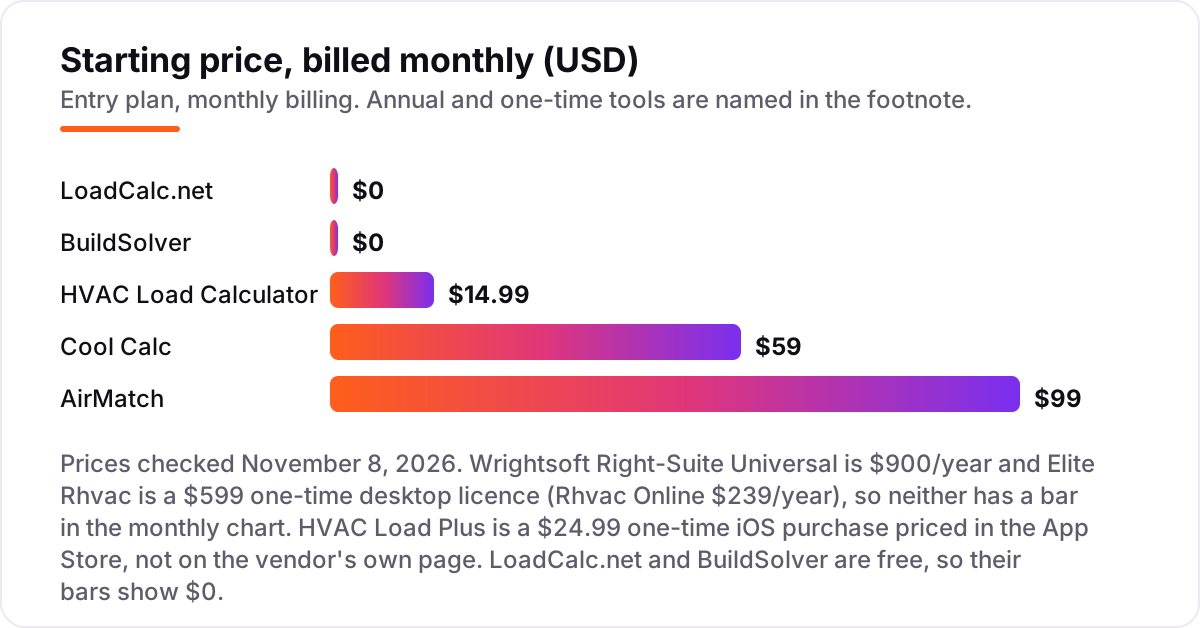
Take a three-person shop that runs ten permitted change-outs a month. On list prices, the load tools cost $0 a month on LoadCalc.net or BuildSolver, $44.97 on the HVAC Load Calculator app at $14.99 per user, $59 on Cool Calc Pro for one seat, $209 on AirMatch for three users, and $225 a month on Wrightsoft at $900 a year per user. Elite Rhvac is different: three desktop licences at $599 each cost $1,797 once, and then nothing per year.
Over a year, that is $0 on the free tools, $539.64 on the HVAC Load Calculator app, $708 on Cool Calc Pro for one seat, $2,508 on AirMatch for three users, and $2,700 on Wrightsoft for three users. The same three people and the same ten jobs cost $0 at the free end and $2,700 at the dear end — and the gap is not features, it is seats, billing shape and whether the report is permit-grade.
Three costs sit outside every number above. First, the per-project option: Cool Calc Personal at $45 a project costs $450 a month at ten jobs, so the $59 Pro seat pays for itself on the second job. Second, the second and third seats: Cool Calc needs a seat per technician, while Elite Rhvac's one-time licence is per computer. Third, training: Wrightsoft's full suite repays a training investment only if the shop runs loads weekly. If the work is mostly replacements with no duct design, compare the estimating side too — see our guide to the best estimating software for contractors.
Annual billing cuts the bill on the subscription tools: Cool Calc Pro drops from $59 to $50 a month per user, and AirMatch's $99 starting price is the annual-billing figure. Wrightsoft and Rhvac have no monthly option at all, so their yearly and one-time prices are the whole story. One more cost to check before you commit: a second business is a second licence on every tool in this list, so price the second shop before you commit to a tool for the first.
Know the difference: ACCA-approved Manual J vs a sizing estimate
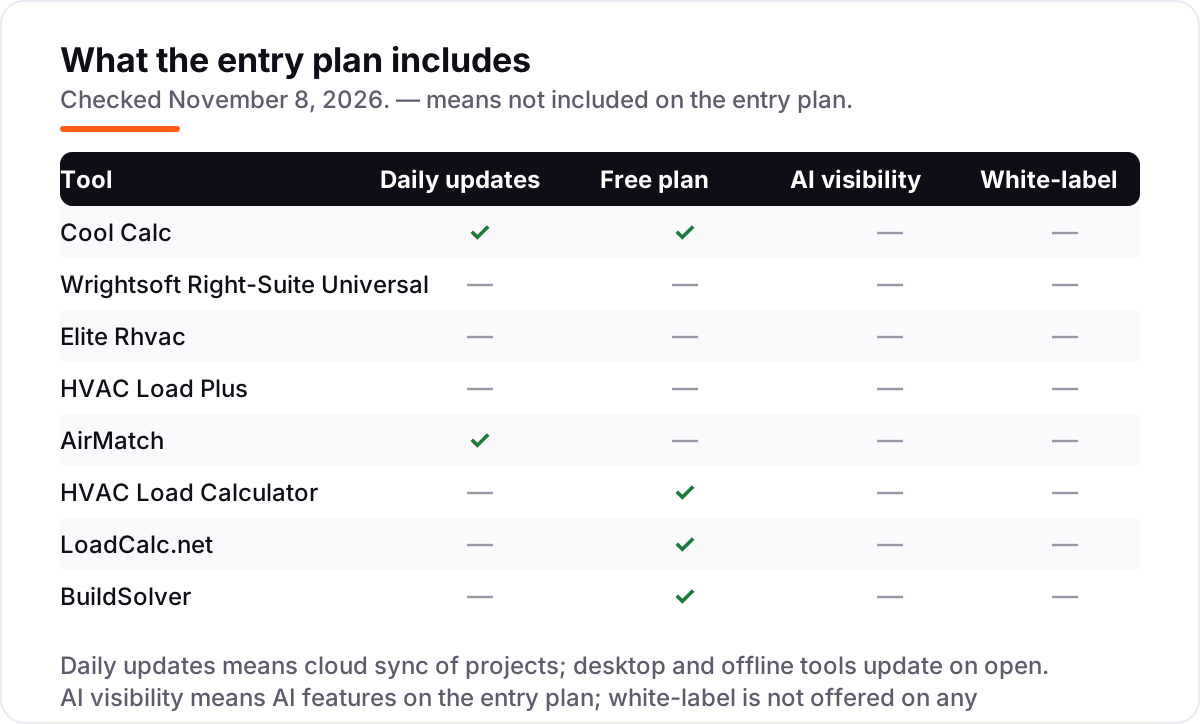
The confusion in this category is between a calculation and an estimate. ACCA Manual J is the residential load calculation standard: room-by-room heating and cooling loads from the envelope, infiltration, occupancy, internal gains and local design conditions. ACCA approves specific software packages against that standard — Wrightsoft Right-J, Elite Rhvac, Cool Calc and the ACCA Speed-Sheet are the commonly accepted ones — and a permit office asking for an official Manual J means output from one of those, room by room, with the inputs documented.
A sizing estimate uses the same physics in simplified form. LoadCalc.net and BuildSolver run whole-house block loads, HVAC Load Plus runs a block load on the phone, and the HVAC Load Calculator app runs a Manual J method that its own listing says is not ACCA-affiliated. These are fine for pricing a job, checking a quote or sizing a replacement — and they cost $0 to $25 — but they are not a substitute for a stamped design where one is required. The International Residential Code references Manual J for load calculations and Manual S for equipment selection as the required methodology for permitted work.
There is a second, quieter confusion: Manual J, S and D are three different steps. Manual J calculates the load, Manual S selects equipment sized to that load, and Manual D sizes the duct. Cool Calc, Wrightsoft and Rhvac cover all three; the free tools cover J only, in simplified form. If a job needs duct design, the free tier is the wrong tool no matter how good its number looks.
Quick comparison: tool type by need
| Buyer | Best pick | Why |
|---|---|---|
| Permit-grade report, no desktop software | Cool Calc | ACCA-recognized Manual J in the browser, Pro is $59/month or $45 for one project |
| Full design: load, duct and proposal | Wrightsoft Right-Suite Universal | Right-J, Right-S, Right-D and Right-Proposal in one suite, $900/year |
| Own it once, no subscription | Elite Rhvac | ACCA-approved J, D and S as a $599 one-time desktop licence |
| Cheapest field app for a quick block load | HVAC Load Plus | Block loads on an iPhone for a $24.99 one-time purchase |
| Load calc inside the sales visit | AirMatch | LaserCalc room-by-room loads inside the proposal flow, from $99/month |
| Free check before you quote | LoadCalc.net | Free whole-house block load in the browser, no account needed |
| Fastest free sizing number | BuildSolver | Whole-house Manual J in about 90 seconds, free with no signup |
Mistakes to avoid
- Buying a sizing estimator for permit work. A free block-load tool is not ACCA-approved software. If the permit office requires an approved Manual J, the $0 tool costs you the job.
- Budgeting on one seat for a three-person team. Cool Calc and Wrightsoft charge per user, so three technicians cost three times the headline price — check the seat count before you compare.
- Paying monthly for one project a month. At one permitted job a month, Cool Calc Personal at $45 a project beats the $59 Pro seat; the subscription only wins from the second job.
- Sizing off the old nameplate. A replacement priced off the old unit repeats whatever mistake sized it. Run the load on the house as it stands now, with its current windows and insulation.
- Forgetting the duct step. A Manual J sizes the equipment; it does not size the ducts. If the job needs new ductwork, the load tool must also do Manual D, or you need a second tool.
How we chose
We checked each vendor's own pricing page on November 8, 2026 and recorded the starting price exactly as shown, except for two prices that come from elsewhere and are labelled as such: Cool Calc's Pro price rests on the vendor's pricing page as read on November 3, 2026, corroborated by a second independent read, and HVAC Load Plus's $24.99 is the App Store listing price from October 2026. This list carries no review ratings because the G2 and Capterra pages for these tools either have no listing or returned too few reviews to use, and we would rather show no rating than a stale or estimated one. No vendor paid for a place in this list, and none of the links here are affiliate links.
What to do next
Start with the free tier of your top pick and run one real house through it — a house you already sized by hand, so you can judge the number. Check that the load lands close to your hand calculation and that the report is one your permit office will accept before you commit to a year. If the sizing is sorted but new customers are not finding you, our local SEO service handles the visibility side — or compare providers in our guide to the best contractor management software. Once your tools are in place, find out what's holding your rankings back.
Your stack only works if people find you
SerpAstra fixes what keeps your site off page one and makes it easy for AI assistants to recommend.
Get a free audit→Sources we checked (9)
- Cool Calc pricing — coolcalc.com (pricing plans read November 3, 2026; two independent reads agree)
- Wrightsoft store — wrightsoft.com/store (checked November 8, 2026)
- Elite Software Rhvac — elitesoft.com (checked November 8, 2026)
- HVAC Load Plus pricing — App Store listing via InvoiceOwl (checked October 2026)
- AirMatch pricing — airmatchpro.com/getstarted (checked November 8, 2026)
- HVAC Load Calculator: Manual J — App Store (checked November 8, 2026)
- LoadCalc.net — loadcalc.net (checked November 8, 2026)
- BuildSolver Manual J calculator — buildsolver.com (checked November 8, 2026)
- Carmel Software — carmelsoft.com (checked November 8, 2026)
Shamim
Founder of SerpAstra
A full-stack SEO and digital marketer who spends most days on Local SEO for dental practices, AI search visibility and lead generation.
Frequently asked questions
What is the best hvac load calculation app?
Cool Calc is the best overall pick: ACCA-recognized Manual J, S and D in the browser from $59/month, or $45 for a single project. Wrightsoft Right-Suite Universal is the better buy for design-build shops that also need duct design and proposals, at $900/year.
How much does HVAC load calculation software cost?
Entry prices run from $0 to $99 a month. LoadCalc.net and BuildSolver are free, HVAC Load Calculator is free with a $14.99/month upgrade, and Cool Calc Pro is $59/month. Wrightsoft costs $900/year per user, and Elite Rhvac is a $599 one-time desktop licence.
Is there a free HVAC load calculation app?
Yes. LoadCalc.net runs a free whole-house block load in the browser with no account, BuildSolver returns a free whole-house Manual J number in about 90 seconds, and the HVAC Load Calculator app is free to download. None of the three is ACCA-approved, so none replaces a permit-grade report.
What is the difference between Manual J and a sizing estimate?
Manual J is the ACCA residential load calculation standard: room-by-room heating and cooling loads from the envelope, infiltration, occupancy and local design conditions. A sizing estimate uses the same physics in simplified form — a block load or a Speed Sheet — and is fine for a quote but not for a permit.
Do I need ACCA-approved software for a permit?
Often, yes. Many permit offices and utility rebate programs require a Manual J report from software on ACCA's approved list, such as Cool Calc, Wrightsoft Right-J or Elite Rhvac. Check what your local authority accepts before you buy, because a free estimator will not pass.
Can I switch load calculation software later?
Yes, but expect to re-enter your projects. Load files do not move between Cool Calc, Wrightsoft and Rhvac, and each tool stores its own envelope libraries and equipment data. Pick the tool that matches the work you do most, and keep the permit-grade one for permitted jobs.
Does Cool Calc do Manual D duct design?
Cool Calc covers Manual J, S and basic Manual D, which is enough for most residential replacements. For full duct design with friction-rate optimization and equivalent-length tables, Wrightsoft Right-D is still the practitioner standard, and Elite Rhvac includes Manual D duct sizing as well.
Free SEO and AI visibility audit
Find out what is holding your rankings back
Send us your site. Within 2 business days you get a written audit, an AI visibility check and a short fix list ranked by impact. Free, with no contract attached.
Request my free audit→Related guides
 Local Business & Vertical Software8 Best Estimating Software for Contractors in 2026, ComparedCompare the 8 best estimating software for contractors on price, takeoff, cost databases and free trials, with every price checked November 7, 2026.Read guide →
 Digital Marketing & Ads7 Best Marketing Software for Contractors in 2026, ComparedCompare the 7 best marketing software for contractors on price, reviews and trade-specific features, with every price checked November 5, 2026.Read guide →
 Local Business & Vertical Software10 Best Contractor Management Software in 2026, ComparedCompare the 10 best contractor management software platforms on price, compliance and global payments, with every price checked November 7, 2026.Read guide →