
9 Best Live Chat Software for Small Business in 2026, Compared
Compare the 9 best live chat software for small business tools on price, free plans and AI chat, with every price re-checked November 4, 2026.
 Shamim Mia, Founder, SerpAstraLast verified November 4, 202614 min read
We compare pricing pages, documentation and public reviews. We never accept payment for rankings.

Key takeaways
- Tidio is the best fit for most small businesses at $29 a month flat for up to 10 seats; Freshchat follows with a free plan for up to 10 agents, and Crisp at $45 a month for a four-seat workspace.
- tawk.to and HubSpot are genuinely free to start — tawk.to with unlimited agents and chats, HubSpot with live chat inside its free CRM for up to 2 users.
- The single most important buying factor is the billing meter: per-seat, per-conversation and flat workspace prices produce very different bills for the same team.
- AI is almost never included in the headline price — Lyro, Freddy and Fin all add usage charges on top of the seat or plan price.
On this page
Quick comparison
| Tool | Best for | Starting price | Free plan |
|---|---|---|---|
| Tidio | Small online shops that want chat, tickets and an AI agent in one flat-priced inbox | $29/mo | Yes (free plan) |
| Freshchat | Small teams that want a free plan ten agents can share before paying anything | Free; Growth $23/mo | Yes (up to 10 agents) |
| Crisp | Small teams of up to four who want flat workspace pricing instead of per-seat billing | $45/mo | Yes (2 seats) |
| HubSpot | Small businesses already running on HubSpot CRM that want chat on the contact record | Free; Starter $20/mo | Yes (free CRM) |
| LiveChat | Solo operators and small teams that want a polished standalone chat widget and nothing else | $25/mo | No (14-day trial) |
| Intercom | SaaS and product-led teams that want an AI agent resolving chats before humans step in | $39/mo | No (14-day trial) |
| Olark | Small teams that want simple human-only live chat at one flat per-agent price | $29/mo | No (14-day trial) |
| tawk.to | Budget-conscious small businesses that want unlimited free live chat and accept branded widgets | Free; Whitelabel $29/mo | Yes (free) |
| Zendesk | Growing support teams whose chats turn into tickets that need tracking and routing | $69/mo | No (14-day trial) |
Make one of these tools?
We re-check this list every quarter. Send a correction, request a review, or ask about a clearly labeled sponsored spot.
Request a listingThe best live chat software for small business

Tidio
Best for: Small online shops that want chat, tickets and an AI agent in one flat-priced inbox
Tidio is the easiest first buy for a small online shop. The free plan covers 50 conversations a month, and Starter costs $29 a month for 100 conversations with up to 10 seats included, so a small team shares one flat price instead of paying per agent. Chat, ticketing and the Lyro AI agent sit in one inbox, and the Shopify integration pulls order details into the chat.
The catch is the meter: Starter counts billable conversations, not seats, so a busy month pushes you toward Growth from $59 a month, and Lyro is a separate add-on from $39 a month for 50 AI conversations. Buy Tidio when chat volume is modest and you want AI and human chat together; buy Crisp when conversations run into the hundreds.
What we like
- Free plan plus Starter at $29 a month flat for up to 10 seats — no per-agent billing
- Lyro AI agent answers from your website content and hands over to a human
- Shopify integration pulls order details into the chat window
- Live chat, ticketing and email share one inbox
Watch out for
- Starter counts billable conversations: 100 a month, then Growth from $59 a month
- Lyro AI is a separate add-on from $39 a month; the 50 free Lyro conversations are one-time only
- Reporting is basic; deeper analytics need a higher plan

Freshchat
Best for: Small teams that want a free plan ten agents can share before paying anything
Freshchat has the most generous free plan in this list: $0 for up to 10 agents, with the chat widget, a shared inbox and email included, so a small team can run live chat for months before paying anything. Growth costs $23 a month per agent on monthly billing, or $19 billed annually, and adds Facebook and Instagram messengers, SMS, reporting and the Freddy AI agent.
The free plan is narrow: no social channels, no SMS, no reporting and no AI, so a team that lives on Instagram or WhatsApp pays from day one. Freddy AI sessions also cost extra after 500 one-time free sessions, at $49 per 100 sessions. Pick Freshchat when you want a free plan a whole team can share; pick Tidio when you want the AI agent bundled into the same conversation count.
What we like
- Free plan covers up to 10 agents with the chat widget, shared inbox and email
- Growth at $19 a month billed annually adds Facebook, Instagram, SMS and reporting
- Freddy AI agent included on Growth, with 500 one-time free sessions
- Part of Freshworks, so it pairs with Freshdesk tickets and Freshsales CRM
Watch out for
- Free plan has no social channels, SMS, reporting or AI
- Freddy AI sessions cost $49 per 100 after the free sessions run out
- Day passes and add-ons make the bill harder to predict than a flat price

Crisp
Best for: Small teams of up to four who want flat workspace pricing instead of per-seat billing
Crisp charges one flat price per workspace instead of per seat, which is the cheapest honest math for a small team: Mini costs $45 a month and covers 4 seats, so a four-person team pays $11.25 per agent. The free plan covers 2 seats with the chat widget, shared inbox and mobile apps, and every plan includes unlimited chat history on paid tiers plus a built-in help center.
The step pricing is the trap: a fifth agent forces Essentials at $95 a month, more than double Mini, and an eleventh forces Plus at $295. AI is also metered: Mini includes only $5 of Hugo AI credits, about 90 automated conversations a month, and WhatsApp waits for Essentials. Buy Crisp when your team size is stable at four or fewer; buy Freshchat when headcount keeps changing.
What we like
- Flat $45 a month per workspace for 4 seats — no per-agent billing
- Free plan covers 2 seats with chat, inbox and mobile apps
- Built-in help center and shared email inbox on paid plans
- Hugo AI credits included on paid plans ($5 on Mini, about 90 conversations)
Watch out for
- A fifth agent forces Essentials at $95 a month — more than double Mini
- WhatsApp and the full AI feature set wait for Essentials at $95 a month
- Mini's $5 of AI credits covers only about 90 automated conversations a month

HubSpot
Best for: Small businesses already running on HubSpot CRM that want chat on the contact record
HubSpot is the only tool here where live chat comes inside a free CRM: the free plan covers up to 2 users with live chat, a chatbot builder, contact records and meeting scheduling at $0, so a tiny business can answer chats and track every conversation against a contact record without a second subscription. Starter lists at $20 per seat a month, with a $7-a-month annual promo for new customers, and removes HubSpot branding.
The catch is the bundle: each Hub is billed separately, so adding Marketing or Service Hub Starter means another subscription, and the AI Customer Agent is billed per resolved conversation on top. Free-plan chat also carries HubSpot branding and no human support. Pick HubSpot when the CRM is already home; pick a standalone chat tool when you only need the widget.
What we like
- Live chat included in the free CRM for up to 2 users, with contact records attached
- Chat, email, deals and meetings share one contact timeline
- Starter Customer Platform bundles every Hub's Starter tier for $20 a seat (promo $7 a month annual for new customers)
Watch out for
- Free-plan chat carries HubSpot branding and offers no human support
- Each Hub is billed separately, so the bundle grows with every Hub you add
- Breeze Customer Agent is billed per resolved conversation on top of seats

LiveChat
Best for: Solo operators and small teams that want a polished standalone chat widget and nothing else
LiveChat is the pure chat specialist: one widget, an agent app with typing preview, and more than 200 integrations, with no ticketing or CRM bundled in to pay for. Starter costs $25 a month per agent on monthly billing, or $19 billed annually, and includes AI assist — reply suggestions, chat summaries and tagging — on every plan, plus 24/7 support.
Starter is limited to one seat, which is the fact that changes the price: a second agent forces Team at $59 a month per agent on monthly billing, so a three-person team pays $177 a month, not $57. The AI chatbot is a separate ChatBot subscription from $52 a month, and ticketing is a separate HelpDesk product. Buy LiveChat when chat alone is the job and one agent does it; buy Tidio when a team shares the queue.
What we like
- Polished agent app with typing preview and more than 200 integrations
- AI assist — reply suggestions, summaries and tagging — included on every plan
- 24/7 support and a 14-day trial with no credit card
Watch out for
- Starter is limited to 1 seat; a second agent forces Team at $59 a month billed monthly
- AI chatbot is a separate ChatBot subscription from $52 a month
- No free plan and no ticketing — HelpDesk is a separate product

Intercom
Best for: SaaS and product-led teams that want an AI agent resolving chats before humans step in
Intercom is the AI-first pick: Essential costs $39 a month per seat on monthly billing, or $29 billed annually, and bundles the Messenger, a shared inbox, ticketing and a help center, with Fin, its AI agent, answering first and handing over to a human when it gets stuck. Fin resolves a share of routine questions on its own, which is the point of paying more than a plain chat widget costs.
Fin is billed separately at $0.99 per resolved conversation, with a 50-resolution monthly minimum, so the seat price is only the first half of the bill — a busy month adds usage charges on top. Copilot, the agent assistant, is another $29 per seat a month. Buy Intercom when AI resolution is the goal and chat volume justifies it; buy LiveChat when a human answers nearly every chat.
What we like
- Fin AI agent answers first and resolves routine questions before a human is involved
- Messenger, shared inbox, ticketing and help center in one platform
- Copilot agent assistant and deep reporting on higher tiers
Watch out for
- Fin costs $0.99 per resolved conversation on top of seats, with a 50-resolution minimum
- Essential at $39 a month billed monthly is the priciest seat in this list after Zendesk
- Copilot is a separate $29-per-seat add-on

Olark
Best for: Small teams that want simple human-only live chat at one flat per-agent price
Olark is the simplest tool in this list: one chat widget, one console, one flat price of $29 per agent a month, with no conversation caps, no tiers and no meter to watch. It includes transcripts, chat routing, triggers, pre-chat forms and agent groups, and it has sold the same live chat for years, which is why teams that tried suites and bounced keep coming back to it.
Simplicity has a price: there is no free plan, only a 14-day trial, and no AI agent on the $29 plan — Olark's AI Website Agent is a separate $400-a-month plan billed annually, with one human seat included. Reporting and integrations are also thinner than the suites. Buy Olark when a human answers every chat and you want the bill to stay flat; buy Tidio when you want AI in the mix.
What we like
- Flat $29 per agent a month with no conversation caps or tiers
- Transcripts, routing, triggers, pre-chat forms and agent groups included
- Simple setup — the widget is live in minutes with no suite to configure
Watch out for
- No free plan, only a 14-day trial
- No AI agent on the $29 plan; the AI Website Agent costs $400 a month billed annually
- Thinner reporting and fewer integrations than the suites

tawk.to
Best for: Budget-conscious small businesses that want unlimited free live chat and accept branded widgets
tawk.to is the only tool here that is genuinely free with no catch on volume: unlimited agents, unlimited chats, unlimited websites and unlimited chat history at $0, plus a knowledge base, ticketing and a basic CRM in the same free account. It has run this model for more than a decade, which is why it sits on millions of small business websites.
Free means branded: the widget carries a 'Powered by tawk.to' footer until you pay $29 a month per property for the Whitelabel add-on, and AI Assist is another $29 a month. Support is community-led rather than a named account team, and the widget's styling options are basic. Buy tawk.to when $0 is the budget; buy Freshchat when you want a free plan without another company's name on it.
What we like
- Completely free: unlimited agents, chats, websites and chat history at $0
- Knowledge base, ticketing and a basic CRM included in the free account
- Add-ons are optional and per property, so you only pay for what you use
Watch out for
- Free widget carries 'Powered by tawk.to' branding; removal costs $29 a month per property
- AI Assist is a separate $29-a-month add-on, not included free
- Support is community-led and widget styling options are basic

Zendesk
Best for: Growing support teams whose chats turn into tickets that need tracking and routing
Zendesk is the full help desk that happens to include live chat: Suite Team costs $69 a month per agent on monthly billing, or $55 billed annually, and adds messaging, a help center, telephony, omnichannel routing and AI agents to the ticketing core. It fits a team whose chats turn into tickets, refunds and follow-ups that need tracking after the visitor leaves.
The $19 Support Team plan does not include live chat at all, so $55 a month billed annually is the real starting price for chat, not $19. AI resolutions above the small included allowance cost $1.50 each, Copilot is a $50-per-agent add-on, and setup takes longer than any standalone chat tool here. Buy Zendesk when support is a system, not a widget; buy Intercom when chat and AI matter more than tickets.
What we like
- Live chat, messaging, ticketing, help center and telephony in one Suite
- AI agents included on Suite Team with a small monthly resolution allowance
- Strongest routing, reporting and automation in this list
Watch out for
- Live chat starts at Suite Team ($55 a month billed annually), not the $19 Support Team plan
- AI resolutions above the allowance cost $1.50 each and Copilot adds $50 per agent
- Heaviest setup here — overkill for a team that only needs a chat widget
The best live chat software for small business buyers is not the tool with the longest feature list — it is the one whose billing model fits how your team actually chats. Some tools charge per agent, some per conversation, and some one flat price per workspace, so the cheapest headline can be the most expensive bill by month three. We ranked the nine tools below by fit for the most common buyer — a small team answering website chats alongside everything else — and every price was re-checked on November 4, 2026.
How to choose the best live chat software for small business
- Count the meter first, not the price. Per-seat tools charge for every login, per-conversation tools charge for chats handled, and flat tools charge one price for a set number of seats. Work out your team size and monthly chat volume before you compare headlines.
- Read the free plan's real limits. A free plan can mean 50 conversations a month (Tidio), 2 seats (Crisp), 2 users (HubSpot), 10 agents (Freshchat) or unlimited everything with branding (tawk.to). The limit you hit first is your real starting price.
- Decide who answers: humans or AI. An AI agent pays off when the same questions repeat all day; it adds usage charges on nearly every tool here. If a human answers most chats, do not pay for AI you will not use.
- Check where chats go when they end. If chats turn into refunds, follow-ups or tickets, you need a shared inbox or help desk behind the widget — Zendesk, Intercom, HubSpot or Freshchat — not a widget alone.
- Test the widget on a phone. Most visitors chat from mobile, so open the widget on your own phone before you buy: check the typing area, the offline message form and how branding looks to a customer.
Live chat is one system in your stack, not the whole stack. If you want the AI side compared on its own, our guide to AI chatbots for customer service covers the chatbot-first tools. And before you publish new pages for the services you sell, run your titles through the free SERP snippet preview tool — it shows exactly how the title and description will look in Google.
Whatever you shortlist, try it with real chats before you pay. The free plans and trials in this list are long enough to run one genuine week — your visitors, your questions, your busiest hours — and that week tells you more than any review can. Check two things in the trial: that the widget loads fast on mobile and that the agent app alerts you before a visitor gives up and leaves. Every tool here offers a free plan or a trial, so there is no reason to buy before a real visitor has chatted with you through it.
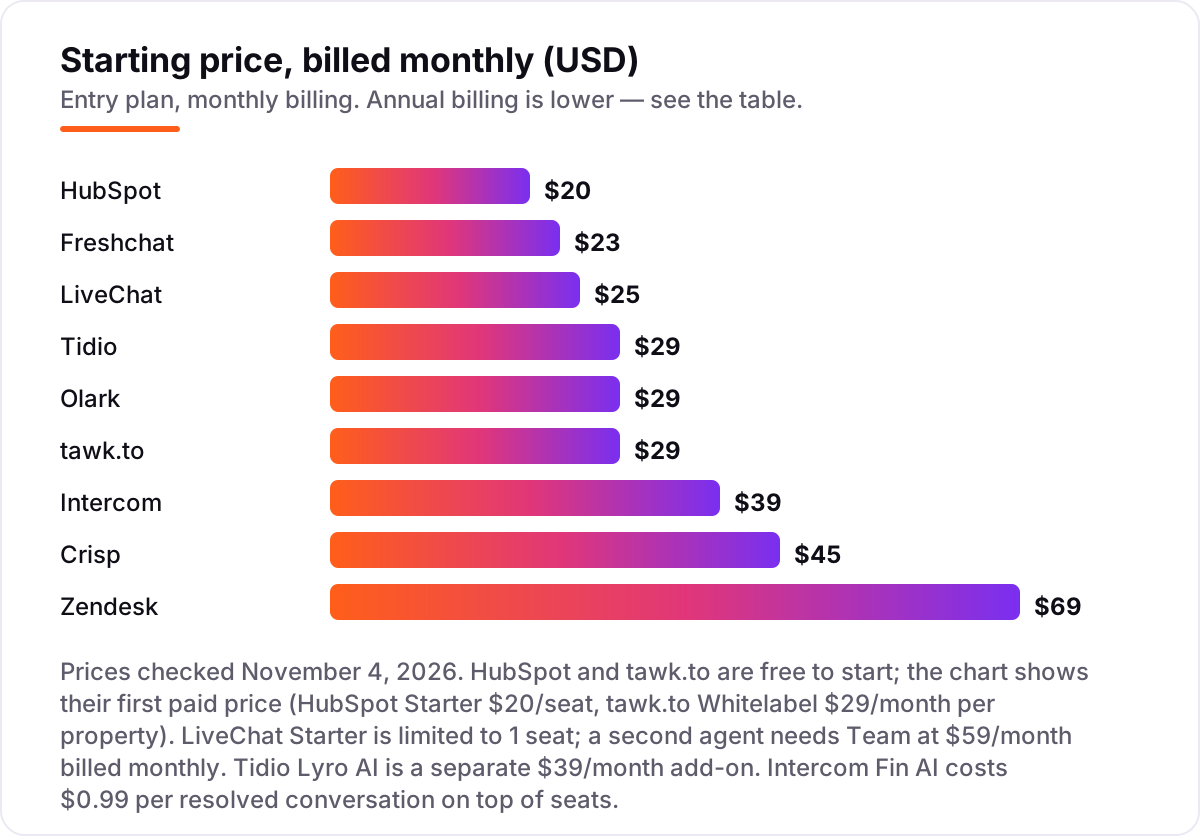
Live chat software pricing: what you will actually pay
Take a three-person team answering about 300 chats a month. On monthly list prices, the subscription costs $0 on tawk.to with its branding showing, $0 on Freshchat Free for up to 10 agents, $0 on HubSpot Free for two of the three users, $29 on Tidio Starter, $45 on Crisp Mini, $87 on Olark, $117 on Intercom Essential and $207 on Zendesk Suite Team. LiveChat is the odd one out: Starter at $25 a month covers one seat only, so three agents need Team at $59 a month each, or $177 a month.
Three of those numbers need adjusting before they are real. First, HubSpot Free covers two users, so the third seat costs $20 a month at list price — or $7 a month on the annual promo for new customers. Second, Tidio Starter covers 100 billable conversations a month, so 300 chats push the team to Growth from $59 a month. Third, Intercom adds Fin at $0.99 per resolved conversation, so 100 AI-resolved chats add $99 a month on top of the $117 in seats.
Over a year on annual billing, the same three people pay $0 on tawk.to and Freshchat Free, $290 on Tidio Starter, $540 on Crisp Mini, $1,044 on Olark and Intercom Essential, $1,764 on LiveChat Team and $1,980 on Zendesk Suite Team. The same three people and the same 300 chats cost nothing at the free end and $1,980 at the dear end — a gap that comes entirely from billing models and seat caps, not from the chat widget itself.
Two costs sit outside every number above. First, AI usage: Lyro from $39 a month, Freddy sessions at $49 per 100 after the free sessions, and Fin at $0.99 per resolution are all billed on top of the plan price. Second, branding removal: tawk.to Whitelabel is $29 a month per property, and HubSpot branding only disappears on a paid plan. If you run a support team rather than a sales chat, the visibility tools differ too — see our guide to customer service chatbots.
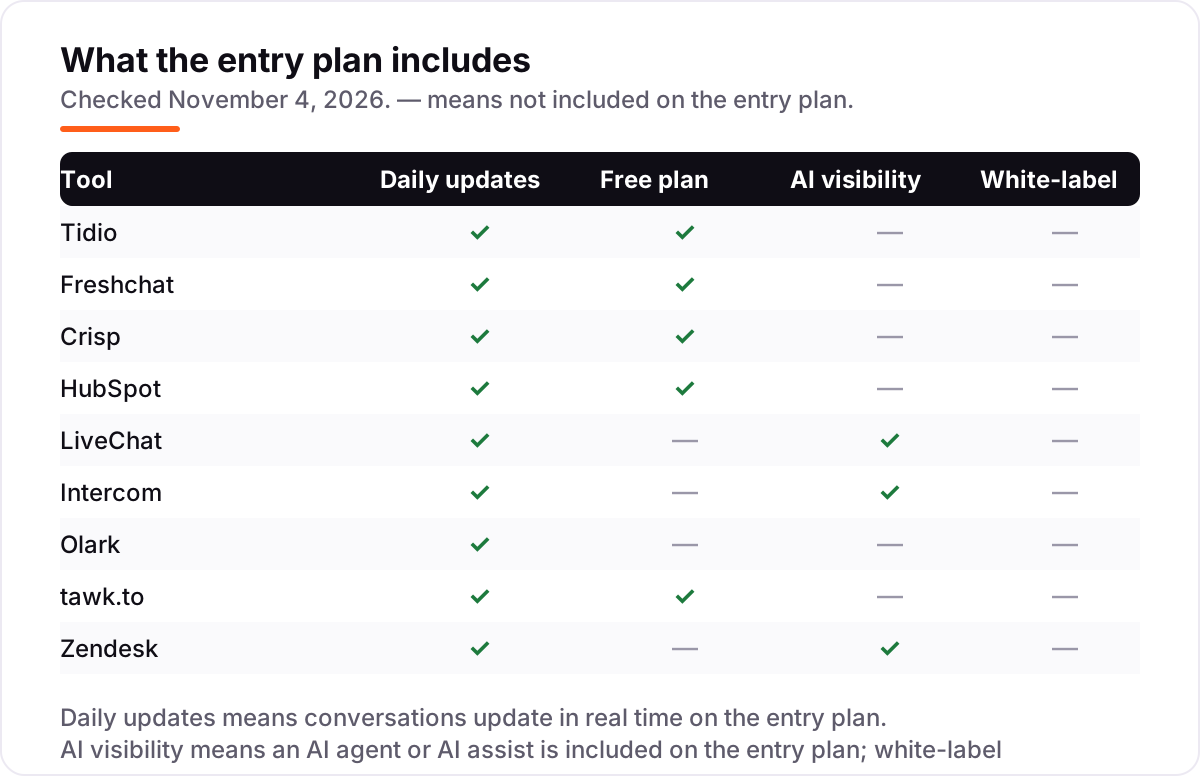
Know the difference: live chat, AI chatbots and help desks
The confusion in this category is between three different jobs. Live chat is a human answering a visitor in real time through a widget on your website. An AI chatbot answers alone, from a knowledge base, and hands over to a human only when it cannot resolve the question. A help desk turns conversations into tickets that can be tracked, assigned and followed up after the visitor leaves. All nine tools in this list do live chat; only some do the other two jobs well.
There is a second, quieter confusion: a free plan is not a free trial. A free plan — tawk.to, Freshchat Free, Crisp Free, HubSpot Free, Tidio Free — costs $0 for as long as you stay inside its limits. A free trial — LiveChat, Intercom, Olark, Zendesk — gives you the paid features for 14 days and then asks for a card. If a tool has no free plan, the trial is your only way to test it without paying, so run real chats through it before the 14 days end.
A third distinction worth knowing is the AI agent versus AI assist. An AI agent (Lyro, Fin, Freddy, Hugo) answers visitors on its own and is billed per conversation or per resolution. AI assist (LiveChat's Copilot-style suggestions, Intercom's Copilot) helps your human agents write faster and is usually bundled or sold per seat. The two are priced differently and solve different problems, so check which one a plan actually includes before you assume the AI in the headline is the AI you need.
Quick comparison: tool type by need
| Buyer | Best pick | Why |
|---|---|---|
| Solo owner on a $0 budget | tawk.to | Free with unlimited agents and chats, Whitelabel is $29/month when branding matters |
| Small shop on Shopify | Tidio | Flat $29/month for up to 10 seats, Lyro AI optional, order details in the chat |
| Team that wants a free plan | Freshchat | Free for up to 10 agents, Growth is $23/month per agent |
| Team that hates per-seat pricing | Crisp | Flat $45/month for a four-seat workspace, no per-agent billing |
| Business already on HubSpot | HubSpot | Free chat inside the CRM for 2 users, Starter is $20/seat at list |
| Team whose chats become tickets | Zendesk | Suite Team is $55/month per agent billed annually, with ticketing and routing |
Mistakes to avoid
- Budgeting on the annual price while paying monthly. The annual figure is lower on nearly every tool here — Intercom is $29 a month billed annually but $39 monthly, Zendesk $55 versus $69 — so compare tools on the billing term you will actually use.
- Buying a one-seat plan for a team. LiveChat Starter at $25 a month covers one agent only; a second agent forces Team at $59 a month. Count seats before you count dollars.
- Ignoring the conversation cap. Tidio Starter covers 100 billable conversations a month, so a busy shop outgrows it fast and lands on Growth from $59 a month. Check your monthly chat volume first.
- Assuming AI is included in the headline price. Lyro, Freddy and Fin are all billed on top of the plan — $39 a month, $49 per 100 sessions and $0.99 per resolution respectively — so a tool can look cheap until the AI bill arrives.
- Forgetting the branding line. tawk.to and HubSpot free plans both show their own branding in the widget. If a clean, unbranded widget matters, add $29 a month for tawk.to Whitelabel or a paid HubSpot seat to the price from day one.
How we chose
We re-checked every price on November 4, 2026. The vendors' pricing pages are JavaScript-rendered, so the figures were verified against each vendor's own published prices as shown on its pricing page and cross-checked against independent price checks dated October and November 2026; no price had moved from the November 2 reconciliation. We ranked the tools by fit for the most common buyer — a small business team answering website chats alongside everything else — not by brand size. Five tools carry a G2 rating because we opened their G2 pages on November 4, 2026; the other four carry no rating because G2 returned rate-limit errors when we tried to open their pages that day, and we would rather show no rating than a stale one. No vendor paid for a place in this list, and none of the links here are affiliate links.
What to do next
Start with the free plan or trial of your top pick and run one real week of chats through it. Check that the widget loads fast on mobile, that alerts reach your agents before visitors leave, and that the bill at the end of the week matches the price you expected. If chat is sorted but new customers are not finding you, our monthly SEO service handles the visibility side — or compare the AI-first options in our guide to AI chatbot apps for small business. Once your tools are in place, find out what's holding your rankings back.
Your stack only works if people find you
SerpAstra fixes what keeps your site off page one and makes it easy for AI assistants to recommend.
Get a free audit→Sources we checked (14)
- Tidio pricing — tidio.com/pricing (checked November 4, 2026)
- Freshchat pricing — freshworks.com/live-chat-software/pricing (checked November 4, 2026)
- Crisp pricing — crisp.chat/en/pricing (checked November 4, 2026)
- HubSpot pricing — hubspot.com/pricing/crm (checked November 4, 2026)
- LiveChat pricing — livechat.com/pricing (checked November 4, 2026)
- Intercom pricing — intercom.com/pricing (checked November 4, 2026)
- Olark pricing — olark.com/pricing (checked November 4, 2026)
- tawk.to add-ons — tawk.to/add-ons (checked November 4, 2026)
- Zendesk pricing — zendesk.com/pricing (checked November 4, 2026)
- Tidio on G2 — g2.com/products/tidio/reviews (checked November 4, 2026)
- Crisp on G2 — g2.com/products/crisp/reviews (checked November 4, 2026)
- LiveChat on G2 — g2.com/products/livechat/reviews (checked November 4, 2026)
- Intercom on G2 — g2.com/products/intercom/reviews (checked November 4, 2026)
- Zendesk on G2 — g2.com/products/zendesk-for-customer-service/reviews (checked November 4, 2026)
Shamim
Founder of SerpAstra
A full-stack SEO and digital marketer who spends most days on Local SEO for dental practices, AI search visibility and lead generation.
Frequently asked questions
What is the best live chat software for small business?
Tidio is the best fit for most small businesses: a free plan, Starter at $29 a month flat for up to 10 seats, and the Lyro AI agent in the same inbox. Freshchat is the better pick when ten agents need a free plan, and Crisp wins when a fixed team of four wants one flat $45 monthly price.
How much does live chat software cost for a small business?
Entry prices run from $0 to $69 a month. tawk.to, Freshchat, Crisp and HubSpot all have free plans, and the first paid plans cost $23–$45 a month. A three-agent team typically pays $0–$207 a month on monthly billing, before AI usage charges, which are billed separately on most tools here.
Is there really free live chat software for small businesses?
Yes, with limits. tawk.to is free with unlimited agents and chats but shows its branding until you pay $29 a month. Freshchat is free for up to 10 agents, Crisp for 2 seats, and HubSpot for 2 users inside its free CRM. Tidio's free plan covers 50 conversations a month.
What is the difference between Tidio and Intercom?
Tidio charges a flat $29 a month for up to 10 seats and counts conversations, while Intercom charges $39 a month per seat and adds Fin AI at $0.99 per resolved conversation. Tidio suits small shops that want one predictable price; Intercom suits product-led teams where AI resolution is the main goal.
Do I need an AI chatbot, or is human live chat enough?
Human chat is enough when volume is low and questions need judgment, such as custom quotes or complaints. An AI agent pays off when the same questions repeat all day — order status, hours, returns — and the volume is high enough to justify its usage charges, which run $0.49–$0.99 per conversation here.
Can I use live chat without buying a help desk?
Yes. Tidio, Crisp, LiveChat, Olark and tawk.to are standalone chat tools that work without a help desk, and Freshchat and HubSpot include basic ticketing in the same account. You only need a full help desk such as Zendesk when chats regularly turn into tickets that need tracking after the visitor leaves.
What is the difference between per-seat and per-conversation pricing?
Per-seat pricing charges for every agent login, so the bill grows with headcount — Intercom, LiveChat and Zendesk work this way. Per-conversation pricing charges for chats handled, so a quiet month costs less — Tidio works this way. Flat workspace pricing, such as Crisp at $45 a month, charges one price for a set number of seats.
Free SEO and AI visibility audit
Find out what is holding your rankings back
Send us your site. Within 2 business days you get a written audit, an AI visibility check and a short fix list ranked by impact. Free, with no contract attached.
Request my free audit→Related guides
 AI, Data & Analytics9 Best AI Chatbot for Customer Service Software in 2026The 9 best AI chatbot for customer service software options compared on price, AI billing and free plans, with every starting price checked on November 2, 2026.Read guide →
 AI, Data & AnalyticsBest Customer Service Chatbots for 2026: 10 Providers Ranked by Value10 best customer service chatbots compared on price, AI resolution fees and free plans, with real starting prices checked on November 2, 2026.Read guide →
 AI, Data & Analytics9 Best AI Chatbot Apps for Small Business in 20269 best AI chatbot apps for small business compared on price, free plans and AI features, with real starting prices checked November 2, 2026.Read guide →