
10 Best Live Chat Support Software in 2026, Compared
Compare the 10 best live chat support software tools on price, free plans, AI chatbots and per-seat costs, with every price checked November 4, 2026.
 Shamim Mia, Founder, SerpAstraLast verified November 4, 202614 min read
We compare pricing pages, documentation and public reviews. We never accept payment for rankings.

Key takeaways
- Intercom leads for AI-first teams at $39/seat a month, Zendesk follows at $25/agent a month for teams that need ticketing too, and LiveChat is the pure chat pick at $25/user a month.
- Tawk.to is genuinely free with unlimited agents, and Freshchat, Crisp, Tidio, HubSpot and Help Scout all offer free plans — but check what the free tier leaves out before you build on one.
- The single most important buying factor is how you are charged: per seat, per conversation or one flat workspace price — the billing unit decides your bill far more than the headline price.
- AI help is billed separately almost everywhere: Fin costs $0.99 per resolved chat on Intercom, Freddy AI sessions cost $49 per 100 on Freshchat, and Lyro conversations are metered on Tidio.
On this page
Quick comparison
| Tool | Best for | Starting price | Free plan |
|---|---|---|---|
| Intercom | Small businesses that want an AI-first support platform where an AI agent resolves chats before a human steps in | $39/seat/mo | No (14-day trial) |
| Zendesk | Growing teams that want email, messaging and live chat in one workspace with room to add AI later | $25/agent/mo | No (14-day trial) |
| LiveChat | Small teams that want a dedicated live chat widget with an AI agent included, without buying a full help desk | $25/user/mo | No (14-day trial) |
| Tidio | Small ecommerce stores that want live chat, ticketing and an AI agent in one cheap subscription | $29/mo | Yes (free plan) |
| Crisp | Small teams that want one flat monthly price whatever the headcount, with chat, email and social in one inbox | $45/mo | Yes (free plan) |
| Freshchat | Teams that want a free chat widget for up to 10 agents and a cheap paid step into AI-assisted messaging | $23/agent/mo | Yes (free plan) |
| HubSpot Service Hub | Small businesses already on HubSpot CRM that want chat and ticketing on the same contact record | $20/seat/mo | Yes (free plan) |
| Help Scout | Email-first support teams that want live chat in the same shared inbox, with a knowledge base included | $30/user/mo | Yes (free plan) |
| Olark | Businesses that want simple human-only live chat with no conversation limits and no platform to learn | $29/agent/mo | No (14-day trial) |
| Tawk.to | Solo owners and tiny teams that need live chat on a $0 budget and will answer chats themselves | Free | Yes (free) |
Make one of these tools?
We re-check this list every quarter. Send a correction, request a review, or ask about a clearly labeled sponsored spot.
Request a listingThe best live chat support software

Intercom
Best for: Small businesses that want an AI-first support platform where an AI agent resolves chats before a human steps in
Intercom is the strongest pick when the AI agent does the first pass. Every plan bundles Fin, the AI agent, at $0.99 per conversation Fin resolves; the seat price covers the humans who take over when Fin hands off. Essential costs $39 a seat a month on monthly billing, or $29 a seat billed annually, and new customers pay $29 monthly or $19 annually while they stay subscribed.
The catch is the double meter: seats plus Fin outcomes. A busy month of AI-resolved chats adds up on top of the seat bill, and Copilot costs another $29 per agent a month billed annually. There is no free plan, only a 14-day trial. Buy Intercom when most of your chats are repetitive questions an AI can answer; buy Zendesk or LiveChat when you want a simpler bill with no usage meter.
What we like
- Fin AI Agent is included on every plan and resolves chats for $0.99 per outcome, with handoff to a human in the same conversation
- Free unlimited live chat, support email and in-app messaging on all plans, with no platform fee
- Advanced adds workflow automation, round-robin assignment and a multilingual help center for $85 a seat a month
- 14-day free trial needs no credit card and includes Fin and all add-ons
Watch out for
- Two meters on one bill: seats plus $0.99 per Fin outcome, so a busy AI month costs more than the seat price
- No free plan, and Copilot costs another $29 per agent a month billed annually
- The new-customer $19 seat price is a discount off the $29 list price, so check what you renew at

Zendesk
Best for: Growing teams that want email, messaging and live chat in one workspace with room to add AI later
Zendesk is the safe choice for teams that expect to grow past chat. Support Team costs $25 an agent a month on monthly billing, or $19 billed annually, and covers email, messaging and live chat in one workspace with ticket routing and reporting. The next step, Suite Team at $69 a month billed monthly, adds the AI agents and automations that complete the platform.
The trade-off is that the entry plan is deliberately basic: AI agents, advanced automations and Copilot all wait for the Suite plans, and the add-ons — Copilot at $50 an agent a month — add up fast. There is no free plan, only a 14-day trial. Pick Zendesk when you want one vendor for chat, email and tickets with a clear upgrade path; pick LiveChat or Tidio when chat alone is the whole job.
What we like
- Email, messaging and live chat share one workspace with ticket routing and conversation history
- Cheapest entry among the full suites at $19 an agent a month billed annually
- Clear upgrade path: Suite Team adds AI agents and automation at $55 an agent a month billed annually
- Pre-built reporting dashboards included on the entry plan, with no extra analytics add-on
Watch out for
- AI agents and advanced automation wait for Suite Team at $55 an agent a month billed annually
- Copilot costs $50 an agent a month on top, and only works on Professional and higher
- No free plan, and setup and reporting take longer to learn than the simpler tools here

LiveChat
Best for: Small teams that want a dedicated live chat widget with an AI agent included, without buying a full help desk
LiveChat is the purest chat tool in this list, now sold under the Text brand. Essential costs $25 a user a month on monthly billing, or $19 billed annually, and includes the website chat widget, a shared inbox and one AI Agent with 10 AI resolutions a month. Growth costs $99 a month billed monthly and raises that to 10 AI Agents and 200 resolutions.
The catch is the AI allowance: once the 10 included resolutions run out, extra packs of 50 cost $49.50, so a chat-heavy site pays more than the headline price. Conversation history on Essential is 60 days, and multilingual support waits for Growth. Buy LiveChat when chat is the product and you want the AI included from the start; buy Olark when you want humans only and no AI meter at all.
What we like
- Essential includes one AI Agent with 10 AI resolutions a month — no separate bot subscription
- Widget runs on multiple websites from one account, with a live editor and dark mode
- 24/7 support on every plan, with desktop apps for Mac and Windows
- No minimum team size: a team of one can start on Essential
Watch out for
- Extra AI resolutions cost $49.50 per 50, so heavy AI use pushes the bill past the headline price
- Conversation history is 60 days on Essential; unlimited history needs Growth
- Multilingual chat and unlimited history wait for Growth at $79 a user a month billed annually

Tidio
Best for: Small ecommerce stores that want live chat, ticketing and an AI agent in one cheap subscription
Tidio is the best value for a small online store because it charges by conversation, not by seat. Starter costs $29 a month, or $24.17 billed annually, and covers 100 billable conversations a month with up to 10 agents included — so a three-person team pays the same $29 as a one-person team. Live chat, ticketing, Flows automation and a free plan come standard.
The catch is the three separate meters: human conversations, Lyro AI conversations and Flows visitors are all counted apart, and Lyro is billed per AI conversation on top of the plan. A busy store can outgrow the 100-conversation Starter limit quickly and land on Growth from $59 a month. Pick Tidio when your team is small and your chat volume is modest; pick Crisp when you want one flat price with no conversation counting.
What we like
- Priced by conversation, not by seat: Starter covers up to 10 agents for $29 a month
- Free plan with 50 conversations a month, plus live chat, ticketing and Flows
- Deep Shopify and ecommerce integrations, with Lyro product recommendations in chat
- 7-day free trial covers every plan with no credit card
Watch out for
- Three separate meters: human conversations, Lyro AI conversations and Flows visitors are billed apart
- Starter caps at 100 billable conversations a month — a busy store lands on Growth from $59
- Lyro AI conversations are billed separately, from $32.50 a month billed annually for 50 conversations

Crisp
Best for: Small teams that want one flat monthly price whatever the headcount, with chat, email and social in one inbox
Crisp is the simplest bill in this list: one flat price per workspace, whatever the headcount. Mini costs $45 a month and includes 4 seats, the website chat widget, a shared inbox, contact forms and $5 of AI credits — around 90 automated conversations a month. There is no per-seat charge and no conversation cap, so a growing team never gets a surprise invoice.
The catch is the seat ladder: a fifth seat means Essentials at $95 a month, and white-labeling the widget waits for Plus at $295. The free plan covers 2 seats, which suits a solo owner. Some long-term users also report that newer AI features arrive slowly and feel bolted on. Buy Crisp when you want predictable pricing and chat plus email in one inbox; buy Tidio when you want to pay less at very low volume.
What we like
- One flat $45 a month per workspace with no per-seat charge and no conversation cap
- Free plan with 2 seats, plus a 14-day trial of every plan
- Chat, email, Telegram, Messenger, Instagram, SMS and WhatsApp in one inbox from Essentials
- Mini includes $5 of AI credits, around 90 automated conversations a month
Watch out for
- A fifth seat forces Essentials at $95 a month — the flat price doubles at 5 seats
- White-labeling the widget waits for Plus at $295 a month
- Long-term reviewers report newer AI features feel separate from the core inbox

Freshchat
Best for: Teams that want a free chat widget for up to 10 agents and a cheap paid step into AI-assisted messaging
Freshchat has the most generous free plan here: $0 for up to 10 agents, with the chat widget, a shared inbox, email and roles included. The first paid step, Growth, costs $23 an agent a month on monthly billing, or $19 billed annually, and adds Freddy AI Agent, Facebook and Instagram messengers, text messaging and reporting dashboards.
The catch is the AI session meter: Freddy AI costs $49 per 100 sessions after the first 500 free sessions, so a busy AI chatbot adds a second bill. Freddy AI Copilot, the agent-assist tool, is another $29 an agent a month on Pro and Enterprise. Pick Freshchat when you want a free start for a real team and a cheap upgrade; pick Tidio when you want AI conversations bundled more simply.
What we like
- Free plan covers up to 10 agents with the chat widget, shared inbox and email
- Growth adds Freddy AI Agent, social messengers and text messaging for $19 an agent a month billed annually
- Day passes at $2 let occasional agents answer without a full seat
- 14-day Enterprise trial with no credit card
Watch out for
- Freddy AI costs $49 per 100 sessions after the first 500 free sessions, on top of the seat price
- Freddy AI Copilot is a $29 an agent a month add-on on Pro and Enterprise only
- Multilingual conversations, intelligent routing and multiple SLA policies wait for Pro at $49 an agent a month billed annually

HubSpot Service Hub
Best for: Small businesses already on HubSpot CRM that want chat and ticketing on the same contact record
HubSpot Service Hub is the right pick when the business already runs on HubSpot CRM, because every chat lands on the same contact record as sales and marketing. Starter costs $20 a seat a month on monthly billing, and new customers currently see $7 a seat a month billed annually. The free plan covers up to 2 users with live chat included, HubSpot branding and all.
The catch is the tier ladder: the full help desk workspace, knowledge base and Breeze Customer Agent all wait for Professional at $100 a seat a month billed monthly, and onboarding fees apply there too. Starter also lacks SLA tracking. Buy HubSpot when your team lives in HubSpot already; buy Help Scout or Zendesk when you want a standalone support tool without the CRM tie-in.
What we like
- Live chat sits on the same contact record as the CRM, so agents see the full customer history
- Free plan for up to 2 users, with live chat included
- Starter removes HubSpot branding from chat and emails, and includes 500 HubSpot Credits
- Calling minutes, conversation routing and custom email templates included on Starter
Watch out for
- Full help desk workspace, knowledge base and Breeze Customer Agent need Professional at $100 a seat a month billed monthly
- Starter has no SLA tracking and no customer portal
- The $7 annual seat price is a new-customer promotion; the standard list price is $20 a seat a month

Help Scout
Best for: Email-first support teams that want live chat in the same shared inbox, with a knowledge base included
Help Scout is built for teams that answer by email first and chat second. Standard costs $30 a user a month on monthly billing, or $25 billed annually, and covers live chat, SMS, multiple inboxes, multiple knowledge bases, one basic SLA policy and the AI Inbox assistant. The free plan covers 5 users with one inbox and one Docs site.
The catch is the user ceiling: Standard stops at 25 users, so the 26th hire pushes every seat to Plus at $54 a month billed monthly. AI Answers, the autonomous agent, costs $0.75 per resolution on top, and phone support runs through an integration. Pick Help Scout when email and chat share one inbox and you want the friendliest setup here; pick Zendesk when you need deeper routing and reporting.
What we like
- Free plan covers 5 users with live chat, one inbox and one Docs site
- Live chat, email, SMS, WhatsApp and Instagram share one inbox with collision detection
- AI Inbox assistant and AI Assist writing tools included on Standard
- Docs knowledge base included, with multiple knowledge bases on Standard
Watch out for
- Standard stops at 25 users; the 26th hire pushes every seat to Plus at $54 a month billed monthly
- Envoy AI agent costs $0.75 per resolution on top of the seat price
- Phone support runs through an integration, not natively

Olark
Best for: Businesses that want simple human-only live chat with no conversation limits and no platform to learn
Olark is the no-frills option: human-only live chat at a flat $29 an agent a month, with no conversation limits, no usage meter and no platform to learn. Setup takes minutes, teams most often report going live in under a day, and the plan includes transcripts, triggers, pre-chat forms, agent groups and integrations with Salesforce, HubSpot and Slack.
The catch is that AI is a separate product: the Standard AI Website Agent costs $400 a month billed annually, so Olark is a poor pick if you want a bot to answer first. The useful extras — co-browsing, translation and an unbranded widget — are paid PowerUp add-ons. Buy Olark when you want humans answering chat and nothing else; buy LiveChat when you want an AI agent included in the price.
What we like
- Flat $29 an agent a month with no conversation limits and no usage meter
- Teams most often report going live in under a day, with setup in minutes
- Transcripts, triggers, pre-chat forms and agent groups included on the human-only plan
- Free trial needs no credit card
Watch out for
- No AI included: the AI Website Agent is a separate $400 a month product
- Co-browsing, translation and an unbranded widget are paid PowerUp add-ons
- Reporting and mobile access are thinner than the full help desks here

Tawk.to
Best for: Solo owners and tiny teams that need live chat on a $0 budget and will answer chats themselves
Tawk.to is the only tool here that is free in full: unlimited agents, live chat, visitor monitoring, canned responses, ticketing, a knowledge base and a contacts CRM, all at $0, with 24/7 support from the vendor itself. The only paid extras are removing the 'Powered by tawk.to' branding for $29 a month and the AI Assist chatbot from $29 a month.
The catch is depth, not price: reviewers repeatedly mention a dated interface, basic reporting, thin integrations and a mobile app that lags. There is no per-seat bill to outgrow, but a high-volume team will feel the missing workflows. Pick Tawk.to when the budget is $0 and the team answers chats itself; pick Freshchat or Crisp when you want a free start with a stronger paid upgrade.
What we like
- Free forever with unlimited agents, live chat, ticketing, knowledge base and CRM
- Visitor monitoring, canned responses and chat transcripts included at $0
- 24/7 live support from the vendor, even on the free plan
- Mobile apps for answering chats away from the desk
Watch out for
- Removing the 'Powered by tawk.to' branding costs $29 a month
- Dated interface, basic reporting and thin integrations, reviewers repeatedly note
- Mobile app notifications are unreliable, according to reviewers
The best live chat support software answers a website visitor in seconds, keeps the conversation in one place, and costs a predictable amount each month. We ranked the 10 tools below by fit for the most common buyer — a small business team answering chats, email and the odd phone call — starting with the AI-first platforms and ending with the free options, and every price was checked on the vendor's own pricing page on November 4, 2026.
How to choose the best live chat support software
- Count the billing unit first. Intercom and Zendesk charge per seat, Tidio charges per conversation, and Crisp charges one flat price per workspace. A three-person team pays $29 a month on Tidio and $117 on Intercom at list prices — the billing unit, not the headline price, decides the bill.
- Decide who answers first: a human or an AI agent. Intercom's Fin, LiveChat's AI Agent and Tidio's Lyro answer routine questions before a person steps in, but each one adds a usage meter — $0.99 per Fin outcome, $49.50 per 50 extra LiveChat resolutions, and per-conversation Lyro billing on Tidio.
- Check what the free plan actually includes. Freshchat's free plan covers 10 agents, Help Scout's covers 5 users, and Tawk.to is free with unlimited agents — but free plans drop AI, reporting and branding removal, so read the limits before you build on one.
- Count the channels you already answer. If customers also write by email, WhatsApp and Instagram, a shared inbox like Zendesk, Crisp or Help Scout saves more time than a chat-only widget like Olark, which needs a separate tool for everything else.
- Try it with your real questions. Every tool here offers a free plan or a 14-day trial. Run one genuine week — your busiest questions, your actual website — and check that handoff from bot to human works before you pay.
Live chat is one system in your stack, not the whole stack. If the business also wants its support answers to show up in AI search results, our guide to AI chatbots for customer service covers the automation side. And before you publish new pages for the services you sell, run your titles through the free SERP snippet preview tool — it shows exactly how the title and description will look in Google.
Whatever you shortlist, test the handoff. The moment that matters is when the bot cannot answer: does the chat pass to a person with the full transcript, or does the customer start again? Try it on each trial with a question the bot cannot answer, and check that the agent sees the conversation history before replying. A clean handoff is worth more than any feature list.
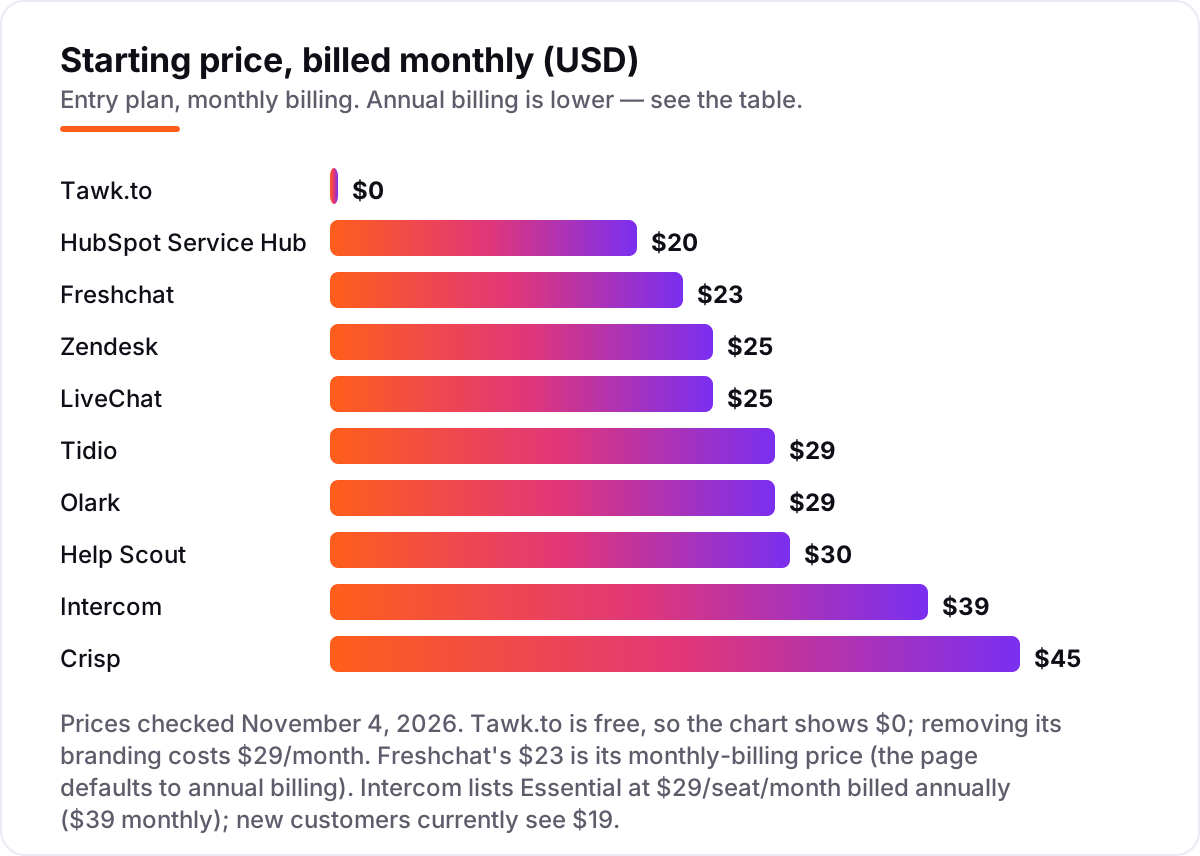
Live chat support software pricing: what you will actually pay
Take a three-person team answering about 80 chats a month. On list prices billed monthly, the subscription costs $0 on Tawk.to, $29 on Tidio Starter, $45 on Crisp Mini, $60 on HubSpot Service Hub Starter, $69 on Freshchat Growth, $75 on Zendesk Support Team or LiveChat Essential, $87 on Olark, $90 on Help Scout Standard and $117 on Intercom Essential. Two of those numbers need adjusting before they are real: Tidio Starter covers 100 billable conversations, so 80 chats fit, but a busier month lands on Growth from $59; and Intercom adds Fin outcomes on top of the seats, so if Fin resolves half of those 80 chats, add 40 times $0.99, or about $40, bringing Intercom to roughly $157 a month.
Over a year on monthly billing, that is $0 on Tawk.to, $348 on Tidio, $540 on Crisp, $720 on HubSpot, $828 on Freshchat, $900 on Zendesk or LiveChat, $1,044 on Olark, $1,080 on Help Scout and $1,404 on Intercom before Fin usage. Annual billing cuts most of those: Intercom drops to $1,044 a year at the $29 list price, or $684 at the $19 new-customer price; HubSpot Starter drops to $252 a year at the $7 new-customer annual price; Zendesk drops to $684, LiveChat to $684, Freshchat to $684 and Help Scout to $900. The same three people and the same 80 chats cost $0 at the free end and $1,404 at the dear end — a gap that comes entirely from billing units and AI meters, not from features.
Three costs sit outside every number above. First, the AI meters: Fin at $0.99 per outcome, Freddy AI at $49 per 100 sessions after the first 500 free, Lyro per conversation, and Help Scout's Envoy at $0.75 per resolution. Second, the add-ons that teams actually buy: Intercom Copilot at $29 an agent a month, Zendesk Copilot at $50, and Freshchat's Freddy AI Copilot at $29. Third, the second website: every tool here covers multiple sites on the entry plan except the ones that charge per workspace, so check before you add a second brand. If the team also answers by phone, note that none of these entry plans includes real phone support — that is a separate product or add-on on every tool in this list.
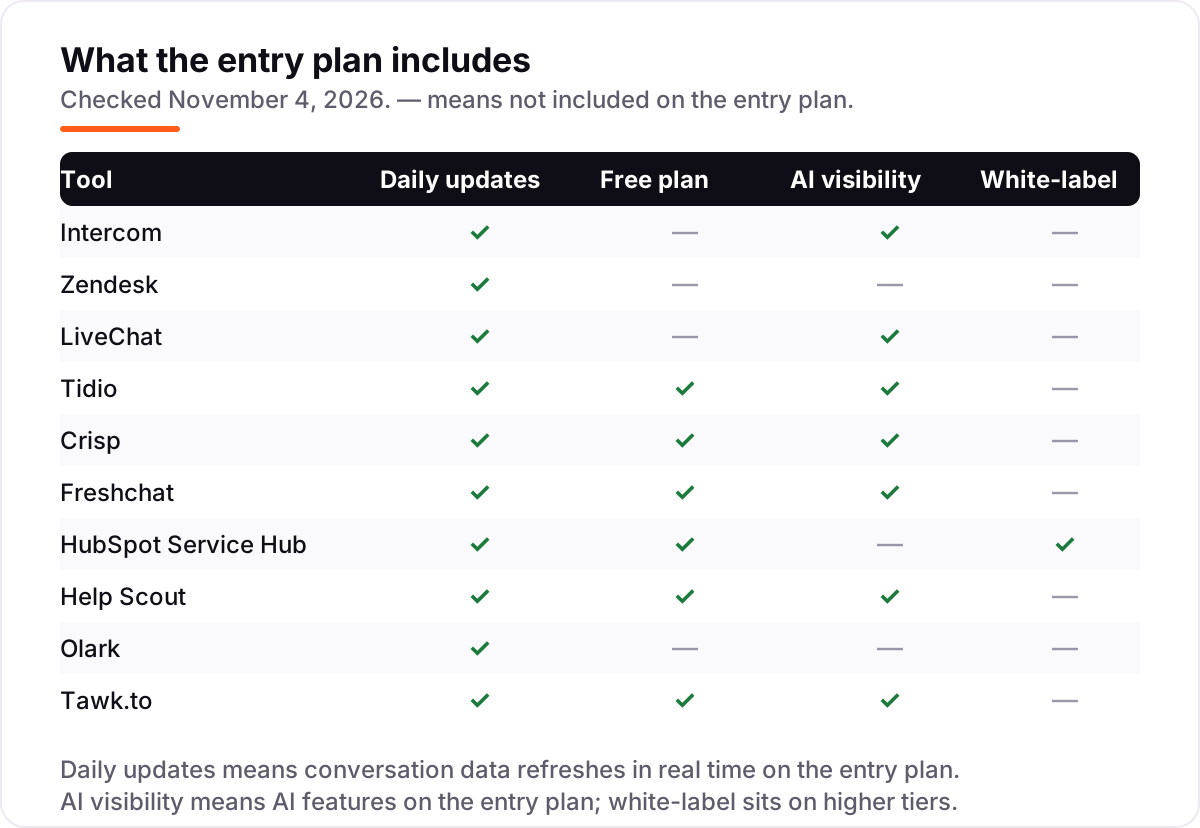
Know the difference: live chat, AI chatbot and help desk
The confusion in this category is between three things sold under one name. Live chat is a real-time conversation between a visitor and a human agent on your website. An AI chatbot is software that answers without a human — it can sit inside the same widget, but it is a different product with its own meter. A help desk is a ticketing system that organizes email, chat and phone requests into queues with SLAs and reporting. Most tools in this list do two of the three, and a few do all three, so check which job you are actually buying.
The second confusion is the free plan versus the free trial. A free plan, like Tawk.to's or Freshchat's, never expires but caps features; a free trial, like Intercom's or Zendesk's 14 days, gives you everything and then stops. A tool with a good free plan is the cheaper long-term buy for a tiny team, while a tool with only a trial needs a budget decision on day 15. Do not confuse the two when you compare the cards above.
A third distinction worth knowing is per-seat versus per-conversation versus flat pricing. Per-seat tools (Intercom, Zendesk, LiveChat, Freshchat, HubSpot, Help Scout, Olark) get more expensive with every hire. Per-conversation tools (Tidio) get more expensive with every chat, whatever the headcount. Flat tools (Crisp per workspace, Tawk.to free) stay the same until you hit a seat or feature ceiling. Your growth path — more agents or more chats — decides which model is cheapest for you in a year.
Quick comparison: tool type by need
| Buyer | Best pick | Why |
|---|---|---|
| Solo owner on a $0 budget | Tawk.to | Free forever with unlimited agents, ticketing and CRM included |
| Small online store | Tidio | $29/month for 100 conversations, up to 10 agents included |
| Team that hates per-seat pricing | Crisp | One flat $45/month per workspace, no conversation cap |
| Team that wants AI to answer first | Intercom | Fin resolves chats for $0.99 per outcome, seats from $39/month |
| Business already on HubSpot | HubSpot Service Hub | Chat on the CRM record, Starter is $20/seat/month |
| Email-first support team | Help Scout | Shared inbox with chat and Docs, $30/user/month |
Mistakes to avoid
- Budgeting on the annual price when you will pay monthly. Intercom is $29 a seat billed annually but $39 billed monthly, and Help Scout is $25 versus $30. The monthly figure is what leaves your account if you do not commit to a year.
- Buying on the seat price and forgetting the AI meter. Fin at $0.99 per outcome, Freddy AI at $49 per 100 sessions and Lyro per conversation all sit on top of the subscription. Estimate your AI volume before you compare headline prices.
- Picking a chat-only widget when you also answer email and social. Olark and LiveChat are chat-first; if customers also write by email, WhatsApp and Instagram, a shared inbox like Zendesk, Crisp or Help Scout saves a second subscription.
- Ignoring the cap that bites first. Tidio Starter stops at 100 billable conversations a month, and Help Scout Standard stops at 25 users. The cap you hit first is your real starting price.
- Paying to remove branding before you need to. Tawk.to charges $29 a month to remove its branding and Crisp holds white-labeling for its $295 plan. Branding removal is a polish step, not a launch requirement — spend that money on answering faster first.
How we chose
We checked each vendor's own pricing page on November 4, 2026 and recorded the starting price exactly as shown, including the annual-billing figure where the page lists one, and we ranked the tools by fit for the most common buyer — a small business team answering chats alongside email — not by brand size. Freshchat's $23 monthly figure and Help Scout's $30 monthly figure are the monthly-billing toggle prices on their vendor pages, confirmed by independent reads of those pages, since both pages default to annual billing. Intercom's page currently shows Essential at $19 a seat for new customers against a $29 list price, and we used the list price with the discount noted. Ratings come from the G2 and Capterra pages we opened on November 4, 2026; Freshchat carries no rating because its G2 page redirects to a category page with no score, and LiveChat's rating comes from Capterra because its G2 page returned a rate-limit error. No vendor paid for a place in this list, and none of the links here are affiliate links.
What to do next
Start with the free plan or trial of your top pick and run one real week of chats through it. Check that the bot-to-human handoff carries the full transcript, that the widget looks right on mobile, and that your team can answer from the phone app before you commit to a year. If the chat is sorted but new customers are not finding you, our monthly SEO service handles the visibility side — or compare providers in our guide to AI chatbots for customer service. Once your tools are in place, find out what's holding your rankings back.
Your stack only works if people find you
SerpAstra fixes what keeps your site off page one and makes it easy for AI assistants to recommend.
Get a free audit→Sources we checked (19)
- Intercom pricing — intercom.com/pricing (checked November 4, 2026)
- Zendesk pricing — zendesk.com/pricing (checked November 4, 2026)
- LiveChat pricing — livechat.com/pricing (checked November 4, 2026)
- Tidio pricing — tidio.com/pricing (checked November 4, 2026)
- Crisp pricing — crisp.chat/en/pricing (checked November 4, 2026)
- Freshchat pricing — freshworks.com/live-chat-software/pricing (checked November 4, 2026)
- HubSpot Service Hub pricing — hubspot.com/pricing/service (checked November 4, 2026)
- Help Scout pricing — helpscout.com/pricing (checked November 4, 2026)
- Olark pricing — olark.com/pricing (checked November 4, 2026)
- Tawk.to pricing — tawk.to/pricing (checked November 4, 2026)
- Intercom reviews — g2.com/products/intercom/reviews (checked November 4, 2026)
- Zendesk reviews — g2.com/products/zendesk/reviews (checked November 4, 2026)
- LiveChat reviews — capterra.com/p/62194/LiveChat (checked November 4, 2026)
- Tidio reviews — g2.com/products/tidio/reviews (checked November 4, 2026)
- Crisp reviews — g2.com/products/crisp/reviews (checked November 4, 2026)
- HubSpot Service Hub reviews — g2.com/products/hubspot-service-hub/reviews (checked November 4, 2026)
- Help Scout reviews — g2.com/products/help-scout/reviews (checked November 4, 2026)
- Olark reviews — g2.com/products/olark/reviews (checked November 4, 2026)
- Tawk.to reviews — capterra.com/p/167792/tawk-to (checked November 4, 2026)
Shamim
Founder of SerpAstra
A full-stack SEO and digital marketer who spends most days on Local SEO for dental practices, AI search visibility and lead generation.
Frequently asked questions
What is the best live chat support software?
Intercom is the best fit for most teams that want AI to answer first: Fin resolves chats for $0.99 per outcome, with seats from $39 a month. Zendesk is the better pick when you also need ticketing and a clear upgrade path, from $25 an agent a month. Tawk.to is the best free option.
How much does live chat support software cost?
Entry prices run from $0 to $45 a month. Tawk.to is free, Tidio starts at $29 a month flat, and per-seat tools start at $20 to $39 a seat a month. A three-person team typically pays $0 to $117 a month before AI usage fees, which are billed separately on most tools.
Is there really free live chat support software?
Yes. Tawk.to is free forever with unlimited agents, live chat, ticketing and a CRM. Freshchat is free for up to 10 agents, Help Scout for 5 users, and Crisp for 2 seats. Free plans drop AI features, advanced reporting and branding removal, so check the limits before you build on one.
Should I choose Intercom or Zendesk?
Choose Intercom when most chats are repetitive questions an AI agent can resolve, and you accept a second meter of $0.99 per Fin outcome. Choose Zendesk when you want email, messaging and live chat in one workspace with ticketing, and you would rather add AI later on the Suite plans.
Do I need an AI chatbot with live chat?
It depends on volume. If you answer fewer than 100 chats a month, humans alone are cheaper — Olark at $29 an agent or Tawk.to at $0 will do. Past a few hundred chats a month, an AI agent that resolves routine questions pays for itself, but budget for its per-resolution or per-session meter.
What is the difference between live chat and a help desk?
Live chat is real-time conversation on your website; a help desk is a ticketing system that organizes email, chat and phone requests with queues, SLAs and reporting. Most tools here do both, but Olark and LiveChat are chat-first, while Zendesk, Help Scout and HubSpot are help desks with chat built in.
Can I switch live chat software later?
Yes, and it is easier than switching accounting or CRM software. Export your chat transcripts and canned replies, keep the old widget live until the new one is tested, and move at a quiet time of week. The harder part is retraining agents, so pick a tool whose trial covers your real questions.
Free SEO and AI visibility audit
Find out what is holding your rankings back
Send us your site. Within 2 business days you get a written audit, an AI visibility check and a short fix list ranked by impact. Free, with no contract attached.
Request my free audit→Related guides
 AI, Data & Analytics9 Best AI Chatbot for Customer Service Software in 2026The 9 best AI chatbot for customer service software options compared on price, AI billing and free plans, with every starting price checked on November 2, 2026.Read guide →
 AI, Data & AnalyticsBest Customer Service Chatbots for 2026: 10 Providers Ranked by Value10 best customer service chatbots compared on price, AI resolution fees and free plans, with real starting prices checked on November 2, 2026.Read guide →
 AI, Data & Analytics9 Best AI Chatbot Apps for Small Business in 20269 best AI chatbot apps for small business compared on price, free plans and AI features, with real starting prices checked November 2, 2026.Read guide →