
Best Mobile App Analytics (2026): 12 Apps Worth Downloading
12 best mobile app analytics tools compared on price, free plans and attribution, with real starting prices checked on vendor pages, November 2, 2026.
 Shamim Mia, Founder, SerpAstraLast verified November 2, 202614 min read
We compare pricing pages, documentation and public reviews. We never accept payment for rankings.

Key takeaways
- Firebase Analytics is free and already inside most apps, Mixpanel gives 1M events a month free, and Amplitude's free Starter covers 2M events — start with one of these three before paying anything.
- The single most important buying factor is the billing unit: per-event, per-user, per-conversion and per-session pricing punish different apps, so match the meter to your volume before comparing prices.
- Attribution tools (AppsFlyer, Adjust, Kochava) answer which ads drove installs; behavior tools (Mixpanel, Amplitude) answer what users did after; store tools (Appfigures, AppFollow, Sensor Tower) answer how the listing performs.
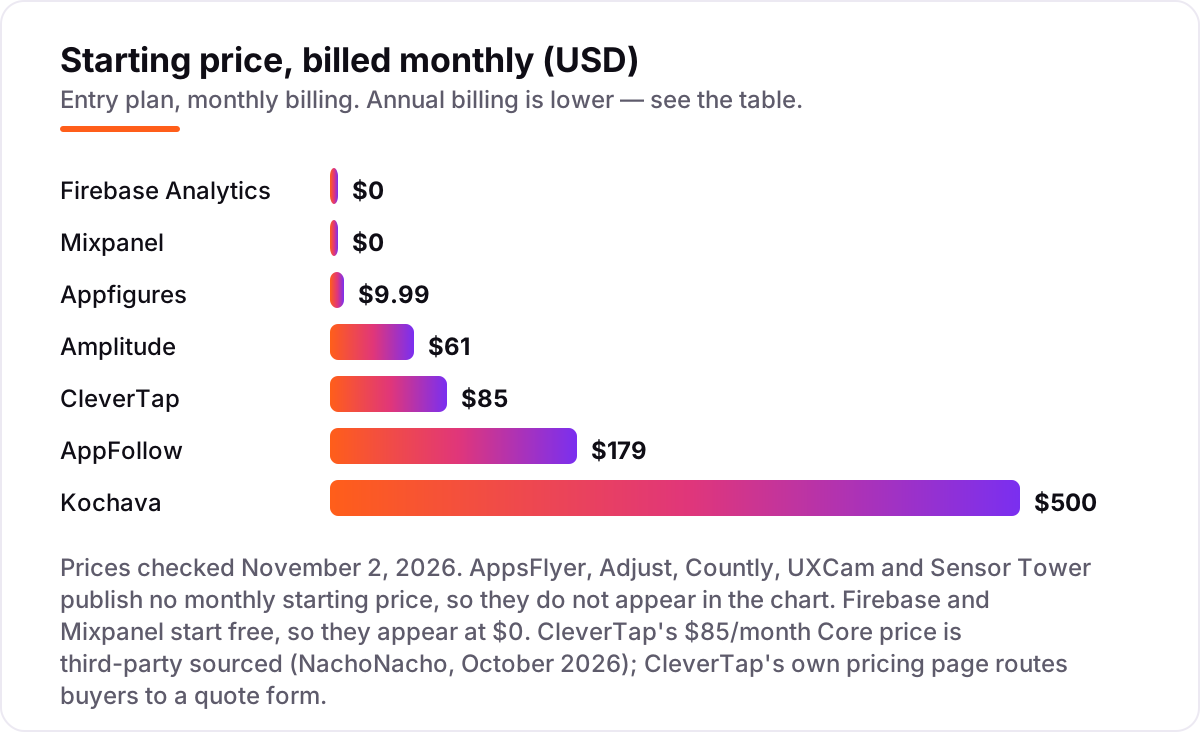
- Five tools here publish no monthly price — AppsFlyer, Adjust, Countly, UXCam and Sensor Tower are quote-only or usage-priced, so budget them by quote, not by headline.
- Every price below was checked on the vendor's own pricing page on November 2, 2026, except CleverTap's $85 Core price, which is third-party sourced. Ratings are G2, with review counts shown.
On this page
Quick comparison
| Tool | Best for | Starting price | Free plan |
|---|---|---|---|
| Firebase Analytics | Indie developers and small app teams who want free, unlimited event analytics built into their Google stack | Free | Yes (free) |
| Mixpanel | Product teams at growing apps who need funnels, retention and cohorts without paying until they scale | $0/mo (1M events) | Yes (1M events) |
| Amplitude | Mid-size product and growth teams that need deep behavioral analysis and predictive features | $49/mo (annual) | Yes (10,000 MTUs) |
| AppsFlyer | App marketers running paid campaigns who need attribution across every ad network | $0.07/conversion | Yes (12,000 conv.) |
| Adjust | Mid-market app teams that need accurate attribution plus fraud prevention in one dashboard | Custom quote | Yes (Base, 12 mo) |
| Appfigures | Indie developers and small teams who want store downloads, revenue and keyword ranks in one cheap dashboard | $9.99/mo | Yes (5 apps) |
| Kochava | App marketers who want attribution plus audience building and push messaging in one platform | $500/mo | Yes (10,000 conv.) |
| CleverTap | Consumer-app teams that want analytics tied directly to retention campaigns and messaging | $85/mo | No (30-day trial) |
| Countly | Privacy-focused teams and developers who want to self-host their analytics | Custom quote | Yes (Community) |
| UXCam | Mobile product and UX teams who need to watch real sessions to find where users get stuck | Custom quote | Yes (3,000 sessions) |
| AppFollow | App teams that manage reviews and store rankings for several apps at once | $129/mo (annual) | Yes (2 apps) |
| Sensor Tower | Larger app publishers and analysts who need market sizing and competitor download estimates | Custom quote | No (demo only) |
Make one of these tools?
We re-check this list every quarter. Send a correction, request a review, or ask about a clearly labeled sponsored spot.
Request a listingThe best mobile app analytics

Firebase Analytics
Best for: Indie developers and small app teams who want free, unlimited event analytics built into their Google stack
Firebase Analytics is the default starting point for most app teams because it is already inside the project. It is Google Analytics for Firebase: event-based, unlimited, and no-cost on both the Spark and Blaze plans, so a new app can ship analytics on day one without a procurement decision. It sits beside Crashlytics, Cloud Messaging, Remote Config and A/B Testing in the same console, which means one SDK covers crash reports, push and experiments as well as events.
The trade-off is depth. Funnels and segments are simpler than Mixpanel or Amplitude, and exporting raw events to BigQuery needs the Blaze pay-as-you-go plan. For a small team that wants reliable numbers for free, it is the obvious first install.
What we like
- Analytics is no-cost on both the Spark and Blaze plans, with unlimited event tracking
- Bundled with Crashlytics, Cloud Messaging, Remote Config and A/B Testing in one console
- Deep integration with Google Ads and Google Play, plus BigQuery export on Blaze
Watch out for
- Reporting is less flexible than Mixpanel or Amplitude, with no true funnel builder on the free tier
- Raw event data export to BigQuery needs the Blaze pay-as-you-go plan, so heavy analysis costs extra

Mixpanel
Best for: Product teams at growing apps who need funnels, retention and cohorts without paying until they scale
Mixpanel is the product-analytics pick for teams that outgrow Firebase reporting but are not ready to pay enterprise prices. The free plan covers 1 million events a month with the full report set — funnels, retention, flows and cohorts — and Growth stays at $0 until that first million is used, which makes the upgrade path unusually gentle. Session replay and experimentation live in the same product, so a team can watch a session, spot a drop-off and test a fix without switching tools.
The catch is the meter. Event-based pricing means a chatty app can jump from free to $140 a month at 1.5 million events, and group analytics and data pipelines are paid add-ons. Count your events before you commit.
What we like
- Free plan covers 1 million events a month with all core report types included
- Funnels, retention, flows and cohorts are built for product questions, not pageviews
- Session replay and experimentation sit in the same product, so behavior and tests share data
Watch out for
- Pricing is event-based, so a chatty app can jump from free to $140 a month with little warning
- Advanced features such as group analytics and data pipelines are paid add-ons on Growth

Amplitude
Best for: Mid-size product and growth teams that need deep behavioral analysis and predictive features
Amplitude is the deepest behavioral analytics tool in this list, and its free tier is generous enough to run a real product on. Starter covers 10,000 monthly tracked users and 2 million events a month, with session replay, feature flags and web experimentation included — no card, no trial clock. Paid Plus starts at $49 a month billed annually and adds unlimited analytics, behavioral cohorts and custom audience syncs.
The analysis is the selling point: funnels, retention and predictive features such as forecasts and anomaly detection go further than Mixpanel at the same tier. The ceiling is the quote. Growth and Enterprise are sales-led with no self-serve path, so costs past Plus are a negotiation, not a price list.
What we like
- Free Starter covers 10,000 monthly tracked users and 2 million events a month
- Deepest funnel, retention and cohort analysis in this list, with forecasts and anomaly detection
- Session replay, feature flags and web experimentation are included from the free tier
Watch out for
- Growth and Enterprise are quote-only, so there is no self-serve path past Plus
- Pricing scales by monthly tracked users, and overage costs are hard to predict before you commit

AppsFlyer
Best for: App marketers running paid campaigns who need attribution across every ad network
AppsFlyer is the attribution standard for apps that spend on paid installs. It measures which network, campaign and creative drove each install, re-engagement and in-app event, then ties that back to revenue — the question every paid UA team has to answer. Its partner ecosystem is the widest in this list, and Protect360 fraud protection plus SKAN support come built in.
AppsFlyer says it is trusted by more than 15,000 businesses, which is why most networks and agencies already know how to work with it. The cost is the catch. At $0.07 per conversion after the 12,000-conversion Welcome Package, the bill grows with every paid install, and the interface takes time to learn. Buy it when paid UA is a real budget line.
What we like
- Widest partner ecosystem of any MMP here, with integrations across every major ad network
- Protect360 fraud protection and SKAN support are built into the platform
- Trusted by more than 15,000 businesses, so most networks and agencies already know it
Watch out for
- Per-conversion pricing means the bill grows with every paid install, so costs are hard to cap
- The interface has a steep learning curve, and reviewers cite setup complexity for new users

Adjust
Best for: Mid-market app teams that need accurate attribution plus fraud prevention in one dashboard
Adjust is the highest-rated MMP in this list at 4.7 on G2, and it earns that score on attribution accuracy. It unifies campaign data from Google, Meta, TikTok and hundreds of smaller networks into one dashboard, with fraud prevention and SKAN measurement on every plan — including the free Base plan, which includes the full Core feature set for up to 1,500 conversions a month for a year.
That makes Base the most honest free trial in this category: it is the real product, not a demo. The drawback is pricing opacity. Core and Enterprise are quote-only, so a growing app cannot budget without a sales conversation, and reviewers note the dashboard can feel complex at first. Choose Adjust when attribution accuracy is the deciding factor.
What we like
- Highest G2 score in this list at 4.7, with reviewers citing attribution accuracy most
- Free Base plan includes all Core features, so the trial is the real product
- Unlimited organic installs, raw data access and iOS 14.5+ measurement on every plan
Watch out for
- Paid plans are quote-only, so you cannot budget without a sales conversation
- Reviewers note the dashboard can feel complex for beginners and slow on heavy datasets

Appfigures
Best for: Indie developers and small teams who want store downloads, revenue and keyword ranks in one cheap dashboard
Appfigures is the cheapest way to watch your own apps in the stores. The free Starter plan tracks 5 apps, and Connect at $9.99 a month adds keyword tracking, revenue reporting, email reports and API access — a price no other paid tool in this list comes close to. It pulls App Store, Google Play and Amazon data into one dashboard that updates daily, so downloads, ratings and keyword ranks sit beside each other instead of in three consoles.
The limits are real. It is store analytics, not in-app behavior: there are no funnels or session replays, and its G2 score of 4.0 rests on only 18 reviews, with some reviewers reporting feature gating and support problems. For an indie developer, though, it is the best $10 in this list.
What we like
- Cheapest paid plan in this list at $9.99 a month, with a free Starter plan for 5 apps
- Pulls App Store, Google Play and Amazon data into one dashboard with daily updates
- Keyword rank tracking, reviews and revenue reporting are included from Connect
Watch out for
- Only 18 G2 reviews, so the 4.0 score rests on a small base
- Reviewers report feature gating and unexpected charges on higher tiers, and support scores are low

Kochava
Best for: App marketers who want attribution plus audience building and push messaging in one platform
Kochava is the MMP with the most honest free tier. Free App Analytics covers 10,000 attributed conversions and 500,000 app events a month at $0, with SmartLinks deep linking included — enough for a small app to run real attribution without paying. Foundation starts at $500 a month for 33,000 conversions and adds full attribution, audience segments and lifetime-value reporting in the same platform.
The trade-offs are the rating and the free-plan limits. At 4.1 on G2 from 136 reviews it is the lowest-rated MMP here, and paid attribution on the free plan only covers self-attributing networks. For a team that wants attribution plus audience building in one subscription, it is still the cheapest route in.
What we like
- Free App Analytics covers 10,000 attributed conversions and 500,000 app events a month
- Foundation includes SmartLinks deep linking and full attribution from $500 a month
- Audience segments, retention and lifetime-value reporting are built into the same platform
Watch out for
- Lowest G2 score among the MMPs here at 4.1, from only 136 reviews
- Paid attribution on the free plan is limited to self-attributing networks only

CleverTap
Best for: Consumer-app teams that want analytics tied directly to retention campaigns and messaging
CleverTap is the retention pick in this list because analytics and messaging live in one platform. Behavioral analytics, journeys, push, in-app messages and email share the same user profiles, so a team can spot a churn risk in the morning and message those users by lunch without exporting anything. Core starts at $85 a month for 5,000 monthly active users — that figure is third-party sourced, since CleverTap's own pricing page routes buyers to a quote form — and includes audience curation and A/B testing.
The limits are the trial and the top tiers. There is no permanent free plan, only a 30-day trial, and Advanced and Cutting Edge are quote-only. Pick CleverTap when retention campaigns, not just reports, are the job.
What we like
- Analytics, journeys and messaging live in one platform, so retention work needs no second tool
- Behavioral cohorts and predictive segmentation are built for win-back and onboarding flows
- User history runs 3 years on Core, which is long for this price band
Watch out for
- No permanent free plan, only a 30-day trial, so evaluation is time-boxed
- Advanced and Cutting Edge plans are quote-only, and messaging add-ons raise the bill fast

Countly
Best for: Privacy-focused teams and developers who want to self-host their analytics
Countly is the only self-hosted analytics tool in this list, and that is the whole reason to choose it. The open-source Community Edition is free forever and runs on your own servers, so user data never leaves your infrastructure — a real answer for privacy-regulated apps and teams that cannot send data to a US cloud. It covers mobile, web and desktop in one platform, with funnels, cohorts, crash reporting and push built in.
The costs are evidence and pricing. Its G2 score of 4.1 rests on only 20 reviews, and Enterprise is a personalized quote priced per data point, which reviewers call expensive. For a team that must own its data, though, nothing else here qualifies.
What we like
- Open-source Community Edition is free forever and can be self-hosted for full data control
- Covers mobile, web and desktop in one platform, with funnels, cohorts and crash reporting
- Privacy by design: no third-party data sharing, and data stays on your own servers
Watch out for
- Only 20 G2 reviews, so the 4.1 score is the thinnest evidence in this list
- Enterprise pricing is personalized per data point, and reviewers call premium tiers expensive

UXCam
Best for: Mobile product and UX teams who need to watch real sessions to find where users get stuck
UXCam answers a question no dashboard can: what did the user actually do before they quit? Session replay, heatmaps and funnels are built mobile-first, so a product team can watch real sessions, see where thumbs hesitate and find the screen that loses people. Its Tara AI analyst surfaces behavior patterns without manual query building, and its G2 support score of 9.3 is the highest in this list.
The free plan covers 3,000 sessions a month, with a 14-day trial of the paid features. The catch is pricing transparency. UXCam publishes no dollar prices at all — Starter, Growth and Enterprise are all custom quotes based on monthly sessions — so budgeting starts with a sales call. Choose it when watching users matters more than counting them.
What we like
- Session replay, heatmaps and funnels are built for mobile first, not adapted from web
- Tara AI analyst surfaces behavior patterns without manual query building
- Highest G2 support score in this list at 9.3, with easy setup cited by reviewers
Watch out for
- No published prices at all, so budgeting starts with a sales quote
- Reviewers report occasional delays or gaps in session data at high volume

AppFollow
Best for: App teams that manage reviews and store rankings for several apps at once
AppFollow is the review-operations pick: it pulls every App Store and Google Play review into one workspace, auto-tags issues, drafts AI replies and ties review sentiment back to keyword ranks and competitor moves. For a team managing several apps, that single inbox replaces three consoles and a spreadsheet.
Essential at $179 a month covers 5 apps, 3,000 keywords, 100 competitors and a year of history, with unlimited users on every plan. The price is the objection. At $179 a month it is steep for a solo developer with one app, and reviewers call the interface dense. For a support or ASO team handling review volume daily, the time saved is the justification.
What we like
- Reviews, keyword ranks and competitor tracking live in one workspace across both stores
- AI replies and semantic tagging turn review volume into fix lists for the product team
- Unlimited users on every plan, so support and product share one login cost
Watch out for
- Essential at $179 a month is steep for a solo developer with one or two apps
- Reviewers call the interface dense, and several cite pricing as the main drawback

Sensor Tower
Best for: Larger app publishers and analysts who need market sizing and competitor download estimates
Sensor Tower is the market-intelligence pick for teams that need to know what rivals are doing, not just what their own app did. It estimates downloads, revenue, usage and ad creatives for millions of apps across the App Store and Google Play, with keyword tracking and Ad Intelligence on top — the dataset investors and large publishers plan around. Reviewers cite data accuracy and competitive intelligence as its top strengths.
The price is the barrier. There is no published price list and no free trial; contracts are annual and quoted by module, seats and markets, with buyer data putting typical deals far above small-team budgets. Buy it when market sizing is a business decision, not a curiosity.
What we like
- Deepest market intelligence here: download and revenue estimates for millions of apps
- Ad Intelligence and Usage Intelligence cover competitor creatives and real usage, not just ranks
- Reviewers cite data accuracy and competitive intelligence as the top strengths
Watch out for
- Quote-only annual contracts, with buyer data putting typical deals far above small-team budgets
- Estimates are modeled, so figures for smaller apps and smaller markets can be off
What a mobile app analytics tool actually does
The best mobile app analytics tools answer three different questions, and most apps need all three answered. First, which ads drove the install. Second, what users did after the install. Third, how the app is doing in the stores against rivals. No single tool in this list answers all three well, which is why the ranking below is sorted by the job each tool does best, not by brand size.
A mobile app analytics tool sits inside your app as an SDK. It records events — installs, opens, purchases, screen views — then turns them into funnels, retention curves and revenue reports. The scale of the category is easy to see in the customer counts: AppsFlyer says it is trusted by more than 15,000 businesses, and Mixpanel reports serving more than 26,000 companies. These are not niche tools; they are the default infrastructure of the app economy.
Free options first
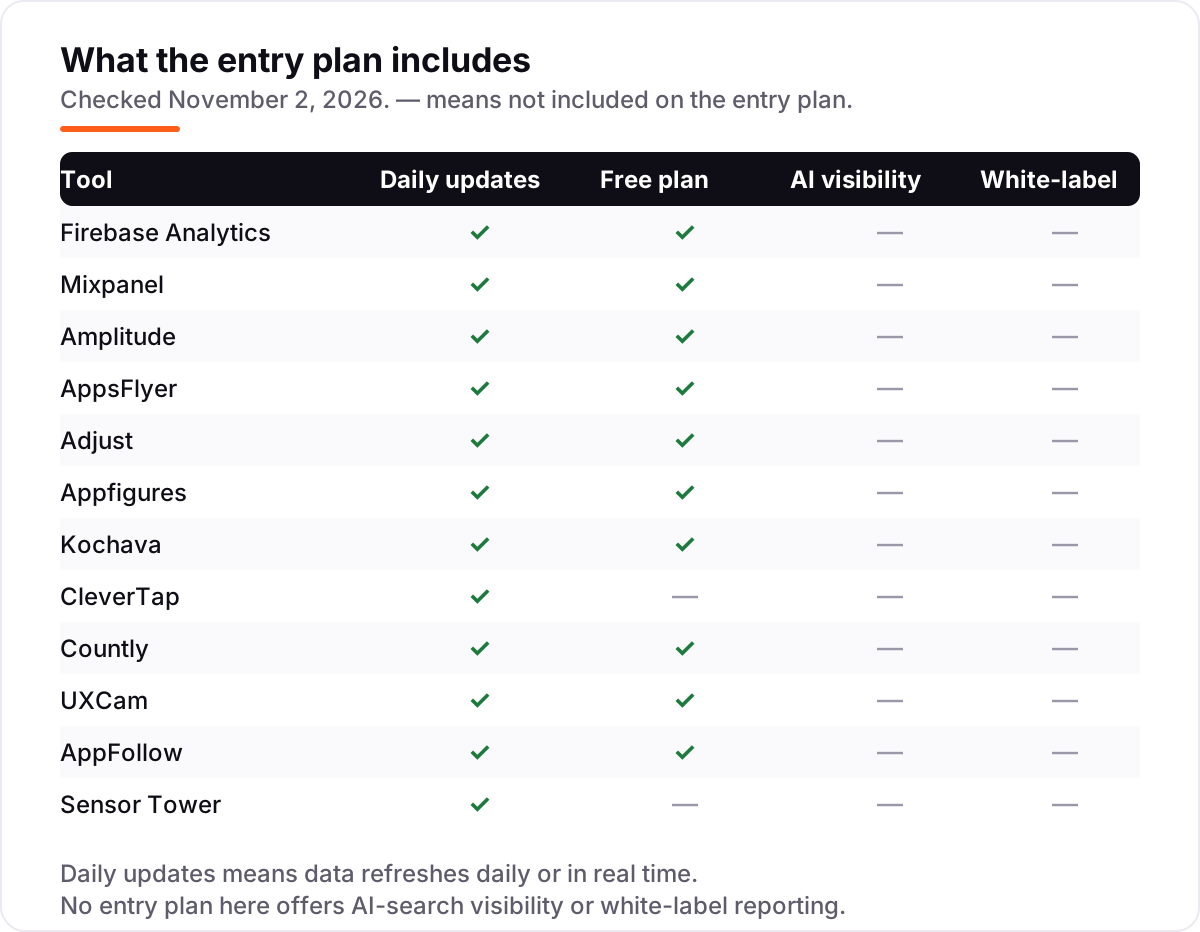
If your app is small, you may not need to pay at all. Firebase Analytics is free with no event limit, Mixpanel gives 1 million events a month free, and Amplitude's free Starter covers 10,000 monthly users and 2 million events. AppsFlyer, Adjust and Kochava all have free attribution tiers too, and Appfigures, Countly, UXCam and AppFollow offer free plans for store data, self-hosted analytics, session replay and review tracking.
The free tiers are honest products, not demos — but they cap out on volume, history or features. The moment your event count, conversion count or session count passes the cap, a paid plan is cheaper than the time you lose to manual workarounds. For anything client-facing, skip the free tier: the reporting and white-label features start on the paid plans.
In-app behavior: what users do after install
Firebase, Mixpanel, Amplitude, CleverTap, Countly and UXCam all live inside the app, but they answer different questions. Firebase tells you what happened, for free. Mixpanel and Amplitude tell you why it happened, with funnels, retention and cohorts that show where users drop off. CleverTap adds the next step: messaging the users who are about to churn. Countly does the same job on your own servers. UXCam shows you the session itself, so you can watch the exact moment a user gets stuck.
For most teams, the choice is between Mixpanel and Amplitude. Mixpanel is cheaper to start and easier to learn; Amplitude goes deeper on behavioral analysis and prediction. Either way, start on the free tier with your real event list and compare the reports against your own data before paying.
Attribution: which ads drove the install
Attribution is a separate job from behavior analytics, and it has its own vendors: AppsFlyer, Adjust, Kochava and, for smaller teams, Singular-style free tiers. A mobile measurement partner (MMP) connects a paid click to an install and to the revenue that follows, across every network you buy on. Without one, you cannot tell which campaign earned its budget and which one burned it.
The pricing model is the thing to understand before you sign. AppsFlyer charges $0.07 per conversion after a 12,000-conversion Welcome Package. Adjust and Kochava start free — 1,500 conversions a month for a year on Adjust Base, 10,000 a month on Kochava Free App Analytics — then move to quote-only paid plans. Kochava Foundation is the only MMP here with a published paid price: from $500 a month. If paid UA is a small test budget, start on a free tier; if it is a real spend line, get quotes from at least two MMPs before committing.
Store data and market intelligence
The third job is the store itself: downloads, revenue, keyword ranks, ratings and reviews, and what rival apps are doing. Appfigures is the budget pick at $9.99 a month. AppFollow adds review management and AI replies for teams handling review volume. Sensor Tower is the enterprise pick for market sizing, with download and revenue estimates for millions of apps — and a quote-only price to match.
Store data matters because the listing is the product page. A keyword rank drop or a one-star review spike shows up in store analytics days before it shows up in revenue. If your store listing is the bottleneck rather than the app itself, an SEO audit will show which pages and listings are underperforming and what to fix first.
Quick comparison: tool type by need
| Buyer | Best pick | Why |
|---|---|---|
| Indie developer, zero budget | Firebase Analytics | Free, unlimited events, already in the project |
| Growing app, product questions | Mixpanel or Amplitude | 1M–2M free events, deep funnels and retention |
| Paid installs at scale | AppsFlyer or Adjust | Widest network coverage and top-rated attribution |
| Store downloads and revenue | Appfigures | $9.99/month, daily store data in one dashboard |
| Retention campaigns | CleverTap | Analytics wired into journeys and messaging |
| Privacy or self-hosting required | Countly | Open-source Community Edition, free forever |
| Watching real user sessions | UXCam | Session replay and heatmaps, mobile-first |
| Reviews across several apps | AppFollow | One inbox for reviews, ranks and competitors |
| Market sizing and rivals | Sensor Tower | Deepest download, revenue and ad data |
How to choose the best mobile app analytics
- Name the question first. Attribution, in-app behavior and store performance are three different jobs. Pick the tool that answers your question, not the one with the longest feature list.
- Match the billing unit to your volume. Per-event pricing punishes chatty apps, per-conversion pricing punishes paid growth, per-session pricing punishes long sessions. Estimate your real monthly volume before comparing prices.
- Start free, with real data. Every tool in this list has a free plan or a free trial. Run your real app for two weeks and check the numbers against your store console and your own backend.
- Check the export and retention limits. History you cannot export is history you lose when you switch. Countly keeps data on your servers; the cloud tools vary from 30 days to several years.
- Mind the store listing too. Analytics tells you what happened inside the app; the listing decides how many people install it. Before you publish new landing-page copy for the app, run your titles through the free SERP snippet preview tool to see how they will look in Google.
Mistakes to avoid
- Comparing monthly prices without checking the billing unit. $9.99 a month and $0.07 a conversion are not comparable numbers — one is a flat fee, the other scales with every paid install.
- Paying for an MMP before you spend on ads. If your growth is organic, attribution adds cost without adding answers. Firebase or Mixpanel covers you until paid UA becomes a real budget line.
- Ignoring the free-tier cap. Mixpanel's free tier ends at 1 million events, Kochava's at 10,000 conversions, UXCam's at 3,000 sessions. Crossing a cap mid-month can trigger a bill or a data cutoff.
- Trusting modeled estimates as fact. Sensor Tower's download and revenue figures are estimates, and they are least accurate for small apps and small markets. Use them as a benchmark, not a balance sheet.
- Forgetting the trial ends. Set a reminder for the day the trial converts, and export your data before the trial closes so a surprise bill never locks your history away.
How we chose
We checked each vendor's own pricing page on November 2, 2026 and recorded the starting price exactly as shown, including the annual-billing figure where the page lists one. Five tools publish no monthly starting price — AppsFlyer charges per conversion, and Adjust, Countly, UXCam and Sensor Tower are quote-only — so those are shown as custom or per-conversion rather than given a made-up monthly figure. CleverTap's $85 a month Core price is third-party sourced (NachoNacho, October 2026) because CleverTap's own pricing page routes buyers to a quote form. Ratings come from G2, with review counts shown. We ranked the tools by fit for the most common buyer — a small app team that needs to know what users do and where installs come from — not by brand size. No vendor paid for a place in this list, and none of the links here are affiliate links.
What to do next
Start with the decision path above: name your question, match the billing unit to your volume, and run the free plan of your top pick on your real app for two weeks. If the numbers match your store console and the reports answer the question you actually asked, you have your tool. If you'd rather have this set up and read for you, request a free SEO + AI visibility audit and get a ranked fix list in 2 business days.
Rather not run the tools yourself?
Tools show you the data. SerpAstra turns it into higher rankings, more map-pack calls and citations in AI answers.
Get a free SEO + AI visibility audit→Sources we checked (26)
- Firebase pricing — firebase.google.com/pricing (checked November 2, 2026)
- Firebase on G2 — 4.5/5, 307 reviews (checked November 2, 2026)
- Mixpanel pricing — mixpanel.com/pricing (checked November 2, 2026)
- Mixpanel on G2 — 4.6/5, 1,267 reviews (checked November 2, 2026)
- Amplitude pricing — amplitude.com/pricing (checked November 2, 2026)
- Amplitude on G2 — 4.5/5, 2,977 reviews (checked November 2, 2026)
- AppsFlyer pricing — appsflyer.com/pricing (checked November 2, 2026)
- AppsFlyer on G2 — 4.5/5, 780 reviews (checked November 2, 2026)
- Adjust pricing — adjust.com/pricing (checked November 2, 2026)
- Adjust on G2 — 4.7/5, 730 reviews (checked November 2, 2026)
- Appfigures pricing — appfigures.com/pricing (checked November 2, 2026)
- Appfigures on G2 — 4.0/5, 18 reviews (checked November 2, 2026)
- Kochava pricing — kochava.com/get-started (checked November 2, 2026)
- Kochava on G2 — 4.1/5, 136 reviews (checked November 2, 2026)
- CleverTap pricing — clevertap.com/pricing (checked November 2, 2026)
- CleverTap on G2 — 4.6/5, 656 reviews (checked November 2, 2026)
- Countly pricing — countly.com/pricing (checked November 2, 2026)
- Countly on G2 — 4.1/5, 20 reviews (checked November 2, 2026)
- UXCam pricing — uxcam.com/pricing (checked November 2, 2026)
- UXCam on G2 — 4.6/5, 211 reviews (checked November 2, 2026)
- AppFollow pricing — appfollow.io/pricing (checked November 2, 2026)
- AppFollow on G2 — 4.6/5, 197 reviews (checked November 2, 2026)
- Sensor Tower pricing — sensortower.com/pricing (checked November 2, 2026)
- Sensor Tower on G2 — 4.4/5, 171 reviews (checked November 2, 2026)
- AppsFlyer on G2 — trusted by over 15,000 businesses (checked November 2, 2026)
- Mixpanel serves over 26,000 companies — TrustRadius (checked November 2, 2026)
Shamim
Founder of SerpAstra
A full-stack SEO and digital marketer who spends most days on Local SEO for dental practices, AI search visibility and lead generation.
Frequently asked questions
What is the best mobile app analytics tool in 2026?
Firebase Analytics is the best starting point because it is free and already inside most apps. Mixpanel is the best free product-analytics option, with 1M events a month free, and Amplitude is the deepest for behavioral analysis. Apps that spend on paid installs should add an attribution tool such as AppsFlyer or Adjust.
How much does mobile app analytics cost?
From $0 to $500 a month at the entry level, plus quote-only tools above that. Firebase and Mixpanel start free, Appfigures costs $9.99 a month, Amplitude Plus is $61 a month billed monthly, AppFollow Essential is $179, and Kochava Foundation is $500. AppsFlyer charges $0.07 per conversion, while Adjust, Countly, UXCam and Sensor Tower are quote-only.
Is there a free mobile app analytics tool?
Yes, several. Firebase Analytics is free with no event limit, Mixpanel gives 1 million events a month free, and Amplitude's free Starter covers 10,000 monthly users and 2 million events. AppsFlyer, Adjust, Kochava, Countly, UXCam, Appfigures and AppFollow all have free plans too. Free tiers work well for small apps; paid plans start when volume or features outgrow them.
What is the difference between attribution and product analytics?
Attribution answers which ad drove the install: it connects a paid click to a download and to the revenue that follows. Product analytics answers what users did after the install: funnels, retention, cohorts and session behavior inside the app. Most growing apps need both, which is why many teams pair an MMP such as Adjust with a behavior tool such as Mixpanel.
Do I need an MMP like AppsFlyer or Adjust?
Only if you spend real money on paid installs. An MMP (mobile measurement partner) attributes installs to networks, campaigns and creatives, and protects against install fraud. If your growth is organic, store search or word of mouth, Firebase or Mixpanel covers your needs. Once paid UA becomes a budget line, an MMP pays for itself in spend you stop wasting.
Can I self-host mobile app analytics?
Yes, with Countly. Its open-source Community Edition is free forever and runs on your own servers, so user data never leaves your infrastructure. That is the only self-hosted option in this list. The trade-off is maintenance: you run the servers, the updates and the backups. Every other tool here is cloud-hosted, which is simpler but means your data sits with the vendor.
What should I check before paying for mobile app analytics?
Four things: what the billing unit is and how much of it you actually use, whether the free tier covers your current volume, whether attribution or behavior data is the priority, and whether the price is monthly or annual billing. Also check data retention and export limits, since moving history between tools is painful. Run the free plan or trial on your real app for two weeks first.
Free SEO and AI visibility audit
Find out what is holding your rankings back
Send us your site. Within 2 business days you get a written audit, an AI visibility check and a short fix list ranked by impact. Free, with no contract attached.
Request my free audit→Related guides
 SEO & AI Search11 Best Rank Tracking Tools in 2026 (Free and Paid, Compared)11 best rank tracking tools compared on price, keyword limits, update speed and AI visibility. Prices checked on the vendor pricing page, October 31, 2026.Read guide →
 SEO & AI SearchBest SEO Audit Software for 2026: 10 Options Compared by Use Case10 best SEO audit software tools compared on price, crawl depth and AI visibility. Prices checked on vendor pricing pages, November 1, 2026.Read guide →
 AI SearchBest AI SEO tools in 2026: honest picks by jobBest AI SEO tools in 2026, picked by job: Semrush and Ahrefs for research, Surfer and Clearscope for content, Otterly for AI tracking, with 2026 prices.Read guide →