
8 Best Product Analytics Tools for Startups in 2026, Compared
8 best product analytics tools for startups compared on price, free tiers and fit — with starting prices and free tiers checked November 2, 2026.
 Shamim Mia, Founder, SerpAstraLast verified November 2, 202614 min read
We compare pricing pages, documentation and public reviews. We never accept payment for rankings.

Key takeaways
- PostHog is the top pick for most startups: 1M free events a month, plus analytics, replay, flags and surveys, with pay-as-you-go pricing from $0.
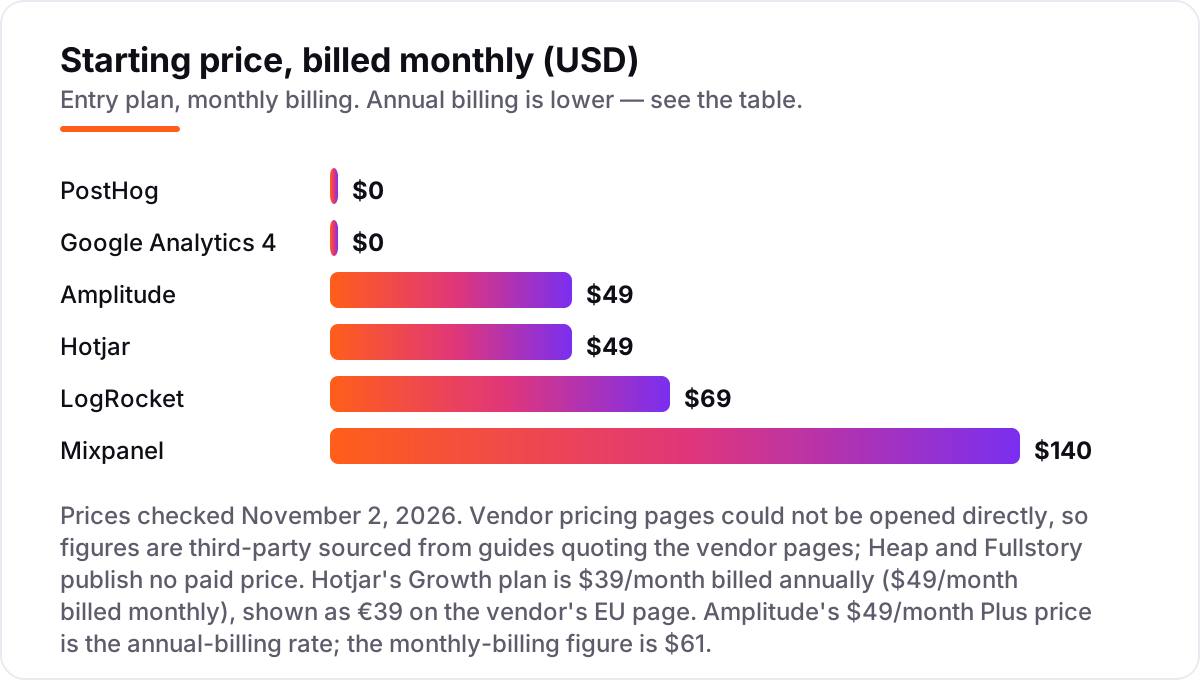
- Mixpanel and Amplitude have the strongest free tiers for pure event analytics — 1M and 2M events a month — with paid plans from $140 and $49 a month.
- Google Analytics 4 is free and belongs in every stack, but it answers traffic questions, not product questions.
- The single most important buying factor is the meter: events, sessions or users decide the bill, so match the meter to how your product is used.
- Every price below was checked against vendor pricing pages through published pricing guides on November 2, 2026; ratings are G2 with review counts shown.
On this page
Quick comparison
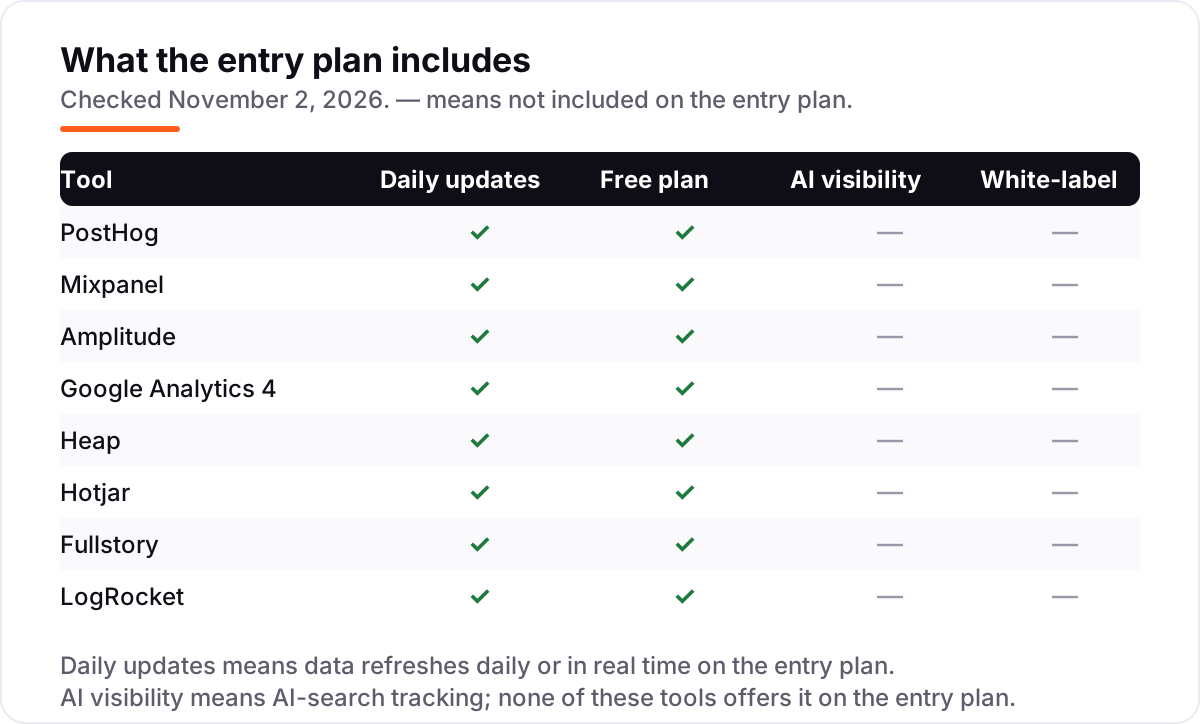
| Tool | Best for | Starting price | Free plan |
|---|---|---|---|
| PostHog | Early-stage startups that want analytics, replay, flags and surveys in one free tool | $0 (free tier) | Yes (1M events) |
| Mixpanel | Startups that need clear funnels and retention reports without an engineer on call | $140/mo | Yes (1M events) |
| Amplitude | Startups with up to 2M monthly events that want the longest free runway | $49/mo (annual) | Yes (2M events) |
| Google Analytics 4 | Every startup that needs free traffic and acquisition reporting alongside product analytics | $0 | Yes (free) |
| Heap | Startups that want retroactive analysis without writing event-tracking code first | Custom quote | Yes (10K sessions) |
| Hotjar | Startups that need to see why users struggle, with heatmaps, replays and surveys | $39/mo (annual) | Yes (200K sessions) |
| Fullstory | Startups with complex funnels that need deep session replay before they pay | Custom quote | Yes (30K sessions) |
| LogRocket | Startups whose engineers need to replay the exact session behind a bug report | $69/mo | Yes (1,000 sessions) |
Make one of these tools?
We re-check this list every quarter. Send a correction, request a review, or ask about a clearly labeled sponsored spot.
Request a listingThe best product analytics tools for startups

PostHog
Best for: Early-stage startups that want analytics, replay, flags and surveys in one free tool
PostHog is the most complete free starting point in this list. One install gives you product analytics, session replay, feature flags, surveys and error tracking, all on a free tier of 1 million events a month. For a startup with no budget, that replaces three or four separate tools, and the data stays in one place so a funnel and a replay of the same session sit side by side.
The catch is the meter. Every product bills separately once you pass its free allowance, so analytics, replay and flags each grow their own bill, and the per-event price falls at high volume. Advanced features such as single sign-on sit behind paid platform add-ons from $250 a month. Start on the free tier, set a billing limit, and move to pay-as-you-go only when the free allowance runs out.
What we like
- Free tier covers 1M analytics events, 5,000 session replays and 1M feature flag requests every month
- Analytics, replay, flags, surveys, error tracking and a data warehouse in one install
- Self-hosting option keeps your data on your own infrastructure
- Unlimited team members on the free and pay-as-you-go plans
Watch out for
- Each product bills separately past its free allowance, so costs are harder to forecast than a flat plan
- Single sign-on and advanced permissions need paid platform add-ons from $250/month

Mixpanel
Best for: Startups that need clear funnels and retention reports without an engineer on call
Mixpanel is the classic product analytics tool, and its reports are still the easiest for a non-technical founder to read. Funnels, retention curves and flows answer the questions a startup actually asks — where do users drop off, who comes back, and which path leads to a paid plan — without a data team. The free plan covers 1M events a month, which lasts a surprisingly long time for an early product.
The bill is where Mixpanel gets expensive. Growth starts free up to 1M events, then charges $0.28 per 1,000 events, so a product doing 10M events a month pays around $2,520. Replay and experiments are billed separately, and the free plan caps saved reports at 5 per user. Apply for the startup plan first: qualifying startups get Growth free for a year.
What we like
- Free plan covers 1M events and 10,000 session replays a month with unlimited seats
- Funnels, retention and flows are the clearest in this list for non-technical founders
- Startup plan gives qualifying startups the Growth plan free for one year
Watch out for
- Growth pricing rises steeply with event volume — about $2,520/month at 10M events
- Only 5 saved reports per user on the free plan, and group analytics costs extra
- Session replay and experiments are billed separately from event volume

Amplitude
Best for: Startups with up to 2M monthly events that want the longest free runway
Amplitude gives a startup the longest free runway in this list: 2M events and 10,000 monthly tracked users a month on the free Starter plan, with session replay, feature flags and web experimentation included. For a product still finding its audience, that is months of real analytics before any invoice. Plus starts at $49 a month billed annually and adds unlimited analytics, behavioral cohorts and custom audiences.
The trade-off is the pricing model. Amplitude bills on monthly tracked users, so a user who triggers one event costs the same as one who triggers five hundred — light-usage products pay for users they barely see. And past Plus, everything is custom-quoted, so a growing startup cannot budget the next tier from the pricing page. Pick Amplitude when the free tier's size matters most.
What we like
- Largest free tier here: 2M events and 10,000 monthly tracked users a month at no cost
- Plus starts at $49/month billed annually and adds unlimited analytics, cohorts and custom audiences
- Session replay, feature flags and web experimentation included from the free Starter plan
Watch out for
- Growth and Enterprise are custom-quoted, so costs past Plus are impossible to budget in advance
- Pricing is based on monthly tracked users, which can punish products with many light users
- Advanced features such as causal insights and multi-armed bandit tests need Growth or above

Google Analytics 4
Best for: Every startup that needs free traffic and acquisition reporting alongside product analytics
Google Analytics 4 is the baseline every startup should run, and it costs nothing at any traffic level. It answers the marketing questions — where did visitors come from, which channel converts, which pages hold attention — and it connects directly to Google Ads and Search Console. There is no paid tier inside the product; the only paid version is Analytics 360, a separate enterprise contract.
But GA4 is not a product analytics tool. It is built around sessions and pageviews, so user-level funnels, retention cohorts and per-account analysis take real setup work, and exploration data is kept for only 14 months. Run GA4 for traffic and acquisition, and pair it with PostHog, Mixpanel or Amplitude for what happens inside the product.
What we like
- Free at any traffic level, with no trial period and no paid tier inside the product
- Standard reports, explorations and funnels cover traffic, acquisition and conversion basics
- Native BigQuery export and deep integration with Google Ads and Search Console
Watch out for
- Built for sessions and pageviews, so user-level product funnels take more setup than in Mixpanel or PostHog
- Exploration data is kept for 14 months and reports sample above 10M events per query

Heap
Best for: Startups that want retroactive analysis without writing event-tracking code first
Heap is the lazy-startup pick: install one snippet and autocapture records every click, tap and form fill, with no event code to write. When you later decide what to measure, you define the event retroactively from data already collected — so a funnel you invent in month six can reach back to month one. The free plan covers 10,000 sessions a month with 6 months of history.
The problem is the price. Heap publishes no price for Growth, Pro or Premier, so every paid plan starts with a sales call, and reviewers consistently report costs rising fast with session volume. Third-party contract data puts the median Heap deal above $40,000 a year. Use the free plan while you are small, and get a written quote before you build your reporting around Heap.
What we like
- Autocapture records every click, tap and form fill with no manual event code
- Events can be defined retroactively from data already collected
- Free plan covers 10,000 sessions a month with 6 months of data history
Watch out for
- No published price for Growth, Pro or Premier — every paid plan needs a sales conversation
- Reviewers report costs rising fast with session volume; third-party contract data puts the median Heap deal above $40,000 a year
- Session replay is an add-on on higher plans rather than included

Hotjar
Best for: Startups that need to see why users struggle, with heatmaps, replays and surveys
Hotjar answers a different question from the event tools: not what users did, but why they struggled. Heatmaps show where people click and how far they scroll, session recordings show the exact moment a user hesitates, and short surveys ask them directly. The free plan is generous — up to 200,000 sessions a month with heatmaps, replays and funnels — and a non-technical founder can read every report.
Two things changed in 2025. Hotjar merged into Contentsquare, so pricing and signup now live on Contentsquare's pages, and the free plan keeps only 1 month of data. Growth is $39 a month billed annually ($49 billed monthly), shown as €39 on the vendor's EU page. Use Hotjar to watch behavior; use an event tool to count it.
What we like
- Free plan covers up to 200,000 sessions a month with heatmaps, replays and funnels
- Heatmaps and session recordings are the easiest to read in this list for non-technical teams
- Basic surveys with 100 responses a month included on the free plan
Watch out for
- Hotjar is now sold through Contentsquare, so pricing and signup live on another company's pages
- Free plan keeps only 1 month of data, and surveys beyond the free allowance are a separate product
- Pricing is shown in euros on the vendor's EU page and in dollars on the US page, so the same Growth plan shows as €39 or $39 depending on locale

Fullstory
Best for: Startups with complex funnels that need deep session replay before they pay
Fullstory has the deepest session replay in this list. Every session carries console logs, network requests and error data, and frustration signals — rage clicks, dead clicks, error bursts — flag the sessions worth watching without manual tagging. The free plan covers 30,000 sessions a month with 12 months of retention for up to 10 users, which is a real runway for an early product.
The paid side is a black box. Business, Advanced and Enterprise are all quote-only, and mobile analytics, surveys and guides are paid add-ons on every tier. A startup can outgrow the free plan before it can afford a quote, so treat Fullstory as a free tool with an expensive future, and keep your core funnels in a tool with published pricing.
What we like
- Free plan covers 30,000 sessions a month with 12 months of retention for up to 10 users
- Frustration signals and journey analysis surface struggling users without manual tagging
- Strongest session replay here, with console, network and error data attached to each session
Watch out for
- No public price for any paid plan — Business, Advanced and Enterprise are all quote-only
- Mobile analytics, surveys and guides are paid add-ons on every tier
- Built for larger teams; a startup can outgrow the free tier before it can afford a quote

LogRocket
Best for: Startups whose engineers need to replay the exact session behind a bug report
LogRocket is the engineer's analytics tool. A session replay sits on the same timeline as console logs, network requests and JavaScript errors, so when a user reports a bug, the team replays the exact session and sees the error that caused it. Team starts at $69 a month for 10,000 sessions, and the free plan covers 1,000 sessions a month for a tiny product.
It is not a full product analytics replacement. Real product analytics features sit on the $295 a month Professional plan, not Team, and session-based pricing means a traffic spike can burn the monthly quota in days. Buy LogRocket to debug sessions, and keep your funnels and retention in PostHog or Mixpanel.
What we like
- Session replay paired with console logs, network requests and JavaScript errors in one timeline
- Team plan starts at $69/month for 10,000 sessions, with unlimited team members on paid plans
- Galileo AI summaries flag struggling sessions on the Professional plan
Watch out for
- Free plan covers only 1,000 sessions a month, the smallest free tier in this list
- Product analytics features sit on the $295/month Professional plan, not Team
- Session-based pricing means a traffic spike can burn the monthly quota in days
The best product analytics tools for startups are the ones you can start using before you have revenue — free tiers that cover real usage, honest meters, and no sales call to get going. This guide ranks eight tools by fit for an early-stage team: a founder and a few engineers who need to know which features keep users and which ones lose them, sorted by what you actually need first. The ranking favors tools a small team can run on its own, with a free tier that lasts and a paid price you can read on the pricing page.
What a product analytics tool actually does
A product analytics tool records what users do inside your product — every signup, click, upgrade and cancellation — then turns those events into funnels, retention curves and cohorts. Instead of guessing which feature matters, you see the path users take from first visit to paying customer, and where they drop off along the way. That is different from web analytics, which counts visits and pageviews: product analytics counts people and the actions they take.
Getting started is lighter than most founders expect. You add a snippet or a small SDK to your site or app, and the tool starts collecting events the same day — no data warehouse, no pipeline work, no analyst. The first useful reports usually appear within a week: a signup funnel, a seven-day retention curve, and a list of your most active accounts. From there the work is deciding which events matter, not building infrastructure.
The scale of the default option shows why most startups start there. W3Techs data from mid-2025 put Google Analytics at 81.4% of the web analytics market, so GA4 is the traffic baseline almost every startup already runs. But GA4 answers traffic questions, not product questions — which is why the tools in this list exist alongside it rather than instead of it.
Free first: the no-bill shortlist
Four tools in this list cost nothing to start, and the free tier is the whole decision for a pre-revenue startup. PostHog gives you 1M events a month plus replay, flags and surveys; Mixpanel gives 1M events with the clearest funnels; Amplitude gives 2M events, the largest free allowance here; and GA4 is free at any traffic level. Between them, a startup can run real product analytics for months — sometimes a year — before any invoice arrives.
The free tier is not a demo. PostHog's free allowance covers a product doing tens of thousands of monthly users, and Amplitude's 2M events covers more. What ends the free ride is usually not volume but a missing feature: saved reports on Mixpanel, longer retention on Hotjar, or cohorts on Amplitude Plus. Start free, learn what you actually measure, and only pay when a limit blocks real work.
Two startup programs are worth applying for before you pay anything. Mixpanel's startup plan gives qualifying startups the Growth plan free for a year, and PostHog's pay-as-you-go plan keeps the same free allowances while adding longer retention and more projects. Neither needs a sales call — both are self-serve applications — and either one can carry a startup through its first year of analytics.
All-in-one suites vs single-purpose tools
The eight tools split into two camps, and the split matters more than any single feature. PostHog, Mixpanel and Amplitude are event-analytics suites: they count behavior across thousands of users and answer how many, how often and who comes back. Hotjar, Fullstory and LogRocket are behavior tools: they show individual sessions, heatmaps and errors, and answer why one user struggled. GA4 is the traffic baseline, and Heap sits in between with autocapture that feeds both kinds of question.
A startup usually needs one from each camp, not two from the same one. Two event suites means two bills for the same funnels; two replay tools means two bills for the same recordings. The cheapest honest stack in this list is PostHog plus GA4 — one free install for product behavior, one free install for traffic — and the most common upgrade path is adding Mixpanel or Amplitude when funnels and retention become the daily question.
Replay and behavior: see the why behind the numbers
Event tools tell you where users drop off. Replay tools show you why. Hotjar, Fullstory and LogRocket record sessions — clicks, scrolls, hesitations, errors — so you can watch the exact moment a user gives up on a checkout or a signup form. Hotjar adds heatmaps and short surveys to the same session; Fullstory adds frustration signals that flag rage clicks and dead clicks without tagging; LogRocket attaches console logs and network requests so engineers can debug the session behind a bug report.
Heap sits between the two groups. Its autocapture records every interaction automatically, so you define events retroactively instead of writing tracking code up front. That is a genuine advantage for a startup that ships fast and decides what to measure later — but Heap publishes no paid price, so the free plan is the only part you can budget with confidence.
Quick comparison: tool type by need
| Buyer | Best pick | Why |
|---|---|---|
| Startup that wants one free tool for everything | PostHog | 1M free events a month plus replay, flags and surveys from $0 |
| Clearest funnels and retention | Mixpanel | Best funnel and retention reports, free to 1M events a month |
| Longest free runway | Amplitude | 2M free events a month, Plus from $49/month billed annually |
| Free traffic and acquisition reporting | Google Analytics 4 | Free at any traffic level, built into the Google stack |
| No tracking code, retroactive events | Heap | Autocapture records everything; free to 10,000 sessions a month |
| See why users struggle | Hotjar or Fullstory | Heatmaps and replays on generous free plans |
| Debug the session behind a bug | LogRocket | Replay with console logs and network data from $69/month |
How to choose the best product analytics tools for startups
- Name the meter first. Events, sessions or users — that is what decides your bill. A product with many light users fits an event meter; a product with few heavy users fits a session meter. Check the meter before the price.
- Start on the free tier, not the sales call. Every tool in this list has a free plan. Install your top pick, instrument the three events that matter most — signup, activation, payment — and use it for two weeks before paying anything.
- Decide events or replay. If you need to know how many users finish a funnel, buy event analytics. If you need to know why they stop, buy replay. Most startups need both, which is why PostHog's combined free tier leads this list.
- Check the next tier before you commit. Heap and Fullstory publish no paid price, so ask for a written quote before you build reporting around them. Mixpanel's Growth price rises steeply with volume, so model your bill at 5M and 10M events.
- Keep GA4 running alongside. It costs nothing and covers traffic and acquisition. Before you publish new pages for the keywords you track, run your titles through the free SERP snippet preview tool — it shows exactly how the title and description will look in Google.
Mistakes to avoid
- Comparing headline prices without checking the meter. $49 a month for Amplitude and $140 for Mixpanel are not comparable until you know whether you pay per user or per event, and how many of each you have.
- Paying before the free tier runs out. A startup doing 200,000 events a month pays $0 on PostHog, Mixpanel and Amplitude. Spending money to solve a problem you do not have yet is the most common waste in this category.
- Choosing a quote-only tool without a quote. Heap and Fullstory are excellent products with unpublished prices. If you cannot get a written number, you cannot budget, and a surprise renewal is worse than a higher published price.
- Tracking everything on day one. Instrumenting every click creates noise, not insight. Track signup, activation and payment first, then add events when a question needs them.
- Ignoring retention limits. Hotjar's free plan keeps 1 month of data and GA4 keeps 14 months of explorations. If you need to compare this quarter with last year, check retention before you commit — and if the numbers point to a bigger visibility problem, our SEO audit service looks at how findable the product is in the first place.
How we chose
We ranked these tools by fit for the most common buyer — an early-stage startup with a small team, no analytics budget yet, and a product that needs funnels, retention and session insight — not by brand size. One honest limitation: on November 2, 2026 the vendor pricing pages could not be opened directly because the page-fetch tool failed, so every starting price below is third-party sourced from pricing guides published in September and October 2026 that quote the vendor pages, plus G2 vendor-submitted pricing tables. Ratings come from G2 comparison pages checked the same day. Re-check the vendor's own pricing page before you buy, and treat any price here as a guide, not a quote. No vendor paid for a place in this list, and none of the links here are affiliate links.
What to do next
Start with the decision path above: name your meter, install the free tier of your top pick, and instrument signup, activation and payment. Run it for two weeks against real traffic and see whether the reports answer the questions you actually ask. If the numbers hold up and the free tier still fits, stay free; if a limit blocks real work, upgrade one tier at a time. If you'd rather have this set up and read for you, request a free SEO + AI visibility audit and get a ranked fix list in 2 business days.
Rather not run the tools yourself?
Tools show you the data. SerpAstra turns it into higher rankings, more map-pack calls and citations in AI answers.
Get a free SEO + AI visibility audit→Sources we checked (17)
- PostHog pricing — posthog.com/pricing (checked November 2, 2026)
- PostHog on G2 — 4.5/5, 1,054 reviews (checked November 2, 2026)
- Mixpanel pricing — mixpanel.com/pricing (checked November 2, 2026)
- Mixpanel on G2 — 4.5/5, 1,371 reviews (checked November 2, 2026)
- Amplitude pricing — amplitude.com/pricing (checked November 2, 2026)
- Amplitude on G2 — 4.5/5, 2,977 reviews (checked November 2, 2026)
- Google Analytics 4 — marketingplatform.google.com/about/analytics/ (checked November 2, 2026)
- Google Analytics on G2 — 4.5/5, 6,863 reviews (checked November 2, 2026)
- Heap pricing — heap.io/pricing (checked November 2, 2026)
- Heap on G2 — 4.4/5, 1,097 reviews (checked November 2, 2026)
- Hotjar pricing (Contentsquare) — contentsquare.com/pricing (checked November 2, 2026)
- Hotjar on G2 — 4.3/5, 345 reviews (checked November 2, 2026)
- Fullstory pricing — fullstory.com/pricing (checked November 2, 2026)
- Fullstory on G2 — 4.5/5, 1,052 reviews (checked November 2, 2026)
- LogRocket pricing — logrocket.com/pricing (checked November 2, 2026)
- LogRocket on G2 — 4.6/5, 2,403 reviews (checked November 2, 2026)
- Google Analytics market share (W3Techs, via Relevant Audience) — 81.4% of the web analytics market (checked November 2, 2026)
Shamim
Founder of SerpAstra
A full-stack SEO and digital marketer who spends most days on Local SEO for dental practices, AI search visibility and lead generation.
Frequently asked questions
What is the best product analytics tool for a startup?
PostHog is the best pick for most startups: 1M free events a month, plus analytics, session replay, feature flags and surveys in one install. Mixpanel is better if you want the clearest funnels, and Amplitude if you want the longest free runway at 2M events a month.
How much does product analytics cost for a startup?
Nothing at first. PostHog, Mixpanel, Amplitude, GA4, Heap, Hotjar and Fullstory all have free tiers, and LogRocket is free up to 1,000 sessions a month. The first paid step ranges from $49 a month for Amplitude Plus to $140 for Mixpanel Growth; Heap and Fullstory are quote-only.
Is there a free product analytics tool?
Yes, several. Amplitude's free Starter covers 2M events a month, PostHog and Mixpanel each cover 1M, and GA4 is free at any traffic level. Hotjar's free plan covers 200,000 sessions a month. Free tiers work until event or session volume, data retention or team features force an upgrade.
PostHog vs Mixpanel vs Amplitude — which should a startup pick?
Pick PostHog if you want one tool for analytics, replay, flags and surveys on a free tier. Pick Mixpanel if funnels and retention clarity matter most and you can accept steep event pricing later. Pick Amplitude if you want the biggest free tier and plan to stay under 2M events for a while.
Do I still need Google Analytics if I have product analytics?
Yes. GA4 answers traffic and acquisition questions — which channels bring visitors and convert — for free, while product analytics answers what users do inside the product. They measure different things. Most startups run GA4 alongside PostHog, Mixpanel or Amplitude, not instead of one.
What is the difference between product analytics and session replay?
Product analytics counts behavior: funnels, retention and cohorts across thousands of users. Session replay shows individual behavior: a recording of one user's clicks, scrolls and errors. Use analytics to find where users drop off, then watch replays of those sessions to learn why.
When should a startup switch from a free plan to a paid plan?
Switch when you hit a hard limit that blocks real work: the free event or session cap, short data retention, or a missing feature such as cohorts or exports. Before paying, check the next tier's meter — events, sessions or users — because that meter, not the headline price, decides your bill.
Free SEO and AI visibility audit
Find out what is holding your rankings back
Send us your site. Within 2 business days you get a written audit, an AI visibility check and a short fix list ranked by impact. Free, with no contract attached.
Request my free audit→Related guides
 SEO & AI Search11 Best Rank Tracking Tools in 2026 (Free and Paid, Compared)11 best rank tracking tools compared on price, keyword limits, update speed and AI visibility. Prices checked on the vendor pricing page, October 31, 2026.Read guide →
 SEO & AI SearchBest SEO Audit Software for 2026: 10 Options Compared by Use Case10 best SEO audit software tools compared on price, crawl depth and AI visibility. Prices checked on vendor pricing pages, November 1, 2026.Read guide →
 AI SearchBest AI SEO tools in 2026: honest picks by jobBest AI SEO tools in 2026, picked by job: Semrush and Ahrefs for research, Surfer and Clearscope for content, Otterly for AI tracking, with 2026 prices.Read guide →