
11 Best Retail Analytics Software in 2026, Compared
11 best retail analytics software tools compared on price, from free POS analytics to enterprise in-store tracking. Prices checked November 2, 2026.
 Shamim Mia, Founder, SerpAstraLast verified November 2, 202614 min read
We compare pricing pages, documentation and public reviews. We never accept payment for rankings.
Key takeaways
- Shopify Analytics is the best starting point for most retailers: sales, inventory and customer reports come with the $39/month Basic plan ($29/month billed annually).
- Square Analytics is free with any Square account, and Dor counts foot traffic from $150/month per sensor — the cheapest way to measure conversion in a physical store.
- Power BI Pro at $14/user/month is the best-value BI tool here; Tableau's Creator seat costs $75/user/month and white-label reports need Enterprise.
- The single most important buying factor is whether the tool reads your own sales data directly: POS-bundled analytics are live and complete, while BI tools are only as fresh as their connector.
- Every price below was checked on the vendor's own pricing page on November 2, 2026, except Lightspeed's monthly figure; RetailNext, Placer.ai and EDITED publish no starting price.
On this page
Quick comparison
| Tool | Best for | Starting price | Free plan |
|---|---|---|---|
| Shopify Analytics | Online and omnichannel retailers already selling on Shopify who want sales, inventory and customer reports without a second tool | $39/mo | No (3-day trial) |
| Square Analytics | Single-location shops and market sellers who take card payments through Square and want free sales reports | Free | Yes (free) |
| Lightspeed Analytics | Multi-location brick-and-mortar retailers who need strong inventory and sales reporting across stores | $109/mo | No (free trial) |
| Dor | Independent and small-chain retailers who want to know how many people enter the store and how many buy | $150/mo | No |
| Microsoft Power BI | Retail teams on Microsoft 365 who want to join POS, inventory and ad data in one dashboard | $14/user/mo | Yes (Desktop free) |
| Zoho Analytics | Small retailers already using Zoho apps who want low-cost dashboards with an AI assistant | $24/mo (annual) | Yes (free plan) |
| Looker Studio | Google-stack retailers who want free dashboards on GA4, Ads and Sheets data | Free | Yes (free) |
| Tableau | Retail analysts who need the best interactive dashboards and can pay per seat | $75/user/mo | No (14-day trial) |
| RetailNext | Large chains that want traffic, path tracking, dwell heatmaps and cross-retailer benchmarking | Custom quote | No (demo only) |
| Placer.ai | Retailers choosing new locations or benchmarking their stores against competitors' foot traffic | Custom quote | Yes (free edition) |
| EDITED | Apparel, footwear and homeware buyers and planners who set prices and ranges against competitors | Custom quote | No (14-day trial) |
Make one of these tools?
We re-check this list every quarter. Send a correction, request a review, or ask about a clearly labeled sponsored spot.
Request a listingThe best retail analytics software

Shopify Analytics
Best for: Online and omnichannel retailers already selling on Shopify who want sales, inventory and customer reports without a second tool
Shopify Analytics is the analytics most Shopify stores already own. The Basic plan includes more than 200 reports on sales, customers, inventory and marketing, and because the data comes from the store itself there is no connector to configure, no sync to break and no import to schedule. A store owner can see best sellers, sales by channel and returning-customer rates within minutes of opening the dashboard.
The catch is that the good reporting costs more than the headline price. Standard reports start on Grow at $79 a month billed annually, and anything beyond descriptive dashboards — forecasting, cohort analysis, custom metrics — needs an app or a BI tool. Buy Shopify Analytics by staying on the plan you already pay for; add a BI tool only when the built-in reports stop answering your questions.
What we like
- More than 200 reports come with the plan, covering sales, customers, inventory and marketing
- The data is live because it is the store itself — no connector, sync or import to maintain
- Grow adds standard reports and a lower card rate, so the analytics grow with the store
Watch out for
- Standard reports are missing on Basic — they start on Grow ($79/month billed annually)
- Card processing (2.9% + 30 cents online on Basic) is charged on every order, on top of the subscription
- Deeper analysis still needs an app or a BI tool; Shopify's own reports stop at descriptive dashboards

Square Analytics
Best for: Single-location shops and market sellers who take card payments through Square and want free sales reports
Square Analytics is the simplest deal in this list: it costs nothing. Any Square account gets real-time reports on sales, best sellers, busy hours and team performance, viewable from a phone or a computer, with no setup beyond taking payments through Square. For a single shop, a market stall or a pop-up, that is often all the analytics the business will ever need.
The limits appear as the business grows. Advanced reporting and dashboards sit behind Square Plus at $49 a month per location, and the reports only cover Square transactions, so sales on another platform stay invisible. Card processing at 2.6% plus 15 cents per in-person payment is also the real cost of free. Start here if you sell through Square; move on when you need cross-channel numbers.
What we like
- Free with any Square account: no setup fee, no monthly fee, no contract
- Real-time reports show best sellers, busy hours and top team members from any device
- Reports export as CSV, so the numbers move into a spreadsheet or BI tool easily
Watch out for
- Advanced reporting and dashboards need Square Plus ($49/month per location)
- Card processing at 2.6% + 15 cents per in-person payment adds up as volume grows
- Reports cover Square sales only — online sales on another platform stay outside

Lightspeed Analytics
Best for: Multi-location brick-and-mortar retailers who need strong inventory and sales reporting across stores
Lightspeed Analytics is built for retailers whose hardest problem is inventory, not traffic. The Basic plan pairs a retail POS with inventory management and basic reports, while Core adds advanced sales, staff and inventory reports, loyalty and accounting integrations. For a multi-location shop selling apparel, bikes or gifts, the stock and sales numbers live in the same place, which is the point.
It is also the priciest way into POS analytics here, at $109 a month billed monthly, and each plan covers only one register — extra registers cost more. Custom reporting and forecasting wait for the Plus plan at $289 a month billed annually. Choose Lightspeed when inventory depth matters more than price; choose Square or Shopify when it does not.
What we like
- Inventory-led reporting: stock, purchase orders and supplier catalogs sit next to the sales data
- Core adds advanced sales, staff and inventory reports plus loyalty and accounting integrations
- Built-in ecommerce and multi-location support keep online and in-store numbers in one place
Watch out for
- The highest entry price among the POS tools here, and each plan covers only one register
- Advanced reporting, forecasting and custom reports need the Plus plan ($289/month billed annually)
- Reviewers cite high fees and expensive add-ons, and support scores trail Square and Shopify

Dor
Best for: Independent and small-chain retailers who want to know how many people enter the store and how many buy
Dor answers the one question POS reports cannot: how many people walked in. A battery-powered thermal sensor sticks above the door, counts entries anonymously with machine learning, and reports traffic, conversion rate, peak hours and staffing patterns in a cloud dashboard. Installation takes minutes, with no wiring and no dependence on the store's Wi-Fi, and the sensors now run in more than 2,000 stores.
The price is transparent and flat: $150 a month per sensor, or $135 on an annual plan, plus a $300 one-time hardware cost, with every feature included. What Dor cannot do is follow shoppers inside — there are no paths, dwell times or heatmaps. Buy Dor when conversion rate is the missing number; buy RetailNext when the in-store journey matters too.
What we like
- Peel-and-stick thermal sensor installs in minutes with no wiring and no store Wi-Fi needed
- Counting is fully anonymous and GDPR-compliant by design, with no cameras involved
- Every feature is included in every plan — traffic, conversion, peak hours and staffing insights
Watch out for
- A $300 sensor is a one-time cost per door, on top of the monthly software fee
- It counts entries and exits, not the path shoppers take once they are inside
- POS integration runs through an app, so joining traffic to sales takes an extra step

Microsoft Power BI
Best for: Retail teams on Microsoft 365 who want to join POS, inventory and ad data in one dashboard
Power BI is the cheapest route to a proper retail dashboard once the POS reports run out. It connects to Shopify, Square, Excel, SQL databases and hundreds of other sources, then turns the joined data into shared reports with alerts, scheduled refreshes and mobile apps. At $14 per user a month paid yearly, a five-person team pays $70 a month — less than one Lightspeed register.
The trade-off is skill. DAX, the formula language behind custom measures, has a real learning curve, and everyone who views a shared report needs a Pro licence, so the bill grows with the audience. Copilot AI features sit on Premium Per User at $24. Pick Power BI when the team already lives in Microsoft 365 and someone can own the dashboards.
What we like
- Hundreds of native connectors, including Shopify, Square, Excel and SQL databases
- Included at no extra cost in Microsoft 365 E5, which many retailers already pay for
- Scheduled refreshes, alerts and mobile apps keep store managers on the same numbers
Watch out for
- DAX, the formula language, has a steep learning curve for non-technical users
- Everyone who views a shared report needs a Pro licence, so the bill grows with the audience
- Copilot AI features need Premium Per User ($24/user/month), not the Pro plan

Zoho Analytics
Best for: Small retailers already using Zoho apps who want low-cost dashboards with an AI assistant
Zoho Analytics is the budget BI pick for small retailers, and its pricing is the reason: a flat $24 a month billed annually covers two users and half a million rows, with a free plan below it. The Zia AI assistant builds dashboards from plain-language questions, and the integrations with Zoho Books, Inventory and CRM keep sales and stock in one view for shops already in the Zoho world.
The compromise is freshness. Data arrives on scheduled syncs rather than live, so the dashboard is a snapshot, not a pulse — near real-time needs a live database connection. Advanced features and higher row limits also wait for the Standard, Premium and Enterprise tiers. Choose Zoho when the team is small, the budget is tight and the Zoho apps are already in use.
What we like
- Flat monthly price for two users, not per-seat billing, so a small team pays $24 a month billed annually
- Zia, the built-in AI assistant, builds dashboards and answers questions in plain language
- Deep integration with Zoho Books, Inventory and CRM keeps sales and stock in one view
Watch out for
- Data arrives on scheduled syncs, not live — near real-time needs a live database connection
- Advanced features and higher row limits are gated behind the Standard, Premium and Enterprise tiers
- Smaller connector library than Power BI, so some POS and ad platforms need a workaround

Looker Studio
Best for: Google-stack retailers who want free dashboards on GA4, Ads and Sheets data
Looker Studio, renamed Data Studio by Google in April 2026, is the free dashboard in this list. It connects to GA4, Google Ads, Sheets and BigQuery in a few clicks, has no cap on users or reports, and shares easily with staff, suppliers or an agency. For a retailer whose marketing and web data already live in Google, the first dashboard takes an afternoon and costs nothing.
Free has edges. Reports slow down with large datasets or many charts, and connecting a non-Google source usually means a paid third-party connector at $20 to $350 a month. The Pro tier at $9 per user per project per month adds team workspaces and support, but the billing multiplies per project. Use it for Google-data dashboards; use Power BI when the data lives elsewhere.
What we like
- Free with no user cap: build and share unlimited reports on Google data for $0
- The best native Google connectors — GA4, Google Ads, Sheets and BigQuery in a few clicks
- Drag-and-drop reports are easy to share with staff, suppliers or an agency
Watch out for
- Reports slow down with large datasets, many charts or heavy data sources
- Non-Google connectors are paid third-party products, often $20–$350 a month each
- Pro billing multiplies per Google Cloud project, not just per user, so multi-client teams pay more

Tableau
Best for: Retail analysts who need the best interactive dashboards and can pay per seat
Tableau makes the best-looking dashboards in this list, and that matters more than it sounds: a report managers actually open gets used, and Tableau's drag-and-drop builder, templates and community make the first dashboard fast. A Creator builds, Explorers tweak and Viewers watch at $15 a month, so sharing a finished dashboard across a company stays affordable.
The price is the honest problem. A Creator seat costs $75 a month, every deployment needs at least one, and contracts are annual only — there is no monthly billing. White-label branding and advanced governance wait for Enterprise, where Creator rises to $115. Buy Tableau when presentation and exploration justify the seat price; buy Power BI when they do not.
What we like
- The best interactive visuals in this list — dashboards managers actually open and explore
- Tableau Prep Builder and a huge template community speed up the first dashboards
- Viewers cost only $15 a month, so sharing widely stays affordable once one Creator builds
Watch out for
- A Creator seat costs $75 a month and every deployment needs at least one
- Annual contracts only — there is no monthly billing option
- White-label branding and advanced governance need Enterprise, where Creator jumps to $115

RetailNext
Best for: Large chains that want traffic, path tracking, dwell heatmaps and cross-retailer benchmarking
RetailNext is the enterprise answer to in-store analytics. Its Aurora sensors sit at entrances and across the shop floor, feeding a cloud platform that reports traffic, conversion, path tracking, dwell time and heatmaps, plus cross-retailer benchmarking that shows how each store compares with the wider market. Asset protection reads the same cameras, so merchandising and loss prevention share one system.
Everything about buying it is enterprise: quote-only pricing, annual contracts, hardware installation in every store and a rollout measured in weeks. G2 reviewers call it very expensive, and with only three reviews behind its 4.2 score the rating is thin. Choose RetailNext when a chain needs the shopper journey, not just the door count; smaller retailers get the same headline numbers from Dor.
What we like
- Aurora sensors track the full shopper journey — path, dwell time and heatmaps, not just the door count
- Cross-retailer benchmarking compares each store against the wider market
- Hardware is included in the subscription, with traffic, merchandising and asset-protection modules
Watch out for
- Quote-only pricing with annual contracts — no self-serve checkout or published starting price
- Enterprise cost and a multi-week rollout with sensor installation in every store
- Overkill below roughly a dozen stores, where Dor or POS reports answer the same questions

Placer.ai
Best for: Retailers choosing new locations or benchmarking their stores against competitors' foot traffic
Placer.ai is the only tool in this list that measures stores you do not own. It turns mobile location signals into visit counts, trade areas and demographic profiles for any US property, so a retailer can compare its own foot traffic with competitors, test a new site or check whether a rival's promotion pulled visitors away. A free edition covers basic exploration before any sales call.
The catch is the quote. Placer.ai publishes no starting price, and G2 reviewers name cost as the main drawback, so the budget only becomes clear after a sales conversation. Coverage is also strongest in the US. Use it when location decisions are on the table — a new store, a closure, a competitor opening nearby — and skip it when the question is only about your own four walls.
What we like
- Visit data for any US property, including competitors — the only tool here that measures stores you do not own
- Trade-area maps and demographic profiles show who visits and where they come from
- A free edition covers basic exploration before any sales conversation
Watch out for
- No published price — the budget is only clear after a sales quote
- Premium positioning, with cost the most-cited drawback in G2 reviews
- Coverage is strongest in the US; smaller markets and rural areas are thinner

EDITED
Best for: Apparel, footwear and homeware buyers and planners who set prices and ranges against competitors
EDITED is market intelligence for the buying team rather than the store floor. It tracks competitor pricing, discounts, assortment and trends in real time across more than 8 billion SKUs, and its AskEDITED assistant answers plain-language questions — am I priced competitively on tableware, which colours are trending in bedding — in seconds. For apparel, footwear and homeware buyers, that replaces weeks of manual competitor checks.
It is priced for large brands: a custom annual quote with no published starting price and no self-serve plan, and the data is built for softlines rather than grocery or hardware. G2 shows only four reviews behind its 4.6 score, so treat the rating as thin. Buy EDITED when pricing and range decisions drive margin; skip it when the team is small and the catalogue is narrow.
What we like
- Real-time competitor pricing and discount tracking across 8 billion-plus SKUs
- AskEDITED answers plain-language questions on assortment and pricing in seconds
- More than 15 years of normalized retail data across 100+ countries and 4,000+ retailers
Watch out for
- Quote-only pricing aimed at large brands, with no self-serve plan for small retailers
- Built for softlines — apparel, footwear and homeware — not grocery or hardware
- Small review base on G2, with only 4 reviews behind its 4.6 score
Retail analytics software turns till receipts, door counts and web data into decisions: which products to reorder, when to staff up, which store deserves the next promotion. This guide compares the 11 best retail analytics software options for 2026, sorted by what you actually need — the analytics bundled with your POS, a door counter, a dashboard builder, or market intelligence — with every starting price checked on the vendor's own pricing page on November 2, 2026.
The short version: most retailers should start with the analytics their POS already includes, add a door counter when conversion rate becomes the question, and buy a BI tool only when one system stops answering. The three enterprise tools at the end of this list are for chains and buying teams, not for a first dashboard.
What a retail analytics tool actually does
At its simplest, a retail analytics tool joins three questions: what sold, who came in, and what it means. POS analytics answer the first from till data — sales by product, hour, store and customer. Door counters and location tools answer the second — entries, conversion rate, dwell time and trade areas. Dashboard and market-intelligence tools answer the third, by joining sales to stock, advertising or competitor prices.
One number shows the scale of the data behind the market-intelligence end of this list: EDITED says its platform covers more than 8 billion SKUs across 4,000-plus retailers and 600,000-plus brands in over 100 countries. That is the dataset its AskEDITED assistant draws on when a buyer asks whether a price is competitive. At the other end, Dor says its sensors run in more than 2,000 stores — a reminder that most retail analytics starts with one door and one till.
Start with the analytics you already pay for
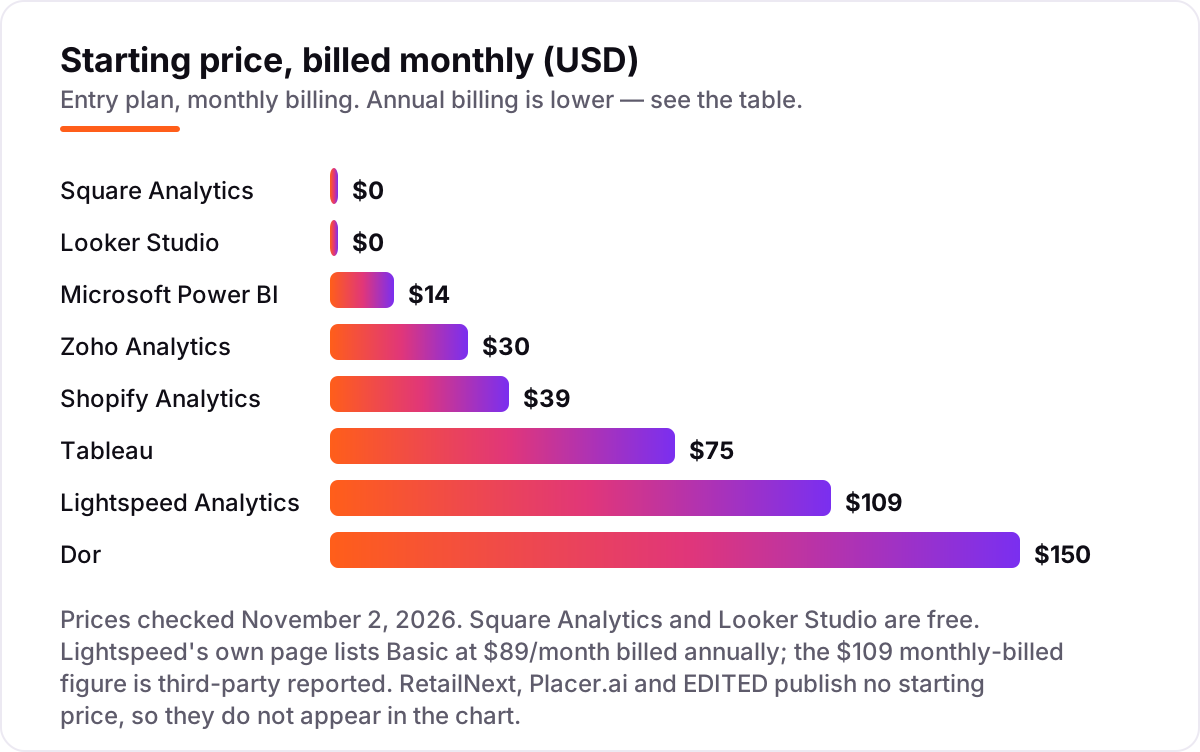
Shopify, Square and Lightspeed all bundle analytics into the POS subscription, and for most retailers that is the right first stop. The data is live because it is the store's own data, there is no connector to maintain, and the price is the plan already in the budget — free with Square, $39 a month billed monthly for Shopify Basic, $109 a month billed monthly for Lightspeed Basic.
The split between them is the business, not the charts. Square fits a single shop that wants free, real-time sales reports. Shopify fits an online or omnichannel store that needs 200-plus reports and a lower card rate as it grows. Lightspeed fits a multi-location shop where inventory — stock levels, purchase orders, supplier catalogs — is the hard problem. Move past this group only when the bundled reports stop answering the question.
Count the people in the store
Sales tell you what happened; traffic tells you what could have happened. Conversion rate — transactions divided by entries — is the single most useful number in physical retail, and it needs a door count. Dor is the affordable way in: a $300 thermal sensor and $150 a month, self-installed, with no cameras and no IT. RetailNext is the enterprise version: Aurora sensors, paths, dwell heatmaps and benchmarking, quoted per chain.
Placer.ai answers a different question: how busy is a place you do not own. Its visit data covers any US property, so it fits site selection and competitor checks rather than daily operations. Between the three, the choice is the question: Dor for conversion in your own stores, RetailNext for the shopper journey across a chain, Placer.ai for the market around the store.
Build your own dashboards
When the POS reports run out, a BI tool takes over. Power BI, Zoho Analytics, Looker Studio and Tableau all join sales data to inventory, advertising and finance data, and the choice is mostly about the stack and the budget. Power BI at $14 per user a month is the value pick for Microsoft shops. Zoho Analytics at $24 a month billed annually is the cheapest flat rate for a two-person team. Looker Studio is free and best on Google data. Tableau has the best visuals and the highest seat price.
The honest cost of a BI tool is rarely the licence. It is the person who builds and maintains the dashboards, the connectors for non-Google or non-Microsoft sources, and the refresh schedule. Before buying, name the three questions the dashboard must answer every week; if the POS already answers them, you do not need the tool yet.
Know what competitors charge
EDITED sits apart in this list because it watches the market, not your store. It tracks competitor pricing, discounts, assortment and trends in real time, and its AskEDITED assistant answers plain-language questions in seconds. That is buying-team software: the buyer who sets the price of a dress or a table needs to know what the shop across the street charged yesterday.
It is also the hardest tool here to justify for a small retailer: a custom annual quote, no self-serve plan, and data built for apparel, footwear and homeware. Treat it as a specialist purchase for the team whose margin depends on getting prices and ranges right, not as a general analytics tool.
Quick comparison: tool type by need
| Buyer | Best pick | Why |
|---|---|---|
| Single shop, free reports | Square Analytics | Free, real-time, no setup |
| Online or omnichannel store | Shopify Analytics | 200+ live reports in the plan |
| Multi-location, inventory-heavy | Lightspeed Analytics | Stock and sales in one place |
| Need conversion rate | Dor | $150/month per sensor, self-install |
| Dashboards across systems | Power BI or Zoho Analytics | $14/user or $24/month flat |
| Free Google dashboards | Looker Studio | Free, no user cap |
| Best visuals, bigger budget | Tableau | Dashboards people actually open |
| Chain-wide shopper journey | RetailNext | Paths, heatmaps, benchmarking |
| New site or competitor check | Placer.ai | Visit data for any US property |
| Competitor pricing and ranges | EDITED | Real-time pricing across 8 billion SKUs |
How to choose the best retail analytics software
- Start from the till. If you sell through Shopify, Square or Lightspeed, use the bundled analytics first — it is live, complete and already paid for.
- Add a door count before a dashboard. Conversion rate changes staffing and marketing decisions; a BI tool cannot calculate it without entries.
- Count the real users and stores. Per-user tools like Power BI and Tableau and per-sensor tools like Dor scale with the team and the door count, not the headline price.
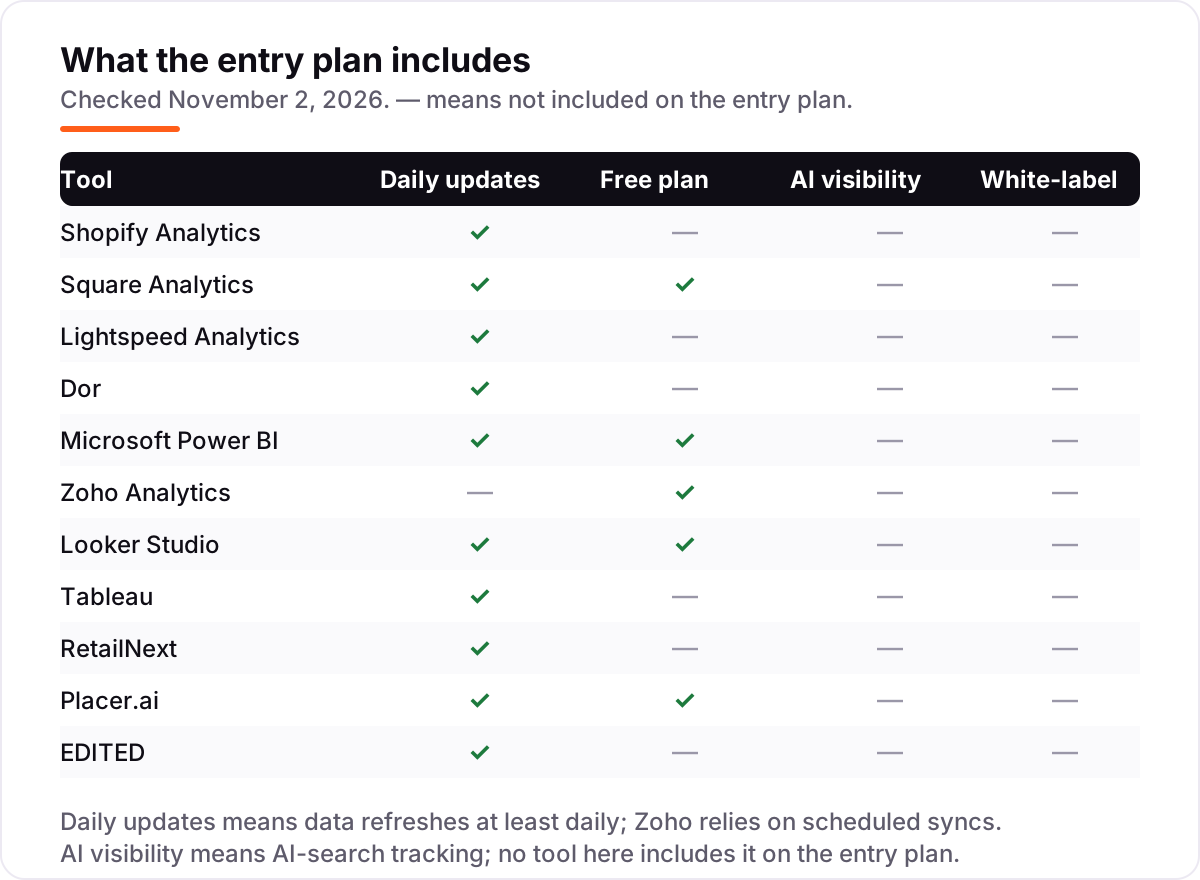
- Check the refresh. Daily or real-time data suits trading decisions; Zoho's scheduled syncs suit weekly reporting.
- Trial with your own data. Run the free plan or trial on real sales for two weeks and compare the totals with the till before paying.
Before you publish new pages for the products your analytics flag, run your titles through the free SERP snippet preview tool — it shows exactly how the title and description will look in Google.
Mistakes to avoid
- Paying for a BI tool when the POS already answers the question. If the three numbers you check weekly are sales, best sellers and stock, the bundled reports are enough.
- Comparing prices without the per-store or per-user maths. A $14 Power BI seat for ten people is $140 a month; a $150 Dor sensor in five doors is $750 a month plus hardware.
- Buying a door counter and never joining it to sales. Traffic alone is trivia; conversion rate — transactions divided by entries — is the decision.
- Trusting a directory price. Lightspeed's own page lists Basic at $89 a month billed annually; the $109 monthly figure is third-party reported. Always check the vendor's own page.
- Forgetting the refresh schedule. A dashboard that updates weekly cannot run a daily trading decision — check whether the plan refreshes daily before you buy.
If the numbers point to a visibility problem rather than a merchandising one, our SEO audit service shows where the site stands before you spend on more software.
How we chose
We checked each vendor's own pricing page on November 2, 2026 and recorded the starting price exactly as shown, including the annual-billing figure where the page lists one. Two exceptions: Lightspeed's own page lists Basic at $89 a month billed annually, so the $109 monthly-billed figure is third-party reported, and Dor's $150-a-month software price is stated on Dor's own site rather than a standalone pricing page. RetailNext, Placer.ai and EDITED publish no starting price, so we list them as custom quote. Ratings come from G2, checked November 2, 2026; Dor has no G2 page, so it shows no rating, and the RetailNext, Placer.ai and EDITED ratings rest on 3, 12 and 4 reviews. We ranked the tools by fit for the most common buyer — a small or mid-size retailer who needs sales, traffic and stock numbers first — not by brand size. No vendor paid for a place in this list, and none of the links here are affiliate links.
What to do next
Start with the decision path above: use the analytics your POS already includes, add a door count if conversion rate is the missing number, and trial one BI tool with your real sales data for two weeks. If the numbers match the till and the reports make sense to the team, you have your tool. If you'd rather have this set up and read for you, request a free SEO + AI visibility audit and get a ranked fix list in 2 business days.
Rather not run the tools yourself?
Tools show you the data. SerpAstra turns it into higher rankings, more map-pack calls and citations in AI answers.
Get a free SEO + AI visibility audit→Sources we checked (22)
- Shopify pricing — shopify.com/pricing (checked November 2, 2026)
- Shopify on G2 — 4.4/5, 5,129 reviews (checked November 2, 2026)
- Square Analytics pricing — squareup.com free POS software (checked November 2, 2026)
- Square Point of Sale on G2 — 4.6/5, 1,219 reviews (checked November 2, 2026)
- Lightspeed Retail pricing — product-info.lightspeedhq.com (checked November 2, 2026)
- Lightspeed Retail on G2 — 4.0/5, 295 reviews (checked November 2, 2026)
- Dor pricing — getdor.com foot traffic guide (checked November 2, 2026)
- Power BI pricing — microsoft.com (checked November 2, 2026)
- Microsoft Power BI on G2 — 4.5/5, 1,658 reviews (checked November 2, 2026)
- Zoho Analytics pricing — zoho.com (checked November 2, 2026)
- Zoho Analytics on G2 — 4.2/5, 290 reviews (checked November 2, 2026)
- Looker Studio pricing — lookerstudio.google.com (checked November 2, 2026)
- Looker Studio on G2 — 4.4/5, 445 reviews (checked November 2, 2026)
- Tableau pricing — tableau.com/pricing/server (checked November 2, 2026)
- Tableau on G2 — 4.4/5, 4,234 reviews (checked November 2, 2026)
- RetailNext — retailnext.net (checked November 2, 2026)
- RetailNext on G2 — 4.2/5, 3 reviews (checked November 2, 2026)
- Placer.ai pricing — placer.ai/pricing (checked November 2, 2026)
- Placer.ai on G2 — 4.3/5, 12 reviews (checked November 2, 2026)
- EDITED — edited.com (checked November 2, 2026)
- EDITED on G2 — 4.6/5, 4 reviews (checked November 2, 2026)
- EDITED homeware launch, 8 billion+ SKUs — BusinessWire, October 21, 2026
Shamim
Founder of SerpAstra
A full-stack SEO and digital marketer who spends most days on Local SEO for dental practices, AI search visibility and lead generation.
Frequently asked questions
What is the best retail analytics software in 2026?
Shopify Analytics is the best starting point for most retailers because it comes with the store: 200+ live reports from $39 a month billed monthly. Square Analytics is the best free option. Retailers who need dashboards across several systems should look at Power BI at $14 per user a month, and chains measuring the shopper journey should look at RetailNext.
How much does retail analytics software cost?
From $0 to a custom quote. Square Analytics and Looker Studio are free, Power BI Pro costs $14 per user a month, Zoho Analytics $24 a month billed annually, Shopify $29 a month billed annually, Tableau $75 per Creator a month, and Dor $150 a month per sensor plus $300 hardware. RetailNext, Placer.ai and EDITED publish no price and quote per contract.
Is there free retail analytics software?
Yes. Square Analytics is free with any Square account and covers real-time sales reports, best sellers and busy hours. Looker Studio is free for unlimited reports on Google data, and Placer.ai has a free edition for basic location exploration. Free tools cover sales reporting well; foot-traffic counting, benchmarking and competitor pricing all need a paid plan.
What is the difference between POS analytics and BI tools?
POS analytics read the sales data your till already collects: what sold, when, and to whom. BI tools like Power BI, Tableau and Zoho Analytics join that sales data with inventory, advertising, web and finance data so you can ask cross-system questions. Start with POS analytics; add a BI tool when one system can no longer answer the question.
How do retailers measure foot traffic and conversion?
With a people counter at the door. Dor's thermal sensor counts entries for $150 a month per sensor, and conversion is entries divided into transactions from the POS. RetailNext adds paths and dwell time for chains, and Placer.ai estimates visits to any US property from mobile location data. Pick the counter that matches the question and the store count.
Do I need an enterprise tool like RetailNext or Placer.ai?
Only if the question needs it. RetailNext fits chains that want path tracking, heatmaps and benchmarking across many stores. Placer.ai fits location decisions — new sites, closures, competitor moves. A single store or small chain gets the same headline numbers from Dor and its POS reports for far less money and no sales process.
What should I check before paying for retail analytics software?
Four things: whether the tool reads your POS data directly or needs a connector, whether the numbers refresh daily or on a schedule, what the per-store or per-user price becomes at your real size, and whether the price is monthly or annual billing. Run a trial with your own sales data first, and compare the output with your till totals.
Free SEO and AI visibility audit
Find out what is holding your rankings back
Send us your site. Within 2 business days you get a written audit, an AI visibility check and a short fix list ranked by impact. Free, with no contract attached.
Request my free audit→Related guides
 SEO & AI Search11 Best Rank Tracking Tools in 2026 (Free and Paid, Compared)11 best rank tracking tools compared on price, keyword limits, update speed and AI visibility. Prices checked on the vendor pricing page, October 31, 2026.Read guide →
 SEO & AI SearchBest SEO Audit Software for 2026: 10 Options Compared by Use Case10 best SEO audit software tools compared on price, crawl depth and AI visibility. Prices checked on vendor pricing pages, November 1, 2026.Read guide →
 SEO & AI SearchBest Local SEO Tools for 2026: 11 Picks Ranked by What You Need11 best local SEO tools with real prices checked November 1, 2026 — from $14/month trackers to quote-only enterprise platforms, sorted by what you need.Read guide →