
10 Best SEO Chrome Extensions in 2026 (Free and Paid, Compared)
10 best SEO Chrome extensions compared on price, free plans and what each one checks. Seven are free; paid data starts at $84 a year, checked November 1, 2026.
 Shamim Mia, Founder, SerpAstraLast verified November 1, 202614 min read
We compare pricing pages, documentation and public reviews. We never accept payment for rankings.

Key takeaways
- The free short-list is Detailed SEO Extension, Ahrefs SEO Toolbar and SEOquake: all three cost $0 and cover on-page checks, redirects and SERP metrics.
- The single most important buying factor is what the extension checks: on-page tags, SERP metrics or keyword data. No single extension covers all three well.
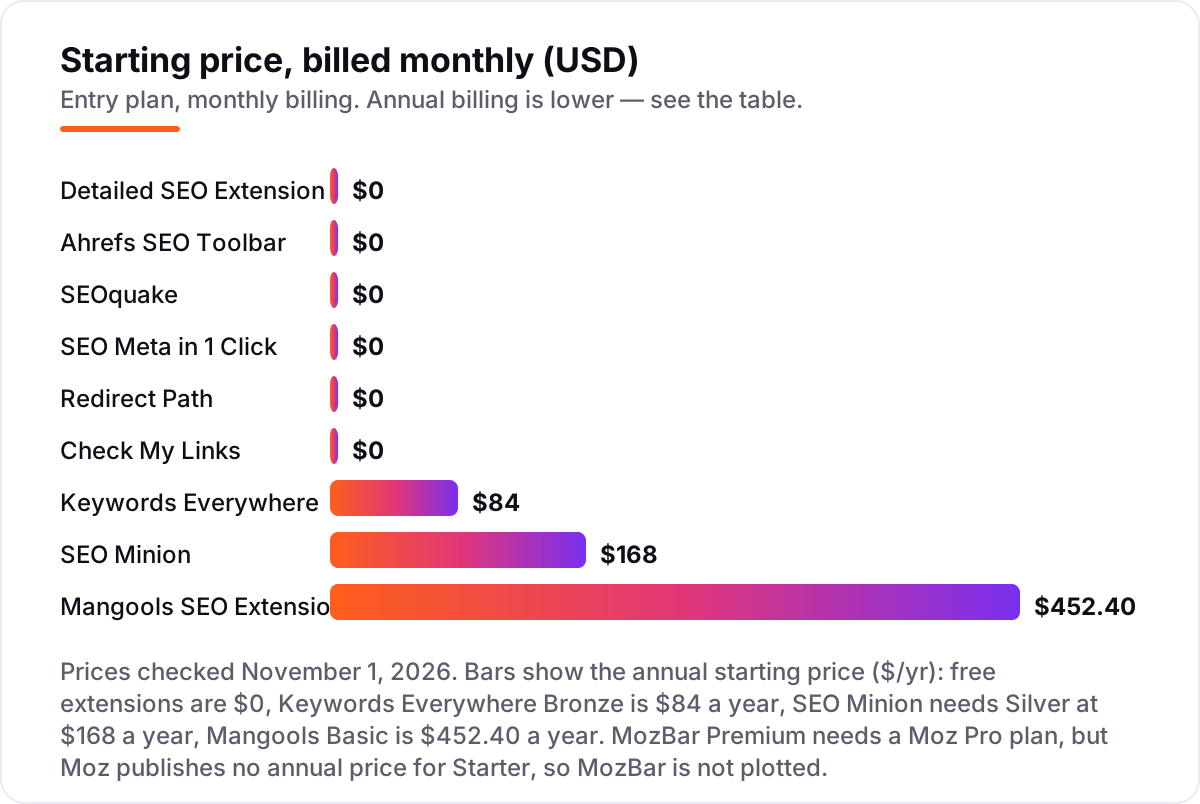
- Only two extensions here cost anything on their own: Keywords Everywhere from $84 a year and SEO Minion from $168 a year. MozBar Premium needs a Moz Pro plan, from $49 a month.
- Every price below was checked on the vendor's own pricing page on November 1, 2026. Ratings are G2, where a G2 page exists; five extensions have no G2 page, so they show no rating.
On this page
Quick comparison
| Tool | Best for | Starting price | Free plan |
|---|---|---|---|
| Detailed SEO Extension | SEOs and content editors who want the cleanest one-panel on-page check of any page they open | $0 | Yes |
| Ahrefs SEO Toolbar | SEOs who already use Ahrefs and want its on-page report, redirect tracer and broken-link checker in the browser | $0 | Yes |
| SEOquake | SEOs who want a free SERP overlay, a 28-check page audit and Semrush metrics without leaving the tab | $0 | Yes |
| Keywords Everywhere | Keyword researchers who want search volume, CPC and competition inside Google, YouTube and Amazon results | $84/yr | Yes (limited) |
| MozBar | SEOs who judge sites by Domain Authority and Page Authority and want those scores on every search result | Free (Premium via Moz Pro) | Yes (limited) |
| SEO Minion | Technical SEOs who want twelve on-page tools in one sidebar, including hreflang checks and People Also Ask scraping | $168/yr | No |
| Mangools SEO Extension | Bloggers and small teams already paying for Mangools who want KWFinder, SERPChecker and rank data in the browser | $452.40/yr | Yes (low limits) |
| SEO Meta in 1 Click | Content writers and editors who need a fast self-check of title, description, headings and social tags before publishing | $0 | Yes |
| Redirect Path | SEOs checking redirects after a migration, URL change or site move, one page at a time | $0 | Yes |
| Check My Links | Content editors cleaning up broken links on blog posts and service pages before publishing | $0 | Yes |
Make one of these tools?
We re-check this list every quarter. Send a correction, request a review, or ask about a clearly labeled sponsored spot.
Request a listingThe best SEO Chrome extensions

Detailed SEO Extension
Best for: SEOs and content editors who want the cleanest one-panel on-page check of any page they open
Detailed SEO Extension is the first extension to install because it answers the most common question — what is wrong with this page — in one click. The panel shows the title, meta description, canonical, robots tags, heading outline, schema, links and images, with no account and no upsell. It is built by Glen Allsopp's Detailed, and it stays out of the way until you need it.
The weakness is scope. Detailed only covers the page you are on, so there is no keyword data, no SERP overlay and no rank tracking. Pair it with SEOquake or the Ahrefs toolbar when you need metrics on search results as well as the page itself. For a clean, fast on-page check with nothing to pay and nothing to configure, nothing in this list beats it.
What we like
- One panel shows title, meta description, canonical, robots tags, heading outline, schema, links and images
- Right-click menu opens the page or domain in Ahrefs, Moz, Majestic, Similarweb, Semrush or the Wayback Machine
- Free with no upsells and no account, on Chrome and Firefox
Watch out for
- Covers only the page you are on, with no keyword data and no SERP overlay
- No rank tracking, site crawl or reporting — it is a page inspector, not a suite

Ahrefs SEO Toolbar
Best for: SEOs who already use Ahrefs and want its on-page report, redirect tracer and broken-link checker in the browser
Ahrefs SEO Toolbar is the best free all-rounder in this list. The on-page report covers titles, descriptions, headings, redirects, canonicals and outgoing links, and the redirect tracer and broken-link checker handle the two checks that catch most publishing mistakes. Sign in with a free Ahrefs account and Domain Rating and URL Rating appear for any site you visit.
The paid catch is the SERP data. Traffic, keyword and backlink numbers inside Google results need a paid Ahrefs plan, starting at $29 a month for Starter. If you already pay for Ahrefs, the toolbar is an easy yes. If you do not, the free report alone still beats most paid extensions for day-to-day page checks.
What we like
- Free on-page report, redirect tracer, broken-link checker and link highlighter on any page
- Sign in free and DR and UR appear for any site; paid accounts add traffic, keyword and backlink data in the SERP
- SERP tools switch country and language so you can check results as they appear elsewhere
Watch out for
- Full SERP metrics (traffic, keywords, backlinks) need a paid Ahrefs plan from $29/month
- The range of reports can feel like a lot for a beginner who only wants a quick meta check

SEOquake
Best for: SEOs who want a free SERP overlay, a 28-check page audit and Semrush metrics without leaving the tab
SEOquake is the deepest free extension in this list. Semrush rebuilt it in September 2026, and the new version keeps the idea that made it popular: one click shows what is on the page and how it performs. Quick View gives a compact snapshot, and the Full Report opens six panels with a 28-check audit, keyword density, links, schema and Semrush metrics.
The SERP Overlay is the reason to install it. Position numbers and Semrush metrics sit under each Google result, and the rebuilt version covers AI Overview sources too, so you can see which pages the AI answers cite. G2 reviewers praise the instant analysis and the Semrush integration, and note the interface can feel dated next to newer tools.
What we like
- Free SERP Overlay with position numbers and Semrush metrics under each Google result, including AI Overview sources
- Quick View snapshot plus a Full Report with a 28-check page audit, keyword density, links and schema
- Core reports and built-in Semrush metrics work with no account; a free Semrush account adds Authority Score and visits
Watch out for
- The rebuilt version is Chrome-first; the Firefox listing was last updated in January 2023
- Deeper backlink reporting and Traffic Analytics need a connected Semrush account
Keywords Everywhere
Best for: Keyword researchers who want search volume, CPC and competition inside Google, YouTube and Amazon results
Keywords Everywhere is the cheapest paid step in this list, and the only extension here that puts keyword data inside the search results. One credit buys volume, CPC, competition and a 12-month trend for one keyword, and Bronze costs $84 a year for 100,000 credits. The extension also shows related keywords, People Also Search For and long-tail suggestions on the results page.
The meter is the thing to manage. Widgets burn credits on every search, and one Google search with all widgets on can use 54 credits, so turn off the panels you do not use. Credits expire after a year, so buy the tier that matches a year of real searches, not the biggest one. For volume data while you browse, nothing else comes close on price.
What we like
- Volume, CPC, competition and a 12-month trend for one keyword cost one credit, on Google, YouTube, Amazon, Etsy and Bing
- Bronze is $84 a year for 100,000 credits — about $0.84 per 1,000 keyword lookups
- Every plan includes the extension, the API and an MCP server, so the same credits work in AI tools
Watch out for
- Credits drain fast when every widget is on — one Google search can use 54 credits
- Credits expire 12 months after purchase, so unused credits do not roll over

MozBar
Best for: SEOs who judge sites by Domain Authority and Page Authority and want those scores on every search result
MozBar is the DA and PA pick. The extension overlays Domain Authority and Page Authority on every Google result and on any page you visit, which makes it the fastest way to judge a competitor's strength while you browse. The SERP overlay and on-page analysis cover the basics, and MozBar Premium unlocks the full link data for Moz Pro subscribers.
The free tier is thinner than it used to be. It now needs a Moz login, has usage limits, and hides linking root domains and link counts, which is why its Chrome Web Store rating has fallen. The rating shown here is for Moz Pro on G2, since MozBar has no separate G2 page. Install it free for the scores; pay only if you need the full link data.
What we like
- Domain Authority and Page Authority overlaid on every Google result and page you visit
- SERP overlay, on-page analysis and link metrics in one toolbar, with MozBar Premium on Moz Pro plans
- DA and PA are the metrics clients already recognize, so the scores drop straight into reports
Watch out for
- The free version now needs a Moz login and has usage limits, and full link data needs Moz Pro
- Reviewers report the free tier hides linking root domains and link counts
SEO Minion
Best for: Technical SEOs who want twelve on-page tools in one sidebar, including hreflang checks and People Also Ask scraping
SEO Minion is the multi-tool pick in this list: twelve checks in one sidebar on any page you open. It analyses on-page SEO, checks broken links and redirects, validates hreflang tags, compares source HTML with the rendered DOM, and previews your snippet against Google's pixel limits. The standout is the People Also Ask scraper, which pulls thousands of questions from a results page as a list or a tree.
The price changed. SEO Minion used to be free, but the vendor now bundles it with Keywords Everywhere Silver and above, so the entry cost is $168 a year. That is fair if you already buy Keywords Everywhere credits, and poor value if you only want the on-page checks. Buy it for the PAA scraper and the location comparison, not for the basics.
What we like
- Twelve tools in one sidebar: on-page analysis, broken links, redirects, hreflang, schema and SERP preview
- Scrapes thousands of People Also Ask questions from Google as a list or a tree
- Compares Google results across two locations side by side, without personalisation
Watch out for
- No longer free in practice: the vendor bundles it with Keywords Everywhere Silver and above
- Paying $168 a year just for SEO Minion is hard to justify when Detailed and Ahrefs cover on-page checks free

Mangools SEO Extension
Best for: Bloggers and small teams already paying for Mangools who want KWFinder, SERPChecker and rank data in the browser
Mangools SEO Extension is the suite-in-a-tab pick. The free extension shows on-page data such as heading structure and loading metrics from Chrome users while you browse, and one click reaches the full Mangools suite: KWFinder for keywords, SERPChecker for results, SERPWatcher for ranks, LinkMiner for backlinks and SiteProfiler for competitors. Every paid plan includes the same five tools plus AI Search Watcher PRO.
The honest limit is that the extension is only as good as the plan behind it. The free plan has low limits and a 10-day Free+ trial, and real research needs Basic at $37.70 a month billed annually, or $452.40 a year. The rating shown is for Mangools on G2. Buy it if you already use Mangools; do not buy the suite just for the extension.
What we like
- Shows on-page data, heading structure and loading metrics from Chrome users while you browse
- One click reaches the full Mangools suite: KWFinder, SERPChecker, SERPWatcher, LinkMiner and SiteProfiler
- Every paid plan has the same five tools plus AI Search Watcher PRO — only the limits change
Watch out for
- The extension is a window into the suite, not a standalone tool — the useful data needs a paid Mangools plan
- Mangools' own pricing page did not render its price table in our check, and G2 lists a lower $29.90 starting figure, so confirm at checkout

SEO Meta in 1 Click
Best for: Content writers and editors who need a fast self-check of title, description, headings and social tags before publishing
SEO Meta in 1 Click does exactly what its name says, and that is why it belongs in this list. One click reveals the title and description with length counters, the headings in order, the canonical, robots directives and Open Graph data, plus the images missing alt text. It is the extension to hand to a content writer who needs to self-check a page before publishing.
It is a single-purpose tool, so do not expect more from it. There is no keyword volume, no backlink data and no rank tracking, and the social preview is a readout rather than an editor. Pair it with Detailed for the full on-page picture or with Check My Links for the link check. For a fast meta check with no account and no cost, it is the quickest option here.
What we like
- One click shows title and description with length counters, headings in order, canonical, robots and Open Graph data
- Lists images missing alt text and internal and external link counts on the page
- Free on the Chrome Web Store with no login and no subscription
Watch out for
- Shows meta data only — no keyword volume, backlink data or rank tracking
- One job done well, but you still need another extension for links, redirects or SERP metrics

Redirect Path
Best for: SEOs checking redirects after a migration, URL change or site move, one page at a time
Redirect Path is Ayima's free redirect checker, and it has been a staple of technical SEO work for years. The toolbar icon changes the moment a page redirects, and one click shows every hop in the chain with its status code: 301, 302, 404 and 500, plus JavaScript and meta redirects. Full HTTP headers, server type, caching headers and the server IP address are all one click away.
It is a one-page tool, not a crawler. It reports only what happened on the page you loaded, so a site-wide migration check still needs a crawl from a tool like Screaming Frog. But for the check that matters most — did this old URL land where it should — nothing is faster. Keep it pinned during any migration or URL change.
What we like
- Toolbar icon changes when a page redirects, and one click shows every hop with its status code
- Flags 301, 302, 404 and 500 responses plus JavaScript and meta redirects
- Shows full HTTP headers, server type, caching headers and server IP address
Watch out for
- Chrome only, and it reports only what happened on the page you loaded
- One page at a time — it cannot crawl a whole site for redirect chains

Check My Links
Best for: Content editors cleaning up broken links on blog posts and service pages before publishing
Check My Links is the simplest tool in this list, and it solves a real problem: broken links on pages you have already published. Click the icon and it scans every link on the page, highlighting working links green and broken links red, with the status code shown for each failure. One click copies all the broken links to the clipboard, so the fix list is ready for a spreadsheet.
The limit is the same as every extension here: one page at a time. A site with hundreds of posts still needs a crawler for a full audit, and this tool will not schedule scans or report on its own. Use it as the last check before a page goes live, and after any content migration, when a quick scan catches the links a crawl has not run yet.
What we like
- Scans every link on a page and highlights working links green and broken links red, with the status code
- One click copies all broken links to the clipboard for a fix list
- Exclude domains from checks, so internal links can be skipped when you only want external ones
Watch out for
- Checks one page at a time, so it is not a site-wide broken-link audit
- Manual by design — you have to open each page and run the scan yourself
What the best SEO Chrome extensions actually do
The best SEO Chrome extensions put the check inside the browser, on the page you are already looking at. Instead of opening a dashboard, pasting a URL and waiting for a report, you click the toolbar icon and the answer appears: the title and description, the headings, the canonical, the links, the keyword volume or the authority score. This guide is organised by what you actually need — a clean on-page check, metrics on the search results, keyword data while you search, or a technical check for redirects and broken links — so you can install the two or three that cover your work and skip the rest.
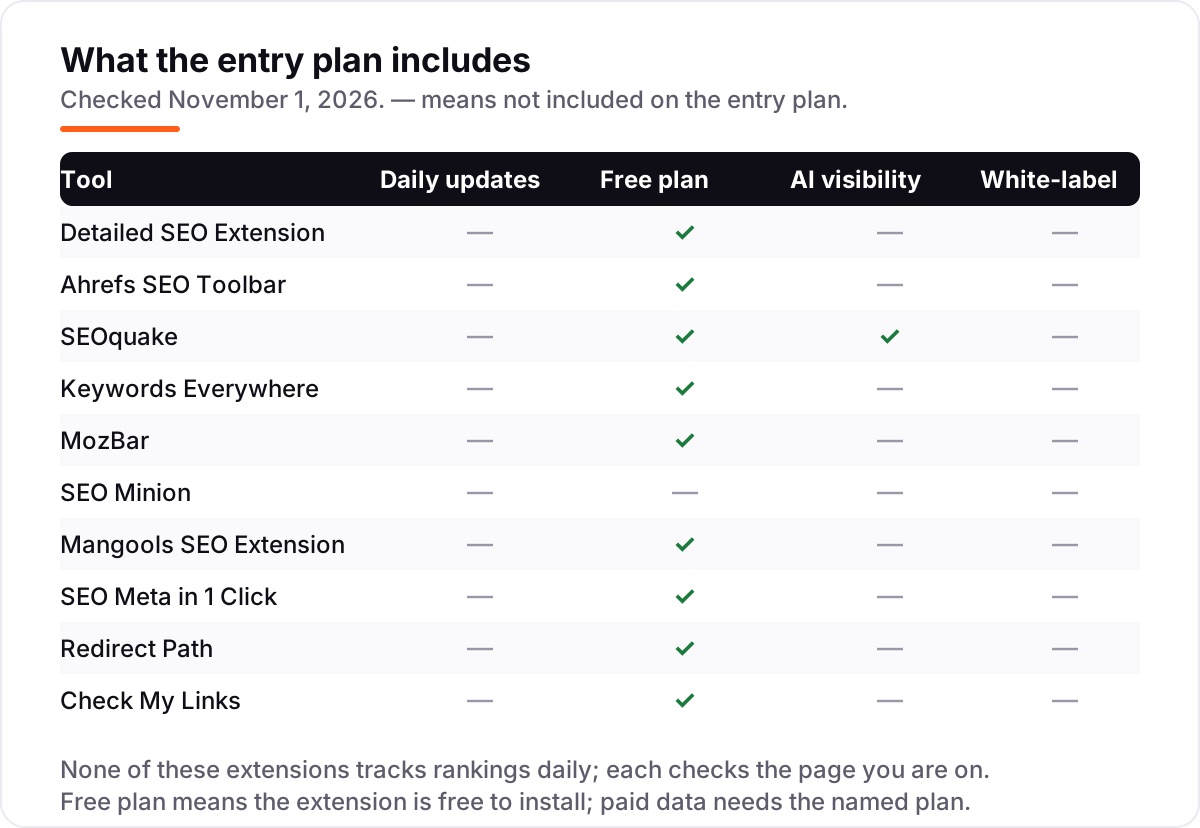
An extension is a spot check, not a monitoring tool. None of the ten here tracks rankings on a schedule or crawls a whole site; each one inspects the page in front of you, on demand. That limit is also the appeal: the check takes seconds, costs nothing in seven cases, and happens in the middle of real work rather than in a separate reporting session. Keywords Everywhere says more than 1.5 million marketers use its extension, which shows how routine this kind of in-browser checking has become.
Free on-page checkers first
If you install only one extension, make it an on-page checker. Detailed SEO Extension is the cleanest of the group: one panel, no account, no upsell. SEO Meta in 1 Click is the fastest for a pure meta check, and the Ahrefs SEO Toolbar adds a redirect tracer and a broken-link checker to the same job. All three are free, and together they cover the checks that catch most publishing mistakes — a missing title, a wrong canonical, a page blocked by robots, images without alt text.
Start with Detailed for the full picture, then add SEO Meta in 1 Click for the writers on your team. Writers self-check a page in one click before it goes live, and you keep the deeper panel for your own audits. Neither extension phones home with your browsing in a way that matters for this job, but check the permissions of any extension before installing it, and keep the toolbar lean: every extension you add slows the browser a little.
SERP metrics without opening a dashboard
The second group answers a different question: how strong is this result, and what is behind it? SEOquake puts Semrush metrics under each Google result, with position numbers and, since the September 2026 rebuild, AI Overview sources. MozBar does the same job with Moz's Domain Authority and Page Authority, the two scores clients ask for by name. Both are free to install, and both turn a results page into a competitor briefing.
MozBar's free tier is thinner than it used to be: it needs a Moz login, has usage limits, and hides linking root domains and link counts. SEOquake's core reports need no account at all, which makes it the better first install for SERP metrics. If you already pay for Moz Pro or Semrush, use the toolbar that matches your subscription — the data behind it is the data you already trust.
Keyword data inside the search results
Keywords Everywhere is the only extension here that answers the keyword question where you ask it: inside the search results. Volume, CPC, competition and a 12-month trend appear next to each keyword on Google, YouTube, Amazon, Etsy and Bing, and one credit buys the data for one keyword. Bronze costs $84 a year for 100,000 credits, which makes it the cheapest paid step in this list by a wide margin.
The catch is the meter. Widgets burn credits on every search, and a single Google search with all widgets on can use 54 credits, so turn off the panels you do not use and watch the balance for the first week. Credits expire after twelve months, so buy the tier that matches a year of real searches. If you already pay for Ahrefs or Semrush, you do not need Keywords Everywhere for research — but at $84 a year, many SEOs keep it anyway for the quick volume check that a dashboard cannot match for speed.
Technical checks: redirects and broken links
The last group is the least glamorous and the most useful during a migration. Redirect Path flags every redirect hop and HTTP status code as you browse, including JavaScript and meta redirects, and shows the full HTTP headers. Check My Links scans every link on a page and highlights broken ones in red, with one click to copy the whole fix list. Both are free, and both belong on every technical SEO's toolbar.
SEO Minion sits between the groups: twelve tools in one sidebar, including a broken-link checker, a redirect chain view, hreflang validation and a People Also Ask scraper. It used to be free, but the vendor now bundles it with Keywords Everywhere Silver at $168 a year, so it only makes sense if you already buy those credits. For a one-page redirect or link check, the two free single-purpose extensions are faster.
Quick comparison: tool type by need
| Buyer | Best pick | Why |
|---|---|---|
| Solo site owner, first extension | Detailed SEO Extension | Free, one panel, no account |
| Checking competitors in Google | SEOquake | Free SERP overlay plus a 28-check audit |
| Keyword research while searching | Keywords Everywhere | $84 a year, volume and CPC in the results |
| Judging sites by authority | MozBar | Free install; DA and PA on every result |
| Technical audits and migrations | Redirect Path and Check My Links | Both free; status codes and broken links |
| One extension for a paid suite | Mangools SEO Extension | $452.40 a year, five tools in the browser |
How to choose: a short decision path
- Start free. Install Detailed SEO Extension and SEOquake first. Between them you get the on-page panel, the SERP overlay and a 28-check audit for $0, and you will learn what you actually miss before spending anything.
- Match the check to the job. On-page tags need Detailed or SEO Meta in 1 Click; SERP strength needs SEOquake or MozBar; keyword volume needs Keywords Everywhere; redirects and broken links need Redirect Path and Check My Links.
- Add keyword data only if you search a lot. Keywords Everywhere earns its $84 a year when you check volume several times a day. If you open a keyword tool once a week, the free plans of the big suites cover you.
- Check the paid catch before you pay. SEO Minion needs Silver at $168 a year, MozBar Premium needs Moz Pro from $49 a month, and the Mangools extension needs a Mangools plan from $37.70 a month billed annually. In each case you are buying the plan, not the extension.
- Keep the toolbar lean. Install the two or three extensions that cover your daily checks and remove the rest. Every extension adds weight to the browser, and a toolbar full of overlapping checkers slows down the work it is meant to speed up.
Before you publish the pages you have just checked, run your titles through the free SERP snippet preview tool — it shows exactly how the title and description will look in Google.
Mistakes to avoid
- Installing every extension on every list. Ten overlapping checkers slow the browser and show the same numbers three times. Pick two or three that cover different jobs and remove the rest.
- Comparing annual prices as if they were monthly. Keywords Everywhere prints Bronze as $7 a month, but there is no monthly checkout — the bill is $84 a year. SEO Minion's $168 is an annual total too. MozBar Premium needs Moz Pro Starter at $49 a month, and Moz publishes no annual price for it.
- Trusting a directory price. G2 lists Mangools Basic from $29.90, but the vendor page verified on October 31, 2026 lists $37.70 a month billed annually. Always check the vendor's own page.
- Paying for SEO Minion on its own. It now comes only with Keywords Everywhere Silver and above, so $168 a year buys the credits too. If you only want on-page checks, Detailed and the Ahrefs toolbar are free.
- Expecting extensions to track rankings. No extension here checks positions on a schedule or crawls a site. For daily tracking, see how to track your Google ranking and use a real rank tracker.
How we chose
We checked each vendor's own pricing page on November 1, 2026 and recorded the starting price exactly as shown, including the annual-billing figure where the page lists one. Two checks had limits worth stating plainly. Moz's own pricing page lists Starter at $49 a month and publishes no annual price for Starter, so MozBar Premium has no annual total to plot and is left out of the price chart. The $49 figure is the one verified on the vendor page on October 31, 2026, because moz.com itself could not be opened directly in this check — the fetch was blocked on policy grounds. Mangools' pricing page loaded only its FAQ text in our check, so its $37.70 a month billed annually figure is the one verified on the vendor page on October 31, 2026, and G2's lower $29.90 figure is noted in the card. Ratings come from G2, opened on November 1, 2026, and only where a G2 page exists for the product: Ahrefs, SEOquake, Keywords Everywhere, Moz Pro (shown for MozBar, which has no separate G2 page) and Mangools. Detailed SEO Extension, SEO Minion, SEO Meta in 1 Click, Redirect Path and Check My Links have no G2 page, so they show no rating rather than an estimated one. Prices in the chart are annual totals, not monthly equivalents, because most of these extensions are free and the paid ones bill annually. No vendor paid for a place in this list, and none of the links here are affiliate links. If your rankings need a deeper look than a browser check can give, our SEO audit service covers the full site.
What to do next
Install Detailed SEO Extension and SEOquake now — both are free and take two minutes — then run them on your homepage and your top three posts. Fix the missing titles, wrong canonicals and broken links they surface, then decide whether keyword data is worth $84 a year to you. If you'd rather have this set up and read for you, request a free SEO + AI visibility audit and get a ranked fix list in 2 business days.
Rather not run the tools yourself?
Tools show you the data. SerpAstra turns it into higher rankings, more map-pack calls and citations in AI answers.
Get a free SEO + AI visibility audit→Sources we checked (16)
- Detailed SEO Extension — detailed.com (checked November 1, 2026)
- Ahrefs pricing — ahrefs.com/pricing (checked November 1, 2026)
- Ahrefs on G2 — 4.5/5, 723 reviews (checked November 1, 2026)
- SEOquake relaunch — semrush.com/blog/seoquake-relaunch (checked November 1, 2026)
- SEOquake on G2 — 4.4/5, 43 reviews (checked November 1, 2026)
- Keywords Everywhere pricing — keywordseverywhere.com/compare-plans.html (checked November 1, 2026)
- Keywords Everywhere on G2 — 5.0/5, 8 reviews (checked November 1, 2026)
- Moz Pro pricing — moz.com/products/pro/pricing (checked November 1, 2026)
- Moz Pro on G2 — 4.3/5, 608 reviews (checked November 1, 2026)
- SEO Minion — keywordseverywhere.com/seominion (checked November 1, 2026)
- Mangools pricing — mangools.com/plans-and-pricing (checked November 1, 2026)
- Mangools on G2 — 4.7/5, 97 reviews (checked November 1, 2026)
- SEO Meta in 1 Click — Chrome Web Store (checked November 1, 2026)
- Ayima Chrome extensions — ayima.com/chrome (checked November 1, 2026)
- Check My Links — selectorshub.com/checkmylinks (checked November 1, 2026)
- Keywords Everywhere reviews — 1.5 million marketers (checked November 1, 2026)
Shamim
Founder of SerpAstra
A full-stack SEO and digital marketer who spends most days on Local SEO for dental practices, AI search visibility and lead generation.
Frequently asked questions
What is the best SEO Chrome extension in 2026?
Detailed SEO Extension is the best free starting point: one click shows the title, description, canonical, robots tags, headings, schema, links and images. Add SEOquake for SERP metrics and Keywords Everywhere for keyword volume. Most SEOs end up with two or three of these installed, not one.
Are SEO Chrome extensions free?
Seven of the ten extensions in this list are free to install and use. The paid ones are Keywords Everywhere from $84 a year, SEO Minion from $168 a year, and MozBar Premium and the Mangools extension, which need Moz Pro and Mangools plans. Free extensions still cover on-page checks, redirects and broken links well.
What is the difference between MozBar and SEOquake?
MozBar overlays Moz's Domain Authority and Page Authority on every result, so it judges a site's strength at a glance. SEOquake shows Semrush metrics, a 28-check page audit and keyword density, and its SERP Overlay covers AI Overview sources. Use MozBar for authority scores and SEOquake for the deeper page audit.
Do I need Keywords Everywhere if I already have Ahrefs?
Probably not for research, since Ahrefs covers volume and difficulty in far more depth. Keywords Everywhere earns its place when you want volume, CPC and competition inside the search results themselves, without opening a dashboard. At $84 a year it is cheap enough to keep alongside Ahrefs for quick checks.
Can a Chrome extension replace an SEO suite?
No. Extensions check one page at a time and cannot crawl a site, track rankings daily or audit thousands of URLs. They are a fast first look that tells you where to dig deeper. Use them for spot checks and competitor glances, and keep a suite or a crawler for site-wide work and reporting.
Which extension checks redirects and broken links?
Redirect Path flags every redirect hop and HTTP status code as you browse, including 301, 302, 404 and 500 responses. Check My Links scans every link on a page and highlights broken ones in red. Both are free. Install both before a migration: one watches the redirects, the other catches the dead links.
Free SEO and AI visibility audit
Find out what is holding your rankings back
Send us your site. Within 2 business days you get a written audit, an AI visibility check and a short fix list ranked by impact. Free, with no contract attached.
Request my free audit→Related guides
 StrategyHow to track your Google ranking (and what the numbers actually mean)Track your Google ranking the right way: Search Console, free checkers and rank trackers explained, and what average position and CTR really mean today.Read guide →
 AI SearchBest AI SEO tools in 2026: honest picks by jobBest AI SEO tools in 2026, picked by job: Semrush and Ahrefs for research, Surfer and Clearscope for content, Otterly for AI tracking, with 2026 prices.Read guide →
 SEO & AI Search10 Best On-Page SEO Analysis Tools in 2026 (Free and Paid, Compared)10 best on-page seo analysis tools compared on price, content scoring and technical audits, with every price checked on the vendor's own pricing page.Read guide →