
Best SEO Reporting Software for 2026: 11 Options Compared by Use Case
11 best seo reporting software options compared on price, white-label reports and AI visibility, with real prices checked on vendor pages on November 2, 2026.
 Shamim Mia, Founder, SerpAstraLast verified November 2, 202613 min read
We compare pricing pages, documentation and public reviews. We never accept payment for rankings.

Key takeaways
- AgencyAnalytics is the short-list pick for most agencies: white-label reports and 90+ integrations from $25 per client a month billed monthly ($20 billed annually).
- SE Ranking is the best value suite at $103.20/month billed annually; Semrush is the deepest at $117.33/month billed annually.
- Free reporting exists — Looker Studio costs $0 — but you build every dashboard yourself and buy any SEO connectors separately.
- The single most important buying factor is what the price meters: per client, per dashboard, per data source or per keyword — the same agency pays very different bills on each model.
- Prices below were checked against vendor pages on November 2, 2026; where a vendor page would not load, we say so in How we chose.
On this page
Quick comparison
| Tool | Best for | Starting price | Free plan |
|---|---|---|---|
| AgencyAnalytics | Marketing agencies with 5–25 clients that need white-label dashboards and scheduled client reports | $25/mo per client | No (14-day trial) |
| SE Ranking | Small agencies and in-house teams that want suite data plus white-label client reports for about $103/month | $103.20/mo (annual) | No (14-day trial) |
| Semrush | Small teams and agencies that want the deepest research data behind their client reports | $117.33/mo (annual) | Yes (10 keywords) |
| DashThis | Small agencies and freelancers that want simple, good-looking client dashboards without a learning curve | $44/mo (annual) | No (14-day trial) |
| Swydo | Agencies that want flat, predictable reporting with white-label included and no per-seat fees | $62/mo (annual) | No (14-day trial) |
| Databox | In-house teams that want KPI dashboards and goals across 130+ integrations without per-seat pricing | $64/mo (annual) | Yes (3 sources) |
| Ahrefs | In-house SEOs already paying for Ahrefs who want scheduled reports on top of backlink data | $29/mo | Yes (verified sites) |
| Looker Studio | Solo SEOs and small teams with time to build, who want free, fully custom client dashboards | Free | Yes (free) |
| Nightwatch | Small agencies and SEO teams that want rank and AI-citation data in one client report | €79/mo (annual) | No (14-day trial) |
| Moz Pro | Small in-house teams that want Domain Authority metrics in plain, client-friendly reports | $49/mo | No (7-day trial) |
| Whatagraph | Larger agencies that want polished, white-label client reports and can pay a premium for them | €699/mo (annual) | No (14-day trial) |
Make one of these tools?
We re-check this list every quarter. Send a correction, request a review, or ask about a clearly labeled sponsored spot.
Request a listingThe best seo reporting software
AgencyAnalytics
Best for: Marketing agencies with 5–25 clients that need white-label dashboards and scheduled client reports
AgencyAnalytics is built for one job: turning client data into reports an agency can send without touching a spreadsheet. The Core plan covers every feature for each client you add, pulling from more than 90 integrations — Search Console, GA4, ads, social and local — into dashboards you can brand with your logo, colors and domain. Reports go out on a schedule as PDFs or live links, and clients get their own portal login.
The per-client model is the thing to price carefully. Five clients cost $100 a month billed annually, which beats most flat plans, but 25 clients cost $500, and rank tracking and AI visibility are paid add-ons on top. If your roster is small and your reports need to look like yours, start here; if you track thousands of keywords, budget for the Rank Tracker add-on.
What we like
- One plan with every feature included: 90+ integrations, unlimited staff and client users, white-label branding and a custom domain
- Per-client pricing scales with the roster — a 5-client agency pays $100/month billed annually, with no seat fees
- Scheduled PDF and live-link reports plus an MCP connector that lets Claude and ChatGPT query live client data
Watch out for
- Rank tracking and AI visibility are paid add-ons ($41.67/month per 500 keywords and $20.83/month per 250 credits, billed annually)
- The bill grows with every client, so a 25-client agency pays $500/month before add-ons

SE Ranking
Best for: Small agencies and in-house teams that want suite data plus white-label client reports for about $103/month
SE Ranking earns its place because the reports sit on real suite data, not just connectors. Core tracks 2,000 keywords daily, runs a 250,000-page site audit and adds AI visibility across five engines, so a monthly client report can show rankings, fixes and AI mentions in one document. Scheduled reports and guest links come standard, and the white-label Agency Pack costs from $69 a month.
The catch is that white-label branding is not in Core — the report your client sees carries SE Ranking's name unless you buy the pack. Some reviewers also note small accuracy differences against the bigger suites. For a small agency that wants suite depth and client-ready reporting near $100 a month, it is the best value in this list.
What we like
- Core tracks 2,000 keywords daily across 10 projects and includes AI visibility across five engines
- Scheduled white-label reports and guest links for client work, with an Agency Pack add-on from $69/month
- Full suite behind the reports: site audit, keyword and backlink research, content and local tools
Watch out for
- White-label reports need the Agency Pack add-on; Core alone does not brand reports
- Some G2 reviewers report small accuracy differences in rank tracking versus larger competitors

Semrush
Best for: Small teams and agencies that want the deepest research data behind their client reports
Semrush is the deepest data source in this list, and its My Reports builder is where that depth becomes a client deliverable. Position Tracking, Site Audit, backlinks and PPC feed into custom PDFs you can schedule weekly or monthly, and the SEO plan tracks 500 keywords a day with ZIP-code-level targeting. The free account is a real way to test the reporting before paying.
The extras are the honest cost. White-label reports are paid add-ons, extra users start at $45 a month, and the SEO plan covers AI Overviews citations only — prompt tracking needs the AI toolkit from the $199 Starter plan. Buy Semrush when the client report needs research depth behind it, not just clean charts.
What we like
- My Reports builds custom white-label PDFs from Position Tracking, audit, backlink and PPC data in one place
- 500 keywords tracked daily with ZIP-code-level targeting and up to 20 competing domains per campaign
- 27-billion-plus keyword database and site audits behind every report
Watch out for
- White-label reports are paid add-ons and extra users start at $45/month
- The SEO plan covers AI Overviews citations only — prompt tracking needs the AI toolkit from Starter ($199/month)

DashThis
Best for: Small agencies and freelancers that want simple, good-looking client dashboards without a learning curve
DashThis is the fastest route from data to a report a client will actually read. Pick a preset template, connect GA4, Search Console and the ad accounts, and you have a dashboard with automated email dispatch in minutes rather than an afternoon of widget building. Users are unlimited on every plan, and AI Insights adds a plain-English summary to each dashboard.
The Individual plan is small by design: three dashboards and 15 data sources, so one client running search, ads and social already uses a big share of it. There is also no rank tracker of its own — positions arrive through Search Console or another connected tool. For a freelancer or small agency sending a handful of reports, it is the lowest-friction option here.
What we like
- Preset templates turn GA4, Search Console and ad data into a client-ready dashboard in minutes
- Unlimited users on every plan, with automated email dispatch and link sharing built in
- AI Insights summaries included on every plan, plus an MCP connector for asking ChatGPT about the data
Watch out for
- Individual covers only 3 dashboards and 15 data sources — a second client with three channels can fill it
- No rank tracking of its own; SEO positions come through connected tools like Search Console

Swydo
Best for: Agencies that want flat, predictable reporting with white-label included and no per-seat fees
Swydo keeps pricing simple in a way agencies notice: one plan, every feature, and the only meter is data sources. White-label branding, a custom domain, daily monitoring and Swydo AI all sit in the $69 base price, with 10 sources included and extra sources at $4.50 each. Clients, users, reports and dashboards are unlimited, so adding a seat or a report never changes the bill.
The meter still needs counting. One source is one connected account, so a client with GA4, Search Console and three ad accounts uses five sources, and a 10-client agency can pass 30 sources fast. There is no free plan, only a 14-day trial. If your client list is stable and you want one predictable number, Swydo is the easiest budget to defend.
What we like
- One plan with every feature: white-label, custom domain, monitoring and Swydo AI in the base price
- Unlimited clients, users, reports and dashboards — only data sources are metered, at $4.50 each past the first 10
- Daily monitoring alerts when a metric moves, so reports are not the only output
Watch out for
- Each connected account counts as a source, so a 10-client agency on three channels each pays for 30 sources
- No free plan, and the 38-integration list is smaller than the big suites
Databox
Best for: In-house teams that want KPI dashboards and goals across 130+ integrations without per-seat pricing
Databox is a KPI dashboard first and a report builder second, which suits in-house teams better than agencies. The free plan connects three data sources, and Analyst at $64 a month billed annually adds goals and more sources across 130-plus integrations. Paid plans include unlimited users, so the cost never rises when the team grows, and an AI analyst explains the numbers in plain language.
The limits sit in the details. Analyst covers one user and five sources, so a real team needs Pro at $159 a month billed annually, and white-label branding is a $200-a-month add-on — or bundled only on the $799 Agency Premium plan. For internal reporting and goals, it is strong; for branded client reports, the add-on changes the price.
What we like
- Free plan covers 3 data sources, and paid plans include unlimited users, so cost never grows with headcount
- 130+ native integrations with goals, forecasting on Growth, and an AI analyst that explains the numbers
- Mobile app and scheduled report snapshots keep the numbers in front of the team
Watch out for
- Analyst covers 1 user and 5 sources; Pro ($159/month billed annually) is the real team plan
- White-label branding is a $200/month add-on, or included only on the $799/month Agency Premium plan

Ahrefs
Best for: In-house SEOs already paying for Ahrefs who want scheduled reports on top of backlink data
Ahrefs reports are only worth buying if you already want Ahrefs for research, because reporting is a feature of the suite, not the product. Scheduled PDF reports and alerts draw on one of the largest backlink indexes and a 110-billion-keyword database, and Rank Tracker covers 190-plus locations with competitor tracking. The $29 Starter plan is the cheapest entry point in this list.
The tracker itself is the limitation: it updates weekly by default, so daily positions need the paid Project Boost add-on, and there is no free trial. Metered report credits on Starter and Lite also cap how much research you can run each month. Use Ahrefs reporting when backlink and keyword data matter more to the client than daily position checks.
What we like
- Scheduled PDF reports and alerts built on one of the largest backlink indexes and a 110-billion-keyword database
- Rank Tracker covers 190+ locations on desktop and mobile, with competitor tracking and SERP-feature visibility
- Lite ($129/month) jumps to 750 tracked keywords with 6 months of history, plus API and MCP access
Watch out for
- Rank Tracker updates weekly by default — daily updates need the paid Project Boost add-on
- No free trial, and metered report credits on Starter and Lite cap how much research you can do each month

Looker Studio
Best for: Solo SEOs and small teams with time to build, who want free, fully custom client dashboards
Looker Studio is the only free tool in this list, and the only one where you build everything yourself. There is no cap on reports or dashboards, native connectors cover GA4, Search Console, Google Ads and BigQuery, and you control every chart, calculated field and color. Live links share with clients under view-only access, and scheduled email delivery sends the report on your timetable.
Free stops at Google's own data. SEO metrics need a third-party connector, and those usually charge per source, while refresh timing depends on the connector you pick. There is no white-label option and no client portal — the report always looks like a Google product. Databox reports Looker Studio Pro at $9 per user per project per month for teams that need the paid tier. Build here when budget is zero and time is not.
What we like
- Free with no report or dashboard limit, and native connectors for GA4, Search Console, Ads and BigQuery
- Full control over layout, branding and calculated fields — no template forces your hand
- Easy to share live links with clients, with view-only access and scheduled email delivery
Watch out for
- No SEO data of its own — every metric needs a connector, and third-party SEO connectors often cost extra
- Refresh timing depends on the connector, and there is no built-in white-label or client portal

Nightwatch
Best for: Small agencies and SEO teams that want rank and AI-citation data in one client report
Nightwatch pairs rank tracking with reporting, and its Citation Intelligence is the feature no other tool in this list offers at this price: it links each ranking change to the AI citations behind it in ChatGPT, Claude, Gemini and Perplexity. Starter tracks 500 keywords daily with unlimited seats, ZIP-code-level local data and a site audit, all for €79 a month billed annually.
Two costs to watch. White-label reports start on Professional, not Starter, so branded client reports cost more than the entry price, and the bill climbs steeply with keyword volume — €499 a month for 7,500 keywords. Pick Nightwatch when clients ask where they show up in AI answers, not just where they rank in Google.
What we like
- Unlimited seats on every plan, with white-label reports and API access from Professional up
- Citation Intelligence links each ranking change to AI citations in ChatGPT, Claude, Gemini and Perplexity
- ZIP-code-level local tracking across 107,000+ locations in 190+ countries
Watch out for
- Price climbs steeply with keyword volume — €499/month for 7,500 keywords
- White-label reports sit on Professional, not Starter, and keyword-research runs are capped at 100/month on Starter

Moz Pro
Best for: Small in-house teams that want Domain Authority metrics in plain, client-friendly reports
Moz Pro is the gentlest suite in this list, and its reports read that way: custom campaigns bundle rank tracking, site crawls and link data into one scheduled report, with Domain Authority, Page Authority and Spam Score on every page. Those are the metrics clients already recognize, which means less explaining and more reporting. Training resources from Moz Academy help newer teams get going.
The entry price hides a gap. The $49 Starter plan has no Rank Checker, so rank tracking in reports starts at Standard ($99 a month, $79 billed annually), and even there updates are weekly. AI Visibility in beta starts on the $179 Medium plan. Buy Moz for clear, beginner-friendly client reports — not for daily tracking.
What we like
- Custom campaigns bundle rank tracking, site crawls and link data into one scheduled client report
- Domain Authority, Page Authority and Spam Score — the metrics clients already recognize — built into every plan
- Rated the easiest full SEO suite to learn, with extensive training resources for newer SEOs
Watch out for
- The $49 Starter plan has no Rank Checker, so rank tracking in reports starts at Standard ($99/month)
- Rank tracking updates weekly on Standard, and AI Visibility (Beta) starts on the Medium plan ($179/month)

Whatagraph
Best for: Larger agencies that want polished, white-label client reports and can pay a premium for them
Whatagraph sells polish. Max includes white-label reports, data blends and KPI alerts on clean templates that need little formatting before they reach a client, plus a dedicated success manager and unlimited users and reports. Fifty-plus source credits cover a mid-size agency's connected accounts, and everything is built for the moment a report leaves your desk.
The price is the story: €699 a month billed annually, with no month-to-month option, makes it the most expensive entry in this list by a wide margin. Premium integrations such as HubSpot and Shopify need the custom-priced Prime plan. Whatagraph fits larger agencies where report quality is the selling point; smaller teams get the same white-label result far cheaper elsewhere.
What we like
- White-label reports, data blends and KPI alerts included on Max, with a dedicated success manager
- 50+ source credits with unlimited users and reports, so the whole team works in one account
- Clean, client-ready templates that need little formatting before they go out
Watch out for
- The most expensive entry price in this list, and both plans are annual-only — no month-to-month option
- Premium integrations like HubSpot and Shopify need the custom-priced Prime plan
Good reporting is what turns SEO work into renewals. The best seo reporting software takes rankings, traffic, links and AI visibility from a dozen sources and turns them into one document a client understands in five minutes — branded, scheduled and sent without a spreadsheet in sight. This guide compares 11 options by what they actually charge and what the entry plan includes, so you can match the tool to the size of your client list and the reports you send. Prices were checked on November 2, 2026.
What the best seo reporting software actually does
SEO reporting software collects data from the tools that already hold it — Search Console, GA4, rank trackers, ad platforms and local listings — and turns it into scheduled reports and live dashboards. The client sees one branded document instead of five logins, and you see the same numbers without rebuilding a spreadsheet every month. The difference from a rank tracker is scope: a tracker answers "where do we rank", while reporting software answers "what happened, why, and what is it worth".
The scale of the data matters. AgencyAnalytics connects to more than 90 data sources on every plan, according to its pricing page, which is why agencies can report on search, ads, social and local from one login. Databox lists 130-plus integrations, and Looker Studio connects natively to Google's own products. Before you compare prices, list the sources your reports must pull from — a tool that cannot connect to a client's ad account is useless no matter how cheap it is.
Dedicated reporting platforms
Five tools in this list exist only to report. AgencyAnalytics, DashThis, Swydo, Databox and Whatagraph do not track rankings or crawl sites themselves; they pull data from other tools and turn it into dashboards and scheduled reports. That focus is their strength: the templates are built for client delivery, white-label branding is usually included, and setup takes minutes rather than days.
The trade-off is dependence. If a source stops syncing, the report goes stale, and SEO positions only appear if you connect a tracker or Search Console. Pricing also meters different things: AgencyAnalytics charges per client, DashThis per dashboard, Swydo and Databox per data source. A 10-client agency pays $200 a month on AgencyAnalytics, $44 on DashThis for three dashboards, or $69 plus source fees on Swydo — the same workload, three very different bills.
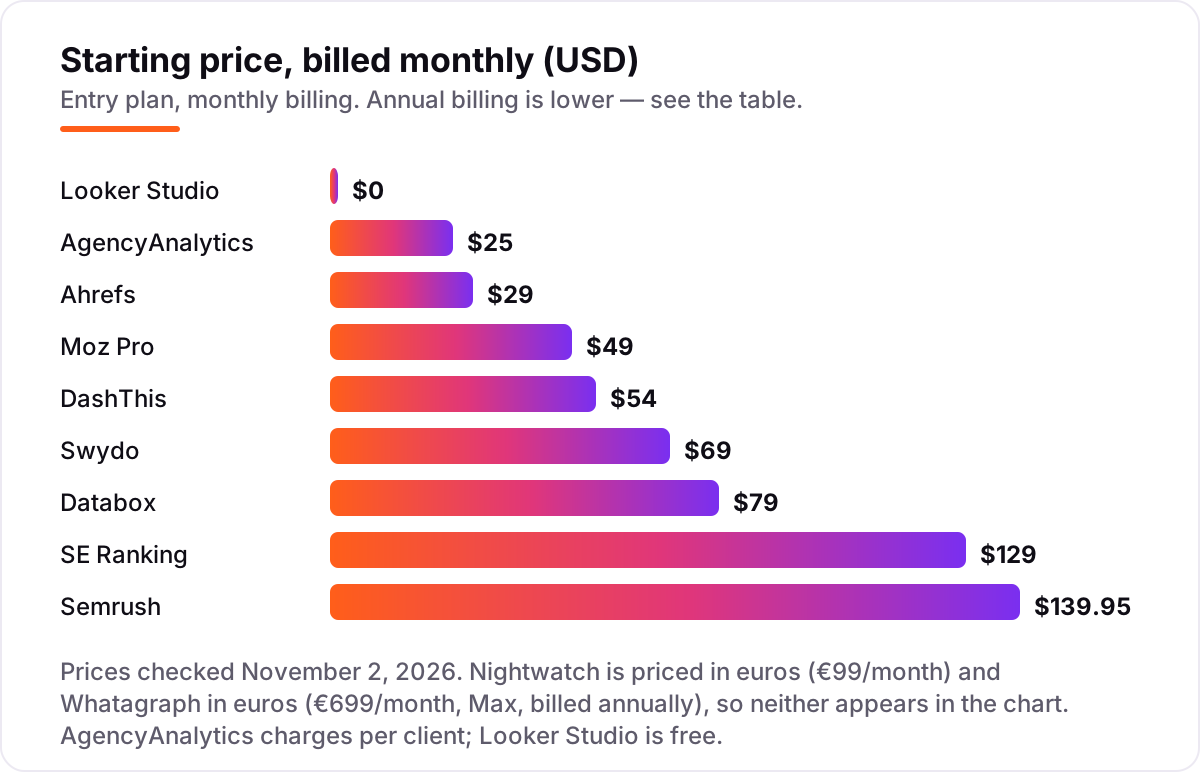
SEO suites that report as well as they research
SE Ranking, Semrush, Ahrefs and Moz Pro are SEO suites first and reporting tools second. Their reports draw on data they collect themselves — rankings, audits, backlinks — so nothing depends on a connector staying in sync. That makes them the safer pick when the client report must include positions and technical findings, not just traffic and ad spend. Our SEO audit service works the same way: the audit data and the client report come from one place.
The catch is that reporting is rarely the suite's best feature. White-label reports are paid add-ons on Semrush and SE Ranking, rank tracking on Ahrefs updates weekly unless you pay for a boost, and Moz Pro's Starter plan has no rank tracking at all. If you already pay for a suite, use its reports; if you only need reports, a dedicated platform costs less. For the ranking side of the report, our guide to the best rank tracking tools covers the trackers in detail.
Free tools and rank trackers with reporting
Two entries sit outside the two camps above. Looker Studio is free and fully custom: you build every dashboard yourself from Google's connectors, which costs nothing but an afternoon per client. Nightwatch is a rank tracker whose reports carry something the others do not — Citation Intelligence, which links each ranking change to the AI citations behind it. If clients ask where they appear in ChatGPT and Perplexity, that is the report to send.
Both need honest expectations. Looker Studio has no SEO data of its own and no white-label option, so the report always looks like a Google product. Nightwatch keeps white-label reports on its Professional plan and prices in euros, so the entry price is not the branded-report price. Start with one of these when the budget is tight or AI visibility is the question; move to a dedicated platform when the client list grows.
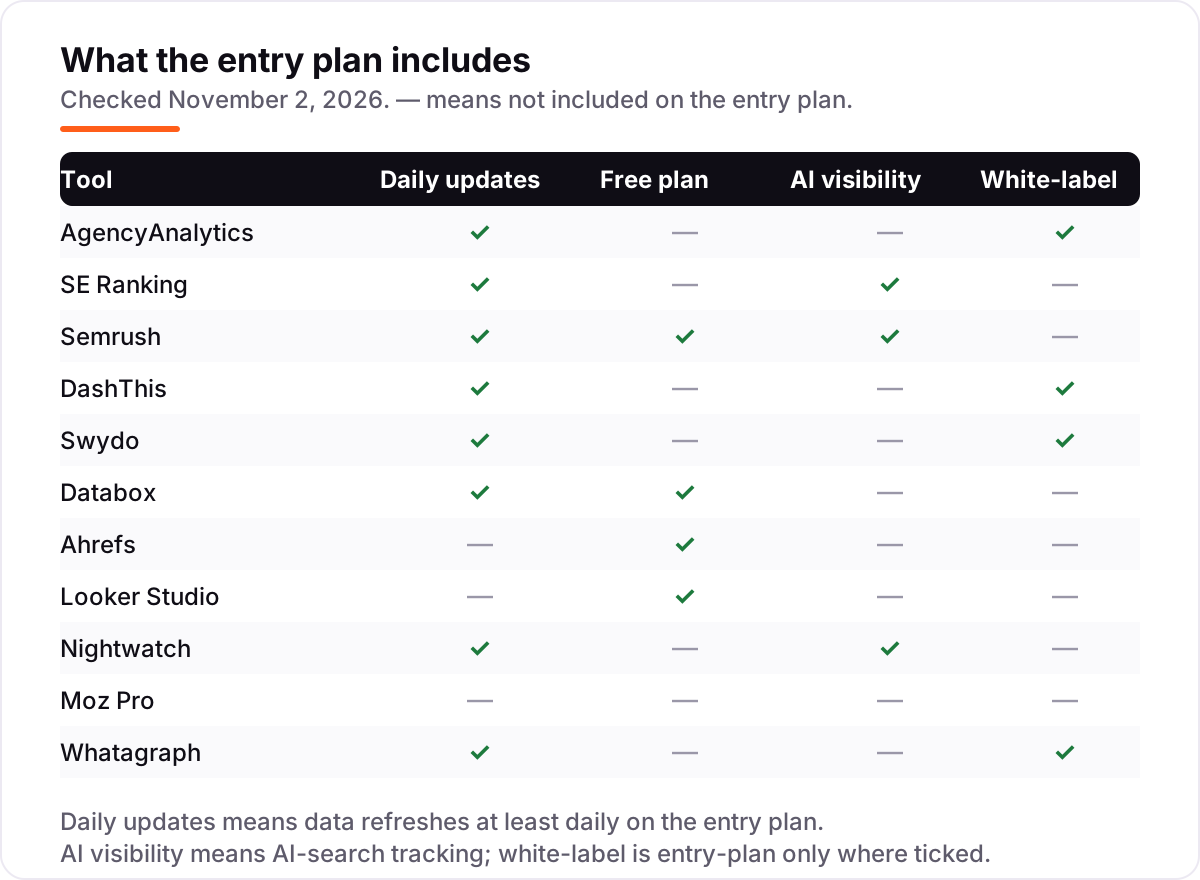
Quick comparison: tool type by need
| Buyer | Best pick | Why |
|---|---|---|
| Solo SEO, one or two sites | Looker Studio | Free, fully custom dashboards |
| Small agency, 5–25 clients | AgencyAnalytics | White-label everything, $20 per client a month billed annually |
| Best value suite | SE Ranking | 2,000 keywords a day plus reports from $103.20/month |
| Deepest research behind reports | Semrush | 27-billion-keyword database, reports from $117.33/month |
| Simplest client dashboards | DashThis | Preset templates from $44/month billed annually |
| Predictable flat price | Swydo | Every feature included from $62/month billed annually |
How to choose: a short decision path
- Count what the price meters. Per client, per dashboard, per data source or per keyword — run your real client list through each model before comparing headline prices.
- Decide who reads the report. Clients need white-label branding and a scheduled PDF or portal; internal teams need live dashboards and goals.
- List the sources you must connect. Search Console, GA4, ads, social and local — if one source is missing, the report has a hole.
- Check the AI question. If clients ask about ChatGPT and AI Overviews, confirm AI visibility is in the plan you buy, not a higher tier.
- Trial with one real client. Run the free plan or trial for two weeks, send the report, and check the numbers against Search Console. Before you publish new pages for the keywords in the report, run your titles through the free SERP snippet preview tool — it shows exactly how the title will look in Google.
Mistakes to avoid
- Comparing headline prices without checking the meter. A $44 plan that covers 3 dashboards costs more than a $69 plan that covers 10 sources once you add a second client.
- Paying for a suite when you only need reports. A dedicated platform at $44–$69 a month beats a $129 suite you only use for PDFs.
- Forgetting rank tracking is an add-on. AgencyAnalytics charges extra for it, Ahrefs updates weekly by default, and Moz Pro Starter has none at all.
- Trusting a directory price. Whatagraph's old Start and Boost tiers still appear on directories; the live pricing page sells Max from €699 a month. Always check the vendor's own page.
- Sending a report nobody reads. A scheduled PDF with no summary and no next step gets ignored. Put the three numbers that changed and the one action you recommend at the top.
How we chose
We checked each vendor's own pricing page on November 2, 2026 and recorded the starting price exactly as shown, including the annual-billing figure where the page lists one. Three pages would not load for us that day — DashThis, Whatagraph and Swydo — so those prices are corroborated by independent write-ups that quote the same vendor pages, and DashThis's $54 Individual price is also confirmed by the vendor-provided pricing on its G2 page. Nightwatch's €99/€79 figures were verified on its pricing page on November 1, 2026; the November 2 crawl of the same page did not render the plan prices. Looker Studio Pro's $9 per user per project per month figure comes from Databox, not from Google's own page. Ratings come from G2, checked November 2, 2026; Whatagraph, Databox, Swydo and Looker Studio have no rating here because their G2 pages returned rate-limit errors when we opened them. We ranked the tools by fit for the most common buyer — a small agency sending branded monthly reports — not by brand size. No vendor paid for a place in this list, and none of the links here are affiliate links.
What to do next
Start with the decision path above: count what the price meters, list your sources, and check whether white-label and AI visibility are included. Then take the free plan or trial of your top pick and send one real client report for two weeks. If the numbers match Search Console and the client understands it without a call, you have your tool. If you'd rather have this set up and read for you, request a free SEO + AI visibility audit and get a ranked fix list in 2 business days.
Rather not run the tools yourself?
Tools show you the data. SerpAstra turns it into higher rankings, more map-pack calls and citations in AI answers.
Get a free SEO + AI visibility audit→Sources we checked (23)
- AgencyAnalytics pricing — agencyanalytics.com/pricing (checked November 2, 2026)
- AgencyAnalytics on G2 — 4.7/5, 463 reviews (checked November 2, 2026)
- SE Ranking pricing — seranking.com/subscription.html (checked November 2, 2026)
- SE Ranking on G2 — 4.7/5, 1,619 reviews (checked November 2, 2026)
- Semrush pricing — semrush.com/prices (checked November 2, 2026)
- Semrush on G2 — 4.4/5, 4,304 reviews (checked November 2, 2026)
- DashThis pricing — dashthis.com/pricing (checked November 2, 2026)
- DashThis on G2 — 4.7/5, 94 reviews (checked November 2, 2026)
- Swydo pricing — swydo.com/pricing (checked November 2, 2026)
- Swydo vs DashThis 2026 — swydo.com (checked November 2, 2026)
- Databox pricing — databox.com/pricing (checked November 2, 2026)
- Databox plans — databox.com (checked November 2, 2026)
- Ahrefs pricing — ahrefs.com/pricing (checked November 2, 2026)
- Ahrefs on G2 — 4.5/5, 723 reviews (checked November 2, 2026)
- Looker Studio — lookerstudio.google.com (checked November 2, 2026)
- Looker Studio Pro pricing — databox.com (checked November 2, 2026)
- Nightwatch pricing — nightwatch.io/pricing (checked November 2, 2026)
- Nightwatch on G2 — 4.7/5, 64 reviews (checked November 2, 2026)
- Moz Pro pricing — moz.com/products/pro/pricing (checked November 2, 2026)
- Moz Pro on G2 — 4.3/5, 608 reviews (checked November 2, 2026)
- Whatagraph pricing — whatagraph.com/pricing (checked November 2, 2026)
- Whatagraph Max pricing — databox.com/whatagraph-review (checked November 2, 2026)
- Whatagraph vs Swydo pricing — swydo.com (checked November 2, 2026)
Shamim
Founder of SerpAstra
A full-stack SEO and digital marketer who spends most days on Local SEO for dental practices, AI search visibility and lead generation.
Frequently asked questions
What is the best SEO reporting software in 2026?
AgencyAnalytics is the best pick for most agencies: white-label reports, 90-plus integrations and scheduled delivery from $25 per client a month billed monthly, or $20 billed annually. If you want suite data behind the reports, SE Ranking is the best value at $103.20 a month billed annually. Solo SEOs on a zero budget should start with Looker Studio, which is free.
How much does SEO reporting software cost?
From free to €699 a month. Looker Studio costs $0, Ahrefs starts at $29 a month, and the dedicated agency platforms run $44 to $69 a month billed annually at entry level. SE Ranking and Semrush cost $103.20 and $117.33 a month billed annually, while Whatagraph starts at €699 a month. The headline price rarely equals the bill — check what the plan meters first.
Is there free SEO reporting software?
Yes. Looker Studio is free with unlimited reports and dashboards, native Google connectors and scheduled email delivery. Databox has a free plan covering three data sources and one user, and Semrush and Ahrefs offer free accounts with limited tracking. Free plans work for one or two sites; agencies sending branded client reports will need a paid plan.
What is the difference between SEO reporting software and a rank tracker?
A rank tracker checks positions for keywords and reports the movement. SEO reporting software pulls rankings, traffic, links, ads and AI visibility from many sources into one branded, scheduled client report. Trackers such as Nightwatch add reporting, and suites such as Semrush bundle both, but pure reporting tools like DashThis and Swydo show no rankings without a connected source.
Do I need white-label reporting?
Yes, if clients see the reports. White-label branding puts your logo, colors and domain on the report instead of the vendor's, which is why agencies pay for it. AgencyAnalytics, Swydo, DashThis and Whatagraph include it on their entry plans. SE Ranking, Semrush and Nightwatch keep it for higher tiers or paid add-ons, so check before you buy.
Can SEO reporting software track AI visibility?
Some of it can. SE Ranking includes AI visibility across five engines on its Core plan, Nightwatch links ranking changes to AI citations, and Semrush covers AI Overviews citations on its SEO plan. AgencyAnalytics and DashThis need paid add-ons or connected tools for AI data. If clients ask about ChatGPT and AI Overviews, confirm AI tracking is in the plan you buy.
What should I check before paying for SEO reporting software?
Four things: what the price meters (client, dashboard, source or keyword), whether white-label branding is included, which data sources connect natively, and whether the price is monthly or annual billing. Then trial it with one real client report for two weeks and compare the numbers against Search Console before you move the whole client list over.
Free SEO and AI visibility audit
Find out what is holding your rankings back
Send us your site. Within 2 business days you get a written audit, an AI visibility check and a short fix list ranked by impact. Free, with no contract attached.
Request my free audit→Related guides
 SEO & AI SearchBest SEO Audit Software for 2026: 10 Options Compared by Use Case10 best SEO audit software tools compared on price, crawl depth and AI visibility. Prices checked on vendor pricing pages, November 1, 2026.Read guide →
 SEO & AI SearchBest Local SEO Tools for 2026: 11 Picks Ranked by What You Need11 best local SEO tools with real prices checked November 1, 2026 — from $14/month trackers to quote-only enterprise platforms, sorted by what you need.Read guide →
 SEO & AI Search11 Best Rank Tracking Tools in 2026 (Free and Paid, Compared)11 best rank tracking tools compared on price, keyword limits, update speed and AI visibility. Prices checked on the vendor pricing page, October 31, 2026.Read guide →