
Best Text Analytics Software for 2026: 8 Options Compared by Use Case
8 best text analytics software tools compared on price, free tiers and fit — from $99/month APIs to enterprise VoC suites. Prices checked November 2, 2026.
 Shamim Mia, Founder, SerpAstraLast verified November 2, 202614 min read
We compare pricing pages, documentation and public reviews. We never accept payment for rankings.

Key takeaways
- The short list: MonkeyLearn from $299/month for custom models, MeaningCloud from $99/month for a ready API, and Google Cloud Natural Language, free for the first 5,000 units a month.
- The single most important buying factor is your data source: survey-led tools only analyze feedback they collect, while APIs analyze any text you send them.
- Enterprise feedback suites — Chattermill, Thematic and Kapiche — publish no monthly price; expect a sales call and an annual contract.
- Two prices below come from third-party directories, not the vendor page, because those pages did not load for verification on November 2, 2026 — see How we chose.
On this page
Quick comparison
| Tool | Best for | Starting price | Free plan |
|---|---|---|---|
| MonkeyLearn | Small and mid-size teams that want to train custom text classifiers without writing code | $299/mo | No (free trial) |
| MeaningCloud | Developers and small teams that need a ready-made text analysis API at the lowest monthly price | $99/mo | Yes (20,000/yr) |
| Google Cloud Natural Language | Developers building on Google Cloud who want prebuilt sentiment and entity analysis in one API call | Free, then pay per use | Yes (5,000 units/mo) |
| IBM Watson Natural Language Understanding | Developers and enterprise teams on IBM Cloud who need custom models for domain language | Free, then $0.003/item | Yes (30,000 items/mo) |
| Chattermill | Enterprise CX teams unifying feedback from dozens of channels into one dashboard | Custom quote | No (free trial) |
| Thematic | Enterprise VoC teams that want analyst-grade theme analysis with a published price | $25,000/yr | No (free trial) |
| Kapiche | Mid-market CX and support teams analyzing surveys, tickets and calls without building models | Custom quote | No (demo only) |
| Qualtrics Text iQ | Research teams already running Qualtrics surveys who want text analysis inside the same platform | Custom quote | Yes (500 responses) |
Make one of these tools?
We re-check this list every quarter. Send a correction, request a review, or ask about a clearly labeled sponsored spot.
Request a listingThe best text analytics software

MonkeyLearn
Best for: Small and mid-size teams that want to train custom text classifiers without writing code
MonkeyLearn is a text analysis platform for teams that want models trained on their own language, not generic ones. You upload labeled examples — support tickets tagged by intent, survey answers tagged by topic — and the platform builds a classifier around them, with no code. Prebuilt models cover sentiment, topic, intent and keyword extraction for teams that want results on day one.
The pricing catch is the per-feature structure: $299 a month buys one feature, so a team that needs sentiment plus classification plus extraction pays for each. The API plan includes 10,000 queries a month, and the 60-plus integrations pull feedback in from Zendesk, Intercom, Typeform and Google Sheets. Buy it when your categories are specific to your business; buy a prebuilt API when they are not.
What we like
- Train custom classifiers, sentiment models and extractors without code, using your own labeled examples
- API plan covers 10,000 queries a month from $299, with 60-plus native integrations for Zendesk, Intercom and Google Sheets
- Prebuilt models for sentiment, topic, intent and keyword extraction work out of the box
Watch out for
- The $299 starting price is per feature, per month, so sentiment plus classification plus extraction costs more than the headline figure
- No permanent free plan, only a free trial and a free academic plan

MeaningCloud
Best for: Developers and small teams that need a ready-made text analysis API at the lowest monthly price
MeaningCloud is a text mining API suite that does the standard jobs — sentiment analysis, categorization, entity and topic extraction, language detection — in many languages, as a cloud service or on-premises. The Basic plan costs $99 a month for 120,000 requests, which makes it the cheapest self-serve entry in this list by a clear margin.
The free plan is the most generous here too: 20,000 requests a year at no cost, though capped at 2 requests per second. The honest limitation is evidence: only 4 G2 reviews exist, so you are buying on the spec sheet and the trial, not on peer experience. For a developer who needs a documented API at a known monthly price, that trade is usually worth it.
What we like
- Cheapest self-serve entry here: Basic is $99 a month for 120,000 requests a month
- Free plan covers 20,000 requests a year, the most generous free allowance in this list
- Covers sentiment, categorization, entity and topic extraction and language detection in many languages, as SaaS or on-premises
Watch out for
- Only 4 G2 reviews, so peer evidence for the product is thin
- The free plan caps at 2 requests per second, which is too slow to evaluate at real volume
Google Cloud Natural Language
Best for: Developers building on Google Cloud who want prebuilt sentiment and entity analysis in one API call
Google Cloud Natural Language is the prebuilt API you reach for when you want one REST call that returns sentiment, entities, entity-level sentiment, syntax and content classification. There is nothing to train: the models are built on Google language research, and the entity sentiment feature is genuinely useful, because it tells you which product feature a negative review is about.
Pricing is usage-based, with 5,000 units free each month and a $300 credit for new Google Cloud customers. That makes it nearly free for a side project and a real line item at scale, which is exactly what G2 reviewers warn about. There is no dashboard, so you build the reporting yourself. Pick it when you already live on Google Cloud and need accurate prebuilt analysis.
What we like
- One API call returns sentiment, entities, entity sentiment, syntax and content classification
- Free tier covers 5,000 units a month, plus a $300 credit for new Google Cloud customers
- Entity sentiment shows which product feature the negativity targets, not just that a review is negative
Watch out for
- No custom model training on the standard API, so domain-specific language needs another tool
- Costs scale with volume, and G2 reviewers warn bills climb fast on large batches

IBM Watson Natural Language Understanding
Best for: Developers and enterprise teams on IBM Cloud who need custom models for domain language
IBM Watson Natural Language Understanding is a cloud-native service that pulls metadata from text: entities, keywords, categories, sentiment, emotion, relations and syntax, in more than 13 languages. The free Lite plan covers 30,000 NLU items a month and includes one free custom model, which is the most generous free tier of any cloud API in this list.
The Standard plan charges $0.003 per NLU item for the first 250,000 items, so a team processing a million items a month is looking at real money. Custom models come through Watson Knowledge Studio, and G2 reviewers say training them takes expertise. Choose Watson when you need custom domain models on IBM Cloud; choose Google when prebuilt models are enough.
What we like
- Free Lite plan covers 30,000 NLU items a month and includes 1 free custom model
- Extracts entities, keywords, categories, sentiment, emotion, relations and syntax in more than 13 languages
- Custom models through Watson Knowledge Studio learn the language of your business
Watch out for
- Costs add up at volume: $0.003 per NLU item after the free Lite allowance
- G2 reviewers say building and training custom models takes real expertise

Chattermill
Best for: Enterprise CX teams unifying feedback from dozens of channels into one dashboard
Chattermill is an AI-native customer experience platform that pulls feedback from 65-plus channels — surveys, reviews, support tickets, social, chat and app reviews — into a single layer, then runs aspect-based sentiment analysis in more than 100 languages. Its Lyra AI model and anomaly detection flag themes as they emerge, rather than in a quarterly report.
Plans are sold by data credits: 10,000 a month on Pro, 30,000 on Team and 100,000 on Enterprise, with no dollar price published for any of them. That makes budgeting impossible before a sales call, which is the main reason it sits below the self-serve tools here. It is the right pick for an enterprise CX team that needs every channel in one place.
What we like
- Unifies 65-plus feedback channels: surveys, reviews, support tickets, social, chat and app reviews
- Aspect-based sentiment analysis in 100-plus languages, with the Lyra AI model and anomaly detection
- Most reviewed tool in this list, with 238 G2 reviews and enterprise customers including Uber and Booking.com
Watch out for
- No published price: every plan starts with a sales conversation and a tailored quote
- Credit-based plans (10,000 credits a month on Pro) make the real cost hard to predict before a quote

Thematic
Best for: Enterprise VoC teams that want analyst-grade theme analysis with a published price
Thematic is a feedback analytics platform built for enterprise voice-of-customer programs: it finds themes, sentiment and categories in surveys, reviews, support tickets and calls, with a trace from each theme back to the verbatims behind it. Thematic Answers adds a natural-language Q&A layer, so a product manager can ask the feedback a question instead of reading a dashboard.
It is the only enterprise tool here with a published price — Foundation costs $25,000 a year for up to 25,000 comments and 3 datasets, with a dedicated success manager and 24/7 support. That is also its honest limit: $25,000 is the floor, and larger volumes move to a custom Enterprise proposal. Thematic holds the highest G2 rating in this list at 4.8 from 43 reviews.
What we like
- Only enterprise VoC tool here with a published price: Foundation is $25,000 a year for up to 25,000 comments
- Thematic Answers adds a natural-language Q&A layer over your feedback data
- Foundation includes an assigned Customer Success Manager and 24/7 support
Watch out for
- $25,000 a year is the cheapest published tier, which prices out small teams entirely
- Thematic says the product works best with at least 2,000 rows of verbatims

Kapiche
Best for: Mid-market CX and support teams analyzing surveys, tickets and calls without building models
Kapiche is a text mining tool for CX and support teams that want themes from raw feedback without building models first. Its unsupervised discovery surfaces themes with no code frames and no manual coding, and it connects live to voice-of-customer surveys plus chat, call and ticket transcripts. Churn prediction and escalation forecasting are built into the workflow.
There is no published price and no free trial — evaluation runs through a demo and a quote. Third-party reports disagree on the entry figure, with one recent pricing survey reading $2,000 a month from the vendor page and a competitor citing a $1,060-a-month Bronze tier, so treat any number you see as unconfirmed until Kapiche quotes you. G2 reviewers rate it 4.7 from 42 reviews.
What we like
- Unsupervised theme discovery surfaces themes with no code frames, setup or manual coding
- Live connection to voice-of-customer survey data, plus chat, call and ticket transcripts
- Churn prediction and escalation forecasting are built in, not bolted on
Watch out for
- No published price: quotes only, and third-party reports disagree on the entry figure, so get it in writing
- G2 reviewers report connection issues when integrating data sources

Qualtrics Text iQ
Best for: Research teams already running Qualtrics surveys who want text analysis inside the same platform
Qualtrics Text iQ is not a standalone product: it is the text analysis layer inside Qualtrics experience management, analyzing open-text survey responses with NLP and pairing the results with Stats iQ, dashboards and XM workflows. For a research team already running Qualtrics surveys, it turns the comment boxes they already collect into themes and sentiment without a second tool.
The limit is the data source. Text iQ only sees feedback Qualtrics collects, so app reviews, support tickets and social comments stay outside unless you move them in. CX pricing is quote-only, and the only published paid price is the $420-a-month Strategic Research plan. Buy it when Qualtrics is already your survey platform; do not buy Qualtrics just for Text iQ.
What we like
- Text iQ analyzes open-text survey responses with NLP inside the Qualtrics platform
- Pairs text analysis with Stats iQ, dashboards and XM workflows in one login
- Most reviewed vendor here: Qualtrics Customer Experience holds 752 G2 reviews
Watch out for
- Text iQ only analyzes feedback Qualtrics itself collects, so reviews, tickets and social stay outside
- CX pricing is quote-only; the only published paid price is the $420/month Strategic Research plan
What a text analytics tool actually does
The best text analytics software turns piles of unread text — survey answers, support tickets, reviews, chat logs — into themes, sentiment scores and entities you can act on. You feed it text, it tags what each comment is about and how the writer feels, and you get a dashboard that shows which topics are growing and which ones drag your scores down. IBM's free Watson Lite plan covers 30,000 NLU items a month, which shows how far a pilot can go before you pay anything.
People search for this category as text analytics software, text mining software and feedback analytics, and the three overlap heavily. The products split into two camps: APIs and no-code builders that analyze any text you send, and enterprise feedback platforms that collect the feedback and analyze it in one place. The price follows the camp, not just the analysis: self-serve tools start at $99 a month, while enterprise suites start at $25,000 a year or a quote.
The output is only as good as the input. A tool that scores sentiment on 10,000 support tickets can tell you that frustration is rising, but it cannot tell you why unless the tickets mention the reason. The teams that get value from these tools do two things before they buy: they check that their feedback actually names the products, features and problems they care about, and they run a pilot on a few hundred real comments to see whether the themes the tool finds match the themes their team already knows. If the pilot themes look wrong, no amount of dashboard polish will fix them.
One more split matters inside the category. Some tools are built for analysts who live in the data — they offer custom models, APIs and exports. Others are built for managers who want a weekly read on what customers are saying — they offer dashboards, alerts and a summary. Neither is better in the abstract. A support lead who wants a Monday-morning view of the top five complaints needs the second kind; a data team building churn prediction into its own product needs the first.
Self-serve APIs and no-code builders
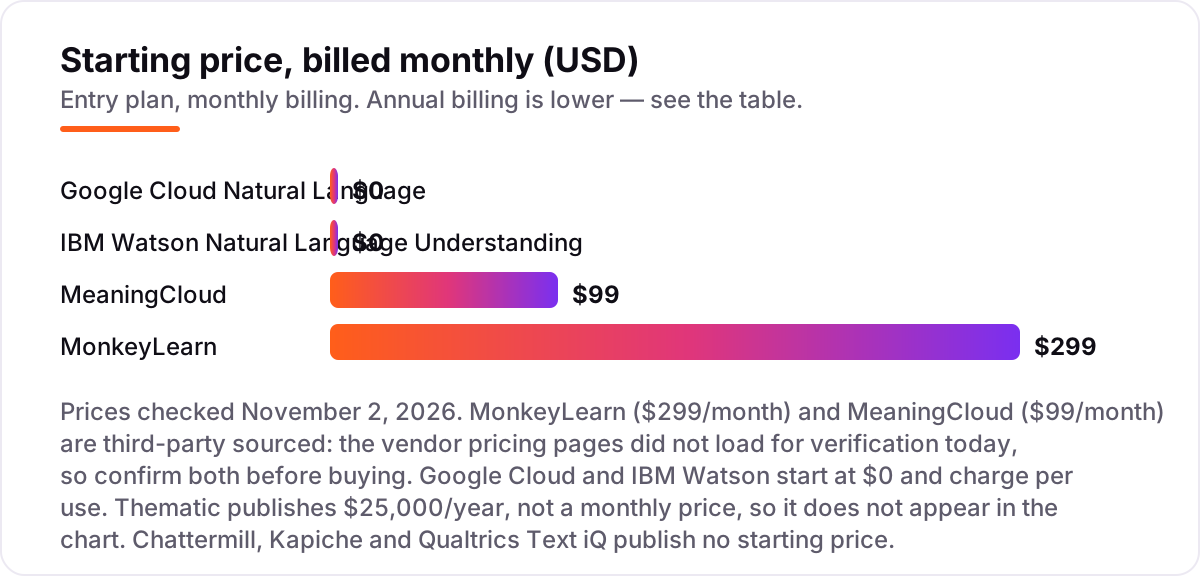
If you want to start this week without a sales call, this is your group: MonkeyLearn, MeaningCloud, Google Cloud Natural Language and IBM Watson NLU. MonkeyLearn is the no-code option — train a classifier on your own labeled examples and plug it into Zendesk or Google Sheets. MeaningCloud is the cheapest documented API, at $99 a month for 120,000 requests. Google and IBM are cloud APIs with real free tiers, so a developer can build a working prototype before the first invoice.
The trade is control against convenience. The APIs give you prebuilt models and charge per use, so the bill follows your volume exactly. MonkeyLearn gives you custom models without code, but you pay per feature. Pick the API when your categories are standard — sentiment, entities, topics — and pick MonkeyLearn when your categories are specific to your business, like the exact reasons customers cancel.
Volume is where the cheap-looking options diverge. MeaningCloud's $99 plan covers 120,000 requests a month, which is generous for a small team, but a team processing a million support messages a month will outgrow it and move to a higher tier or a per-use API. Google and IBM look free at pilot scale and become a real line item at production scale — which is fine, as long as you forecast it. Before you commit, take your last three months of feedback volume, run it through each vendor's pricing unit, and write the monthly number down. The tool that looks cheapest on the pricing page is often not the cheapest at your volume.
Enterprise feedback analytics
The enterprise group — Chattermill, Thematic and Kapiche — does more than analyze text: it unifies the feedback first. Chattermill pulls in 65-plus channels, from surveys and reviews to tickets, social and chat. Thematic is built for analyst-grade voice-of-customer programs, with themes traced back to the verbatims behind them. Kapiche focuses on support conversations and adds churn prediction to the analysis.
Only one of the three publishes a price. Thematic lists Foundation at $25,000 a year for up to 25,000 comments, while Chattermill and Kapiche are quote-only — and even third-party reports disagree on Kapiche, as the How we chose section explains. Expect a demo, a pilot and an annual contract with any of these three, and budget for implementation time as well as the license.
The other cost of this group is the buying process itself. These tools are sold, not bought: a demo on your own data, a paid pilot, a proposal built around your comment volume and channel count. That is not a flaw — the vendors tune the models to your data during onboarding, and that tuning is part of what you pay for. But it means the decision takes weeks, not an afternoon, and a team that needs answers this month should start with a self-serve tool while the enterprise evaluation runs. The self-serve pilot also gives you a baseline: when the enterprise vendor demos on your data, you will know whether its themes are actually better than the ones you already have.
Survey-led research, not standalone analysis
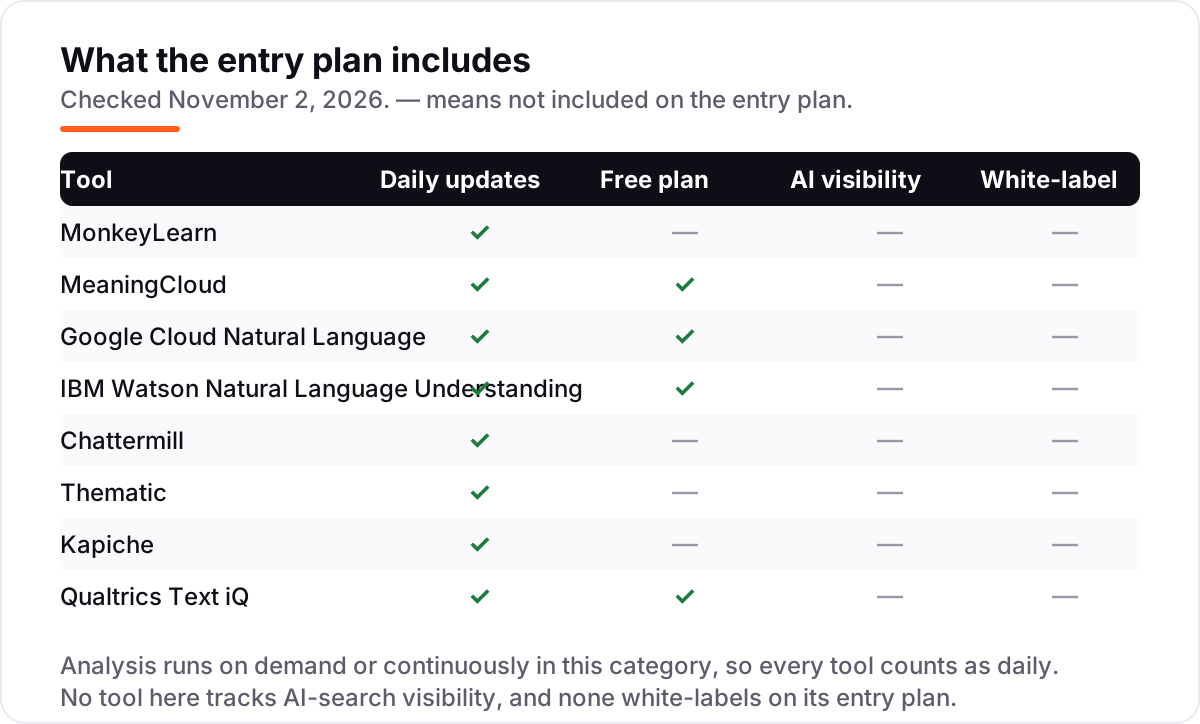
Qualtrics Text iQ is the odd one out here, because it is not a product you buy on its own. It is the text analysis layer inside Qualtrics experience management, and it only analyzes the feedback Qualtrics itself collects. That is a real strength for a research team already running Qualtrics surveys: the open-text answers are analyzed where they already live, next to Stats iQ, dashboards and XM workflows.
It is also a real limit. App reviews, support tickets and social comments stay outside unless you move them in, and CX pricing is quote-only — the only published paid price is the $420-a-month Strategic Research plan. If Qualtrics is already your survey platform, Text iQ is the easy choice. If it is not, do not buy Qualtrics just for Text iQ; a standalone tool will analyze more of your feedback for less money.
The same logic applies in reverse. A team that buys a standalone text analytics tool and then discovers it needs survey collection, panel management and research-grade logic will end up buying Qualtrics anyway, and running two tools where one would have done. So the honest question is not which text engine is better — the engines are close — but which system already holds your feedback. Buy the analysis where the data already lives, and only buy a second tool when the first one cannot read a source that matters.
Quick comparison: tool type by need
| Buyer | Best pick | Why |
|---|---|---|
| Small team, small budget | MeaningCloud | $99/month API, free tier of 20,000 requests a year |
| Non-technical team, custom categories | MonkeyLearn | Train classifiers without code from $299/month |
| Developer building on Google Cloud | Google Cloud Natural Language | Prebuilt models, free for 5,000 units a month |
| Developer building on IBM Cloud | IBM Watson NLU | Free Lite plan, custom models for domain language |
| Enterprise CX team, many channels | Chattermill | 65-plus channels in one dashboard, quote-only |
| Research team running surveys | Qualtrics Text iQ | Text analysis inside Qualtrics surveys, quote-only |
How to choose the best text analytics software
- Start with your data source. If your feedback lives in surveys, a survey-led tool fits. If it lives in tickets, reviews and chat, you need a tool that reads all of them — an API or a multi-channel platform.
- Count your volume before you compare prices. Cloud APIs charge per item or per unit, and enterprise tools charge per comment or per credit. A $99 plan that covers 120,000 requests beats a $0 plan that bills per item once you pass the free tier.
- Check your languages. Sentiment usually works in more languages than entity extraction or custom classification. Confirm your specific languages on the vendor's documentation page, not on a marketing page.
- Decide no-code or API. CX, product and research teams should buy a dashboard tool they can run themselves. Developers building a feature into their own product should buy an API.
- Test on your real data. Every tool here has a free tier, a free trial or a demo. Run a few hundred of your own comments through it and check whether the themes match what your team already knows.
Before you publish pages for the topics your feedback keeps surfacing, run your titles through the free SERP snippet preview tool — it shows exactly how the title and description will look in Google.
Mistakes to avoid
- Comparing monthly prices without checking the billing unit. One tool charges per feature, another per request, a third per comment or per credit. Two tools at $299 a month can cost very different amounts at your volume.
- Buying a survey tool for non-survey feedback. Qualtrics Text iQ only analyzes what Qualtrics collects. If most of your feedback is tickets and reviews, it will sit idle.
- Trusting a directory price. Kapiche has no published price, and third-party reports disagree on the entry figure. Always get a written quote with the volume it covers.
- Skipping the free tier test. A free tier that covers 30,000 items a month, like IBM Watson Lite, can run a real pilot. Do not pay before you know the themes match your data.
- Forgetting the trial ends. Set a reminder for the day the trial converts, and check the numbers against an SEO audit of the pages the feedback points to, so the insights turn into fixes.
How we chose
We checked each vendor's pricing page on November 2, 2026 and recorded the starting price exactly as shown — except for two. The MonkeyLearn and MeaningCloud pricing pages did not load today, so their $299 and $99 figures come from Capterra and Software Advice directories, not the vendor pages, and should be confirmed before buying. Kapiche publishes no price, and third-party reports disagree on its entry figure: a pricing survey dated October 26, 2026 reads $2,000 a month from the vendor page, while a competitor cites a $1,060-a-month Bronze tier, so we list Kapiche as quote-only rather than picking a number. Ratings come from G2, except MonkeyLearn, where we used Capterra because its G2 listing is a separate G Suite add-on. We ranked the tools by fit for the most common buyer — a team that wants themes and sentiment from customer feedback without a data science hire — not by brand size. No vendor paid for a place in this list, and none of the links here are affiliate links.
What to do next
Start with the decision path above: name your data source, count your volume, and decide no-code or API. Then take the free tier or trial of your top pick and run a few hundred of your own comments through it. If the themes match what your team already knows and the price holds at your volume, you have your tool. If you'd rather have this set up and read for you, request a free SEO + AI visibility audit and get a ranked fix list in 2 business days.
Rather not run the tools yourself?
Tools show you the data. SerpAstra turns it into higher rankings, more map-pack calls and citations in AI answers.
Get a free SEO + AI visibility audit→Sources we checked (17)
- MonkeyLearn starting price ($299/month) — Capterra (checked November 2, 2026)
- MonkeyLearn pricing page — monkeylearn.com/pricing (checked November 2, 2026; page did not load)
- MeaningCloud starting price ($99/month) — Software Advice (checked November 2, 2026)
- MeaningCloud pricing page — meaningcloud.com/pricing (checked November 2, 2026; page did not load)
- Google Cloud Natural Language pricing — cloud.google.com/natural-language/pricing (checked November 2, 2026; page did not load)
- IBM Watson NLU pricing — IBM Cloud docs (checked November 2, 2026)
- Chattermill plans (credit tiers, no dollar price) — chattermill.com/blog/chattermill-vs-caplena (checked November 2, 2026)
- Thematic pricing — getthematic.com/product/plan-and-pricing (checked November 2, 2026)
- Kapiche and Qualtrics pricing survey — dimensionlabs.io (checked October 26, 2026)
- MonkeyLearn on Capterra — 4.3/5, 4 reviews (checked November 2, 2026)
- MeaningCloud on G2 — 4.5/5, 4 reviews (checked November 2, 2026)
- Google Cloud Natural Language API on G2 — 4.3/5, 126 reviews (checked November 2, 2026)
- IBM Watson Natural Language Understanding on G2 — 4.2/5, 35 reviews (checked November 2, 2026)
- Chattermill on G2 — 4.4/5, 238 reviews (checked November 2, 2026)
- Thematic on G2 — 4.8/5, 43 reviews (checked November 2, 2026)
- Kapiche on G2 — 4.7/5, 42 reviews (checked November 2, 2026)
- Qualtrics Customer Experience on G2 — 4.3/5, 752 reviews (checked November 2, 2026)
Shamim
Founder of SerpAstra
A full-stack SEO and digital marketer who spends most days on Local SEO for dental practices, AI search visibility and lead generation.
Frequently asked questions
What is the best text analytics software in 2026?
MonkeyLearn is the best starting point for most teams: custom models without code from $299 a month. MeaningCloud is the cheapest self-serve API at $99 a month. Developers should start with Google Cloud or IBM Watson, both free at low volume. Enterprise CX teams should shortlist Chattermill, Thematic and Kapiche.
How much does text analytics software cost?
Self-serve tools run $99 to $299 a month: MeaningCloud at $99 and MonkeyLearn at $299. Cloud APIs start free and charge per use, so the bill follows your volume. Enterprise feedback suites are far pricier: Thematic publishes $25,000 a year, and Chattermill, Kapiche and Qualtrics Text iQ are quote-only.
Is there a free text analytics tool?
Yes, with limits. MeaningCloud gives 20,000 requests a year free, Google Cloud gives 5,000 units a month free, and IBM Watson Lite gives 30,000 NLU items a month free. Qualtrics has a free account with 500 responses. Free tiers work for pilots and small volumes; production feedback programs need a paid plan.
What is the difference between text analytics and sentiment analysis?
Sentiment analysis is one output of text analytics: whether a text is positive, negative or neutral. Text analytics is the wider job — finding themes, extracting entities and topics, classifying intent and tracking how each topic trends over time. A tool that only scores sentiment will not tell you which product feature is driving the complaints.
Can text analytics tools handle multiple languages?
Most of the tools here can. Chattermill covers more than 100 languages, IBM Watson works in more than 13, and MeaningCloud supports many languages as well. Coverage still varies by feature: sentiment usually works in more languages than entity extraction or custom classification, so check your specific languages before you buy.
Do I need a developer to use text analytics software?
Not for the no-code tools. MonkeyLearn, Chattermill, Thematic, Kapiche and Qualtrics Text iQ are built for CX, product and research teams, with dashboards instead of code. The cloud APIs — Google Cloud, IBM Watson and MeaningCloud — are developer tools: you call an API and build the reporting yourself.
What should I check before paying for text analytics software?
Four things: which data sources it can actually read, how pricing scales with your volume, which languages your feedback is in, and whether the free tier or trial lets you test on your real data. For quote-only tools, get the quote in writing with the volume it covers, because per-comment and per-credit pricing can surprise you.
Free SEO and AI visibility audit
Find out what is holding your rankings back
Send us your site. Within 2 business days you get a written audit, an AI visibility check and a short fix list ranked by impact. Free, with no contract attached.
Request my free audit→Related guides
 SEO & AI SearchBest SEO Audit Software for 2026: 10 Options Compared by Use Case10 best SEO audit software tools compared on price, crawl depth and AI visibility. Prices checked on vendor pricing pages, November 1, 2026.Read guide →
 AI SearchBest AI SEO tools in 2026: honest picks by jobBest AI SEO tools in 2026, picked by job: Semrush and Ahrefs for research, Surfer and Clearscope for content, Otterly for AI tracking, with 2026 prices.Read guide →
 SEO & AI SearchBest Local SEO Tools for 2026: 11 Picks Ranked by What You Need11 best local SEO tools with real prices checked November 1, 2026 — from $14/month trackers to quote-only enterprise platforms, sorted by what you need.Read guide →