
10 Best Tools for SEO Topical Map in 2026 (Free and Paid, Compared)
10 best tools for SEO topical map compared on price, clustering, briefs and AI visibility. Every price checked on the vendor pricing page, November 2, 2026.
 Shamim Mia, Founder, SerpAstraLast verified November 2, 202614 min read
We compare pricing pages, documentation and public reviews. We never accept payment for rankings.

Key takeaways
- Keyword Insights is the best dedicated topical map tool: SERP-based clustering and briefs from $58/month, with a $1 trial for 7 days.
- Surfer and Frase are the best all-round picks for teams that plan the map and write the content in one place, from $49/month billed annually and $39/month billed annually.
- AlsoAsked is the cheapest way in at $15/month, and MarketMuse is the strategy pick for large libraries — but its paid plans are quote-only.
- The single most important buying factor is how the map is built: clusters grouped by live SERP overlap beat clusters grouped by keyword similarity alone.
- Every price below was checked on the vendor's own pricing page on November 2, 2026, except where noted. Ratings are G2, with review counts shown.
On this page
Quick comparison
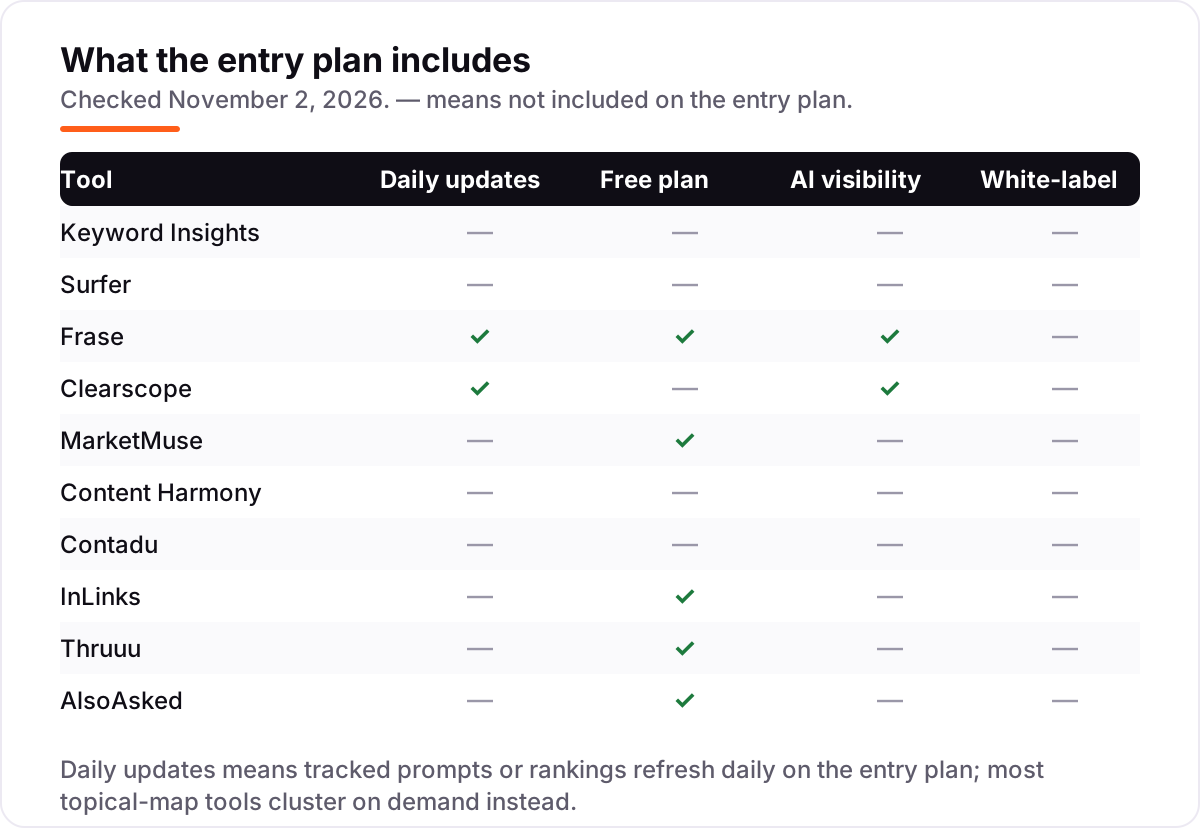
| Tool | Best for | Starting price | Free plan |
|---|---|---|---|
| Keyword Insights | Content strategists planning large sites who need SERP-based keyword clusters turned into briefs and drafts | $58/mo | No ($1 trial) |
| Surfer | Small content teams that want a topical map plus a content editor and AI visibility tracking in one subscription | $49/mo (annual) | No (7-day refund) |
| Frase | Solo creators and small teams who want SERP-based briefs, AI visibility tracking and a free tier in one cheap plan | $39/mo (annual) | Yes (1 document) |
| Clearscope | Editorial teams that want one clean content grade per page plus tracked topics across ChatGPT, Gemini and Claude | $129/mo | No (14-day trial) |
| MarketMuse | Large content teams and agencies that need site-wide topic authority scoring and a prioritised content plan | Custom quote | Yes (10 queries/mo) |
| Content Harmony | Content teams that want data-driven briefs with keyword reports and a grader, billed per workflow | $50/mo | No ($10 trial) |
| Contadu | Freelancers and small teams that want keyword clustering, a topical map and a content writer in one workflow | $47/mo | No (7-day trial) |
| InLinks | SEOs who build topical maps around entities and need automated internal links and schema to support them | $49/mo | Yes (2 optimizations/mo) |
| Thruuu | Budget-conscious teams that want SERP analysis, keyword clustering and briefs from one cheap credit pool | $19/mo | Yes (10 credits) |
| AlsoAsked | Bloggers and small teams who build topical maps from real People Also Ask questions | $12/mo (annual) | Yes (3 searches/day) |
Make one of these tools?
We re-check this list every quarter. Send a correction, request a review, or ask about a clearly labeled sponsored spot.
Request a listingThe best SEO topical map tools

Keyword Insights
Best for: Content strategists planning large sites who need SERP-based keyword clusters turned into briefs and drafts
Keyword Insights is the most focused topical map tool in this list because it starts from the SERP, not from keyword similarity. You upload a keyword list, it checks the live results for each term, and it groups only the phrases Google treats as the same intent. Each cluster then becomes a brief and a draft, so the map turns into a publishing plan instead of a diagram you admire once.
The catch is the credit meter. Basic costs $58 a month for 10,000 credits, with one credit per clustered keyword and 100 per brief, so a 20,000-keyword export needs the $99 Professional plan or a top-up. Buy it when you already have a keyword list to organise; skip it if you still need to discover the keywords first.
What we like
- Clusters keywords by live, country-specific SERP overlap and search intent, so groups reflect what Google actually ranks together
- Carries each cluster through to a content brief and an AI-written draft without leaving the platform
- Upload up to 200,000 keywords in one run, which suits programmatic builds and large site migrations
Watch out for
- Credit-based pricing burns fast on big lists: one credit per clustered keyword and 100 credits per brief
- No free plan, and it is not a full keyword database, so you still need a research source for discovery

Surfer
Best for: Small content teams that want a topical map plus a content editor and AI visibility tracking in one subscription
Surfer is the best all-round pick here because the map and the writing live in the same tool. Its Topical Map groups keyword gaps into clusters with a content calendar, then the Content Editor scores each draft in real time against the pages already ranking. For a team that publishes every week, that loop — plan, write, score, publish — is worth more than a prettier map in a separate tool.
Watch the plan ladder. Discovery costs $49 a month billed annually and covers 120 documents a year, but AI prompt tracking only starts on Standard at $99 a month billed annually. If AI citations matter to your clients, budget for Standard from the start instead of buying Discovery and upgrading a month later.
What we like
- Topical Map clusters keyword gaps into a content calendar, and the Content Editor scores each draft against the top-ranking pages
- AI visibility tracking across ChatGPT, Perplexity, Google AI Mode, AI Overviews and Gemini from the Standard plan up
- Highest G2 review volume in this list, at 4.8/5 from 546 reviews
Watch out for
- Discovery has no AI prompt tracking, so the topical map plus AI visibility combination starts at Standard ($99/month billed annually)
- Document limits are tight for high-volume teams: 120 documents a year on Discovery, 360 on Standard and Pro

Frase
Best for: Solo creators and small teams who want SERP-based briefs, AI visibility tracking and a free tier in one cheap plan
Frase is the cheapest serious option for a team that plans topics and writes in the same place. Starter costs $39 a month billed annually and gives you 10 articles, 50 audit pages and AI visibility tracking across ChatGPT and Google AI, plus a free tier with one SEO document to try first. Its briefs are built from the pages already ranking, so the outline you hand a writer reflects what Google rewards.
The limit to respect is volume. Ten articles a month covers a solo creator or a small blog, but a team publishing daily will hit the cap in a week and need Professional at $103 a month billed annually. Frase also has no dedicated topical map view — it plans by brief and audit, not by a visual cluster diagram.
What we like
- SERP-based briefs and outlines built from the top-ranking pages, with SEO and GEO scores on every article
- AI Visibility Monitor tracks prompts daily and alerts when visibility changes, included from Starter
- Free tier and a 7-day trial with no credit card required, so you can test the workflow before paying
Watch out for
- Starter caps at 10 articles a month and 1 seat, so a busy team needs Professional ($103/month billed annually)
- White-label reports and branded client portals are Enterprise only

Clearscope
Best for: Editorial teams that want one clean content grade per page plus tracked topics across ChatGPT, Gemini and Claude
Clearscope is the most polished tool in this list, and its G2 score shows it: 4.9 out of 5 from 92 reviews, the joint-highest here. Essentials costs $129 a month and gives you 20 monthly topic explorations, 50 tracked queries and 20 drafts, with unlimited users and projects — so a whole editorial team shares one subscription. The content grade is simple enough for a freelance writer to follow without training.
The price is the honest trade-off. There is no cheaper tier and no annual discount, and the 20-draft monthly cap applies on Business too, so a team writing 40 drafts a month pays for add-ons. Buy Clearscope when writing quality and a clean grade matter more than volume; buy Frase or Surfer when volume matters more.
What we like
- Highest G2 score in this list at 4.9/5, with reviewers praising the clean grading and easy editor
- Essentials includes 20 monthly topic explorations, 50 tracked queries and 50 pages, with unlimited users and projects
- Prompt Tracking monitors brand mentions across ChatGPT, Gemini and Claude
Watch out for
- No free plan and no annual discount, so $129 a month is the floor for a single-site team
- Drafts are capped at 20 a month on every paid plan, and extra drafts cost $50 a block on Essentials

MarketMuse
Best for: Large content teams and agencies that need site-wide topic authority scoring and a prioritised content plan
MarketMuse works at a different level from the rest of this list: it audits your entire content inventory and scores each topic against your competitors, then tells you what to write, what to update and what to merge. For a site with hundreds of articles, that site-level view is the whole point — a page optimiser cannot tell you that a whole topic cluster is thin.
The price is the barrier. The vendor publishes no dollar figure for any paid plan, so every tier is a demo and a quote, and older third-party figures such as $149 a month are stale and should not be budgeted against. Use the free plan to test the research, then talk to sales only when the inventory view is worth the enterprise process.
What we like
- Scores your whole content inventory against competitors, so the plan reflects the authority your site already has
- Topic Navigator and content briefs turn gaps into a prioritised list of what to write, update or merge
- Free plan with 10 queries a month lets you test the research before booking a demo
Watch out for
- No published paid prices: every paid tier is quote-only through a demo, so budgeting needs a sales conversation
- Paid briefs are capped at 5 a month on Optimize, 10 on Research and 20 on Strategy

Content Harmony
Best for: Content teams that want data-driven briefs with keyword reports and a grader, billed per workflow
Content Harmony is a brief-first tool: each content workflow bundles a keyword report, a content brief and a content grader, so one credit covers a page from research to a scored draft. The entry Standard-5 plan costs $50 a month for five workflows, and every plan includes unlimited users and projects, which suits a team with several writers sharing one account.
The model to understand is the credit meter. You pay for workflows, not seats, so a team publishing 25 pages a month pays $199, and 100 pages costs $599. The $10 trial — ten workflow credits, no time limit, no auto-renewal — is the honest way to test whether the briefs are worth the per-page cost.
What we like
- Each workflow bundles a keyword report, a content brief and a content grader, so one credit covers a whole page
- Unlimited users and projects on every plan, with unused credits rolling over for 90 days
- $10 trial buys 10 workflow credits with no time limit and no auto-renewal
Watch out for
- No free plan, and no built-in AI writer, so drafting happens in another tool
- Per-workflow pricing punishes high-volume teams: 100 workflows a month costs $599

Contadu
Best for: Freelancers and small teams that want keyword clustering, a topical map and a content writer in one workflow
Contadu is the closest like-for-like alternative to Keyword Insights for teams that want the whole loop in one place. Its Content Strategy module gathers topic-related keywords into clusters, shows a topical map of your coverage against competitors, and generates a content plan with ideas for each cluster. The Content Writer then helps you draft with real-time semantic recommendations.
Freelance costs $47 a month with five content strategies, and there is a 7-day free trial plus a free Keywords Grouper that needs no login. The gap to note is reviewer coverage: we could not verify a G2 rating for Contadu, so weigh the free grouper and the trial more heavily than any review score before you commit.
What we like
- Content Strategy module shows a topical map of your coverage against competitors, then generates a content plan per cluster
- Clusters, planning and writing sit in one workflow, with real-time semantic recommendations in the writer
- Free Keywords Grouper clusters keywords with no login, so you can test the grouping before paying
Watch out for
- No G2 rating was available to verify, so reviewer sentiment is harder to check than for the bigger tools here
- Freelance covers only 5 content strategies a month, so a busy planner needs a higher tier

InLinks
Best for: SEOs who build topical maps around entities and need automated internal links and schema to support them
InLinks approaches the topical map from entities, not keywords. It maps the topics your pages should cover to the entities Google recognises, then automates the internal links and schema that tie the cluster together. For a site whose problem is structure — pages that exist but do not support each other — that automation is the feature the other tools here do not offer.
Freelancer costs $49 a month for 100 pages, and the free plan covers two content optimizations a month, which is enough to test it on real pages. The learning curve is real, and the vendor's own documentation says to review link opportunities before deploying them. Use it to strengthen a map you already have, not to discover one from scratch.
What we like
- Entity-based planning maps topics to the entities Google recognises, then automates internal links and schema around them
- Free plan includes 2 content optimizations a month and 25 internal links, so you can test it on real pages
- G2 score of 4.9/5, though from only 5 reviews, so treat it as a weak signal
Watch out for
- Steep learning curve for entity targeting, and schema automation needs a manual review before it goes live
- Credit-style pricing by page count: Freelancer covers 100 pages, and larger sites pay more per block

Thruuu
Best for: Budget-conscious teams that want SERP analysis, keyword clustering and briefs from one cheap credit pool
Thruuu is the budget pick for teams that want SERP analysis, keyword clustering and content briefs without paying suite prices. Starter costs $19 a month billed monthly and includes 75 credits, up to 75 SERP analyses, 15 briefs and clustering for up to 1,500 keywords. Its clustering uses live SERP overlap with intent classification, and Pro adds hub management and domain visibility across clusters.
The free plan is genuinely useful: ten one-time credits and a one-time cluster of up to 500 keywords. The caution is the annual price — a third-party review lists $13 a month billed annually, but the vendor's own pricing explainer lists the monthly figures, so confirm the annual total at checkout before budgeting on it.
What we like
- Cheapest paid entry in this list after AlsoAsked, with clustering, SERP analysis and briefs in one credit pool
- Clustering uses live SERP overlap with adjustable URL overlap control and search-intent classification
- Free plan includes 10 credits and a one-time 500-keyword cluster, so you can test the grouping for free
Watch out for
- Starter caps clustering at 1,500 keywords and briefs at 15 a month, so larger maps need Pro ($49/month)
- No G2 rating was available to verify, and the annual $13 figure comes from a third-party review, not the vendor page

AlsoAsked
Best for: Bloggers and small teams who build topical maps from real People Also Ask questions
AlsoAsked is the smallest and cheapest tool here, and it earns its place because topical maps are built from questions as much as keywords. It pulls Google's People Also Ask boxes into visual trees that show how questions branch from a seed query, which is exactly the subtopic structure a cluster needs. Basic costs $15 a month billed monthly for 100 credits, and the free plan allows three searches a day.
The limits are clear. Basic keeps history for only 24 hours and exports PNG only, so the practical minimum is Lite at $29 a month for CSV export and a month of history. AlsoAsked is a question mapper, not a cluster engine — pair it with Keyword Insights or Surfer when you need the full keyword-to-page plan.
What we like
- Cheapest tool in this list, with visual People Also Ask trees that show how questions branch from a seed query
- Free plan allows 3 searches a day with no account needed, and every paid plan includes unlimited users
- CSV export, bulk search and API access from the Lite plan up, so question data flows into briefs and sheets
Watch out for
- Basic keeps search history for only 24 hours and has no CSV export, so Lite ($29/month) is the practical minimum
- Google People Also Ask data only, so it maps questions, not full keyword clusters or search volume
What the best tools for SEO topical map actually do
A topical map is a plan of the topics and subtopics your site needs to cover before Google treats it as an authority on a subject. The best tools for SEO topical map work start from a seed topic, gather every related keyword, group those keywords into clusters that match one search intent each, and assign every cluster to a page. The good ones build the clusters from live search results, not from keyword similarity alone, so each group reflects what Google already ranks together.
That distinction matters more than any feature list. Two keywords can look similar and still belong on different pages, because Google ranks different pages for them. Keyword Insights, for example, lets you upload up to 200,000 keywords and groups them by checking which terms share the same live results, per its own product page. A map built that way tells you what to write, what to merge and what to update — a map built on similarity alone mostly tells you what you already guessed.
A good map also has a second job: it stops you writing the same page twice. When two clusters overlap, the tool should show it, so you merge the pages before they compete with each other in the results. That is why the clustering method matters more than the size of the keyword database behind the tool. A small, well-built map that matches real search intent will outrank a large map built from guesses, and it will cost less to maintain, because every page on it has a clear reason to exist.
Dedicated clustering tools first
If your only job is turning a keyword list into a page plan, start with a dedicated clustering tool. Keyword Insights is the benchmark here: SERP-based clustering, intent labels, then a brief and a draft for each cluster. Contadu does the same job with a topical map view that shows your coverage against competitors, and Thruuu does it at the lowest paid price, with SERP analysis and briefs in the same credit pool.
These tools are narrow by design. They do not write your whole content program, and they do not replace a keyword database for discovery. What they do is take a messy export — thousands of keywords from a research tool — and return a clean list of clusters, each with a page to write. If you already have the keywords, start here. If you do not, start with a research suite and come back.
One practical check before you buy: cluster a sample of 500 real keywords from your own site and look at the groups. If the clusters match the pages you would write anyway, the tool understands your niche. If the groups look random, no feature list will fix that — try a different clustering method instead of a different plan tier.
Content optimizers that build the map as you write
Most teams do not want a map in one tool and the writing in another, so the content optimizers in this list earn their place by doing both. Surfer's Topical Map clusters keyword gaps into a content calendar, then its Content Editor scores each draft against the top-ranking pages. Frase builds SERP-based briefs and scores articles for Google and for AI citations in the same editor. Clearscope keeps it simpler: a topic exploration, a grade, and a draft.
The trade-off is depth of the map. A dedicated clusterer groups tens of thousands of keywords by live SERP overlap; an optimizer groups the topics around the pages you are already writing. For a team publishing a few articles a week, the optimizer's map is enough, and the writing loop is worth more. For a programmatic build or a site migration with thousands of URLs, run the dedicated tool first and hand its clusters to the optimizer.
Strategy platforms for large libraries
Once a site holds hundreds of articles, the question changes from what to write next to what the whole library is missing. That is the job MarketMuse does: it crawls your content inventory, scores each topic against competitors, and returns a prioritised list of what to write, update or merge. No other tool in this list works at that level, which is why it sits near the top despite its quote-only pricing.
Content Harmony sits between the optimizers and the strategists. It is brief-first: each workflow bundles a keyword report, a brief and a grader, and you pay per workflow rather than per seat. It suits a content team with several writers sharing one account, where the brief is the unit of work and the map is the calendar of briefs.
Question and entity tools that fill the gaps
A topical map built only from keywords misses two things: the questions people actually ask, and the entities that tie a topic together. AlsoAsked covers the first: it turns Google's People Also Ask boxes into visual trees that show how questions branch from a seed query, which is the subtopic structure a cluster needs. InLinks covers the second: it maps topics to entities, then automates the internal links and schema that connect the cluster.
Neither tool is a full map on its own. AlsoAsked maps questions, not keyword clusters, and its Basic plan keeps history for only 24 hours. InLinks strengthens a map you already have rather than discovering one. Use them as the second layer: build the cluster with Keyword Insights or Surfer, fill the subtopics with AlsoAsked questions, then let InLinks wire the pages together. Our AI search optimization service follows the same order — map first, questions second, internal links last.
Quick comparison: tool type by need
| Buyer | Best pick | Why |
|---|---|---|
| Large keyword list to organise | Keyword Insights | SERP-based clustering for up to 200,000 keywords, from $58/month |
| Plan and write in one tool | Surfer or Frase | Topical map plus editor; Surfer from $49/month billed annually, Frase from $39/month billed annually |
| Editorial team, one clean grade | Clearscope | 4.9/5 on G2, unlimited users, $129/month |
| Large library, site-wide strategy | MarketMuse | Inventory scoring and prioritised plan; paid plans are quote-only |
| Briefs billed per page | Content Harmony | Keyword report, brief and grader per workflow from $50/month |
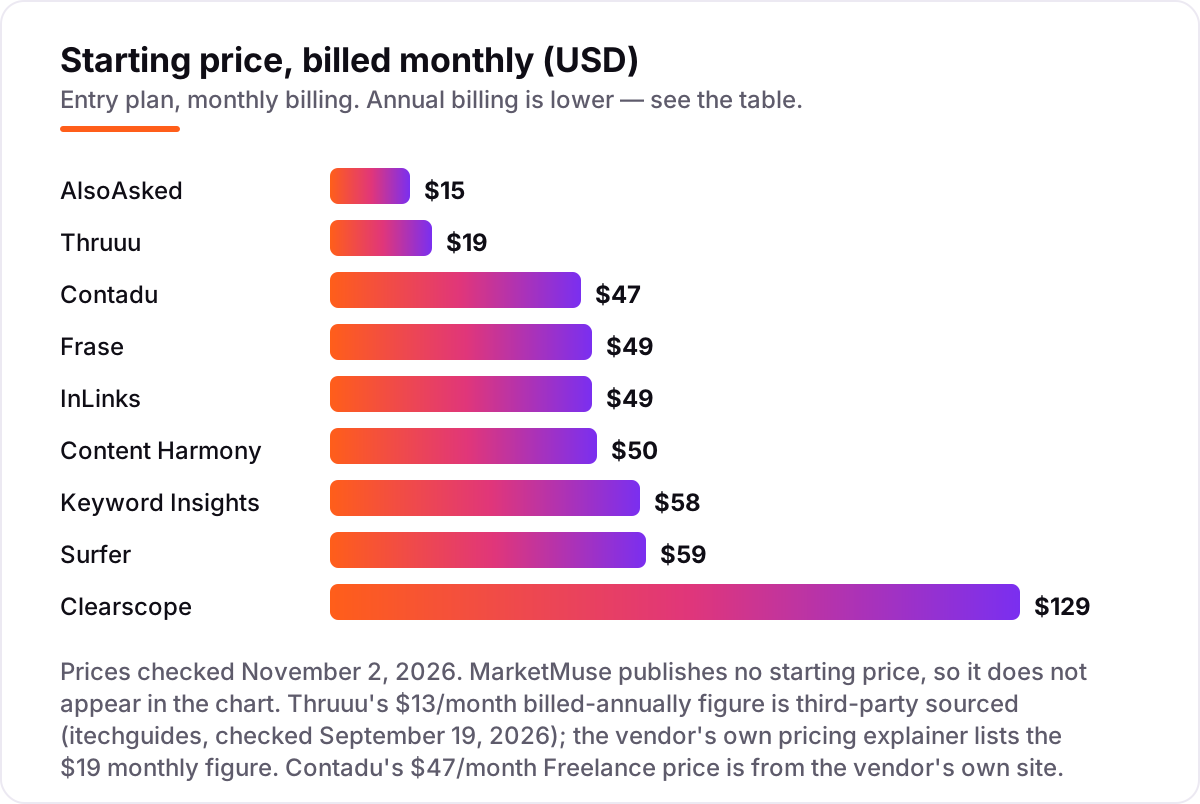
| Questions and internal links | AlsoAsked or InLinks | AlsoAsked from $15/month; InLinks from $49/month |
How to choose: a short decision path
- Start from your keyword list, not the tool. If you already have thousands of keywords to organise, buy a dedicated clusterer first. If you are starting from one seed topic, an optimizer with a topical map is enough.
- Check how the clusters are built. SERP-overlap clustering reflects what Google ranks together; similarity clustering reflects what the words look like. Ask the vendor which one it uses before you pay.
- Count the unit you pay for. Some tools charge per keyword, some per credit, some per brief and some per workflow. Run your real monthly volume through the plan before comparing headline prices.
- Decide who writes. If writers work in the tool, the editor and the grade matter more than the map view. If writers work elsewhere, the brief export and the map matter more.
- Test with your own data. Every tool in this list has a free plan, a free tier or a cheap trial. Cluster your real keyword list and check whether the groups match the pages you would actually write.
Before you publish the pages on your new map, run your headings through the free heading structure checker — it shows whether each page's structure matches the cluster it belongs to.
Mistakes to avoid
- Building the map from keyword similarity alone. Two similar keywords can need two different pages. Clusters must follow live SERP overlap, or you will merge pages Google wants separate.
- Comparing headline prices without counting the unit. A $19 plan that charges per credit can cost more than a $58 plan that charges per keyword, once your real list runs through it.
- Buying a strategy platform for a small site. MarketMuse earns its price on a library of hundreds of articles; on a 20-page site it is a sales call for a problem you do not have yet.
- Forgetting the internal links. A topical map without links between the pages is a list, not a map. Budget time for linking, or use a tool like InLinks to automate it.
- Trusting a directory price. MarketMuse still shows old $149 and $399 figures on several directories, but the vendor publishes no paid prices. Always check the vendor's own page.
How we chose
We checked each vendor's own pricing page on November 2, 2026 and recorded the starting price exactly as shown, including the annual-billing figure where the page lists one. Two prices need a note: Thruuu's $13 a month billed annually comes from a third-party review checked September 19, 2026, not from the vendor's own pricing explainer, which lists the $19 monthly figure; and Contadu's $47 Freelance price comes from the vendor's own site, where its topical map and pricing are described on its alternatives page. MarketMuse publishes no paid prices, so it is listed as a custom quote, and older third-party figures for it are stale. Ratings come from G2, except Content Harmony, Contadu, Thruuu and AlsoAsked, where we could not verify a G2 rating, so no rating is shown for those four. We ranked the tools by fit for the most common buyer — a small team building topical authority for a growing site — not by brand size. No vendor paid for a place in this list, and none of the links here are affiliate links.
What to do next
Start with the decision path above: count your keywords, check how the clusters are built, and decide whether you need a dedicated clusterer or an optimizer that also writes. Then take the free tier or cheap trial of your top pick and cluster your real keyword list — if the groups match the pages you would actually write, you have your tool. If you'd rather have this set up and read for you, request a free SEO + AI visibility audit and get a ranked fix list in 2 business days.
Rather not run the tools yourself?
Tools show you the data. SerpAstra turns it into higher rankings, more map-pack calls and citations in AI answers.
Get a free SEO + AI visibility audit→Sources we checked (16)
- Keyword Insights pricing — keywordinsights.ai/pricing (checked November 2, 2026)
- Keyword Insights on G2 — 4.9/5, 11 reviews (checked November 2, 2026)
- Surfer pricing — surferseo.com/pricing (checked November 2, 2026)
- Surfer on G2 — 4.8/5, 546 reviews (checked November 2, 2026)
- Frase pricing — frase.io/pricing (checked November 2, 2026)
- Frase on G2 — 4.8/5, 311 reviews (checked November 2, 2026)
- Clearscope pricing — clearscope.io/pricing (checked November 2, 2026)
- Clearscope on G2 — 4.9/5, 92 reviews (checked November 2, 2026)
- MarketMuse pricing — marketmuse.com/pricing (checked November 2, 2026)
- MarketMuse on G2 — 4.6/5, 216 reviews (checked November 2, 2026)
- Content Harmony pricing — contentharmony.com/pricing (checked November 2, 2026)
- Contadu pricing — contadu.com keyword clustering and topical map (checked November 2, 2026)
- InLinks pricing — inlinks.com (checked November 2, 2026)
- InLinks on G2 — 4.9/5, 5 reviews (checked November 2, 2026)
- Thruuu pricing — thruuu.com pricing explainer (checked November 2, 2026)
- AlsoAsked pricing — alsoasked.com/pricing (checked November 2, 2026)
Shamim
Founder of SerpAstra
A full-stack SEO and digital marketer who spends most days on Local SEO for dental practices, AI search visibility and lead generation.
Frequently asked questions
What is the best tool for SEO topical map in 2026?
Keyword Insights is the best dedicated tool: it clusters keywords by live SERP overlap and turns each cluster into a brief and draft from $58/month. If you also want to write and optimise in the same tool, Surfer from $49/month billed annually or Frase from $39/month billed annually are the better all-round picks.
How much does a topical map tool cost?
Between $15 and $129 a month at the entry level. AlsoAsked starts at $15, Thruuu at $19 and Contadu at $47, while Clearscope starts at $129 and MarketMuse is quote-only. The cheapest plan is not always the cheapest map: check whether the price is per keyword, per credit or per brief before comparing.
Is there a free SEO topical map tool?
There is no fully free dedicated topical map tool in this list, but several free tiers help. AlsoAsked allows 3 free searches a day, MarketMuse gives 10 free queries a month, and Thruuu includes a one-time 500-keyword cluster. Contadu's Keywords Grouper is free with no login, which is the closest free clustering option here.
What is a topical map in SEO?
A topical map is a plan of the topics and subtopics a site needs to cover to be seen as an authority on a subject. It groups related keywords into clusters, assigns each cluster to a page, and links the pages together. The best tools build the clusters from live SERP overlap, not from keyword similarity alone.
Keyword Insights vs Surfer: which is better for topical maps?
Keyword Insights is better for the map itself: it clusters up to 200,000 keywords by live SERP overlap and carries each cluster to a brief. Surfer is better for the whole workflow: its Topical Map feeds a content editor that scores drafts, plus AI visibility tracking from Standard. Use Keyword Insights to plan, Surfer to plan and write.
Do I need MarketMuse for topical authority?
Only for a large library. MarketMuse scores your whole content inventory against competitors and prioritises what to write, update or merge, which matters once you have hundreds of articles. For a small site, Keyword Insights, Surfer or Frase give you a usable map for far less money and without a sales call.
How do I build a topical map from scratch?
Start with a seed topic and gather every related keyword you can find, then cluster them by live SERP overlap so each group matches one search intent. Assign one page per cluster, draft the pillar page first, then the supporting pages, and link them together. Re-check the map quarterly as rankings and search demand change.
Free SEO and AI visibility audit
Find out what is holding your rankings back
Send us your site. Within 2 business days you get a written audit, an AI visibility check and a short fix list ranked by impact. Free, with no contract attached.
Request my free audit→Related guides
 SEO & AI Search10 Best Keyword Research Software in 2026, Compared10 best keyword research software tools compared on price, database size and ease of use, with prices checked on each vendor page on November 1, 2026.Read guide →
 SEO & AI Search8 Best AI SEO Tools for Content Optimization in 2026, Compared8 best AI SEO tools for content optimization compared on price, article limits and AI visibility. Prices checked on the vendor pricing pages, November 1, 2026.Read guide →
 SEO & AI Search10 Best Content Optimization Tools for Beginners in 2026, Compared10 best content optimization tools for beginners compared on price, free plans and live scoring, with prices checked on each vendor's page November 1, 2026.Read guide →