
Best Video Analytics Software for 2026: 9 Options Compared by Use Case
9 best video analytics software tools compared on price, engagement analytics and free plans. Prices checked on the vendor pricing page, November 2, 2026.
 Shamim Mia, Founder, SerpAstraLast verified November 2, 202612 min read
We compare pricing pages, documentation and public reviews. We never accept payment for rankings.

Key takeaways
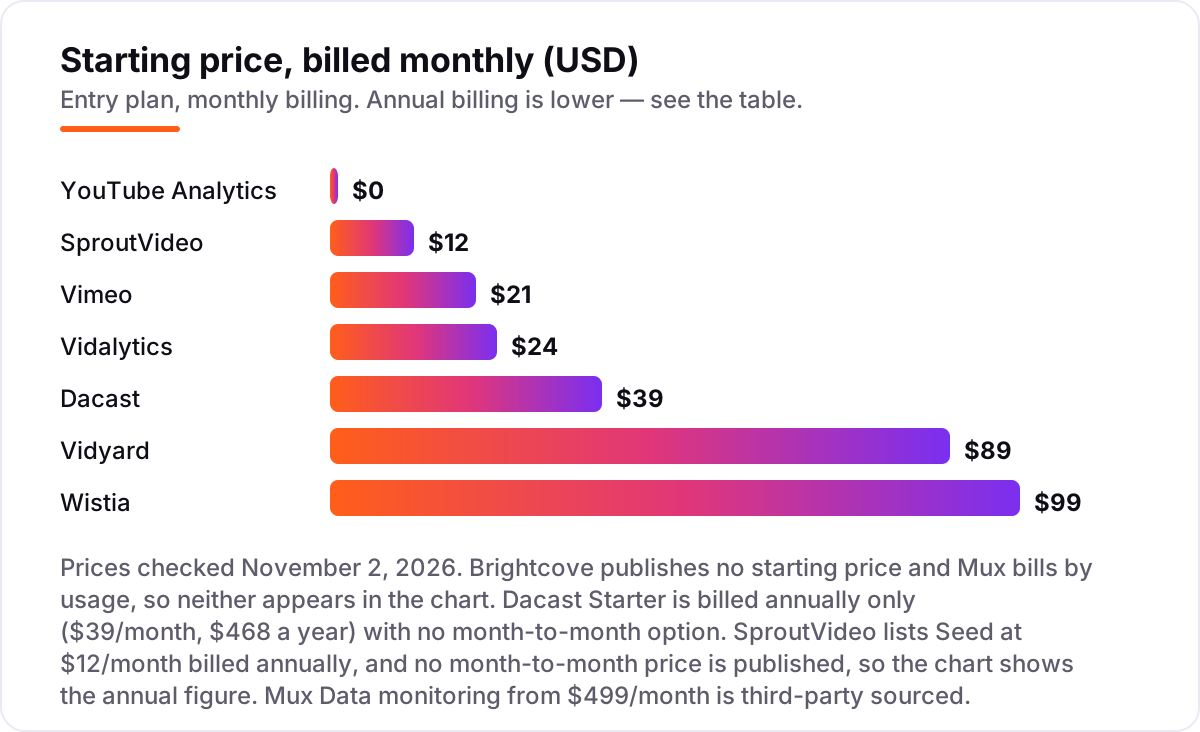
- Wistia ($99/month), Vidyard ($89/seat/month) and Vimeo ($21/seat/month) are the short list for most teams; YouTube Analytics is free and Vidalytics starts at $24/month.
- The single most important buying factor is where the analytics live: on your own site with viewer-level data, or inside someone else's platform with channel totals only.
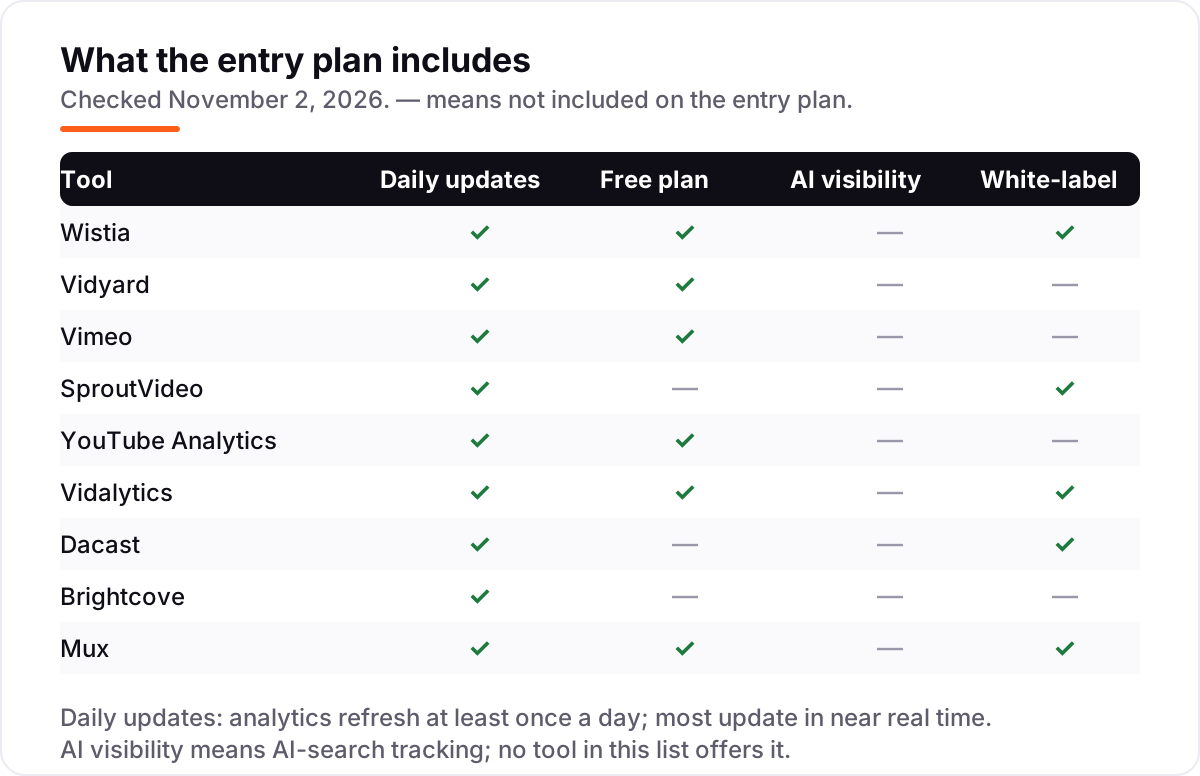
- Free plans exist — YouTube Analytics is free for every channel and Wistia, Vidyard and Vidalytics all have free tiers — but viewer-level tracking starts on paid plans.
- Every price below was checked against the vendor's published pricing on November 2, 2026. Ratings are G2, with review counts shown; YouTube Analytics has no G2 rating.
On this page
Quick comparison
| Tool | Best for | Starting price | Free plan |
|---|---|---|---|
| Wistia | B2B marketing teams that host video on their own site and want viewer-level analytics tied to leads | $99/mo | Yes (free plan) |
| Vidyard | Sales teams that send personalized video and want to see exactly who watched and for how long | $89/mo per seat | Yes (free plan) |
| Vimeo | Small teams and creators who want ad-free hosting, a clean player and solid analytics for $21 a month | $21/mo per seat | Yes (free plan) |
| SproutVideo | Small businesses and course creators who want private, white-label video hosting with strong privacy controls | $12/mo (annual) | No (30-day trial) |
| YouTube Analytics | Creators and brands whose audience lives on YouTube and who want free, first-party performance data | Free | Yes (free) |
| Vidalytics | Direct-response marketers who run video sales letters and need conversion tracking per second of video | $24/mo | Yes (free plan) |
| Dacast | Broadcasters and event organizers who stream live, charge for access and need viewer analytics | $39/mo (annual) | No (14-day trial) |
| Brightcove | Media companies and enterprises streaming at scale who need broadcast-grade analytics and monetization | Custom quote | No (free trial) |
| Mux | Product and engineering teams that stream video inside their own app and need playback-quality analytics | Usage-based | Yes (free tier) |
Make one of these tools?
We re-check this list every quarter. Send a correction, request a review, or ask about a clearly labeled sponsored spot.
Request a listingThe best video analytics software

Wistia
Best for: B2B marketing teams that host video on their own site and want viewer-level analytics tied to leads
Wistia is the marketing team's video platform: hosting, analytics and lead capture in one place, with the analytics built for proving what a video did, not just how many people pressed play. Heatmaps show second-by-second engagement per viewer, and Turnstile forms and CTAs turn that attention into contacts that sync to HubSpot, Salesforce or Marketo.
The price is the honest catch. Business costs $99 a month billed monthly, or $79 billed annually, and it is the first paid plan — the free plan caps at 25 GB of storage and one user with Wistia branding. If your videos live on your own site and need to generate pipeline, that is money well spent; if you only need view counts, Vimeo or YouTube Analytics cost far less.
What we like
- Heatmaps show exactly where each viewer stops watching, and Turnstile forms capture leads inside the player
- Business includes CTAs, A/B testing and HubSpot, Salesforce and Marketo integrations from $79/month billed annually
- Channels turn a video library into a branded, searchable hub without a separate course platform
Watch out for
- The jump from the free plan to Business is steep — $99/month billed monthly — with no mid-tier in between
- Extra users cost $25/month each on annual billing, so the bill grows with the team
- Storage and bandwidth caps mean a large library can push you toward Enterprise

Vidyard
Best for: Sales teams that send personalized video and want to see exactly who watched and for how long
Vidyard is built for one job: helping sales reps use video to start conversations and then see what happened next. Every view is tracked to the person, so a rep knows who watched a proposal video to the end and who stopped after ten seconds, and that activity feeds back into Salesforce or HubSpot on the Teams plan.
Starter costs $89 per seat a month billed monthly, or $59 billed annually, with unlimited recording and full analytics. The per-seat math is the thing to model: one rep is cheap, ten reps is $590 a month billed annually. Buy Vidyard when video is a sales motion; buy Wistia when it is a marketing one.
What we like
- Viewer-level tracking shows who watched, how much they watched and when they rewatched
- Records and shares from the browser, Gmail, Outlook, Salesforce and HubSpot without leaving the sales workflow
- Starter includes unlimited recording and full analytics for $59/seat/month billed annually
Watch out for
- Priced per seat, so a 10-person sales team pays $590/month billed annually before add-ons
- CRM and marketing-automation integrations sit on the Teams plan, which is quote-only
- Built for sales outreach first; it is not a general video library or course host

Vimeo
Best for: Small teams and creators who want ad-free hosting, a clean player and solid analytics for $21 a month
Vimeo is the long-running middle ground: ad-free hosting, a player that looks good on any site, and analytics that cover the essentials — plays, finish rate, geography and where embeds were watched. For a small team embedding videos on its own site, Starter at $13 per seat a month billed annually is the cheapest paid way into this list.
Two warnings from 2026 matter more than the price. Every self-serve plan shares a 2 TB monthly bandwidth cap, and Vimeo's plan usage policy lets it move accounts it classifies as business use to Studio at $400 a month. Check the policy against your account before you build a library on it.
What we like
- Ad-free, customizable player with privacy controls including password protection and domain restrictions
- Analytics cover plays, finishes, geography and embeds, with live streaming on Advanced
- Starter is $13 per seat a month billed annually — the cheapest paid entry in this list
Watch out for
- Every self-serve plan caps bandwidth at 2 TB a month; exceeding it twice in a year can force a move to Enterprise
- Vimeo can require accounts it classifies as business use to move to its $400/month Studio plan
- Advanced analytics and team seats need the $76/month Advanced plan

SproutVideo
Best for: Small businesses and course creators who want private, white-label video hosting with strong privacy controls
SproutVideo is the quiet value pick: private video hosting with the privacy controls bigger platforms charge extra for — domain restrictions, password protection, viewer login and white-label players — included on the $12-a-month Seed plan billed annually. Every plan also includes lead capture, calls to action and engagement analytics.
The catch is bandwidth. Seed includes 1.8 TB pooled for the year, and overages run $0.06 to $0.25 per GB, so a video that takes off can add to the bill. There is no free plan, only a 30-day trial. For coaches, course creators and small businesses that want control without a $99-a-month commitment, it is the cheapest serious option here.
What we like
- White-label hosting, domain restrictions and password protection on every plan, including Seed
- Lead capture and calls to action included from $12/month billed annually, with no per-video fees
- Engagement analytics track plays, domains, viewer location and which parts of a video were watched
Watch out for
- Bandwidth is pooled and metered — Seed includes 1.8 TB a year, with $0.06–$0.25 per GB overage
- No free plan, only a 30-day trial, and no native subscription or membership management
- Smaller ecosystem than Wistia or Vimeo, with fewer marketing integrations

YouTube Analytics
Best for: Creators and brands whose audience lives on YouTube and who want free, first-party performance data
YouTube Analytics is the free dashboard inside YouTube Studio, and it is the most accurate data any creator will ever get about their own channel — because it comes from YouTube itself. Retention graphs show where viewers leave, traffic sources show how they found you, and click-through rate shows whether the title and thumbnail did their job.
Its limits are the shape of YouTube itself. It only measures your channel, not videos embedded on your website, and it never identifies individual viewers, so there is no lead capture and no CRM sync. Use it as the free baseline for every YouTube decision, and pair it with a hosted platform when the video needs to sell something on your own site.
What we like
- Free for every channel, with the most accurate first-party data about your own videos
- Retention graphs, traffic sources, click-through rate and subscriber growth in one dashboard
- Real-time reporting shows views and watch time within hours, not days
Watch out for
- Only covers your own YouTube channel — it cannot track videos hosted on your website
- No viewer-level data, so you cannot see who watched or tie views to leads
- Competitor and search data is limited to the Research tab's broad trends

Vidalytics
Best for: Direct-response marketers who run video sales letters and need conversion tracking per second of video
Vidalytics is built for marketers who sell with video: video sales letters, webinar replays and funnel pages. Its analytics are tuned to that job — per-second heatmaps, conversion tracking that ties revenue to the exact moment a viewer bought, and benchmarks drawn from more than 178,000 videos on the platform.
Starter costs $24 a month billed monthly, or $19 billed annually, for 5 videos and 2,000 plays. The play caps are the honest limit: a funnel that works will burn through 2,000 plays, and extra plays cost $0.02 each. The G2 score is the highest here at 4.9, but it rests on just 28 reviews, so treat it as encouraging rather than proven.
What we like
- Per-second heatmaps and conversion tracking show the exact moment viewers turn into buyers
- Smart Autoplay, conditional playback and delayed CTAs are built for sales pages and funnels
- Free plan includes 3 videos and 1,000 plays a month; Starter is $19/month billed annually
Watch out for
- Only 28 G2 reviews, so the 4.9 score rests on a small base of mostly small-business users
- Starter caps at 5 videos and 2,000 plays a month — a busy funnel outgrows it fast
- Extra plays cost $0.02 each, so a viral video adds to the bill

Dacast
Best for: Broadcasters and event organizers who stream live, charge for access and need viewer analytics
Dacast is a broadcaster's platform: live streaming and on-demand hosting with a paywall, a white-label player and real-time analytics that show concurrent viewers and geography while an event is running. Starter costs $39 a month billed annually and includes 2.4 TB of bandwidth a year with 500 GB of storage.
The billing needs attention. Starter is annual-only, so $468 leaves the account up front, and G2 reviewers report being charged on auto-renewal without a reminder. The analytics are solid for live events but less deep than Wistia's for marketing funnels. Buy Dacast when the video is the event; buy a marketing platform when the video is the pitch.
What we like
- Live streaming, VOD hosting, paywall and analytics in one plan from $39/month billed annually
- Fully white-label player on every plan, with monetization through pay-per-view and subscriptions
- Real-time analytics cover concurrent viewers, geography and engagement during live events
Watch out for
- Starter is billed annually only — $468 up front — with no month-to-month option
- G2 reviewers report auto-renewal charges with no reminder, and mixed support experiences
- The dashboard and API feel dated next to Wistia and Vimeo, per G2 reviewers

Brightcove
Best for: Media companies and enterprises streaming at scale who need broadcast-grade analytics and monetization
Brightcove is the enterprise end of this list: a video platform for media companies and large organizations that stream at scale, with audience analytics, advertising and subscription monetization, DRM and global delivery. Its Audience Insights product ties viewing behavior to marketing data in a way none of the self-serve tools here attempt.
There is no published price — every plan is a custom quote, and third-party data puts most buyers at $20,000 or more a year. G2 reviewers report a three-month average implementation. Unless you run a media operation or an OTT service, Brightcove is the wrong shape; the self-serve tools above do the same analytics job for a fraction of the cost.
What we like
- Broadcast-grade analytics with audience insights across live, on-demand and OTT delivery
- Monetization built in — advertising, subscriptions and pay-per-view — with DRM and global CDN delivery
- Integrations with marketing automation and CMS platforms, plus dedicated support on enterprise plans
Watch out for
- No published pricing — every deal is a custom quote, and buyers report $20,000-plus annual contracts
- Implementation averages three months on G2, with a 28-month average payback period
- Overkill and overpriced for a small team that only needs hosting and basic analytics

Mux
Best for: Product and engineering teams that stream video inside their own app and need playback-quality analytics
Mux is infrastructure, not a marketing tool: APIs for encoding, storing and delivering video, with Mux Data watching playback quality in real time — rebuffering, errors, startup time — for every viewer and device. For a product team streaming inside its own app, that quality data is the analytics that matters, and the first 100,000 delivery minutes each month are free.
There is no flat price to compare: delivery is billed per minute watched, so the bill follows viewing volume. Deep monitoring through Mux Data is a paid plan, listed by third-party sources at $499 a month. Buy Mux when your developers own the video experience; buy Wistia or Vidyard when your marketers do.
What we like
- Mux Data tracks playback quality in real time — buffering, errors and startup time per viewer and device
- API-first: encoding, storage and delivery are all programmable, with the first 100,000 delivery minutes free each month
- Per-second billing means small libraries cost almost nothing until viewing grows
Watch out for
- No flat starting price — costs scale with minutes watched, so a popular video raises the bill
- Built for developers; non-technical teams will need engineering help to set it up
- Mux Data's paid monitoring starts at $499/month on the Media plan, per third-party pricing data
What a video analytics tool actually does
The best video analytics software answers one question your view count cannot: what did people actually do while your video played? A view count says someone pressed play. Analytics show how much they watched, where they stopped, whether they came back, and — on the marketing platforms — who they were and what they did next.
The difference between tools is where that data comes from. YouTube Analytics reports on your channel inside YouTube. Wistia, Vidyard, Vimeo and the rest report on videos embedded on your own site, where you control the player, the privacy and the follow-up. One number shows the scale of the data behind the specialist tools: Vidalytics reports that its benchmarks draw on more than 178,000 videos hosted on its platform, which have generated over $3.5 billion in revenue.
Free options first
If your audience lives on YouTube, you may not need to pay at all. YouTube Analytics is free for every channel and shows retention, traffic sources and click-through rate — the three numbers that decide whether a video grows. Wistia, Vidyard and Vidalytics also have free plans, but each caps something: videos, plays or storage.
Free tiers are honest products, not demos, but they stop at the point that matters for marketing: none of them tracks a viewer to a lead on the free plan. Start free to learn what your audience does, and pay when you need to know who they are.
Marketing and sales video: Wistia, Vidyard and Vidalytics
These three exist to turn watching into revenue. Wistia is the broadest marketing platform of the three, with heatmaps, lead capture and CRM integrations. Vidyard is narrower and sharper: it is built for sales reps sending one-to-one video, and its analytics answer who watched and for how long. Vidalytics is the most specialized of all, tuned to video sales letters and funnels, with per-second conversion tracking.
The choice between them is a choice about the funnel. If the video sits on a landing page and needs to produce leads, Wistia is the default. If a rep sends the video personally, Vidyard's per-viewer tracking earns its per-seat price. If the video is the sales pitch itself, Vidalytics' second-by-second conversion data is the reason to buy it.
General hosting with analytics: Vimeo, SproutVideo and Dacast
Most teams do not need a sales platform; they need a good player, honest analytics and a price that does not sting. Vimeo is the cheapest paid entry here at $13 per seat a month billed annually, with an ad-free player and solid analytics. SproutVideo costs about the same and adds the privacy controls — domain restrictions, viewer login, white-label players — that Vimeo charges more for. Dacast is the live-event option, with a paywall and real-time analytics for broadcasts.
The trade-offs are structural, not cosmetic. Vimeo's bandwidth cap and its business-use policy can force a move to a $400-a-month Studio plan, SproutVideo meters bandwidth with overage fees, and Dacast bills annually only. Pick the host whose limit you will never hit.
Enterprise and developer platforms: Brightcove and Mux
Brightcove and Mux sit at opposite ends of the enterprise market. Brightcove is a managed platform for media companies: broadcast-grade analytics, monetization and DRM, sold as a custom annual contract. Mux is infrastructure for developers: APIs for encoding and delivery, with Mux Data watching playback quality in real time.
Neither is a sensible buy for a small marketing team. Brightcove's entry point is a five-figure annual contract with a three-month implementation; Mux needs engineering time to set up and bills by the minute watched. Both earn their place here because, at scale, they solve problems the self-serve tools cannot — broadcast distribution on one side, playback quality inside your own app on the other.
Quick comparison: tool type by need
| Buyer | Best pick | Why |
|---|---|---|
| Solo creator on YouTube | YouTube Analytics | Free, first-party data, retention and traffic sources |
| B2B marketing team | Wistia | Heatmaps, lead capture and CRM sync from $79/month billed annually |
| Sales team sending video | Vidyard | Viewer-level tracking per person from $59/seat/month billed annually |
| Small team, tight budget | Vimeo or SproutVideo | Paid hosting from $13 or $12 a month billed annually |
| Funnels and video sales letters | Vidalytics | Per-second conversion tracking from $19/month billed annually |
| Live events and paywalls | Dacast | Streaming, paywall and real-time analytics for $39/month billed annually |
| Media company or OTT | Brightcove | Broadcast analytics and monetization, custom quote |
| Developers streaming in-app | Mux | Real-time playback-quality data, billed per minute watched |
How to choose the best video analytics software
- Decide where the video lives first. If it lives on YouTube, YouTube Analytics is the answer and it is free. If it lives on your site, you need a hosted platform.
- Decide whether you need to know who watched. Anonymous totals are free; viewer-level tracking and lead capture are the features that cost money.
- Count what the plan meters. Wistia meters storage and seats, Vidyard meters seats, Vidalytics meters plays, SproutVideo meters bandwidth, Mux meters minutes. The cheapest headline price is not the cheapest bill.
- Check the privacy and branding limits. Password protection, domain restrictions and unbranded players sit on different tiers at every vendor — confirm the tier you need before you commit.
- Try the free plan or trial with a real video. Publish one video, watch the analytics for a week, and check the numbers against what your site analytics say before you pay.
If the numbers show people finding your videos but not your site, our SEO audit service can show where the search visibility is leaking. Before you publish the landing page the video sits on, run your titles through the free SERP snippet preview tool — it shows exactly how the title and description will look in Google.
Mistakes to avoid
- Comparing monthly prices without checking billing. Annual billing is usually 15–20% lower, and Dacast has no monthly option at all.
- Ignoring what the plan meters. One platform charges per seat, another per play, another per minute watched — the same audience costs very different amounts.
- Buying a sales platform for a hosting job. Vidyard's per-seat price is wasted if nobody on your team sends one-to-one video.
- Trusting a directory price. SproutVideo's G2 profile still shows the old $10 Seed price; the vendor's own site lists $12 a month billed annually.
- Forgetting Vimeo's business-use policy. An account Vimeo classifies as business use can be moved to Studio at $400 a month — check the policy before you build a library on it.
How we chose
We checked each starting price against the vendor's published pricing on November 2, 2026 and recorded the monthly-billing figure, including the annual-billing figure where the page lists one. Ratings come from G2 pages opened the same day, except YouTube Analytics, which has no G2 product page because it is a free feature inside YouTube Studio. Two prices need a note: SproutVideo's page lists Seed at $12 a month billed annually, and no month-to-month price is published, so we show the annual figure only; and Mux Data's $499-a-month monitoring price comes from third-party pricing data, not from Mux. We ranked the tools by fit for the most common buyer — a marketing team hosting video on its own site that wants to know what viewers did — not by brand size. No vendor paid for a place in this list, and none of the links here are affiliate links.
What to do next
Start with the decision path above: decide where the video lives, whether you need to know who watched, and what the plan meters. Then take the free plan or trial of your top pick and publish one real video — a product demo, a sales video or a course lesson — and watch the analytics for a week. If the retention curve and the viewer data tell you something you can act on, you have your tool. If you'd rather have this set up and read for you, request a free SEO + AI visibility audit and get a ranked fix list in 2 business days.
Rather not run the tools yourself?
Tools show you the data. SerpAstra turns it into higher rankings, more map-pack calls and citations in AI answers.
Get a free SEO + AI visibility audit→Sources we checked (19)
- Wistia pricing — wistia.com/pricing (checked November 2, 2026)
- Wistia on G2 — 4.6/5, 1,196 reviews (checked November 2, 2026)
- Vidyard pricing — vidyard.com/pricing (checked November 2, 2026)
- Vidyard on G2 — 4.5/5, 837 reviews (checked November 2, 2026)
- Vimeo pricing — vimeo.com/pricing (checked November 2, 2026)
- Vimeo on G2 — 4.3/5, 723 reviews (checked November 2, 2026)
- SproutVideo pricing — sproutvideo.com/pricing (checked November 2, 2026)
- SproutVideo on G2 — 4.6/5, 187 reviews (checked November 2, 2026)
- YouTube Analytics — studio.youtube.com (free for every channel, checked November 2, 2026)
- Vidalytics pricing — vidalytics.com/pricing (checked November 2, 2026)
- Vidalytics on G2 — 4.9/5, 28 reviews (checked November 2, 2026)
- Dacast pricing — dacast.com/pricing (checked November 2, 2026)
- Dacast on G2 — 4.3/5, 30 reviews (checked November 2, 2026)
- Brightcove — brightcove.com (no published pricing; custom quotes only, checked November 2, 2026)
- Brightcove on G2 — 4.1/5, 54 reviews (checked November 2, 2026)
- Mux pricing — mux.com/pricing (checked November 2, 2026)
- Mux on G2 — 4.4/5, 20 reviews (checked November 2, 2026)
- Vimeo plan usage policy and Studio pricing — sproutvideo.com/vimeo-alternative (checked November 2, 2026)
- Vimeo pricing 2026 — brault.app (verified on the vimeo.com pricing page, October 29, 2026)
Shamim
Founder of SerpAstra
A full-stack SEO and digital marketer who spends most days on Local SEO for dental practices, AI search visibility and lead generation.
Frequently asked questions
What is the best video analytics software in 2026?
Wistia is the best pick for most marketing teams: viewer-level heatmaps, lead capture and CRM integrations from $79/month billed annually. Vidyard fits sales teams, Vimeo fits small teams on a budget, and YouTube Analytics is the free baseline for creators. The right tool depends on where your videos live, not on the brand name.
How much does video analytics software cost?
Between $0 and $99 a month at the entry level. YouTube Analytics is free, SproutVideo starts at $12 a month billed annually, Vidalytics at $24, Dacast at $39 billed annually, and Wistia at $99. Brightcove is quote-only and Mux bills per minute watched, so budget those by viewing volume rather than by seat.
Is there a free video analytics tool?
Yes. YouTube Analytics is free for every channel and covers views, watch time, retention and traffic sources. Wistia, Vidyard and Vidalytics also have free plans, but they cap videos, plays or storage. Free tools work for a single channel or a small library; viewer-level tracking and lead capture need a paid plan.
What is the difference between video analytics and YouTube Analytics?
Video analytics is the category: any tool that measures how people watch your videos. YouTube Analytics is one free member of that category, built into YouTube Studio, and it only measures your own YouTube channel. Hosted platforms like Wistia and Vidyard measure videos embedded on your website and can identify individual viewers.
Do I need Wistia or will Vimeo do?
Vimeo does the job if you need ad-free hosting, a clean player and solid analytics for $21 a month per seat. Choose Wistia when the video has to generate leads: its heatmaps, Turnstile forms and CRM integrations are built for marketing, and Vimeo does not match them. The $78-a-month gap buys pipeline data, not prettier playback.
Can video analytics track individual viewers?
Some tools can. Wistia and Vidyard track viewing to the person when the viewer is known — through a form, an email link or a CRM record — and show exactly what each person watched. YouTube Analytics never identifies individuals, and privacy laws mean you need consent before tying viewing to a named person.
What should I check before paying for video analytics software?
Four things: whether the analytics cover your own site or only one platform, whether viewer-level tracking costs extra, what counts toward the cap — videos, plays, seats or minutes — and whether the price is monthly or annual billing. All four vary widely, and the comparison table at the top of this guide shows the starting price and free plan for each tool.
Free SEO and AI visibility audit
Find out what is holding your rankings back
Send us your site. Within 2 business days you get a written audit, an AI visibility check and a short fix list ranked by impact. Free, with no contract attached.
Request my free audit→Related guides
 SEO & AI SearchBest SEO Audit Software for 2026: 10 Options Compared by Use Case10 best SEO audit software tools compared on price, crawl depth and AI visibility. Prices checked on vendor pricing pages, November 1, 2026.Read guide →
 AI SearchBest AI SEO tools in 2026: honest picks by jobBest AI SEO tools in 2026, picked by job: Semrush and Ahrefs for research, Surfer and Clearscope for content, Otterly for AI tracking, with 2026 prices.Read guide →
 SEO & AI SearchBest Local SEO Tools for 2026: 11 Picks Ranked by What You Need11 best local SEO tools with real prices checked November 1, 2026 — from $14/month trackers to quote-only enterprise platforms, sorted by what you need.Read guide →