
6 Best Website Change Monitoring Software in 2026, Compared
Compare the 6 best website change monitoring software on check limits, frequency, alerts and real yearly cost, with every price checked on vendor pricing pages.
 Shamim Mia, Founder, SerpAstraLast verified November 1, 20268 min read
We compare pricing pages, documentation and public reviews. We never accept payment for rankings.

Key takeaways
- Distill.io gives the most checks for the money: Starter is $15 a month for 50 monitors and 30,000 cloud checks, and its browser extension runs local checks without a monthly cap.
- Visualping is the easiest to set up and has a free plan for 5 pages, but hourly checks across many pages push you to Business 20K at $140 a month or $1,200 a year.
- changedetection.io is open source, and its hosted plan costs $8.99 a month for up to 5,000 URLs.
- Watching competitors and watching your own site are different jobs: ContentKing monitors your own pages for SEO breakages such as a dropped noindex or broken canonical.
On this page
Quick comparison
| Tool | Best for | Starting price | Free plan |
|---|---|---|---|
| Visualping | Marketers and small teams that want the simplest setup and clear visual alerts | Free; $14/mo | Yes (5 pages) |
| Distill.io | Researchers and power users who want many monitors and frequent checks for a low price | Free; $15/mo | Yes |
| PageCrawl | Teams that want high check volumes and AI summaries on a low annual budget | Free; $160/yr | Yes (6 pages) |
| changedetection.io | Technical users who want open-source monitoring, self-hosted or for $8.99 a month | $8.99/mo | Self-host |
| Fluxguard | Compliance, legal and enterprise teams that need full-site crawls, AI filtering and audit history | Free; $110/mo | Yes (3 sites) |
| ContentKing | SEO teams that need alerts when their own site changes in a way that hurts rankings | $139/mo (third-party) | No (trial only) |
Make one of these tools?
We re-check this list every quarter. Send a correction, request a review, or ask about a clearly labeled sponsored spot.
Request a listingThe best website change monitoring software

Visualping
Best for: Marketers and small teams that want the simplest setup and clear visual alerts
Visualping is the tool most people start with because setup takes a minute: paste a URL, draw a box around the part of the page you care about, and choose how often to check. The free plan covers 5 pages with 150 checks a month, about one check a day each. Personal 1K costs $14 a month, or $120 a year billed annually, for 1,000 checks across 10 pages at intervals down to 15 minutes.
The catch is how checks add up. Twenty pages checked every hour need about 14,400 checks a month, which means Business 20K at $140 a month or $1,200 a year. Business plans add up to 11 users and 2-minute checks, and there is a 14-day trial with no card.
What we like
- Free plan covers 5 pages with 150 checks a month
- Personal 1K is $14 a month, or $120 a year billed annually
- Business plans add up to 11 users and checks as often as every 2 minutes
- 14-day Business trial with no card on file
Watch out for
- Checks are counted per page per run, so hourly checks use the quota quickly
- Personal 1K caps you at 10 pages and a 15-minute interval
- Team features start at Business 20K, $140 a month billed monthly

Distill.io
Best for: Researchers and power users who want many monitors and frequent checks for a low price
Distill.io stretches further than any other paid plan here. Starter costs $15 a month for 50 monitors, 30,000 cloud checks and intervals down to 10 minutes; Professional at $35 a month raises that to 150 monitors, 100,000 checks and 5-minute checks. Annual billing takes 20% off. Its browser extension adds something no cloud-only tool offers: local checks are unlimited and can run every few seconds while your computer is on.
The free plan is generous on monitors, with 25 in total and 5 in the cloud, but cloud checks run only every 6 hours and email alerts stop at 30 a month. Paid plans add cloud macros that automate steps on a page before it is checked.
What we like
- Starter covers 50 monitors and 30,000 cloud checks a month for $15
- Browser extension checks are unlimited, with local intervals from 5 seconds
- Free plan includes 25 monitors, 5 of them in the cloud
- Cloud macros on paid plans automate page steps before a check
Watch out for
- Free cloud checks run no more often than every 6 hours
- Free plan allows only 30 email alerts a month and no SMS
- Annual prices are given only as a 20% discount, not as dollar figures

PageCrawl
Best for: Teams that want high check volumes and AI summaries on a low annual budget
PageCrawl is the best value for anyone who pays yearly. Standard costs $160 a year, excluding VAT, for up to 30,000 checks a month, checks as often as every 15 minutes and 500 AI summaries that describe what changed in plain words. Enterprise at $300 a year moves to 5-minute checks, 4 users, 2 workspaces and residential proxies for most bot-protected sites.
The free plan watches up to 6 pages with checks down to 60 minutes and 15 AI summaries a month, enough to test it on real competitors. The pricing page is less clear on monthly billing, so confirm the monthly figure at checkout, and note that paid plans have no self-serve trial.
What we like
- Standard covers up to 30,000 checks a month and 500 AI summaries for $160 a year
- Free plan watches up to 6 pages with 15 AI change summaries a month
- Enterprise at $300 a year adds 5-minute checks, 4 users and residential proxies for most sites
Watch out for
- Monthly prices on the pricing page are unclear, so confirm the figure at checkout
- Free plan keeps only the last 3 screenshots and has no technical support
- No self-serve free trial for paid plans

changedetection.io
Best for: Technical users who want open-source monitoring, self-hosted or for $8.99 a month
changedetection.io is the open-source option in this list, and its hosted plan is the cheapest way to watch a lot of URLs. The subscription costs $8.99 a month and includes up to 5,000 page watches, with rechecks from about every five minutes per runner. Faster checking needs extra Chrome browsers, which are sold separately.
Because the whole project is open source, a technical team can run it on its own server instead and pay only for hosting. That suits developers who want full control over filters, notifications and data. Marketers who want a polished dashboard and AI summaries will find Visualping or PageCrawl friendlier.
What we like
- Hosted plan is $8.99 a month with up to 5,000 page watches
- Fully open-source project, so you can run it on your own server
- Rechecks from about every 5 minutes per runner
Watch out for
- Faster checks need extra Chrome browsers, sold separately
- No free trial mentioned on the hosted plan
- Self-hosting means you maintain the server, updates and alerts yourself

Fluxguard
Best for: Compliance, legal and enterprise teams that need full-site crawls, AI filtering and audit history
Fluxguard is built for teams that monitor whole sites rather than a handful of pages: legal and compliance teams watching terms and disclosures, or enterprises tracking their own and partner sites. The free plan covers 3 sites and one user with visual, HTML and text comparison. Standard at $110 a month covers 25 sites and 3 users and can log in through forms to track content behind a login.
AI does more of the work higher up. Plus at $220 a month adds custom AI prompts, summaries and a regional proxy network; Premium at $550 adds AI filtering, webhooks and checks as often as every 5 minutes. Annual billing gives two months free, and paid plans start with a 7-day trial.
What we like
- Free plan covers 3 sites with visual, HTML and text change detection
- Standard tracks content behind logins through form submission
- Plus adds custom AI prompts, AI summaries and a regional proxy network
- 7-day free trial on paid plans
Watch out for
- Standard at $110 a month is the most expensive entry plan here
- Checks as often as every 5 minutes are a Premium feature at $550 a month
- Annual prices are given only as 2 months free, not as dollar figures

ContentKing
Best for: SEO teams that need alerts when their own site changes in a way that hurts rankings
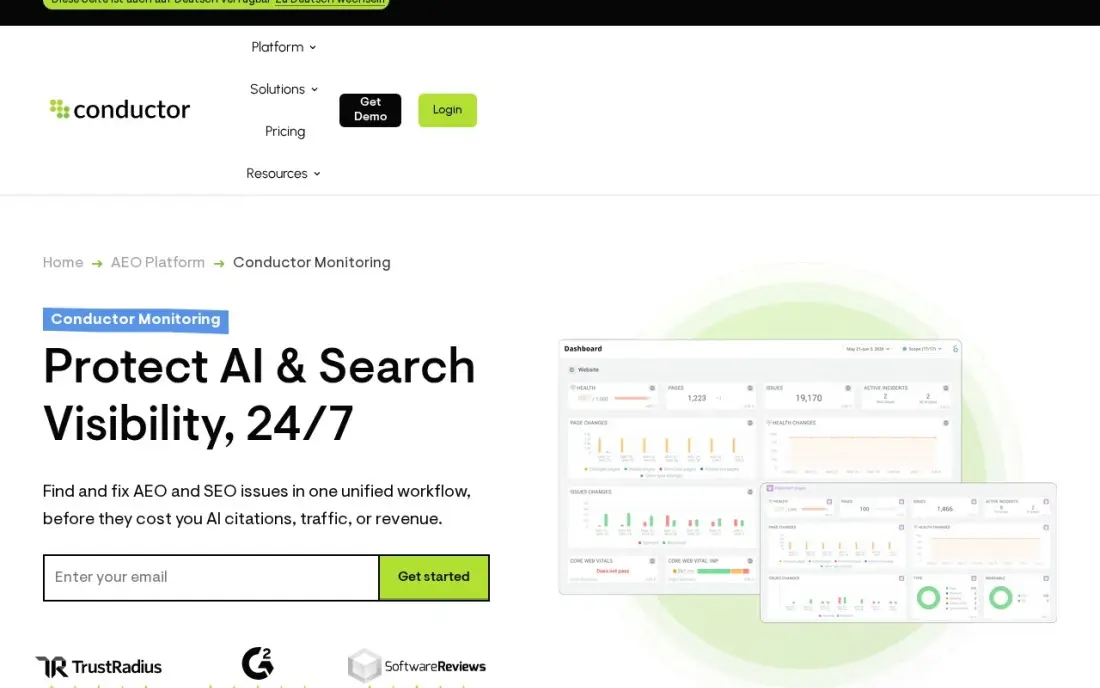
ContentKing does a different job from every other tool here: it watches your own website, not someone else's. It monitors continuously and alerts you when a change breaks something for search, such as a dropped noindex tag, a broken canonical or a sudden spike in 404 errors, and keeps up to 60 months of change history so you can trace a ranking drop to the exact deploy that caused it.
Pricing is the weak point. Since Conductor bought it there is no published standalone price, and the $139 a month Basic figure comes from third-party directories, so confirm it before budgeting. Every plan includes unlimited websites and users, and there is a free trial but no free plan.
What we like
- Monitors continuously and alerts the moment a change breaks something — a dropped noindex, a broken canonical, a spike in 404s
- Up to 60 months of change history, so any issue can be traced back to the exact change that caused it
- Unlimited websites and users on every plan, with alerts routed by sensitivity to the right channel
Watch out for
- No published standalone price since the Conductor acquisition — the $139/month figure comes from third-party directories, not the vendor
- No free plan, and pricing scales by page volume, so large sites pay more than the headline figure
- Enterprise-leaning: the sales process, not a self-serve checkout, is the way in for larger sites
The best website change monitoring software checks the pages you care about on a schedule and tells you exactly what changed: a competitor's new price, an edited policy, a restocked product or a broken tag on your own site. We compared six tools on check limits, frequency, alert channels, login support and real yearly cost, and every price below comes from the vendor's own pricing page as checked in November 2026, apart from one clearly marked third-party figure.
How to choose the best website change monitoring software
- Count your checks before you pick a plan. Most tools bill by checks, and pages times checks per day times 30 is the number that decides the tier.
- Match the interval to the job. Competitor content changes weekly; stock, tenders and ticket pages change by the minute. Pay for speed only where it matters.
- Make sure you can ignore the noise. Dates, ads and rotating banners trigger false alerts; look for element selection, filters or AI summaries that say what really changed.
- Check how alerts arrive. Email is standard; Slack, webhooks and SMS matter if the change needs action within the hour.
- Ask about logins and bot blocking. Pages behind a login or behind bot protection need macros, form submission or proxies.
- Decide whether you are watching others or yourself. Competitor monitoring and monitoring your own site for SEO breakages need different tools.
Change alerts are only useful if someone acts on them. When a competitor rewrites its titles or launches new pages, our monthly SEO service turns those signals into content and on-page work, and our SEO audit catches problems on your own site that a change alert might miss.
Website change monitoring software pricing: what you will actually pay
Take a marketer watching 20 competitor pages every hour. That is about 14,400 checks a month. On Visualping, Personal 10K tops out at 10,000 checks and 40 pages, so the job needs Business 20K at $140 a month, or $1,200 a year billed annually. On Distill.io, Starter covers 30,000 cloud checks and 50 monitors for $15 a month, or $180 a year billed monthly, less 20% on annual billing.
PageCrawl Standard covers up to 30,000 checks a month for $160 a year, excluding VAT. changedetection.io's hosted plan is $8.99 a month, or $107.88 over a year, for up to 5,000 URLs. Fluxguard's Standard plan costs $110 a month for 25 sites with 3 users, which makes sense only when you need its login tracking and compliance focus.
Drop to one check a day and the maths changes: 20 pages need about 600 checks a month, which fits Visualping Personal 5K at $35 a month, or $300 a year, with its 20-page limit, or Distill.io Starter at $15 a month, since Distill's free plan allows only 5 cloud monitors. The cheapest plan is the one sized to how often the page really changes.
Know the difference: visual monitoring vs code-level monitoring
Visual monitoring compares screenshots or the visible text of a page. Visualping, Distill.io and PageCrawl work this way by default, and it is the right choice for marketers: you see the changed price or paragraph highlighted, and you can ignore parts of the page that do not matter. It does miss changes that do not show on screen.
Code-level monitoring compares the HTML and page elements underneath. Fluxguard tracks HTML alongside visual changes, and ContentKing watches the SEO elements of your own site, such as robots directives, canonicals, titles and status codes. Those invisible changes are often the ones that cost rankings, which is why SEO teams pair a visual competitor monitor with a code-level monitor on their own site.
Quick comparison: tool type by need
| Buyer | Best pick | Why |
|---|---|---|
| Easiest setup for marketers | Visualping | Free plan for 5 pages, Personal 1K $14/month or $120/year |
| Most checks for the money | Distill.io | Starter $15/month for 50 monitors and 30,000 cloud checks |
| Lowest yearly bill with AI summaries | PageCrawl | Standard $160/year for up to 30,000 checks a month |
| Developers and self-hosters | changedetection.io | Open source, hosted plan $8.99/month for 5,000 URLs |
| Compliance and full-site tracking | Fluxguard | Login tracking and AI filtering, Standard $110/month |
| Monitoring your own site's SEO | ContentKing | Alerts on noindex, canonical and 404 changes |
Mistakes to avoid
- Checking too often. Hourly checks on pages that change monthly burn through quota and send you to a higher tier for nothing.
- Monitoring the whole page. Dates, cookie banners and ads change constantly; select the element you care about or you will learn to ignore the alerts.
- Sending every alert to one inbox. Route urgent changes to Slack or SMS and the rest to a weekly digest so the important ones get read.
- Forgetting your own site. Many teams watch competitors closely and miss the deploy that put noindex on their own key pages.
- Ignoring the terms of the site you watch. Check a site's terms before scraping it heavily, and keep check rates reasonable.
How we chose
We read each vendor's own pricing page in November 2026 and recorded plan prices, check limits, intervals and billing terms exactly as shown, including where a page gives annual savings only as a percentage. ContentKing is the exception: Conductor publishes no standalone price, so its figure comes from third-party directories and is labelled that way. We do not show review-site ratings because we did not read a complete rating page for each tool this session. No vendor paid for a place in this list, and none of the links here are affiliate links.
What to do next
List the five pages whose changes would actually change a decision, such as a competitor's pricing page or your own top landing page, and set them up on a free plan this week at a daily interval. After a month, you will know which ones deserve faster checks. If the changes point to SEO gaps on your own site, book a free SEO review.
Frequently asked questions
What is the best website change monitoring software?
Visualping is the easiest for most marketers, with a free plan for 5 pages and Personal 1K at $14 a month. Distill.io gives the most checks for the money at $15 a month for 50 monitors and 30,000 cloud checks, and PageCrawl is the best yearly deal at $160 a year.
Is there free website change monitoring software?
Yes. Visualping's free plan covers 5 pages and 150 checks a month, Distill.io's covers 25 monitors with 5 in the cloud, PageCrawl's covers up to 6 pages, and Fluxguard's covers 3 sites. changedetection.io is open source, so you can self-host it.
How often should I check a web page for changes?
Daily is enough for most competitor pricing and content pages. Hourly or faster checks suit stock, tenders and job boards, but they use quota quickly: 20 pages checked hourly need about 14,400 checks a month.
Can I monitor pages behind a login?
Some tools can. Fluxguard Standard tracks content behind logins through form submission, and Distill.io's paid plans add cloud macros that automate steps before a check. Distill's browser extension runs local checks in your own browser.
What is the difference between change monitoring and uptime monitoring?
Uptime monitoring tells you whether a site responds at all. Change monitoring compares the content of a page over time and tells you what changed, such as a new price, a removed clause or a new product.
Can website change monitoring help with SEO?
Yes, in two ways. Watching competitors' pages shows when they change titles, offers or content, and watching your own site with a tool like ContentKing catches SEO breakages, such as a dropped noindex or broken canonical, before rankings fall.
Sources we checked (6)
- Visualping — visualping.io/pricing (checked November 16, 2026)
- Distill.io — distill.io/pricing (checked November 16, 2026)
- PageCrawl — pagecrawl.io/pricing (checked November 16, 2026)
- changedetection.io — changedetection.io (checked November 16, 2026)
- Fluxguard — app.fluxguard.com/pricing (checked November 16, 2026)
- ContentKing — www.contentkingapp.com (checked November 1, 2026)
Make one of these tools?
We re-check this list every quarter. Send a correction, request a review, or ask about a clearly labeled sponsored spot.
Request a listingShamim
Founder of SerpAstra
A full-stack SEO and digital marketer who spends most days on Local SEO for dental practices, AI search visibility and lead generation.
Free SEO and AI visibility audit
Find out what is holding your rankings back
Send us your site. Within 2 business days you get a written audit, an AI visibility check and a short fix list ranked by impact. Free, with no contract attached.
Request my free audit→Related buying guides
 SEO & AI Search VisibilityBest Website Audit Software for 2026: 12 Options Compared by Use Case12 best website audit software options compared by use case, with starting prices checked November 2, 2026 — from $18/month crawlers to enterprise platforms.Read guide →
 SEO & AI Search Visibility11 Best SEO Rank Tracking Software in 2026, Compared11 best seo rank tracking software options compared on price, keyword limits, update speed and AI visibility, with prices checked November 2, 2026.Read guide →
 Marketing7 Best Competitor Ad Tracking Platforms in 2026, Compared7 best competitor ad tracking platforms compared on price, coverage and alerts, with real starting prices, free plans and the best pick for each buyer.Read guide →