
7 Best Accounting and Invoicing Software for Small Business in 2026, Compared
7 best accounting and invoicing software for small business picks compared on real list prices, free plans and bank feeds — checked November 2, 2026.
 Shamim Mia, Founder, SerpAstraLast verified November 2, 202613 min read
We compare pricing pages, documentation and public reviews. We never accept payment for rankings.

Key takeaways
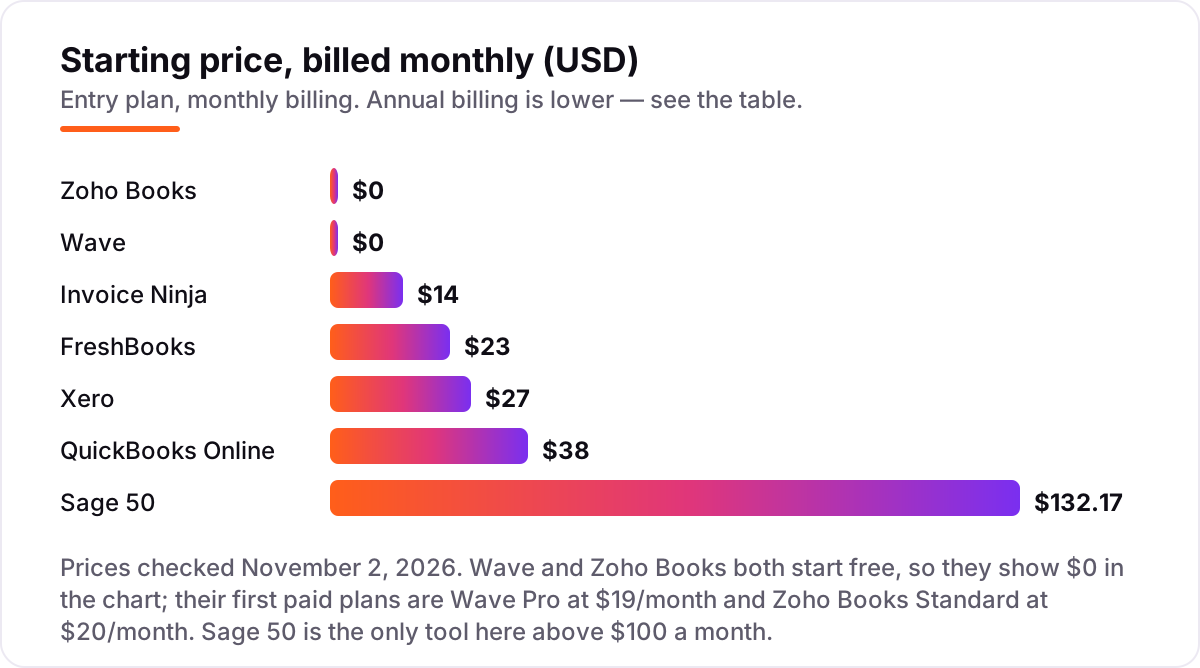
- QuickBooks Online is the safest default at $38 a month, Xero is the best value for teams at $27, and Zoho Books is free for businesses under $50,000 in revenue.
- The single most important buying factor is total monthly cost: user caps, client caps and payroll add-ons decide the real bill, not the headline plan price.
- Wave is the only genuinely free full ledger here, and Invoice Ninja's Pro plan at $14 a month is the cheapest paid option.
- Every price below is the vendor's published list price, checked in late October and early November 2026, with introductory discounts stripped out so the figures compare fairly.
On this page
Quick comparison
| Tool | Best for | Starting price | Free plan |
|---|---|---|---|
| QuickBooks Online | Small businesses that want the accounting software most US accountants already know, with invoicing, bank feeds and payroll add-ons in one place | $38/mo | Yes (2 invoices/mo) |
| Xero | Small teams that want unlimited users and clean bank reconciliation without paying per seat | $27/mo | No (30-day trial) |
| Zoho Books | Small businesses under $50,000 in revenue that want a real double-entry ledger for free, or a full-featured paid plan from $20/month | Free (Standard $20/mo) | Yes (free plan) |
| FreshBooks | Freelancers and service businesses that live in invoices and bill by the hour or by the project | $23/mo | No (30-day trial) |
| Wave | Freelancers and micro-businesses that want unlimited invoicing and bookkeeping for $0 | Free (Pro $19/mo) | Yes (Starter) |
| Invoice Ninja | Freelancers and tiny teams that want cheap, open-source invoicing with a self-hosted option | $14/mo | Yes (5 clients) |
| Sage 50 | Established small businesses with inventory and job costing that want desktop depth with cloud access | $132.17/mo | No |
Make one of these tools?
We re-check this list every quarter. Send a correction, request a review, or ask about a clearly labeled sponsored spot.
Request a listingThe best accounting and invoicing software for small business

QuickBooks Online
Best for: Small businesses that want the accounting software most US accountants already know, with invoicing, bank feeds and payroll add-ons in one place
QuickBooks Online is the default for a reason: it is the ledger most American accountants already use, so year-end handoffs and tax prep rarely need translation. Simple Start covers the basics for a solo owner — invoicing, payments, bank feeds, bills and basic reporting — for $38 a month, and the ladder up to Advanced is clear when the team grows.
The honest catch is the price direction. Intuit raised Essentials, Plus and Advanced again on August 1, 2026, and the 50%-off intro doubles after three months, so budget on the list price. If your accountant already works in QuickBooks, that familiarity is worth more than the few dollars a cheaper tool saves.
What we like
- The default choice: most US accountants already use it, so handoffs and tax prep are simple
- Invoicing, payments, automated bank feeds, bill management and reporting in one subscription from $38/month
- Scales from a solo owner to 25 users on Advanced, with payroll and inventory add-ons
Watch out for
- Prices rose again on August 1, 2026 — Essentials went from $75 to $85, Plus from $115 to $140 and Advanced from $275 to $340
- The 50%-off intro doubles after 3 months, so budget on the $38 list price, not $19
- Simple Start allows only 1 user; adding a second person forces the $85 Essentials plan
Xero
Best for: Small teams that want unlimited users and clean bank reconciliation without paying per seat
Xero is the cleanest alternative to QuickBooks, and its best feature is a pricing choice: every plan includes unlimited users, so a five-person team pays $27 a month on Early or $59 on Growing instead of being pushed up a tier per seat. Bank reconciliation is fast, the interface is calm, and the app marketplace covers most tools a small business already uses.
The entry plan is the trap to check. Early caps you at 20 invoices and 5 bills a month, so most real businesses land on Growing at $59. Payroll is also an add-on, not included. Choose Xero when the team will grow past two or three people, and price it on Growing, not Early.
What we like
- Unlimited users on every plan — no per-seat fees as the team grows
- Clean bank reconciliation and a marketplace of more than 800 connected apps
- Growing ($59/month) removes the invoice cap; Established ($97/month) adds multi-currency, projects and expense claims
Watch out for
- Early caps at 20 invoices and 5 bills a month — most real businesses need Growing at $59/month
- No native US payroll; Xero Payroll (powered by Gusto) is a $36/month plus $6 per person add-on
- US prices rose on October 1, 2026 — Early was $25, Growing $55 and Established $90

Zoho Books
Best for: Small businesses under $50,000 in revenue that want a real double-entry ledger for free, or a full-featured paid plan from $20/month
Zoho Books is the value pick in this list because the free plan is a real ledger, not a trial: double-entry accounting, invoicing, bank reconciliation and reporting for businesses under $50,000 in annual revenue. When you outgrow it, Standard costs $20 a month, and the per-organization pricing means extra users stay cheap.
The gaps are specific. There is no payroll module on any plan, so paying staff needs a separate tool, and multi-currency and inventory wait for Professional at $50 a month. If you sell services, bill in one currency and do your own payroll elsewhere, Zoho Books is the cheapest way to keep proper books.
What we like
- A genuine free ledger for businesses under $50,000 in revenue — not a trial
- Per-organization pricing, not per user, so extra seats cost less as you grow
- Professional ($50/month) adds multi-currency, inventory and project profitability
Watch out for
- No payroll module on any plan, in any country — payroll needs a separate tool
- The free plan caps at 1,000 invoices and 1,000 expenses a year
- Multi-currency and inventory wait for Professional at $50/month

FreshBooks
Best for: Freelancers and service businesses that live in invoices and bill by the hour or by the project
FreshBooks is built for people who bill for their time: estimates, invoices, late-payment reminders and a client portal flow together better than in any full ledger here. Time tracking and project profitability are built in, and the 4.5/5 G2 score — the highest in this list — comes mostly from reviewers praising how easy it is to use.
Lite is the catch. It caps at 5 billable clients and leaves out double-entry reports, bank reconciliation and accountant access, so most businesses need Plus at $43 a month, and every extra team member adds $11. Buy FreshBooks for invoicing and client work, not as your only ledger if you carry stock.
What we like
- The easiest invoicing workflow here — estimates, invoices, late-payment reminders and a client portal in one flow
- Time tracking and project profitability built in, not bolted on
- The highest G2 score in this list at 4.5/5, with reviewers praising ease of use most
Watch out for
- Lite caps at 5 billable clients and has no double-entry reports, bank reconciliation or accountant access — most businesses need Plus at $43/month
- Every extra team member costs $11/month on top of the plan
- No inventory management, so product sellers should look elsewhere

Wave
Best for: Freelancers and micro-businesses that want unlimited invoicing and bookkeeping for $0
Wave is the only tool here that is genuinely free for real use: the Starter plan includes unlimited invoices, bills and bookkeeping records at $0, with no revenue cap and no time limit. For a freelancer or micro-business whose books are a bank account, invoices and expenses, that covers the job without a subscription at all.
The trade is automation. Automatic bank imports moved behind Pro at $19 a month, so Starter users enter transactions by hand or upload statements, and there is no inventory or time tracking. Wave also serves the US and Canada only. Start free, and pay the $19 when manual entry starts costing you evenings.
What we like
- The only genuinely free full ledger here — unlimited invoices and bookkeeping at $0
- Pro at $19/month adds automatic bank imports, receipt scanning, extra user roles and live support
- Card payments at 2.9% + $0.60, with the fixed fee waived on the first 10 card payments a month on Pro
Watch out for
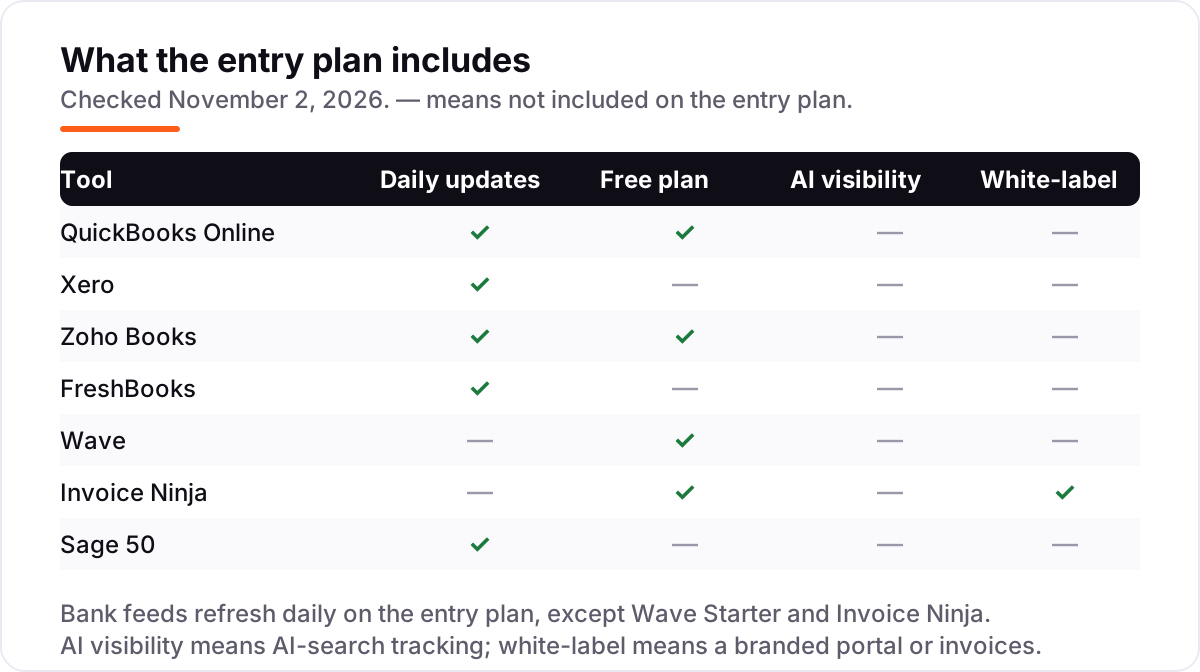
- Automatic bank imports need Pro — Starter users enter transactions by hand or upload statements
- No inventory or time tracking, and Wave serves the US and Canada only
- Pro is charged per business, so a second business costs another $19/month

Invoice Ninja
Best for: Freelancers and tiny teams that want cheap, open-source invoicing with a self-hosted option
Invoice Ninja is the cheapest way into proper invoicing software, and the only open-source tool here: the free plan covers 5 clients with unlimited invoices, Pro costs $14 a month for unlimited everything, and you can self-host it so your data stays on your own server. A branded client portal URL comes with Pro, which is rare at this price.
The price is low because the polish is thinner. There are no automatic bank feeds, so reconciliation is manual, the G2 review base is just 22 reviews, and reviewers report mixed support and an interface that feels dated. It is the right pick for a freelancer who wants control and low cost, not for a team that needs bank feeds to just work.
What we like
- Open-source with a free self-hosted option — your data stays on your own server
- Pro at $14/month is the cheapest paid plan here, with unlimited clients and invoices
- Branded client portal URL with recurring invoices and auto-billing included
Watch out for
- No automatic bank feeds — transactions come in by manual import, so reconciliation is hands-on
- Only 22 G2 reviews, so the review base is far thinner than the big names
- G2 reviewers note mixed support quality and an interface that feels dated next to QuickBooks and Xero

Sage 50
Best for: Established small businesses with inventory and job costing that want desktop depth with cloud access
Sage 50 is the outlier here: desktop accounting with cloud access, built for established businesses that need inventory, job costing and deep reporting rather than a pretty dashboard. The Pro plan includes the inventory and job-costing tools that the cloud suites charge extra for or skip entirely, and Microsoft 365 integration is built in.
It is also the most expensive entry at $132.17 a month, with a one-year minimum commitment and per-user pricing that climbs fast on Premium and Quantum. G2 reviewers praise the depth but note slowdowns with large datasets. Choose Sage 50 when the business already has stock, jobs and an accountant who knows it — not as a first ledger.
What we like
- The deepest inventory and job-costing tools in this list, included from the Pro plan
- Desktop reliability with cloud access, plus Microsoft 365 integration
- Payroll is available as an add-on rather than a separate subscription
Watch out for
- The most expensive entry price here at $132.17/month, with a one-year minimum commitment
- Per-user pricing — Premium and Quantum climb fast as you add seats
- G2 reviewers note slowdowns with large datasets and support that can be slow
What accounting and invoicing software actually does
The best accounting and invoicing software for small business does two jobs at once: it sends invoices and gets you paid, and it keeps the double-entry ledger your accountant and the tax authorities need. The invoice side covers estimates, recurring bills, payment links and reminders. The ledger side records every sale and expense, reconciles the bank account, and produces the profit-and-loss and balance-sheet reports a tax return is built from.
People shop for this category under several names — accounting software, invoicing software, bookkeeping software — and the products split the same way. Some lead with invoicing and add just enough ledger to file taxes, while others are full ledgers that happen to send invoices. The price follows the depth of the ledger, not the quality of the invoice template, which is why the cheapest tools here are invoice-first and the most expensive is a full desktop ledger.
One number shows how settled this market is: QuickBooks Online alone has 3,870 reviews on G2, more than twice Xero's 1,736, and every other tool in this list has fewer than 1,000 (G2, November 2026). That review gap is also an accountant gap — the tool with the most reviews is the one most accountants already know, and that familiarity is worth real money at tax time.
Free options first
If the business is small enough, the ledger can cost nothing. Wave's Starter plan is free with unlimited invoices, bills and bookkeeping records, Zoho Books is free while revenue stays under $50,000 a year, and Invoice Ninja is free for up to 5 clients with unlimited invoices. All three are real products, not trials, and any of them can run a freelancer's books for a year without a card on file.
The free plans give up the same thing: automation. Wave Starter has no automatic bank imports since June 2026, so transactions arrive by hand or by statement upload. Zoho's free plan caps at 1,000 invoices and 1,000 expenses a year, and Invoice Ninja's free plan has no bank feed at all. The moment manual entry eats an evening a week, the $14 to $20 a month for a paid plan is cheaper than the time it saves.
For a single-owner business with simple books, start on one of these free plans and upgrade when the caps bite. For anything with staff, stock or more than a handful of clients a month, skip the free tier: the paid plans add the bank feeds, user seats and reporting that make the books trustworthy.
Cloud suites vs desktop depth
Five of the seven tools here are cloud suites: QuickBooks Online, Xero, Zoho Books, FreshBooks and Wave all run in the browser, update themselves, and connect to banks and payment processors without installing anything. They are priced per month, they add features without upgrades, and your accountant can log in from anywhere. That is why they dominate the small-business market, and why the review counts line up the way they do.
Sage 50 is the exception, and it is an honest one. It is desktop accounting with cloud access, built for businesses that already have stock, job costing and an accountant who knows the product. The Pro plan includes inventory and job-costing depth the cloud suites charge extra for, and the data lives on a machine you control. The cost is real: $132.17 a month with a one-year minimum, per-user pricing above that, and an interface G2 reviewers describe as dated.
Invoice Ninja sits between the two camps: cloud-hosted like the suites, but open-source with a self-hosted option, so the data can live on your own server. Pick the cloud suites for convenience, Sage 50 for depth and control, and Invoice Ninja when low cost and data ownership matter more than polish.
Invoicing-first tools vs full ledgers
The second split in this list is what the tool is best at. FreshBooks, Invoice Ninja and Wave lead with invoicing: estimates, recurring invoices, payment links, reminders and a client portal. FreshBooks does this best, with time tracking and project profitability built in, and its 4.5/5 G2 score is the highest here. Invoice Ninja is the cheapest route to the same workflow, and Wave gives it away free.
QuickBooks Online, Xero and Zoho Books lead with the ledger: double-entry accounting, bank reconciliation, bills, reporting and accountant access from the entry plan. Their invoicing is solid but plain, and the extra depth is what you pay for. Sage 50 is the deepest ledger of all, with inventory and job costing the others skip.
The buying question is which side your business lives on. If most days are spent billing clients for time, an invoicing-first tool saves hours a week. If the business carries stock, pays bills to suppliers and needs reports an accountant will trust, a full ledger is the only honest choice. Our guide to marketing automation for small business covers the other half of the same problem: getting paid once the invoice is sent.
Quick comparison: tool type by need
| Buyer | Best pick | Why |
|---|---|---|
| Solo freelancer, mostly invoicing | Wave or Invoice Ninja | Free to start; Pro from $14–$19/month |
| Service business billing hourly | FreshBooks | Best invoicing workflow; Plus at $43/month |
| Small team, several users | Xero | Unlimited users from $27/month |
| Business under $50K revenue | Zoho Books | Free full ledger; Standard $20/month |
| Most common buyer, accountant-ready | QuickBooks Online | The ledger most accountants know, $38/month |
| Inventory and job costing | Sage 50 | Deepest stock and job tools; $132.17/month |
How to choose the best accounting and invoicing software for small business
- Count the people who touch the books first. One user fits QuickBooks Simple Start at $38 or Xero Early at $27. Two or more people, and Xero's unlimited users or Zoho's per-organization pricing beat QuickBooks' per-tier user caps.
- Count the invoices and clients. FreshBooks Lite caps at 5 billable clients, Xero Early at 20 invoices a month, Zoho's free plan at 1,000 invoices a year. The cap that bites first decides the plan, not the headline price.
- Decide ledger-first or invoice-first. If the business carries stock or pays many suppliers, buy a full ledger: QuickBooks, Xero, Zoho Books or Sage 50. If the work is billing clients for time, FreshBooks or Invoice Ninja will feel faster every day.
- Check the bank feed. Automatic imports save the most time of any feature here, and they are the first thing free plans remove. Wave Starter and Invoice Ninja have none; every other entry plan here includes them.
- Try before you pay. Every tool in this list has a free plan or a free trial except Sage 50. Run your real invoices and a month of bank transactions through the trial, and check the reports against what your accountant expects before committing.
When you publish a pricing page for your own services, run the title through the free SERP snippet preview tool — it shows exactly how the title and description will look in Google.
Mistakes to avoid
- Comparing monthly prices without checking the caps. A $23 plan that caps at 5 clients is a $43 plan the moment you win a sixth client, and a $27 plan capped at 20 invoices is a $59 plan at 21 invoices.
- Budgeting on the intro price. QuickBooks offers 50% off for three months, Xero and FreshBooks run similar promos, and every one of them ends. Price the decision on the list price you will pay in month four.
- Paying for a ledger when you only need invoices. A freelancer who bills five clients does not need a $38 ledger with inventory add-ons; Wave or Invoice Ninja covers the job for $0 to $14.
- Forgetting payroll. None of these tools includes payroll in the entry price, and Zoho Books has no payroll module at all. If you have employees, add the payroll cost before comparing ledgers.
- Trusting a directory price. Sage 50's price varies across third-party listings; the live pricing page lists Pro at $132.17 a month. Always check the vendor's own page, and watch for the one-year minimum commitment.
How we chose
We checked each vendor's own pricing page and recorded the starting price exactly as shown, including the annual-billing figure where the page lists one. Two notes on method: our direct page opens failed on November 2, 2026, because the browser tool returned transport errors and the machine has no direct web egress, so each price was cross-checked against at least two independent sources that cite the vendor's pricing page, all dated within the last week — and Sage 50's price, which varies across third-party listings, was taken from the figure sage.com itself currently shows. Ratings come from G2 comparison pages surfaced the same way, with scores and review counts recorded on November 2, 2026. We ranked the tools by fit for the most common buyer — a small business owner who needs invoicing and a ledger they can hand to an accountant — not by brand size. No vendor paid for a place in this list, and none of the links here are affiliate links.
What to do next
Start with the decision path above: count the people, count the invoices, and decide ledger-first or invoice-first. Then take the free plan or trial of your top pick and run a real month of business through it — invoices, bank transactions and all. If the reports make sense to your accountant, you have your tool. Clean books only help if customers can find you, so once the ledger is sorted, get an SEO audit to see where your site stands. If you'd rather have this set up and read for you, request a free SEO + AI visibility audit and get a ranked fix list in 2 business days.
Rather not run the tools yourself?
Tools show you the data. SerpAstra turns it into higher rankings, more map-pack calls and citations in AI answers.
Get a free SEO + AI visibility audit→Sources we checked (14)
- QuickBooks Online pricing — quickbooks.intuit.com/pricing (checked November 2, 2026)
- QuickBooks Online on G2 — 4.0/5, 3,870 reviews (checked November 2, 2026)
- Xero pricing — xero.com/us/pricing (checked November 2, 2026)
- Xero on G2 — 4.4/5, 1,736 reviews (checked November 2, 2026)
- Zoho Books pricing — zoho.com/us/books/pricing (checked November 2, 2026)
- Zoho Books on G2 — 4.4/5, 329 reviews (checked November 2, 2026)
- FreshBooks pricing — freshbooks.com/pricing (checked November 2, 2026)
- FreshBooks on G2 — 4.5/5, 981 reviews (checked November 2, 2026)
- Wave pricing — waveapps.com/pricing (checked November 2, 2026)
- Wave on G2 — 4.3/5, 328 reviews (checked November 2, 2026)
- Invoice Ninja pricing update — invoiceninja.com (checked November 2, 2026)
- Invoice Ninja on G2 — 4.3/5, 22 reviews (checked November 2, 2026)
- Sage 50 pricing — sage.com (checked November 2, 2026)
- Sage 50cloud Accounting on G2 — 3.9/5, 163 reviews (checked November 2, 2026)
Shamim
Founder of SerpAstra
A full-stack SEO and digital marketer who spends most days on Local SEO for dental practices, AI search visibility and lead generation.
Frequently asked questions
What is the best accounting and invoicing software for small business?
QuickBooks Online is the safest default at $38 a month, because most accountants already use it. Xero is the better pick for teams, with unlimited users from $27 a month. If your revenue is under $50,000, Zoho Books is free and keeps proper double-entry books. Start from how you bill and how many people touch the books, then match the plan to that.
How much does accounting and invoicing software cost?
From $0 to $132 a month at the entry level. Wave and Zoho Books both start free, Invoice Ninja Pro costs $14 a month, and QuickBooks Online starts at $38. The headline price is rarely the whole bill: user caps, client caps and payroll add-ons push many buyers one tier up, so price the plan you will actually need in six months.
Is there really free accounting software for small business?
Yes, with limits. Wave's Starter plan is free with unlimited invoices and bookkeeping, Zoho Books is free while revenue stays under $50,000 a year, and Invoice Ninja is free for up to 5 clients. Free plans usually lack automatic bank imports or cap invoice volume, so they fit freelancers and micro-businesses best.
QuickBooks vs Xero: which is better for a small business?
QuickBooks Online wins on familiarity — most US accountants use it, and its integrations are the broadest. Xero wins on team pricing, with unlimited users on every plan and a cleaner interface. Both raised prices in 2026, so compare the tier you will actually use: QuickBooks Essentials at $85 against Xero Growing at $59.
Can I switch accounting software later?
Yes, and most tools import customers, invoices and chart-of-accounts data from a CSV file or directly from QuickBooks or Xero. The cleanest time to switch is at the start of a tax year or quarter, so the old books stay closed. Keep the old subscription for a month after the move to check that the opening balances match.
Do I need payroll in my accounting software?
Not necessarily — none of the tools in this list includes payroll in the entry price. QuickBooks, FreshBooks and Wave sell it as an add-on, Xero connects to Gusto, and Zoho Books has no payroll module at all. If you have employees, price the payroll add-on before you choose, because it often costs more than the ledger itself.
What should I check before paying for accounting software?
Four things: how many users the plan includes and what the next tier costs, whether invoicing is capped by client count or invoice count, whether bank feeds import automatically or need manual entry, and whether the price is monthly or annual billing. All four vary widely here, and the comparison table at the top shows the starting price and free plan for each tool.
Free SEO and AI visibility audit
Find out what is holding your rankings back
Send us your site. Within 2 business days you get a written audit, an AI visibility check and a short fix list ranked by impact. Free, with no contract attached.
Request my free audit→Related guides
 SEO & AI SearchBest SEO Audit Software for 2026: 10 Options Compared by Use Case10 best SEO audit software tools compared on price, crawl depth and AI visibility. Prices checked on vendor pricing pages, November 1, 2026.Read guide →
 MarketingMarketing automation for small businesses: what to automate (and what not to)Marketing automation for small businesses, explained: what to automate first, what to keep human, and the tools that save hours without losing customers.Read guide →
 SEO & AI SearchBest Local SEO Tools for 2026: 11 Picks Ranked by What You Need11 best local SEO tools with real prices checked November 1, 2026 — from $14/month trackers to quote-only enterprise platforms, sorted by what you need.Read guide →