
10 Best Accounting Software for Small Business with Inventory in 2026, Compared
10 best accounting software for small business with inventory, compared on price, stock depth and free plans. Prices checked November 2, 2026.
 Shamim Mia, Founder, SerpAstraLast verified November 2, 202612 min read
We compare pricing pages, documentation and public reviews. We never accept payment for rankings.

Key takeaways
- QuickBooks Online starts at $38/month, Xero at $27/month and Zoho Books is free — but real inventory costs more, from Plus at $140/month or Zoho Professional at $50/month.
- The single most important buying factor is where inventory lives: inside the ledger, as basic tracking, or in a separate system like Cin7 that syncs to your books.
- Free plans exist — Zoho Books is free under $50,000 of revenue and Wave Starter is free — but neither tracks stock properly without a paid tier or an add-on.
- Every price below was checked on November 2, 2026. Ratings are G2, with review counts shown.
On this page
Quick comparison
| Tool | Best for | Starting price | Free plan |
|---|---|---|---|
| QuickBooks Online | US small businesses that sell physical products and want inventory inside the ledger | $38/mo | Yes (limited) |
| Xero | Small product businesses that want clean books, unlimited users and basic stock tracking | $27/mo | No (30-day trial) |
| Zoho Books | Small businesses already using Zoho apps that want inventory without paying QuickBooks prices | Free | Yes (under $50K) |
| FreshBooks | Service-led sellers with a small product line who bill clients and track time | $23/mo | No (30-day trial) |
| Wave | Freelancers and micro-businesses that want free books and track stock by hand | Free | Yes (Starter) |
| Kashoo | Solo owners who want one simple plan with everything included and no tier decisions | $30/mo | No (14-day trial) |
| AccountEdge | Mac-based retailers and wholesalers that want deep desktop inventory without the cloud | $20/mo | No (30-day trial) |
| Odoo Accounting | Growing businesses that want accounting and inventory in one modular system they can extend | $31.10/user/mo | Yes (one app free) |
| Sage 50 | Established US businesses that want desktop accounting with serialized inventory and job costing | $132.17/mo | No (trial) |
| Cin7 Core | Multichannel sellers outgrowing basic tools who need orders, warehouses and purchasing in one place | $349/mo | No (14-day trial) |
Make one of these tools?
We re-check this list every quarter. Send a correction, request a review, or ask about a clearly labeled sponsored spot.
Request a listingThe best accounting software with inventory

QuickBooks Online
Best for: US small businesses that sell physical products and want inventory inside the ledger
QuickBooks Online is the default choice for a US product business because inventory lives inside the ledger from the Plus plan: stock quantities, cost of goods sold, purchase orders and FIFO costing update as you buy and sell, and the same subscription handles invoicing, expenses and payroll add-ons. Your accountant almost certainly already knows it, which keeps year-end work cheap.
The catch is the price jump. Simple Start costs $38 a month but has no inventory at all, so the real starting price for a stock business is Plus at $140 a month, and the per-plan user caps push growing teams up a tier. If you sell physical products and want one system, start with Plus; if you only invoice services, Simple Start is enough.
What we like
- Plus includes FIFO inventory costing, purchase orders and stock tracking in the same ledger
- The largest accountant network of any tool here, so year-end work is easy to hand over
- Built-in US payroll as an add-on, plus multi-currency from Essentials
Watch out for
- Inventory only arrives on Plus at $140/month, so the $38 entry plan is useless for a stock business
- User caps of 1, 3, 5 or 25 per plan push growing teams up a tier
- G2 reviewers cite frequent price increases, with Plus up from $90 to $140 during 2026
Xero
Best for: Small product businesses that want clean books, unlimited users and basic stock tracking
Xero is the cleanest set of books in this list for the money. Every plan includes unlimited users, so a small team never pays per seat, and basic inventory tracking is included from the $27 Early plan: up to 4,000 items with automatic cost of goods sold. For a business with a short product list, that is often all the stock control it needs.
The ceiling is real, though. Costing is average cost only, there is no multi-warehouse stock, and the deeper Inventory Plus add-on costs $39 a month on top of Growing or Established. Choose Xero when your catalogue is small and your team is wide; choose QuickBooks Plus when the warehouse is the business.
What we like
- Unlimited users on every plan, so the whole team works in the books at no extra seat cost
- Basic inventory tracking on all plans, including Early, with automatic cost of goods sold
- More than 1,000 integrations, including Shopify, Stripe and most inventory apps
Watch out for
- Inventory is basic only, up to 4,000 items with average costing and no multi-warehouse stock
- Deeper stock control needs the Inventory Plus add-on at $39/month on Growing or Established
- The $27 Early plan caps invoices at 20 and bills at 5 a month

Zoho Books
Best for: Small businesses already using Zoho apps that want inventory without paying QuickBooks prices
Zoho Books is the cheapest route to real inventory in this list. The free plan is a genuine double-entry ledger for businesses under $50,000 of annual revenue, and Professional at $50 a month adds inventory quantity tracking, sales orders, purchase orders and multi-currency. If you already run Zoho CRM, the connection is native and free.
The tiers gate features firmly. Standard at $20 a month has no inventory at all, and multi-location stock waits for Elite at $150 a month or the separate Zoho Inventory product. There is also no payroll in any plan. Buy Zoho when the budget is tight and the catalogue is simple; budget for Elite if you run more than one location.
What we like
- Free plan covers real double-entry accounting while annual revenue stays under $50,000
- Professional at $50/month adds inventory quantity tracking, sales and purchase orders
- Extra users cost only $3/month each, and Zoho CRM and Zoho Inventory connect natively
Watch out for
- Inventory only starts on Professional at $50/month; Standard at $20 has none
- Advanced inventory and multi-location stock need Elite at $150/month or Zoho Inventory
- No payroll module in any plan; payroll is a separate Zoho product

FreshBooks
Best for: Service-led sellers with a small product line who bill clients and track time
FreshBooks is built for people who bill clients, and it shows: invoicing is the easiest in this list, time tracking is on every plan, and the $23 Lite plan covers a solo operator well. Stock counts fall automatically when an invoiced item is sold, which is enough tracking for a service business with a small product line on the side.
It is not a stock system, though. There are no purchase orders, no warehouses and no reorder alerts, and the billable-client caps mean the price rises with your client list rather than your sales. Pick FreshBooks when services pay the bills and products are a sideline; pick a ledger with real inventory when products pay the bills.
What we like
- The easiest invoicing in this list, with time tracking on every plan including Lite
- Stock counts fall automatically when invoiced items are sold
- Highest G2 score in this list at 4.5/5, with reviewers praising ease of use and support
Watch out for
- Inventory is basic stock tracking for invoiced items only, with no purchase orders or warehouses
- Lite caps billable clients at 5 and Plus at 50, so client count drives the price
- Extra team members cost $11/month each on every plan

Wave
Best for: Freelancers and micro-businesses that want free books and track stock by hand
Wave is the best free starting point in this list. The Starter plan costs nothing and still gives you unlimited invoices, estimates, bills and real double-entry bookkeeping, with no cap on transactions. For a freelancer or a micro-business selling a handful of items, that is a working set of books for $0, and Pro at $19 a month adds the automation when manual entry gets old.
The honest limit is inventory: there is none. Stock value is handled with manual journal entries, which works for a few items and falls apart for a real catalogue. Wave is the right pick while the business is small and mostly services; the day stock matters, move to Zoho Professional or QuickBooks Plus.
What we like
- Starter is genuinely free with unlimited invoices, estimates, bills and bookkeeping records
- Pro at $19/month adds automatic bank imports, receipt scanning and multi-user access
- Payroll with tax filing in all 50 US states is available as an add-on
Watch out for
- No native inventory tracking at all; stock value is handled with manual journal entries
- Automatic bank imports, receipt scanning and extra users need Pro at $19/month
- US and Canada only, and support is a weak point even on paid plans, per reviewers

Kashoo
Best for: Solo owners who want one simple plan with everything included and no tier decisions
Kashoo sells one plan at $30 a month with everything included and unlimited users, so there is nothing to upgrade into and no tier to outgrow. It sorts transactions automatically, captures receipts and keeps invoicing, expenses and bank reconciliation in one simple screen. It also holds the highest G2 score in this list at 4.6/5, from a small but happy review base.
The trade-off is depth. What Kashoo calls inventory is really item tracking for invoicing, not stock-level control, and G2 reviewers flag exactly that gap. There are also few integrations and no Shopify or WooCommerce connection. Choose Kashoo for simple books done well; choose a deeper tool the moment stock accuracy matters.
What we like
- One plan at $30/month with every feature included and unlimited users
- Highest G2 score in this list at 4.6/5, with reviewers praising simplicity and support
- Automatic transaction sorting and receipt capture with no setup decisions to make
Watch out for
- Inventory is item tracking for invoicing, not stock-level control, per G2 reviewers
- No free plan, and the mobile app is limited with slow startup and no Face ID login
- Few integrations; no Shopify or WooCommerce connection and payroll is Canada-only

AccountEdge
Best for: Mac-based retailers and wholesalers that want deep desktop inventory without the cloud
AccountEdge is the inventory bargain in this list, and it is desktop software. For $20 a month, Pro gives you multi-location stock, item assemblies, serial numbers, price levels and job costing — depth that costs $140 a month at QuickBooks. Ten company files are included, and the Network Edition at $30 a month covers two users.
Desktop is also the catch. Bank feeds cost $5 a month extra, there is no real cloud access unless you pay $50 per user a month for hosting, and reviewers give it the lowest G2 score here at 3.9/5, citing weak support and slow handling of large datasets. Pick it for deep stock control on a budget; skip it if the team works remotely.
What we like
- Deep inventory for the price: multi-location stock, item assemblies, serial numbers and price levels
- Ten company files included, with job costing, time billing and payroll in the same program
- Flat $20/month with no per-user charges on Pro; Network Edition is $30/month for 2 users
Watch out for
- Desktop software, so bank feeds cost $5/month extra and there is no real cloud access
- Lowest G2 score in this list at 3.9/5, with reviewers citing weak support and slow large datasets
- Payroll is a $20/month add-on and hosted access costs $50/user/month

Odoo Accounting
Best for: Growing businesses that want accounting and inventory in one modular system they can extend
Odoo takes a different route: the Accounting app alone is free with unlimited users, multi-currency and online payments, and you add the Inventory, Sales and Purchase apps to the same system when the business needs them. Standard at $31.10 per user a month covers every app, so the ceiling is high — this is a system that can grow from a ledger into a small ERP.
Per-user pricing is the thing to count. A five-person team pays about $155 a month on Standard, and setup takes real effort, so this is not a same-day switch. Choose Odoo when you plan to grow into inventory, sales and purchasing in one system; choose a simpler ledger when accounting is all you need.
What we like
- The Accounting app alone is free with unlimited users, multi-currency and online payments
- Add the Inventory, Sales and Purchase apps to the same system as the business grows
- Standard at $31.10/user/month covers every app, not just accounting
Watch out for
- Priced per user, so a 5-person team pays about $155/month before adding the Inventory app
- Setup and inventory configuration take real effort; this is not a same-day tool
- Support scores trail the simpler tools, and the free Community edition needs self-hosting

Sage 50
Best for: Established US businesses that want desktop accounting with serialized inventory and job costing
Sage 50 is the desktop workhorse in this list. Pro Accounting starts at $132.17 a month for one user and covers invoicing, inventory management and automated bank reconciliation, while Premium adds serialized inventory tracking and job costing and Quantum stretches to 40 users with role-based permissions. It is the pick for an established business that already runs on Sage.
It is also the most expensive way in here, with a one-year minimum commitment, and the interface feels dated next to the cloud tools — reviewers call it reliable but old-fashioned. Costs climb with users and add-ons, and payroll is priced separately. Buy Sage 50 for depth and stability, not for price or looks.
What we like
- Serialized inventory tracking, job costing and advanced budgeting from Premium up
- Handles up to 40 users on Quantum, with role-based permissions and workflow management
- Microsoft 365 integration and deep reporting that accountants trust
Watch out for
- Most expensive entry here at $132.17/month, with a one-year minimum commitment
- Desktop software with a dated interface; reviewers call it reliable but old-fashioned
- Costs climb fast with users and add-ons, and payroll is priced separately

Cin7 Core
Best for: Multichannel sellers outgrowing basic tools who need orders, warehouses and purchasing in one place
Cin7 Core is the only tool here that starts from inventory rather than accounting. Standard at $349 a month covers multi-location stock, purchasing, sales orders, warehousing and demand forecasting, with more than 700 integrations including Shopify, Amazon, eBay and QuickBooks Online. For a multichannel seller, it is the system that stops overselling.
It is not a ledger, though — you still pay for QuickBooks Online or Xero alongside it — and $349 a month only makes sense once order volume justifies it. Setup takes time and extra users and volume cost more. Choose Cin7 when stock runs the business; choose a ledger with inventory when the books run the business.
What we like
- Multi-location stock, purchasing, sales orders, warehousing and demand forecasting in one system
- More than 700 integrations, including Shopify, Amazon, eBay and QuickBooks Online
- Built-in EDI and batch and expiry tracking for wholesale and food businesses
Watch out for
- Starts at $349/month, roughly twelve times the price of Zoho Books Standard
- It is inventory and order management, not a ledger, so you still pay for QuickBooks or Xero
- Setup and onboarding take time, and extra users, volume and integrations cost more
What accounting software with inventory actually does
The best accounting software for small business with inventory does two jobs at once: it keeps the books — invoices, expenses, bank reconciliation and tax reports — and it knows what is on the shelves. When a sale is recorded, stock falls, cost of goods sold rises and the profit on that sale is real, not guessed at month end. That link is the whole point: without it, a business can look profitable while its warehouse quietly fills with dead stock.
The tools in this list split three ways. Some keep full inventory inside the ledger, with purchase orders, multiple locations and cost methods. Some track stock lightly — enough for a small product line, not a warehouse. And one, Cin7 Core, is inventory first and connects to a ledger rather than replacing it. The scale of the biggest tools is large: QuickBooks Online alone holds a 4.0/5 rating across 3,871 G2 reviews, the largest review base in this list, which is one reason accountants default to it.
Full inventory inside the ledger
This is the group for businesses where stock is the business. QuickBooks Online Plus, Zoho Books Professional, Sage 50, AccountEdge and Odoo all keep inventory in the same system as the books, so a purchase order, a sale and a stock count all hit the same ledger. The differences are price and depth: AccountEdge gives you multi-location stock and serial numbers for $20 a month on a desktop, while Sage 50 charges $132.17 a month for similar depth with job costing. QuickBooks Plus at $140 a month is the middle ground most US accountants know, and Odoo is the modular route — start free on accounting alone, then add the Inventory app when the business needs it.
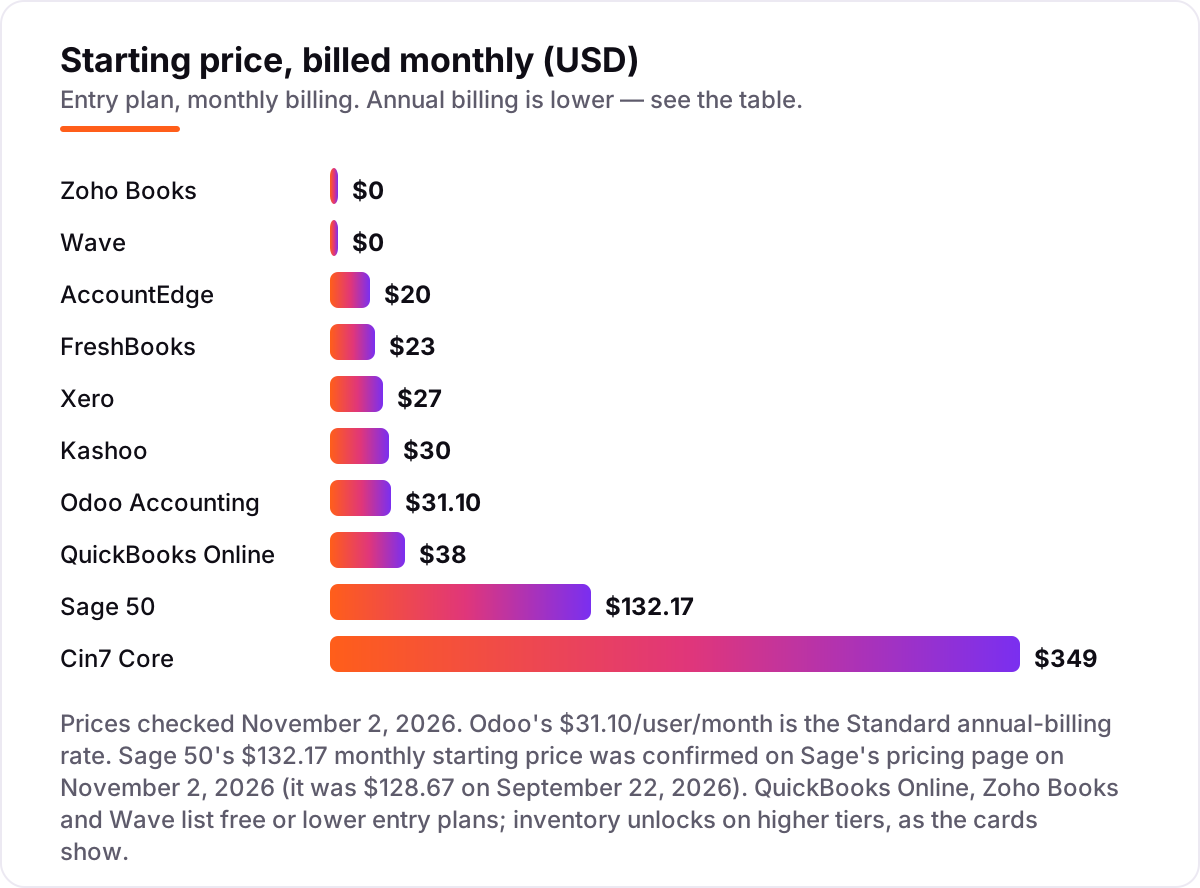
The trap in this group is the entry price. Every tool here advertises a cheaper plan that has no inventory at all, so the number on the pricing page is not the number a stock business pays. Zoho Books is free until revenue passes $50,000, then inventory starts at Professional for $50 a month; QuickBooks Simple Start is $38 a month, then inventory starts at Plus for $140. Always price the tier that actually includes stock.
Basic inventory, low price
This group fits service businesses with a product line on the side. Xero tracks up to 4,000 items with automatic cost of goods sold from its $27 Early plan, FreshBooks drops stock counts when invoiced items sell, and Kashoo tracks items for invoicing. Wave is the honest outlier: it has no inventory tracking at all, and stock value is handled with manual journal entries.
The deal here is simple: you pay $0 to $30 a month and you get books that know roughly what you hold. That is enough while the catalogue is short and the stockroom is one shelf. The moment you need purchase orders, reorder points or a second location, this group stops working and you move up to the full-inventory group above. Do not try to stretch basic tracking into a warehouse job — the spreadsheet you build to cover the gap will cost more in time than the upgrade.
When inventory is the whole business
Cin7 Core is the only tool here that starts from inventory rather than accounting. It runs multi-location stock, purchasing, sales orders, warehousing and demand forecasting in one system, with more than 700 integrations covering Shopify, Amazon, eBay and QuickBooks Online. It is built for multichannel sellers who oversell when stock lives in three places at once.
The price is the filter: $349 a month, plus a ledger subscription on top, since Cin7 is not accounting software. That only makes sense once order volume justifies it — roughly, when manual stock checks are already costing a day a week. Below that volume, inventory inside QuickBooks Plus or Zoho Professional does the same job for a third of the price.
Quick comparison: tool type by need
| Buyer | Best pick | Why |
|---|---|---|
| US product seller, one system | QuickBooks Online Plus | FIFO inventory in the ledger from $140/month, accountants know it |
| Small catalogue, wide team | Xero | Basic inventory to 4,000 items, unlimited users, $27/month |
| Tightest budget with real inventory | Zoho Books Professional | Inventory, orders and multi-currency from $50/month, free below $50K revenue |
| Services first, products on the side | FreshBooks or Wave | Easy invoicing from $23/month, or free books with manual stock tracking |
| Deep stock control, desktop, low price | AccountEdge or Sage 50 | Multi-location and serial numbers from $20/month, or job costing at $132.17/month |
| Multichannel seller, several warehouses | Cin7 Core | Orders, purchasing and forecasting across 700+ integrations, $349/month |
How to choose the best accounting software for small business with inventory
- Count your SKUs first. Under 100 items, basic tracking on Xero or Zoho Professional is enough. Over 1,000, or across more than one location, you need full inventory — QuickBooks Plus, Sage 50, AccountEdge or Cin7.
- Price the inventory tier, not the entry tier. The advertised starting price almost never includes stock. QuickBooks is $140 a month for inventory, not $38; Zoho is $50, not free. Budget from the tier you will actually use.
- Decide ledger or add-on. If one system should hold books and stock, pick from the full-inventory group. If you already love your ledger, keep it and add Cin7 or Xero Inventory Plus for the stock side.
- Check the cost method. FIFO, average cost and serial tracking change your margins on paper. QuickBooks Plus uses FIFO, Xero uses average cost, and AccountEdge and Sage 50 track serial numbers — match the method to how you actually buy and sell.
- Try before you pay. Every tool in this list has a free plan or a free trial. Import your real item list, run a week of sales through it and check the stock value against a physical count before committing.
Before you publish new product pages for the items you stock, run your titles through the free SERP snippet preview tool — it shows exactly how the title and description will look in Google.
Mistakes to avoid
- Budgeting from the entry price. The $38 QuickBooks plan and the free Zoho plan have no inventory. The real cost is the inventory tier, and it is two to four times higher.
- Buying a warehouse tool for a shelf of stock. Cin7 Core at $349 a month is wasted on 50 SKUs in one room. Basic tracking plus a monthly count does the same job for $27 to $50.
- Ignoring what counts as inventory. Some tools count items, others count locations, and Cin7 counts sales orders. Tracking one product in three warehouses can cost three times what the headline price suggests.
- Forgetting the accountant. If your accountant works only in QuickBooks or Xero, a cheaper ledger costs more at year end. Ask them before you buy, not after.
- Skipping the stock count. No software fixes a wrong opening balance. Count the shelves, reconcile the value, then switch — and if the books are clean but sales are flat, the problem is visibility, not accounting, which is what our SEO audit service is for.
How we chose
We checked each vendor's own pricing page on November 2, 2026 and recorded the starting price exactly as shown, including the annual-billing figure where the page lists one. Ratings come from G2, with review counts shown. Two figures carry a caveat: Sage 50's $132.17 monthly starting price was confirmed on the vendor page on November 2, 2026 (it was $128.67 on September 22, 2026), and Odoo's $31.10 is its Standard annual-billing rate per user. We ranked the tools by fit for the most common buyer — a small business that sells physical products and needs its books to know what is on the shelves — not by brand size. No vendor paid for a place in this list, and none of the links here are affiliate links.
What to do next
Start with the decision path above: count your SKUs, price the inventory tier, and decide whether the ledger or an add-on should hold the stock. Then take the free plan or trial of your top pick, import your real item list and run a week of sales through it. If the stock value matches a physical count and the reports make sense, you have your tool. If you'd rather have this set up and read for you, request a free SEO + AI visibility audit and get a ranked fix list in 2 business days.
Rather not run the tools yourself?
Tools show you the data. SerpAstra turns it into higher rankings, more map-pack calls and citations in AI answers.
Get a free SEO + AI visibility audit→Sources we checked (20)
- QuickBooks Online pricing — quickbooks.intuit.com/pricing (checked November 2, 2026)
- QuickBooks Online on G2 — 4.0/5, 3,871 reviews (checked November 2, 2026)
- Xero pricing — xero.com/us/pricing-plans (checked November 2, 2026)
- Xero on G2 — 4.4/5, 1,736 reviews (checked November 2, 2026)
- Zoho Books pricing — zoho.com/us/books/pricing (checked November 2, 2026)
- Zoho Books on G2 — 4.4/5, 329 reviews (checked November 2, 2026)
- FreshBooks pricing — freshbooks.com/pricing (checked November 2, 2026)
- FreshBooks on G2 — 4.5/5, 981 reviews (checked November 2, 2026)
- Wave pricing — waveapps.com/pricing (checked November 2, 2026)
- Wave on G2 — 4.3/5, 328 reviews (checked November 2, 2026)
- Kashoo pricing — kashoo.com (checked November 2, 2026)
- Kashoo on G2 — 4.6/5, 55 reviews (checked November 2, 2026)
- AccountEdge pricing — accountedge.com/pricing (checked November 2, 2026)
- AccountEdge on G2 — 3.9/5, 31 reviews (checked November 2, 2026)
- Odoo pricing — odoo.com/pricing (checked November 2, 2026)
- Odoo Accounting on G2 — 4.3/5, 77 reviews (checked November 2, 2026)
- Sage 50 pricing — sage.com (checked November 2, 2026; $132.17 confirmed on the vendor page November 2, 2026; $128.67 was the September 22, 2026 price)
- Sage 50 on G2 — 3.9/5, 163 reviews (checked November 2, 2026)
- Cin7 Core pricing — cin7.com/pricing (checked November 2, 2026)
- Cin7 Core on G2 — 4.3/5, 353 reviews (checked November 2, 2026)
Shamim
Founder of SerpAstra
A full-stack SEO and digital marketer who spends most days on Local SEO for dental practices, AI search visibility and lead generation.
Frequently asked questions
What is the best accounting software for small business with inventory?
QuickBooks Online Plus is the best fit for most product sellers: real FIFO inventory, purchase orders and project tracking in one ledger at $140/month. Xero at $27/month is the better buy when the catalogue is small and the team is wide. Zoho Books Professional at $50/month is the cheapest route to proper inventory.
How much does accounting software with inventory cost?
From free to $349 a month at the entry level. Zoho Books and Wave start free, Xero starts at $27/month and FreshBooks at $23/month. Real inventory usually starts higher: QuickBooks Plus at $140/month, Zoho Professional at $50/month, and Cin7 Core at $349/month for multichannel stock control.
Is there free accounting software with inventory?
Only partly. Zoho Books is free under $50,000 of annual revenue, but inventory needs the $50/month Professional plan. Wave Starter is free but has no inventory tracking at all. Odoo's Accounting app is free on its own, though inventory needs the paid Standard plan at $31.10/user/month.
Can Xero handle inventory for a small business?
Yes, for a small catalogue. Xero tracks up to 4,000 items with automatic cost of goods sold on every plan, including Early at $27/month. It uses average costing only, with no multi-warehouse stock. Businesses that need deeper control add Inventory Plus at $39/month or move to QuickBooks Plus.
Do I need separate inventory software like Cin7 Core?
Only when stock runs the business. If you sell across Shopify, Amazon and eBay, hold stock in more than one warehouse, or need purchase orders and demand forecasting, Cin7 Core at $349/month earns its price. For a single shop with one stockroom, inventory inside QuickBooks, Zoho or Sage 50 is enough.
What is the difference between basic and full inventory tracking?
Basic tracking counts stock and records cost of goods sold when items sell — enough for a short product list. Full inventory adds purchase orders, reorder points, multiple locations, serial or batch numbers and a cost method like FIFO. The jump usually costs $50 to $140 a month, so count your SKUs before you pay for it.
Can I switch accounting software without losing my stock data?
Yes, with planning. Export your item list, quantities and costs from the old tool as a CSV, then import it into the new one and reconcile the opening stock value against a physical count. Most tools in this list import CSV items, and QuickBooks, Xero and Zoho all offer migration help or a free trial to test the import first.
Free SEO and AI visibility audit
Find out what is holding your rankings back
Send us your site. Within 2 business days you get a written audit, an AI visibility check and a short fix list ranked by impact. Free, with no contract attached.
Request my free audit→Related guides
 SEO & AI SearchBest SEO Audit Software for 2026: 10 Options Compared by Use Case10 best SEO audit software tools compared on price, crawl depth and AI visibility. Prices checked on vendor pricing pages, November 1, 2026.Read guide →
 SEO & AI SearchBest Local SEO Tools for 2026: 11 Picks Ranked by What You Need11 best local SEO tools with real prices checked November 1, 2026 — from $14/month trackers to quote-only enterprise platforms, sorted by what you need.Read guide →
 MarketingMarketing automation for small businesses: what to automate (and what not to)Marketing automation for small businesses, explained: what to automate first, what to keep human, and the tools that save hours without losing customers.Read guide →