
8 Best Accounting Software Reviews in 2026: Pricing, Features and Pros & Cons
8 best accounting software reviews compared on real 2026 prices, free plans and features — QuickBooks, Xero, Zoho Books, FreshBooks, Wave and more.
 Shamim Mia, Founder, SerpAstraLast verified November 2, 202612 min read
We compare pricing pages, documentation and public reviews. We never accept payment for rankings.

Key takeaways
- QuickBooks Online ($38/month), Xero ($27/month) and Zoho Books ($20/month) are the short list for most small businesses — QuickBooks for the widest ecosystem, Xero for unlimited users, Zoho for the lowest price.
- Wave is the only genuinely free ledger here: unlimited invoices and full double-entry books at $0, with Pro at $19 a month for automatic bank imports.
- The single most important buying factor is how the tool charges as you grow — per user, per client or per organization — because that decides your bill in year two, not the starting price.
- Prices are the vendors' published list prices as of November 2, 2026, and ratings are G2 scores with review counts shown.
On this page
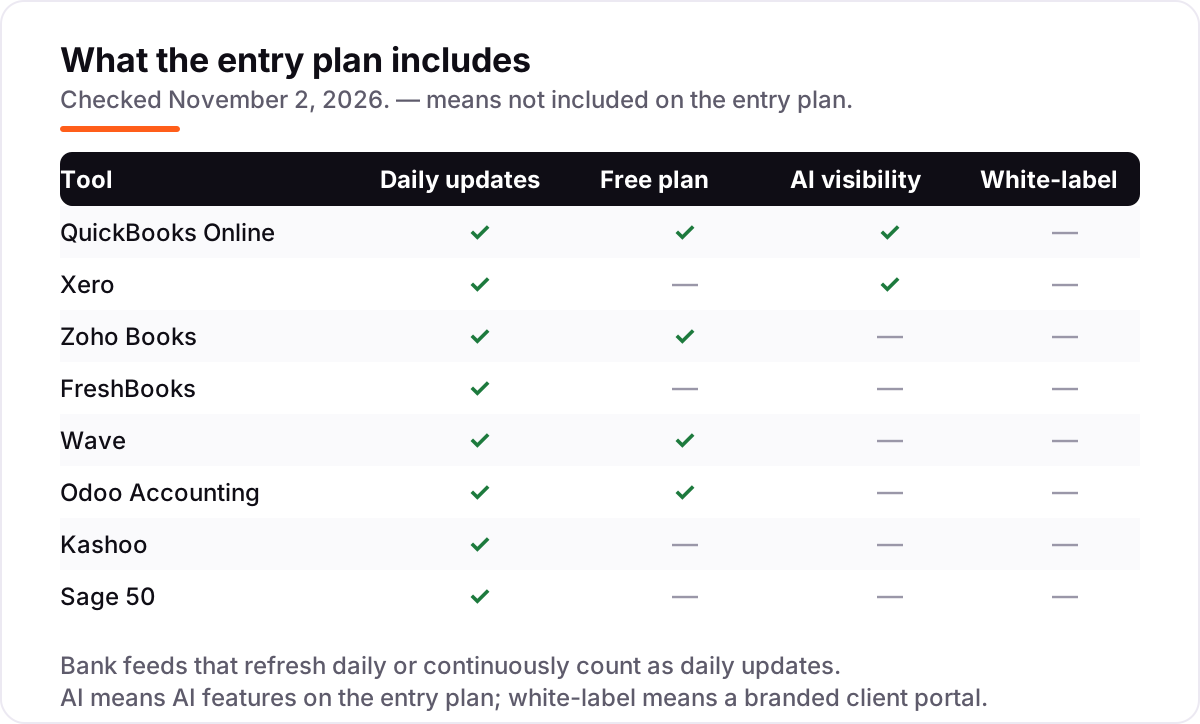
Quick comparison
| Tool | Best for | Starting price | Free plan |
|---|---|---|---|
| QuickBooks Online | Small businesses that want the accounting software most accountants already know, with the widest app and payroll ecosystem | $38/mo | Yes (Free plan) |
| Xero | Small teams that want unlimited users on every plan and clean bank reconciliation | $27/mo | No (30-day trial) |
| Zoho Books | Small businesses that want a full double-entry ledger with a genuinely free plan and low per-organization pricing | $20/mo | Yes (revenue <$50K) |
| FreshBooks | Freelancers and service businesses that live on invoicing and bill by the hour or project | $23/mo | No (30-day trial) |
| Wave | Freelancers and sole proprietors who want a real double-entry ledger for free | $19/mo | Yes (Starter free) |
| Odoo Accounting | Growing businesses that want accounting inside a wider ERP — CRM, sales, inventory and projects in one system | $38.90/user/mo | Yes (One App Free) |
| Kashoo | Small businesses that want one simple plan with every feature and unlimited users | $30/mo | No (14-day trial) |
| Sage 50 | Small businesses with an in-house bookkeeper that need job costing, serialized inventory and deep reporting | $132.17/mo | No (30-day refund) |
Make one of these tools?
We re-check this list every quarter. Send a correction, request a review, or ask about a clearly labeled sponsored spot.
Request a listingThe best accounting software

QuickBooks Online
Best for: Small businesses that want the accounting software most accountants already know, with the widest app and payroll ecosystem
QuickBooks Online is the default small-business ledger for a reason: it does the whole job — invoicing, bank feeds, bills, expenses and reports — and almost every accountant already works in it. Simple Start at $38 a month covers a solo owner who invoices and tracks expenses, with receipt capture and Intuit Intelligence automating categorization from day one.
The costs that surprise buyers are the user caps and the add-ons. A second user forces Essentials at $85, payroll is a separate subscription, and prices have risen most years — Essentials, Plus and Advanced all went up again in August 2026. Buy QuickBooks when you want the widest ecosystem and an accountant who already knows the tool; buy Xero or Zoho when per-user pricing is the problem.
What we like
- The most widely used small-business ledger, so most accountants and bookkeepers already know it
- The largest app marketplace of any tool here, covering payroll, payments, inventory and industry tools
- Intuit Intelligence automates categorization and reconciliation on every plan, including Simple Start
Watch out for
- Entry price has risen repeatedly, and Essentials, Plus and Advanced rose again in August 2026
- User caps force upgrades: a second user means Essentials at $85, and a sixth means Plus at $140
- G2 reviewers cite frequent price increases and support that can be slow to reach
Xero
Best for: Small teams that want unlimited users on every plan and clean bank reconciliation
Xero's pitch is simple: one flat price, unlimited users. Early costs $27 a month and includes bank reconciliation, Hubdoc receipt capture and core inventory for up to 4,000 items, so a three-person team pays the same as a solo owner. The interface is clean, the bank feeds are reliable, and the app marketplace covers payroll, payments and reporting add-ons.
The catch is the Early plan's limits: 20 invoices and 5 bills a month, which a working business crosses quickly, and multi-currency only arrives on Established at $97. Payroll runs through Gusto as a separate subscription. Choose Xero when several people need access and you refuse to pay per seat; choose QuickBooks when your accountant insists on it.
What we like
- Unlimited users on every plan — no per-seat fees as the team grows
- Bank reconciliation and receipt capture (Hubdoc) are included from the $27 Early plan
- A large app marketplace covers payroll, payments, inventory and reporting add-ons
Watch out for
- Early caps at 20 invoices and 5 bills a month — most working businesses need Growing at $59
- Multi-currency, projects and expense claims need Established at $97 a month
- US payroll is an add-on through Gusto ($36 a month plus $6 per person), not built in

Zoho Books
Best for: Small businesses that want a full double-entry ledger with a genuinely free plan and low per-organization pricing
Zoho Books is the value pick in this list. Standard costs $20 a month per organization — not per user — and includes 3 users, 5,000 invoices a year, bank feeds and recurring invoices. The free plan is genuinely usable for a business under $50,000 in revenue, with 1,000 invoices a year and one user plus an accountant.
The gaps are payroll, which Zoho Books does not offer on any plan, and the higher tiers: multi-currency and inventory need Professional at $50, while AI insights wait for Premium at $70. For a small business that wants a full double-entry ledger without paying for seats, Zoho is the cheapest serious option here.
What we like
- Priced per organization, not per user — 3 users included on Standard for $20 a month
- Free plan covers 1,000 invoices a year for businesses under $50K in revenue
- Bank feeds, recurring invoices and multi-currency cost less than the big two
Watch out for
- No payroll module on any plan, in any country — payroll needs a separate tool
- AI insights (Zia) and the client portal start on Premium ($70) and Professional ($50), not Standard
- Invoice caps apply per year: 5,000 on Standard, so high-volume sellers need a higher tier

FreshBooks
Best for: Freelancers and service businesses that live on invoicing and bill by the hour or project
FreshBooks is built around the invoice, and it shows: estimates, proposals, retainers and time tracking sit at the center, with double-entry books underneath from the Plus plan. Lite at $23 a month suits a freelancer with up to 5 billable clients, and every plan includes one user with a 30-day free trial.
The pricing catch is the client cap and the seat fee. Lite's 5-client limit pushes most working freelancers to Plus at $43, and each extra team member costs $11 a month. There is no inventory tracking, so product sellers should look elsewhere. Pick FreshBooks when billing clients is the business; pick QuickBooks or Zoho when the books themselves come first.
What we like
- Invoicing is the best in this list for client-facing work: estimates, proposals and retainers from Plus
- Time tracking and expense capture are included from Lite, so billable hours land on the invoice
- G2 reviewers rate its ease of use and support higher than any other tool here
Watch out for
- Lite caps at 5 billable clients and leaves out bank reconciliation and double-entry reports
- Every plan includes just 1 user — each extra team member costs $11 a month
- No inventory tracking, so product sellers need a different tool

Wave
Best for: Freelancers and sole proprietors who want a real double-entry ledger for free
Wave is the only tool here with a genuinely free ledger. Starter costs $0 and includes unlimited invoices, estimates, bills and bookkeeping records, with profit and loss, balance sheet and cash flow reports — real double-entry accounting, not a trial. It is built for freelancers and sole proprietors in the US and Canada.
The free plan's limit is automation: bank transactions must be entered by hand or uploaded as statements, since automatic imports need Pro at $19 a month. There is no inventory or time tracking, and support is limited on the free plan. Start with Wave when the budget is zero; upgrade to Pro when manual entry starts eating your week.
What we like
- Starter is free with no cap on invoices, estimates, bills or bookkeeping records
- Real double-entry accounting, not a spreadsheet — with profit and loss, balance sheet and cash flow reports
- Pro at $19 a month adds automatic bank imports, receipt scanning and multi-user access
Watch out for
- Automatic bank imports need Pro — Starter users enter transactions by hand or upload statements
- US and Canada only, and no inventory or time tracking on any plan
- G2 reviewers note support can be slow, and it is limited on the free plan

Odoo Accounting
Best for: Growing businesses that want accounting inside a wider ERP — CRM, sales, inventory and projects in one system
Odoo Accounting is unusual: the app alone is free with unlimited users under One App Free, including multi-currency, tax reports and online payments. Paying starts when you want the full suite — Standard at $38.90 a user a month billed monthly covers every Odoo app, from CRM and sales to inventory and projects.
The per-user math is the thing to watch. A five-person team pays about $195 a month billed monthly, and the first-year discount ends after 12 months, when Standard steps up to $31.10 a user billed annually. Choose Odoo when accounting is one part of a bigger system; choose a standalone ledger when it is the whole job.
What we like
- The Accounting app alone is free with unlimited users under One App Free
- One per-user price covers every Odoo app — CRM, sales, inventory, projects and HR included
- Multi-currency, tax reports and online payments are included in the free app
Watch out for
- Per-user pricing: a 5-person team on Standard pays about $195 a month billed monthly
- The first-year discount ends after 12 months, when Standard steps up to $31.10 a user billed annually
- External API access and multi-company support need Custom at $61 a user a month billed annually

Kashoo
Best for: Small businesses that want one simple plan with every feature and unlimited users
Kashoo sells one plan at $30 a month, and everything is in it: unlimited users, bank feeds, invoicing, multi-currency, project and product tracking. There are no tiers to compare and nothing held back for a higher plan, which makes the buying decision unusually simple for a small business.
The trade-offs are scope and integrations. US payroll is not offered — the payroll integration serves Canada only — and there is no inventory or time tracking. The integration list is short next to QuickBooks or Xero. Pick Kashoo when you want the simplest possible ledger with a flat price; skip it when payroll or stock is part of the job.
What we like
- One plan with every feature — no tiers to compare and nothing held back for a higher plan
- Unlimited users at $30 a month, with multi-currency included
- G2 reviewers rate its ease of use and support highly, and setup takes minutes
Watch out for
- No payroll for US businesses — the payroll integration serves Canada only
- No inventory tracking and no time tracking, so stock and billable hours need other tools
- Few integrations next to QuickBooks or Xero, and the mobile app is limited

Sage 50
Best for: Small businesses with an in-house bookkeeper that need job costing, serialized inventory and deep reporting
Sage 50 is the desktop-heritage option in this list, now sold as a cloud-connected subscription. Pro at $132.17 a month covers one user with invoicing, bill tracking, inventory, job management and automated bank reconciliation, plus unlimited support and free migration from most QuickBooks versions.
It is the most expensive starting price here, and the one-year minimum commitment makes it a decision, not a trial. Premium at $182.50 is needed for 2–5 users, and costs add up as the team grows. Choose Sage 50 when job costing and serialized inventory matter more than price; the cloud-only tools are cheaper for straightforward books.
What we like
- Job costing, serialized inventory and purchase orders that the cloud-only tools do not match
- Cloud access from any device with automatic updates and backups, plus unlimited support
- Free data migration from most QuickBooks versions, with Sage support doing the move
Watch out for
- Pro starts at $132.17 a month for one user — the highest starting price in this list
- One-year minimum commitment, and Premium ($182.50) is needed for 2–5 users
- G2 reviewers note costs add up quickly as users and features are added
These best accounting software reviews compare eight tools on the prices that actually show up on the bill — not the promotional rate, not the annual equivalent, but the monthly list price from each vendor's pricing page. The list is sorted by fit for the most common buyer, a small business owner who needs a real double-entry ledger, invoicing and bank feeds without paying for features they will never use.
How to choose: what best accounting software reviews actually tell you
- Count what the price covers. Some tools charge per user, some per client, some per organization — the same $30 buys very different access.
- Check the free plan's limits. A free ledger is only free if your invoice volume, users and bank feeds fit inside it.
- Match the tool to the work. Invoicing-first tools suit service businesses; inventory and job costing need a fuller ledger.
- Price payroll separately. Most tools here sell payroll as an add-on, so add $40 or more a month before comparing.
- Ask your accountant. The cheapest tool is expensive if your bookkeeper has to relearn it or re-enter your data.
- Try the trial on real data. Import a month of bank transactions before paying — reconciliation quality is where cheap tools show their limits.
Before you publish the pages that bring in the invoices, run your titles through the free SERP snippet preview tool — it shows exactly how the title and description will look in Google.
One more check before you commit: open the plan comparison on the vendor's pricing page and find the three limits that force an upgrade — users, invoices or clients, and transactions. Those three numbers decide what you pay in year two. A tool that looks cheap at $19 a month stops looking cheap when the second user, the 21st invoice or the 51st client pushes you to the next tier, and every tool in this list has at least one such trigger.
Finally, check what happens to your data if you leave. Every tool here exports customers, vendors and transactions, but the formats differ, and historical reports rarely survive a move intact. A tool that makes leaving easy is a tool you can trust to stay with — and the vendors that lock the export behind a higher plan are telling you something about how they keep customers.
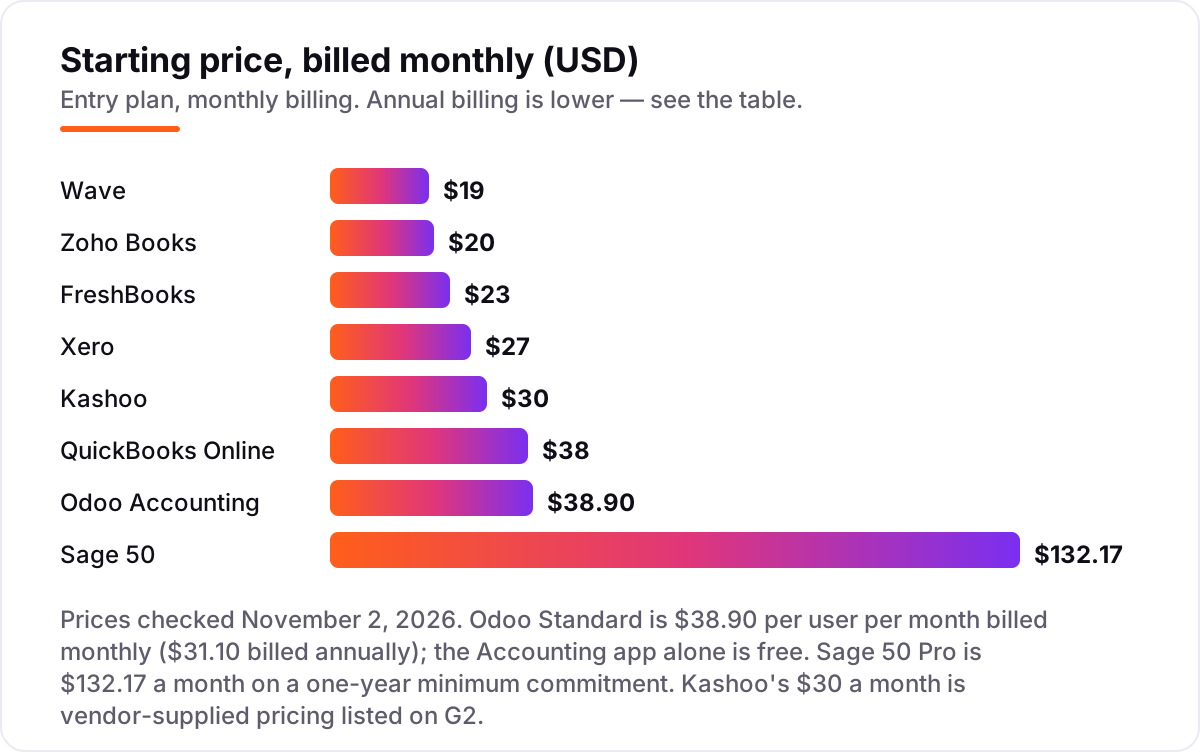
Accounting software pricing: what you will actually pay
Take a three-person service business that sends about 40 invoices a month and needs payroll for three employees. On QuickBooks Online, Essentials at $85 a month covers three users, and payroll adds a separate base fee plus a per-employee charge — so the ledger alone is $1,020 a year before payroll. On Xero, Growing at $59 a month covers unlimited users, or $708 a year, with Gusto-powered payroll at $36 a month plus $6 per person on top. Zoho Books Standard at $20 a month covers three users for $240 a year, but there is no payroll module at all — that business buys payroll elsewhere. FreshBooks Plus at $43 plus two extra seats at $11 each is $65 a month, or $780 a year, before its $40-a-month payroll add-on. The lesson is consistent: the plan price is the floor, and payroll plus payment processing usually doubles it. Budget the whole stack, not the headline.
For finance businesses weighing the whole marketing budget, our guide to the best SEO platform for finance covers the search side of the same decision. Once the ledger is sorted, the next cost that surprises owners is getting found — our monthly SEO service covers that side.
Payment processing is the other cost that hides outside the plan price. Every tool here charges card fees on top of the subscription — typically 2.9% plus $0.30 to $0.60 per transaction, with American Express higher — and those fees scale with revenue, not with the plan. A business collecting $10,000 a month by card pays roughly $290 to $350 a month in processing fees alone, which dwarfs the difference between a $20 plan and a $38 plan. Wave's Pro plan waives the fixed fee on the first 10 card transactions a month, and FreshBooks' Select plan lowers card rates, but neither removes the percentage. Compare processing rates alongside plan prices before you choose.
Free accounting software: what $0 actually gets you
Three tools in this list cost nothing to start: Wave Starter, Zoho Books Free and Odoo's Accounting app, plus QuickBooks Free for the smallest books. Wave is the most complete free ledger — unlimited invoices, bills and records with full reports — but automatic bank imports cost $19 a month. Zoho Books Free covers 1,000 invoices a year for businesses under $50,000 in revenue, which suits a side business or a first year of trading. Odoo's free app is the most capable for a business that may grow into the full suite later, since the upgrade path is already built in. QuickBooks Free is the narrowest: 2 invoices a month and one bank connection, useful for testing the interface and little else. The pattern is consistent: free plans cover the books, and the paid plans cover the automation. If you enter fewer than 50 bank transactions a month by hand without minding it, a free plan can carry you for a year or more.
Know the difference: accounting software vs bookkeeping services
Accounting software records your transactions; a bookkeeping service does the recording for you. Tools like the eight in this list give you the ledger, the bank feeds and the reports, but someone still has to categorize transactions, reconcile accounts and close the month — either you, your bookkeeper, or your accountant. Services such as Bench or Wave Advisors pair software with a human bookkeeper for a monthly fee, and they do the categorization and month-end close for you. The confusion costs money in both directions: buyers who hate bookkeeping pay for software they never open, and buyers who hire a service for a five-invoice-a-month business pay a human to do ten minutes of work. If you send fewer than a dozen invoices a month and enjoy tidy records, software alone is enough. If the books pile up for months, a service — or an accountant on QuickBooks or Xero, which both are built for — is the honest buy.
If the books are only one part of running the business, marketing automation for small business covers the rest of the stack.
The other confusion is cloud software versus desktop software. Sage 50 is the only tool here with desktop roots: it installs on a computer and syncs to the cloud, which suits businesses with an in-house bookkeeper and a fixed office. The other seven run entirely in the browser, so the books are available from any device and the vendor handles updates and backups. Desktop tools can feel faster with large files and work offline; cloud tools win on access, collaboration and automatic updates. Unless job costing or serialized inventory forces the choice, the browser tools are the simpler buy.
Quick comparison: tool type by need
| Buyer | Best pick | Why |
|---|---|---|
| Solo owner who invoices | QuickBooks Online | $38/month, the ledger most accountants already use |
| Team that hates per-seat fees | Xero | $27/month, unlimited users on every plan |
| Tightest budget, full ledger | Zoho Books | $20/month per organization, plus a real free plan |
| Freelancer who bills by the hour | FreshBooks | $23/month, invoicing and time tracking first |
| Zero budget, real books | Wave | Free Starter; Pro adds bank feeds for $19/month |
| Business that needs CRM and stock too | Odoo Accounting | Accounting free alone; full suite $38.90/user/month |
| Simplest flat price | Kashoo | $30/month, one plan, everything included |
| Job costing and inventory depth | Sage 50 | $132.17/month, desktop depth with cloud access |
How we chose
We checked each vendor's published pricing on November 2, 2026 and recorded the monthly list price exactly as shown, including the annual-billing figure where the page lists one. QuickBooks Online and Sage 50 were read directly on the vendors' own pricing pages; the other five prices are the vendors' published list prices as captured by independent checks of those pages in October 2026, and all five agree across multiple sources. Kashoo's $30 a month is vendor-supplied pricing listed on G2, since its pricing page could not be opened for a direct check. Ratings come from G2, with review counts shown. We ranked the tools by fit for the most common buyer — a small business owner who needs a real ledger, invoicing and bank feeds — not by brand size. No vendor paid for a place in this list, and none of the links here are affiliate links.
What to do next
Start with the short list: if your accountant already uses QuickBooks, start there; if several people need access, trial Xero; if the budget is tight, open Zoho Books or Wave and import a month of real bank transactions before you pay anything. Run the trial on your actual invoices and bills, not the demo data — reconciliation quality and the upgrade triggers are what decide the real cost. If you are budgeting the whole growth spend, not just the ledger, see how much SEO costs before you commit. Once your tools are in place, find out what's holding your rankings back.
Your stack only works if people find you
SerpAstra fixes what keeps your site off page one and makes it easy for AI assistants to recommend.
Get a free audit→Sources we checked (16)
- QuickBooks Online pricing — quickbooks.intuit.com/pricing (checked November 2, 2026)
- QuickBooks Online on G2 — 4.0/5, 3,870 reviews (checked November 2, 2026)
- Xero pricing — xero.com/us/pricing-plans (checked November 2, 2026)
- Xero on G2 — 4.4/5, 1,736 reviews (checked November 2, 2026)
- Zoho Books pricing — zoho.com/us/books/pricing (checked November 2, 2026)
- Zoho Books on G2 — 4.4/5, 329 reviews (checked November 2, 2026)
- FreshBooks pricing — freshbooks.com/pricing (checked November 2, 2026)
- FreshBooks on G2 — 4.5/5, 981 reviews (checked November 2, 2026)
- Wave pricing — waveapps.com/pricing (checked November 2, 2026)
- Wave on G2 — 4.3/5, 328 reviews (checked November 2, 2026)
- Odoo pricing — odoo.com/pricing (checked November 2, 2026)
- Odoo Accounting on G2 — 4.3/5, 77 reviews (checked November 2, 2026)
- Kashoo pricing — g2.com/products/kashoo-kashoo/pricing, pricing provided by Kashoo (checked November 2, 2026)
- Kashoo on G2 — 4.6/5, 55 reviews (checked November 2, 2026)
- Sage 50 pricing — sage.com/en-us/products/sage-50 (checked November 2, 2026)
- Sage 50cloud Accounting on G2 — 3.9/5, 163 reviews (checked November 2, 2026)
Shamim
Founder of SerpAstra
A full-stack SEO and digital marketer who spends most days on Local SEO for dental practices, AI search visibility and lead generation.
Frequently asked questions
What is the best accounting software for a small business in 2026?
QuickBooks Online is the best fit for most small businesses: the widest app ecosystem and the ledger most accountants already know, from $38 a month. Xero wins when several people need access, since every plan includes unlimited users. Zoho Books is the value pick at $20 a month, and Wave is free.
How much does accounting software cost?
Between $0 and $132.17 a month at the entry level. Wave's Starter plan is free, Zoho Books starts at $20, FreshBooks at $23, Xero at $27 and QuickBooks Online at $38. Sage 50 starts at $132.17. Payroll and payment processing sit on top of the plan price, so budget the whole stack, not the headline.
Is there really free accounting software?
Yes, with limits. Wave's Starter plan is free with unlimited invoices and full double-entry books, and Zoho Books is free for businesses under $50,000 in revenue. QuickBooks Free covers 2 invoices a month, and Odoo's Accounting app alone is free. Free plans work until bank feeds, users or invoice volume outgrow them.
What is the difference between QuickBooks Online and Xero?
QuickBooks charges per user and per tier, while Xero charges one flat price with unlimited users on every plan. QuickBooks has the larger app marketplace and the most accountants using it. Xero is cheaper for teams: Growing at $59 a month covers everyone, while QuickBooks Plus at $140 covers five users.
Do I still need a bookkeeper if I buy accounting software?
Usually, yes — software records transactions, but someone still has to categorize them, reconcile the accounts and close the month. That can be you, a part-time bookkeeper, or a service such as Bench or Wave Advisors that pairs software with a human. The software saves time; it does not remove the monthly close.
Can I switch accounting software later?
Yes, but plan the move. Export your chart of accounts, customers, vendors and open invoices first, and switch at a month or year end so the opening balances are clean. QuickBooks, Xero and Zoho Books all import from each other, and Sage 50 offers free migration from most QuickBooks versions with support doing the move.
Which accounting software is best for freelancers?
FreshBooks is the best fit for freelancers who bill by the hour or project: invoicing, estimates and time tracking from $23 a month. Wave is the free alternative, with unlimited invoices at $0 and Pro at $19 a month for automatic bank imports. Both suit solo operators; agencies with staff should look at Xero or Zoho Books.
Free SEO and AI visibility audit
Find out what is holding your rankings back
Send us your site. Within 2 business days you get a written audit, an AI visibility check and a short fix list ranked by impact. Free, with no contract attached.
Request my free audit→Related guides
 SEO & AI Search8 Best SEO Platforms for Finance in 2026 (Pros, Cons and Pricing)8 best SEO platform for finance options compared on price, YMYL content tools, branch tracking and AI visibility. All prices checked November 1, 2026.Read guide →
 Pricing & HiringHow much does SEO cost in 2026? A plain pricing guideWhat SEO costs in 2026, how hourly, project, retainer and performance pricing work, what drives the price up or down, and how to set a budget that holds up.Read guide →
 MarketingMarketing automation for small businesses: what to automate (and what not to)Marketing automation for small businesses, explained: what to automate first, what to keep human, and the tools that save hours without losing customers.Read guide →