
10 Best AI Automation Tools for Small Business in 2026, Compared
10 best ai automation tools for small business compared on price, free plans and AI features, with real starting prices checked November 2, 2026.
 Shamim Mia, Founder, SerpAstraLast verified November 2, 202611 min read
We compare pricing pages, documentation and public reviews. We never accept payment for rankings.

Key takeaways
- Zapier is the safest first pick for most small businesses: the biggest app library and the easiest builder, from $19.99/month billed annually. Make is the value pick at $9/month for 10,000 credits.
- The billing unit decides the real cost: Zapier charges per task, Make and Pabbly per credit or task, n8n per whole workflow run, and HubSpot and ActiveCampaign by seats and contacts.
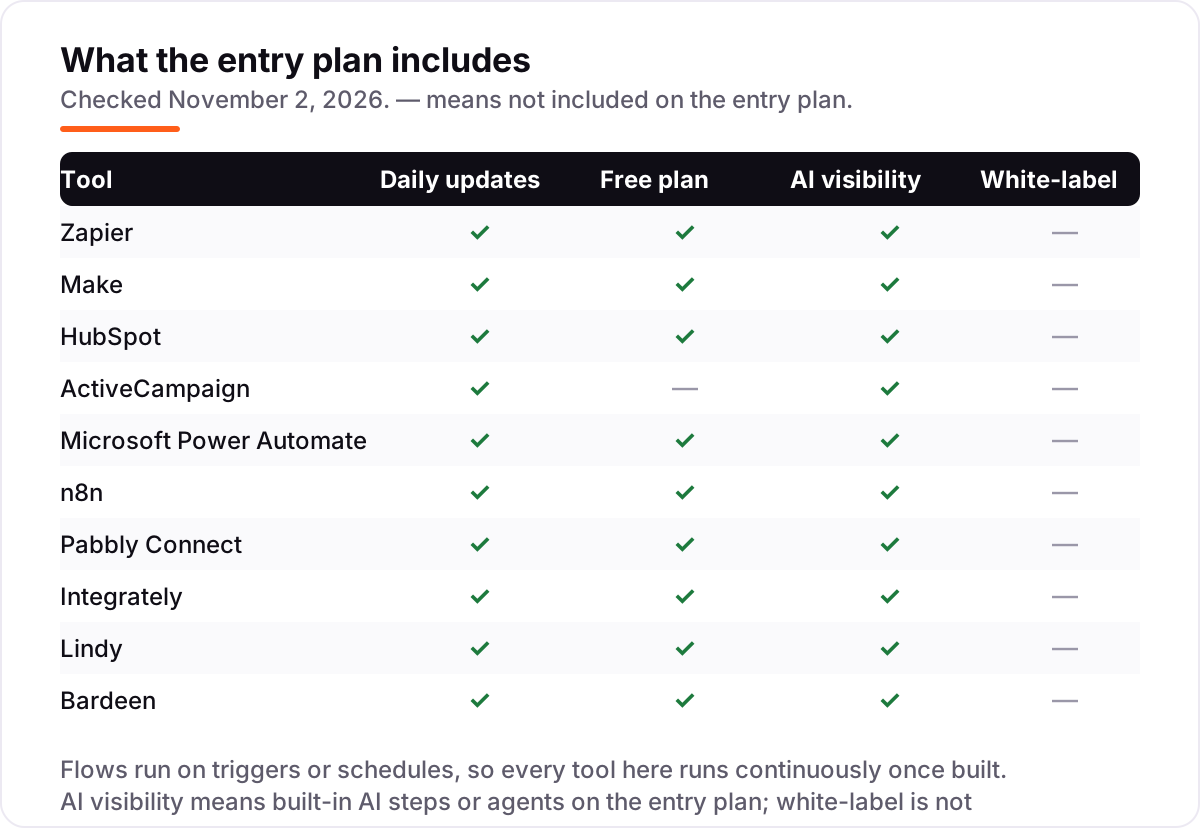
- Free plans are real here: Zapier, Make, HubSpot, n8n, Pabbly, Integrately, Lindy and Bardeen all let you automate at least one job for nothing.
- The single most important buying factor is matching the meter to your volume: count how many runs, tasks or contacts you will actually use each month before comparing prices.
- Every price below was checked on November 2, 2026. Ratings are G2, with review counts shown; Integrately, Pabbly Connect and Lindy show no rating because no verified G2 count was found.
On this page
Quick comparison
| Tool | Best for | Starting price | Free plan |
|---|---|---|---|
| Zapier | Non-technical small teams that want the widest app library and the fastest first automation | $19.99/mo (annual) | Yes (100 tasks) |
| Make | Small teams that run visual, branching workflows and want the most automation per dollar | $9/mo (annual) | Yes (1,000 credits) |
| HubSpot | Small businesses that want CRM, email and automation in one system instead of three subscriptions | $20/mo per seat | Yes (free CRM) |
| ActiveCampaign | Small teams that live in email and want the deepest automation builder at a low entry price | $15/mo (annual) | No (14-day trial) |
| Microsoft Power Automate | Small businesses already on Microsoft 365 that automate approvals, files and Teams work | $15/mo per user | Yes (M365) |
| n8n | Technical owners and small teams that want AI agents and full control, including self-hosting | $20/mo (annual) | Yes (self-hosted) |
| Pabbly Connect | Budget-conscious owners who want high task volume and a one-time lifetime deal option | $16/mo (annual) | Yes (100 tasks) |
| Integrately | Owners who want one-click, ready-made automations instead of building flows from scratch | $19.99/mo | Yes (100 tasks) |
| Lindy | Founders who want an AI agent to handle email, meetings and follow-ups on its own | $19.99/mo | Yes (400 credits) |
| Bardeen | Sales-led owners who build prospect lists in the browser and want scraping plus AI qualification | $10/mo | Yes (100 credits) |
Make one of these tools?
We re-check this list every quarter. Send a correction, request a review, or ask about a clearly labeled sponsored spot.
Request a listingThe best AI automation tools for small business

Zapier
Best for: Non-technical small teams that want the widest app library and the fastest first automation
Zapier is the default first automation tool for a small business because it connects more than 10,000 apps through a builder a non-technical owner can learn in an afternoon. Tell Copilot what you want in plain English and it drafts the workflow, and the free plan covers 100 tasks a month, enough to automate one real job such as saving form submissions to a sheet.
The catch is the meter. Every step in a workflow is a task, so a five-step flow run 1,000 times costs 5,000 tasks, and AI steps can cost up to five times that. Start on the free plan, count your tasks for a month, and only then pick a tier, because the $19.99 headline covers just 750 tasks.
What we like
- Largest app library here: more than 10,000 apps, so most tools a small business uses already connect
- Copilot and AI steps draft workflows from a plain-English description, with no code needed
- Free plan includes 100 tasks a month, Tables and Forms, so a first automation costs nothing
Watch out for
- Per-task billing gets expensive fast: a five-step workflow run 1,000 times a month uses 5,000 tasks
- AI steps cost extra tasks at 1x, 3x or 5x per run, so heavy AI use pushes the bill up
- Free plan allows two-step Zaps only, so real multi-step workflows need Professional

Make
Best for: Small teams that run visual, branching workflows and want the most automation per dollar
Make is the value pick in this list. Core costs $9 a month billed annually for 10,000 credits, which is more than thirteen times the volume Zapier gives at $19.99, and the visual canvas handles branching, loops and error routes that simpler builders cannot do. For a team that outgrows one-step automations, that combination is hard to beat.
The trade-off is learning time. The canvas rewards a day of practice, and every module that runs costs a credit, so a ten-module scenario burns credits ten times faster than its run count suggests. If you want the cheapest path to serious workflows and can invest the afternoon, start here.
What we like
- Cheapest volume here: 10,000 credits a month from $9/month billed annually, against 750 tasks at Zapier
- Visual canvas with branching, loops and error routes that simpler builders cannot do
- Make AI Agents and an AI toolkit are included, with 3,500+ apps connected
Watch out for
- The visual canvas has a real learning curve; branching, routers and error routes take a day to learn
- Every module that runs costs one credit, so a long scenario burns credits faster than the headline suggests
- Human-in-the-loop approval steps are Enterprise-only and were still in closed beta in mid-2026

HubSpot
Best for: Small businesses that want CRM, email and automation in one system instead of three subscriptions
HubSpot is the all-in-one pick: CRM, email, forms and automation under one login, so a lead that fills in a form can be scored, emailed and handed to sales without any syncing between tools. The free CRM is genuinely usable, with contacts, deals and pipelines included, which makes it the easiest way to try the system before paying.
Watch the two meters, not one. Starter is $20 per seat per month and includes 1,000 marketing contacts, with extra contacts at about $50 per 1,000, and the jump to Professional is $890 a month plus onboarding. Buy HubSpot when you want one system, not when you only need a few automations.
What we like
- One login for CRM, email, forms and automation, so leads never need syncing between tools
- Free CRM is genuinely usable, with contacts, deals and pipelines included at no cost
- Workflows trigger from CRM data, so follow-ups react to what a contact actually did
Watch out for
- The bill is per seat plus per 1,000 marketing contacts, so it climbs fast once the list grows
- Professional jumps to $890/month plus a $3,000 onboarding fee, with no middle tier in between
- Automation depth on Starter is basic; advanced workflows and reporting need Professional

ActiveCampaign
Best for: Small teams that live in email and want the deepest automation builder at a low entry price
ActiveCampaign is built around its automation builder first and everything else second. Small teams can chain triggers, conditions, waits and goals into long nurture paths, and the 900-plus recipe library means you rarely start from a blank canvas. At $15 a month for 1,000 contacts, it is the deepest automation in this list for the money.
The limits are the contact count and the Starter caps: one user, five actions per automation, and $149 a month once the list reaches 10,000 contacts. If email is the centre of your business and your list is still small, it is a strong buy; if you need a free plan, look at HubSpot or Make instead.
What we like
- Multi-step, conditional automation with 900-plus ready-made recipes, the deepest builder at this price
- Built-in CRM keeps deals and email in one place, with lead scoring from the Plus plan
- AI campaign drafting and predictive sending help small teams send at the right time
Watch out for
- No free plan at any level, only a 14-day trial, so you pay from the first month
- Starter caps automations at 5 actions each and 1 user, which a real welcome series can hit quickly
- The price rises steeply with list size: Starter is $149/month at 10,000 contacts

Microsoft Power Automate
Best for: Small businesses already on Microsoft 365 that automate approvals, files and Teams work
Power Automate is the tool most Microsoft 365 businesses already own without knowing it. Basic cloud flows using standard connectors are included with most Microsoft 365 plans, so approvals, file moves and Teams notifications can cost nothing extra. Premium, at $15 per user per month, adds premium connectors, attended desktop automation and AI Builder credits.
The licensing catch is who runs the flow. An automated flow needs Premium only for its owner, but an instant flow needs it for every person who runs it, so five runners cost $75 a month before anything else. If your team lives in Outlook, Teams and SharePoint, start with what you already have.
What we like
- Already included with most Microsoft 365 plans for standard connectors, so many teams pay nothing extra
- Premium adds premium connectors, attended desktop RPA and AI Builder credits in one licence
- Approval flows, SharePoint and Teams triggers are native, not bolted on
Watch out for
- Per-user licensing multiplies fast: every person running an instant premium flow needs a licence
- Debugging is hard work; error messages are vague and trigger delays hit time-sensitive flows
- Works best inside Microsoft tools; non-Microsoft apps connect, but less smoothly than on Zapier

n8n
Best for: Technical owners and small teams that want AI agents and full control, including self-hosting
n8n is the technical pick, and its billing is the reason: you pay per workflow run, not per step, so a twenty-step flow with AI agents costs the same as a two-step one. The self-hosted Community Edition is free with unlimited executions, and the hosted Starter plan is $20 a month billed annually for 2,500 runs.
It is not a tool for everyone. Code nodes, webhooks and self-hosting are part of the deal, Starter allows only five active workflows, and a flow that fires every minute exhausts the monthly allowance in under two days. Choose n8n when you have technical help and long workflows; otherwise Zapier or Make will get you running faster.
What we like
- Billed per workflow run, not per step, so a 20-step flow costs the same as a 2-step one
- Self-hosted Community Edition is free with unlimited executions, under a fair-code licence
- Native AI agent nodes and a large integration library, with code when the visual builder runs out
Watch out for
- Needs technical confidence: code nodes, webhooks and self-hosting are part of the appeal, not optional extras
- Starter caps at 5 active workflows and 5 concurrent executions, so busy teams outgrow it fast
- A flow that fires every minute eats the 2,500 monthly executions in under two days

Pabbly Connect
Best for: Budget-conscious owners who want high task volume and a one-time lifetime deal option
Pabbly Connect is the budget pick for owners who count tasks. Standard gives 10,000 tasks a month for $16 billed annually, and only action steps on external apps count: triggers, filters, routers and formatters are free. Every paid plan includes unlimited workflows and team members, and a $349 one-time lifetime plan exists for buyers who want to stop paying monthly.
The trade-offs are polish and depth. The interface feels dated, error handling has no fallback path, and execution logs expire after 30 days on Standard. If your workflows are simple and your budget is tight, the task allowance is hard to beat; if you need branching logic, Make does it better.
What we like
- 10,000 tasks a month from $16/month billed annually, with triggers and internal steps free
- Unlimited workflows and team members on every paid plan, so growth does not add seats
- One-time lifetime plans from $349 for buyers who want to stop paying monthly
Watch out for
- Interface feels dated next to Zapier and Make, and error handling has no fallback path
- Execution logs expire after 30 days on Standard, so old failures cannot be audited later
- Smaller app library than the leaders, so niche tools may need webhooks instead of a native connector

Integrately
Best for: Owners who want one-click, ready-made automations instead of building flows from scratch
Integrately is the simplest way to start automating. Instead of building a flow step by step, you pick two apps and a ready-made recipe, and the automation is running in minutes. The flat $19.99 Starter price has no per-seat fees, so a whole small team can use it for the same money, and a free plan covers 100 tasks a month.
Simplicity is also the ceiling. Recipes are fast but less flexible than Make or n8n when a flow needs custom logic, and no annual discount is listed, so the price never drops. Pick Integrately for your first five automations; graduate to Make when those automations start needing branches and error handling.
What we like
- One-click automations: pick two apps and a ready-made recipe does the setup for you
- Flat $19.99/month Starter with no per-seat fees, so adding teammates costs nothing extra
- Automations run every 15 minutes on the free plan, with faster intervals on paid plans
Watch out for
- No annual billing discount is listed, so the $19.99 monthly price is the price all year
- Pre-built recipes are fast but less flexible than Make or n8n when a flow needs custom logic
- Smaller community and fewer advanced features, so complex error handling is limited

Lindy
Best for: Founders who want an AI agent to handle email, meetings and follow-ups on its own
Lindy is the AI-agent pick in this list. Instead of building trigger-and-action workflows, you describe the job in plain English and an agent does it: triaging email, drafting replies, scheduling meetings and updating the CRM. Templates cover the common jobs, and the free plan gives 400 credits a month to test one agent for real.
The honest warning is the credit meter. Complex agent work burns credits far faster than simple tasks, and daily use usually means the $49.99 Pro plan rather than the $19.99 Starter. Try Lindy when you want work done for you, not another workflow to maintain; keep Zapier or Make for flows you need to see step by step.
What we like
- Build agents in plain English that triage email, schedule meetings and update the CRM by themselves
- Pre-built templates cover the common jobs: meeting notes, email drafts and lead follow-up
- Phone calls and voice minutes can be added, so an agent can ring a lead, not just email one
Watch out for
- Credit-based billing is hard to budget: complex agent work burns credits far faster than simple tasks
- Starter at $19.99/month is light on credits, so daily agent use usually means Pro at $49.99
- Debugging a misbehaving agent is harder than debugging a step-by-step workflow

Bardeen
Best for: Sales-led owners who build prospect lists in the browser and want scraping plus AI qualification
Bardeen is the prospecting pick, and it works differently from everything else here: it runs in the browser. It scrapes websites, enriches contacts, scores leads with AI and moves the results into a sheet or CRM, and it can automate clicks, copying and form-filling that no API tool can touch. The free plan gives 100 credits a month, and Basic starts at $10.
The credit math is the warning. Enrichment costs three credits per row, so enriching 1,000 leads burns 3,000 credits, three months of the $50 Premium allowance, and automations stop when the browser closes. Buy Bardeen for prospecting lists; buy Zapier or Make for automations that must run while you sleep.
What we like
- Scrapes websites, enriches contacts and scores leads with AI, all from the browser
- Automates browser tasks no API tool can touch: clicking, copying and filling web forms
- Free plan gives 100 credits a month forever, enough to test real prospecting flows
Watch out for
- Runs as a browser extension, so automations need an active browser session to work
- Enrichment costs 3 credits per row, so 1,000 leads burns 3,000 credits, three months of Premium
- Now a lead-generation tool first; generic app-to-app automation is not its strength
These are the best AI automation tools for small business owners who want repetitive work handled without hiring or learning to code. We ranked ten tools by fit for a typical small team, checked every starting price, and show what each one actually costs once you use it for real.
How to choose the best AI automation tools for small business
Start from the job, not the tool. Write down the three repetitive jobs that eat the most hours each week, such as chasing leads, copying data between apps or sending the same follow-ups, and then look for the tool that handles those three jobs well. A tool that is brilliant at email but weak at file handling is the wrong buy if your week is mostly files, and the cheapest plan is the wrong buy if its meter counts the thing you do most.
- Count your volume first. A task, a credit, an execution and a contact are different meters, so count your monthly runs before comparing any price.
- Pick your starting point. Non-technical owners should start with Zapier, Make or Integrately; technical owners get more from n8n.
- Check the app list. The best tool is the one that already connects to your CRM, email, shop and sheets without workarounds.
- Test the free plan with a real job. Run one live automation for two weeks and measure the hours it saves before paying.
- Watch the second meter. HubSpot and ActiveCampaign also charge by contacts, and Power Automate charges per user, so the headline price is only half the bill.
- Ask who fixes it when it breaks. A workflow that fails silently is worse than no workflow, so check error alerts and logs before you commit.
AI automation tools for small business pricing: what you will actually pay
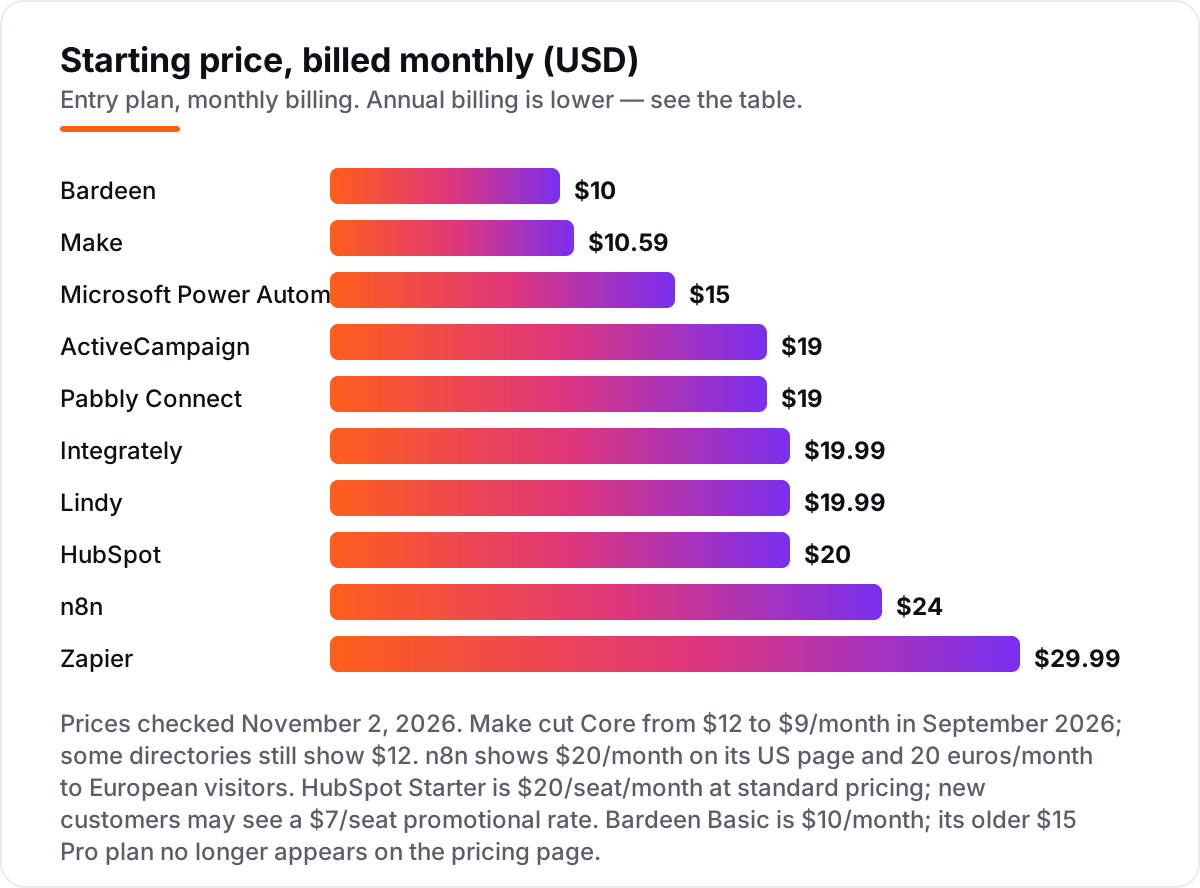
Take a small shop that syncs 1,500 form submissions a month through a five-step workflow. On Zapier that is 7,500 tasks, which needs the 2,000-task Professional tier at $49 a month billed annually, and the next tier up costs more again. On Make the same work is about 7,500 credits, inside the $9 Core plan with 10,000 credits. On Pabbly it is 7,500 tasks inside the $16 Standard plan billed annually, and on n8n it is 1,500 executions inside the $20 Starter plan.
The lesson is the meter, not the headline. Zapier looks close to Make at $19.99 against $9, but at this volume it costs $49 against $9, because Zapier bills every step and Make bills every module run at a far lower unit price.
Contact-based tools need the same maths. ActiveCampaign Starter is $15 a month at 1,000 contacts but $149 a month at 10,000 contacts, and HubSpot Starter is $20 a month per seat with 1,000 contacts included, plus about $50 a month per extra 1,000 contacts, so a single seat with 5,000 contacts costs about $220 a month. A tool that looks cheap at your current list size can be the expensive one six months later, so price every plan at the list size you expect to have, not the one you have today. Before you buy, count your runs in a spreadsheet, then pick the plan whose allowance covers them with room to grow. When your automations start sending traffic to landing pages, check those pages with our free title tag checker so the visits they generate land on pages worth reading. If you want help reading the numbers, our AI search optimization service reviews the tools a business already pays for as part of an audit.
AI automation vs plain workflow automation: know the difference
Plain workflow automation follows rules you write: when a form is submitted, add a row to a sheet and send an email. It is fast, predictable and easy to test, and it covers most of what a small business needs. AI automation adds a judgement step: an agent reads the email, decides what the customer wants, drafts a reply in your tone and updates the CRM, without a rule for every case.
The confusion costs money because the two are priced differently. Rule-based steps are cheap and predictable, while AI steps are metered: Zapier charges AI steps at up to five times the task rate, and Lindy charges credits per agent action. Buy rule-based automation for data movement and approvals, and buy AI agents for work that needs reading, deciding or drafting. If a vendor sells you an agent to move rows between two apps, you are paying AI prices for workflow work.
There is also a middle ground worth knowing about: human-in-the-loop steps. These let an AI agent draft the reply or prepare the invoice, then pause for a person to approve it before anything goes out. That pattern suits refunds, quotes and anything a customer will see, because it keeps the speed of AI with a person checking the judgement. Not every tool offers it on a small-business plan, so check before you buy if approvals matter to you.
Quick comparison: tool type by need
| Buyer | Best pick | Why |
|---|---|---|
| First automation, non-technical owner | Zapier | Biggest app library and easiest builder, free plan included |
| High volume on a small budget | Make or Pabbly Connect | 10,000 credits or tasks for $9 or $16 a month billed annually |
| CRM, email and automation in one place | HubSpot or ActiveCampaign | One login, no syncing, from $15 to $20 a month |
| Already on Microsoft 365 | Microsoft Power Automate | Basic flows included; Premium is $15 per user a month |
| Technical team, long workflows | n8n | Billed per run, not per step, with a free self-hosted option |
| Work that needs an AI agent | Lindy | Plain-English agents for email, meetings and follow-ups |
| Building prospect lists | Bardeen | Browser scraping and AI lead scoring from $10 a month |
How we chose
We ranked the tools by fit for the most common buyer, a small business owner with a small team and no developer on staff, not by brand size. Prices were checked against each vendor's own pricing page on November 2, 2026, through live search results, because direct opening of the vendor pricing pages failed in our browser tool that day; every figure was cross-checked against at least two independent sources that quoted the vendor page in October 2026. Ratings come from G2, except Integrately, Pabbly Connect and Lindy, where no verified G2 review count was found, so those three show no rating rather than an estimate. Two conflicts are worth noting: Make cut Core from $12 to $9 a month in September 2026 and some directories still show $12, and HubSpot's $20 per seat Starter is the standard price while new customers may see a $7 promotional rate. Relay.app was left out because it announced a shutdown, with paid accounts ending September 14, 2026. No vendor paid for a place in this list, and none of the links here are affiliate links.
What to do next
Start with the decision path above: count your monthly runs, pick no-code or technical, and check the app list against the tools you already use. Then take the free plan of your top pick and run one real automation for two weeks, watching the meter as well as the time saved. If the numbers work and the reports make sense, upgrade to the plan whose allowance covers your volume with room to grow. Once your tools are in place, find out what's holding your rankings back.
Your stack only works if people find you
SerpAstra fixes what keeps your site off page one and makes it easy for AI assistants to recommend.
Get a free audit→Sources we checked (17)
- Zapier pricing — zapier.com/pricing (checked November 2, 2026)
- Zapier on G2 — 4.5/5, 2,094 reviews (checked November 2, 2026)
- Make pricing — make.com/en/pricing (checked November 2, 2026)
- Make on G2 — 4.6/5, 399 reviews (checked November 2, 2026)
- HubSpot Marketing Hub pricing — hubspot.com/pricing/marketing (checked November 2, 2026)
- HubSpot Marketing Hub on G2 — 4.4/5, 14,921 reviews (checked November 2, 2026)
- ActiveCampaign pricing — activecampaign.com/pricing (checked November 2, 2026)
- ActiveCampaign on G2 — 4.4/5, 14,789 reviews (checked November 2, 2026)
- Microsoft Power Automate pricing — powerautomate.microsoft.com/en-us/pricing (checked November 2, 2026)
- Microsoft Power Automate on G2 — 4.4/5, 1,092 reviews (checked November 2, 2026)
- n8n pricing — n8n.io/pricing (checked November 2, 2026)
- n8n on G2 — 4.7/5, 283 reviews (checked November 2, 2026)
- Pabbly Connect pricing — pabbly.com/connect/pricing (checked November 2, 2026)
- Integrately pricing — integrately.com/pricing (checked November 2, 2026)
- Lindy pricing — lindy.ai/pricing (checked November 2, 2026)
- Bardeen pricing — bardeen.ai/pricing (checked November 2, 2026)
- Bardeen on G2 — 4.8/5, 35 reviews (checked November 2, 2026)
Shamim
Founder of SerpAstra
A full-stack SEO and digital marketer who spends most days on Local SEO for dental practices, AI search visibility and lead generation.
Frequently asked questions
What is the best AI automation tool for a small business?
Zapier is the best first pick for most small businesses: the largest app library, the easiest builder and a free plan, from $19.99/month billed annually. Make is the better value if you run high volumes, at $9/month for 10,000 credits. Businesses already on Microsoft 365 should start with Power Automate, which is partly included.
How much do AI automation tools cost for a small business?
Entry prices in this list run from $9 to $20 a month billed annually: Make at $9, Bardeen at $10, ActiveCampaign and Power Automate at $15, and Zapier, Integrately and Lindy at $19.99. The headline is not the bill, though: each tool meters usage differently, so count your runs, tasks or contacts first.
Is there a free AI automation tool for small business?
Yes, several. Zapier gives 100 tasks a month free, Make gives 1,000 credits, HubSpot has a free CRM, n8n has a free self-hosted edition, and Pabbly, Integrately, Lindy and Bardeen all have free plans. Free tiers cover one or two real jobs; once automations run daily, a paid plan is cheaper than the time they save.
What is the difference between AI automation and workflow automation?
Workflow automation follows rules you set: when X happens, do Y. AI automation adds judgement: an agent reads an email, decides what it means, drafts a reply and acts on it. Zapier, Make and n8n do both now, while Lindy is built around agents. If your work needs decisions, not just data movement, you need the AI side.
Can AI automation tools replace an employee?
They can replace repetitive tasks, not judgement. A small business can automate lead capture, follow-ups, invoicing reminders and reporting, which often saves several hours a week. Hiring decisions, pricing, customer relationships and anything needing taste or trust still need a person. Treat the tools as extra hands, not extra staff.
Do I need technical skills to use AI automation tools?
Not for Zapier, Make, HubSpot, Integrately or Lindy, which are built for non-technical owners with visual builders and ready-made templates. n8n is the exception: it rewards technical confidence with code nodes, webhooks and self-hosting. Start with a no-code tool and move to n8n only when you hit its limits.
Which AI automation tool is cheapest for high volume?
Make is cheapest at scale: $9 a month billed annually buys 10,000 credits, and Pabbly gives 10,000 tasks for $16 a month billed annually. n8n is cheapest for long workflows because it bills per run, not per step. Zapier is the most expensive at volume because every step is a billable task.
Free SEO and AI visibility audit
Find out what is holding your rankings back
Send us your site. Within 2 business days you get a written audit, an AI visibility check and a short fix list ranked by impact. Free, with no contract attached.
Request my free audit→Related guides
 AI SearchBest AI SEO tools in 2026: honest picks by jobBest AI SEO tools in 2026, picked by job: Semrush and Ahrefs for research, Surfer and Clearscope for content, Otterly for AI tracking, with 2026 prices.Read guide →
 SEO & AI Search12 Best Marketing Platforms for Small Business SEO in 2026, ComparedThe 12 best marketing platforms for small business SEO, compared on real prices, SEO tools and AI visibility. Every price checked November 1, 2026.Read guide →
 AI SearchHow to get your brand cited in ChatGPT and AI searchA practical guide to earning citations in ChatGPT, Perplexity and Google AI Overviews: crawler access, Bing indexing, answer-first pages and brand signals.Read guide →