
Best AI Chatbot Software for 2026: 12 Options Compared by Use Case
12 best ai chatbot software tools compared by use case, with real starting prices, free plans and G2 ratings for every budget, checked November 2, 2026.
 Shamim Mia, Founder, SerpAstraLast verified November 2, 202611 min read
We compare pricing pages, documentation and public reviews. We never accept payment for rankings.

Key takeaways
- Intercom is the best pick for most teams that want AI-first support: Fin AI Agent is included, with Essential from $29 a seat a month billed annually ($39 billed monthly).
- Free plans are real here — Tidio, HubSpot, Freshchat, Crisp, Landbot, Chatbase and Botpress all let you start at $0 — but AI answering is often a paid add-on, so check what the free tier actually automates.
- The single most important buying factor is the billing meter: per seat, per conversation, per contact or per credit changes the real monthly cost far more than the headline price.
- Every price below was checked on November 2, 2026; six prices are third-party sourced from checks of the vendors' pricing pages in September and October 2026, as explained in How we chose.
On this page
Quick comparison
| Tool | Best for | Starting price | Free plan |
|---|---|---|---|
| Intercom | Growing support teams that want an AI agent plus a full helpdesk in one subscription | $29/seat/mo (annual) | No (14-day trial) |
| Tidio | Small ecommerce stores that want chat, email and AI support in one inbox | $24.17/mo (annual) | Yes (50 conversations) |
| HubSpot | Small teams already using HubSpot CRM that want chat tied to contact records | $20/seat/mo | Yes (2 users) |
| Zendesk | Mid-size support teams that need omnichannel queues plus AI agents at scale | $55/agent/mo (annual) | No (14-day trial) |
| Freshchat | Small support teams that want a free plan for up to 10 agents with AI available | $19/agent/mo (annual) | Yes (10 agents) |
| LiveChat | Small teams that want a polished website chat widget with an AI agent included | $19/user/mo (annual) | No (14-day trial) |
| Crisp | Small SaaS and startup teams that want flat workspace pricing instead of per-seat billing | $45/workspace/mo | Yes (2 seats) |
| Chatfuel | Small businesses that sell through WhatsApp, Instagram and Messenger | $18/mo (annual) | No (7-day trial) |
| ManyChat | Creators and small businesses that automate Instagram and Facebook DMs | $29/mo (annual) | Yes (25 contacts) |
| Landbot | Marketing and operations teams that want visual, no-code lead-qualification flows | €32/mo (annual) | Yes (Sandbox) |
| Chatbase | Solo founders who want a chatbot trained on their own website and documents | $19/mo | Yes (20 credits) |
| Botpress | Developers and agencies building custom AI agents with workflows and integrations | $150/mo (annual) | Yes (100 conversations) |
Make one of these tools?
We re-check this list every quarter. Send a correction, request a review, or ask about a clearly labeled sponsored spot.
Request a listingThe best AI chatbot software

Intercom
Best for: Growing support teams that want an AI agent plus a full helpdesk in one subscription
Intercom is the AI-first helpdesk in this list, built around Fin, its AI agent. Fin answers from your help center, takes actions such as issuing refunds or updating records, and hands off to a human with full context when it cannot resolve the issue. The entry Essential plan includes the shared inbox, ticketing, Messenger and a public Help Center, so the platform works as a complete support desk from day one.
The catch is the two-part bill. Seats are $29 each billed annually ($39 billed monthly), and Fin adds $0.99 per resolved conversation on top, with a 50-resolution monthly minimum. A bot that resolves 200 conversations in a month adds $198 to the bill. Buy Intercom when AI-first support is the strategy, not when you want one flat monthly number.
What we like
- Fin AI Agent is included on every plan at $0.99 per resolved conversation, with a 50-resolution monthly minimum
- Shared inbox, ticketing, Messenger and a public Help Center come with the entry plan
- Free, unlimited live chat on all plans, with WhatsApp, SMS and phone as pay-as-you-go channels
Watch out for
- Essential is $29/seat/month billed annually ($39 billed monthly); a $19 promotional variant appeared on some page loads
- Fin usage is billed on top of seats, so a busy month costs more than the seat price suggests
- Copilot costs $29 per agent a month extra, and the Pro add-on is another $100 a month

Tidio
Best for: Small ecommerce stores that want chat, email and AI support in one inbox
Tidio is the friendliest starting point for a small store. Live chat, email and ticketing sit in one inbox, and the Lyro AI agent answers from your website pages and help-center articles, so customers get answers without waiting for an agent. The free plan covers 50 billable conversations, and Starter raises that to 100 for $29 a month, which is enough for a store doing a few dozen chats a day.
The pricing has three meters, and that is the part to read before you commit. The plan covers human conversations, Lyro AI is billed separately from $32.50 a month billed annually, and removing Tidio branding costs another $20 a month. A store that leans on AI can pass $80 a month before it feels busy. Start on the free plan, measure your volume, then pick the tier that fits.
What we like
- Lyro AI agent answers from your website and help-center content, and Tidio reports a resolution rate of up to 67%
- Pricing is by conversation volume, not seats, so a small team pays the same as one person
- Shopify, WordPress and WooCommerce integrations are built in, with sales flows for carts and discounts
Watch out for
- Lyro is billed separately from $32.50 a month billed annually, so AI answering is not in the Starter price
- Removing Tidio branding costs $20 a month extra on Starter and Growth
- Starter covers only 100 billable conversations a month, so a busy store outgrows it fast

HubSpot
Best for: Small teams already using HubSpot CRM that want chat tied to contact records
HubSpot is the pick when the chatbot is part of a CRM, not a standalone widget. Every chat lands on a contact record with the full conversation history, tickets and purchases attached, so an agent never asks a customer to repeat themselves. The free plan covers live chat, a shared inbox and ticketing for up to two users, which is enough for a very small team to run support properly.
The honest limit is the AI. The autonomous Customer Agent needs Professional at $90 per seat a month, and Professional also carries a mandatory $1,500 onboarding fee. Starter gives you rule-based bots, routing and 500 HubSpot Credits a month, which is plenty for qualifying and routing chats. Buy HubSpot if you already live in its CRM; buy a standalone bot if you only need the chat.
What we like
- Free plan includes live chat, a shared inbox and ticketing for up to 2 users
- Every chat lands on a contact record with full history, so agents never ask for context twice
- Starter removes HubSpot branding and adds conversation routing and 500 HubSpot Credits a month
Watch out for
- The autonomous Customer Agent needs Professional ($90/seat/month) or above, not Starter
- Professional and Enterprise carry mandatory one-time onboarding fees of $1,500 and $3,500
- AI credits are shared across the account and do not roll over, so heavy AI use costs extra

Zendesk
Best for: Mid-size support teams that need omnichannel queues plus AI agents at scale
Zendesk is the enterprise-grade option in this list, and it shows in the breadth of the queue. Suite Team routes messaging, live chat, email, voice and social into one place, with a Help Center, macros and automations included from the entry tier. AI agents are included on every plan too, with five automated resolutions per agent a month on Suite Team, so the bot starts working before you buy any add-on.
The bill grows in layers. The $55 per agent a month annual price is the floor, and Copilot adds $50 per agent a month, while AI resolutions beyond the allowance cost $1.50 each on a commitment or $2.00 pay-as-you-go. A ten-agent team pays $550 a month before a single add-on. Choose Zendesk when you need one queue for every channel at volume, not a single website widget.
What we like
- AI agents are included on every plan, with 5 automated resolutions per agent a month on Suite Team
- Omnichannel routing covers messaging, live chat, email, voice and social in one queue
- Help Center, macros and automations are included from Suite Team, not gated to the top tier
Watch out for
- Beyond the included resolutions, AI costs $1.50 per resolution on a commitment or $2.00 pay-as-you-go
- Copilot is a $50 per agent a month add-on, and the ticketing-only Support Team plan has no live chat
- No free plan, and G2 reviewers report go-live times from under a month to three months

Freshchat
Best for: Small support teams that want a free plan for up to 10 agents with AI available
Freshchat is the cheapest way into a real team inbox. The free plan covers up to ten agents with website chat and email, which no other tool in this list matches, and Growth at $19 per agent a month billed annually adds WhatsApp, Facebook and Instagram messaging plus the Freddy AI Agent. For a small team that talks to customers on several channels, that free tier is a genuine home, not a demo.
The AI is metered, and that is the cost to watch. Freddy bills $49 per 100 sessions after a one-time allowance of 500 free sessions, and the Copilot assistant that drafts agent replies costs $29 per agent a month on Pro and Enterprise only. If your volume is mostly human chat, Freshchat is a bargain; if the bot handles most conversations, price the sessions first.
What we like
- Free plan covers up to 10 agents with website chat and email
- Freddy AI Agent is available from Growth, with 500 sessions free once per account
- WhatsApp, Facebook and Instagram messaging are included from Growth
Watch out for
- AI sessions cost $49 per 100 after the free allowance, so heavy AI use adds up
- Advanced ticketing lives in Freshdesk Omni, not Freshchat, so complex queues need a second product
- Freddy AI Copilot costs $29 per agent a month and only runs on Pro and Enterprise

LiveChat
Best for: Small teams that want a polished website chat widget with an AI agent included
LiveChat is the most polished website widget in this list. The chat window is fast, translates into 48 languages on Growth, meets WCAG 2.2 AA accessibility standards and carries your own logo, so it looks like part of your site rather than a bolt-on. The entry Essential plan includes an AI Agent with ten resolutions a month, plus the Shopify catalog, workflows and AI Copilot for agents.
One change to know: new trials now purchase the rebranded Text plans, with the same $19 per user a month annual price for Essential, while existing LiveChat customers keep their old plans. Essential also caps history at 60 days and visitor tracking at 50 live visitors, so a growing team will want Growth at $79 a month. It is the pick for a store that wants chat to sell, not just to answer.
What we like
- AI Agent is included on every plan, with 10 AI resolutions a month on Essential
- Widget is included with translations, dark mode and a custom logo, and it meets WCAG 2.2 AA
- Shopify catalog, workflows and AI Copilot are included, with 24/7 support on all plans
Watch out for
- New trials now buy the rebranded Text plans, so the LiveChat name on old comparisons can confuse
- Essential caps conversation history at 60 days and visitor tracking at 50 live visitors
- Extra AI resolutions cost $49.50 per 50, and the Enterprise plan is custom-quoted

Crisp
Best for: Small SaaS and startup teams that want flat workspace pricing instead of per-seat billing
Crisp is the value pick for a team that hates per-seat pricing. The Mini plan costs $45 a month per workspace, not per agent, so a team of four pays the same as a team of one, and the free plan covers two seats with unlimited conversations. Live chat, a shared inbox and co-browsing all sit in one workspace, which keeps a small SaaS team in a single tab.
The AI story is thinner than the headline suggests. Mini includes the Hugo AI agent with $5 of starter credits a month (about 90 automated conversations); heavier use costs extra, and the chatbot builder and knowledge base need Essentials at $95 a month. Mini caps at four seats and 5,000 contacts. Buy Crisp for the flat price and inbox, and budget for the AI separately.
What we like
- Mini is priced per workspace, not per seat, so adding agents does not raise the bill
- Live chat, shared inbox and co-browsing are in one workspace
- Free plan covers 2 seats with unlimited conversations
Watch out for
- The Hugo AI agent includes $5 of starter credits a month, and heavier AI use costs extra
- Mini covers 4 seats and 5,000 contacts, so a growing team jumps to Essentials at $95 a month
- Settings are split between core settings and plugins, which G2 reviewers call hard to navigate

Chatfuel
Best for: Small businesses that sell through WhatsApp, Instagram and Messenger
Chatfuel is built for businesses that sell in messaging apps rather than on a website. One Business plan covers WhatsApp, Instagram, Messenger, TikTok and website chat, with unlimited contacts and unlimited teammates, and the AI agent answers customers and qualifies leads on every channel. The $20 monthly price includes $20 in credits for AI replies, and Meta's WhatsApp fees come out of the same wallet, so there is one bill.
The wallet model needs attention. Credits are granted each month and do not carry over, so an unused allowance is lost, and heavy months burn through the $20 quickly. There is also no free plan, only a seven-day trial with $15 in credits. Chatfuel fits a business that already gets orders in DMs; a website-only business will get more from a website-first tool.
What we like
- One Business plan covers WhatsApp, Instagram, Messenger, TikTok and website chat with unlimited contacts and teammates
- The $20 plan includes $20 in credits for AI replies, and Meta's WhatsApp fees come from the same wallet
- AI Co-pilot helps set up the bot by chatting, with no code to write
Watch out for
- Credits do not carry over, so unused AI allowance is lost each month
- There is no free plan, only a 7-day trial with $15 in credits
- Older reviews quote $15, $49 or $69 plans that no longer exist, so check the current page

ManyChat
Best for: Creators and small businesses that automate Instagram and Facebook DMs
ManyChat is the tool for creators and small businesses that live on Instagram and Facebook. Its comment-to-DM automation turns a comment such as 'interested' into a private conversation, and the visual flow builder covers Instagram, Facebook, WhatsApp, SMS and email from one canvas. As an official Meta Business Partner, its Instagram and Messenger connections are supported integrations rather than workarounds that can break.
The pricing changed in March 2026, and old guides will mislead you. The free plan dropped from 1,000 contacts to 25, the new Pro starts at $39 a month billed monthly for 2,500 contacts, and the AI features are a $29 a month add-on. Billing is by active contacts, and any message sent or received can count. It is the best pick for social selling, and the wrong pick for a website support inbox.
What we like
- Comment-to-DM automation turns Instagram comments into conversations without manual replies
- Visual flow builder with templates covers Instagram, Facebook, WhatsApp, SMS and email
- Official Meta Business Partner, so the Instagram and Messenger connections are supported, not workarounds
Watch out for
- The March 2026 pricing overhaul cut the free plan from 1,000 contacts to 25, and AI is a $29 a month add-on
- Billing is by active contacts, and any message sent or received can count as an active contact
- Legacy accounts still see the old $15 Pro price, so new buyers should not budget from old screenshots

Landbot
Best for: Marketing and operations teams that want visual, no-code lead-qualification flows
Landbot is the most visual builder in this list. You draw the conversation as a flow of blocks on a canvas, test it on WhatsApp from the builder, and publish it to your website, Messenger or WhatsApp without writing code. Starter includes 500 chats and 100 AI chats a month with human handoff built in, which is enough for a marketing team running lead-qualification and booking flows.
Two costs sit outside the headline price. Landbot bills in euros, so a US buyer pays a converted amount that moves with the exchange rate, and WhatsApp needs a separate add-on while branding removal and API access start on Professional at 100 euros a month. Extra AI chats cost 0.10 euros each past the allowance. Pick Landbot when the flow itself is the product, and check the euro price before you budget.
What we like
- Drag-and-drop builder shows the whole conversation as a visual flow, with testing on WhatsApp from the builder
- Starter includes 500 chats and 100 AI chats a month, with human handoff built in
- WhatsApp, Messenger and website deployment from one builder, with conditional logic and variables
Watch out for
- Prices are in euros, so US buyers pay a converted amount that moves with the exchange rate
- Removing Landbot branding and API access need Professional (100 euros a month), not Starter
- WhatsApp needs a separate Professional WA add-on, and extra AI chats cost 0.10 euros each

Chatbase
Best for: Solo founders who want a chatbot trained on their own website and documents
Chatbase is the simplest way to get a chatbot that knows your business. You point it at your website, files and links, and it builds an AI agent that answers from that content in minutes, with an 11-million-character training limit on the $19 Hobby plan. It embeds on unlimited websites, and API access plus integrations with Zapier, Slack, WordPress and WhatsApp start on Hobby too.
The limits are the message credits. Hobby covers 2,000 credits a month, so a site with steady traffic will need Standard at $99, and the free plan's 20 credits a month is only enough to test. Free-plan bots are also deleted after seven days of inactivity, so the free tier is a trial in practice. Chatbase fits a solo founder who wants their own content answering questions, not a team inbox.
What we like
- Trains on your website, files and links in minutes, with an 11-million-character limit on Hobby
- API access and integrations with Zapier, Slack, WordPress and WhatsApp start on the $19 plan
- Embeds on unlimited websites from the free plan up
Watch out for
- Hobby covers 2,000 message credits a month, so a busy site needs Standard at $99
- Free-plan bots are deleted after 7 days of inactivity, so the free tier is a trial in practice
- White-labeling and team seats need Standard ($99 a month) or above

Botpress
Best for: Developers and agencies building custom AI agents with workflows and integrations
Botpress is the developer-grade platform in this list, and it is also the most powerful. The visual builder combines standard flows with autonomous AI nodes, variables, integrations and a built-in emulator, so a team can ship a support agent that reads a knowledge base, takes actions in other systems and hands off to a human. The free plan includes 100 conversations, three AI agents and three seats.
The price jumped in May 2026, from a legacy $89 Plus plan to $150 a month billed annually, and extra conversations are added automatically at $65 per 100, so a traffic spike raises the bill without asking. Complex flows also have a real learning curve, and AI usage can be hard to predict month to month. Choose Botpress when you need custom logic and integrations, not when a simple FAQ bot will do.
What we like
- Visual builder with autonomous nodes, variables and a built-in emulator for testing flows
- Free plan includes 100 conversations, 3 AI agents and 3 seats, with no card required
- White-label webchat, unlimited AI agents and live-agent handoff start on Plus
Watch out for
- Plus jumped from the legacy $89 to $150 a month billed annually in May 2026, so old price guides are wrong
- Extra conversations are added automatically at $65 per 100, so a traffic spike raises the bill
- Complex flows have a real learning curve, and AI usage can be hard to predict month to month
Chatbots have split into two jobs: answering support questions and selling in messaging apps. This list of the best ai chatbot software covers both, with 12 tools ranked by fit for the most common buyer — a small or mid-size team that wants a bot live this week without hiring a developer — and every starting price checked on November 2, 2026.
How to choose the best AI chatbot software
- Start with the channel. Website chat, WhatsApp, Instagram DMs and email need different tools; a website-first bot will disappoint on Instagram.
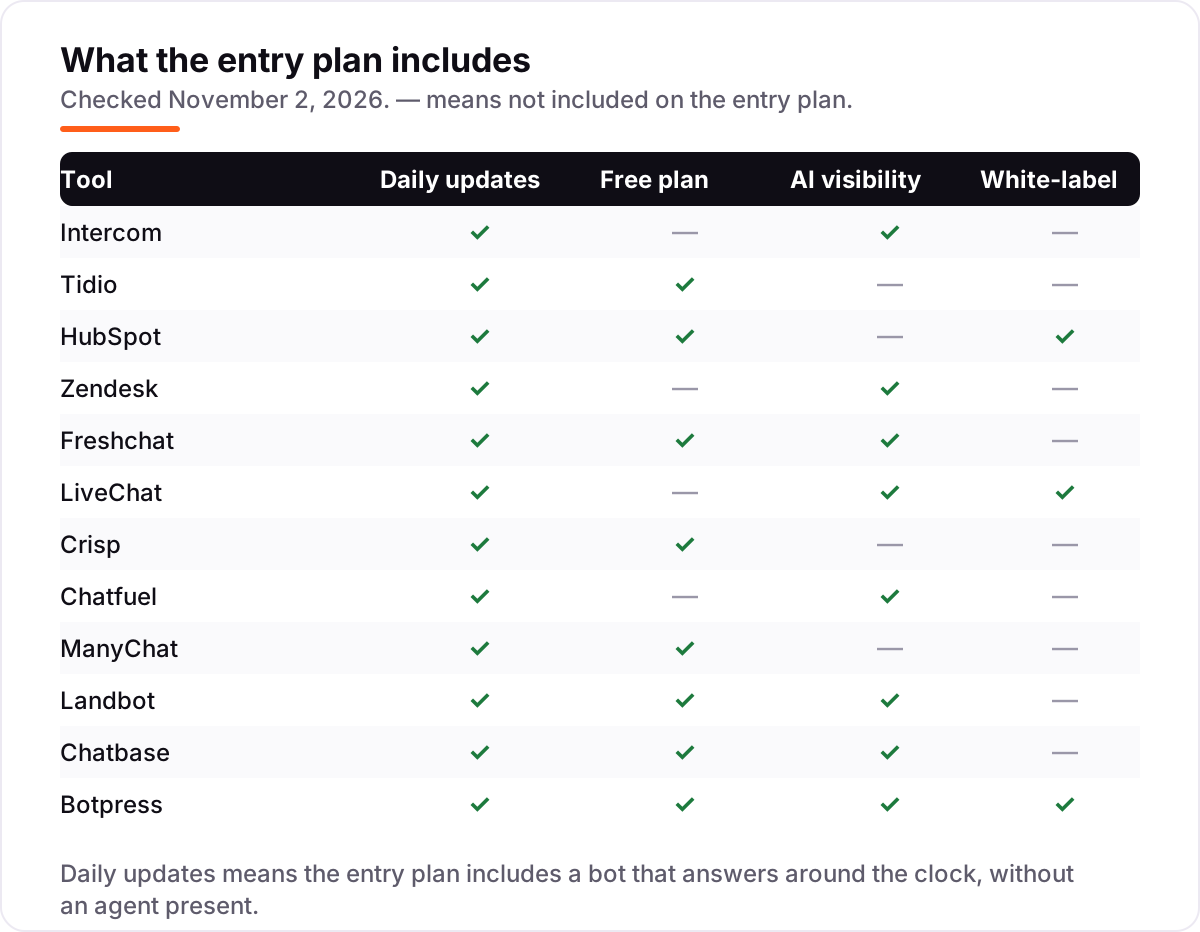
- Check whether the AI is included. Some entry plans include an AI agent, others sell it as an add-on or per-use meter — the comparison table shows which is which.
- Read the billing meter. Per seat, per conversation, per contact and per credit all scale differently; a flat $29 plan can beat a $19-per-seat plan for a five-person team.
- Test the handoff. The bot should pass a conversation to a human with full context, not restart it.
- Train on your own content. A bot that answers from your help center beats one that guesses from the open web. Our guide to the best AI SEO tools covers the research side of that content.
AI chatbot software pricing: what you will actually pay
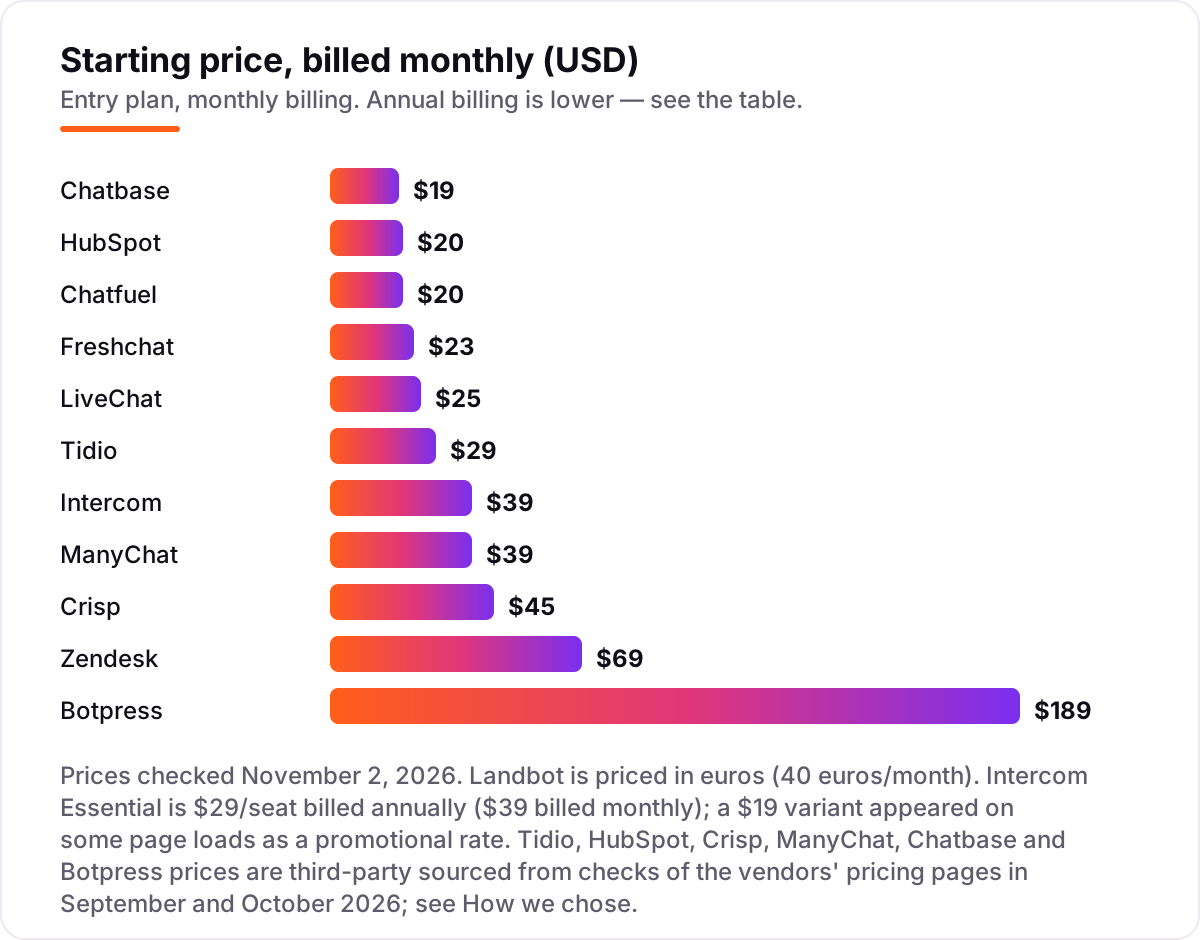
A five-person support team shows how far the meter matters. On LiveChat Essential at $19 per user a month billed annually, five people cost $95 a month, with ten AI resolutions included. The same five on Zendesk Suite Team at $55 a month billed annually cost $275 a month before AI resolutions, and adding Copilot would add another $250. On Tidio Starter the same team pays $29 a month flat, because Tidio charges per conversation rather than per seat — but Lyro AI is a separate charge from $32.50 a month billed annually. At the other end, a solo founder can run Chatbase Hobby at $19 a month or Botpress free for 100 conversations, while a developer team on Botpress Plus pays $150 a month billed annually for 250 conversations. The headline price is never the bill; the meter is.
AI chatbot software vs rule-based chatbot: know the difference
An AI chatbot understands what a customer means and writes an answer from your content, even when the question is phrased in a way nobody scripted. A rule-based chatbot follows a decision tree you built by hand: if the customer taps A, show B. Rule-based bots are predictable and cheap to run, and they still suit simple jobs such as booking forms and FAQ menus. AI bots handle the long tail of questions nobody predicted, but they can also give a confident wrong answer, which is why every tool in this list pairs the bot with a human handoff. Most buyers in 2026 want a hybrid: AI answers the open questions, rules guard the money steps such as refunds and bookings, and a human takes the rest. If a vendor sells you a rule-based bot at AI prices, walk away.
Quick comparison: tool type by need
| Buyer | Best pick | Why |
|---|---|---|
| Small store, website chat + AI | Tidio | $29/month flat, Lyro answers from your content |
| Team already on HubSpot CRM | HubSpot | Free for 2 users, chat tied to contact records |
| AI-first support at scale | Intercom or Zendesk | Fin or Zendesk AI agents included on entry plans |
| Selling in WhatsApp and Instagram DMs | Chatfuel or ManyChat | One plan for every messaging app |
| No-code lead flows and bookings | Landbot | Visual builder, 500 chats from €40 a month |
| Bot trained on your own content | Chatbase | $19 a month, trains on your site and files |
| Custom agents with workflows | Botpress | Free to start, Plus from $150 a month billed annually |
| Flat price for a whole team | Crisp or Freshchat | Per-workspace price, or free for up to 10 agents |
How we chose
We checked each vendor's own pricing page on November 2, 2026 and recorded the starting price exactly as shown, including the annual-billing figure where the page lists one. Ratings come from G2 pages opened the same day, except Freshchat and Chatbase, whose G2 pages redirected to category listings — those two cards show no rating rather than a guessed one. Six prices are third-party sourced rather than vendor-verified today: Tidio, HubSpot, Crisp, ManyChat, Chatbase and Botpress, each taken from checks of the vendor's pricing page in September and October 2026. We ranked the tools by fit for the most common buyer — a small or mid-size team buying its first AI chatbot — not by brand size. No vendor paid for a place in this list, and none of the links here are affiliate links.
What to do next
Start with the channel your customers already use, then take the free plan or trial of your top pick and load it with your real help-center content. Run it for a week, read the conversations it could not answer, and check the bill against the meter before you commit. Before you publish the pages your bot links to, run them through the free SERP snippet preview tool. If the bot is live but customers still cannot find you, our AI search optimization service looks at how you show up in AI answers. Once your tools are in place, find out what's holding your rankings back.
Your stack only works if people find you
SerpAstra fixes what keeps your site off page one and makes it easy for AI assistants to recommend.
Get a free audit→Sources we checked (22)
- Intercom pricing — intercom.com/pricing (checked November 2, 2026)
- Intercom on G2 — 4.5/5, 3,952 reviews (checked November 2, 2026)
- Tidio pricing — tidio.com/pricing (third-party checks of the vendor page, October 16, 2026)
- Tidio on G2 — 4.6/5, 2,077 reviews (checked November 2, 2026)
- HubSpot Service Hub pricing — hubspot.com/pricing/service (standard $20/seat, confirmed November 2, 2026)
- HubSpot Service Hub on G2 — 4.4/5, 3,016 reviews (checked November 2, 2026)
- Zendesk pricing — zendesk.com/pricing (checked November 2, 2026)
- Zendesk on G2 — 4.3/5, 7,120 reviews (checked November 2, 2026)
- Freshchat pricing — freshworks.com/live-chat-software/pricing (checked November 2, 2026)
- LiveChat pricing — livechat.com/pricing (checked November 2, 2026)
- LiveChat on G2 — 4.5/5, 819 reviews (checked November 2, 2026)
- Crisp pricing — crisp.chat/en/pricing (third-party checks of the vendor page, November 2, 2026)
- Crisp on G2 — 4.5/5, 207 reviews (checked November 2, 2026)
- Chatfuel pricing — chatfuel.com/en/pricing (checked November 2, 2026)
- Chatfuel on G2 — 4.4/5, 45 reviews (checked November 2, 2026)
- ManyChat pricing — manychat.com/pricing (third-party checks of the vendor page, November 2, 2026)
- ManyChat on G2 — 4.5/5, 165 reviews (checked November 2, 2026)
- Landbot pricing — landbot.io/pricing (checked November 2, 2026)
- Landbot on G2 — 4.7/5, 334 reviews (checked November 2, 2026)
- Chatbase pricing — chatbase.co/pricing (third-party checks of the vendor page, September 2026)
- Botpress pricing — botpress.com/pricing (third-party checks of the vendor page, October 8, 2026)
- Botpress on G2 — 4.5/5, 516 reviews (checked November 2, 2026)
Shamim
Founder of SerpAstra
A full-stack SEO and digital marketer who spends most days on Local SEO for dental practices, AI search visibility and lead generation.
Frequently asked questions
What is the best AI chatbot software in 2026?
Intercom is the best pick for most teams that want AI-first support, with Fin included on every plan. Tidio suits small stores, HubSpot suits teams already on its CRM, and Chatfuel or ManyChat suit businesses that sell in messaging apps. Pick by channel first, then by billing meter.
How much does AI chatbot software cost?
Entry prices in this list run from $19 to $189 a month, before usage charges. Seat-based tools such as Intercom and Zendesk charge per agent, while Tidio charges per conversation, ManyChat per contact and Chatbase per message credit. Always price your own volume before comparing headline figures.
Is there a free AI chatbot software?
Yes, with limits. Tidio, HubSpot, Freshchat, Crisp, Landbot, Chatbase and Botpress all have free plans. The catch is that AI answering is often a paid add-on or capped at a small allowance, so a free plan usually covers rule-based bots and live chat, not unlimited AI replies.
What is the difference between an AI chatbot and a rule-based chatbot?
An AI chatbot understands what a customer means and writes an answer from your content, even for questions nobody scripted. A rule-based chatbot follows a decision tree you built by hand, so it is predictable but rigid. Most tools in this list blend both: AI answers open questions and rules guard money steps such as refunds.
Do AI chatbots replace human agents?
No, they deflect the routine work so humans handle the rest. Tidio reports that its Lyro agent resolves up to 67% of tickets, which still leaves a third for people. The tools that work best pass a conversation to a human with full context, rather than making the customer start over.
Can an AI chatbot answer on WhatsApp and Instagram?
Yes, but only some tools do it well. Chatfuel and ManyChat are built for WhatsApp, Instagram and Messenger, Landbot and Tidio cover WhatsApp too, and Freshchat adds social messaging from Growth. Website-first tools such as Chatbase and Botpress need extra setup or integrations for social channels.
What should I check before buying AI chatbot software?
Four things: which channel your customers already use, whether the AI agent is included or a paid add-on, what the billing meter counts as one unit, and how the bot hands off to a human. Run the free plan or trial with your real help-center content for a week before you pay.
Free SEO and AI visibility audit
Find out what is holding your rankings back
Send us your site. Within 2 business days you get a written audit, an AI visibility check and a short fix list ranked by impact. Free, with no contract attached.
Request my free audit→Related guides
 AI SearchBest AI SEO tools in 2026: honest picks by jobBest AI SEO tools in 2026, picked by job: Semrush and Ahrefs for research, Surfer and Clearscope for content, Otterly for AI tracking, with 2026 prices.Read guide →
 SEO & AI Search10 Best AI Search Optimization Tools in 2026 (Free and Paid, Compared)10 best AI search optimization tools compared on price, AI visibility coverage and content scoring, with real prices checked October 31, 2026.Read guide →
 SEO & AI Search12 Best Marketing Platforms for Small Business SEO in 2026, ComparedThe 12 best marketing platforms for small business SEO, compared on real prices, SEO tools and AI visibility. Every price checked November 1, 2026.Read guide →