
8 Best AI Contract Review Software in 2026, Compared
The 8 best AI contract review software tools compared with real 2026 prices: in-Word redlining, playbooks and CLM depth, so you can pick by fit.
 Shamim Mia, Founder, SerpAstraLast verified November 10, 202612 min read
We compare pricing pages, documentation and public reviews. We never accept payment for rankings.

Key takeaways
- Spellbook is the best fit for most Word-based lawyers, with Gavel Exec at $160/user/month the only published-price alternative with market benchmarking, and Genie AI the cheapest self-serve start at $75/month.
- Five of the eight tools publish no price at all — budget for a sales call and a written quote, not a checkout page.
- The single most important buying factor is where the review happens: in Word, in the browser, or across a signed-contract repository.
- Every price below was checked on the vendor's own pricing page on November 10, 2026. Ratings are G2, checked the same day; tools without a verified rating show none.
On this page
Quick comparison
| Tool | Best for | Starting price | Free plan |
|---|---|---|---|
| Spellbook | Transactional lawyers at small and mid-size firms who draft and review entirely in Microsoft Word | Custom quote | No (7-day trial) |
| Gavel Exec | Transactional attorneys who want a published per-user price and market benchmarking before they negotiate | $160/mo | No (25 free queries) |
| Genie AI | Small in-house legal teams and commercial managers who need playbook review without a sales call | $75/mo | Yes (free plan) |
| goHeather | Founders, operations and finance managers who sign contracts but are not lawyers | $400/mo | No (7-day trial) |
| Luminance | Large law firms and in-house teams reviewing high volumes of contracts and due-diligence sets | Custom quote | No (demo only) |
| Ironclad | Mid-size to large legal operations teams automating the full contract lifecycle with approvals | Custom quote | No (demo only) |
| Juro | Growing business teams that need self-serve contracts with AI review built into the workflow | Custom quote | No (demo only) |
| Lexion | Mid-market legal teams that want a searchable contract repository with AI extraction after signing | Custom quote | No (free trial) |
Make one of these tools?
We re-check this list every quarter. Send a correction, request a review, or ask about a clearly labeled sponsored spot.
Request a listingThe best ai contract review software

Spellbook
Best for: Transactional lawyers at small and mid-size firms who draft and review entirely in Microsoft Word
Spellbook is a Microsoft Word add-in, so review happens where transactional lawyers already work: it drafts clauses, flags risky language, generates redlines and applies playbooks without leaving the document. It also benchmarks terms against market standards and answers questions about the contract, which makes it a strong first pass on NDAs, MSAs and vendor agreements.
The catch is price transparency. Spellbook publishes no price and quotes by team size, so budgeting starts with a demo and a sales call, and third-party reports of per-seat prices disagree widely. If your team lives in Word and wants the most mature in-document review, start with the 7-day free trial; if you need a number before you talk to sales, look at Gavel Exec or Genie AI instead.
What we like
- Native Word add-in that drafts clauses, flags risky language and generates redlines without leaving the document
- Applies your playbooks during live negotiation and benchmarks terms against market standards
- Answers questions about the contract and suggests clause alternatives with source references
- 7-day free trial with no published seat minimum, so a solo lawyer can try the real workflow
Watch out for
- No published price: quotes are set by team size, so budgeting starts with a demo and a sales call
- Third-party reports of its per-seat price disagree widely, from about $99 to about $500 a month
- Built entirely around Microsoft Word, so teams that review in a browser or a repository get less value

Gavel Exec
Best for: Transactional attorneys who want a published per-user price and market benchmarking before they negotiate
Gavel Exec is the most transparent buy in this list: $160 per user per month, or $1,740 per user per year, with 25 free queries to start and no credit card required. It reviews and redlines inside Word and on the web, applies your playbooks, benchmarks terms against market data and returns priority-ranked redlines as tracked changes with the reasoning behind each one.
The trade-off is scope and scale. Exec is a review and drafting tool, not a full contract lifecycle platform, so repository, obligations and intake live elsewhere. Paid plans include 1,000 queries per user per month, and the per-user price adds up fast for a large team. For one to five reviewers who want a published price, it is the easiest quote to defend.
What we like
- Published price: $160 per user per month, or $1,740 per user per year, with team pricing from 10 seats
- Benchmarks each term against market data for your jurisdiction, industry and company size
- Returns priority-ranked redlines as tracked changes, with comments, missing-term lists and the reasoning behind each change
- SOC 2 Type II certified, with zero data retention agreements with AI providers
Watch out for
- Per-user pricing adds up fast: five reviewers cost $800 a month on monthly billing
- Scoped to review and drafting, not a full contract lifecycle platform, so repository and obligation tracking live elsewhere
- Paid plans cap usage at 1,000 queries per user per month, so heavy playbook runs can eat the allowance

Genie AI
Best for: Small in-house legal teams and commercial managers who need playbook review without a sales call
Genie AI is the cheapest self-serve route into AI contract review: a free plan with no time limit, then Pro at $75 a month, or $59 a month billed annually. It drafts, reviews, redlines and negotiates against your own playbook, rating each clause red, amber or green, and works in a Word-style editor with more than 500 templates across 150-plus jurisdictions.
The limits are usage-based rather than seat-based. Pro includes a set AI token allowance, so a team reviewing dozens of long contracts a month can outgrow it and move to Business at $320 a month for five users. The free plan locks exports, so treat it as a trial of the review quality. For a small team that wants to start today without a sales call, Genie AI is the obvious first try.
What we like
- Cheapest self-serve start here: free plan, then Pro at $75 a month or $59 a month billed annually
- Rates each clause red, amber or green against your own playbook, with tracked-changes redlines
- More than 500 contract templates across 150-plus jurisdictions, with drafting, review and negotiation in one workspace
- ISO/IEC 27001:2022 certified, with self-serve sign-up and no implementation project
Watch out for
- Pro is priced by AI token allowance, so reviewing dozens of long contracts a month can outgrow the plan
- Free plan locks document exports, so it works as a trial of review quality rather than a working tier
- No verified G2 rating with a usable review count, so buyer sentiment is harder to check

goHeather
Best for: Founders, operations and finance managers who sign contracts but are not lawyers
goHeather is written for the person who signs contracts but is not a lawyer: founders, finance managers and operations leads. It reviews contracts in plain English, flags risks, applies playbooks you build yourself and suggests one-click redlines in Word or its web editor, with a commercial lawyer helping you set up your playbooks in free one-to-one sessions.
The price is the honest problem: Starter costs $400 a month, or $200 a month billed annually, for a single seat, and a second seat moves you to a Team plan with a custom quote. There is no document limit and every feature is included, so heavy users get value, but occasional reviewers will find $400 a month hard to justify. Try the 7-day free trial before committing.
What we like
- Published price: Starter at $400 a month, or $200 a month billed annually, with every feature included
- Explains risks in plain English and suggests one-click redlines, built for non-lawyers
- Free one-to-one sessions with a commercial lawyer to help set up your playbooks
- No monthly document limit and no data used to train AI models
Watch out for
- $400 a month for one seat is steep for occasional use, and a second seat moves you to a custom-quoted Team plan
- Only two Trustpilot reviews exist, so there is almost no public buyer signal to check against
- Employment templates are Canada-focused, which limits value for teams hiring elsewhere

Luminance
Best for: Large law firms and in-house teams reviewing high volumes of contracts and due-diligence sets
Luminance is the enterprise pick for volume: it reads whole contract sets, flags clauses that break your standard positions, suggests redlines in Word and supports due diligence across large document collections in more than 80 languages. Its traffic-light markup shows at a glance which clauses comply, which need conditions and which deviate, so a lean team can clear routine agreements without waiting on outside counsel.
It is also the heaviest buy here. Luminance publishes no price, sells through a demo and quote, and implementation typically takes four to eight weeks with a real learning curve. Small teams and occasional reviewers should not start here. Choose Luminance when contract volume or a due-diligence deadline is the problem, and budget for setup time as well as the licence.
What we like
- Reads whole contract sets and flags clauses that break your standard positions, with suggested redlines in Word
- Traffic-light markup shows at a glance which clauses comply, which need conditions and which deviate
- Built for due diligence across large document collections in more than 80 languages
- ISO 27001 certified and SOC 2 Type II examined, with on-premises deployment available
Watch out for
- No published price and no free trial: evaluation runs through a demo and a custom quote
- Implementation typically takes four to eight weeks, with a real learning curve for new teams
- Enterprise pricing puts it out of reach for small teams and occasional reviewers

Ironclad
Best for: Mid-size to large legal operations teams automating the full contract lifecycle with approvals
Ironclad is a full contract lifecycle platform, not just a reviewer: legal builds approval workflows, clause rules and templates once, then sales, procurement and HR self-serve contracts inside those guardrails. Its AI assist drafts, redlines and analyses clauses, and native e-signature means a contract never leaves the platform to get signed.
The cost is enterprise-sized. Ironclad publishes no price, and third-party buyer data puts typical annual contracts in the tens of thousands of dollars, with implementation fees on top and a rollout measured in weeks. That makes it a poor fit for a team that only needs review. Buy it when contract turnaround has become a company-wide bottleneck, not when you need a faster redline.
What we like
- Full lifecycle platform: drafting, approvals, negotiation, native e-signature and obligation tracking in one place
- No-code workflow designer lets legal set the rules once so business teams self-serve inside guardrails
- AI Assist drafts, redlines and analyses clauses, with contract analytics across the whole portfolio
- Named a Forrester Wave CLM Leader in 2025, with deep Salesforce and business-system integrations
Watch out for
- No published price: third-party buyer data puts typical annual contracts in the tens of thousands of dollars
- Implementation fees run into five figures on top of the licence, with a rollout measured in weeks
- Overkill for a team that only needs faster redlines rather than company-wide contract workflows

Juro
Best for: Growing business teams that need self-serve contracts with AI review built into the workflow
Juro is a browser-native contract platform for business teams: contracts are created, negotiated and managed in one workspace, with AI review built into the workflow and unlimited users, workflows and templates on every plan. Pricing is based on how many contracts you process each month rather than on seats, which suits teams where many people touch contracts but only a few are lawyers.
The trade-offs are price opacity and annual billing. Juro publishes no prices, quotes by contract volume and integration complexity, and bills annually, so budgeting means a sales conversation and a written quote. Its Word integration is also less seamless than its in-platform editor. Pick Juro when your team wants self-serve contracts end to end, and trial the editor on your own templates first.
What we like
- Browser-native workspace for creating, negotiating, approving and managing contracts end to end
- Unlimited users, workflows and templates on every plan, with pricing by contract volume rather than seats
- AI review and playbooks built into the workflow, so business teams can self-serve standard agreements
- Rated highly by G2 reviewers for ease of setup and quality of support
Watch out for
- No published prices and annual-only billing, so budgeting means a sales conversation and a written quote
- Pricing is based on contract volume and integration complexity, which is hard to estimate before the call
- Word integration is less seamless than the in-platform editor, per G2 reviewers

Lexion
Best for: Mid-market legal teams that want a searchable contract repository with AI extraction after signing
Lexion is the repository-first pick: it stores signed contracts in one searchable place, extracts key terms and dates with AI, tracks obligations and renewals, and plugs into Word for review. DocuSign acquired Lexion in 2024 for $165 million and is folding its technology into its Intelligent Agreement Management platform, so existing customers keep support while new capability ships through DocuSign.
The uncertainty is the roadmap and the price. Lexion publishes no price, quotes are set by DocuSign, and the independent product roadmap is now tied to a larger platform. That matters if you want a standalone tool with its own release pace. Choose Lexion when your main pain is finding what you already signed and what it obliges you to do, rather than drafting the next contract.
What we like
- Searchable repository that extracts key terms, dates and obligations from signed contracts with AI
- AI Contract Assist reviews in Word, with clause comparison and obligation alerts ahead of renewals
- High G2 ratings for ease of use and ease of setup, with responsive support
- DocuSign backing after the 2024 acquisition, with e-signature integrations built in
Watch out for
- No published price: quotes are now set through DocuSign, so pricing depends on the DocuSign package
- Roadmap is tied to DocuSign Intelligent Agreement Management, so the standalone product has no independent release pace
- Reviewers note AI accuracy can need manual checking on unusual or non-standard contracts
The best AI contract review software reads a contract before you do: it flags risky clauses, suggests redlines against your playbook and summarises what matters, so the first pass takes minutes instead of hours. This list is sorted by fit for the most common buyer — a lawyer or a small legal team reviewing routine commercial contracts — not by brand size, and every price was checked on the vendor's own pricing page on November 10, 2026.
How to choose the best AI contract review software
Picking a reviewer is mostly about matching the tool to the contracts you actually sign. A firm that reviews NDAs all day needs something different from a legal team running due diligence on a thousand-document deal set, and a founder signing vendor agreements needs something different again. The six checks below work for every buyer in this list, whatever the budget.
- Start with where you work. If you live in Microsoft Word, pick a Word add-in like Spellbook or Gavel Exec. If your team works in a browser, Juro or Genie AI fits better.
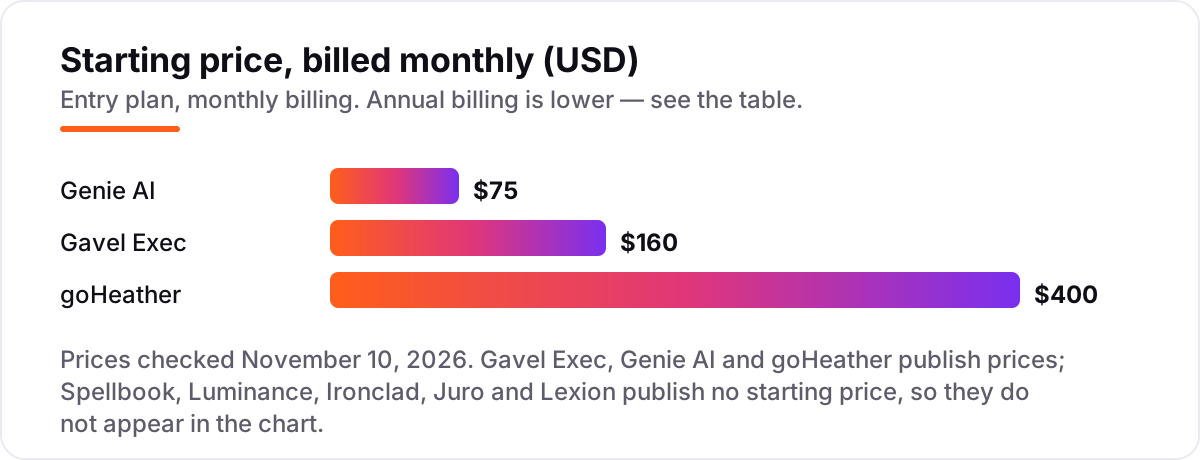
- Check the price model first. Only three tools here publish a price. The other five are quote-only, so ask for a written quote before you compare anything else.
- Ask how playbooks are built. The best tools let you build rules from your own signed contracts and checklists, not just from generic templates.
- Test on your own paper. Run one NDA and one MSA from the other side through the trial, and check whether the redlines match what your lawyer would write.
- Check the usage cap. Some tools cap queries, tokens or documents a month; a cap that looks generous can run out fast on long contracts.
- Confirm who signs off. No tool here replaces a lawyer: the output is a first pass, and a licensed attorney should review anything material before signing.
A practical test that sorts the list fast is the messy-contract test: take the worst counterparty paper you received this year — scanned PDF, unusual governing law, one-sided liability — and run it through the two finalists. The tool that flags the liability cap and the missing termination right, and explains both in plain language, is the one your team will actually use. A tool that only summarises the document is a reader, not a reviewer, and it will not save your lawyer any time.
Before you send a reviewed contract out, check that the title and summary read well in search with the free SERP snippet preview tool — it shows exactly how a page title and description will look in Google.
AI contract review software pricing: what you will actually pay
Only three tools publish a price, so the worked example is short. One reviewer on Genie AI Pro pays $75 a month, or $59 a month billed annually — $708 a year. The same reviewer on Gavel Exec pays $160 a month, or $1,740 a year billed annually. On goHeather Starter, one seat costs $400 a month, or $200 a month billed annually — $2,400 a year.
Five reviewers change the picture. Five seats of Gavel Exec cost $800 a month on monthly billing, or $8,700 a year on annual billing. Five reviewers on Genie AI Business, the five-user plan, cost $320 a month, or $259 a month billed annually. For the five quote-only tools, there is no number to multiply: Spellbook, Luminance, Ironclad, Juro and Lexion all price by team size, volume or scope, so the only honest budget is the written quote. Ask every vendor the same four questions: what is included, what counts toward the cap, what implementation costs, and what the renewal increase is.
One more cost that rarely appears on a pricing page is the setup. A Word add-in can be running the same day you sign up, while an enterprise platform can take weeks of playbook building and training before the first contract is reviewed. That setup time is a real cost, especially for a small team, and it is worth asking the vendor to put it in writing: how many hours of your team's time the first month will take, and whether training and playbook building are included in the quote or billed separately.
Know the difference: AI review, CLM and e-signature
The biggest buyer confusion in this category is the overlap between three kinds of tool. AI contract review software does one job: it reads a single contract, checks it against your playbook and returns redlines. Spellbook and Gavel Exec are review-first tools, and that focus is why they are fast to start.
CLM software manages the whole lifecycle: intake, drafting, approvals, negotiation, e-signature, storage and obligation tracking. Ironclad and Juro are CLM platforms with AI review built in, and Lexion adds the repository and obligation side. E-signature alone, such as DocuSign, only signs a document — it does not review it. If your pain is the redline, buy review; if your pain is contracts getting stuck between teams, buy CLM; if you only need signatures, you do not need either. Teams that also manage signed documents should read our guide to document management software for law firms, and firms that want the full picture can start with our SEO audit service to see how their site presents to clients.
What good review output looks like
A good review is not a summary. It is a marked-up document you can send back. At minimum, expect tracked changes you can accept or reject one by one, a comment on each change that says why it was made, and a short list of missing terms — the clauses your playbook requires but the contract does not have. If a tool only returns a memo about the contract, your lawyer still has to do the redlining by hand, and the time saving evaporates.
Two details separate the strong tools from the weak ones. First, the redline should cite the source of the rule: your playbook, your precedent, or a market benchmark. A change with no reason attached is hard to defend in a negotiation. Second, the tool should keep your positions consistent across contracts: the same liability cap, the same governing law, the same payment terms, every time. That consistency is the real value of a playbook — it turns one lawyer's judgment into a standard the whole team can apply, including the commercial colleagues who review routine agreements without legal training.
Quick comparison: tool type by need
| Buyer | Best pick | Why |
|---|---|---|
| Transactional lawyer living in Word | Spellbook | Most mature in-Word review and playbooks; 7-day free trial |
| Reviewer who wants a published price | Gavel Exec | $160/user/month with market benchmarking and 25 free queries |
| Small team starting without a sales call | Genie AI | Free plan, then Pro at $75/month or $59 billed annually |
| Non-lawyer who signs contracts | goHeather | Plain-English review with a lawyer helping set up playbooks |
| High-volume review or due diligence | Luminance | Whole-portfolio review in more than 80 languages |
| Full lifecycle with approvals | Ironclad or Juro | Workflows, e-signature and self-serve contracts end to end |
| Finding what you already signed | Lexion | Searchable repository with AI extraction and renewal alerts |
How we chose
We checked each vendor's own pricing page on November 10, 2026 and recorded the starting price exactly as shown, or recorded "Custom quote" where the vendor publishes no price. Ratings come from G2, checked the same day, and only where the G2 page showed a score and a review count in a fresh copy; Gavel Exec, Genie AI and goHeather show no rating because no verified G2 or Trustpilot score with a usable count was available. We ranked the tools by fit for the most common buyer — a lawyer or small legal team reviewing routine commercial contracts — not by brand size. No vendor paid for a place in this list, and none of the links here are affiliate links.
What to do next
Start with the decision path above: pick where you work, check the price model, and test the tool on your own NDA and MSA before you pay. If you want a published price, start with Gavel Exec or Genie AI; if you live in Word, start with Spellbook's free trial. Keep the quote in writing, with the cap, the implementation cost and the renewal terms spelled out, before you sign anything. Once your tools are in place, find out what's holding your rankings back.
Your stack only works if people find you
SerpAstra fixes what keeps your site off page one and makes it easy for AI assistants to recommend.
Get a free audit→Sources we checked (13)
- Spellbook pricing — spellbook.com/pricing (no published price; custom quote by team size, checked November 10, 2026)
- Spellbook on G2 — 4.7/5, 29 reviews (checked November 10, 2026)
- Gavel Exec — gavel.io/exec ($160/user/month or $1,740/user/year, checked November 10, 2026)
- Genie AI pricing — genieai.co/pricing (Pro $75/month, $59/month billed annually, checked November 10, 2026)
- goHeather pricing — goheather.io/pricing (Starter $400/month, $200/month billed annually, checked November 10, 2026)
- Luminance pricing — luminance.com (no published price; quote-based, checked November 10, 2026)
- Luminance on G2 — 4.5/5, 35 reviews (checked November 10, 2026)
- Ironclad pricing — ironcladapp.com (no published price; quote-based, checked November 10, 2026)
- Ironclad on G2 — 4.4/5, 312 reviews (checked November 10, 2026)
- Juro pricing — juro.com (no published price; quote-based, checked November 10, 2026)
- Juro on G2 — 4.5/5, 248 reviews (checked November 10, 2026)
- Lexion pricing — lexion.ai (no published price; quote-based, checked November 10, 2026)
- Lexion on G2 — 4.6/5, 135 reviews (checked November 10, 2026)
Shamim
Founder of SerpAstra
A full-stack SEO and digital marketer who spends most days on Local SEO for dental practices, AI search visibility and lead generation.
Frequently asked questions
What is the best AI contract review software in 2026?
Spellbook is the best fit for most Word-based lawyers, with the most mature in-document review and playbooks. If you want a published price, Gavel Exec at $160/user/month is the strongest alternative. Small teams that want to start without a sales call should try Genie AI, which has a free plan and Pro at $75/month.
How much does AI contract review software cost?
Published prices run from $75 a month for Genie AI Pro to $160/user/month for Gavel Exec and $400 a month for goHeather Starter. Five of the eight tools here publish no price at all, including Spellbook, Luminance, Ironclad, Juro and Lexion, so those cost whatever the written quote says — typically thousands a year and far more at enterprise scale.
Is there a free AI contract review tool?
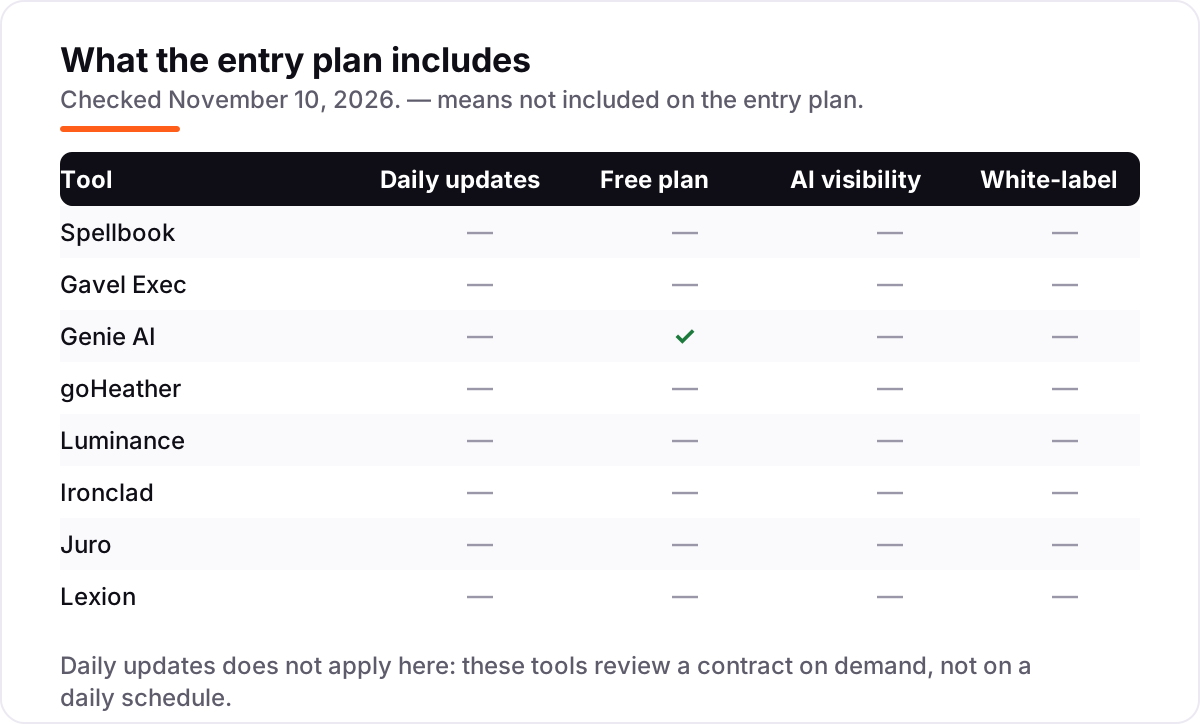
Genie AI has a genuinely free plan with no time limit, though document exports are locked on it. Gavel Exec gives 25 free queries per user with no credit card, Spellbook and goHeather both offer 7-day free trials, and Lexion offers a free trial. Luminance, Ironclad and Juro offer a demo only, with no free plan or trial.
What is the difference between AI contract review software and CLM software?
AI contract review software checks one contract against your playbook and returns redlines, usually in Word or a browser editor. CLM software manages the whole lifecycle: drafting, approvals, e-signature, storage and obligation tracking. Ironclad and Juro are CLM platforms with review built in; Spellbook and Gavel Exec are review-first tools.
Can AI contract review replace a lawyer?
No. These tools give a fast first pass: they flag risky clauses, suggest redlines and check a contract against your playbook. They can miss context, misread unusual clauses and cannot give legal advice or take responsibility for a signature. A licensed attorney should still review anything material before it is signed, and the tools themselves say the same.
What should I check before paying for AI contract review software?
Four things: whether the price is published or quote-only, and what the quote includes; where the review happens, in Word or in a browser; whether your playbooks can be built from your own signed contracts; and what counts toward any usage cap, such as queries, tokens or documents. Run your own NDA and MSA through the trial first.
Which AI contract review tool is best for a small business without a lawyer?
goHeather is built for that buyer: plain-English risk explanations, DIY playbooks and free setup sessions with a commercial lawyer, at $400 a month for one seat. Genie AI is the cheaper start, with a free plan and Pro at $75 a month, but it expects you to build and run your own playbooks without a lawyer's help.
Free SEO and AI visibility audit
Find out what is holding your rankings back
Send us your site. Within 2 business days you get a written audit, an AI visibility check and a short fix list ranked by impact. Free, with no contract attached.
Request my free audit→Related guides
 Local Business & Vertical Software8 Best Document Management Software for Law Firms in 2026, ComparedCompare the 8 best document management software for law firms on price, security and matter filing, with every price checked November 7, 2026.Read guide →
 Local Business & Vertical Software8 Best Case Management Software for Law Firms in 2026, ComparedCompare the 8 best case management software for law firms on published prices, trust accounting and free trials, with prices checked November 7, 2026.Read guide →
 Local Business & Vertical Software12 Best Law Firm Practice Management Software in 2026, ComparedCompare the 12 best law firm practice management software options on price, trust accounting, AI and free plans, with every price checked November 8, 2026.Read guide →