
8 Best AI Platforms for Content Creation in 2026, Compared
8 best AI platforms for content creation compared on price, free plans and output type. Prices checked November 10, 2026, with the right pick for each buyer.
 Shamim Mia, Founder, SerpAstraLast verified November 10, 202610 min read
We compare pricing pages, documentation and public reviews. We never accept payment for rankings.

Key takeaways
- Canva is the best all-round pick for most buyers: design, video, documents and AI tools from $12/month billed annually ($18 month to month), with a free plan.
- Jasper is the strongest long-form AI writer here at $59/month per seat billed annually, while Writesonic covers the same job for $16/month billed annually.
- Video is where the meter matters most: Synthesia, Pictory, InVideo, Predis.ai and Creatify all sell monthly credits or minutes, so the allowance decides the real cost, not the headline price.
- The single most important buying factor is what a plan's allowance buys: count the words, minutes or credits you need each month before you compare prices.
- Every price below was checked on the vendor's own pricing page on November 10, 2026. Ratings are G2, with review counts shown.
On this page
Quick comparison
| Tool | Best for | Starting price | Free plan |
|---|---|---|---|
| Canva | Solo marketer or small team that needs social graphics, presentations and short videos without hiring a designer | $12/mo (annual) | Yes (free plan) |
| Jasper | Small marketing team that needs on-brand long-form content with a shared brand voice | $59/mo (annual) | No (7-day trial) |
| Writesonic | Freelancer or solo creator who needs SEO-ready articles and social copy on a tight budget | $16/mo (annual) | Yes (free plan) |
| Synthesia | Training or L&D team turning scripts into presenter videos without a camera or studio | $14/mo (annual) | Yes (Basic free) |
| Pictory | Blogger or content marketer turning articles and scripts into captioned social videos | $25/mo (annual) | No (14-day trial) |
| InVideo | Social media manager who needs fast prompt-to-video clips for TikTok, Reels and Shorts | $10/mo (annual) | Yes (free plan) |
| Predis.ai | Small ecommerce store or social manager who needs a month of branded posts and ads from a product link | $19/mo (annual) | No (3-day trial) |
| Creatify | Ecommerce brand that needs product-link-to-video-ad drafts to test on Meta and TikTok | $10/mo (annual) | Yes (free plan) |
Make one of these tools?
We re-check this list every quarter. Send a correction, request a review, or ask about a clearly labeled sponsored spot.
Request a listingThe best AI platforms for content creation

Canva
Best for: Solo marketer or small team that needs social graphics, presentations and short videos without hiring a designer
Canva is the broadest tool in this list: one subscription covers social graphics, presentations, documents, short videos and print, with Magic Studio AI tools that draft designs, write copy, remove backgrounds and resize a design for every channel. The Pro plan costs $18 a month, or $12 a month billed yearly, and adds more than 3.6 million templates, 141 million premium stock assets, five Brand Kits and 100 GB of storage.
The catch is the seat rule: Pro covers one person only, so a second teammate means moving to Business at $25 per person a month. AI use is also metered, with up to 200 Premium or 20 Ultra AI uses a month on Pro. If you need one place where a non-designer can produce a week of on-brand content, Canva is the pick.
What we like
- More than 3.6 million templates and 141 million premium stock assets on Pro
- Magic Studio AI drafts designs, writes copy, removes backgrounds and resizes for every channel
- Five Brand Kits and social scheduling keep a small team on brand
- Free plan covers everyday design work, with a 30-day Pro trial
Watch out for
- Pro covers one person only; a second user means Business at $25 per person a month
- AI use is capped at 200 Premium or 20 Ultra uses a month on Pro
- No white-label option, and advanced photo editing needs a dedicated tool

Jasper
Best for: Small marketing team that needs on-brand long-form content with a shared brand voice
Jasper is the strongest long-form writer in this list, built for marketing teams that publish blogs, emails and campaigns on a schedule. The Canvas workspace, campaign agents and Brand Voice keep output consistent, and Pro includes two Brand Voices, five Knowledge assets, three Audiences, AI image generation and a plagiarism checker.
The price is per seat, so the bill grows with the team: Pro costs $69 a month per seat, or $59 billed annually, and there is no free plan, only a 7-day trial. Some advanced agents also draw on usage credits on top of the seat price. Buy Jasper when one writer's output has to sound like the same brand every time; for occasional articles, Writesonic costs far less.
What we like
- Brand Voice, Canvas and campaign agents keep long-form output on brand
- Two Brand Voices, five Knowledge assets and three Audiences on Pro
- AI image generation and a plagiarism checker included in the plan
Watch out for
- Per-seat pricing: each extra teammate adds the full $69 or $59 a month
- No free plan, only a 7-day trial, and Business needs a 12-month commitment
- Some advanced agents draw on usage credits on top of the seat price

Writesonic
Best for: Freelancer or solo creator who needs SEO-ready articles and social copy on a tight budget
Writesonic is the budget way into AI writing, and the Individual plan is the cheapest paid writing tier in this list. For $20 a month, or $16 billed annually, you get 100,000 premium words a month, the Article Writer, Chatsonic, templates and SEO tools, plus a free plan with 10,000 words a month to start on.
The trade-off is the credit system: premium words burn fast on long articles, and the full GEO and AI visibility platform is a separate product from $79 a month. Drafts also need editing, and reviewers note quality varies by topic. For a freelancer publishing a few SEO articles a week, it is the best value here; for a team that needs shared brand controls, Jasper fits better.
What we like
- Individual includes 100,000 premium words a month for $20, or $16 billed annually
- Article Writer, Chatsonic and SEO tools in one plan, with a free plan to start
- Brand Voice and templates cover blogs, ads and social copy
Watch out for
- The word and credit system is confusing, and heavy use burns premium words fast
- The GEO and AI visibility platform is a separate product from $79 a month
- Drafts need editing; reviewers note output quality varies by topic

Synthesia
Best for: Training or L&D team turning scripts into presenter videos without a camera or studio
Synthesia turns a script into a presenter video without a camera, a studio or an actor. The Basic free plan gives 10 minutes of video a month with a watermark, and Starter costs $19 a month, or $14 billed annually, adding 1,250 credits, 125-plus avatars, three personal avatars, downloads and logo removal.
The allowance is the thing to watch: Starter adds only about 12 minutes a month on top of the free 10, so an hour of training video a month needs the Pro plan at $89. Prices also vary by region on Synthesia's page, with US visitors seeing the $19 figure. Buy it for training and internal videos; for marketing clips, Pictory or InVideo give you more minutes per dollar.
What we like
- Turns a script into a presenter video with 125+ avatars and AI dubbing
- Basic free plan gives 10 minutes of video a month to try it
- Downloads and logo removal start on Starter, with 3 personal avatars
Watch out for
- Starter adds only about 12 minutes a month on top of the free 10
- Video is metered in credits, and the page shows different prices by region
- Avatar voices can sound robotic, per G2 reviewer summaries

Pictory
Best for: Blogger or content marketer turning articles and scripts into captioned social videos
Pictory is built for one job: turning articles, scripts and web pages into captioned videos with stock footage and an AI voiceover. Starter costs $29 a month, or $25 billed annually, and covers up to 30 video minutes a month with 2,000 credits, one brand kit, 5 GB of storage and a library of more than 5 million Getty and Storyblocks clips.
There is no free plan, only a 14-day trial, and subscriptions are not refunded, so use the trial first. Exports cap at 1080p and Starter has no custom avatars, and cancelling deletes your projects, so download everything before you leave. For a blogger repurposing every post into a video, it is the fastest workflow here.
What we like
- Turns articles, scripts and URLs into captioned videos with AI voiceover
- 5 million-plus Getty and Storyblocks clips and ElevenLabs voices on Starter
- Starter covers up to 30 video minutes a month with 2,000 credits
Watch out for
- No free plan, only a 14-day trial, and subscriptions are not refunded
- Video exports cap at 1080p, with no custom avatars on Starter
- Cancelling deletes your projects, so download everything first

InVideo
Best for: Social media manager who needs fast prompt-to-video clips for TikTok, Reels and Shorts
InVideo turns a prompt into a finished social video, running more than 200 AI models through one agent with a full timeline editor for fixes. Starter costs $20 a month per seat, or $10 billed annually, and includes 400 credits a month, 100 premium stock clips and 200 GB of storage, with a free plan on a weekly credit quota.
The credit meter is the risk: unused credits do not roll over, and InVideo's own FAQ says it can change credit costs at any time without notice. Starter is also limited to Lite agents and the Seedance 2.0 Fast and Mini models. For a social manager posting several short clips a week, it is the cheapest video entry here; for longer videos, Pictory's minute allowance goes further.
What we like
- Prompt-to-video with 200-plus AI models and a full timeline editor
- Starter is $10 a month billed annually, the cheapest video entry here
- Free plan with a weekly credit quota to test before paying
Watch out for
- Credits do not roll over, and InVideo can change credit costs without notice
- Starter is limited to Lite agents and Seedance 2.0 Fast and Mini models
- Free exports carry an InVideo watermark

Predis.ai
Best for: Small ecommerce store or social manager who needs a month of branded posts and ads from a product link
Predis.ai turns a product link or a prompt into a month of social content: posts, carousels, videos and ads, with captions and hashtags matched to your brand. Core costs $32 a month, or $19 billed annually, and includes 1,300 credits a month, one brand, 10 publishing channels, 25,000 words and 60 competitor runs a month.
There is no free plan, only a 3-day trial that needs a card and charges when it ends unless you cancel. Auto-posting is not included on Core either; scheduling automation starts on Rise. And its own estimate of what 1,300 credits buy has changed during 2026, so check the current figure before you commit. For a small store that needs ads and posts from one link, it replaces two or three tools.
What we like
- Turns a product link or prompt into posts, carousels, videos and ads
- 1,300 credits a month on Core, about 325 images or 33 videos by its own estimate
- Competitor analysis with 60 runs a month and 10 publishing channels
Watch out for
- No free plan; the 3-day trial needs a card and charges if you forget to cancel
- No auto-posting on Core; scheduling automation starts on Rise
- Its own credit-to-output estimates changed during 2026, so check what a credit buys

Creatify
Best for: Ecommerce brand that needs product-link-to-video-ad drafts to test on Meta and TikTok
Creatify is an ad factory: paste a product URL and it drafts video ads with an AI avatar, script and voiceover, ready to test on Meta and TikTok. Standard costs $15 a month, or $10 billed annually, for 55 credits a month, 300 AI actors, more than 200 templates and videos up to two minutes, with a free plan worth about two watermarked ads a month.
The credit meter is hard to predict: one G2 reviewer reports a single 15-second video costing 89 credits, and credits expire after two months, so re-renders cost real money. Billing is also the main complaint on Trustpilot, where it scores 3.7 against 4.8 on G2. For an ecommerce brand testing ad angles fast, it is the cheapest way in; for polished brand films, it is the wrong tool.
What we like
- Turns a product URL into video ad drafts with AI avatars, scripts and voiceovers
- Standard is $10 a month billed annually, the cheapest paid entry in this list
- Free plan with 10 credits a month, about two watermarked video ads
Watch out for
- Credit costs are hard to predict; one G2 reviewer reports a 15-second video costing 89 credits
- Credits expire after two months, and re-renders spend more
- Trustpilot reviewers rate it 3.7 out of 5, well below its 4.8 on G2, mostly over billing
The best AI platforms for content creation are not all the same kind of tool: some write, some design, some make videos, and a few try to do all three. This list ranks eight of them by fit for the most common buyer — a small business or marketing team that needs a steady flow of posts, articles and videos without hiring for each format.
We sorted the list by output first, then by what the entry plan actually buys: words, minutes or credits. Every price below comes from the vendor's own pricing page, and the comparison table at the top shows the starting price and free plan for each tool.
Quick comparison: tool type by need
| Buyer | Best pick | Why |
|---|---|---|
| Solo creator on a budget | Writesonic or Creatify | $16 or $10 a month billed annually, with free plans |
| One tool for everything visual | Canva | Design, video and docs from $12 a month billed annually |
| Long-form marketing writing | Jasper | Brand Voice and campaigns from $59 a month per seat billed annually |
| Training and presenter video | Synthesia | Avatar video from $14 a month billed annually |
| Turning articles into video | Pictory | Blog-to-video from $25 a month billed annually |
| Fast social video clips | InVideo or Predis.ai | Prompt-to-video from $10 or $19 a month billed annually |
| Product video ads | Creatify | URL-to-ad drafts from $10 a month billed annually |
How to choose the best AI platforms for content creation
- Start with the output you make most. If you publish mostly articles, a writing tool pays for itself; if you publish mostly social video, a video tool does. Buying a platform that covers everything usually means paying for formats you never use.
- Count the allowance, not the price. Five of the eight tools here sell credits or minutes, so a $10 plan with 55 credits can cost more per video than a $20 plan with 400. Work out your monthly words, minutes or clips first.
- Check what the free plan really allows. Free tiers range from Canva's usable design plan to watermarked trials with a handful of credits, so test the exact job you need before you pay.
- Look for brand controls. Brand Kits, Brand Voice and templates decide whether the output looks like your business or like everyone else's default.
- Try it on a real job. Run one real article, design or video through the trial and check the output before the trial ends, not after.
- Check the export quality before you commit. A watermark, a 1080p cap or a robotic voice is easy to miss on a pricing page and hard to fix later, so download one finished piece from the trial and show it to a colleague before you pay.
Before you publish anything the tool writes, run your titles through the free SERP snippet preview tool to see how they will look in Google.
AI content creation pricing: what you will actually pay
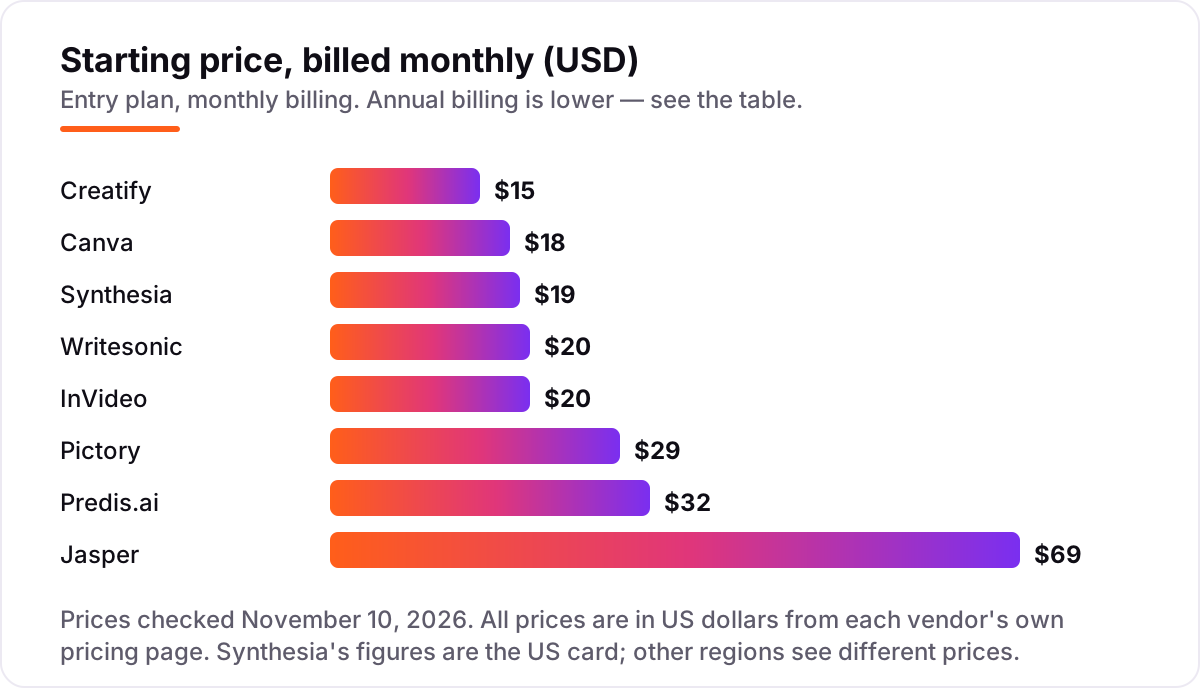
A solo creator who writes with Writesonic and designs with Canva pays $16 a month for Writesonic Individual plus $12 a month for Canva Pro on annual billing, or $28 a month for the pair. Add Pictory Starter at $25 a month billed annually and the three come to $53 a month, covering articles, designs and up to 30 minutes of video a month. Pay the same three month to month and the bill is $67 a month: Canva $18, Writesonic $20 and Pictory $29.
Video is where the bill grows fastest. InVideo Starter looks cheap at $10 a month billed annually, but it buys only 400 credits a month, and Creatify Standard's 55 credits cover about eleven 15-second ads a month at 5 credits per 15 seconds. Synthesia Starter adds only about 12 minutes a month on top of the free 10, so an hour of training video a month needs the Pro plan at $89. Count your monthly output before you pick a tier, and remember that annual billing is paid up front on most of these tools.
Know the difference: content platforms, writing assistants and video generators
The phrase AI content platform hides three different products. Writing assistants such as Jasper and Writesonic produce text: articles, ads and social copy. Video generators such as Synthesia, Pictory, InVideo and Creatify produce video from a script, an article or a product link. All-rounders such as Canva and Predis.ai cover several formats, but neither writes a long article as well as Jasper or makes a presenter video as well as Synthesia.
The second confusion is the meter. Seats, words, minutes and credits are four different ways of charging, and the cheapest headline is rarely the cheapest month. A per-seat tool multiplies with every teammate, a credit tool multiplies with every re-render, and a minute tool multiplies with every extra video. Match the meter to the job: seats for teams, words for writers, minutes for trainers, credits for advertisers.
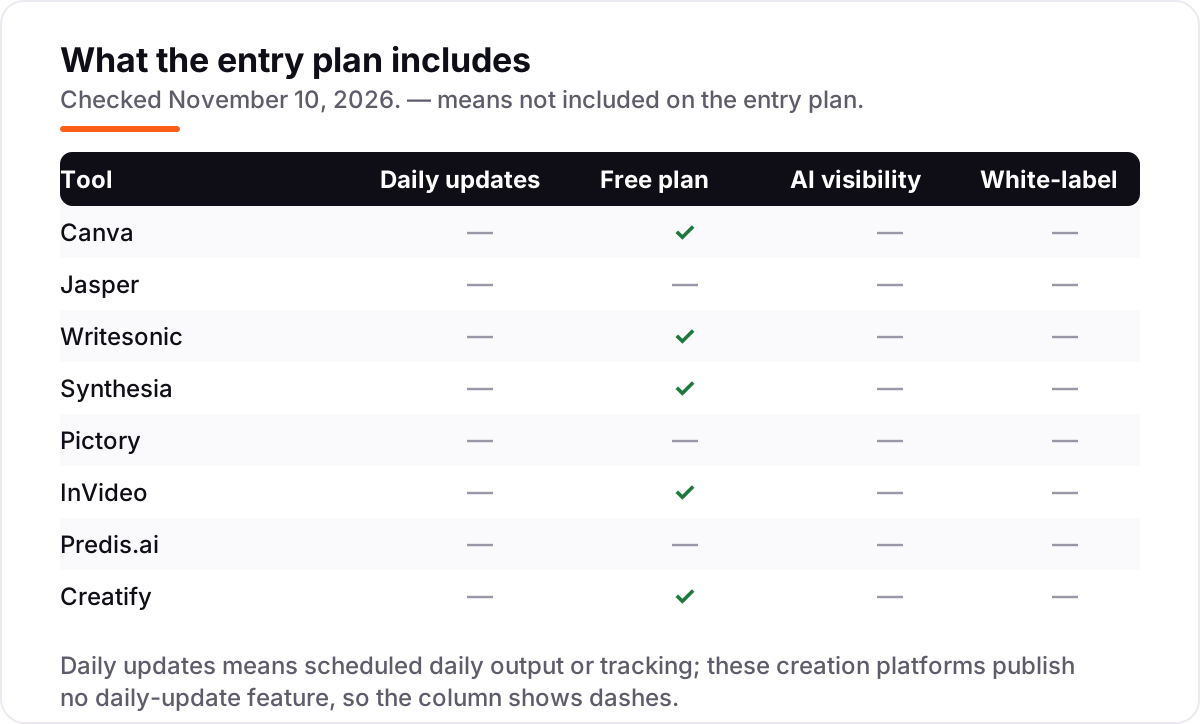
A third confusion is the free plan. Five tools here offer one, but only Canva's is a real working plan; the rest are small allowances or watermarked trials. Treat a free plan as a test drive, not a publishing plan, and check the trial's end date on the day you sign up so it does not convert while you are still deciding.
If the content is meant to bring in search traffic, the tool is only half the job: the pages still need to rank and show up in AI answers, which is what our AI search optimization service covers. Pick the creation tool for output, and treat visibility as a separate decision. For a closer look at the writing-only side, see our guide to the best AI content generation tools.
How we chose
We checked each vendor's own pricing page and recorded the starting price exactly as shown, including the annual-billing figure where the page lists one. Direct page opens failed on November 10, 2026, so prices rest on independent reads of those vendor pages dated October 24 to November 9, 2026, all of which agree with the figures below; Synthesia's figures are the US prices, since its page shows different prices by region. Ratings come from G2, from fresh copies of the exact G2 pages crawled within the last few days. We ranked the tools by fit for the most common buyer — a small team that needs text, design and video every week — not by brand size. No vendor paid for a place in this list, and none of the links here are affiliate links.
What to do next
Start with the output you make most: pick one writing tool and one video or design tool, not a stack of eight. Run a real job through each free plan or trial this week and check the output against the allowance it used. If the numbers work, pay annually on the one you will use daily and stay monthly on the rest. Keep the receipt: note the renewal date and the allowance you actually used, so the second month's bill holds no surprises. Once your tools are in place, find out what's holding your rankings back.
Your stack only works if people find you
SerpAstra fixes what keeps your site off page one and makes it easy for AI assistants to recommend.
Get a free audit→Sources we checked (16)
- Canva pricing — canva.com/pricing (checked November 10, 2026)
- Canva on G2 — 4.7/5, 7,660 reviews (checked November 10, 2026)
- Jasper pricing — jasper.ai/pricing (checked November 10, 2026)
- Jasper on G2 — 4.7/5, 1,274 reviews (checked November 10, 2026)
- Writesonic pricing — writesonic.com/pricing (checked November 10, 2026)
- Writesonic on G2 — 4.7/5, 2,149 reviews (checked November 10, 2026)
- Synthesia pricing — synthesia.io/pricing (checked November 10, 2026)
- Synthesia on G2 — 4.6/5, 2,859 reviews (checked November 10, 2026)
- Pictory pricing — pictory.ai/pricing (checked November 10, 2026)
- Pictory on G2 — 4.6/5, 82 reviews (checked November 10, 2026)
- InVideo pricing — invideo.io/pricing (checked November 10, 2026)
- InVideo on G2 — 4.3/5, 179 reviews (checked November 10, 2026)
- Predis.ai pricing — predis.ai/pricing (checked November 10, 2026)
- Predis.ai on G2 — 4.7/5, 114 reviews (checked November 10, 2026)
- Creatify pricing — creatify.ai/pricing (checked November 10, 2026)
- Creatify on G2 — 4.8/5, 1,813 reviews (checked November 10, 2026)
Shamim
Founder of SerpAstra
A full-stack SEO and digital marketer who spends most days on Local SEO for dental practices, AI search visibility and lead generation.
Frequently asked questions
What is the best AI platform for content creation in 2026?
Canva is the best all-round pick for most buyers: design, video, documents and AI tools from $12/month billed annually, with a free plan. If you mainly write, Jasper is stronger for long-form content at $59/month per seat billed annually. Pick by the output you make most, not by the longest feature list.
How much does an AI content creation platform cost?
Between $10 and $69 a month at the entry level on monthly billing. Creatify starts at $15, InVideo at $20 and Canva Pro at $18, while Jasper Pro costs $69 per seat. Annual billing cuts most of these by 20 to 50 percent, but video tools add credit or minute limits that decide the real cost.
Is there a free AI platform for content creation?
Yes, with limits. Canva, Writesonic, Synthesia, InVideo and Creatify all have free plans, though most watermark exports or cap credits, minutes or words. Jasper, Pictory and Predis.ai offer trials instead: 7 days, 14 days and 3 days. Free plans work for testing; regular publishing needs a paid plan.
Which AI platform is best for video content?
It depends on the video. Synthesia is best for presenter and training videos from a script, Pictory for turning articles into captioned videos, InVideo for fast social clips from a prompt, and Creatify for product video ads. Check the monthly minutes or credits first, because that allowance decides how many videos you actually get.
What is the difference between an AI writing tool and an AI content platform?
A writing tool such as Jasper or Writesonic produces text: articles, ads and social copy. A content platform such as Canva or Predis.ai covers several formats, including design and video. Video generators such as Synthesia and Pictory sit between the two, turning text into video. Most buyers need one of each, not one tool for everything.
What should I check before paying for an AI content platform?
Four things: what the entry plan's allowance buys in words, minutes or credits; whether unused credits roll over; whether exports carry a watermark on the plan you pick; and whether the price is per seat, per user or flat. All four vary widely in this list, and the cheapest headline is rarely the cheapest month.
Free SEO and AI visibility audit
Find out what is holding your rankings back
Send us your site. Within 2 business days you get a written audit, an AI visibility check and a short fix list ranked by impact. Free, with no contract attached.
Request my free audit→Related guides
 AI, Data & Analytics11 Best AI Content Generation Tools in 2026 (Free and Paid, Compared)11 best ai content generation tools compared on price, free plans, SEO scoring and AI visibility. Prices checked on the vendor pricing page, November 2, 2026.Read guide →
 AI, Data & Analytics8 Best AI Tools for Content Creators in 2026 (Free and Paid, Compared)The 8 best ai tools for content creators, compared on price, free plans and strengths — writing, design, video. Prices checked on vendor sites, Nov 2, 2026.Read guide →
 SEO & AI SearchBest AI Writing Tools for SEO in 2026: 7 Picks Ranked by What You Need7 best ai writing tools for seo compared on price, live scoring, and drafting power. Prices checked on each vendor pricing page, November 1, 2026.Read guide →