
9 Best Aia Billing Software in 2026: Pricing, Features and Pros & Cons
9 best aia billing software options compared on price, AIA G702/G703 forms and fit for contractors, with starting prices checked on vendor pages in 2026.
 Shamim Mia, Founder, SerpAstraLast verified November 4, 202612 min read
We compare pricing pages, documentation and public reviews. We never accept payment for rankings.

Key takeaways
- Knowify is the top pick for AIA billing: licensed G702/G703 pay apps with the deepest QuickBooks sync, from $99/month billed annually. Contractor Foreman is the cheapest native AIA option at $49/month, and JobTread is the best all-in-one at $159/month billed annually.
- Five of the nine tools publish no starting price — Siteline, Procore, Buildertrend, Sage 100 Contractor and Foundation Software all quote by company size and volume, so budget for a sales conversation, not a checkout page.
- The single most important buying factor is the form your general contractor requires: licensed AIA forms or AIA-style formatting. Only Knowify in this list offers the licensed version.
- QuickBooks Online handles the books and progress invoicing, but it has no native AIA form and no retainage tracking — pair it with Knowify or Contractor Foreman for commercial AIA work.
- Prices below come from October and November 2026 checks of the vendor pricing pages. Two pages would not load for a direct re-check on November 4, 2026, so those figures are disclosed as third-party-sourced in How we chose.
On this page
Quick comparison
| Tool | Best for | Starting price | Free plan |
|---|---|---|---|
| Knowify | Trade and specialty contractors on QuickBooks Online who bill commercial jobs on AIA G702/G703 forms | $149/mo | No (14-day trial) |
| Contractor Foreman | Small general contractors and remodelers who want native AIA billing at the lowest flat monthly price | $49/mo (annual) | No (30-day trial) |
| JobTread | Residential builders and remodelers who want budgets, job costing and AIA-style pay apps in one plan | $199/mo | No |
| Siteline | Commercial trade subcontractors who bill many general contractors in different formats each month | Custom quote | No |
| QuickBooks Online | Small contractors whose CPA already lives in QuickBooks and who need job costing with progress invoicing | $140/mo | No (30-day trial) |
| Procore | Commercial general contractors running $3M-plus annual volume who already manage projects in Procore | Custom quote | No |
| Buildertrend | Residential builders and remodelers running 5-plus projects a year who want one platform for the whole build | Custom quote | No |
| Sage 100 Contractor | Established small to midsize contractors upgrading from QuickBooks who need certified payroll with AIA billing | Custom quote | No |
| Foundation Software | Midsize to large contractors doing $2M-plus a year who want accounting-first AIA billing with WIP reporting | Custom quote | No |
Make one of these tools?
We re-check this list every quarter. Send a correction, request a review, or ask about a clearly labeled sponsored spot.
Request a listingThe best aia billing software

Knowify
Best for: Trade and specialty contractors on QuickBooks Online who bill commercial jobs on AIA G702/G703 forms
Knowify is the AIA-first pick in this list. It builds licensed G702/G703 pay applications from the schedule of values: enter the percentage complete and stored materials, and Knowify applies retainage, folds in approved change orders and produces the forms a general contractor expects. The pay app and retainage data sync to QuickBooks in real time, so the invoice in the books always matches the application on the job.
The catch is the seat math. Core covers one user at $99 a month billed annually, and every extra user costs $29 a month, so a five-person office pays $215 a month. Job costing, budgets and WIP reporting sit on Advanced at $329 a month, which is the plan most growing firms need. Buy Knowify when AIA billing and QuickBooks are the job; look elsewhere if you need a ledger.
What we like
- Licensed G702/G703 AIA pay applications built from the schedule of values, with retainage tracking and change-order reconciliation
- Real-time two-way sync with QuickBooks Online and Desktop, Payments, Time and Payroll
- Progress billing, estimates, time tracking and purchase orders in one plan from $99/month billed annually
- 14-day free trial with no contract and no implementation fee
Watch out for
- Core includes only 1 user; extra users cost $29/month each
- Job costing, budgets and WIP reporting need Advanced at $329/month billed annually
- G2 reviewers report the payroll add-on is costly and awkward for crews that rotate weekly

Contractor Foreman
Best for: Small general contractors and remodelers who want native AIA billing at the lowest flat monthly price
Contractor Foreman is the budget pick that still does real AIA billing. It generates native G702 and G703 pay applications with retainage tracking and lien waivers, and wraps them in a full all-in-one: estimating, scheduling, daily logs, time tracking, change orders and a QuickBooks sync. Pricing is a flat company rate rather than per seat, so adding field staff does not raise the bill once you are on the right tier.
The trade-off is polish and packaging. The interface feels less refined than JobTread or Buildertrend, and the pricing page does not map features to plans, so confirm that AIA billing sits on the tier you buy — Basic covers one user only, and a three-person office needs Standard at $105 a month billed annually. For a small crew that wants the most software per dollar, start here.
What we like
- Native G702/G703 pay applications with retainage tracking and lien waivers from the entry plan
- Flat company-wide pricing from $49/month billed annually, not per seat, so adding field staff does not raise the bill
- 30-day free trial and a 100-day money-back guarantee on annual plans
- Estimating, scheduling, daily logs, time tracking, change orders and a QuickBooks sync in one subscription
Watch out for
- Basic covers 1 user only; a three-person office needs Standard at $105/month billed annually
- The pricing page does not map features to plans, so confirm AIA billing sits on the tier you buy
- Interface feels less polished than JobTread or Buildertrend

JobTread
Best for: Residential builders and remodelers who want budgets, job costing and AIA-style pay apps in one plan
JobTread is the all-in-one pick for residential builders and remodelers. One plan includes everything: estimates that flow into budgets, purchase orders, schedules, time tracking, change orders, client portals and AIA-style pay applications, with QuickBooks Online as the accounting sync. Every account gets a dedicated customer success manager and free onboarding, and reviewers consistently praise the support team.
The honest limits are the form and the trial. JobTread added AIA-style billing in April 2026, but the forms are not licensed G702/G703 documents, so a commercial GC that requires the licensed version will not accept them. There is also no free trial — only a 30-day money-back guarantee on monthly plans. Buy JobTread when budgets and job costing are the job; buy Knowify when the licensed form is.
What we like
- AIA-style pay applications built from budgets, with change orders, purchase orders and job costing in one subscription
- Single plan with every feature included — no tier to unlock, only $20 per extra internal user ($16 billed annually)
- Unlimited free customer, vendor and subcontractor portal users
- Dedicated customer success manager and free onboarding with every account
Watch out for
- AIA billing is AIA-style formatting, not licensed G702/G703 forms
- No free trial — only a 30-day money-back guarantee on monthly plans
- $199/month for the first user is a meaningful fixed cost for a solo operator

Siteline
Best for: Commercial trade subcontractors who bill many general contractors in different formats each month
Siteline is the only tool in this list built exclusively for subcontractor billing. It pulls project data from your ERP, generates the pay application in whatever format each general contractor requires — AIA-style forms or one of more than 17,000 GC-specific formats already in its system — and tracks retainage, lien waivers, lower-tier waivers and collections in one workflow. It also submits directly to GC portals including Textura, GCPay and Procore Pay.
Siteline is not accounting software and does not replace your ERP; it sits alongside it and handles the monthly billing cycle. Pricing is a custom annual subscription based on billing volume and integrations, with unlimited users and offices and support included. Subcontractors have billed over $14 billion across more than 250,000 projects through Siteline, according to the vendor. If you bill many GCs in many formats, start here.
What we like
- Built only for subcontractor billing — generates AIA-style pay apps and 17,000-plus GC-specific forms from ERP data
- Tracks retainage, lien waivers, lower-tier waivers and collections in one billing workflow
- Submits directly to GC portals including Textura, GCPay and Procore Pay
- Unlimited users and offices on every plan, with support included
Watch out for
- Custom quote only, priced on billing volume and integrations — no way to compare the price before a sales call
- Does not replace your accounting system; it sits alongside your ERP
- Built for subcontractors, so general contractors billing owners will find the wrong workflow

QuickBooks Online
Best for: Small contractors whose CPA already lives in QuickBooks and who need job costing with progress invoicing
QuickBooks Online is the accounting backbone most small contractors already run, and Plus is the tier where it becomes useful for construction: project profitability, inventory tracking, budgets and class and location tracking for five users. Progress invoicing bills a fixed-price job in stages against the estimate, and the 30-day free trial or 50 percent off for three months makes it cheap to test.
What Plus cannot do is the AIA pay app. There is no native G702/G703 form and no retainage tracking, so commercial general contractors and lenders often reject a QuickBooks progress invoice as a pay application. The August 2026 increase also moved Plus from $115 to $140 a month, the second rise in eight months. Keep QuickBooks for the books and pair it with Knowify or Contractor Foreman for the pay apps.
What we like
- Plus includes project profitability, inventory, budgets and class tracking for 5 users
- Progress invoicing bills a fixed-price job in stages against the estimate
- 30-day free trial or 50% off for 3 months for new customers
- The accounting system most CPAs and bookkeepers already know
Watch out for
- No native AIA G702/G703 form — commercial GCs and lenders often reject progress invoices as pay apps
- No retainage tracking built in; it needs an add-on or a manual workaround
- Plus rose from $115 to $140 in August 2026, the second increase in eight months

Procore
Best for: Commercial general contractors running $3M-plus annual volume who already manage projects in Procore
Procore is the commercial standard in this list. Its Progress Billings tool generates standard AIA G702 and G703 forms from budgets, commitments and change orders, and subcontractor invoices, owner billing, lien waivers and disbursements live in the same project record as the schedule and the daily log. The platform syncs two ways with QuickBooks, Sage and other construction ERPs, and the annual fee includes unlimited users, storage and support.
The cost is the barrier: pricing is a custom annual fee per product based on annual construction volume, with no published figure and no free trial. Implementation and training take weeks, and a small firm will pay for depth — BIM, safety modules, field productivity — that it may never use. Buy Procore when you already run commercial projects on it; do not buy it for billing alone.
What we like
- Progress Billings tool generates standard AIA G702/G703 forms from budgets and change orders
- Subcontractor invoices, owner billing, lien waivers and disbursements live with the project, not in a separate tool
- Two-way sync with QuickBooks, Sage and other construction ERPs
- Unlimited users, storage and support included in the annual fee
Watch out for
- Quote-only pricing based on annual construction volume — no published figure and no free trial
- Enterprise-scale platform: implementation and training take weeks, and small firms pay for depth they may not use
- Overkill if billing alone is the job; the value comes from running whole projects on it

Buildertrend
Best for: Residential builders and remodelers running 5-plus projects a year who want one platform for the whole build
Buildertrend is the residential builder's platform: estimating, budgets, schedules, selections, client portal, warranty management and progress billing in one subscription with unlimited users and unlimited projects. It is built for builders who oversee five or more projects a year or handle complex multi-phase builds, and paying an annual plan upfront currently earns a 10 percent discount.
Two honest limits. Buildertrend no longer publishes pricing — the former Essential, Advanced and Complete tiers are gone, and the price now arrives as a custom quote after an intake form and a sales call. And its progress billing is not native AIA G702/G703, so commercial work that requires the form needs another tool. There is also no free trial; onboarding starts with a personalized demo. Buy it for residential builds, not for AIA billing.
What we like
- Progress billing, change orders, budgets, schedules and client portal in one subscription with unlimited users and projects
- Built for builders who oversee 5-plus projects a year or handle complex multi-phase builds
- 10% discount for paying an annual plan upfront
- Payments, selections and warranty management included
Watch out for
- No published pricing — a custom quote after an intake form and a sales call
- Progress billing is not native AIA G702/G703
- No free trial — onboarding starts with a personalized demo

Sage 100 Contractor
Best for: Established small to midsize contractors upgrading from QuickBooks who need certified payroll with AIA billing
Sage 100 Contractor is the veteran of this list: construction accounting, job costing, estimating, project management, payroll and service operations in one system, formerly sold as Sage Master Builder. Sage lists certified payroll, AIA billings and lien waivers among its strengths, and the system handles union and prevailing-wage payroll, percentage-of-completion accounting and multi-state certified reporting that QuickBooks cannot.
The price is the problem to solve first. Sage 100 Contractor is quote-only through Sage sales or partners, and third-party figures around $115 to $160 per user per month are unverified, so get a written quote early. The interface is desktop-era and the architecture is on-premise at heart, and implementation is heavier than a cloud add-on. Buy it when you are outgrowing QuickBooks and need certified payroll with your AIA billing.
What we like
- AIA billings, certified payroll, lien waivers and percentage-of-completion accounting in one system
- Job costing by cost code and phase, with estimating and service management included
- Handles union and prevailing-wage (Davis-Bacon) payroll natively
- The system many construction CPAs already know, formerly Sage Master Builder
Watch out for
- Quote-only pricing through Sage sales or partners — third-party figures around $115 to $160 per user per month are unverified
- Desktop-era interface and on-premise roots; the cloud strategy has been slow
- Implementation is heavier than a cloud add-on — budget for training and a partner

Foundation Software
Best for: Midsize to large contractors doing $2M-plus a year who want accounting-first AIA billing with WIP reporting
Foundation Software — sold as FOUNDATION — is the accounting-first pick for midsize and large contractors. AIA-format G702 and G703 billing generates natively, with retainage, work-in-progress reporting, job costing by cost code, phase and category, certified payroll for prevailing wage and Davis-Bacon work, equipment tracking and 1099s. It is built for construction accounting from the ground up, not adapted from a generic ledger.
The trade-offs are price, time and interface. Pricing is a custom quote based on company size and modules, with third-party figures starting around $300 to $400 a month and climbing from there. Implementation takes weeks, the learning curve is steep, and the Windows-based interface feels dated next to cloud tools. Buy Foundation Software when the firm does $2 million-plus a year and the CPA wants the ledger and the pay apps in one system.
What we like
- Native AIA-format G702/G703 billing with retainage, WIP reporting and job costing by cost code, phase and category
- Certified payroll for prevailing wage and Davis-Bacon work, plus equipment tracking and 1099s
- Purpose-built for construction accounting, not adapted from a generic ledger
- Modular: add payroll, equipment and project management as needed
Watch out for
- Custom quote only — third-party figures start around $300 to $400 a month and climb with users and modules
- Implementation takes weeks and the learning curve is steep
- Windows-based interface feels dated next to cloud tools
The best AIA billing software for a contractor is the one that produces a pay application the general contractor accepts the first time. On commercial jobs that means the AIA G702 application and certificate for payment with the G703 continuation sheet: the schedule of values, the percentage complete on each line, retainage held back and approved change orders, all reconciled to one total. This guide compares nine tools that handle that workflow, sorted by fit for the most common buyer: a small to midsize contractor billing commercial work on AIA forms.
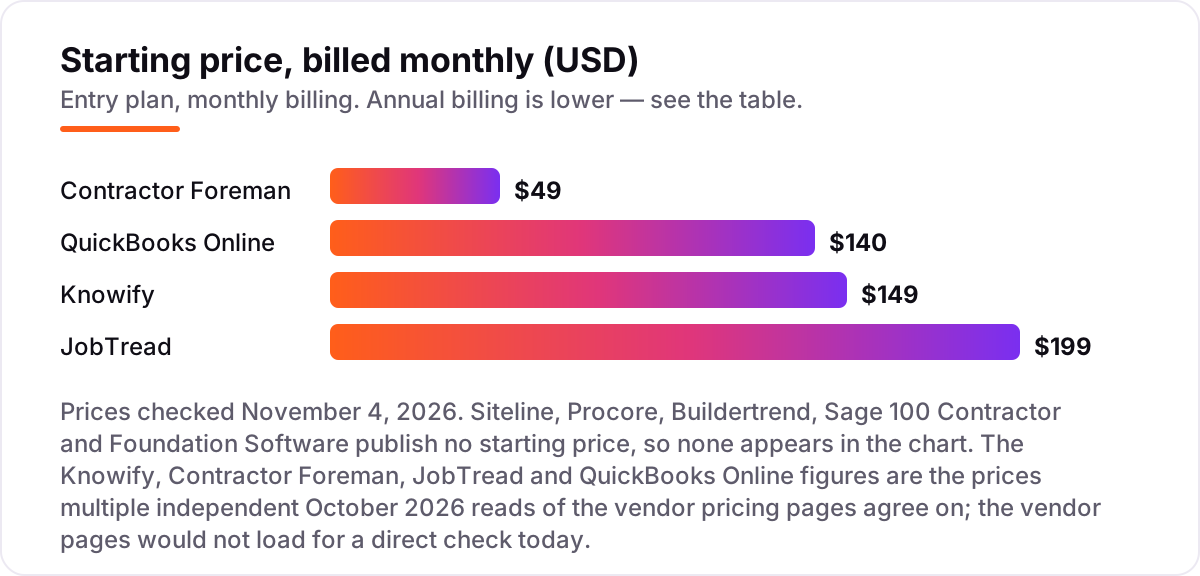
Five of the nine tools publish no starting price at all, and that is normal in this category: construction platforms quote by company size, modules and annual volume. The four priced tools run from $49 to $199 a month, and the worked example below shows what a five-person firm actually pays once seats are counted. Every price in this guide was checked against the vendor's own pricing page in October and November 2026.
How to choose the best AIA billing software
- Start with the form your GC requires. Some owners accept AIA-style formatting; others require licensed G702/G703 forms, and only Knowify in this list offers the licensed version through its AIA partnership. Ask the GC before you buy, not after the first pay app is rejected.
- Check retainage handling. The tool must track retainage by line and by phase, carry it forward across draws and release it on completion. Retainage is typically 5 to 10 percent of each progress payment, so a tool that fudges it will cost you real money.
- Follow the money into the ledger. AIA billing software is not accounting software. Knowify, JobTread and Contractor Foreman all sync to QuickBooks; Procore, Sage 100 Contractor and Foundation Software carry the ledger themselves. Pick the combination your bookkeeper already uses.
- Price the seats, not the headline. Knowify Core is $99 a month for one user; JobTread charges per internal user; Contractor Foreman and Buildertrend charge a flat company rate. A five-person office can pay double the headline price on per-seat plans.
- Ask about change orders. Approved change orders must land in the right billing period and update the schedule of values automatically. If the tool makes you re-key them, the pay app will disagree with the contract.
- Test the submission, not the demo. A pay app is only done when the GC accepts it. Run one real billing cycle on a trial or demo project — including the lien waiver and the portal upload — before you sign an annual contract.
AIA billing software pricing: what you will actually pay
Take a five-person trade contractor that bills commercial jobs on AIA forms and keeps its books in QuickBooks Online Plus. On Knowify, one user on Core is not enough for five people, so the firm needs Advanced at $329 a month billed annually, which includes ten users: $3,948 a year, plus QuickBooks Online Plus at $140 a month, or $1,680 a year, because Knowify syncs to QuickBooks rather than replacing it. The combined first-year cost is $5,628 before the Service Pro add-on.
The same firm on Contractor Foreman needs Plus at $166 a month billed annually, which covers eight users: $1,992 a year, plus the same $1,680 for QuickBooks Online Plus, for a combined $3,672 a year. On JobTread the math is $159 a month billed annually for the first user plus $16 a month for each of the four extra users, or $223 a month: $2,676 a year, plus $1,680 for QuickBooks, for a combined $4,356 a year. The quote-only tools — Siteline, Procore, Buildertrend, Sage 100 Contractor and Foundation Software — cannot be priced this way, so get each quote in writing with the user count, modules and onboarding stated before you compare.
Know the difference: AIA billing vs. progress invoicing
The confusion in this category is the gap between progress invoicing and an AIA pay application. Progress invoicing bills a fixed-price job in stages: the contractor sends an invoice for a percentage of the contract, the client pays it, and the books record the income. QuickBooks Online does this well, and for residential work or a private client it is usually enough. An AIA pay application is a different document with a different audience: the G702 cover sheet states the contract sum, work completed to date, retainage held and the amount currently due, while the G703 continuation sheet breaks the schedule of values into line items with the percentage complete on each one.
The audience is the difference that matters. A pay application goes to the general contractor and the architect, who check it against the schedule of values and the work in place before certifying payment; a progress invoice goes to the client, who simply pays it. Retainage is the second difference: typically 5 to 10 percent of each progress payment is held back until completion, and the pay app must track it line by line. QuickBooks has no native retainage tracking and no G702/G703 form, which is why contractors who bill commercial work pair it with a tool like Knowify, or move the ledger to Sage 100 Contractor or Foundation Software. If your contracts say AIA, buy the form your contract names; if they do not, progress invoicing is cheaper and simpler. And once the billing workflow is settled, the next job is getting found: our local SEO service is built for contractors who win work on Google, and the free SERP snippet preview tool shows how your service pages will look in search.
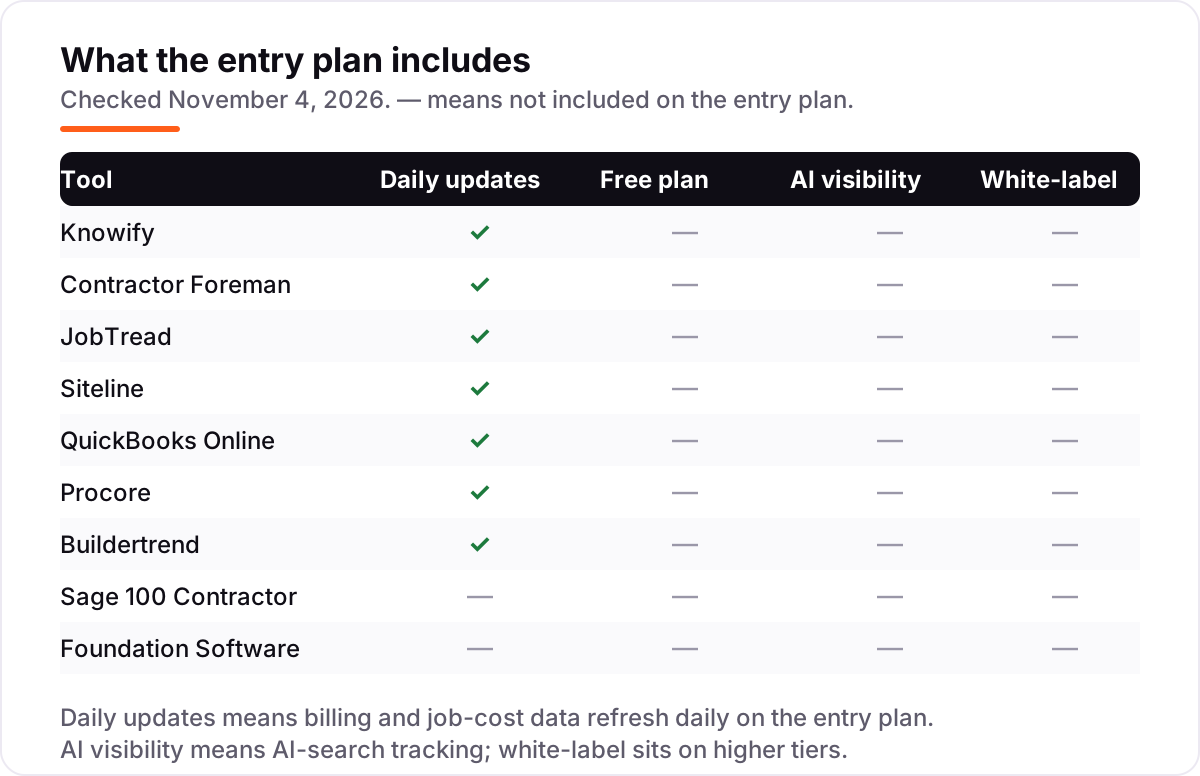
Quick comparison: tool type by need
| Buyer | Best pick | Why |
|---|---|---|
| Trade contractor on QuickBooks, AIA every month | Knowify | Licensed G702/G703 forms with the deepest QuickBooks sync, from $99/month billed annually |
| Small GC on a tight budget | Contractor Foreman | Native AIA billing at a flat $49/month billed annually |
| Residential builder or remodeler | JobTread | Budgets, job costing and AIA-style pay apps from $159/month billed annually |
| Subcontractor billing many GCs | Siteline | One billing workflow for 17,000-plus GC formats, custom quote |
| Small contractor whose CPA runs QuickBooks | QuickBooks Online | Progress invoicing and job costing from $140/month, no native AIA form |
| Commercial GC at scale | Procore or Foundation Software | AIA billing inside a full project or accounting platform, custom quote |
| Established firm needing certified payroll | Sage 100 Contractor | AIA billing with Davis-Bacon payroll, custom quote |
How we chose
We checked each vendor's own site on November 4, 2026. Two pricing pages loaded in full that day — Knowify and JobTread — and their figures are vendor-verified: Knowify Core at $149 a month billed monthly ($99 billed annually) and JobTread at $199 a month ($159 billed annually). The Contractor Foreman and QuickBooks Online figures are the prices multiple independent October 2026 reads of the vendor pricing pages agree on: Contractor Foreman Basic at $49 a month billed annually and QuickBooks Online Plus at $140 a month. Our own page loads for those two vendors would not complete on November 4, 2026 — the Contractor Foreman page failed to load and the page-fetch service returned rate-limit errors — so those two prices are third-party-sourced, not vendor-verified by us today, and should be confirmed on the vendor page before purchase. Siteline, Procore, Buildertrend, Sage 100 Contractor and Foundation Software publish no starting price, so they are listed as custom quote; third-party directories show figures for some of them, but none of those figures comes from the vendor, so we do not repeat them here. Ratings are shown only for Knowify and JobTread, whose G2 pages we opened today; the other G2 pages would not load, so those ratings are omitted rather than estimated. We ranked the tools by fit for the most common buyer — a small to midsize contractor billing commercial work on AIA forms — not by brand size, and no vendor paid for a place in this list.
What to do next
Start with the decision list above: confirm whether your GC requires licensed AIA forms, check the retainage handling, and price the seats for your actual team size. Then take the free trial of your top priced pick — Knowify for 14 days or Contractor Foreman for 30 — and run one real billing cycle through it, lien waiver included. For a quote-only platform, book the demo and ask for the full first-year total in writing, including onboarding and modules, before you sign. Once your tools are in place, find out what's holding your rankings back.
Your stack only works if people find you
SerpAstra fixes what keeps your site off page one and makes it easy for AI assistants to recommend.
Get a free audit→Sources we checked (13)
- Knowify pricing — knowify.com/pricing (Core $149/month billed monthly, $99 billed annually; checked November 4, 2026)
- Knowify on G2 — 4.5/5, 104 reviews (checked November 4, 2026)
- Contractor Foreman pricing — contractorforeman.com/pricing (Basic $49/month billed annually; figures from an October 26, 2026 read of the vendor page)
- JobTread pricing — jobtread.com/pricing ($199/month billed monthly, $159 billed annually; checked November 4, 2026)
- JobTread on G2 — 4.9/5, 118 reviews (checked November 4, 2026)
- Siteline pricing — siteline.com/pricing (custom quote; checked November 4, 2026)
- QuickBooks Online pricing — quickbooks.intuit.com/pricing (Plus $140/month; figures from independent October 2026 reads of the vendor page)
- Procore pricing — procore.com/pricing (custom quote; checked November 4, 2026)
- Buildertrend pricing — buildertrend.com/pricing (custom quote; checked November 4, 2026)
- Sage 100 Contractor — sage.com/en-us/products/sage-100-contractor/ (custom quote; checked November 4, 2026)
- Foundation Software — foundationsoft.com (custom quote; checked November 4, 2026)
- What is AIA billing? G702 and G703 forms explained — glaziersoftware.com
- AIA G702/G703 pay applications and retainage — aparbooks.com
Shamim
Founder of SerpAstra
A full-stack SEO and digital marketer who spends most days on Local SEO for dental practices, AI search visibility and lead generation.
Frequently asked questions
What is AIA billing software?
Software that produces AIA progress-billing pay applications for construction projects. The core documents are the G702 application and certificate for payment, which summarizes the contract sum, work completed, retainage and the amount due, and the G703 continuation sheet, which breaks the schedule of values into line items with the percentage complete on each. It replaces the monthly spreadsheet rebuild.
How much does AIA billing software cost?
The priced tools in this list run from $49 a month for Contractor Foreman Basic (billed annually) to $199 a month for JobTread (billed monthly), with Knowify Core at $99 a month billed annually and QuickBooks Online Plus at $140 a month. Five of the nine tools publish no price and quote by company size, modules and annual volume, so expect a sales conversation and a quote for those.
Does QuickBooks do AIA billing?
Not natively. QuickBooks Online has progress invoicing, which bills a fixed-price job in stages, but it produces no G702/G703 form and tracks no retainage. Commercial general contractors and lenders often reject progress invoices as pay applications. Contractors who bill AIA work usually pair QuickBooks with Knowify or Contractor Foreman, or move the ledger to Sage 100 Contractor or Foundation Software.
What is the difference between AIA billing and progress billing?
Progress billing is the general idea: billing a job in stages as work is completed. AIA billing is the specific standardized format for it on commercial construction — the G702 cover sheet and G703 continuation sheet from the American Institute of Architects, with a schedule of values, percentage complete per line, retainage and approved change orders. If your contract names AIA forms, progress invoicing alone will not satisfy it.
Do I need licensed AIA forms or are AIA-style forms enough?
It depends on who pays you. Some general contractors and owners accept AIA-style formatting, which JobTread and several other tools produce. Others require licensed G702/G703 forms, and only Knowify in this list offers the licensed version through its partnership with AIA Contract Documents. Ask your general contractor which version the pay application must be before you choose a tool.
What is retainage in AIA billing?
Retainage is the percentage of each progress payment — typically 5 to 10 percent — that the owner or general contractor holds back until the work is complete or a milestone is reached. The G703 tracks it line by line, and the G702 shows the total held and the amount currently due. Good AIA billing software carries retainage forward across draws and releases it on completion without re-keying.
Can I switch to AIA billing software from spreadsheets?
Yes, and the switch is usually the point: the tool takes over the schedule of values, the percentage-complete math and the retainage carry-forward that spreadsheets get wrong. Expect to set up the schedule of values and open change orders once, then run one billing cycle in parallel with the spreadsheet to check the numbers match before you stop using Excel.
Free SEO and AI visibility audit
Find out what is holding your rankings back
Send us your site. Within 2 business days you get a written audit, an AI visibility check and a short fix list ranked by impact. Free, with no contract attached.
Request my free audit→Related guides
 Accounting, Tax & Finance11 Best Billing Software for Small Business in 2026, Compared11 best billing software for small business picks compared on price, free plans and payment fees, with real starting prices checked November 2, 2026.Read guide →
 Accounting, Tax & Finance7 Best Accounting Software for Small Businesses in 2026, ComparedCompare the 7 best accounting software for small businesses on price, free plans, bank feeds and AI features, with every price checked November 2, 2026.Read guide →
 Accounting, Tax & Finance10 Best Bookkeeping and Payroll Software for Small Business in 2026, ComparedThe 10 best bookkeeping and payroll software for small business, compared on real 2026 prices, per-employee payroll fees and free plans at your headcount.Read guide →