
11 Best Billing Software for Small Business in 2026, Compared
11 best billing software for small business picks compared on price, free plans and payment fees, with real starting prices checked November 2, 2026.
 Shamim Mia, Founder, SerpAstraLast verified November 2, 202611 min read
We compare pricing pages, documentation and public reviews. We never accept payment for rankings.

Key takeaways
- FreshBooks leads for most small businesses at $23/month, with QuickBooks Online at $38/month and Xero at $27/month close behind for full bookkeeping.
- Four tools start free — Wave, Zoho Invoice, Square Invoices and Invoice Ninja — but card processing fees of 2.9–3.3% still apply on every paid invoice.
- The single most important buying factor is how you get paid: pick the tool whose payment fees and invoice limits fit your volume, not the lowest plan price.
- Subscription billing is priced by volume, not by seat: Chargebee Flow costs 0.80% of monthly billing and Stripe Billing costs 0.7% of billing volume.
On this page
Quick comparison
| Tool | Best for | Starting price | Free plan |
|---|---|---|---|
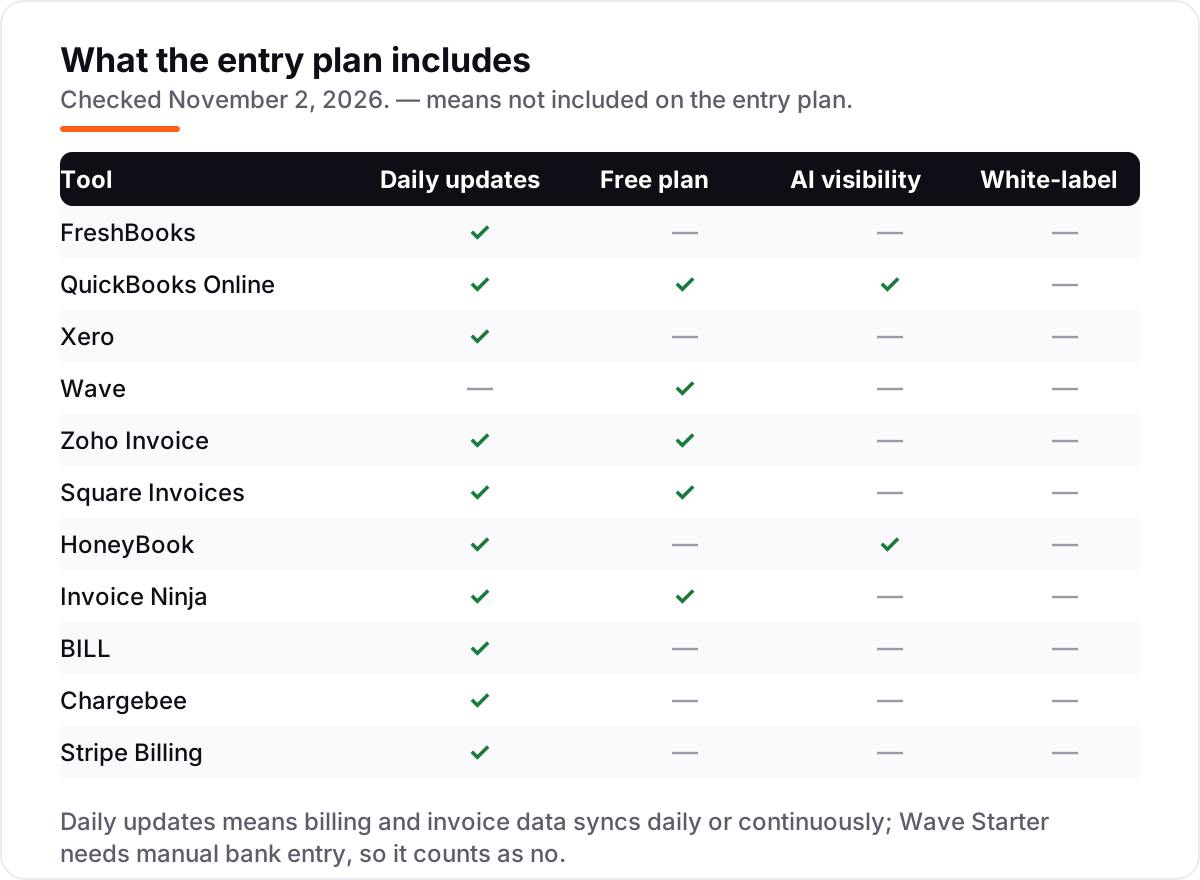
| FreshBooks | Freelancers and service businesses with up to 5 clients who want invoices, time tracking and expenses in one simple tool | $23/mo | No (30-day trial) |
| QuickBooks Online | Small businesses that want invoicing plus full double-entry bookkeeping, bank feeds and tax-time reports | $38/mo | Yes (2 invoices/mo) |
| Xero | Small businesses with under 20 invoices a month that want unlimited users and clean bank reconciliation | $27/mo | No (30-day trial) |
| Wave | Solo owners and micro-businesses that want unlimited free invoicing plus free bookkeeping in one account | Free | Yes (Starter) |
| Zoho Invoice | Freelancers and two-person businesses that send under 500 invoices a year and want billing for nothing | Free | Yes (500/yr) |
| Square Invoices | Businesses that also take in-person payments and want invoices tied to the same Square account | Free | Yes (unlimited) |
| HoneyBook | Photographers, designers and coaches who sell with proposals, contracts and invoices in one flow | $36/mo | No (30-day trial) |
| Invoice Ninja | Freelancers with a small client list who want free invoicing and the option to self-host | Free | Yes (5 clients) |
| BILL | Small teams that pay many supplier bills and chase customer payments in the same workflow | $49/user/mo | No |
| Chargebee | Subscription businesses that bill recurring plans and usage and want the fee to scale with revenue | 0.80% of billing | No (pay as you go) |
| Stripe Billing | Businesses already taking payments through Stripe that want subscriptions without a second billing system | 0.7% of volume | No |
Make one of these tools?
We re-check this list every quarter. Send a correction, request a review, or ask about a clearly labeled sponsored spot.
Request a listingThe best billing software for small business

FreshBooks
Best for: Freelancers and service businesses with up to 5 clients who want invoices, time tracking and expenses in one simple tool
FreshBooks is built around the invoice, and it shows. The Lite plan covers unlimited invoicing, estimates, expenses and time tracking for $23 a month, and the time you log flows straight onto the invoice without retyping. Recurring invoices and automatic reminders are included from the start, so repeat work chases itself.
The catch is the client cap. Lite covers five billable clients, and the sixth forces Plus at $43 a month, which is where bank reconciliation and accountant access also start. If your client list is short and stable, Lite is the cheapest billing-first tool here; if it grows past five, price Plus instead.
What we like
- Invoices, estimates, expenses and time tracking in one plan, with tracked time flowing straight onto invoices
- Recurring invoices and automatic payment reminders are included from the Lite plan
- Annual billing cuts the price by 10%, to $248.40 a year for Lite
Watch out for
- Lite covers only 5 billable clients, so a sixth client forces an upgrade to Plus at $43/month
- No bank reconciliation or accountant access on Lite, and each extra team member costs $11/month
- No free plan, only a 30-day free trial, and card payments add 2.9% + $0.30 per transaction

QuickBooks Online
Best for: Small businesses that want invoicing plus full double-entry bookkeeping, bank feeds and tax-time reports
QuickBooks Online is the bookkeeping standard that happens to bill well. Simple Start costs $38 a month and includes unlimited invoices and bills, automated bank feeds, income and expense tracking and basic reporting, all on a double-entry ledger. It is the tool most accountants already know, which makes tax time and handovers easier.
The limits are seats and inventory. Simple Start allows one user, so a second person posting means Essentials at $85 a month, and inventory tracking waits for Plus at $140. Buy QuickBooks when you want invoicing and the books in one place; buy a billing-only tool when the books already live elsewhere.
What we like
- Unlimited invoices and bills on every paid plan, with automated bank feeds and income and expense tracking
- The most widely supported accounting tool here, so accountants and add-ons rarely need a workaround
- A free plan covers 2 invoices a month for a business just starting out
Watch out for
- Simple Start allows only 1 user, so a second person posting means Essentials at $85/month
- No inventory tracking below Plus at $140/month, and payroll is a paid add-on
- Introductory discounts end after 3 months, so budget on the $38 list price
Xero
Best for: Small businesses with under 20 invoices a month that want unlimited users and clean bank reconciliation
Xero is the quiet pick for teams. Early costs $27 a month and includes unlimited users, so the whole team can post without a per-seat fee, plus bank reconciliation, Hubdoc receipt capture, quotes and recurring invoices. For a business sending under 20 invoices a month, that is a complete billing setup at a lower price than QuickBooks.
The cap is the thing to watch. Early allows 20 invoices and 5 bills a month, and regular volume above that means Growing at $59. Multi-currency and projects wait for Established at $97. Count your monthly invoices first; if you stay under 20, Xero is the best-value ledger here.
What we like
- Unlimited users on every plan, with no per-seat fee as the team grows
- Hubdoc receipt capture and bank reconciliation are included from Early
- Clean invoicing with quotes, recurring invoices and online payments
Watch out for
- Early caps you at 20 invoices and 5 bills a month, so steady volume forces Growing at $59/month
- Multi-currency, projects and expense claims need Established at $97/month
- No annual billing option on the US pricing page, and US payroll is a separate add-on

Wave
Best for: Solo owners and micro-businesses that want unlimited free invoicing plus free bookkeeping in one account
Wave is the only tool here that pairs unlimited free invoicing with free bookkeeping. Starter costs nothing and includes unlimited estimates, invoices, bills and bookkeeping records, plus recurring invoices and automatic payment reminders that rivals charge for. For a solo owner starting out, it is a real business setup at $0.
Free does not mean costless. Card payments on Starter cost 2.9% plus $0.60 per transaction, and bank entry is manual until Pro at $19 a month adds automatic imports. Wave is also limited to US and Canadian businesses. If you bill mostly by card, work out the processing fees before calling it free.
What we like
- Starter is free with unlimited estimates, invoices, bills and bookkeeping records, and no invoice cap
- Recurring invoices and automatic payment reminders are included on the free plan
- Pro at $19/month adds automatic bank imports, receipt scanning and multi-user access
Watch out for
- Starter needs manual bank entry; automatic bank imports and receipt scanning need Pro at $19/month
- Available only to businesses in the US and Canada, with USD and CAD as business currencies
- Card payments cost 2.9% + $0.60 per transaction on Starter, so payment fees are the real cost

Zoho Invoice
Best for: Freelancers and two-person businesses that send under 500 invoices a year and want billing for nothing
Zoho Invoice is the most generous free plan in this list. It costs $0 and includes the features other tools charge for: automated payment reminders, recurring invoices, a self-service customer portal, estimates, expenses and time tracking. The limits are 500 invoices a year, two users and three projects, which covers most freelancers comfortably.
The trade-off is the ceiling. There is no paid tier to grow into, so outgrowing the limits means switching to Zoho Billing, which starts at $25 per organization a month billed annually. Zoho also processes no payments itself, so your gateway charges its own fee. Start here while you fit; plan the move before you hit 500 invoices.
What we like
- Completely free with no paid tier, including automated payment reminders and recurring invoices
- A self-service customer portal and 10-plus payment gateway options are included at $0
- Estimates, expenses, time tracking and reports are all in the free plan
Watch out for
- Free plan caps at 500 invoices a year, 2 users and 3 projects, with Powered by Zoho Invoice branding
- There is no paid tier of Zoho Invoice itself; outgrowing the limits means switching to Zoho Billing
- Zoho Invoice does not process payments itself, so a payment gateway charges its own fee

Square Invoices
Best for: Businesses that also take in-person payments and want invoices tied to the same Square account
Square Invoices fits businesses that sell in person as well as online. The free plan sends unlimited invoices with automatic reminders and recurring billing, and the money lands in the same Square account as till sales. That single money view is the reason to pick Square over a standalone invoicing tool.
The price is the processing fee. Card payments on the free plan cost 3.3% plus $0.30 per invoice, and Square is the only processor you can use. Plus at $49 a month per location cuts the card fee to 2.9% plus $0.30 and adds payment schedules and custom fields. If most clients pay by card, compare the fee before the plan price.
What we like
- Free plan sends unlimited invoices with automatic payment reminders and recurring invoices
- Invoices, in-person sales and online payments all settle in one Square account
- Plus at $49/month per location cuts the card fee to 2.9% + $0.30 and adds payment schedules
Watch out for
- Card payments on the free plan cost 3.3% + $0.30 per invoice, higher than most rivals here
- You must use Square for payment processing; there is no bring-your-own gateway option
- Custom invoice fields, multi-package estimates and milestone billing need Plus at $49/month per location

HoneyBook
Best for: Photographers, designers and coaches who sell with proposals, contracts and invoices in one flow
HoneyBook sells the client journey, not just the invoice. Starter costs $36 a month on monthly billing, or $29 billed annually, and covers proposals, contracts, invoices, payments, a client portal and a calendar for unlimited clients and projects. A client can sign and pay from one file, which suits photographers, designers and coaches.
The entry plan is not the full flow. Workflow automations, the scheduler, SMS reminders and branding removal all sit on Essentials at $59 a month on monthly billing. Card payments also add 2.7% plus 10 cents per transaction. Buy HoneyBook for the proposal-to-payment flow; buy a cheaper tool if you only send invoices.
What we like
- Proposals, contracts, invoices and payments live in one client flow, with unlimited clients and projects
- AI features sit on every plan, including an automations builder, email drafts and meeting notes
- A client portal, calendar and lead forms are included from Starter
Watch out for
- No free plan, only a 30-day free trial, and Starter is $36/month on monthly billing
- Workflow automations, the scheduler and SMS reminders sit on Essentials at $59/month, not Starter
- Removing HoneyBook branding from client documents also needs Essentials

Invoice Ninja
Best for: Freelancers with a small client list who want free invoicing and the option to self-host
Invoice Ninja is the open-source option in this list. The free hosted plan gives unlimited invoices for up to 5 clients, with recurring billing, auto-billing, a client portal and dozens of payment gateways. Pro costs $14 a month and unlocks unlimited clients, 11 invoice templates and a branded portal URL, which is still the cheapest paid plan here.
The self-hosted edition is the real draw for technical owners: it is free, unlocks the Pro and Enterprise features, and has no client cap at all. The trade-off is that Invoice Ninja does no full bookkeeping, so the books need a separate tool. Pick it when you want control and a low bill, not a guided setup.
What we like
- Free hosted plan gives unlimited invoices for up to 5 clients, with a client portal and auto-billing
- Pro at $14/month unlocks unlimited clients, 11 invoice templates and a branded portal URL
- The self-hosted edition is free and open source, with no client cap
Watch out for
- Free hosted plan covers only 5 clients, so a sixth client means Pro at $14/month
- No full bookkeeping, so the books still need a separate accounting tool
- The interface is more technical than FreshBooks or Wave, and support is thinner on the free plan

BILL
Best for: Small teams that pay many supplier bills and chase customer payments in the same workflow
BILL, formerly Bill.com, is the only tool here that automates both directions of billing. Essentials costs $49 per user a month and covers accounts payable and receivable: supplier bills come in, approvals run, payments go out, and customer invoices go the other way. It syncs with QuickBooks, Xero, Sage and NetSuite, so nothing is retyped into the books.
Per-user pricing is the catch. A five-person team pays $245 a month before transaction fees, which makes BILL the priciest entry here for a team. It earns that price only when bill volume is high and approvals matter. If you only send invoices, a billing-only tool costs far less.
What we like
- Automates both sides of billing: supplier bills in and customer invoices out, with approval workflows
- Syncs with QuickBooks, Xero, Sage and NetSuite, so bills and payments stay in the books
- Team at $65/user/month adds two-way accounting sync, custom roles and audit trails
Watch out for
- Essentials costs $49 per user per month, so a 5-person team pays $245/month before transaction fees
- Transaction fees apply on top of the subscription, including ACH and card payment fees
- No free plan for the AP and AR platform; the free plan covers Spend and Expense only

Chargebee
Best for: Subscription businesses that bill recurring plans and usage and want the fee to scale with revenue
Chargebee is built for recurring revenue, and its 2026 pricing matches that job. The Flow plan charges 0.80% of monthly billing value with no platform fee and no contract, or $99 a month plus 0.65% on the commit variant. Subscriptions, usage billing, proration, trials, coupons and dunning all sit in one catalog, with more than 40 payment gateways to connect.
The percentage model is also the risk. A business billing $50,000 a month pays $400 a month on pay as you go, and the fee never stops growing with revenue. Chargebee also moves no money itself, so gateway fees sit on top. It fits subscription businesses that want billing to scale with sales, not a flat subscription.
What we like
- Flow pay-as-you-go charges 0.80% of monthly billing value with no platform fee and no contract
- Handles subscriptions, usage billing, proration, trials, coupons and dunning in one catalog
- Connects to more than 40 payment gateways, so you are not locked to one processor
Watch out for
- There is no flat monthly price, so the bill grows with revenue and is hard to budget in advance
- Chargebee does not process payments, so gateway fees sit on top of the 0.80% billing fee
- Revenue recognition, retention and CPQ are separate products with their own pricing

Stripe Billing
Best for: Businesses already taking payments through Stripe that want subscriptions without a second billing system
Stripe Billing is the subscription layer inside Stripe, and it suits businesses already taking Stripe payments. Pay as you go costs 0.7% of billing volume with no recurring fee, and it covers subscriptions, trials, discounts, proration and Smart Retries. Setup runs through the Stripe Dashboard, Payment Links or Checkout, with no code needed for standard plans.
The fee stacks. Card processing at 2.9% plus $0.30 sits under the 0.7% billing fee, so a $20 subscription paid by US card costs about $1.02 in total fees. Stripe Billing also covers recurring charges only; one-off invoices use Stripe Invoicing at 0.4% per paid invoice. It is the simplest subscription pick for a Stripe shop.
What we like
- Pay as you go costs 0.7% of billing volume with no recurring fee, so a quiet month costs nothing extra
- Subscriptions, trials, discounts, proration and Smart Retries are included in the 0.7%
- Works inside the Stripe Dashboard with Payment Links and Checkout, so setup needs no code
Watch out for
- Billing adds 0.7% of recurring volume on top of Stripe card processing at 2.9% + $0.30
- There is no bookkeeping or invoicing-only mode; one-off invoices use Stripe Invoicing instead
- The pay-monthly annual contract starts at $620/month, so smaller volumes stay on pay as you go
The best billing software for small business is the one that gets invoices paid with the least admin, at a price that fits how you actually bill. This list is sorted by fit for the most common buyer — a small service or product business sending regular invoices — not by brand size, and every starting price was checked on November 2, 2026.
How to choose the best billing software for small business
- Count your invoices and clients first. A freelancer sending 10 invoices a month fits a free plan; a business sending 100 needs to check the invoice and client caps on the entry plan before anything else.
- Work out how clients pay. Card fees of 2.9–3.3% per payment usually cost more than the plan itself, so compare the processing fee, not just the subscription price.
- Decide whether you need books as well. If you need bank reconciliation and tax-time reports, pick QuickBooks Online or Xero; if you only send invoices, a billing-only tool costs less.
- Check recurring billing. Retainers and subscriptions need recurring invoices, auto-billing and dunning; one-off invoicing tools handle them badly, so subscription businesses should look at Chargebee or Stripe Billing.
- Check the client portal. A portal where clients see invoices, pay and download receipts cuts chasing emails, and it is included free on Zoho Invoice, Wave and Invoice Ninja.
- Try the free plan or trial first. Every tool here has a free plan or a free trial, so send a real invoice to a real client before paying.
Before you send invoices from a new website, check that your pages read well in search with the free SERP snippet preview tool — it shows exactly how a title and description will look in Google.
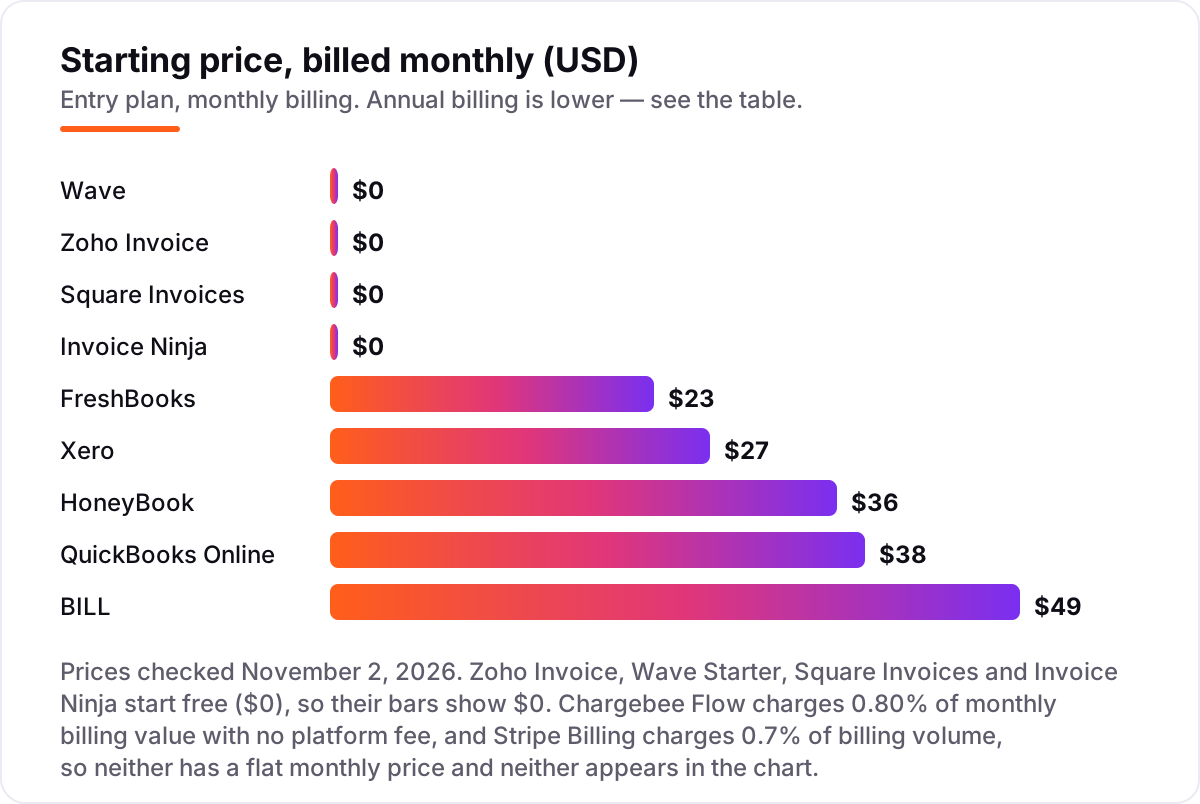
Billing software for small business pricing: what you will actually pay
Take a small business that sends 20 invoices a month at $500 each, so $10,000 billed, and half the clients pay by card. On FreshBooks Lite at $23 a month, the card half is $5,000 of volume: at 2.9% plus $0.30 per payment, that is $145 in percentage fees plus $3.00 in fixed fees, so the month costs $23 plus $148, or $171 in total. On Wave Starter the plan is $0, but the same card payments cost 2.9% plus $0.60 each, so $145 plus $6.00, or $151 for the month — cheaper than FreshBooks here, even though Wave is the free tool.
The same $10,000 billed as subscriptions through Stripe Billing costs 0.7% of volume, or $70, plus card processing of 2.9% plus $0.30 per charge, which is $145 plus $6.00 on 20 payments, for $221 in total and no plan fee. Through Chargebee Flow at 0.80% of monthly billing value, the billing layer alone is $80, before gateway fees. The lesson is consistent: the plan price is the small line, and the processing fee is the big one, so model your own volume before you compare.
If the numbers above feel high for a business still finding customers, read our guide to how much SEO costs before spending on tools — getting found is usually the cheaper growth lever. And if you want help turning more searches into paid invoices, our monthly SEO service is built around exactly that job.
Billing vs invoicing vs subscriptions: know the difference
These three terms get used as if they mean the same thing, and buying the wrong one is the most common mistake in this category. Invoicing software creates and sends an invoice for work already done and tracks whether it was paid. That is what Zoho Invoice, Square Invoices and Invoice Ninja do best, and it is enough for most small businesses that bill per job or per project.
Billing software covers the wider job around the invoice: recurring charges, payment collection, automatic reminders, dunning for failed payments, and reporting on what is owed and what is overdue. FreshBooks, QuickBooks Online, Xero, Wave and HoneyBook sit here, because they combine invoicing with reminders, recurring billing and some bookkeeping. BILL goes further and covers payables too, paying your suppliers as well as chasing your customers.
Subscription billing is a third job again: charging the same customer every month, handling trials, upgrades, proration and usage, and retrying failed cards. That is Chargebee and Stripe Billing, and neither is a good first invoicing tool for a business that mostly sends one-off invoices. Pick the category that matches how you charge, then pick the tool inside it.
Quick comparison: tool type by need
| Buyer | Best pick | Why |
|---|---|---|
| Freelancer billing by the hour | FreshBooks | $23/month, time tracking flows straight onto invoices |
| Small business needing real books | QuickBooks Online or Xero | Full double-entry bookkeeping from $38 or $27/month |
| Zero budget, invoices plus books | Wave | Free Starter with unlimited invoices and bookkeeping records |
| Zero budget, invoicing only | Zoho Invoice | Free, with reminders, recurring invoices and a client portal |
| Also takes in-person payments | Square Invoices | Free unlimited invoices sharing one Square account |
| Proposals, contracts and invoices together | HoneyBook | One client flow from $36/month, AI features included |
| Subscription or usage billing | Stripe Billing or Chargebee | 0.7% or 0.80% of billing volume, no monthly fee |
| Pays many supplier bills too | BILL | AP and AR automation with approvals, $49/user/month |
One more check before you buy: open the pricing page yourself and read the plan you would actually buy, not the headline on the homepage. Promotional prices expire, free plans cap clients or invoices, and per-user pricing multiplies fast on a team plan. The figures in this guide are the list prices as shown on November 2, 2026, so if a checkout page shows a different number, the checkout page is the one that will bill you.
How we chose
We read each vendor's own pricing page through live web search on November 2, 2026 and recorded the starting price exactly as shown, including the annual-billing figure where the page lists one; the Chargebee, Invoice Ninja and Stripe Billing figures match the vendors' own pricing pages returned in that search, and the BILL figure is $49 per user per month, not a flat $49. No ratings are shown in this post because no G2, Capterra or Trustpilot review page could be opened and verified today, so every rating was omitted rather than estimated. We ranked the tools by fit for the most common buyer — a small business sending regular invoices and wanting to get paid with the least admin — not by brand size, and we did not include Harvest, whose pricing changed after an acquisition and could not be verified as stable. No vendor paid for a place in this list, and none of the links here are affiliate links.
What to do next
Start with the worked example above: count your monthly invoices, work out how much clients pay by card, and price the two or three tools that fit your volume. Then take the free plan or trial of your top pick and send a real invoice to a real client, checking that the payment lands and the reminder works. If you run a service business and want the same discipline applied to winning customers, see how the best SEO companies for small business are judged, and consider marketing automation for small business once the invoices are flowing. Once your tools are in place, find out what's holding your rankings back.
Your stack only works if people find you
SerpAstra fixes what keeps your site off page one and makes it easy for AI assistants to recommend.
Get a free audit→Sources we checked (11)
- FreshBooks pricing — freshbooks.com/pricing (checked November 2, 2026)
- QuickBooks Online pricing — quickbooks.intuit.com/pricing (checked November 2, 2026)
- Xero pricing — xero.com/us/pricing-plans (checked November 2, 2026)
- Wave pricing — waveapps.com/pricing (checked November 2, 2026)
- Zoho Invoice pricing — zoho.com/invoice (checked November 2, 2026)
- Square Invoices pricing — squareup.com/us/en/invoices (checked November 2, 2026)
- HoneyBook pricing — honeybook.com/pricing (checked November 2, 2026)
- Invoice Ninja pricing — invoiceninja.com/pricing-plans (checked November 2, 2026)
- BILL pricing — bill.com/pricing (checked November 2, 2026)
- Chargebee pricing — chargebee.com/pricing (checked November 2, 2026)
- Stripe Billing pricing — stripe.com/billing/pricing (checked November 2, 2026)
Shamim
Founder of SerpAstra
A full-stack SEO and digital marketer who spends most days on Local SEO for dental practices, AI search visibility and lead generation.
Frequently asked questions
What is the best billing software for a small business?
FreshBooks is the best fit for most small service businesses at $23 a month, with invoicing, time tracking and expenses in one plan. If you need full bookkeeping, QuickBooks Online at $38 a month or Xero at $27 a month are stronger. Businesses that only send invoices should start with a free plan from Wave or Zoho Invoice.
How much does billing software cost for a small business?
Between $0 and $45 a month at the entry level. Four tools here start free, FreshBooks starts at $23, Xero at $27 and QuickBooks Online at $38. Subscription billing is different: Chargebee charges 0.80% of monthly billing and Stripe Billing 0.7%, so the cost grows with revenue instead of a flat fee.
Is there free billing software for small business?
Yes. Wave Starter, Zoho Invoice, Square Invoices and Invoice Ninja all offer free plans with unlimited or capped invoicing. The free plan is not the whole cost: card payments add 2.9% to 3.3% plus a fixed fee per transaction, and some free plans cap clients or invoices, so check the limits before you commit.
What is the difference between billing software and invoicing software?
Invoicing software creates and sends invoices and tracks payment. Billing software covers the wider job: recurring charges, payment collection, reminders, dunning and reporting, plus payables in tools like BILL. Most small businesses need invoicing first, then add recurring billing when subscriptions or retainers become a regular part of sales.
Do I need QuickBooks or is FreshBooks enough?
FreshBooks is enough if you mainly send invoices, track time and record expenses for a service business. QuickBooks Online is the better pick when you need double-entry bookkeeping, bank reconciliation, tax-time reports and an accountant-friendly ledger. Many small businesses start on FreshBooks and move to QuickBooks as the books get more complex.
What payment fees should I expect on top of the plan price?
Expect 2.9% plus $0.30 per card payment on FreshBooks, 2.9% plus $0.60 on Wave Starter, and 3.3% plus $0.30 on Square Invoices free. HoneyBook charges 2.7% plus 10 cents. Subscription tools add their own layer: Stripe Billing is 0.7% of volume and Chargebee Flow is 0.80%, both on top of gateway processing fees.
Can I switch billing software later without losing my invoices?
Usually yes, but plan the move. Export your customer list, open invoices and payment history before cancelling, and check whether the new tool imports them. Run both tools for one billing cycle so no invoice goes unpaid, then close the old account once the last payment has cleared and the records are saved.
Free SEO and AI visibility audit
Find out what is holding your rankings back
Send us your site. Within 2 business days you get a written audit, an AI visibility check and a short fix list ranked by impact. Free, with no contract attached.
Request my free audit→Related guides
 SEO & AI Search8 Best SEO Companies for Small Business in 20268 best SEO companies for small business compared on price, contracts and AI visibility, with prices checked on each agency's own site on November 1, 2026.Read guide →
 Pricing & HiringHow much does SEO cost in 2026? A plain pricing guideWhat SEO costs in 2026, how hourly, project, retainer and performance pricing work, what drives the price up or down, and how to set a budget that holds up.Read guide →
 MarketingMarketing automation for small businesses: what to automate (and what not to)Marketing automation for small businesses, explained: what to automate first, what to keep human, and the tools that save hours without losing customers.Read guide →