
9 Best All-In-One AI Workspace Tools in 2026 (Free and Paid, Compared)
The 9 best all-in-one ai workspace tools for 2026, compared on price, AI features and free plans — every price checked on the vendor's pricing page.
 Shamim Mia, Founder, SerpAstraLast verified November 2, 202611 min read
We compare pricing pages, documentation and public reviews. We never accept payment for rankings.

Key takeaways
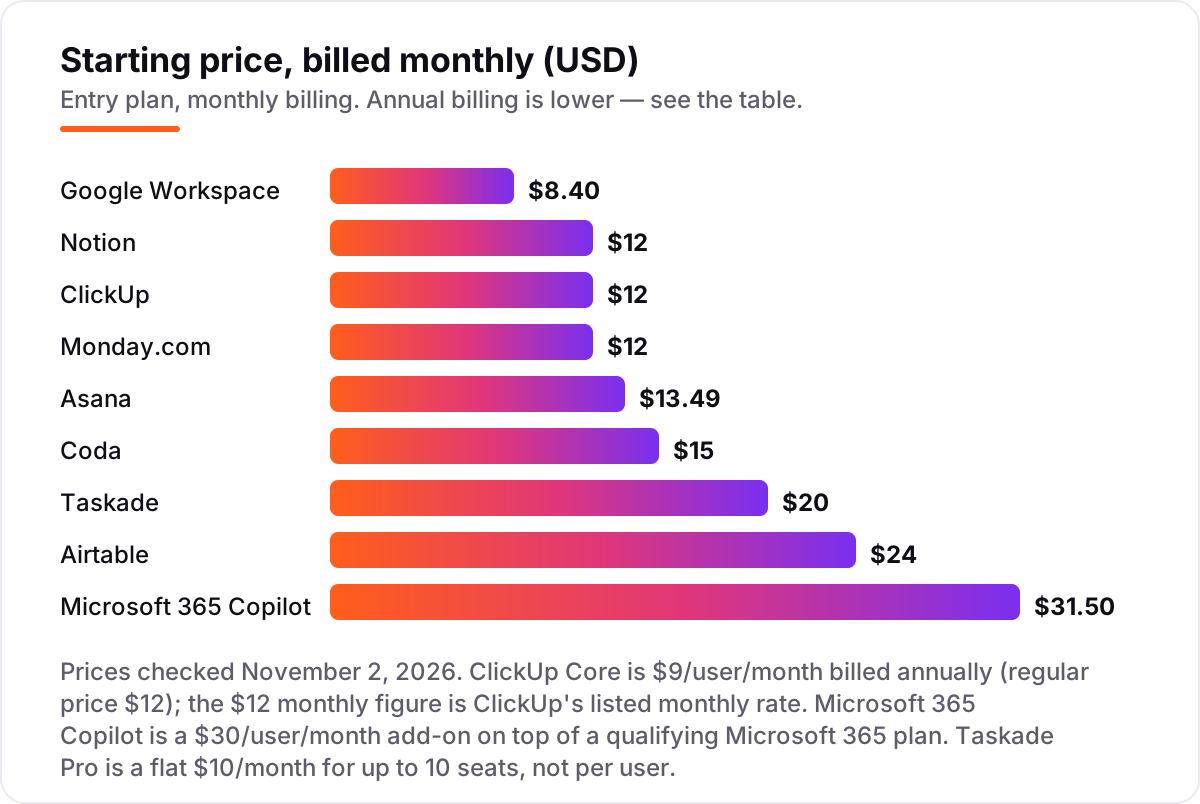
- Notion, ClickUp and Google Workspace lead the short-list: Notion Plus from $12/user/month, ClickUp Core from $12/user/month, and Google Workspace Business Starter from $8.40/user/month, all billed monthly.
- The single most important buying factor is where the AI actually lives: some tools bundle AI into every paid plan, while Notion keeps full AI on its $20 Business plan and Microsoft sells Copilot as a $30 add-on.
- Free plans are real here — Notion, ClickUp, Coda, Asana, Monday.com, Airtable and Taskade all let a small team start free — but the free tiers cap AI use, so check the credit limits before you build on them.
- Every price below was checked on the vendor's own pricing page on November 2, 2026. Ratings are G2, with review counts shown.
On this page
Quick comparison
| Tool | Best for | Starting price | Free plan |
|---|---|---|---|
| Notion | Small teams that live in docs and wikis and want one place for notes, projects and AI writing | $12/mo | Yes (AI trial only) |
| ClickUp | Small teams that want tasks, docs, chat and dashboards in one workspace at the lowest per-seat price | $12/mo | Yes (Free Forever) |
| Google Workspace | Small businesses that already live in Gmail and Google Docs and want Gemini built into email, docs and meetings | $8.40/mo | No (14-day trial) |
| Coda | Operations teams that build their workspace from structured data — trackers, dashboards and automations in living docs | $15/mo | Yes (limited) |
| Asana | Small teams that run structured projects with clear owners, deadlines and approvals, and want AI teammates built in | $13.49/mo | Yes (up to 2 users) |
| Monday.com | Visual teams that manage work on boards and want AI credits and automations bundled into the seat price | $12/mo | Yes (up to 2 seats) |
| Microsoft 365 Copilot | Teams already on Microsoft 365 that want AI inside Word, Excel, Outlook and Teams without leaving the suite | $31.50/mo | No (Copilot Chat free) |
| Airtable | Teams that organize work as structured data — content calendars, CRMs and inventories built on linked records | $24/mo | Yes (5 editors) |
| Taskade | Small teams and solo builders who want an AI-native workspace with agents and automations at one flat monthly price | $20/mo | Yes (2 members) |
Make one of these tools?
We re-check this list every quarter. Send a correction, request a review, or ask about a clearly labeled sponsored spot.
Request a listingThe best all-in-one ai workspace tools
Notion
Best for: Small teams that live in docs and wikis and want one place for notes, projects and AI writing
Notion is the default pick for teams whose work starts as writing. Pages, wikis and databases share one structure, so a meeting note can become a task list and a task list can become a project board, all searchable from one box. Plus covers the basics well — unlimited blocks and uploads, 30-day history, unlimited guests — and the template gallery means most teams start from a proven setup, not a blank page.
The catch is the AI. Plus and Free include only a trial of Notion AI, so the Agent, AI Meeting Notes and enterprise search start on Business at $20 per user a month billed annually. Metered credits for Custom Agents add a second bill for heavy users. Buy Notion when docs are the job; if tasks matter more, ClickUp or Asana fit better.
What we like
- The most flexible workspace here: docs, wikis, databases, tasks and calendars in one place, with 100+ templates to start from
- Notion Agent can search across the workspace and connected apps, then draft, autofill and translate from a chat prompt
- Free plan covers unlimited pages for individuals, and guests are free on every plan
- Strongest template and community ecosystem of any tool in this list
Watch out for
- Full Notion AI — Agent and AI Meeting Notes — starts on Business at $20/user/month billed annually, double the Plus price
- Custom Agents and Workers run on metered Notion credits ($10 per 1,000 credits), so heavy AI use adds a second bill
- Large databases can feel slow, and offline use is limited to pages you download in advance

ClickUp
Best for: Small teams that want tasks, docs, chat and dashboards in one workspace at the lowest per-seat price
ClickUp tries to replace several subscriptions at once, and on price it comes closest. Core covers tasks, docs, chat, whiteboards and Gantt charts for $9 per user a month billed annually, with unlimited storage and 1,000 automations a month. Every paid plan includes AI credits too, so there is no separate add-on to buy.
The trade-off is setup. Reviewers like the flexibility but warn that the settings, views and custom fields take real time to tame, so roll it out one workflow at a time. The $9 rate is a promotion against a $12 regular price, and the premium AI models start on Business at $17. Still, for a small team that wants everything in one place for the least money, ClickUp is the value pick.
What we like
- Cheapest paid entry here on annual billing: Core is $9/user/month, with unlimited storage, tasks, docs and Gantt charts
- Every paid plan now includes AI credits (1,000 per user a month, pooled), so there is no separate AI add-on to buy
- The widest view set in this list: list, board, calendar, Gantt, mind map, whiteboard and chat in one workspace
Watch out for
- The $9 annual rate is a promotional price against a $12 regular rate, and monthly billing costs $12/user/month
- Premium AI models from Anthropic, OpenAI and Google start on Business ($17/user/month billed annually)
- Reviewers say the sheer number of views and settings takes real setup time before the workspace feels simple

Google Workspace
Best for: Small businesses that already live in Gmail and Google Docs and want Gemini built into email, docs and meetings
Google Workspace is the safe pick because most teams already live in it. Business Starter covers custom email, Drive, Docs, Sheets, Slides and Meet for $7 per user a month on a one-year commitment, and Gemini now comes with it — in Gmail and the Gemini app on Starter, across Docs, Sheets, Meet and Drive from Standard. There is nothing to install, nothing to learn, and Docs collaboration is still the smoothest here.
The limits are about structure, not AI. There is no free plan, only a 14-day trial, and no native task views — Docs and Sheets do the organizing, with no kanban built in. The full Gemini experience needs Standard at $14 a user a month. Buy Workspace when email and documents are the workspace; add Notion or Asana when projects need real tracking.
What we like
- Gemini is included in every business plan — in Gmail and the Gemini app on Starter, and across Docs, Sheets, Meet and Drive from Standard
- The lowest entry price in this list, and it covers business email, 30 GB of storage and Meet calls for 100 people
- Real-time collaboration in Docs, Sheets and Slides is still the smoothest in this list, with no setup
Watch out for
- No free plan, and the full Gemini experience in Docs and Meet needs Business Standard at $14/user/month
- No native task or project views to match Notion or ClickUp — Docs and Sheets do the organizing, with no kanban built in
- Business plans cap at 300 users, so larger teams move to quote-only Enterprise plans

Coda
Best for: Operations teams that build their workspace from structured data — trackers, dashboards and automations in living docs
Coda is the pick for teams whose workspace is really a database with a friendly face. Docs hold live tables, buttons, formulas and automations, so a tracker, a dashboard and a project plan can be the same document. Only Doc Makers pay, while editors and viewers are free on every plan, so a 25-person team with five builders pays for five seats — the cheapest option here for viewer-heavy teams.
The price of that power is a learning curve: formulas, packs and cross-doc sync take real time to master, and reviewers call setup the hardest part. Coda is also mid-rebrand — the site now sells 'Superhuman Docs' — and unlimited automations need Business at $33 per Doc Maker a month. Buy Coda when your workspace runs on structured data; buy Notion when it runs on prose.
What we like
- Only Doc Makers are billed — editors and viewers are free on every plan, so a 25-person team with five builders pays for five
- Docs AI is included from Pro: write, edit and ask across docs, plus AI trackers, pages and views in beta
- The strongest formula and automation engine here — tables that act like a lightweight database with buttons and cross-doc sync
Watch out for
- Steepest learning curve in this list: formulas, packs and automations take real time to learn well
- Now branded 'Superhuman Docs' after the acquisition, and the pricing page sells the Superhuman bundle — the Coda name is fading from the site
- Databases and unlimited automations need Business at $33/Doc Maker/month billed annually

Asana
Best for: Small teams that run structured projects with clear owners, deadlines and approvals, and want AI teammates built in
Asana is the most structured tool in this list, and that is the point. Work has one owner, one due date and one status, and Timeline and Gantt views show how it all fits together from the Starter plan. Asana AI is included on every paid plan — AI Teammates, Asana Dash and AI Studio, with 50,000 AI Studio credits a month on Starter — and unlimited guests join free.
The limits are scope. Asana organizes tasks, not knowledge: there is no real docs or wiki, so most teams pair it with Notion or Google Docs. AI Teammates and Dash are capped at five requests per user a month, with extras at $0.50 each, and portfolios and goals need Advanced at $24.99. Buy Asana when clear ownership and deadlines are the job; buy Notion when the job is writing.
What we like
- Asana AI is included in every paid plan: AI Teammates, Asana Dash and AI Studio, with 50,000 AI Studio credits a month on Starter
- The clearest project structure here — Timeline and Gantt views, dependencies and reporting dashboards from Starter
- Unlimited free guests on paid plans, so clients and contractors join without a paid seat
Watch out for
- AI Teammates and Dash are capped at 5 requests per user a month (50 per account); extra requests cost $0.50 each prepaid
- No real docs or wiki — Asana organizes tasks, not the knowledge around them, so most teams pair it with a docs tool
- Portfolios, goals and resource management need Advanced at $24.99/user/month billed annually

Monday.com
Best for: Visual teams that manage work on boards and want AI credits and automations bundled into the seat price
Monday.com is the most visual tool here, with the highest G2 score in this list at 4.7 out of 5. Work lives on color-coded boards with automations that move items, notify owners and update statuses without anyone touching them. AI credits are bundled into every paid plan — 1,000 a month on Basic, 2,000 on Standard, 3,000 on Pro — so there is no separate AI bill.
The pricing catches are the seat rules. Every paid plan has a three-seat minimum, so a solo user still pays $27 a month on Basic billed annually, and seats are sold in blocks after three, so a team of four buys five. Basic has no automations or integrations at all — the real starting point is Standard at $12 a seat a month. Buy monday.com when the team thinks in boards and automations.
What we like
- Highest G2 score in this list at 4.7/5, with reviewers praising the visual boards and automation recipes
- AI credits are bundled into every paid plan — 1,000 a month on Basic, 2,000 on Standard, 3,000 on Pro — with no separate AI add-on
- Automations and integrations start on Standard ($12/seat/month billed annually), with 250 actions a month
Watch out for
- Every paid plan has a 3-seat minimum, so a solo user still pays $27 a month on Basic billed annually
- Seats are sold in blocks after three, so a team of four buys five seats
- Basic has no automations or integrations at all — the real starting point is Standard

Microsoft 365 Copilot
Best for: Teams already on Microsoft 365 that want AI inside Word, Excel, Outlook and Teams without leaving the suite
Microsoft 365 Copilot is the pick for teams that already live inside Word, Excel, Outlook and Teams. It reads your files, email and meeting history to draft documents, summarize threads and answer questions grounded in your own data, with no new app to learn. Copilot Business, for up to 300 users, costs $21 per user a month on an annual term, less than the $30 enterprise add-on.
The catch is the total bill. Copilot is an add-on, never a standalone product, so the $30 licence sits on top of a qualifying Microsoft 365 plan — Business Standard plus Copilot runs about $44 a user a month. Agentic work bills separately in Copilot Credits too, and reviewers say quality varies by app. Buy Copilot when Microsoft 365 is already the office; otherwise the suites above cost less.
What we like
- The deepest integration in this list: Copilot reads your files, email and Teams chats to draft, summarize and answer inside the apps you already use
- Copilot Business, for up to 300 users, costs $21/user/month on an annual term ($25.20 billed monthly) — less than the $30 enterprise add-on
- Enterprise-grade compliance, admin controls and data protection come with the Microsoft 365 tenant
Watch out for
- Copilot is an add-on, never a standalone product — the $30 licence sits on top of a qualifying Microsoft 365 plan, so the real per-user cost is higher
- Agentic work now bills separately in Copilot Credits, on top of the licence, and usage caps apply
- Reviewers report uneven quality across apps — strong in Word and Outlook, weaker in Excel and PowerPoint

Airtable
Best for: Teams that organize work as structured data — content calendars, CRMs and inventories built on linked records
Airtable is the pick when work is really data: content calendars, CRMs, inventories and hiring pipelines built on linked records. Tables connect with rollups, lookups and formulas, automations move records between views, and Interface Designer turns a base into a custom app. AI credits are included on every plan, including Free, and read-only collaborators and share links are never charged.
Check the billing rule before you buy. Team charges for everyone with commenter-or-higher permission, so a ten-person team with six commenters pays for all ten seats. The jump to Business is steep — $20 to $45 a seat — and it is the only way past the 50,000-record cap. Reviewers also flag a real learning curve. Buy Airtable when the workspace is a database; buy Notion when it is a document.
What we like
- AI credits are included on every plan, including Free — 15,000 credits per paid seat a month on Team
- The most flexible data model here: linked records, rollups, formulas, automations and Interface Designer for custom apps
- Read-only collaborators, form submissions and share links are not charged, so clients can view work free
Watch out for
- Team bills everyone with commenter-or-higher permission as a seat, so a 10-person team with six commenters pays for all ten
- The jump from Team ($20) to Business ($45) is steep, and it is the only way to raise the 50,000-record cap
- Reviewers flag a real learning curve and slower performance on very large bases

Taskade
Best for: Small teams and solo builders who want an AI-native workspace with agents and automations at one flat monthly price
Taskade is the most AI-native tool in this list, and the cheapest flat rate. Pro costs $10 a month billed annually for up to ten people — not per person — and covers custom AI agents, automations and Taskade Genesis, which turns a prompt into a working app. Seven-plus views, from mind maps to Gantt charts, cover most planning styles.
The trade-offs are scale and maturity. AI runs on a credit pool, and reviewers say credits run out fast when agents and automations run often. The review base is also the smallest here — 92 G2 reviews — and the product has shifted toward AI app building. Buy Taskade when a small team wants agents and automations at one flat price; buy ClickUp when the team needs a deeper project tool.
What we like
- Flat pricing, not per seat: Pro is $10 a month billed annually for up to 10 people, and Business is $25 a month for unlimited seats
- The most AI-native tool here: custom AI agents, automations and Taskade Genesis, which turns a prompt into a working app
- Seven-plus project views — list, board, mind map, Gantt, calendar, table and org chart — in one workspace
Watch out for
- AI runs on a credit pool, and reviewers say credits can run out fast when agents and automations run often
- Smallest review base in this list (92 G2 reviews), and the product has shifted focus from project management toward AI app building
- No white-label or custom branding below Business, and the free plan starts with no AI credits
The best all-in-one ai workspace tool puts your docs, tasks, chat and AI assistant in one place, so a small team stops paying for four subscriptions and stops losing work between them. This list ranks nine tools that do that job in 2026, sorted by fit for the most common buyer — a small team that wants to write, plan and ship work without leaving one workspace — with every price checked on the vendor's own pricing page on November 2, 2026.
How to choose the best all-in-one ai workspace tool
- Where the AI lives. Some tools bundle AI into every paid plan; others charge for it. Notion keeps full AI on Business, and Microsoft sells Copilot as an add-on, so read the AI line, not just the plan price.
- Per-seat, per-maker or flat billing. Notion, ClickUp and Asana charge per user; Coda charges only Doc Makers; Taskade charges one flat fee for up to ten people. The billing unit matters more than the headline price.
- Docs-first or tasks-first. Notion and Coda are built for writing and structured data; ClickUp, Asana and Monday.com are built for tasks and deadlines. Pick the shape that matches where your work starts.
- What the free plan caps. Seven tools here have free plans, but the caps differ — AI credits, seats, records and storage all run out at different points. Check the cap you will hit first.
- How you get out. Export a project and check what the export actually contains before you commit. Migration is the cost nobody quotes on the pricing page.
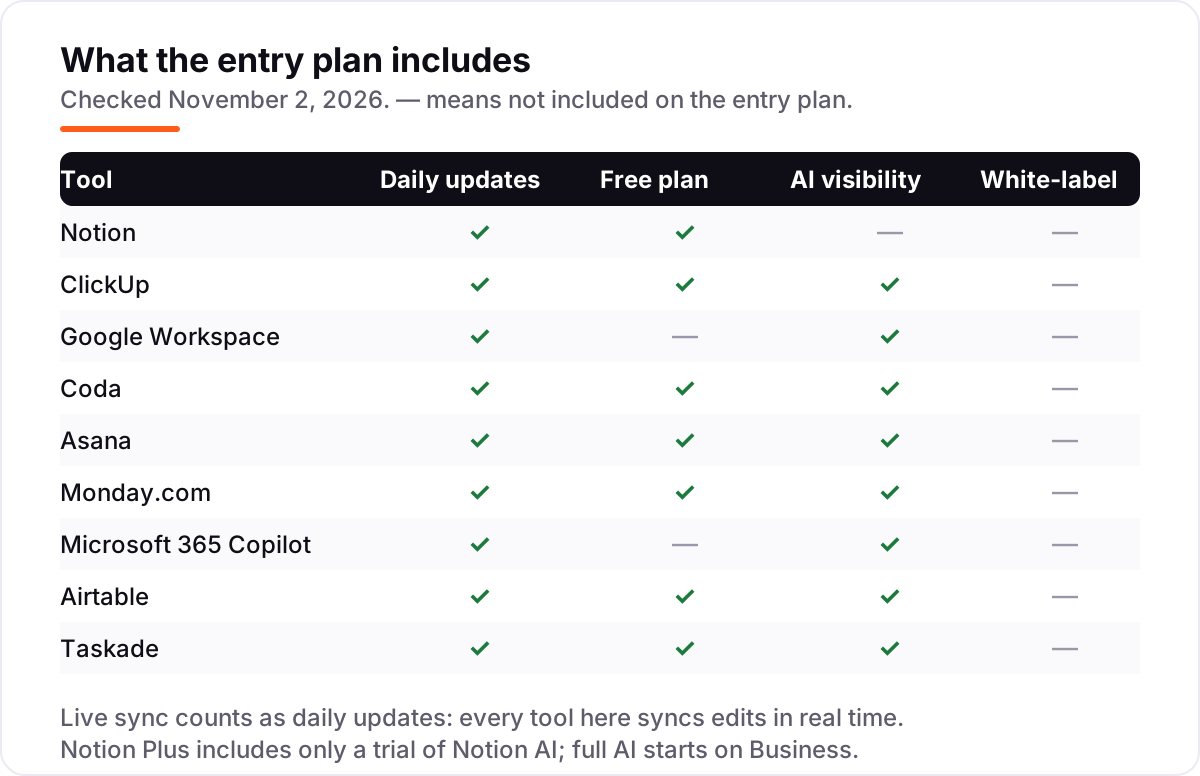
Quick comparison: tool type by need
| Buyer | Best pick | Why |
|---|---|---|
| Docs and wikis are the core job | Notion | The most flexible docs workspace, from $12/user/month |
| Tasks and projects are the core job | ClickUp or Asana | More views and structure; ClickUp from $12, Asana from $13.49/user/month |
| Already live in Gmail and Google Docs | Google Workspace | Gemini built in from $8.40/user/month, nothing new to learn |
| Work runs on structured data | Coda or Airtable | Pay only for Doc Makers on Coda; linked records on Airtable |
| Already live in Microsoft 365 | Microsoft 365 Copilot | AI inside Word, Excel and Teams, from $30/user/month plus a base plan |
| Cheapest flat price for a small team | Taskade | $10 a month flat for up to 10 seats, billed annually |
All-in-one ai workspace tools pricing: what you will actually pay
Take a ten-person team for one year, on annual billing. Google Workspace Business Starter costs $840 a year (10 × $7 × 12), and ClickUp Core costs $1,080 (10 × $9 × 12). Notion Plus costs $1,200 (10 × $10 × 12) — but full Notion AI needs Business, which is $2,400 a year (10 × $20 × 12), so the AI doubles the bill. Coda Pro is the cheapest route if only three people build docs: $432 a year (3 × $12 × 12), because editors and viewers are free. Taskade Pro beats them all on flat pricing: $120 a year for the whole team.
The expensive end is Microsoft. Copilot alone is $3,600 a year for ten people (10 × $30 × 12), and it sits on top of a Microsoft 365 plan — Business Standard adds $1,680 a year (10 × $14 × 12) — so the all-in total is $5,280 a year before any Copilot Credit packs. Asana Starter lands in the middle at $1,318.80 a year (10 × $10.99 × 12), Monday.com Basic at $1,080 (10 × $9 × 12), and Airtable Team at $2,400 (10 × $20 × 12) if all ten need seats. The lesson: annual billing saves roughly 15–20% everywhere, and the billing unit — per user, per Doc Maker, or flat — changes the total more than the headline price does.
All-in-one workspace vs office suite vs separate tools: know the difference
Three different products all call themselves "all-in-one" now, and the label is the confusion. An all-in-one workspace — Notion, ClickUp, Coda, Taskade — keeps docs, tasks and AI in one shared database, so the AI can read the same content the team writes and plans in. An office suite with AI — Google Workspace and Microsoft 365 Copilot — is separate apps (mail, docs, sheets) with an assistant inside each one: strong on documents and email, weaker on task structure, and you still switch apps all day. Separate best-of-breed tools go deepest in each job, but you pay four bills and work scatters across four logins.
Choose by where the work lives. If it lives in documents and email, the suite you already pay for is the cheapest AI you will buy — check what Gemini or Copilot already covers before adding another subscription. If it lives in tasks and deadlines, a workspace is the better home. If it lives in structured data — content calendars, CRMs, inventories — Coda or Airtable is the better home. And if you want AI assistants to recommend your business, not just run it, make sure they can read your site: our free llms.txt generator builds the file that tells AI crawlers what your site is about.
How we chose
We checked each vendor's own pricing page on November 2, 2026 and recorded the starting price exactly as shown, including the annual-billing figure where the page lists one. Three vendors render their prices with JavaScript, so the figures for Notion, Monday.com and Google Workspace come from reads of their own pricing pages dated November 1–2, 2026, and Microsoft's Copilot pricing page did not load in our fetcher, so the $30 figure is from Microsoft's published pricing checked October 31, 2026. ClickUp's $12 monthly rate is the regular price shown on its pricing page next to the $9 annual promotion. Ratings come from G2 pages opened on November 2, 2026, with review counts shown; where a G2 page rendered only part of its data we recorded the score the page itself publishes. We did not estimate any price or rating, and any figure we could not verify was left out rather than guessed. We ranked the tools by fit for the most common buyer — a small team that wants docs, tasks and AI in one place — not by brand size. No vendor paid for a place in this list, and none of the links here are affiliate links.
What to do next
Start with the decision path above: find where your work lives, check what AI your current suite already includes, and count who actually needs a paid seat under each billing model. Then take the free plan or trial of your top pick and run real work through it for two weeks — a doc, a project and one AI task — and export a project before you commit. If the numbers hold and the team actually opens it every day, you have your workspace. Once your tools are in place, find out what's holding your rankings back.
Before you publish the pages your new workspace produces, remember the tool is only half the job: getting found is the other half, and our AI search optimization service is built around exactly that — making sure AI assistants recommend your business when customers ask.
Your stack only works if people find you
SerpAstra fixes what keeps your site off page one and makes it easy for AI assistants to recommend.
Get a free audit→Sources we checked (18)
- Notion pricing — notion.com/pricing (checked November 2, 2026)
- Notion on G2 — 4.6/5, 13,767 reviews (checked November 2, 2026)
- ClickUp pricing — clickup.com/pricing (checked November 2, 2026)
- ClickUp on G2 — 4.6/5, 13,729 reviews (checked November 2, 2026)
- Google Workspace pricing — workspace.google.com/pricing (checked November 2, 2026)
- Google Workspace on G2 — 4.6/5, 48,170 reviews (checked November 2, 2026)
- Coda pricing — coda.io/pricing (checked November 2, 2026)
- Coda on G2 — 4.6/5, 492 reviews (checked November 2, 2026)
- Asana pricing — asana.com/pricing (checked November 2, 2026)
- Asana on G2 — 4.4/5, 13,866 reviews (checked November 2, 2026)
- monday.com pricing — monday.com/pricing (checked November 2, 2026)
- monday.com on G2 — 4.7/5, 17,146 reviews (checked November 2, 2026)
- Microsoft 365 Copilot pricing — microsoft.com/en-us/microsoft-365/copilot/pricing (checked November 2, 2026)
- Microsoft Copilot on G2 — 4.4/5, 665 reviews (checked November 2, 2026)
- Airtable pricing — airtable.com/pricing (checked November 2, 2026)
- Airtable on G2 — 4.6/5, 3,288 reviews (checked November 2, 2026)
- Taskade pricing — taskade.com/pricing (checked November 2, 2026)
- Taskade on G2 — 4.5/5, 92 reviews (checked November 2, 2026)
Shamim
Founder of SerpAstra
A full-stack SEO and digital marketer who spends most days on Local SEO for dental practices, AI search visibility and lead generation.
Frequently asked questions
What is the best all-in-one AI workspace tool in 2026?
Notion is the best fit for most teams: docs, wikis, databases and tasks in one place, with Notion Agent from the Business plan. If tasks matter more than docs, ClickUp is the better pick at $9 per user a month billed annually. Teams already on Google or Microsoft should use the AI built into the suite they pay for.
How much does an all-in-one AI workspace tool cost?
Between $8.40 and $31.50 per user a month billed monthly at the entry level. Google Workspace starts at $8.40, Notion and ClickUp at $12, and Microsoft 365 Copilot at $31.50 — plus a base Microsoft 365 plan. Taskade is the outlier: a flat $20 a month for up to 10 seats, or $10 billed annually.
Is there a free all-in-one AI workspace tool?
Yes, with limits. Notion, ClickUp, Coda, Asana, Monday.com, Airtable and Taskade all have free plans. The free tiers cap AI use hard — Notion gives only a trial of its AI, and Taskade's free plan starts with no AI credits — so treat them as a way to test the workspace, not as a permanent AI plan.
Notion vs ClickUp: which is better for a small team?
Notion if the work starts as writing: docs, wikis and databases are its strength, and it is the more flexible workspace. ClickUp if the work starts as tasks: it has more views, more automations and a lower per-seat price. Full AI costs more on Notion (Business, $20 a user a month) than on ClickUp, where AI credits are bundled into every paid plan.
Do I need to pay extra for AI in these tools?
Usually not, with two exceptions. ClickUp, Coda, Asana, Monday.com, Airtable, Taskade and Google Workspace all bundle AI into their paid plans. Notion keeps full AI on Business, and Microsoft 365 Copilot is itself a paid add-on. Even where AI is bundled, most tools meter it with credits or request caps, so heavy use can still cost more.
Can an AI workspace replace Google Workspace or Microsoft 365?
Not for most teams. Notion, ClickUp and Coda replace the docs-and-tasks layer, but they do not replace business email, calendars or file storage at the same depth. The common setup is one workspace for planning plus Google Workspace or Microsoft 365 for email and files — and both suites now bundle their own AI, so check what you already pay for first.
What should I check before switching to an all-in-one AI workspace?
Four things: whether AI is bundled or a paid add-on, what counts as a billable seat (per user, per Doc Maker, or flat), what the free plan actually caps, and how you get your data out. Run the free plan or trial with real work for two weeks, and export a project before you commit — migration is the cost nobody quotes.
Free SEO and AI visibility audit
Find out what is holding your rankings back
Send us your site. Within 2 business days you get a written audit, an AI visibility check and a short fix list ranked by impact. Free, with no contract attached.
Request my free audit→Related guides
 AI SearchBest AI SEO tools in 2026: honest picks by jobBest AI SEO tools in 2026, picked by job: Semrush and Ahrefs for research, Surfer and Clearscope for content, Otterly for AI tracking, with 2026 prices.Read guide →
 SEO & AI Search10 Best AI Search Optimization Tools in 2026 (Free and Paid, Compared)10 best AI search optimization tools compared on price, AI visibility coverage and content scoring, with real prices checked October 31, 2026.Read guide →
 SEO & AI Search8 Best SEO Automation Tools in 2026 (Free and Paid, Compared)8 best SEO automation tools compared on price, automation depth and free plans, with every price checked on the vendor's own pricing page, November 1, 2026.Read guide →