
7 Best Apps for Contractors in 2026: Free and Paid Apps Ranked
Compare the 7 best app for contractors picks on price, free plans and field features — every price checked on the vendor page, November 7, 2026.
 Shamim Mia, Founder, SerpAstraLast verified November 7, 202612 min read
We compare pricing pages, documentation and public reviews. We never accept payment for rankings.

Key takeaways
- Jobber is the best fit for most small contractors at $49/month; Housecall Pro follows at $79/month with AI included on every plan, and Fieldwire starts free for small field teams.
- Buildertrend and ServiceTitan publish no prices at all — both sell by custom quote after a demo, so budget time for a sales call as well as money.
- The single most important buying factor is how the price scales: per-user tools like Fieldwire charge for every crew member, while flat plans like Contractor Foreman charge by user cap.
- Add-ons decide the real bill: AI call answering, payroll, GPS tracking and QuickBooks sync are paid extras on several tools here, and most are unpriced.
On this page
Quick comparison
| Tool | Best for | Starting price | Free plan |
|---|---|---|---|
| Jobber | Small home-service contractors that want one app for quotes, scheduling, invoicing and payments | $49/mo | No (14-day trial) |
| Housecall Pro | HVAC, plumbing and electrical contractors that want AI help and a price book on the entry plan | $79/mo | No (14-day trial) |
| Fieldwire | Trade contractors and small general contractors that run jobs from drawings on site | Free; Pro $39/user/mo | Yes (free) |
| Buildertrend | Custom home builders and remodelers managing multi-month projects with clients to keep updated | Custom quote | No (demo only) |
| Contractor Foreman | Small contractors that want the widest feature set for the lowest flat monthly price | $49/mo (annual) | No (30-day trial) |
| CompanyCam | Roofing and remodeling contractors that need a photo record of every job, organized by project | $79/mo | No (free trial) |
| ServiceTitan | Larger multi-crew HVAC, plumbing and electrical companies with dispatchers and membership plans | Custom quote | No (demo only) |
Make one of these tools?
We re-check this list every quarter. Send a correction, request a review, or ask about a clearly labeled sponsored spot.
Request a listingThe best apps for contractors

Jobber
Best for: Small home-service contractors that want one app for quotes, scheduling, invoicing and payments
Jobber is the default pick for a small home-service contractor because it covers the whole job in one app: quote, schedule, invoice and take payment, with online booking and a client hub so customers can approve work without a phone call. Core costs $49 a month for one user, or $29 a month billed annually, and includes Jobber Copilot, the AI assistant that answers questions from your own schedule and quote data.
The catch is the user cap. Core covers one user only, so a second person on the team means Connect at $139 a month, and QuickBooks sync, GPS tracking and job forms wait for that tier too. Buy Jobber when one app should run the office; buy Fieldwire when the job itself lives on drawings, or Contractor Foreman when the budget is the deciding factor.
What we like
- Jobber Copilot AI is included on every plan, free in beta, and answers questions from your own job and quote data
- Quote, schedule, invoice and take card payments in one app, so a job moves from estimate to paid without retyping
- Online booking and a client hub let customers book and approve quotes without a phone call
- 14-day free trial with no credit card, and month-to-month billing with no long-term contract
Watch out for
- Core covers one user only; a second user means Connect at $139/month, nearly triple the entry price
- QuickBooks sync, GPS tracking and job forms wait for Connect; two-way texting waits for Grow at $199/month
- Card payments cost 2.9% + 30¢ per transaction on top of the subscription

Housecall Pro
Best for: HVAC, plumbing and electrical contractors that want AI help and a price book on the entry plan
Housecall Pro is the strongest pick for HVAC, plumbing and electrical contractors because it pairs the usual field service workflow — scheduling, dispatch, estimates, invoicing and payments — with a price book, job costing and an AI Team on every plan. Basic costs $79 a month for one user, or $59 a month billed annually, and the AI assistants draft marketing copy, answer business questions and handle website chat.
The catch is the add-on bill. CSR AI call answering, payroll, websites, vehicle GPS and marketing campaigns are all sold separately with no published price, and Basic has no QuickBooks sync or extra seats, so most crews land on Essentials at $189 a month. Buy Housecall Pro when you want AI help included from the start; buy Jobber when you want the lower entry price and fewer paid extras.
What we like
- AI Team members (Marketing, Analyst, Coach and Help AI, plus CSR AI chat) are included on every plan, including Basic
- Price book and job costing are included on Basic, so flat-rate quotes stay profitable from day one
- Online booking, scheduling, dispatch, estimates, invoicing and payments in a single app built for home-service trades
- Review management is included on Basic, so finished jobs can ask customers for a review
Watch out for
- Basic covers one user only and has no QuickBooks sync, GPS tracking or extra seats — most crews need Essentials at $189/month
- CSR AI call answering, payroll, websites and vehicle GPS are unpriced add-ons, so the plan price is not the total bill
- Card processing starts at 2.59% per transaction on top of the subscription

Fieldwire
Best for: Trade contractors and small general contractors that run jobs from drawings on site
Fieldwire is the pick for contractors whose job lives on drawings. The free Basic plan covers 5 users, 3 projects and 100 sheets, with plan viewing, markups, tasks, checklists and photos — a real working tool, not a demo. Tasks and punch-list items pin to exact spots on the drawing, so the foreman, the crew and the office all look at the same marked-up plan, and the mobile app works fully offline.
The catch is the reporting gate. Daily reports, exports and project templates start on Pro at $39 per user a month billed annually, and custom forms, integrations and the BIM viewer wait for Business at $64. Buy Fieldwire when the field team needs plans in hand; buy Jobber when the office work — quotes, invoices, payments — is the bigger job.
What we like
- The free Basic plan is a real working tool: 5 users, 3 projects and 100 sheets with plan viewing and tasks
- Tasks, punch lists and photos pin to exact spots on the drawing, so the crew and the office look at the same thing
- Full offline access on mobile, so the app keeps working in basements and buildings with no signal
- Sheet compare and version control keep every worker on the current drawing, not last week's print
Watch out for
- Reports, exports and project templates start on Pro at $39/user/month — the free plan cannot produce a daily report
- Custom forms, integrations and the BIM viewer wait for Business at $64/user/month
- RFIs, submittals, change orders and budgets wait for Business Plus at $89/user/month

Buildertrend
Best for: Custom home builders and remodelers managing multi-month projects with clients to keep updated
Buildertrend is the pick for custom home builders and remodelers who run multi-month jobs with clients to keep updated. One subscription covers leads, scheduling, budgets, change orders, invoicing and a client portal, and every plan includes unlimited users and unlimited projects, so adding office staff and subcontractors costs nothing extra. Homeowners see progress, approve selections and pay through the portal.
The catch is the price: there is none published. Every buyer fills in a quote form based on builder type and annual volume, then takes a sales call, and the old tier prices still found online are history, not quotes. Get the quote in writing, with every fee listed, before you compare it with the published prices in this list. Buy Buildertrend when the project is the product; buy Jobber when the job is a visit, not a build.
What we like
- One subscription covers leads, scheduling, budgets, change orders, invoicing and the client portal — no per-module fees
- Every plan includes unlimited users and unlimited projects, so adding office staff and subs costs nothing extra
- Clients get a branded portal with selections, photos and payment links, which cuts the 'what's the status?' calls
- Paying annually up front earns a 10% discount on the quoted price
Watch out for
- No published price: every buyer fills in a quote form and takes a sales call before seeing a number
- Old tier prices still circulate online ($339–$1,099 a month) but Buildertrend no longer publishes them — treat them as history, not quotes
- Built for home builders and remodelers; a service contractor who only needs scheduling will pay for project management it never uses

Contractor Foreman
Best for: Small contractors that want the widest feature set for the lowest flat monthly price
Contractor Foreman is the budget pick that does not skimp on modules. Every tier includes the full feature set — estimates, Gantt schedules, daily logs, time cards, change orders, a client portal and QuickBooks integration — and plans are priced by user cap rather than per seat, so an 8-person crew costs $166 a month instead of eight per-user fees. Basic is $49 a month for one user, billed annually.
The catch is the cap and the billing. Basic is sold on yearly billing only, so a one-user shop pays $588 up front with no monthly option, and Basic leaves out time cards, daily logs and equipment logs, which start on Plus. A 30-day trial and a 100-day money-back guarantee give you the longest leash here. Buy Contractor Foreman when the budget is fixed and the feature list is long.
What we like
- Flat per-company pricing by user cap, not per seat, so an 8-person crew costs $166/month instead of eight per-user fees
- Every tier includes the full feature set — estimates, Gantt schedules, daily logs, time cards, change orders and a client portal
- 30-day free trial plus a 100-day money-back guarantee on annual plans, the longest leash in this list
- AIA-style progress billing and retainage tracking are included from Pro at $221/month
Watch out for
- Basic is sold on yearly billing only — $588 up front, with no monthly-billing option for a 1-user shop
- Basic covers one user and leaves out time cards, daily logs and equipment logs, which start on Plus at $166/month
- Local material pricing is not included on Basic or Standard, and the interface packs a lot onto each screen

CompanyCam
Best for: Roofing and remodeling contractors that need a photo record of every job, organized by project
CompanyCam does one job and does it well: it turns phone photos into a searchable record of every project. Each photo is automatically time- and location-stamped and filed under the right job, so a progress photo from March is findable in seconds, and crews can share galleries, reports and annotated images with clients from a link. Core costs $79 a month for one user, or $63 a month billed annually.
The catch is scope. CompanyCam does not schedule, dispatch or run payroll, so it pairs with a field service or project management app rather than replacing one, and the crew plans jump to $149 and $299 a month. Buy it alongside Jobber or Buildertrend when photo proof wins jobs and settles disputes; skip it when one app has to do everything.
What we like
- Every photo is automatically time- and location-stamped and filed by project, so progress photos become a searchable job record
- Unlimited photo storage with reports and annotations that clients and crews can open from a link
- Core starts with a single user — no three-user minimum — so a solo contractor can use it without paying for empty seats
- On-site payments, a price book and invoicing are included on Core, so a photo app can also close small jobs
Watch out for
- It documents jobs; it does not schedule, dispatch or run payroll, so it pairs with another app rather than replacing one
- Crew and Scale jump to $149 and $299 a month, and each extra user costs $34 a month on monthly billing
- AI credits are metered by tier and CompanyCam's own pages disagree on whether Core includes them — ask before buying on AI features

ServiceTitan
Best for: Larger multi-crew HVAC, plumbing and electrical companies with dispatchers and membership plans
ServiceTitan is the pick for larger trade businesses that have outgrown a solo app: multi-crew HVAC, plumbing and electrical companies with dispatchers, membership plans and a marketing budget. Dispatch, estimates, invoicing, payments, memberships and marketing run on one platform, with the deepest reporting in this list — scorecards and dashboards that track every technician and every job.
The catch is the price and the setup. There is no published price: Starter, Essentials and The Works all sit behind a 'Request Pricing' button and a demo, and third-party reports put the cost at roughly $245–$500 per technician a month plus a $5,000+ implementation fee. Setup is the heaviest here, so buy ServiceTitan when the operation is big enough to need it — and small enough to survive the onboarding.
What we like
- Dispatch, estimates, invoicing, payments, memberships and marketing run on one platform built for multi-crew trade businesses
- The deepest reporting in this list, with scorecards and dashboards that track every technician and every job
- Membership and recurring service plans are built in, so maintenance agreements renew without spreadsheets
- Integrations cover accounting, payroll, financing and inventory, so it can sit at the center of a larger operation
Watch out for
- No published price: Starter, Essentials and The Works all sit behind a 'Request Pricing' button and a demo
- Third-party reports put the cost at roughly $245–$500 per technician a month plus a $5,000+ implementation fee — budget for both
- Setup is the heaviest here, with the lowest ease-of-setup score in the list (6.8/10 on G2), and contracts typically run 12 months
The best app for contractors is the one that matches how your jobs actually run: short service visits need scheduling and invoicing, while multi-month builds need budgets, change orders and a client portal. We ranked the seven apps below by fit for the most common buyer — a small US contractor running a crew of one to ten — and every price was checked on the vendor's own pricing page on November 7, 2026.
How to choose the best app for contractors
- Match the app to the job length. Short service visits need scheduling, dispatch and invoicing; multi-month builds need budgets, change orders and selections.
- Count heads the way the vendor does. Jobber and Housecall Pro sell per-account bundles of users, Fieldwire charges per user, and Contractor Foreman charges a flat rate per user cap.
- Check which features sit on the entry plan. QuickBooks sync, GPS tracking, reports and custom forms are all gated to higher tiers on at least one tool here.
- Price the add-ons. AI call answering, payroll, vehicle GPS and marketing campaigns are paid extras on several tools, and most carry no published price.
- Try it on a real job. The trials run 14 to 30 days — long enough to run one genuine job through scheduling, invoicing and payment before you pay.
New software will not fill the calendar on its own. If the jobs are sorted but new customers are not finding you, our local SEO service handles the visibility side, and the free local business schema generator checks the structured data that helps a contractor show up in local results.
Whatever you shortlist, try it with real data before you pay. The free plan and trials in this list are long enough to run one genuine job — your customers, your drawings, your invoices — and that job tells you more than any review can. Check two things in the trial: that the mobile app works where your crews actually work, with no signal if needed, and that the reports show what your clients or your accountant need. Every tool here is built for contractors, so there is no reason to buy before your crew has used it on site.
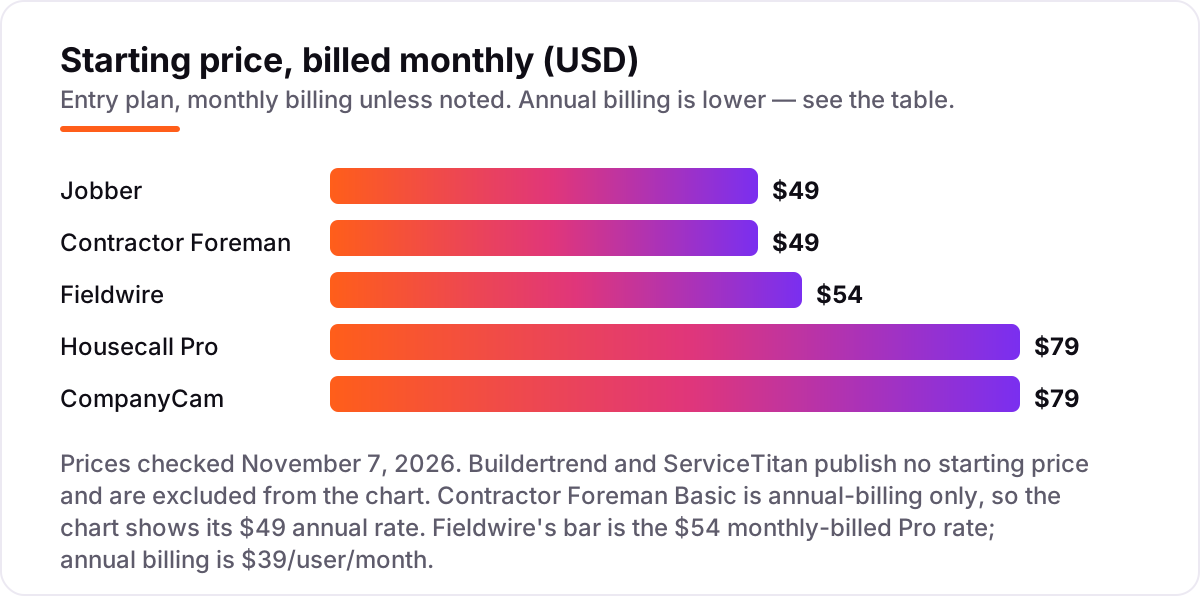
Contractor app pricing: what you will actually pay
Take a five-person residential remodeling crew that runs about 10 jobs a month. On annual billing, the subscription costs $149 a month on Jobber Connect (5 users included) and the same $149 on Housecall Pro Essentials (5 users included), $166 on Contractor Foreman Plus (up to 8 users), $177 on CompanyCam Crew with two extra seats ($119 for 3 users plus $29 each), and $195 on Fieldwire Pro (5 users at $39 each). Buildertrend and ServiceTitan publish no prices, so they cannot be priced here — both need a quote.
Over a year, that is $1,788 on Jobber Connect or Housecall Pro Essentials, $1,992 on Contractor Foreman Plus, $2,124 on CompanyCam Crew with two extra seats, and $2,340 on Fieldwire Pro. The same five people and the same ten jobs cost $1,788 a year at the cheap end and $2,340 at the dear end — a $552 gap that comes entirely from how each vendor counts users, not from features.
Three costs sit outside every number above. First, monthly billing costs more: the same five-person crew pays $199 a month on Jobber Connect, $189 on Housecall Pro Essentials, $199 on Contractor Foreman Plus, $217 on CompanyCam Crew with two extra seats, and $270 on Fieldwire Pro. Second, card processing on the invoices you send — 2.9% + 30¢ on Jobber and Contractor Foreman, from 2.59% on Housecall Pro. Third, the add-ons: CSR AI call answering, payroll and vehicle GPS on Housecall Pro, and the AI Receptionist at $29 a month on Jobber, are all extra.
One more cost to check before you commit: CompanyCam's $2,124 buys photo documentation, not a scheduling system — a five-person crew that buys it still needs Jobber or Fieldwire to run the jobs. And a second business is a second subscription on every tool in this list, so price the second crew before you commit to a tool for the first.
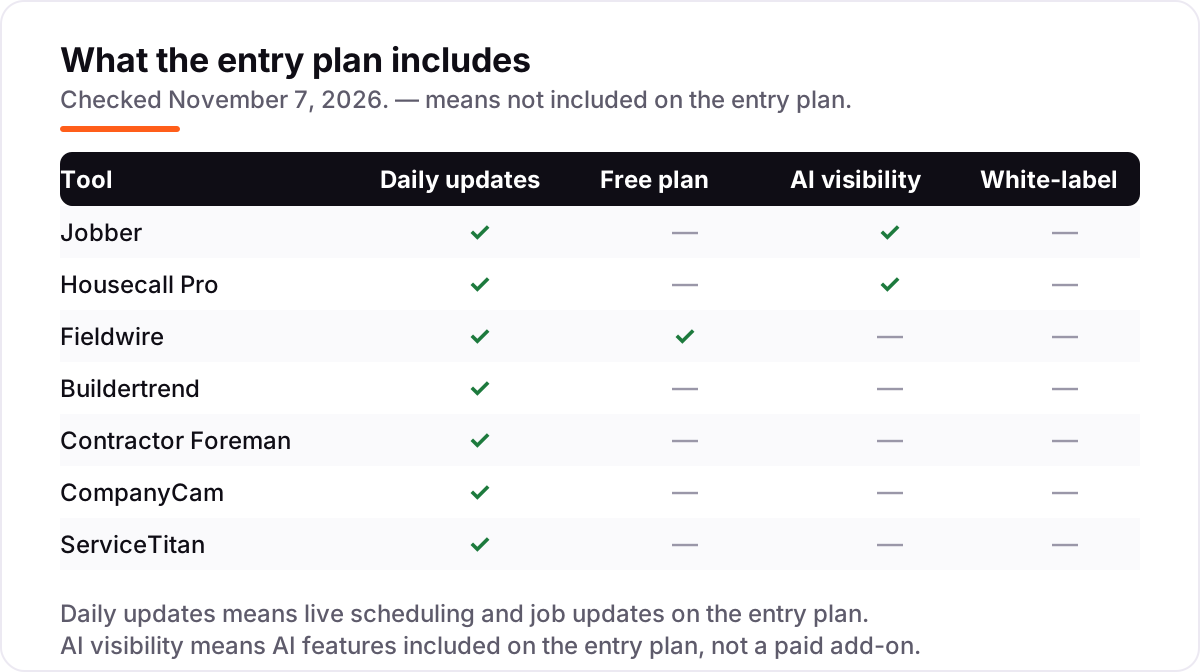
Know the difference: field service apps vs construction management software
The confusion in this category is between three kinds of app that all call themselves contractor software. A field service app — Jobber, Housecall Pro, ServiceTitan — runs short jobs: it schedules the visit, dispatches the tech, sends the estimate and takes the payment. A construction management platform — Buildertrend, Contractor Foreman, Fieldwire — runs longer projects: it holds the schedule, the budget, the change orders and the client portal across weeks or months. A single-purpose tool — CompanyCam — does one job, photo documentation, and does it better than any all-in-one.
Buying the wrong type is the most expensive mistake in this list. A remodeler who buys a field service app will find no change orders and no budget tracking; a plumber who buys a construction platform will pay for Gantt charts and AIA billing it never opens. Match the app to the job length first, and only then compare prices: a one-truck shop doing same-day calls is a field service buyer, and a builder running three-month remodels is a construction management buyer, whatever the homepage claims.
A second, quieter confusion is the free plan. Only Fieldwire has one, and it is a real tool for small field teams — but it cannot produce a daily report, which is the first thing a growing crew asks for. The other six tools offer trials of 14 to 30 days instead. A trial is not a free plan: it ends, and the price that follows is the monthly rate, not the annual one, unless you commit to a year.
Quick comparison: tool type by need
| Buyer | Best pick | Why |
|---|---|---|
| Solo contractor on a budget | Fieldwire | Free Basic plan, Pro is $39/user/month billed annually |
| Most small contractors | Jobber | One app for quotes, scheduling and invoicing, from $49/month |
| Home-service trades that want AI | Housecall Pro | AI Team included on every plan, Basic is $79/month |
| Residential builders and remodelers | Buildertrend | Unlimited users and projects, priced by custom quote |
| Best value all-in-one | Contractor Foreman | Full features on every tier, from $49/month billed annually |
| Photo records of every job | CompanyCam | Time-stamped photos filed by project, from $79/month |
| Larger multi-crew operations | ServiceTitan | Deepest dispatch and reporting, priced by custom quote |
Mistakes to avoid
- Budgeting on the annual rate while paying monthly. Jobber Core is $29 a month billed annually but $49 month to month — nearly 70% more — and the same gap applies on every tool here.
- Buying on the entry price, then finding the feature you need is a tier up. QuickBooks sync waits for Connect on Jobber, reports wait for Pro on Fieldwire, and GPS tracking waits for Essentials on Housecall Pro.
- Ignoring how the price scales with headcount. Fieldwire charges per user, so a 10-person crew pays double a 5-person one; Contractor Foreman charges by user cap, so the jump comes in steps, not per head.
- Forgetting the add-ons are unpriced. CSR AI call answering, payroll, websites and vehicle GPS on Housecall Pro, and implementation on ServiceTitan, carry no published price — get each one quoted before you sign.
- Signing a quote-only contract without a written quote. Buildertrend and ServiceTitan both sell by custom quote, so ask for the full list of modules, users and fees in writing, and check whether the price rises at renewal.
How we chose
We verified every price against the vendor's own pricing page on November 7, 2026, and recorded the starting price exactly as shown, including the annual-billing figure where the page lists one. CompanyCam's figures come from its pricing page and its own help-center plan table, which agree. Buildertrend and ServiceTitan publish no prices, so we list them as custom quote and do not repeat third-party estimates as their price; the $245–$500 per-technician range for ServiceTitan comes from independent roundups, not from ServiceTitan. Ratings are G2 scores with review counts, checked November 7, 2026. No vendor paid for a place in this list, and none of the links here are affiliate links.
What to do next
Start with the free plan or trial of your top pick and run one real job through it — schedule, estimate, invoice and payment — before you pay for a year. Check that the mobile app works where your crews actually work, and that the reports show what your accountant or your clients need. If the jobs are sorted but new customers are not finding you, our local SEO service handles the visibility side — or compare providers in our guide to marketing software for contractors. Once your tools are in place, find out what's holding your rankings back.
Your stack only works if people find you
SerpAstra fixes what keeps your site off page one and makes it easy for AI assistants to recommend.
Get a free audit→Sources we checked (14)
- Jobber pricing — getjobber.com/pricing (checked November 7, 2026)
- Housecall Pro pricing — housecallpro.com/pricing (checked November 7, 2026)
- Fieldwire pricing — fieldwire.com/pricing (checked November 7, 2026)
- Buildertrend pricing — buildertrend.com/pricing (checked November 7, 2026)
- Contractor Foreman pricing — contractorforeman.com/pricing (checked November 7, 2026)
- CompanyCam pricing — companycam.com/pricing (checked November 7, 2026)
- ServiceTitan pricing — servicetitan.com/pricing (checked November 7, 2026)
- Jobber on G2 — g2.com/products/jobber/reviews (checked November 7, 2026)
- Housecall Pro on G2 — g2.com/products/housecall-pro/reviews (checked November 7, 2026)
- Fieldwire on G2 — g2.com/products/fieldwire-by-hilti/reviews (checked November 7, 2026)
- Buildertrend on G2 — g2.com/products/buildertrend/reviews (checked November 7, 2026)
- Contractor Foreman on G2 — g2.com/products/contractor-foreman/reviews (checked November 7, 2026)
- CompanyCam on G2 — g2.com/products/companycam/reviews (checked November 7, 2026)
- ServiceTitan on G2 — g2.com/products/servicetitan/reviews (checked November 7, 2026)
Shamim
Founder of SerpAstra
A full-stack SEO and digital marketer who spends most days on Local SEO for dental practices, AI search visibility and lead generation.
Frequently asked questions
What is the best app for contractors?
Jobber is the best fit for most small contractors: quotes, scheduling, invoicing and payments in one app from $49 a month, with a 14-day trial. Fieldwire is the best free option, with a real Basic plan at $0. Housecall Pro is the better pick when AI help matters, since its AI Team is included on every plan. Larger multi-crew operations should look at ServiceTitan instead.
How much does a contractor app cost per month?
Entry prices run from $0 to $79 a month. Fieldwire Basic is free, Contractor Foreman Basic is $49 a month billed annually, Jobber Core is $49 a month and CompanyCam Core is $79 a month. A five-person crew pays $149 a month on Jobber Connect or Housecall Pro Essentials billed annually. Buildertrend and ServiceTitan publish no prices and sell by custom quote.
Is there a free app for contractors?
Yes, with limits. Fieldwire Basic is free for 5 users, 3 projects and 100 sheets, with plan viewing, tasks and photos — enough to run small jobs. It cannot produce daily reports or use custom forms, which start on Pro at $39 per user a month. Every other tool here offers a free trial instead of a free plan, from 14 to 30 days.
What is the difference between a field service app and construction management software?
A field service app runs short jobs: scheduling, dispatch, estimates, invoicing and payments for trades like HVAC and plumbing — Jobber, Housecall Pro and ServiceTitan. Construction management software runs longer projects: schedules, budgets, change orders and client portals for builders — Buildertrend, Contractor Foreman and Fieldwire. Buy the type that matches your job length.
Do contractor apps include estimating and invoicing?
Most do. Jobber, Housecall Pro, Buildertrend and Contractor Foreman all include estimates and invoicing on their entry plans, and Buildertrend and Contractor Foreman add change orders and progress billing. Fieldwire does not invoice — it manages drawings, tasks and punch lists. CompanyCam adds a price book and invoicing on Core, but it is a photo app first.
Can I switch contractor apps later?
Yes, but plan the move between jobs. Export your customer list, open estimates, job history and photos from the old app, then import them into the new one and run one small job end to end before moving the rest. Switching mid-project means running two systems while work is live, and photo history is the hardest part to move cleanly.
Why do Buildertrend and ServiceTitan not publish prices?
Both sell by custom quote because the price depends on the business, not just the seat count: Buildertrend quotes on builder type and annual construction volume, while ServiceTitan quotes per technician and by module. Third-party reports put ServiceTitan at roughly $245–$500 per technician a month. Always get the quote in writing, with every module and fee listed.
Free SEO and AI visibility audit
Find out what is holding your rankings back
Send us your site. Within 2 business days you get a written audit, an AI visibility check and a short fix list ranked by impact. Free, with no contract attached.
Request my free audit→Related guides
 Digital Marketing & Ads7 Best Marketing Software for Contractors in 2026, ComparedCompare the 7 best marketing software for contractors on price, reviews and trade-specific features, with every price checked November 5, 2026.Read guide →
 Local SEOSEO for home services: plumbers, electricians and roofersSEO for home services: how plumbers, electricians and roofers win the map pack, emergency searches and service-area pages — and turn calls into booked jobs.Read guide →
 Consumer Apps10 Best Small Business Apps for 2026, Tested on Features and PriceCompare the 10 best small business apps for 2026 on price, free plans and AI features, with every price checked on the vendor's own page on November 4, 2026.Read guide →