
10 Best Small Business Apps for 2026, Tested on Features and Price
Compare the 10 best small business apps for 2026 on price, free plans and AI features, with every price checked on the vendor's own page on November 4, 2026.
 Shamim Mia, Founder, SerpAstraLast verified November 4, 202614 min read
We compare pricing pages, documentation and public reviews. We never accept payment for rankings.

Key takeaways
- QuickBooks Online leads for most small businesses at $38/month; Google Workspace follows at $8.40/user/month for email and docs, and Trello is the cheapest paid plan here at $6/user/month.
- Nine of the ten apps have a free plan — only Google Workspace makes you pay from day one, after a 14-day trial.
- The single most important buying factor is the per-seat math: $8.75 a user looks cheap until ten people use it, and the caps that force the next tier decide what you actually pay.
- AI is included on the entry plan of six of the ten apps — but Mailchimp, Notion and Calendly hold their AI for higher tiers or paid add-ons.
On this page
Quick comparison
| Tool | Best for | Starting price | Free plan |
|---|---|---|---|
| QuickBooks Online | Small businesses that want the accounting software most US accountants already know, with room to grow into payroll | $38/mo | Yes (Free plan) |
| Slack | Small teams that live in chat and want every conversation searchable in one place | $8.75/user/mo | Yes (free plan) |
| Asana | Small teams that run projects with deadlines and want timelines, dashboards and AI help | $13.49/user/mo | Yes (free plan) |
| Trello | Small teams that want a visual board for everyday work without a learning curve | $6/user/mo | Yes (free plan) |
| Zoom | Small businesses that meet clients and staff on video every day | $16.99/user/mo | Yes (free Basic) |
| Canva | Small businesses that design their own social posts, flyers and presentations | $18/mo | Yes (free plan) |
| Mailchimp | Small businesses building an email list under 500 contacts | $13/mo | Yes (free plan) |
| Google Workspace | Small businesses that want business email, docs and storage in one subscription | $8.40/user/mo | No (14-day trial) |
| Notion | Small teams that want docs, wikis and project tracking in one workspace | $12/user/mo | Yes (free plan) |
| Calendly | Solo professionals and small teams that book client meetings by link | $12/seat/mo | Yes (free plan) |
Make one of these tools?
We re-check this list every quarter. Send a correction, request a review, or ask about a clearly labeled sponsored spot.
Request a listingThe best small business apps

QuickBooks Online
Best for: Small businesses that want the accounting software most US accountants already know, with room to grow into payroll
QuickBooks Online is the default choice for a reason: it is the accounting software most American accountants know, so finding help is easy, and it covers the job — invoicing, bills, bank feeds and reporting — in one subscription. Simple Start costs $38 a month for one user, and the price climbs with headcount rather than features: Essentials is $85 for three users, Plus is $140 for five, and Advanced is $340 for 25.
The trade-off is the price history. Intuit raised Essentials, Plus and Advanced for renewals from August 1, 2026, and the user caps mean a growing team pays for the next tier. Payroll is a separate add-on on every plan. Buy QuickBooks Online when you want the standard choice your accountant knows; buy something cheaper when the books are simple and per-seat pricing matters.
What we like
- The software most US accountants already use, so finding help and switching accountants is easy
- Full double-entry accounting with invoicing, bills, bank feeds and reporting on every paid plan
- Intuit Intelligence AI features are included on Simple Start, not held for the top tier
- More than 800 integrations cover payroll, payments, inventory and industry tools
Watch out for
- Price rises most years — Essentials, Plus and Advanced all went up again for renewals from August 1, 2026
- Simple Start covers one user — a second user means Essentials at $85/month, and payroll is a paid add-on
- No free plan beyond the limited QuickBooks Free tier (1 user, 2 invoices a month, no accountant access)

Slack
Best for: Small teams that live in chat and want every conversation searchable in one place
Slack is where small teams do their talking: channels for every project, direct messages for quick questions, and search that finds a decision from six months ago in seconds. The free plan costs $0 and covers 90 days of message history and 10 apps; Pro costs $8.75 per user a month, or $7.25 on annual billing, and removes the history limit while adding unlimited integrations and group huddles.
The catch is the 90-day wall on the free plan. A team that relies on Slack as its memory will lose old conversations after three months, so most businesses end up on Pro sooner than they expect. The per-user price also multiplies fast — ten people is $87.50 a month. Buy Slack when chat is the team's main workspace; buy nothing when email and a shared drive still do the job.
What we like
- Unlimited message history on Pro — every conversation and file stays searchable
- More than 2,600 app integrations, the widest directory of any chat tool here
- Basic AI is included on Pro: conversation summaries, Slackbot and AI search
- Huddles give the team quick audio and video calls without opening another app
Watch out for
- The free plan keeps only 90 days of message history — older conversations vanish unless you pay
- Per-user pricing adds up fast: ten people on Pro costs $87.50 a month before any add-on
- Advanced AI, data loss prevention and SSO wait for Business+ at $15/user/month or higher

Asana
Best for: Small teams that run projects with deadlines and want timelines, dashboards and AI help
Asana turns a project into something the whole team can see: tasks with owners and due dates, a timeline that shows what depends on what, and dashboards that report progress without a status meeting. The Personal plan is free for two people; Starter costs $13.49 per user a month, or $10.99 on annual billing, and adds timelines, Gantt views, reporting dashboards, unlimited automations and Asana AI.
The price to watch is the per-seat total. Five people on Starter is $67.45 a month on monthly billing, and ten people is $134.90 — the headline $13.49 is only cheap for a small team. Portfolios and goals also wait for Advanced at $24.99 a user. Buy Asana when projects have real deadlines and several owners; buy Trello when a simple board is enough.
What we like
- Asana AI is included on Starter: AI Teammates, Asana Dash and AI Studio
- Timeline and Gantt views, reporting dashboards and unlimited automations on the entry plan
- No seat limits on Starter — the whole team can join, with unlimited free guests
- More than 100 free integrations, including Slack, Google Workspace and Microsoft 365
Watch out for
- Per-user pricing means a ten-person team pays $134.90 a month on monthly billing
- Portfolios, goals and resource management wait for Advanced at $24.99/user/month
- Guests are free, but every full member needs a paid seat — no free seats beyond the Personal plan

Trello
Best for: Small teams that want a visual board for everyday work without a learning curve
Trello is the simplest tool in this list: a board, lists for each stage of work, and cards you drag from list to list. The free plan costs $0 for up to 10 collaborators; Standard costs $6 per user a month, or $5 on annual billing, and adds unlimited boards, advanced checklists, custom fields, card mirroring and AI summarization. A new team member learns it in about ten minutes.
The limits show up as the work grows. Boards with hundreds of cards get hard to navigate, the free plan's 10-collaborator cap forces an upgrade sooner than expected, and there is no real reporting — no workload view or progress rollup. Premium at $10 a user adds the timeline and calendar views. Buy Trello when the work is simple and visual; buy Asana when projects need dependencies or reporting.
What we like
- The cheapest paid plan in this list — Standard is $6/user/month on monthly billing
- AI features are included on Standard: card summarization, checklist generation and due dates
- Unlimited boards and unlimited Workspace collaborators from the first paid plan
- New team members are productive in minutes — no training, no setup project
Watch out for
- The free plan caps a Workspace at 10 collaborators — an eleventh person forces a paid plan
- Timeline, calendar, dashboard and map views wait for Premium at $10/user/month
- Reporting is thin: there is no real workload or progress reporting even on Premium

Zoom is the meeting room for small businesses that talk to clients on video: reliable calls, screen sharing, breakout rooms, and AI Companion summaries in your inbox after the call. The Basic plan is free with 40-minute meetings for 100 participants; Pro costs $16.99 per user a month, or $14.16 on annual billing, and lifts the time limit to 30 hours while adding unlimited AI summaries and 10 GB of cloud recording.
The price is the highest per seat here, and only the people who host meetings need a licence — attendees join free, so count hosts, not staff. The 40-minute cap on Basic is the real nudge toward Pro: any client call that runs long gets cut off. Buy Zoom when video is a daily habit; stay free when calls are short and rare.
What we like
- Unlimited AI meeting summaries and AI Companion are included on Pro, not held for a higher tier
- 30-hour meetings for 100 participants, with 10 GB of cloud recording per user
- Team Chat, Mail, Calendar, Whiteboard and Scheduler come in the same subscription
- The free Basic plan is genuinely usable for short calls, so trials cost nothing
Watch out for
- Pro rose to $16.99/user/month on monthly billing — the dearest per-seat price in this list
- The free Basic plan cuts meetings at 40 minutes, so any real meeting needs a paid licence
- Custom branding, SSO and managed domains wait for Business at $21.99/user/month

Canva
Best for: Small businesses that design their own social posts, flyers and presentations
Canva is how small businesses design without a designer: templates for social posts, flyers and presentations, a drag-and-drop editor, and AI tools that write copy, remove backgrounds and resize designs for every platform. The free plan costs $0 with 5 GB of storage; Pro costs $18 a month, or $144 a year, and adds the Brand Kit, Magic Studio AI, 100 GB of storage and the premium asset library.
The catch is the one-person limit on Pro. A second designer needs the Business plan at $200 a year per person, so a two-person team pays $400 a year, not $144. The free plan still works for occasional posts, but the Brand Kit and background remover are what make Pro worth paying for. Buy Canva Pro when you design weekly; stay free when you design once a month.
What we like
- Magic Studio AI tools are included on Pro: Magic Write, Magic Design and background remover
- Brand Kit keeps every design on-brand with saved logos, colours and fonts
- 1 TB of storage and more than 100 million premium photos, videos and graphics
- Magic Resize turns one design into every social size in a click
Watch out for
- Pro covers one person only — a second designer needs the Business plan at $200/year per person
- The free plan has no Brand Kit, background remover or Magic Resize
- Annual billing is a single $120 payment, not twelve monthly payments of $10

Mailchimp
Best for: Small businesses building an email list under 500 contacts
Mailchimp turns an email list into repeat business: campaigns, signup forms, simple automations and reports that show who opened what. The free plan costs $0 for 250 contacts and 500 sends a month; Essentials costs $13 a month for 500 contacts and 5,000 sends, with 3 seats, 3 audiences, email scheduling and testing, and 24/7 support. Standard costs $20 a month for the same 500 contacts and adds stronger automation.
The price to plan around is the contact ladder. Every contact counts toward the limit — subscribed, unsubscribed and non-subscribed — so a list that grows to 2,500 contacts costs $45 a month on Essentials, and 5,000 contacts costs $75. The free plan's 250-contact cap is now a demo, not a plan. Buy Mailchimp while the list is small; reprice it every time the list doubles.
What we like
- The only tool here that lets you remove the vendor's branding on the entry plan
- Email scheduling, testing and simple automation flows are included on Essentials
- 24/7 email and chat support from the first paid plan, not just the top tier
- More than 300 integrations, including Shopify, WordPress and Zapier
Watch out for
- The price climbs with every contact band — 2,500 contacts costs $45 a month, not $13
- Generative AI features are not included on Essentials, only on Standard and Premium
- The free plan shrank in February 2026 to 250 contacts and 500 sends a month

Google Workspace
Best for: Small businesses that want business email, docs and storage in one subscription
Google Workspace is the foundation most small businesses build on: business email on your own domain, plus Gmail, Docs, Sheets, Slides, Drive and Meet in one subscription. Business Starter costs $8.40 per user a month on the Flexible plan, or $7 with a one-year commitment, and includes 30 GB of pooled storage per person, Gemini AI in Gmail and Meet for 100 participants. Standard costs $14 and doubles storage to 2 TB.
It is the only tool here with no free plan — the 14-day trial is the only free look. The billing choice matters too: the Flexible plan costs about 20% more than the annual rate, so five people pay $42 a month flexible or $35 committed. Buy Google Workspace first when the business needs a professional email address; everything else in this list plugs into it.
What we like
- Gemini AI is included on Starter: help writing in Gmail and the Gemini app
- Custom business email on your own domain, with Docs, Sheets, Slides and Drive in one price
- Meet for 100 participants and the Vids video editor are included from the entry plan
- The annual-commitment rate is $7/user/month — the cheapest per-seat foundation here
Watch out for
- No free plan — the 14-day trial is the only way to try it before paying
- The Flexible plan costs $8.40/user/month, about 20% more than the $7 annual-commitment rate
- Storage is 30 GB per person on Starter — growing file libraries need Standard at $14/user/month

Notion
Best for: Small teams that want docs, wikis and project tracking in one workspace
Notion is one workspace for everything a small team writes down: docs, wikis, meeting notes, trackers and databases, linked together instead of scattered across files. The free plan costs $0 and is unlimited for one person; Plus costs $12 per user a month, or $10 on annual billing, and adds unlimited blocks and uploads, 30-day history, unlimited guests, charts, custom forms and published sites.
Two limits matter: the free plan's 1,000-block cap for teams — a second member hits it fast — and the AI split, where Plus gets only a limited trial of Notion AI and the full assistant needs Business at $20 a user. Guests are free on every plan, so only members count. Buy Notion when the team wants one place for docs and tracking; skip it when email and a shared drive already hold that knowledge.
What we like
- Unlimited blocks, file uploads and guests on Plus — the free plan's caps all disappear
- Databases, charts, custom forms and published sites in the same workspace
- Guests are free on every plan, so clients and contractors cost nothing
- 30-day page history means a deleted section is recoverable for a month
Watch out for
- Full Notion AI needs the Business plan at $20/user/month — Plus gets only a limited trial
- The free plan caps a multi-member workspace at 1,000 blocks, so teams hit the wall fast
- Large pages can load slowly, and there is no full offline mode

Calendly
Best for: Solo professionals and small teams that book client meetings by link
Calendly ends the back-and-forth of booking meetings: you share a link, the client picks a time that is actually free, and the meeting lands on both calendars with a reminder attached. The free plan costs $0 for one event type and one calendar; Standard costs $12 per seat a month, or $10 on annual billing, and adds unlimited event types, six calendar connections, automations, reminders, and payments through Stripe and PayPal.
Only the people who host meetings need a seat — invitees book free, so a solo consultant pays $12 a month and a five-person team pays $60. The free plan's one-event-type limit is the real constraint: a consultant who offers both a 30-minute intro call and a 60-minute session needs Standard. Buy Calendly when booking eats your inbox; stay free when one meeting type covers everything.
What we like
- Unlimited event types and six calendar connections from the first paid plan
- Automated reminders and follow-ups cut no-shows without extra work
- Payments at booking through Stripe and PayPal, so consultations can be prepaid
- Connects to HubSpot and Mailchimp, so bookings flow into the tools that already hold contacts
Watch out for
- The free plan allows one event type only — a second meeting type needs Standard
- AI notetaking and the Callie scheduling assistant are paid add-ons, not included on Standard
- Removing Calendly branding waits for the Teams plan at $16/seat/month
The best small business apps cover the jobs a small team does every day — the books, the inbox, the chat, the meetings, the projects and the marketing — without charging enterprise prices for them. We ranked the ten apps below by fit for the most common buyer, a US small business with a handful of staff, starting with the money and ending with the booking link, and every price was checked on the vendor's own pricing page on November 4, 2026.
How to choose the best small business apps
- Count the seats that actually need a licence. Guests are free on Asana, Notion and Trello, meeting attendees join Zoom free, and only meeting hosts need a Calendly seat. Pay for creators and hosts, not watchers.
- Check the free plan's real limit. Slack keeps 90 days of history, Mailchimp allows 250 contacts, Trello allows 10 collaborators and Calendly allows one event type. The limit you hit first is your real starting price.
- Do the per-seat math. $8.75 a user looks cheap until ten people use it: Slack Pro is $87.50 a month for ten, Asana Starter is $134.90, and Zoom Pro is $169.90. Multiply before you compare.
- Check the integrations with what you already use. Calendly connects to HubSpot and Mailchimp, Asana connects to Slack and Google Workspace, and QuickBooks Online connects to more than 800 tools. An app that does not talk to the stack costs hours a week.
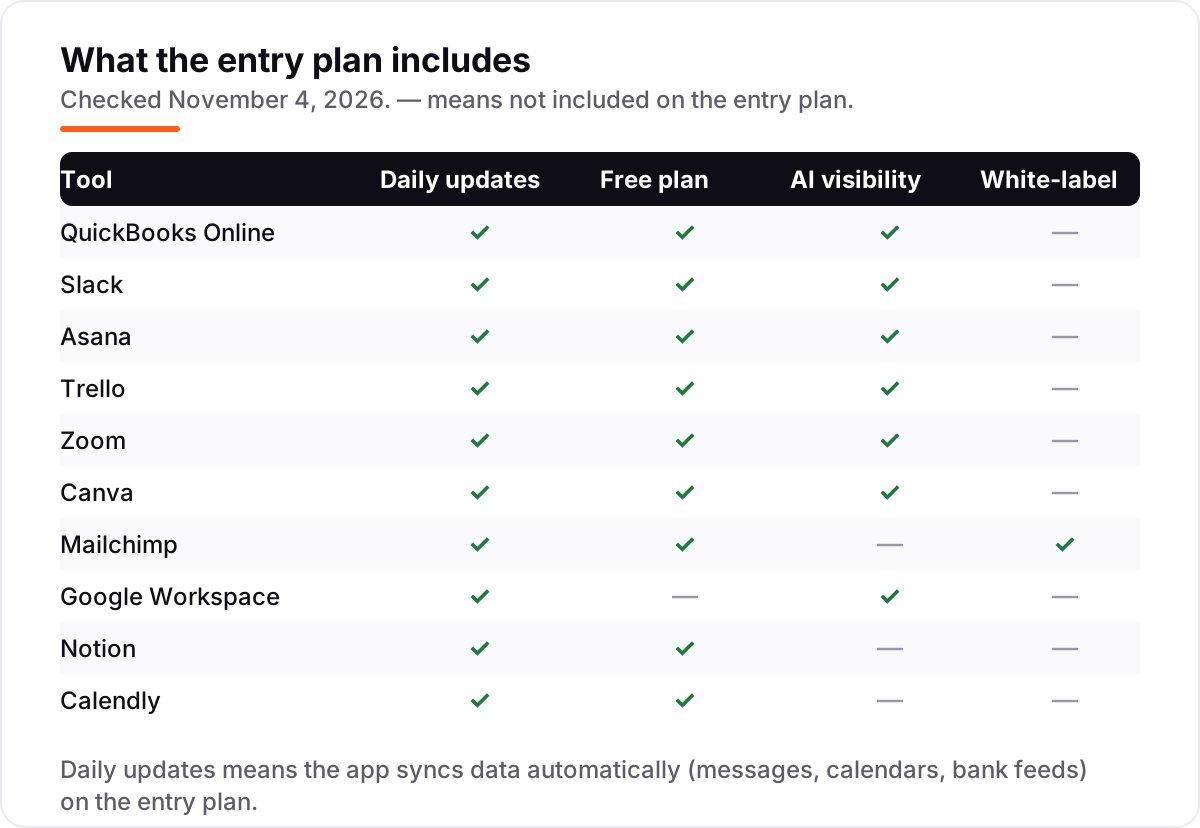
- Check whether the AI is on the entry plan. Six of the ten apps here include AI from the first paid plan; Mailchimp, Notion and Calendly hold theirs for higher tiers or add-ons.
- Check the exit before you enter. Slack, Notion and QuickBooks Online all export your data, so a bad pick is a month of work to undo, not a trap. Ask how the export works before you pay.
Running a small business means the apps are only half the job — the other half is being found. Our guide to marketing platforms for small business SEO covers the visibility side, and before you publish new pages for the services you sell, run your titles through the free SERP snippet preview tool to see exactly how they will look in Google.
Whatever you shortlist, try it with real work before you pay. Nine of the ten apps here have a free plan, and the tenth offers a 14-day trial — long enough to run one genuine week of your own meetings, invoices and projects through it. Check two things in the trial: that the free plan's limit does not bite in week one, and that the people who only need to view can do so without a paid seat.
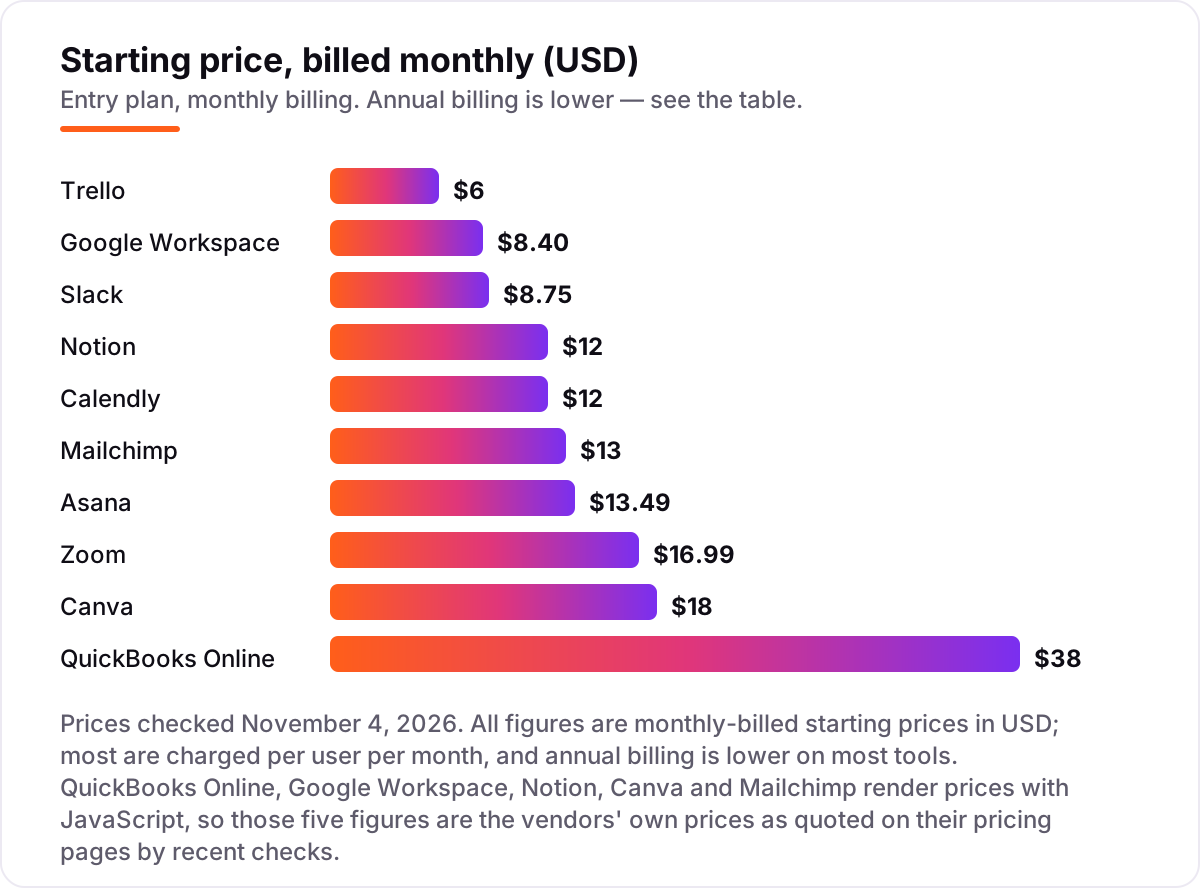
Small business apps pricing: what you will actually pay
Take a five-person business that buys the whole stack in this list. On monthly billing the bill is $457.15 a month: QuickBooks Online Simple Start $38, Slack Pro $43.75 (5 × $8.75), Asana Starter $67.45 (5 × $13.49), Trello Standard $30 (5 × $6), Zoom Pro $84.95 (5 × $16.99), Canva Pro $18, Mailchimp Essentials $13, Google Workspace Starter $42 (5 × $8.40), Notion Plus $60 (5 × $12) and Calendly Standard $60 (5 × $12).
The same five people on annual billing pay $385 a month: Slack drops to $36.25, Asana to $54.95, Trello to $25, Zoom to $70.80, Canva to $12 a month ($144 a year), Google Workspace to $35, Notion to $50 and Calendly to $50, while QuickBooks Online and Mailchimp stay at $38 and $13 — neither publishes an annual price for its entry plan. Over a year that is $5,485.80 on monthly billing against $4,620 on annual billing, a saving of $865.80 for committing to a year.
Three costs sit outside every number above. First, the introductory discounts — 50% off for three months on QuickBooks Online and Slack Pro — end, so budget on the list price. Second, the limits that force upgrades: a sixth client-facing seat, a 91st day of Slack history, or a 251st Mailchimp contact each move the bill. Third, the add-ons: payroll on QuickBooks Online, AI notetaking on Calendly, and extra storage on Google Workspace are all billed on top. If the business also needs to be found online, compare providers in our guide to SEO companies for small business.
The cheapest honest start is $0. Nine of the ten apps have a free plan, so a new business can run the books, the chat, the boards, the docs and the bookings for nothing and pay only Google Workspace's $42 a month for business email — then pay for each app the month its free limit starts costing evenings.
Know the difference: an app vs a suite
The confusion in this category is between buying ten separate apps and buying one suite that does several jobs. A suite — Google Workspace for email, docs and meetings, or Microsoft 365 for the same — gives you one bill, one login and tools that already work together. Separate apps give you the best tool for each job: QuickBooks Online for the books, Slack for chat, Zoom for meetings, Calendly for booking.
The trade-off is real in both directions. A suite is cheaper per seat and simpler to manage, but its parts are average at everything: Google Meet is fine, but it is not Zoom, and its chat is not Slack. Separate apps are better at their one job, but the bill is ten subscriptions, ten logins and ten places where something can break — and the per-seat prices multiply across every app.
Most small businesses end up with a mix, and that is the right answer: a suite for the foundation — Google Workspace at $8.40 a user a month covers email, docs, storage and meetings — and best-of-breed apps for the jobs that earn money, like QuickBooks Online for the books and Mailchimp for the list. Buy the suite first, then add one app at a time for the job that hurts most.
Quick comparison: tool type by need
| Buyer | Best pick | Why |
|---|---|---|
| Owner doing their own books | QuickBooks Online | The standard accountants know, from $38/month |
| Team that needs email and docs | Google Workspace | Business email, Docs and Gemini from $8.40/user/month |
| Team drowning in chat | Slack | Unlimited searchable history, Pro is $8.75/user/month |
| Business that meets on video daily | Zoom | 30-hour meetings and AI summaries, Pro is $16.99/user/month |
| Team that needs simple task boards | Trello | Visual boards anyone can use, Standard is $6/user/month |
| Business booking client meetings | Calendly | Unlimited event types, Standard is $12/seat/month |
Mistakes to avoid
- Budgeting on the promo price. The 50% discounts on QuickBooks Online and Slack Pro last three months. The list price is what you pay in month four, so compare tools on that number.
- Paying for seats that only need to watch. Guests are free on Asana, Notion and Trello, and meeting attendees join Zoom free. Count hosts and creators, not the whole headcount.
- Buying annual billing before the trial proves the fit. Annual billing saves about $854 a year on the full stack here — but only if you still use every app in month twelve. Run a month on monthly billing first.
- Picking tools that do not talk to each other. Calendly feeds HubSpot and Mailchimp, Asana feeds Slack, and QuickBooks Online feeds more than 800 tools. An app with no integration to the rest of the stack costs hours a week in copy-and-paste.
- Letting the free plan's limit surprise you. Slack's 90-day history, Mailchimp's 250 contacts and Trello's 10 collaborators are all walls that arrive suddenly. Know the wall before you build on the free plan.
How we chose
We opened every vendor's pricing page on November 4, 2026 and recorded the starting price exactly as shown, including the annual-billing figure where the page lists one, and we ranked the tools by fit for the most common buyer — a US small business with a handful of staff — not by brand size. Five pages (Slack, Asana, Trello, Zoom and Calendly) showed their prices directly. The other five render prices with JavaScript, so for QuickBooks Online, Google Workspace, Notion, Canva and Mailchimp we used the vendors' own figures as quoted on their pricing pages by recent checks, and QuickBooks Online's $38 also appears in the vendor-provided pricing on its G2 page. No price here is estimated or derived by arithmetic. Ratings come from the G2 review page for each app, opened on November 4, 2026. No vendor paid for a place in this list, and none of the links here are affiliate links.
What to do next
Start with the free plan or trial of your top pick and run one real week of your own work through it — your meetings, your invoices, your projects. Check that the free plan's limit does not bite in week one and that the people who only need to view can do so without a paid seat. Then add the next app only when a job starts hurting: the books first, the email second, the chat third. If the apps are sorted but new customers are not finding you, our monthly SEO service handles the visibility side — or compare providers in our guide to SEO companies for small business. Once your tools are in place, find out what's holding your rankings back.
Your stack only works if people find you
SerpAstra fixes what keeps your site off page one and makes it easy for AI assistants to recommend.
Get a free audit→Sources we checked (20)
- QuickBooks Online pricing — quickbooks.intuit.com/pricing (checked November 4, 2026)
- Slack pricing — slack.com/pricing (checked November 4, 2026)
- Asana pricing — asana.com/pricing (checked November 4, 2026)
- Trello pricing — trello.com/pricing (checked November 4, 2026)
- Zoom pricing — zoom.us/pricing (checked November 4, 2026)
- Canva pricing — canva.com/pricing (checked November 4, 2026)
- Mailchimp pricing — mailchimp.com/pricing (checked November 4, 2026)
- Google Workspace pricing — workspace.google.com/pricing (checked November 4, 2026)
- Notion pricing — notion.com/pricing (checked November 4, 2026)
- Calendly pricing — calendly.com/pricing (checked November 4, 2026)
- QuickBooks Online reviews — g2.com (checked November 4, 2026)
- Slack reviews — g2.com (checked November 4, 2026)
- Asana reviews — g2.com (checked November 4, 2026)
- Trello reviews — g2.com (checked November 4, 2026)
- Zoom reviews — g2.com (checked November 4, 2026)
- Canva reviews — g2.com (checked November 4, 2026)
- Mailchimp reviews — g2.com (checked November 4, 2026)
- Google Workspace reviews — g2.com (checked November 4, 2026)
- Notion reviews — g2.com (checked November 4, 2026)
- Calendly reviews — g2.com (checked November 4, 2026)
Shamim
Founder of SerpAstra
A full-stack SEO and digital marketer who spends most days on Local SEO for dental practices, AI search visibility and lead generation.
Frequently asked questions
What is the best small business app?
QuickBooks Online is the best fit for most small businesses: the accounting software most US accountants know, from $38/month. Google Workspace is the best foundation at $8.40/user/month for business email and docs, and Trello is the cheapest paid plan here at $6/user/month for simple task boards.
How much do small business apps cost?
Entry prices run from $0 to $38 a month, and nine of the ten apps here have a free plan. A five-person team paying monthly for the full stack in this list spends $457.15 a month; the same stack on annual billing costs $385 a month, a saving of about $866 a year.
Are there really free small business apps?
Yes, with limits. Slack, Trello, Asana, Notion, Canva, Mailchimp, Zoom, Calendly and QuickBooks Online all have free plans, but each caps something: Slack keeps 90 days of history, Mailchimp allows 250 contacts, Trello allows 10 collaborators. Only Google Workspace has no free plan.
Should I buy separate apps or one all-in-one suite?
Separate apps win when each job matters: QuickBooks Online for the books, Slack for chat, Zoom for meetings. A suite wins when the business wants one bill and one login — Google Workspace already covers email, docs and meetings for $8.40/user/month. Most small businesses end up with a mix: a suite for the foundation, best-of-breed apps for the rest.
Do I need to pay per user for everyone on the team?
No. Only the people who need a full seat pay. Guests are free on Asana, Notion and Trello, meeting attendees join Zoom free, and only meeting hosts need a Calendly or Zoom licence. Count the people who create and host, not the people who watch — that is usually half the headcount you first assume.
Can I switch small business apps later?
Yes, but plan the move. Export your data first — Slack exports messages, Notion exports pages as HTML or Markdown, QuickBooks Online exports the chart of accounts and transactions — then import into the new tool and run both side by side for a month. Switching accounting or email mid-year is the hardest move, so time it for a quiet month.
Which small business apps include AI on the entry plan?
Six of the ten: QuickBooks Online, Slack, Asana, Trello, Zoom and Google Workspace all include AI features on their entry plans. Mailchimp, Notion and Calendly hold their AI for higher tiers or paid add-ons, so check the plan table before assuming the AI you read about comes with the price you saw.
Free SEO and AI visibility audit
Find out what is holding your rankings back
Send us your site. Within 2 business days you get a written audit, an AI visibility check and a short fix list ranked by impact. Free, with no contract attached.
Request my free audit→Related guides
 SEO & AI Search12 Best Marketing Platforms for Small Business SEO in 2026, ComparedThe 12 best marketing platforms for small business SEO, compared on real prices, SEO tools and AI visibility. Every price checked November 1, 2026.Read guide →
 SEO & AI Search8 Best SEO Companies for Small Business in 20268 best SEO companies for small business compared on price, contracts and AI visibility, with prices checked on each agency's own site on November 1, 2026.Read guide →
 AI, Data & Analytics10 Best AI Automation Tools for Small Business in 2026, Compared10 best ai automation tools for small business compared on price, free plans and AI features, with real starting prices checked November 2, 2026.Read guide →