
9 Best BI Software for Small Business in 2026, Compared
9 best bi software for small business compared on price, free plans and G2 ratings — find the cheapest dashboard, from free tools to quote-only platforms.
 Shamim Mia, Founder, SerpAstraLast verified November 2, 202612 min read
We compare pricing pages, documentation and public reviews. We never accept payment for rankings.

Key takeaways
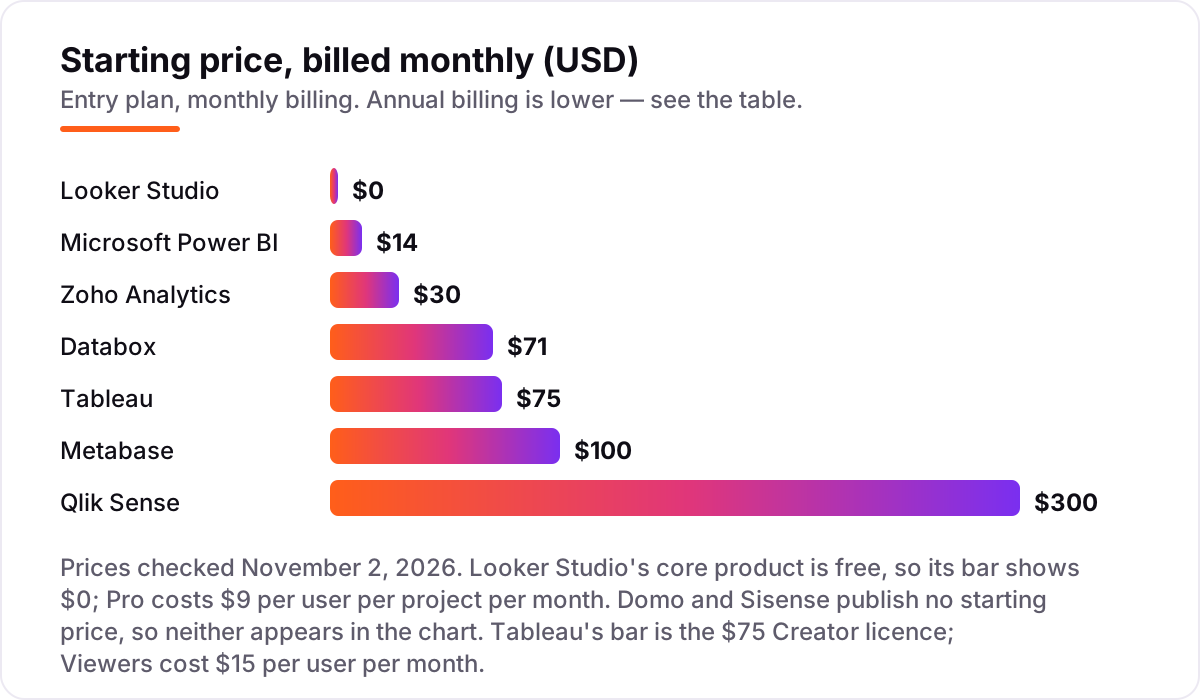
- Zoho Analytics is the short-list pick for most small businesses: a full BI suite from $30 a month. Looker Studio is free if you live on Google, and Power BI Pro costs $14 per user a month if you live on Microsoft 365.
- The single most important buying factor is per-user pricing: a $14 or $15 licence looks cheap until every viewer needs one, so count viewers before you count features.
- Free options are real: Looker Studio costs nothing, Zoho has a free plan, and Metabase is free to self-host, but each free tier has a limit that pushes growing teams to paid plans.
- Domo and Sisense publish no prices at all, so only shortlist them if you can get a written quote first.
- Every price below was checked on November 2, 2026, against the vendor's published pricing; ratings are G2, with review counts shown.
On this page
Quick comparison
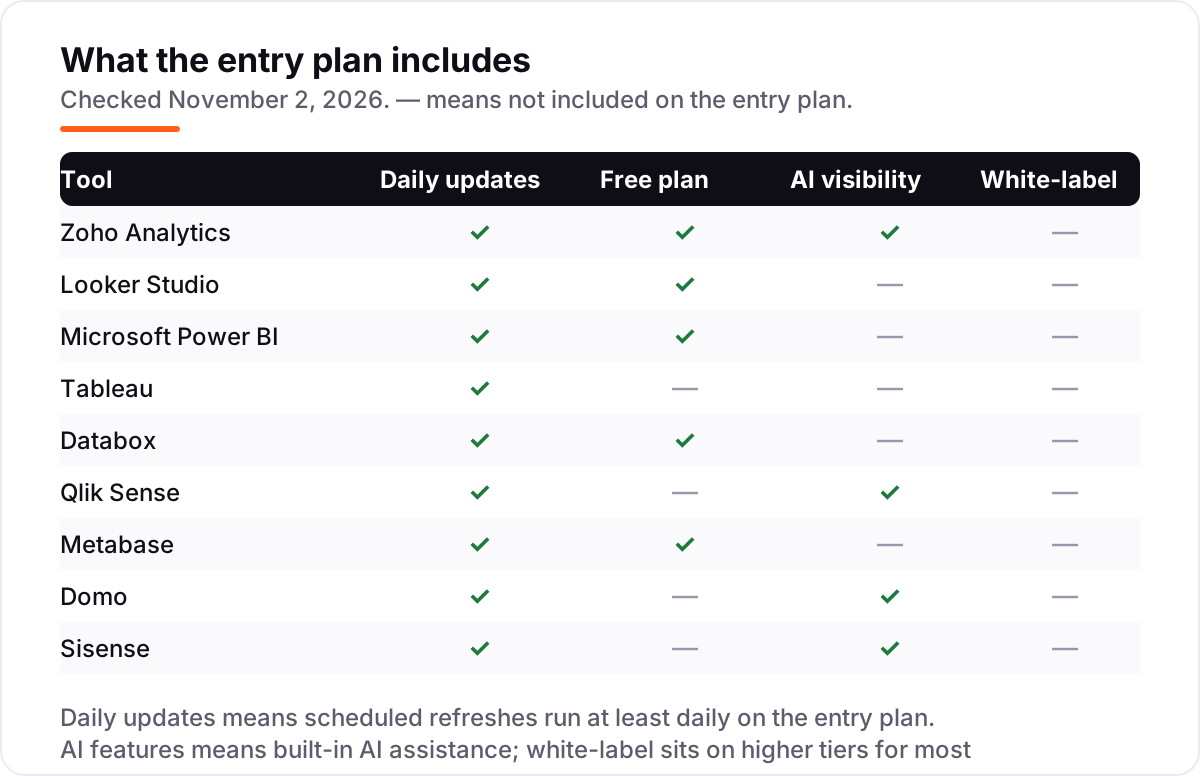
| Tool | Best for | Starting price | Free plan |
|---|---|---|---|
| Zoho Analytics | Small businesses already using Zoho apps, or any small team that wants a full BI suite for a flat $30 a month | $30/mo | Yes (2 users) |
| Looker Studio | Small businesses that live in Google Sheets, Analytics and Ads and want dashboards for free | Free | Yes (free core) |
| Microsoft Power BI | Small businesses on Microsoft 365 that need to share reports with the whole team | $14/user/mo | Yes (no sharing) |
| Tableau | Small businesses with one analyst who needs the best interactive visualisations | $75/mo (Creator) | No (14-day trial) |
| Databox | Small marketing and sales teams that want live KPI dashboards without building data models | $71/mo (annual) | Yes (3 sources) |
| Qlik Sense | Small teams with messy, related data who need to explore freely rather than follow fixed reports | $300/mo | No (30-day trial) |
| Metabase | Small technical teams that want a free, self-hosted BI tool on their own database | $100/mo | Yes (open source) |
| Domo | Growing small businesses that want ETL, storage and dashboards in one platform and can get a quote | Custom quote | No (trial available) |
| Sisense | Small product teams that need to embed analytics inside their own app | Custom quote | No (trial available) |
Make one of these tools?
We re-check this list every quarter. Send a correction, request a review, or ask about a clearly labeled sponsored spot.
Request a listingThe best bi software for small business

Zoho Analytics
Best for: Small businesses already using Zoho apps, or any small team that wants a full BI suite for a flat $30 a month
Zoho Analytics is the best-value pick in this list because it charges a flat monthly rate instead of a per-seat fee. The $30 Basic plan covers two users and half a million rows, with unlimited reports and dashboards, connecting to 500-plus sources, from spreadsheets and accounting tools to CRM and marketing apps. For a small business that wants real BI without a per-user bill, that is a hard combination to beat.
The catch is the cap. Two users and 500,000 rows cover a small team, but a third user or a bigger dataset pushes you to Standard at $60 a month, and the fancier AI and white-label features sit higher still. If you already use Zoho CRM or Zoho Books, the choice is easy — just check the row limit against your data first.
What we like
- Flat-rate pricing: Basic covers 2 users and 500,000 rows for $30 a month, with unlimited reports and dashboards
- More than 500 data connectors, including spreadsheets, accounting tools, CRM and marketing apps
- Zia, the built-in AI assistant, answers questions in plain English and suggests charts
- Native fit with Zoho CRM, Books and other Zoho apps small businesses already use
Watch out for
- Basic is capped at 2 users and 500,000 rows, so a growing team jumps to Standard at $60 a month
- Advanced AI features and white-label reporting sit on the higher plans

Looker Studio
Best for: Small businesses that live in Google Sheets, Analytics and Ads and want dashboards for free
Looker Studio is the free pick in this list, and it is free in the honest sense: the core product costs nothing for creators or viewers, with no user limit and no trial clock. If your numbers already live in Google Sheets, Analytics, Ads or BigQuery, you can build a live dashboard in an afternoon and share it with the whole team. Nothing else here starts at zero.
The trade-off is depth. Looker Studio is a visualisation layer, not a BI platform: there is no serious data preparation, no modelling, and no governed metrics, so messy data has to be cleaned somewhere else first. Dashboards also slow down as datasets grow. Use it when Google is already your system of record; buy a full platform when your data needs cleaning, not just charting.
What we like
- Completely free core product with no user limits, including sharing and scheduled email delivery
- Native connectors for Google Sheets, Analytics, Ads, BigQuery and Search Console
- Pro adds team workspaces, organisation-owned reports and Gemini AI for $9 per user per project each month
Watch out for
- No real data preparation or modelling: messy data has to be cleaned before it arrives
- Dashboards slow down with large datasets, and third-party connectors often cost extra

Microsoft Power BI
Best for: Small businesses on Microsoft 365 that need to share reports with the whole team
Power BI is the natural pick for a small business already on Microsoft 365. The Desktop app is free, Excel skills transfer directly, and reports live where the team already works: Teams, SharePoint and Outlook. Pro costs $14 per user a month billed annually, and it buys publishing, sharing and scheduled refreshes up to eight times a day, with hundreds of connectors behind it.
The cost trap is the viewer rule. Below Fabric capacity, every person who opens a shared report needs a Pro licence, so a five-person team pays $70 a month, not $14. Check whether your Microsoft 365 plan already includes Pro — E5 does — before buying seats. If your team lives in Google instead, Looker Studio is the free equivalent.
What we like
- Deep integration with Excel, Teams and SharePoint, plus hundreds of data connectors
- Strong data modelling with DAX, scheduled refreshes up to 8 times a day on Pro
- Included in Microsoft 365 E5, so some teams already own it
Watch out for
- Every viewer needs a $14 Pro licence unless the workspace sits on Fabric capacity
- Copilot AI and large models need Premium Per User at $24 a month, not Pro

Tableau
Best for: Small businesses with one analyst who needs the best interactive visualisations
Tableau is the visualisation pick in this list. Its drag-and-drop exploration is still the standard other tools are judged against: an analyst can turn a raw spreadsheet into an interactive dashboard in an afternoon, and the result feels fast and polished. The role-based pricing helps too — once one Creator builds the dashboards, Viewers cost $15 a month each.
The honest problem is the entry price. A Creator licence is $75 a month billed annually, which is $900 a year before a single Viewer is added, and there is no monthly billing option. The AI features sit in the quote-only Cloud+ edition. Buy Tableau when one person does serious analysis every week; for occasional reporting, the cheaper tools do the job.
What we like
- The strongest drag-and-drop visual exploration in this list, with fast interactive dashboards
- Connects to almost any source, including spreadsheets, databases and cloud warehouses
- Viewer licences at $15 a month let the rest of the team read dashboards cheaply
Watch out for
- A single Creator costs $900 a year before any viewer is added, and billing is annual only
- Advanced features have a steep learning curve, and AI features need the quote-only Cloud+ edition

Databox
Best for: Small marketing and sales teams that want live KPI dashboards without building data models
Databox is the KPI pick in this list, built for teams that want to see marketing and sales numbers without learning BI. It connects to more than 100 tools, from Google Analytics and HubSpot to Shopify and Meta Ads, and the ready-made templates mean a live dashboard can be running the same day. Dashboards refresh on their own and can be pushed to a TV, Slack or email.
The catch is the meter. The Analyst plan costs $71 a month billed annually, but extra data sources cost extra, so the bill climbs with every tool you add. Custom calculations are limited, and this is not the tool for joining messy datasets. If your job is tracking KPIs from tools you already use, Databox is the fastest route; if your job is modelling data, look at Zoho or Power BI.
What we like
- More than 100 native connectors for marketing, sales and finance tools, with ready-made templates
- Dashboards update automatically and can be pushed to TV screens, Slack or email
- No data modelling needed: pick metrics, pick a template, and the dashboard is live
Watch out for
- Extra data sources cost extra, so the bill grows with every tool you connect
- Limited custom calculations and data manipulation compared with a full BI platform

Qlik Sense
Best for: Small teams with messy, related data who need to explore freely rather than follow fixed reports
Qlik Sense is the exploration pick in this list. Its associative engine is the feature that sets it apart: click any value — a product, a region, a month — and every other figure on the dashboard updates to match. That makes it the right tool when the question changes every day and fixed reports keep missing the point. Insight Advisor adds plain-English questions and suggested charts on the entry plan.
The trade-offs are price and learning curve. Starter costs $300 a month flat for 10 users and 10GB, there is no permanent free plan, and premium connectors cost extra. The interface also takes longer to learn than Looker Studio or Databox. Choose Qlik when your team explores data daily; choose a dashboard tool when the same ten numbers matter every week.
What we like
- Associative engine lets users click any value and see how every other figure changes
- Insight Advisor suggests charts and answers plain-English questions about the data
- Strong governance and scheduled reloads even on the entry Starter plan
Watch out for
- No permanent free plan, and premium connectors and report distribution cost extra
- The interface takes longer to learn than the simpler dashboard tools in this list

Metabase
Best for: Small technical teams that want a free, self-hosted BI tool on their own database
Metabase is the open-source pick in this list, and the free edition is genuinely free: self-host it and there are no user limits, no dashboard limits and no trial clock. The visual query builder lets non-technical staff ask questions of a database without writing SQL, which is why small technical teams love it. Cloud Starter costs $100 a month for five users if you would rather not run a server.
Free comes with responsibility. Self-hosting means your team owns security patches, upgrades and backups, and the August 2026 zero-day that hit unpatched Metabase installs is a reminder of what that means. SSO and row-level permissions need Pro at $575 a month. Pick Metabase when you have someone technical to run it; otherwise the hosted Starter plan is the safer buy.
What we like
- Open-source edition is genuinely free to self-host, with no user or dashboard limits
- Visual query builder lets non-technical staff ask questions without writing SQL
- Cloud Starter at $100 a month removes hosting, upgrades and backups for small teams
Watch out for
- Self-hosting means your team owns security, upgrades and backups, including patching
- SSO, row-level permissions and white-labeling need Pro at $575 a month

Domo
Best for: Growing small businesses that want ETL, storage and dashboards in one platform and can get a quote
Domo is the all-in-one pick in this list. It covers the whole pipeline — connectors, Magic ETL, cloud storage and dashboards — in a single platform, so a growing business does not need to stitch tools together. Pricing runs on credits rather than seats, which means the whole company can view dashboards without a licence per head, and the mobile app keeps the numbers in your pocket.
The honest problem is transparency. Domo publishes no price list, so you cannot budget without a sales conversation and a written quote, and credit use is hard to forecast before you sign. Reviewers also report a steep learning curve. Shortlist Domo when you have outgrown single-purpose dashboards and can negotiate; skip it when you need a price today.
What we like
- End-to-end platform: connectors, Magic ETL, cloud storage and dashboards in one login
- Credit-based pricing means no per-seat fees, so the whole company can view dashboards
- More than 1,000 connectors plus a mobile app for checking numbers on the move
Watch out for
- No published price, so budgeting means a sales conversation and a custom quote
- Reviewers report a steep learning curve, and credit use is hard to forecast before signing

Sisense
Best for: Small product teams that need to embed analytics inside their own app
Sisense is the embedded pick in this list, and it earns its place for one specific job: putting analytics inside your own product. Its white-label dashboards sit in your app rather than in a separate tool, the ElastiCube engine handles large datasets quickly, and Sisense Intelligence adds AI-assisted insights and natural-language questions. For a small software team, that is a real product feature, not just an internal report.
The catch is cost and effort. Sisense publishes no pricing, and third-party estimates put entry well into five figures a year, so it is the most expensive tool in this list for most buyers. Multi-tenant setup and full branding also take real engineering work. Choose Sisense when embedded analytics is the product; for internal reporting, the cheaper tools do the same job.
What we like
- Built for embedded analytics, with white-label dashboards that sit inside your own product
- ElastiCube engine handles large datasets fast, with 100-plus connectors
- Sisense Intelligence adds AI-assisted insights and natural-language questions
Watch out for
- No published pricing, and third-party estimates put entry well into five figures a year
- Multi-tenant setup and full branding take real engineering effort, not an afternoon
The best bi software for small business turns the numbers you already have — sales, ad spend, website traffic — into dashboards you can read in a minute. This list ranks 9 tools by fit for a typical small team: price per person, how fast you can set it up, and what it costs once everyone needs a login.
How to choose the best bi software for small business
- Count viewers, not just builders. One Creator licence is cheap; five viewer licences are the real bill. Multiply the per-user price by everyone who will open a dashboard, not just the person who builds it.
- Start from where your data lives. If your numbers are in Google Sheets and Analytics, Looker Studio is free. If they are in Excel and SharePoint, Power BI fits. Switching ecosystems costs more than any licence.
- Check the refresh speed. Daily refreshes are enough for weekly reporting, but a dashboard that updates once a day cannot run a live sales board. Databox refreshes every four hours on Analyst; Power BI Pro refreshes up to eight times a day.
- Test the free tier with real data. Connect your actual spreadsheet or ad account, not the sample data. You will learn in an hour whether the connectors cover your tools and whether the charts make sense to your team.
- Look at the second-year cost. Annual billing cuts most prices by 15 to 20 percent, but row limits, user caps and paid connectors push teams to the next tier. Price the plan you will need in a year, not the one you need today.
- Tag your campaigns before you build. A dashboard can only report what it can measure, so tag every link with the free UTM builder and your traffic sources will line up with your sales numbers.
Quick comparison: tool type by need
| Buyer | Best pick | Why |
|---|---|---|
| Already on Google | Looker Studio | Free, and it plugs straight into Sheets, Analytics and Ads |
| Already on Microsoft 365 | Microsoft Power BI | $14 per user a month, and it lives inside Excel and Teams |
| Best value all-rounder | Zoho Analytics | Full BI suite for a flat $30 a month |
| Marketing KPIs only | Databox | Live dashboards from 100-plus tools, no data modelling |
| One analyst, best charts | Tableau | Strongest visual exploration, Creator at $75 a month |
| Free and technical | Metabase | Open-source edition costs nothing to self-host |
Bi software for small business pricing: what you will actually pay
Take a five-person team with one person building dashboards and four people reading them. On Zoho Analytics Standard the bill is $60 a month, or $720 a year, because Standard covers five users. The same team on Power BI Pro pays $70 a month ($840 a year) since every viewer needs a licence. On Tableau Standard it is one Creator at $75 plus four Viewers at $15, which comes to $135 a month ($1,620 a year). Looker Studio costs nothing for all five, or $9 a month if the builder takes Pro. Metabase Cloud Starter covers five users for $100 a month ($1,200 a year).
The lesson is that the cheapest licence is rarely the cheapest team bill. Per-user tools look affordable at $14 or $15 a month, but the cost multiplies with every viewer, while flat-rate tools like Zoho Analytics and Metabase Cloud Starter stay fixed as the team grows. Annual billing lowers most of these figures by 15 to 20 percent, so the numbers above are the monthly-billed worst case. Before you commit, write down your real headcount — builders plus viewers — and price that, not the single seat on the pricing page.
Annual billing is worth pricing separately, because the saving is real money over a year. Zoho Analytics Basic drops from $30 to $24 a month on annual billing, which saves $72 a year on one plan, and Metabase Cloud Starter drops from $100 to $90 a month, saving $120 a year. Power BI Pro and Tableau are annual-billed by default, so there is no monthly option to compare against — the $14 and $75 figures already assume a yearly commitment. Looker Studio Pro is billed monthly per project, so there is no annual figure to chase there either. The practical rule is simple: if you are sure the tool will still be in use in twelve months, pay annually; if you are still testing, pay monthly for one quarter and switch once the team actually uses the dashboards every week.
BI dashboards vs. full BI platforms: know the difference
A dashboard tool and a BI platform look alike on a screenshot, but they do different jobs. A dashboard tool takes numbers that already exist and draws them nicely: Looker Studio and Databox are dashboard tools, and they are fast because they skip the hard part. A full BI platform also cleans the data, joins sources together, defines shared metrics and alerts you when something changes: Zoho Analytics, Power BI, Tableau and Qlik Sense are full platforms, and they cost more because they do more.
The difference matters when your data is messy. If every source already agrees — one spreadsheet, one ad account, one shop — a dashboard tool is enough and a platform is overkill. If sales says one number and marketing says another, you need the modelling layer a platform provides, or the dashboard will just draw the disagreement in prettier colours. Metabase sits in between: it queries your database directly, which is powerful, but it will not clean the data for you. Domo and Sisense are full platforms with ETL and embedding on top, which is why they are priced by quote rather than by seat.
There are three signs you have outgrown a dashboard tool and need a platform. First, people argue about which number is right, which means you need one governed definition of revenue or leads instead of five spreadsheets. Second, you need alerts — an email when sales drop or ad spend spikes — rather than a chart someone has to remember to open. Third, you need to control who sees what, for example keeping salary or margin data away from part-time staff. Row-level permissions and governed metrics live on the platform side, and they are the features that separate a reporting tool from a system the whole business can trust.
How we chose
We checked each vendor's own pricing page on November 2, 2026 and recorded the starting price exactly as shown, including the annual-billing figure where the page lists one. Where directories disagreed with the vendor, we used the vendor's figure: several directories still list Databox Starter at $47–$49 a month, but Databox's own pricing page now lists Analyst at $71 a month billed annually, and G2 still lists Metabase Starter at $85, but Metabase's own pricing page lists $100 a month ($90 billed annually). Domo and Sisense publish no starting price, so both are listed as custom quote rather than given an estimated figure. Ratings come from G2, checked the same day, with review counts shown. We ranked the tools by fit for the most common buyer — a small business with about five people who need shared dashboards — not by brand size. No vendor paid for a place in this list, and none of the links here are affiliate links.
What to do next
Start with the decision path above: count your viewers, check where your data lives, and test the free tier with your real numbers for a week. If the dashboards show that traffic is the weak spot rather than reporting, our monthly SEO service can fix the pipeline that feeds the numbers. Pick the tool that fits your stack, not the one with the longest feature list, and re-check the price before you pay — BI pricing changes often, and the annual figure is usually the one that matters. Once your tools are in place, find out what's holding your rankings back.
Your stack only works if people find you
SerpAstra fixes what keeps your site off page one and makes it easy for AI assistants to recommend.
Get a free audit→Sources we checked (18)
- Zoho Analytics pricing — zoho.com/analytics/pricing.html (checked November 2, 2026)
- Zoho Analytics on G2 — 4.2/5, 286 reviews (checked November 2, 2026)
- Looker Studio — lookerstudio.google.com (checked November 2, 2026)
- Looker Studio on G2 — 4.4/5, 476 reviews (checked November 2, 2026)
- Microsoft Power BI pricing — microsoft.com/power-platform/products/power-bi/pricing (checked November 2, 2026)
- Microsoft Power BI on G2 — 4.5/5, 1,658 reviews (checked November 2, 2026)
- Tableau pricing — tableau.com/pricing (checked November 2, 2026)
- Tableau on G2 — 4.4/5, 4,234 reviews (checked November 2, 2026)
- Databox pricing — databox.com/pricing (checked November 2, 2026)
- Databox on G2 — 4.4/5, 194 reviews (checked November 2, 2026)
- Qlik Sense pricing — qlik.com/us/pricing (checked November 2, 2026)
- Qlik Sense on G2 — 4.4/5, 929 reviews (checked November 2, 2026)
- Metabase pricing — metabase.com/pricing (checked November 2, 2026)
- Metabase on G2 — 4.4/5, 147 reviews (checked November 2, 2026)
- Domo pricing — domo.com/pricing (checked November 2, 2026)
- Domo on G2 — 4.3/5, 1,097 reviews (checked November 2, 2026)
- Sisense pricing — sisense.com/pricing (checked November 2, 2026)
- Sisense on G2 — 4.2/5, 1,078 reviews (checked November 2, 2026)
Shamim
Founder of SerpAstra
A full-stack SEO and digital marketer who spends most days on Local SEO for dental practices, AI search visibility and lead generation.
Frequently asked questions
What is the best BI software for a small business?
Zoho Analytics is the best all-round pick for most small businesses: a full BI suite from $30 a month with 500-plus connectors and a free plan. If your data lives in Google, Looker Studio is free and hard to beat. If you live on Microsoft 365, Power BI Pro at $14 per user a month is the natural choice.
How much does BI software cost for a small business?
From $0 to about $135 a month for a five-person team. Looker Studio is free, Zoho Analytics Standard covers five users for $60 a month, and Power BI Pro costs $70 a month for five licences. Tableau is the priciest here at $135 a month for one Creator and four Viewers. Domo and Sisense are custom quote only.
Is there free BI software for small business?
Yes. Looker Studio is completely free, Zoho Analytics has a free plan for two users, Databox has a free plan for three data sources, and Metabase is free to self-host with no user limits. Free tiers work well for one dashboard and a handful of users, but growing teams usually hit a limit within months.
What is the difference between Power BI and Tableau for a small business?
Power BI is cheaper and fits Microsoft 365: $14 per user a month, with Excel skills transferring directly. Tableau has stronger visual exploration but costs $75 a month for a Creator, billed annually. Choose Power BI when the whole team needs licences; choose Tableau when one analyst builds dashboards everyone else reads.
Do I need a data warehouse to use BI software?
No. Most tools in this list connect straight to spreadsheets, accounting software and marketing apps, and that is enough for a small business. A warehouse only becomes worth it when you combine many large sources or need governed, shared metrics. Start with direct connectors and add a warehouse later if reporting slows down.
Can BI software connect to QuickBooks, Shopify and Google Ads?
Yes, in most cases. Zoho Analytics, Power BI, Tableau, Databox and Domo all publish native connectors for accounting, ecommerce and advertising tools, including QuickBooks, Shopify and Google Ads. Check the connector list for your exact apps before buying, because some connectors sit on higher plans or cost extra.
How long does it take to set up BI software for a small business?
A first dashboard takes an afternoon with Looker Studio or Databox if your data is already clean. A full BI setup with Zoho Analytics or Power BI takes one to two weeks, including connecting sources and agreeing on definitions. Budget extra time if your data needs cleaning, because that is where most projects actually stall.
Free SEO and AI visibility audit
Find out what is holding your rankings back
Send us your site. Within 2 business days you get a written audit, an AI visibility check and a short fix list ranked by impact. Free, with no contract attached.
Request my free audit→Related guides
 SEO & AI Search12 Best Marketing Platforms for Small Business SEO in 2026, ComparedThe 12 best marketing platforms for small business SEO, compared on real prices, SEO tools and AI visibility. Every price checked November 1, 2026.Read guide →
 SEO & AI Search8 Best SEO Companies for Small Business in 20268 best SEO companies for small business compared on price, contracts and AI visibility, with prices checked on each agency's own site on November 1, 2026.Read guide →
 SEO & AI SearchBest Local SEO Tools for 2026: 11 Picks Ranked by What You Need11 best local SEO tools with real prices checked November 1, 2026 — from $14/month trackers to quote-only enterprise platforms, sorted by what you need.Read guide →