
7 Best Communication Software for Small Business in 2026, Compared
Compare the 7 best communication software for small business on price, free plans, AI features and phone systems, with every price checked November 4, 2026.
 Shamim Mia, Founder, SerpAstraLast verified November 4, 202613 min read
We compare pricing pages, documentation and public reviews. We never accept payment for rankings.

Key takeaways
- Slack is the best fit for most small teams at $8.75 a user a month; Microsoft Teams is the cheapest paid plan at $4.80, and Zoom Workplace is the meeting pick at $16.99.
- Slack, Microsoft Teams and Zoom Workplace all offer genuinely free plans — Slack with 90 days of history, Teams with free chat and meetings, and Zoom with 40-minute group meetings.
- The single most important buying factor is whether you need a phone system: chat and meeting tools do not replace a business phone line, and the phone tools cost $20–$30 a user a month.
- Per-user pricing is the real cost driver: a 10-person team pays $48 a month on Teams Essentials and $299.90 on RingCentral Essentials, before taxes and fees.
On this page
Quick comparison
| Tool | Best for | Starting price | Free plan |
|---|---|---|---|
| Slack | Small teams that live in chat and want the widest app integrations, starting free | $8.75/mo | Yes (free plan) |
| Microsoft Teams | Small businesses already on Microsoft 365, or teams that want the cheapest paid plan | $4.80/mo | Yes (free plan) |
| Zoom Workplace | Remote and hybrid teams that meet on video most days and want guests to join in one click | $16.99/mo | Yes (free plan) |
| RingCentral | Small businesses replacing a landline that want phone, SMS and video in one system | $29.99/mo | No (14-day trial) |
| Nextiva | Growing small businesses that want phone, chat and basic CRM in one subscription | $23/mo | No (demo only) |
| Dialpad | Small sales and service teams that want AI call notes on every call from day one | $20/mo | No (14-day trial) |
| Ooma Office | Small shops and offices that want a simple no-contract phone system with a real receptionist greeting | $19.95/mo | No (30-day guarantee) |
Make one of these tools?
We re-check this list every quarter. Send a correction, request a review, or ask about a clearly labeled sponsored spot.
Request a listingThe best communication software for small business

Slack
Best for: Small teams that live in chat and want the widest app integrations, starting free
Slack is the chat-first pick: channels keep every project conversation in one place, threads keep side discussions from drowning the main feed, and the free plan is generous enough for a small team for months, with 90 days of history and 10 apps. Pro costs $8.75 a user a month billed monthly, or $7.25 billed annually, and removes the history limit while adding group huddles, unlimited apps and AI summaries.
The catch is that Slack is not a phone system. There is no business number, no auto-attendant and no call queue, so a business that takes customer calls needs a VoIP tool alongside it. Slack bills only members who were active in the last 28 days, which softens the price for part-time teams. Buy Slack when your team lives in chat; buy Teams when the budget is tighter.
What we like
- Free plan with 90 days of searchable history and 10 apps, so a small team can start at $0
- Unlimited message history and group huddles from Pro, plus AI conversation summaries on every paid plan
- More than 2,600 apps in the Slack App Directory, the widest integration list here
- Slack Connect lets you message clients and vendors in shared channels without a second tool
Watch out for
- No built-in phone system — business calling needs a separate VoIP tool or an add-on
- The free plan caps history at 90 days, so old decisions and files disappear
- Per-user pricing adds up fast: 10 people on Pro cost $87.50 a month billed monthly

Microsoft Teams
Best for: Small businesses already on Microsoft 365, or teams that want the cheapest paid plan
Microsoft Teams is the cheapest way into business communication: Essentials costs $4 a user a month billed annually, or $4.80 billed monthly, and covers chat, meetings, file sharing and co-editing. Meetings run up to 30 hours for 300 people, with recordings, transcripts and live captions included, and each user gets 10 GB of cloud storage. If the business pays for Microsoft 365, Teams is included at no extra cost.
The limits are about what Essentials leaves out. There are no Office apps — Word, Excel and Outlook need a Microsoft 365 plan, starting at $7 a user a month — and AI Copilot recaps cost extra. The desktop app is heavy on memory, which shows on older laptops. Pick Teams when the team lives in Microsoft 365, or when the lowest paid price is the priority.
What we like
- Cheapest paid plan here at $4 a user a month billed annually, with a free plan under it
- Chat, meetings, file sharing and co-editing in one place, with 10 GB of cloud storage per user on Essentials
- Meetings run up to 30 hours for 300 people on Essentials, with recordings and transcripts included
- Included at no extra cost in Microsoft 365 Business Basic at $7 a user a month
Watch out for
- No Office apps on Essentials — Word, Excel and Outlook need a Microsoft 365 plan
- The desktop app is heavy on memory and can feel slow on older laptops
- AI Copilot meeting recaps cost extra, on top of the Essentials price

Zoom Workplace
Best for: Remote and hybrid teams that meet on video most days and want guests to join in one click
Zoom Workplace is the meeting pick because the meeting is the most reliable here: guests join from a link with no account, calls hold up on weak connections, and screen sharing, breakout rooms and recording all just work. Pro costs $16.99 a user a month billed monthly, or $14.16 billed annually, and raises meetings to 30 hours for 100 people, with AI summaries, Team Chat, Mail, Calendar and 10 GB of storage bundled in.
The free Basic plan is the catch: group meetings stop at 40 minutes, which is fine for a quick call and useless for a workshop. Phone, webinars and larger meetings are paid add-ons, and the app has grown cluttered as Zoom added chat, mail and docs. Buy Zoom Workplace when video is how the team works; buy Slack or Teams for chat-first days.
What we like
- The most reliable video in this list: guests join from a link with no account needed
- Pro removes the 40-minute limit, raising meetings to 30 hours for 100 people
- AI Companion meeting summaries and unlimited AI queries included on Pro
- Team Chat, Mail, Calendar and Whiteboard are bundled into the same licence
Watch out for
- The free plan cuts group meetings at 40 minutes, so real work needs Pro
- The app has grown cluttered as chat, mail, calendar and docs were added to meetings
- Phone, webinars and large meetings are paid add-ons, not part of Pro

RingCentral
Best for: Small businesses replacing a landline that want phone, SMS and video in one system
RingCentral is the pick when the business phone is the job, not an extra: RingEX Essentials is a full phone system with unlimited US and Canada calling, an auto-attendant, call queues and video meetings in the same subscription. Essentials costs $29.99 a user a month billed monthly, or $19.99 billed annually, and includes AI call transcription and captions from the entry plan, plus more than 330 integrations.
The limits are usage caps and fees. Essentials allows only 25 SMS messages a user a month and 100 toll-free minutes, so a team that texts customers will hit the ceiling fast, and mandatory regulatory and recovery fees add a few dollars per line on top of the headline price. There is no free plan, only a 14-day trial. Buy RingCentral when customers call you and the phone has to just work.
What we like
- The only tool here that is a full business phone system and a meeting tool in one subscription
- Core includes unlimited US and Canada calling, auto-attendant, call queues and video meetings
- AI call transcription and captions included on Core, not held for a higher tier
- More than 330 integrations across 200 companies, the widest phone-system list here
Watch out for
- No free plan — the 14-day trial is the only way to try it for $0
- Core caps SMS at 25 messages a user a month and toll-free minutes at 100
- Mandatory regulatory and recovery fees add a few dollars per line a month on top of the headline price

Nextiva
Best for: Growing small businesses that want phone, chat and basic CRM in one subscription
Nextiva is the value phone pick: NEXT Core bundles the phone system with video, team chat, SMS and a basic CRM and ticketing system, so a growing business stops paying for four tools. Core costs $23 a user a month billed monthly, or $15 billed annually, and includes 100 business SMS a user a month, skills-based routing and 50 AI transcriptions and summaries a month, with 24/7 support on every plan.
The catches are the terms. There is no free plan and no free trial, so you buy on a demo, and the $15 annual rate applies only to new small-business customers with 1 to 100 employees on a 12-month term — month-to-month costs $23. AI transcription is capped at 50 a month on Core. Buy Nextiva when you want one subscription for phone, chat and basic customer records.
What we like
- Core bundles phone, video, team chat, SMS and a basic CRM and ticketing system in one price
- 100 business SMS a user a month and 50 AI transcriptions included on Core
- Rated 4.5 out of 5 on G2 from 3,701 reviews
- 24/7 support included on every plan
Watch out for
- No free plan and no free trial — you buy on the strength of a demo
- Annual rates apply only to new small-business customers with 1–100 employees on a 12-month term
- AI transcription and summaries are capped at 50 a month on Core; unlimited needs Scale at $75
Dialpad
Best for: Small sales and service teams that want AI call notes on every call from day one
Dialpad is the AI pick: Connect Standard includes real-time transcription, call summaries and sentiment analysis on every call, so the notes write themselves and nobody has to type during a customer call. Standard costs $20 a user a month billed monthly, or $15 billed annually, and adds unlimited calling to the US and Canada, SMS, team messaging and video meetings, with the deepest Google Workspace integration in this list.
The limits are numbers and message caps. Standard allows one phone number per user, so extra numbers need Pro at $25 a user a month, and SMS is capped at 250 messages a month per account — not per user — which a busy team can burn through in days. There is no free plan, only a 14-day trial. Buy Dialpad when call notes and follow-ups are the bottleneck.
What we like
- AI transcription, call summaries and sentiment analysis included on Standard at $15 a user a month
- Unlimited calling to the US and Canada, SMS and team messaging in one app
- The deepest Google Workspace integration in this list, plus Microsoft 365
- Rated 4.4 out of 5 on G2 from 4,259 reviews
Watch out for
- Standard allows one phone number per user; extra numbers need Pro at $25 a user a month
- SMS is capped at 250 messages a month per account on Standard, not per user
- No free plan, and the higher tiers carry user minimums (3 on Pro, 100 on Enterprise)
Ooma Office
Best for: Small shops and offices that want a simple no-contract phone system with a real receptionist greeting
Ooma Office is the simple phone pick: Essentials costs $19.95 a user a month, billed monthly, with no contract and no annual discount to chase — the price is the price. It packs more than 50 features into the entry plan, including a virtual receptionist, unlimited calling to the US, Canada, Mexico and Puerto Rico, call forwarding and voicemail, plus one free toll-free number with 500 included minutes.
The trade-off is what Essentials leaves out: no SMS, no call recording and no desktop-app calling, and no video meetings — all of those start on Pro at $24.95 a user a month. Taxes and regulatory fees are added on top, and a one-time activation fee applies. Buy Ooma Office when the business needs a professional phone presence with the least fuss.
What we like
- No contract and no annual-commitment discount games — $19.95 is the price either way
- More than 50 features on Essentials, including a virtual receptionist and unlimited calling to the US, Canada, Mexico and Puerto Rico
- One free toll-free number with 500 included minutes on every plan
- Rated 4.5 out of 5 on G2, and setup is simple enough for a non-technical owner
Watch out for
- No SMS, no call recording and no desktop-app calling on Essentials — those start at Pro ($24.95)
- No video meetings on Essentials; video starts on Pro for up to 25 people
- Taxes and regulatory fees are added on top, and a one-time activation fee applies
The best communication software for small business does one job well: it keeps every conversation — chat, calls and video — in one place your team actually checks, without charging per message or per meeting. We ranked the seven tools below by fit for the most common buyer — a US small business of 2 to 20 people — starting with the chat-first tools and ending with the phone systems, and every price was checked on the vendor's own pricing page on November 4, 2026.
How to choose the best communication software for small business
- Decide whether you need a phone system. Slack, Teams and Zoom handle chat and meetings; only RingCentral, Nextiva, Dialpad and Ooma Office give the business a phone number with an auto-attendant and call queues.
- Count the seats, not the features. Every tool here charges per user per month, so a $4 plan and a $30 plan are $48 and $300 a month for a 10-person team — the gap is the decision.
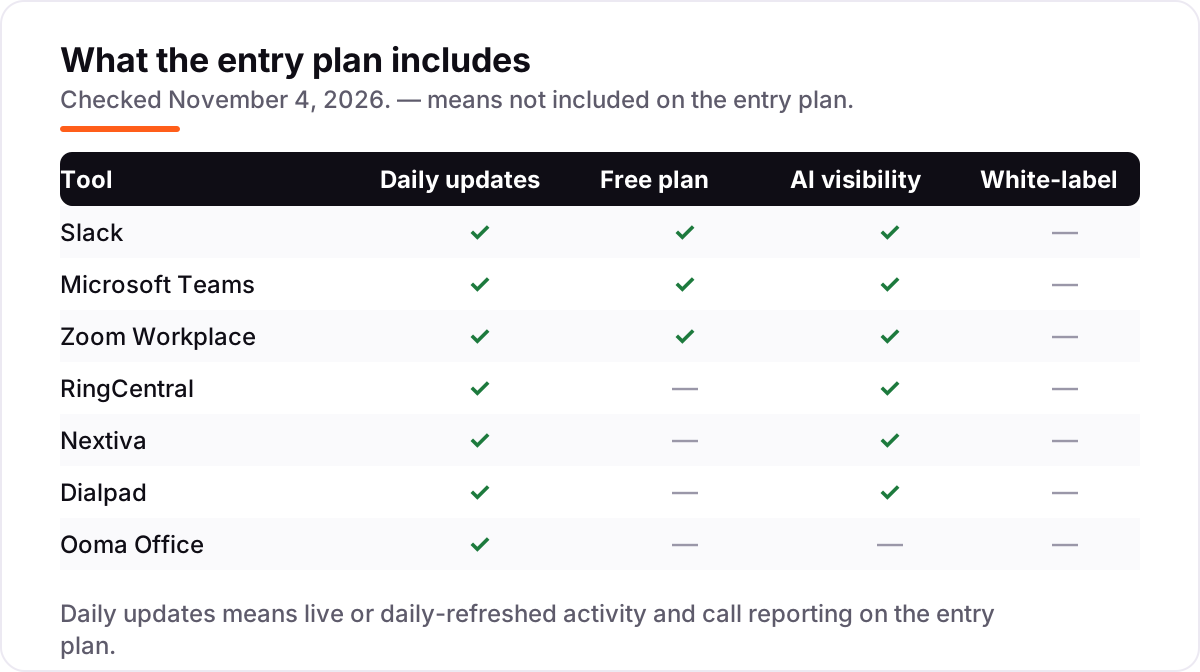
- Check the free plan's real limit. Slack keeps 90 days of history, Teams is free with no history cap stated, and Zoom cuts group meetings at 40 minutes. The limit you hit first is your real starting price.
- Check the AI on the entry plan, not the top tier. Summaries and transcription are included on most entry plans here; Copilot recaps on Teams and unlimited AI on Nextiva cost extra.
- Think about who else has to use it. If clients and vendors need to reach you, Slack Connect, Teams guest access and Zoom's one-click join matter more than any feature list — ask your most frequent contacts what they already use.
Communication is one system in your stack, not the whole stack. If the business also needs to be found online, our monthly SEO service handles the visibility side while you sort the tools. And before you publish new pages for the services you sell, run your titles through the free SERP snippet preview tool — it shows exactly how the title and description will look in Google.
Whatever you shortlist, try it with real conversations before you pay. The free plans and trials in this list are long enough to run one genuine week — your channels, your meetings, your customer calls — and that week tells you more than any review can. Check two things in the trial: that messages and calls reach the right people without daily fixing, and that the people you talk to most can join without installing anything new. Every tool here lets you start free or on a trial, so there is no reason to buy before the team has used it.
Communication software for small business pricing: what you will actually pay
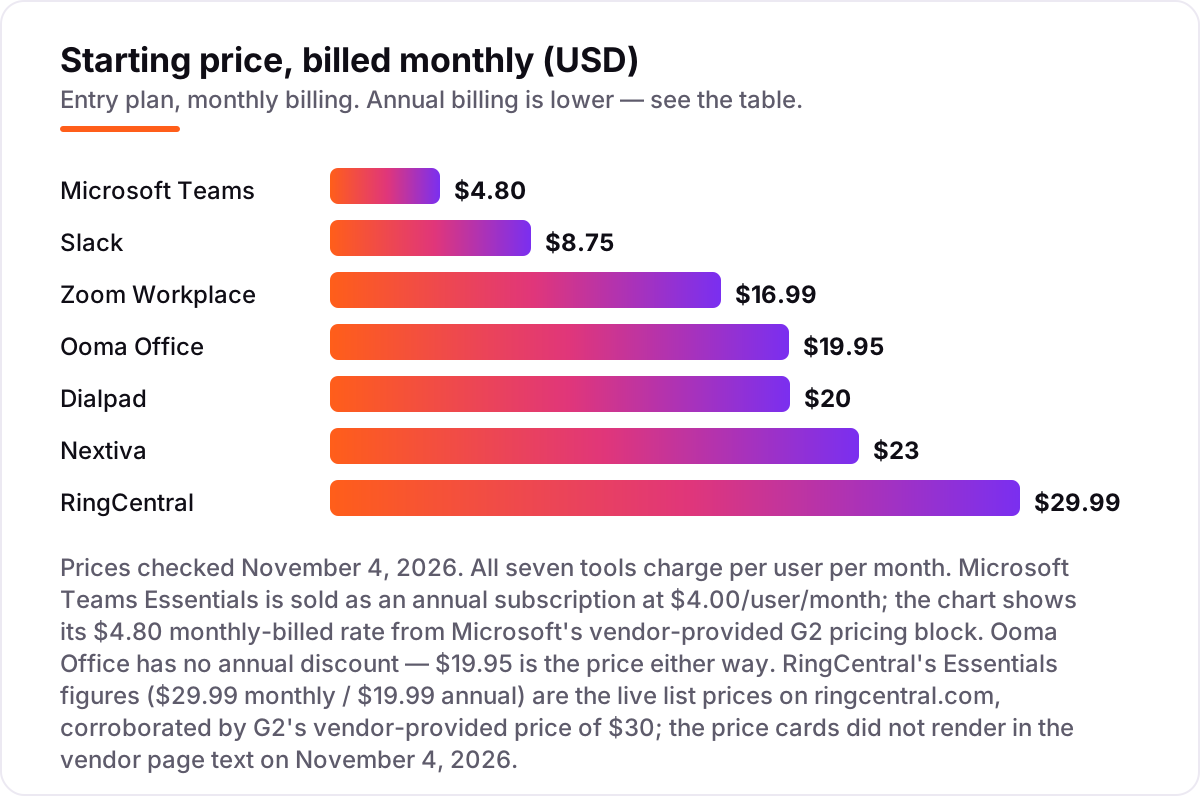
Take a 10-person team that chats daily, meets on video three times a week and takes customer calls. On monthly-billed list prices, the subscription costs $48 a month on Microsoft Teams Essentials, $87.50 on Slack Pro, $169.90 on Zoom Workplace Pro, $199.50 on Ooma Office Essentials, $200 on Dialpad Standard, $230 on Nextiva NEXT Core and $299.90 on RingCentral Essentials. One of those numbers needs adjusting before it is real: RingCentral Core covers only 25 SMS messages a user a month, so a team that texts customers will pay for an SMS add-on or a higher tier.
Over a year on annual billing, that is $480 on Teams Essentials, $870 on Slack Pro, $1,699.20 on Zoom Workplace Pro, $1,800 on Nextiva NEXT Core or Dialpad Standard, $2,394 on Ooma Office Essentials and $2,398.80 on RingCentral Essentials. The same 10 people cost $480 a year at the cheap end and $2,398.80 at the dear end — a $1,920 gap that comes entirely from per-user pricing and billing choices, not from features.
Three costs sit outside every number above. First, the introductory discounts — 50% off for three months on Slack Pro — end, so budget on the list price. Second, the fees: Nextiva adds about $5.45 a line a month in regulatory and E911 fees, RingCentral adds a few dollars a line in compliance fees, and Ooma adds taxes and a one-time activation fee. Third, the second tool: if you pick a chat app and still need a business phone line, add a phone system on top — Slack Pro plus Ooma Office Essentials costs $28.70 a user a month, more than RingCentral Essentials alone.
Know the difference: team chat vs a business phone system
The confusion in this category is between a place to talk and a number to call. Team chat tools like Slack and Microsoft Teams give your own people a place to talk to each other; a business phone system like RingCentral or Ooma Office gives customers a number to call, with a greeting, extensions and queues. Most small businesses need both jobs done, and the mistake is buying one tool and expecting it to do the other.
There is a second, quieter confusion: video meetings are not phone calls. Zoom Workplace, Teams and Slack huddles connect people who agree to meet; a phone system connects a stranger who dials your number. That is why Zoom Pro, for all its meeting quality, does not replace a phone line — Zoom Phone is a separate product at a separate price, and the same is true of Teams, which needs a calling plan or an operator to dial out.
A third distinction worth knowing is per-user pricing versus per-line pricing. Chat and meeting tools charge for every person on the team, while phone systems charge for every user too — but the phone bill also carries per-line regulatory fees, and a second location or a second number is a second charge. If you compare tools on the headline price alone, the phone systems always look dearer; compare them on the whole bill, including the fees and the second tool you would otherwise buy.
Quick comparison: tool type by need
| Buyer | Best pick | Why |
|---|---|---|
| Team that lives in chat | Slack | Best channels and integrations, free plan, Pro is $8.75 a user a month |
| Tightest budget | Microsoft Teams | Essentials is $4.80 a user a month, and the free plan costs nothing |
| Team that meets on video daily | Zoom Workplace | Most reliable video, guests join in one click, Pro is $16.99 a user a month |
| Business replacing a landline | RingCentral | Full phone system plus video, Essentials is $29.99 a user a month |
| Phone, chat and CRM in one bill | Nextiva | NEXT Core bundles phone, SMS and ticketing for $23 a user a month |
| Team that wants AI call notes | Dialpad | Transcription and summaries on every plan, Standard is $20 a user a month |
| Simplest no-contract phone | Ooma Office | Flat $19.95 a user a month, no contract, virtual receptionist included |
Mistakes to avoid
- Budgeting on the annual price while paying monthly. The $4 Teams rate and the $15 Nextiva and Dialpad rates need a 12-month commitment. On monthly billing the same plans cost $4.80, $23 and $20 — compare tools on the billing term you will actually use.
- Buying a chat app and expecting a phone number. Slack and Teams do not give the business a number to publish. If customers call you, price a phone system in the same decision, not after the chat tool is bought.
- Ignoring the SMS and toll-free caps. RingCentral Essentials allows 25 SMS a user a month and 100 toll-free minutes; Dialpad Standard caps SMS at 250 a month for the whole account. A team that texts customers will outgrow both fast.
- Paying for AI twice. Summaries and transcription are included on most entry plans here, but Teams Copilot and Nextiva's unlimited AI are paid extras. Check what the entry plan already includes before buying an AI add-on.
- Forgetting the fees and the second tool. Regulatory fees add a few dollars a line on the phone systems, and a chat app plus a phone system costs more than either alone. Price the whole stack — chat, meetings, phone and fees — before you commit.
How we chose
We checked each vendor's own pricing page on November 4, 2026 and recorded the starting price exactly as shown, including the annual-billing figure where the page lists one, and we ranked the tools by fit for the most common buyer — a US small business that needs chat, meetings and calling in as few subscriptions as possible — not by brand size. Ratings are G2 scores checked November 4, 2026. Three prices needed a note: RingCentral's pricing page did not render its price cards in the text we fetched on November 4, so its Essentials figures ($29.99 a month billed monthly, $19.99 billed annually) are the live list prices on ringcentral.com, corroborated by G2's vendor-provided price of $30; Dialpad's pricing page now leads with custom-priced AI agents, so its Connect Standard figures ($20 monthly, $15 annual) come from G2's vendor-provided pricing block; and Nextiva's price cards did not render in the page text either, so its NEXT Core figures ($23 monthly, $15 annual) come from Nextiva's own published pricing summary. No vendor paid for a place in this list, and none of the links here are affiliate links.
What to do next
Start with the free plan or trial of your top pick and run one real week of chats, meetings and customer calls through it. Check that messages reach the right people, that guests can join meetings without installing anything, and that the phone greeting sounds like your business before you commit to a year. If the tools are sorted but new customers are not finding you, our monthly SEO service handles the visibility side — or compare providers in our guide to contact center software for small business. Once your tools are in place, find out what's holding your rankings back.
Your stack only works if people find you
SerpAstra fixes what keeps your site off page one and makes it easy for AI assistants to recommend.
Get a free audit→Sources we checked (14)
- Slack pricing — slack.com/pricing (checked November 4, 2026)
- Microsoft Teams pricing — microsoft.com (checked November 4, 2026)
- Zoom Workplace pricing — zoom.us/pricing (checked November 4, 2026)
- RingCentral pricing — ringcentral.com/office/plansandpricing.html (checked November 4, 2026)
- Nextiva pricing — nextiva.com/pricing.html (checked November 4, 2026)
- Dialpad pricing — dialpad.com/pricing (checked November 4, 2026)
- Ooma Office pricing — ooma.com (checked November 4, 2026)
- Slack reviews — g2.com/products/slack/reviews (checked November 4, 2026)
- Microsoft Teams reviews — g2.com/products/microsoft-teams/reviews (checked November 4, 2026)
- Zoom Workplace reviews — g2.com/products/zoom/reviews (checked November 4, 2026)
- RingCentral reviews — g2.com/products/ringcentral/reviews (checked November 4, 2026)
- Nextiva reviews — g2.com/products/nextiva/reviews (checked November 4, 2026)
- Dialpad reviews — g2.com/products/dialpad/reviews (checked November 4, 2026)
- Ooma Office reviews — g2.com/products/ooma-office/reviews (checked November 4, 2026)
Shamim
Founder of SerpAstra
A full-stack SEO and digital marketer who spends most days on Local SEO for dental practices, AI search visibility and lead generation.
Frequently asked questions
What is the best communication software for small business?
Slack is the best fit for most small teams: the widest integrations, a real free plan, and group huddles from Pro at $8.75 a user a month. Microsoft Teams is the cheapest paid plan at $4.80, and Zoom Workplace is the better pick when video meetings are the main way the team works.
How much does communication software for a small business cost?
Entry prices run from $0 to $30 a user a month. Slack, Teams and Zoom all have free plans, and the first paid plans cost $4.80–$19.95 a user a month. A 10-person team pays $48 a month on Teams Essentials and $299.90 on RingCentral Essentials billed monthly, before taxes and fees.
Is there really free communication software for small businesses?
Yes, with limits. Slack is free with 90 days of message history, Teams is free with chat and meetings, and Zoom Basic is free with a 40-minute cap on group meetings. None of the four phone systems here has a free plan — RingCentral and Dialpad offer 14-day trials instead.
Do I need a phone system as well as a chat app?
Yes, if customers call you. Chat apps like Slack and Teams give your team a place to talk, but they do not give the business a phone number, an auto-attendant or call queues. RingCentral, Nextiva, Dialpad and Ooma Office do, and they cost $19.95–$29.99 a user a month on top of any chat tool.
Slack vs Microsoft Teams: which is better for a small business?
Slack wins on integrations and ease of use, with more than 2,600 apps and a free plan that small teams can run on for months. Teams wins on price — Essentials is $4 a user a month billed annually — and on bundling, since it is included in Microsoft 365. Pick Slack for chat-first teams, Teams for Microsoft shops.
Can I switch communication software later?
Yes, but plan the move. Export your chat history, contacts and call logs from the old tool, set up the new one alongside it for a week, and port your business number — number porting usually takes a few days and must be started before you cancel the old service, or you can lose the number.
Does communication software include AI features?
Mostly, yes. Slack Pro, Zoom Pro, RingCentral Essentials, Nextiva Core and Dialpad Standard all include AI summaries or transcription on the entry plan. Microsoft Teams includes transcription and live captions on Essentials, but Copilot recaps cost extra. Ooma Office keeps AI features for Pro Plus at $29.95.
Free SEO and AI visibility audit
Find out what is holding your rankings back
Send us your site. Within 2 business days you get a written audit, an AI visibility check and a short fix list ranked by impact. Free, with no contract attached.
Request my free audit→Related guides
 Communication & Customer Support11 Best Contact Center Software for Small Business in 2026, ComparedCompare the 11 best contact center software for small business options on price, channels and AI features, with every price checked November 4, 2026.Read guide →
 Communication & Customer Support8 Best VOIP Phone Services for Small Business in 2026Compare the 8 best voip phone service for small business options on price, trials and AI features, with every price checked November 4, 2026.Read guide →
 AI, Data & Analytics9 Best AI Chatbot Apps for Small Business in 20269 best AI chatbot apps for small business compared on price, free plans and AI features, with real starting prices checked November 2, 2026.Read guide →