
8 Best VOIP Phone Services for Small Business in 2026
Compare the 8 best voip phone service for small business options on price, trials and AI features, with every price checked November 4, 2026.
 Shamim Mia, Founder, SerpAstraLast verified November 4, 202614 min read
We compare pricing pages, documentation and public reviews. We never accept payment for rankings.

Key takeaways
- RingCentral is the best fit for most small businesses at $19.99 a user a month billed annually; Nextiva and Dialpad follow at $15, and both include AI features on the entry plan.
- Google Voice is the cheapest entry at $10 a user a month, but teams need a paid Google Workspace subscription underneath — at least $7 a user a month more.
- The single most important buying factor is what is metered: per-minute calling, SMS allowances and user caps decide what you actually pay, not the headline price.
- No tool here offers a free business plan — Google Voice is free only for personal use — so budget for a trial and a paid plan from month one.
On this page
Quick comparison
| Tool | Best for | Starting price | Free plan |
|---|---|---|---|
| RingCentral | Small businesses that want the most complete phone, text, video and fax system in one subscription | $29.99/mo | No (14-day trial) |
| Nextiva | Small teams that want phone, SMS, video and basic CRM in one place with 24/7 support | $23/mo | No (demo only) |
| Dialpad | Small teams that want AI call transcripts and summaries on every plan | $18/mo | No (14-day trial) |
| Ooma Office | Small offices that want desk phones and a virtual receptionist with no contract | $19.95/mo | No (30-day guarantee) |
| Zoom Phone | Teams already on Zoom that want phone inside the app they open every day | $12/mo | No (7-day trial) |
| Vonage | Mobile-first teams that run the business from phones, not desk phones | $19.99/mo | No (14-day trial) |
| Google Voice | Solo owners and tiny teams already on Google Workspace who need one business number | $10/mo | Yes (free personal) |
| Grasshopper | Solopreneurs who want one flat monthly price no matter how many people answer | $18/mo | No (7-day trial) |
Make one of these tools?
We re-check this list every quarter. Send a correction, request a review, or ask about a clearly labeled sponsored spot.
Request a listingThe best voip phone service for small business

RingCentral
Best for: Small businesses that want the most complete phone, text, video and fax system in one subscription
RingCentral RingEX is the most complete phone system in this list: voice, SMS, team messaging, video and fax in one subscription, backed by a 99.999% uptime SLA and more than 300 integrations with Salesforce, HubSpot, Zendesk and Microsoft Teams. Essentials costs $19.99 a user a month billed annually, or $29.99 month to month, and covers up to 20 users with unlimited calls in the US and Canada.
The trade-off is that Essentials is phone and messaging only — video meetings and AI call summaries wait for Standard at $24.99 a user a month. The admin console also takes real setup time, and reviewers call it the steepest learning curve here. Buy RingCentral when you want one system that covers every channel; buy Nextiva or Dialpad when you want a simpler setup at $15 a user.
What we like
- The most complete system here: phone, SMS, team messaging, video and fax in one subscription, with 300+ integrations
- 99.999% uptime SLA, the strongest reliability promise in this list
- Essentials covers up to 20 users, so a growing team does not outgrow the entry plan immediately
- 24/7 phone support and a 14-day free trial with up to 20 lines
Watch out for
- Video meetings and AI call summaries wait for Standard at $24.99 a user a month — Essentials is phone and messaging only
- The admin console takes real setup time; reviewers call the learning curve the steepest here
- Monthly billing jumps to $29.99 a user, so the $19.99 figure needs a 12-month commitment

Nextiva
Best for: Small teams that want phone, SMS, video and basic CRM in one place with 24/7 support
Nextiva Core packs phone, SMS, video and team chat into one app, with a basic CRM and ticketing system included — the most bundled entry plan here after RingCentral. Core costs $15 a user a month billed annually, or $23 month to month, and includes unlimited voice and video calls, 100 business text messages per user a month, and 50 AI transcriptions and summaries.
The limits to watch are the caps: AI allowances stop at 50 a month, call recording is not on Core, and the annual price needs a 12-month commitment for teams of 1 to 100 employees. There is also no free trial for the phone system — you start with a demo or pay. Choose Nextiva when you want phone and basic CRM in one place with 24/7 support.
What we like
- Core includes 50 AI transcriptions and 50 AI summaries a month, plus a basic CRM and ticketing system
- 100 business text messages per user a month, included from the entry plan
- 24/7 support on every plan, with a 99.999% uptime SLA
- Unlimited voice and video calls plus team chat in one app
Watch out for
- No free trial for the phone system — you start with a demo or pay
- Annual billing is a 12-month commitment for 1–100 employees; month-to-month costs $23 a user
- Call recording is not on Core; the AI allowances cap at 50 conversations a month

Dialpad
Best for: Small teams that want AI call transcripts and summaries on every plan
Dialpad Standard is the cheapest way to get AI on every call: real-time transcription and AI call summaries are included from the entry plan, which no other tool here does at this price. Standard costs $15 a user a month billed annually, or $18 month to month, and includes unlimited US and Canada calling, SMS and MMS, team messaging and video meetings.
The catch is the next tier. CRM integrations, phone menus and automatic call recording wait for Pro at $25 a user a month, and toll-free minutes cost extra on Standard. The mobile app also draws complaints about slow call connection when switching between Wi-Fi and mobile data. Pick Dialpad when call transcripts and summaries matter more than a deep CRM connection.
What we like
- AI transcription and call summaries included on Standard, the cheapest AI-included plan here
- Unlimited calls and SMS/MMS in the US and Canada from the entry plan
- Setup takes minutes and the interface needs almost no training, per G2 reviewers
- 14-day free trial and integrations with Google Workspace, Microsoft 365, Salesforce and HubSpot
Watch out for
- CRM integrations, phone menus and automatic call recording wait for Pro at $25 a user a month
- Toll-free minutes and some advanced routing are capped or cost extra on Standard
- Mobile app reviews mention slow call connection when switching between Wi-Fi and mobile data
Ooma Office
Best for: Small offices that want desk phones and a virtual receptionist with no contract
Ooma Office is the desk-phone pick: it ships pre-configured IP phones, includes a virtual receptionist and call forwarding, and charges $19.95 a user a month with no contract and no annual commitment. Essentials covers the whole office phone job — voicemail-to-email, call park, music on hold and free number porting — and most teams are running the same day.
The gaps are texting and meetings. Business SMS is not included on Essentials and needs Pro at $24.95 a user, and video meetings and call recording wait for Pro too. Reviewers also report taxes and fees adding close to $10 a user to the advertised price. Pick Ooma when your team sits at desks and wants real phones without a contract.
What we like
- No contract and no annual commitment — $19.95 a user a month, cancel any time
- Virtual receptionist, call forwarding and free number porting included from Essentials
- Desk-phone friendly: works with pre-configured IP phones, not just an app
- Setup is fast — most teams are running the same day
Watch out for
- Business texting is not included on Essentials; SMS needs Pro at $24.95 a user
- Reviewers report taxes and fees adding close to $10 a user to the advertised price
- Video meetings and call recording wait for Pro, and analytics are basic

Zoom Phone
Best for: Teams already on Zoom that want phone inside the app they open every day
Zoom Phone is the cheapest entry here for light callers: the Metered plan costs $10.50 a user a month billed annually, or $12 month to month, and the phone lives inside the Zoom app your team already opens. It includes SMS and MMS, voicemail transcription, call queues and AI Companion call summaries, and it carries the highest rating in this list at 4.6 out of 5 on G2.
Metered means paying about $0.03 a minute for outbound calls, so a heavy caller is cheaper on Unlimited at $16 a user a month billed annually. Business texting also needs a 10DLC campaign approval, which reviewers say slows setup, and international calling and extra numbers are add-ons. Choose Zoom Phone when your team already lives in Zoom and call volume is light to moderate.
What we like
- Cheapest entry here for light callers at $10.50 a user a month billed annually
- Phone lives inside the Zoom app your team already opens, with AI Companion call summaries included
- Highest rated in this list at 4.6/5 from 2,690 G2 reviews
- 7-day free trial of the Unlimited plan, with no separate 911 or regulatory recovery fee
Watch out for
- Metered means paying about $0.03 a minute for outbound calls — heavy callers need Unlimited at $16 a user
- Business texting needs a 10DLC campaign approval, which reviewers say slows setup
- Add-ons for international calling and extra numbers push the bill up fast

Vonage
Best for: Mobile-first teams that run the business from phones, not desk phones
Vonage Mobile is the app-first pick: the whole phone system runs on desktop and mobile apps, with unlimited domestic calling, SMS and MMS, and voicemail on every plan. Mobile costs $19.99 a line a month, or $13.99 with the 30% promo for new customers on a 1-year contract, and extra lines cost less than the first — additional extensions run $17.99 or $14.99 a month.
The promo is the catch: after 12 months the price returns to the $19.99 list rate, and the contract runs a year. Desk phone support also needs Premium at $29.99 a line, and call recording and visual voicemail wait for Advanced at $39.99. Pick Vonage when your team works from phones, not desks, and you are comfortable with a 1-year contract.
What we like
- The 30% promo drops Mobile to $13.99 a line for 12 months for new customers
- Unlimited domestic calling, SMS/MMS and voicemail on every plan, with desktop and mobile apps
- Per-line prices fall as you add lines — additional extensions run $17.99 or $14.99 a month
- 14-day free trial on business plans
Watch out for
- The $13.99 price is a 12-month promo that needs a 1-year contract; the list price is $19.99 a line
- Mobile is app-only — desk phone support needs Premium at $29.99 a line
- Call recording and visual voicemail wait for Advanced at $39.99 a line

Google Voice
Best for: Solo owners and tiny teams already on Google Workspace who need one business number
Google Voice is the cheapest business number here: Voice Starter costs $10 a user a month, covers up to 10 users, and includes unlimited domestic calling and texting, voicemail transcription and call forwarding. A single owner can even buy the standalone Starter plan for $10 a month on a personal Gmail account, with no Workspace subscription underneath.
The catch is the second bill. Teams need a paid Google Workspace subscription under Voice — at least $7 a user a month — so the real entry cost for a team is $17 a user a month. Starter also has no auto attendant or ring groups; those need Standard at $20 a user. Pick Google Voice when the team already pays for Workspace and needs a simple business number, not a full phone system.
What we like
- Cheapest real business number here at $10 a user a month, with a standalone plan for one person
- Runs inside Gmail and Google Calendar, so there is nothing new to install for Workspace teams
- Unlimited domestic calling and texting, voicemail transcription and 24/7 support on Starter
- Setup takes under a day for most teams, per G2 reviewers
Watch out for
- Teams need a paid Google Workspace subscription underneath — at least $7 a user a month on top of Voice
- No auto attendant or ring groups on Starter; those need Standard at $20 a user
- No free trial for the paid tiers, and support is mainly forums and help articles

Grasshopper
Best for: Solopreneurs who want one flat monthly price no matter how many people answer
Grasshopper is the flat-rate pick: one monthly price covers the whole account, not a fee per person. True Solo costs $14 a month billed annually, or $18 month to month, for one number and one extension; Solo Plus costs $25 a month billed annually and covers unlimited users with one number and three extensions. Every plan includes unlimited US and Canada minutes, voicemail transcription and business texting.
The trade-off is scope. Grasshopper is app-only, with no desk phones and no video meetings, so it is a business phone line rather than a full communications system. It is also the lowest rated tool here at 3.9 out of 5 on G2, with reviewers citing app freezes and a cancellation process that requires a phone call. Pick Grasshopper when one flat price matters more than features.
What we like
- One flat monthly price, not per user — Solo Plus at $25 a month covers unlimited users
- Cheapest flat-rate start here: True Solo at $14 a month billed annually
- Unlimited US and Canada minutes on every plan, with voicemail transcription and business texting
- 7-day free trial with no credit card required
Watch out for
- App-only — no desk phones and no video meetings, so it is a phone line, not a full communications system
- True Solo covers one user and one extension; a team needs Solo Plus at $25 a month
- Lowest rated here at 3.9/5 on G2, with reviewers citing app freezes and a hard cancellation process
The best voip phone service for small business buyers is the one that fits how your team actually answers the phone — not the one with the longest feature list. We ranked the eight services below by fit for the most common buyer, a US owner with one to ten people answering calls, and every price was checked on November 4, 2026.
How to choose the best voip phone service for small business
- Count the people who answer the phone, not the people on payroll. Every tool except Grasshopper charges per user, so a five-person team pays five seats. Grasshopper charges one flat rate, which changes the math completely for teams over three.
- Check what is metered. Zoom Phone Metered charges about $0.03 a minute for outbound calls, Nextiva Core caps AI transcriptions at 50 a month, and Ooma Essentials leaves texting out entirely. The limit you hit first is your real price.
- Decide whether you need desk phones. Ooma and RingCentral are built for IP desk phones; Vonage Mobile and Grasshopper are app-only. Buying phones adds $90 or more per handset, so count that before you compare monthly prices.
- Ask about taxes and fees. Vonage, Ooma and RingCentral all add taxes and regulatory fees on top of the advertised price, and reviewers report Ooma's adding close to $10 a user. Budget 10–20% above the headline rate.
- Try it with your real number. Porting is free on every tool here, and the trials run 7 to 14 days. Test call quality on your own internet before you move the whole team.
A phone system is one part of the stack, not the whole stack. If the business also needs to be found online, our guide to marketing platforms for small business SEO covers the visibility side. And before you publish new pages for the services you sell, run your titles through the free SERP snippet preview tool — it shows exactly how the title and description will look in Google.
Whatever you shortlist, try it with real calls before you pay. The trials in this list run 7 to 14 days, which is long enough to run one genuine week — your number, your internet, your busiest hours — and that week tells you more than any review can. Check two things in the trial: that call quality holds when the office Wi-Fi is busy, and that voicemail transcription actually works. Every tool here lets you port your number in for free, so there is no reason to buy before you have tested it on your own connection.
VOIP pricing: what you will actually pay
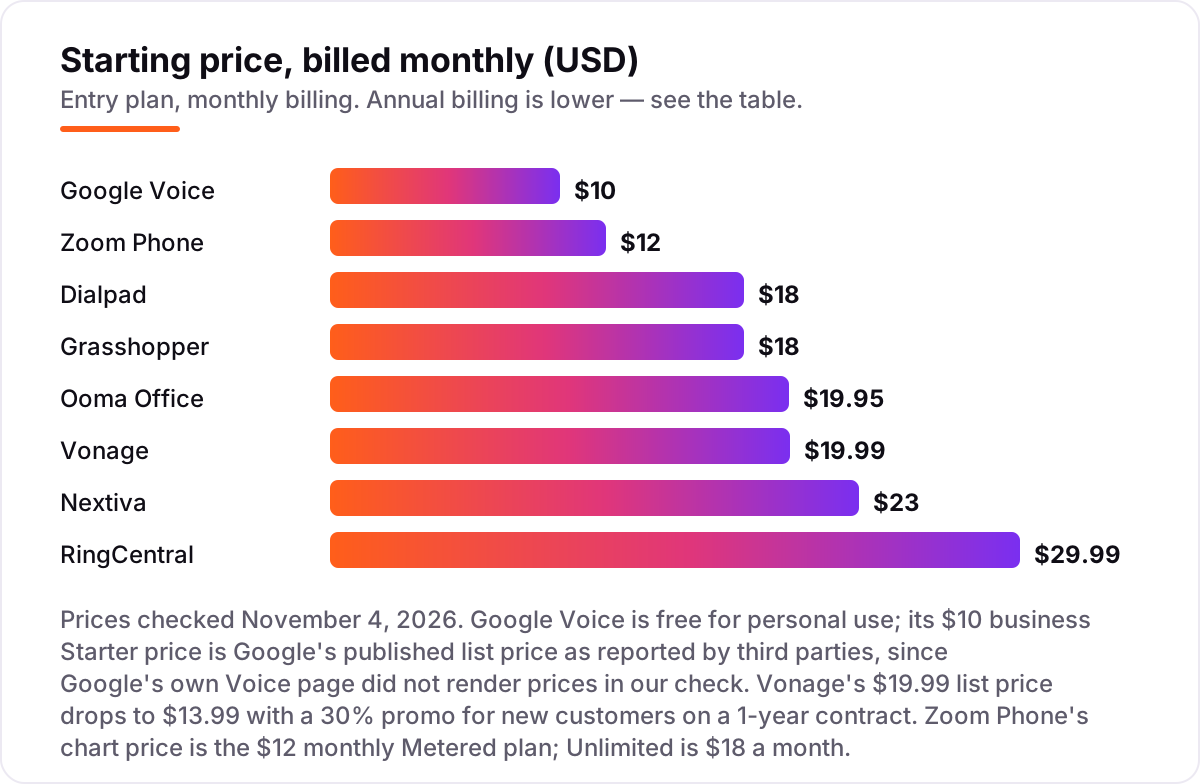
Take a five-person team that answers calls all day. On annual-billed list prices, the subscription costs $25 a month on Grasshopper Solo Plus, $75 on Nextiva Core or Dialpad Standard, $80 on Zoom Phone Unlimited, $99.95 on RingCentral Essentials or Vonage Mobile at list price, and $99.75 on Ooma Essentials. Google Voice is $50 a month for Voice Starter — plus $35 a month for the five Google Workspace seats underneath, so $85 a month in total.
Over a year, that is $300 on Grasshopper Solo Plus, $900 on Nextiva Core or Dialpad Standard, $960 on Zoom Phone Unlimited, $1,020 on Google Voice with Workspace, $1,197 on Ooma Essentials, and $1,199.40 on RingCentral Essentials or Vonage Mobile at list price. Vonage's 30% promo cuts the first year to $839.40, but the price returns to $1,199.40 in year two. The same five people cost $300 a year at the cheap end and $1,199.40 at the dear end — a $899.40 gap that comes entirely from per-user pricing and billing choices, not from call quality.
Three costs sit outside every number above. First, the metered minutes: Zoom Phone Metered looks cheapest at $52.50 a month for five users, but at about $0.03 a minute, 1,000 outbound minutes a month adds $30, taking it to $82.50 — more than the $80 Unlimited plan. Second, taxes and regulatory fees, which every vendor here adds on top of the advertised price; budget 10–20% above the headline rate. Third, desk phones: Ooma and RingCentral users who want hardware pay $90 or more per handset, and Vonage's desk-phone support needs the Premium plan at $29.99 a line. If you run a customer-service team rather than a general small business, the support tools differ too — see our guide to the best AI chatbots for customer service.
Annual billing cuts the bill on most tools here: RingCentral Essentials drops from $29.99 to $19.99 a user a month, Nextiva Core from $23 to $15, Dialpad Standard from $18 to $15, and Zoom Phone Unlimited from $18 to $16. Ooma has no annual discount — $19.95 is $19.95 either way — and Grasshopper's flat rate drops from $32 to $25 a month on Solo Plus. One more cost to check before you commit: a second location is not a second subscription on most tools here, since you pay per user rather than per site, but each user who needs a phone line is a seat — so count the people who answer, not the offices you have.
Know the difference: metered vs unlimited calling
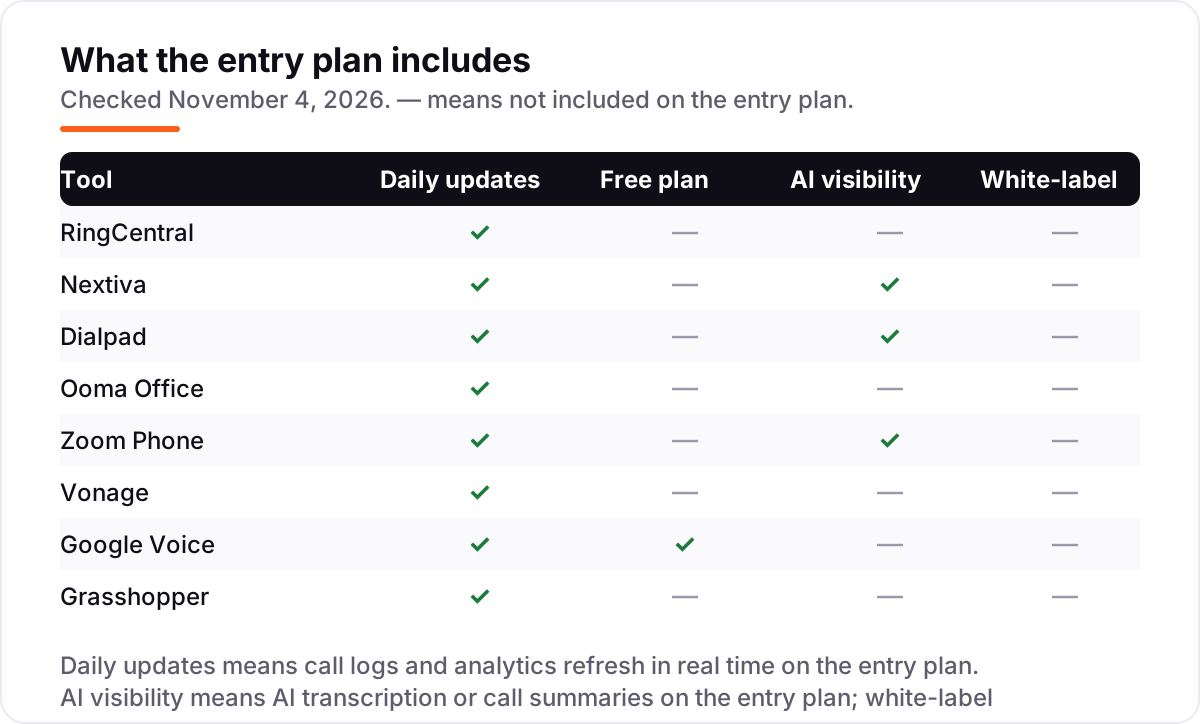
The confusion in this category is between two ways of paying for the same calls. A metered plan charges a low monthly fee and then a per-minute rate for every outbound call — Zoom Phone Metered is $10.50 a user a month billed annually, plus about $0.03 a minute. An unlimited plan charges a higher flat fee and includes domestic calls — Zoom Phone Unlimited is $16 a user a month billed annually. The plans look similar on a pricing page, but the bill they produce is very different once the team starts calling.
The break-even point is simple arithmetic. Unlimited costs $5.50 a user a month more than Metered, and at $0.03 a minute that buys about 180 outbound minutes. A person who makes fewer than 180 outbound minutes a month saves money on Metered; a person who makes more pays less on Unlimited. A receptionist who spends the day on the phone will blow past 180 minutes in the first week, while a back-office worker who takes two calls a day will never reach it. The right plan depends on the person, not the company — and most tools here let you mix plans across users.
There is a second, quieter confusion: per-user pricing versus flat-rate pricing. Seven tools here charge per user, so the bill grows with every hire. Grasshopper charges one flat rate per account, so adding a sixth person to Solo Plus costs nothing at all. That makes Grasshopper the cheapest option for a growing team even though its per-person math looks worse for a solo owner. If the team will grow past five people this year, run the numbers on the flat rate before you compare per-user prices.
Quick comparison: tool type by need
| Buyer | Best pick | Why |
|---|---|---|
| Solo owner on a budget | Google Voice | $10 a user a month, and free for personal use — but add Workspace for a team |
| Most small businesses | RingCentral | The fullest system, from $19.99 a user a month billed annually |
| Team that wants AI on every call | Dialpad | Transcripts and summaries included, from $15 a user a month |
| Office that wants desk phones | Ooma Office | Pre-configured IP phones, no contract, from $19.95 a user a month |
| Team already on Zoom | Zoom Phone | Phone inside the Zoom app, metered from $10.50 a user a month |
| Mobile-first team | Vonage | App-based calling, $19.99 a line, or $13.99 on the 12-month promo |
Mistakes to avoid
- Budgeting on the promo price. Vonage's $13.99 a line lasts 12 months, then the price returns to $19.99. The list price is what you pay in month thirteen, so compare tools on that number.
- Buying on the per-user price, then finding the next tier holds the feature you need. RingCentral video meetings, Ooma texting and Google Voice auto attendant all sit one tier up. Check the feature list, not just the price.
- Ignoring the metered minutes. Zoom Phone Metered looks cheapest at $10.50 a user, but 1,000 outbound minutes a month adds $30 — more than the Unlimited plan costs. Count your minutes before you pick Metered.
- Forgetting taxes and fees. Every vendor here adds taxes and regulatory fees on top of the advertised price. Budget 10–20% above the headline rate, and check the first invoice against the quote.
- Skipping the trial. Every tool here offers a trial or a money-back guarantee. Test call quality on your own internet, in your busiest hours, before you port the main number — a bad connection shows up in the first week, not the first month.
How we chose
We checked each vendor's own pricing page on November 4, 2026 and recorded the starting price exactly as shown, including the annual-billing figure where the page lists one, and we ranked the tools by fit for the most common buyer — a US small business owner with one to ten people answering calls — not by brand size. Ratings come from the G2 review page for each product, opened the same day. Two prices need a note: Google Voice's $10 Starter price is Google's published list price, but Google's own Voice page did not render prices when we checked it, so the figure is third-party-sourced from Google's list prices as reported in October 2026; and Zoom Phone's $16 Unlimited price comes from Zoom's own pricing guide, since Zoom's pricing page lists Workplace plans rather than the standalone phone plans. No vendor paid for a place in this list, and none of the links here are affiliate links.
What to do next
Start with the free trial of your top pick and run one real week of calls through it. Check that call quality holds on your office internet, that voicemail transcription works, and that your main number ports cleanly before you move the whole team. If the phones are sorted but new customers are not finding you, our monthly SEO service handles the visibility side — or compare providers in our guide to SEO companies for small business. Once your tools are in place, find out what's holding your rankings back.
Your stack only works if people find you
SerpAstra fixes what keeps your site off page one and makes it easy for AI assistants to recommend.
Get a free audit→Sources we checked (16)
- RingCentral pricing — ringcentral.com/us/en/office/plansandpricing.html (checked November 4, 2026)
- RingEX reviews — g2.com/products/ringcentral-mvp/reviews (checked November 4, 2026)
- Nextiva pricing — nextiva.com/pricing.html (checked November 4, 2026)
- Nextiva reviews — g2.com/products/nextiva/reviews (checked November 4, 2026)
- Dialpad pricing — dialpad.com/pricing (checked November 4, 2026)
- Dialpad reviews — g2.com/products/dialpad/reviews (checked November 4, 2026)
- Ooma Office pricing — ooma.com/small-business-phone-systems/plans (checked November 4, 2026)
- Ooma Office reviews — g2.com/products/ooma-office/reviews (checked November 4, 2026)
- Zoom Phone pricing — zoom.com/en/blog/voip-providers (checked November 4, 2026)
- Zoom Phone reviews — g2.com/products/zoom-zoom-phone/reviews (checked November 4, 2026)
- Vonage pricing — vonage.com/unified-communications (checked November 4, 2026)
- Vonage reviews — g2.com/products/vonage-business/reviews (checked November 4, 2026)
- Google Voice pricing — workspace.google.com/products/voice (checked November 4, 2026)
- Google Voice reviews — g2.com/products/google-voice/reviews (checked November 4, 2026)
- Grasshopper pricing — grasshopper.com/pricing/trial (checked November 4, 2026)
- Grasshopper reviews — g2.com/products/grasshopper/reviews (checked November 4, 2026)
Shamim
Founder of SerpAstra
A full-stack SEO and digital marketer who spends most days on Local SEO for dental practices, AI search visibility and lead generation.
Frequently asked questions
What is the best VOIP phone service for a small business?
RingCentral is the best fit for most small businesses: the widest feature set, a 99.999% uptime SLA and room to grow, from $19.99 a user a month billed annually. Nextiva is the better pick when you want phone, SMS, video and basic CRM in one place, and Dialpad is the better pick when AI call transcripts matter most. Google Voice is the cheapest start for one person.
How much does a VOIP phone service cost per month?
Entry prices run from $10 to $29.99 a user a month. Google Voice starts at $10, Zoom Phone at $10.50 on a metered plan, and Nextiva and Dialpad at $15, all billed annually. A five-person team pays $300 to $1,200 a year for the subscription alone, before taxes, fees, desk phones and international calling.
Is there a free VOIP phone service for small businesses?
Not for business use. Google Voice is free for personal use on a single Gmail account, but the business plans cost $10 to $30 a user a month and need a paid Google Workspace subscription underneath for teams. Every other tool here offers a free trial or a money-back guarantee instead of a free plan.
What is the difference between metered and unlimited VOIP plans?
A metered plan charges a low monthly fee plus a per-minute rate for outbound calls — Zoom Phone Metered is $10.50 a user a month plus about $0.03 a minute. An unlimited plan charges a higher flat fee and includes domestic calls — Zoom Phone Unlimited is $16 a user a month billed annually. Metered wins for light callers; unlimited wins past about 180 outbound minutes a month.
Do I need desk phones for a VOIP phone service?
No. Most tools here run as apps on a computer or mobile phone, and Vonage Mobile and Grasshopper are app-only by design. Desk phones are optional hardware: Ooma and RingCentral sell pre-configured IP phones, and Vonage supports them from the Premium plan. Start with the app, and buy desk phones only for staff who sit at a phone all day.
Can I keep my current business phone number?
Yes. Every tool in this list offers free number porting, and the move usually takes a few days to a couple of weeks depending on your current carrier. Do not cancel the old service until the port completes, or you can lose the number. Tell the new provider the number first, and it handles the transfer with your old carrier.
Does VOIP work without good internet?
No — a VOIP phone service runs over your broadband connection, so call quality follows your internet. A stable connection of about 100 Kbps per call is enough for voice, but shared office Wi-Fi with heavy video use can cause dropouts. Use a wired connection for desk phones where possible, and keep a mobile backup for the days the broadband goes down.
Free SEO and AI visibility audit
Find out what is holding your rankings back
Send us your site. Within 2 business days you get a written audit, an AI visibility check and a short fix list ranked by impact. Free, with no contract attached.
Request my free audit→Related guides
 AI, Data & Analytics9 Best AI Chatbot for Customer Service Software in 2026The 9 best AI chatbot for customer service software options compared on price, AI billing and free plans, with every starting price checked on November 2, 2026.Read guide →
 SEO & AI Search12 Best Marketing Platforms for Small Business SEO in 2026, ComparedThe 12 best marketing platforms for small business SEO, compared on real prices, SEO tools and AI visibility. Every price checked November 1, 2026.Read guide →
 SEO & AI Search8 Best SEO Companies for Small Business in 20268 best SEO companies for small business compared on price, contracts and AI visibility, with prices checked on each agency's own site on November 1, 2026.Read guide →