
10 Best Content Curation Tools in 2026 (Free and Paid, Compared)
Compare the 10 best content curation tools on price, free plans and curation features, with prices checked November 10, 2026 and ratings from G2.
 Shamim Mia, Founder, SerpAstraLast verified November 10, 202613 min read
We compare pricing pages, documentation and public reviews. We never accept payment for rankings.

Key takeaways
- Feedly is the best fit for most buyers at $8/month; Scoop.it follows at $14.99/month for publishable topic pages, and Inoreader at $9.99/month for power readers who want rules and filters.
- Flipboard is completely free, and Feedly, Elink, Inoreader, DrumUp and Quuu all have free plans — but only Flipboard costs nothing at all once you start using it seriously.
- The single most important buying factor is where the curated content ends up: a private feed, a social queue, a newsletter or a page on your own site. Pick the destination first, then the tool.
- Every price below was checked on November 10, 2026. Scoop.it, UpContent and DrumUp prices are vendor-supplied via G2 rather than read on the vendors' own pricing pages, and Curata publishes no price, so it is listed as a custom quote.
On this page
Quick comparison
| Tool | Best for | Starting price | Free plan |
|---|---|---|---|
| Feedly | Content marketers and small teams that want one feed reader to gather, sort and share articles for social posts and newsletters | $8/mo | Yes (100 feeds) |
| Scoop.it | Solo marketers and small businesses that want dedicated topic pages to publish curated content on their own site | $14.99/mo | Yes (basic account) |
| Elink | Marketers and creators who turn saved links into visual web pages, newsletters and website embeds | $15/mo | Yes (free) |
| Inoreader | Power readers and researchers who follow hundreds of sources and want rules and filters to sort them automatically | $9.99/mo | Yes (150 feeds) |
| UpContent | Small marketing teams that want a steady stream of third-party articles to share on social media | $15/mo | No (free trial) |
| DrumUp | Solo marketers and small businesses that want content suggestions plus scheduling in one cheap subscription | $15/mo | Yes (free) |
| Quuu | Small teams that want human-reviewed article suggestions to fill a social calendar without writing every post | $19.99/mo | Yes (free) |
| Anyone who wants a free, visual way to collect articles into shareable magazines | Free | Yes (free) | |
| BuzzSumo | Content and PR teams that need to find the most-shared articles and the journalists behind them | $199/mo | No (free trial) |
| Curata | Enterprise marketing teams that need machine-learning curation with analytics tied to pipeline | Custom quote | No (demo only) |
Make one of these tools?
We re-check this list every quarter. Send a correction, request a review, or ask about a clearly labeled sponsored spot.
Request a listingThe best content curation tools

Feedly
Best for: Content marketers and small teams that want one feed reader to gather, sort and share articles for social posts and newsletters
Feedly is the best fit for most buyers because it does the first half of curation better than anything else here: gathering. Pro costs $8 a month billed monthly, or $72 a year, and covers 1,000 feeds with full-text search, notes, highlights and faster updates. The free plan covers 100 feeds in 3 folders, which is enough to test whether a feed-based workflow suits your team.
The limit is what happens after you save an article. Feedly does not schedule or publish social posts, so most teams pair it with a scheduler such as Buffer or DrumUp, and the AI features sit on Pro+ at $144 a year rather than Pro. Prices also vary by region, so check your own checkout figure. Buy Feedly when gathering is the bottleneck; buy Scoop.it or Elink when publishing is.
What we like
- Cheapest paid reader here: Pro covers 1,000 feeds with search, notes and highlights
- Free plan covers 100 feeds, and Pro removes the sponsored ads the free plan shows
- Boards, notes and highlights turn reading into a shareable shortlist for a team
- Integrations with Zapier, Evernote and OneNote push saved articles into other tools
Watch out for
- AI curation (Feedly AI) needs Pro+ at $144 a year, not the $8 Pro plan
- Feedly does not schedule or publish social posts, so it needs a scheduler alongside it
- Prices vary by region: some visitors see $6.99 a month billed annually instead of the $72-a-year US figure

Scoop.it
Best for: Solo marketers and small businesses that want dedicated topic pages to publish curated content on their own site
Scoop.it is the dedicated curation tool in this list: it does not just collect articles, it publishes them. Basic costs $14.99 a month and gives you topic pages that present curated articles as a branded page on your own site, plus analytics, custom visibility and up to five social accounts. The suggestion engine keeps each topic fed, so the page updates without daily hunting.
The price to watch is the step up. WordPress integration and email newsletters need Plus at $67 a month, and reviewers say the pricing structure is unclear, with advanced features getting expensive fast. The $14.99 figure itself is vendor-supplied via G2 rather than read on Scoop.it's own pricing page. Pick Scoop.it when you want curated content to live publicly on your site.
What we like
- Highest G2 score in this list at 4.6 out of 5, with reviewers praising ease of use
- Topic pages publish curated content as a branded page, not just a private feed
- Suggestion engine surfaces relevant articles by topic, so the feed fills itself
- Basic unlocks analytics, custom visibility and up to five social accounts
Watch out for
- The $14.99 figure is vendor-supplied via G2, not read on Scoop.it's own pricing page
- Reviewers say the pricing structure is unclear, and advanced features get expensive fast
- WordPress integration and email newsletters need the $67 a month Plus tier, not Basic

Elink
Best for: Marketers and creators who turn saved links into visual web pages, newsletters and website embeds
Elink is the publishing pick: it turns a bundle of saved links into something you can send or embed. Pro costs $15 a month billed monthly, or $12 billed annually, and adds unlimited published posts, unlimited links per post, unlimited RSS feeds, team collaboration and newsletter export. RSS feeds auto-update a post, so a curated page stays fresh without being rebuilt each week.
The trade-off is automation and measurement. Content automation and auto-scheduling need the $36 a month Auto Pilot plan, and the analytics are basic next to BuzzSumo, while the interface takes time to learn. There is also no G2 star rating, because G2 has too few reviews to score it. Choose Elink when the end product is a page, a newsletter or an embed.
What we like
- Turns a bundle of links into a visual web page, newsletter or website embed in minutes
- RSS feeds auto-update posts, so a curated page stays fresh without re-editing
- Pro at $12 a month billed annually adds team collaboration and unlimited published posts
- Free plan includes unlimited bookmarks and the Chrome extension
Watch out for
- No G2 star rating: G2 shows too few reviews to give elink a score
- Content automation and auto-scheduling need the $36 a month Auto Pilot plan
- Analytics are basic next to BuzzSumo, and the interface takes time to learn

Inoreader
Best for: Power readers and researchers who follow hundreds of sources and want rules and filters to sort them automatically
Inoreader is the power-reader pick in this list, built for people who follow hundreds of sources and want the software to do the sorting. Pro costs $9.99 a month billed monthly, or $7.50 billed annually, and covers 2,500 feeds with rules, filters, monitoring feeds, AI article summaries and offline reading. The free plan alone covers 150 feeds with search and no ads.
The honest limit is that the tools that make Inoreader special all sit behind the paid plan: rules, filters, newsletters and offline reading are all Pro features, and Pro caps newsletter feeds at 20. We also show no G2 rating, because its G2 page was last crawled weeks ago. Pick Inoreader when you follow so many sources that manual sorting has stopped working.
What we like
- Most generous free plan here: 150 feeds, folders, tags and search, with no ads
- Pro adds rules, filters, monitoring feeds, AI article summaries and offline reading
- Monitoring feeds watch the web for a keyword, not just feeds you already follow
- Team plans from $44.99 a month for 3 members share folders, channels and limits
Watch out for
- No G2 star rating shown here: its G2 page (3.9 out of 5, 19 reviews) was last crawled weeks ago, so we omitted it
- Rules, filters, newsletters and offline reading all sit behind the paid plan
- No desktop app, and Pro caps newsletter feeds at 20 and web feeds at 20

UpContent
Best for: Small marketing teams that want a steady stream of third-party articles to share on social media
UpContent is built for one job: keeping a social queue full of good third-party articles. Sharer costs $15 a month and ranks each article with four filters — recency, relevance, shareability and more — before you see it, then sends the picks to Buffer, Hootsuite or another scheduler in one click. It carries the largest G2 review base here at 293 reviews, scoring 4.4 out of 5.
The catch is scope. Sharer covers one topic area, so a team curating across several topics needs Curator at $49 a month, and the $15 figure is vendor-supplied via G2 rather than read on UpContent's own pricing page. Reviewers also say the interface can feel overwhelming at first. Choose UpContent when social sharing is the destination.
What we like
- Largest G2 review base in this list at 293 reviews, scoring 4.4 out of 5
- Four filters (recency, relevance, shareability and more) rank each article before you see it
- One-click sharing to Buffer, Hootsuite and social schedulers keeps the workflow short
- Reviewers praise the support team and onboarding most
Watch out for
- The $15 figure is vendor-supplied via G2, not read on UpContent's own pricing page
- Sharer covers one topic area, so broad coverage needs Curator at $49 a month
- Reviewers say the interface can feel overwhelming at first

DrumUp
Best for: Solo marketers and small businesses that want content suggestions plus scheduling in one cheap subscription
DrumUp is the budget all-rounder: it suggests the content and schedules it, in one $15 a month subscription. Starter covers 3 content streams, 3 RSS feeds and 3 social accounts, with 10 posts a day per account, hashtag and mention suggestions, and repeat scheduling that recycles evergreen posts without re-creating them. A free plan with one stream and one account lets you test it first.
The limits are scale and proof. Analytics and 20 social accounts need Pro at $39 a month, and the 4.1 G2 score rests on only 15 reviews. The $15 figure is also vendor-supplied via G2 rather than read on DrumUp's own pricing page. Pick DrumUp when one cheap subscription needs to cover both finding and posting.
What we like
- Cheapest combined curation-plus-scheduling plan here at $15 a month
- Keyword-based content streams suggest shareable posts with hashtag and mention ideas
- Starter covers 3 social accounts, 3 RSS feeds and 10 posts a day per account
- Repeat scheduling recycles evergreen posts without re-creating them
Watch out for
- The $15 figure is vendor-supplied via G2, not read on DrumUp's own pricing page
- Only 15 reviews on G2, so the 4.1 score rests on a small base
- Analytics and 20 social accounts need Pro at $39 a month, not Starter

Quuu
Best for: Small teams that want human-reviewed article suggestions to fill a social calendar without writing every post
Quuu's difference is that people review the suggestions before they reach your queue. The paid plan costs $19.99 a month per profile, or $16.49 billed annually, and includes unlimited AI-generated posts, image and carousel generation and smart auto-scheduling, with all features in the one plan. A free plan exists, and the 7-day trial needs no credit card.
Two things to check before buying. First, the price is per profile, so several social profiles multiply the bill. Second, Quuu needs a connected social scheduler for full functionality, per G2 reviewers. We also show no G2 rating, because its G2 page was last crawled more than 3 days ago. Pick Quuu when you want a hand-checked feed rather than a purely algorithmic one.
What we like
- Human-reviewed suggestions, so the feed is hand-checked rather than purely algorithmic
- AI-generated posts, images and carousels, with smart auto-scheduling included
- One plan includes all features, so there is no feature tier to climb into
- Free plan exists alongside the paid plan, and the trial needs no credit card
Watch out for
- No G2 star rating shown here: its G2 page (4.2 out of 5, 12 reviews) was last crawled more than 3 days ago, so we omitted it
- Priced per profile, so a team with several social profiles pays per profile
- Needs a connected social scheduler for full functionality, per G2 reviewers

Best for: Anyone who wants a free, visual way to collect articles into shareable magazines
Flipboard is the only tool in this list that costs nothing at all, and for personal curation that is hard to beat. The free app turns your interests into Smart Magazines — visual collections of articles, videos and social posts — and group magazines let several people contribute to one collection. A Daily Edition delivers a curated set of top stories every morning.
The trade-off is that Flipboard is a reader, not a marketing tool. It has no scheduling, analytics or team features, ads appear throughout the app, and some publishers paywall their articles. There is also no G2 rating for the reader app, because the G2 listing covers Flipboard FLEX, a different product. Use Flipboard for personal curation; buy a paid tool when curation is a marketing job.
What we like
- Completely free for readers: no subscription, no paid tier to unlock magazines
- Smart Magazines collect articles, videos and social posts into a visual layout
- Group magazines let several people contribute to one curated collection
- Daily Edition delivers a curated set of top stories every morning
Watch out for
- No G2 star rating: the G2 listing is for Flipboard FLEX, a different product, so we omitted it
- Ads appear throughout the free app, and some publishers paywall their articles
- No scheduling, analytics or team tools: it collects and displays, it does not publish for you

BuzzSumo
Best for: Content and PR teams that need to find the most-shared articles and the journalists behind them
BuzzSumo is the research tool in this list: instead of collecting articles you already follow, it finds the articles that are already performing. Content Creation costs $199 a month billed annually, or $239 billed monthly, and includes unlimited searches, 2 alerts and 2 years of history across an index the vendor puts at more than 8 billion articles. The Question Analyzer shows what people actually ask around a topic.
The price is the barrier: $199 a month buys one user, and the journalist database and outreach tools need PR & Comms at $299 a month. The old free tier was retired, so only a trial remains. Buy BuzzSumo when you need to know what is working before you curate it; for simple gathering, Feedly costs a fraction of the price.
What we like
- Indexes more than 8 billion articles, per the vendor, so trending content is easy to find
- Content Creation includes unlimited searches, 2 alerts and 2 years of history
- Question Analyzer shows the questions people actually ask around a topic
- Strongest G2 score among the paid research tools here at 4.5 out of 5
Watch out for
- Most expensive entry price here at $199 a month, for a single user
- The journalist database and outreach tools need PR & Comms at $299 a month
- No free plan: the old free tier was retired, and only a trial remains

Curata
Best for: Enterprise marketing teams that need machine-learning curation with analytics tied to pipeline
Curata is the enterprise end of this list, and the only tool here that sells by quote. Its content curation software uses machine learning to find relevant articles across the web, and the content marketing platform adds an editorial calendar plus analytics that tie curated content to leads and sales opportunities, per the vendor. It scores 4.5 out of 5 on G2 across 42 reviews, with support praised most.
The honest trade-off is fit and price. There is no published starting price, so you budget a sales process rather than a subscription, and the product is built for enterprise teams — a small business pays for scale it may not need. Reviewers also describe the interface as dated and occasionally glitchy. Choose Curata when curation has to report into pipeline, not just into a feed.
What we like
- Machine-learning curation finds relevant articles across the web for a team
- Analytics tie curated content to leads and sales opportunities, per the vendor
- Editorial calendar keeps a team aligned on what is planned and published
- Rated 4.5 out of 5 on G2 across 42 reviews, with support praised most
Watch out for
- No published price: Curata sells by quote, so budget the sales process, not just the subscription
- Built for enterprise teams; small businesses pay for scale they may not need
- Reviewers describe the interface as dated and occasionally glitchy
The best content curation tools save a marketing team the hardest part of the job: finding good articles to share every day. This list covers 10 tools, ranked by fit for the most common buyer — a small marketing team that curates articles for social media and a newsletter — from the cheapest readers to the enterprise research platforms, with every price checked on November 10, 2026.
How to choose the best content curation tools
- Decide where the content ends up first. A private feed needs a reader such as Feedly or Inoreader; a social queue needs UpContent, DrumUp or Quuu; a newsletter or a page on your site needs Elink or Scoop.it.
- Count the sources, not just the price. Feedly Pro covers 1,000 feeds and Inoreader Pro 2,500, while Quuu charges per social profile and UpContent Sharer covers one topic area.
- Check what the entry plan leaves out. Feedly AI needs Pro+, Scoop.it newsletters need Plus, and BuzzSumo outreach needs PR & Comms — the feature you want is often one tier up.
- Try the free plan with your real sources. Add the feeds and topics you actually follow, not a demo set, and see whether the suggestions are relevant within a week.
- Price the whole workflow, not one tool. A reader plus a scheduler costs more than DrumUp alone, and a $199 research tool only pays for itself if the team acts on what it finds.
Curated content still needs to be found, and that is where search comes in. Our monthly SEO service handles the visibility side once your content is published, and before you publish new pages, run your titles through the free SERP snippet preview tool — it shows exactly how the title and description will look in Google. For the wider picture, see our guide to content marketing software.
Whatever you shortlist, run it with real sources before you pay. The free plans in this list are generous enough for a genuine test: load the feeds you actually read, follow the topics you actually cover, and share a week of posts. That week tells you whether the suggestions are relevant, whether the publishing step is quick, and whether the team will actually open the tool every day. A curation tool only works if it becomes a daily habit.
Content curation tools pricing: what you will actually pay
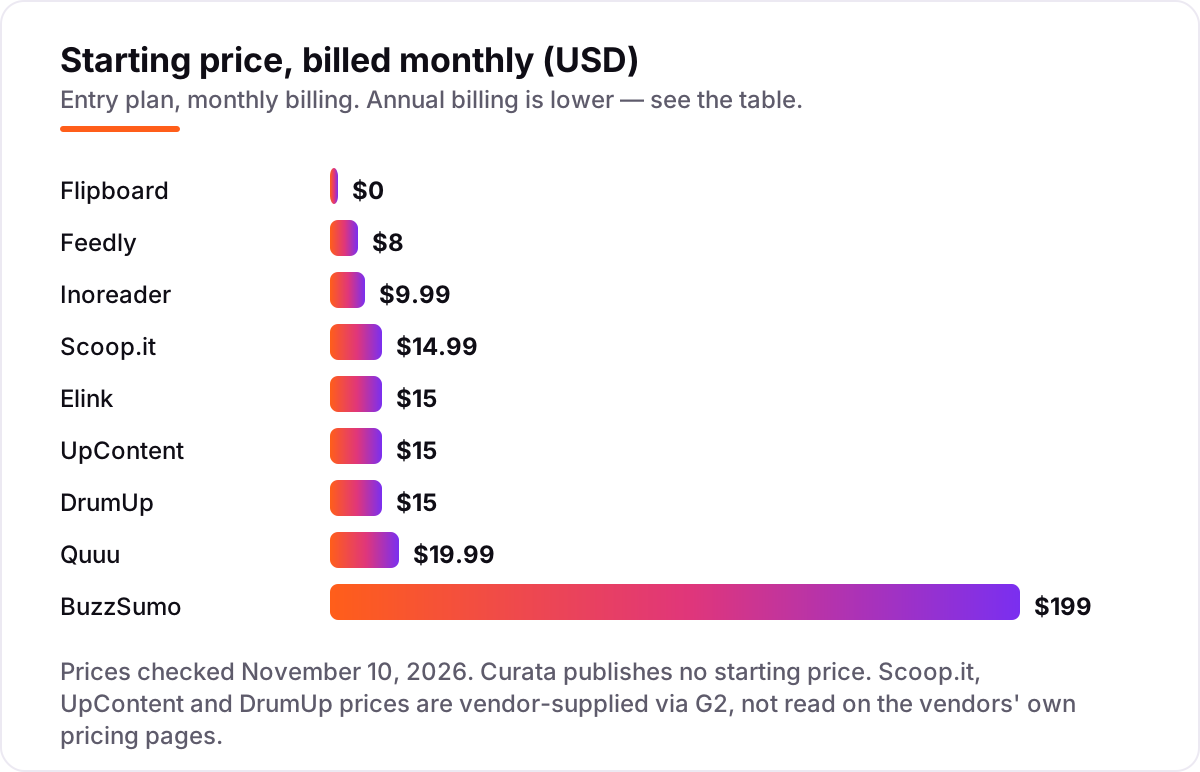
Take a small team of two marketers curating for one social queue and a monthly newsletter. On list prices, the monthly subscription costs $0 on Flipboard, $8 on Feedly Pro, $9.99 on Inoreader Pro, $14.99 on Scoop.it Basic, $15 on Elink Pro, UpContent Sharer or DrumUp Starter, $19.99 on Quuu for one profile, and $199 on BuzzSumo Content Creation. Curata is a custom quote, so it cannot be priced here.
Over a year, that is $0 on Flipboard, $96 on Feedly Pro billed monthly ($72 billed annually), $119.88 on Inoreader Pro billed monthly ($90 billed annually), $179.88 on Scoop.it Basic, $180 on Elink Pro billed monthly ($144 billed annually), UpContent Sharer or DrumUp Starter, $239.88 on Quuu for one profile ($197.88 billed annually), and $2,388 on BuzzSumo Content Creation billed monthly ($1,908 billed annually). The same two people and the same one queue cost $0 at the free end and $2,388 at the dear end — a gap that comes from research depth, not from gathering.
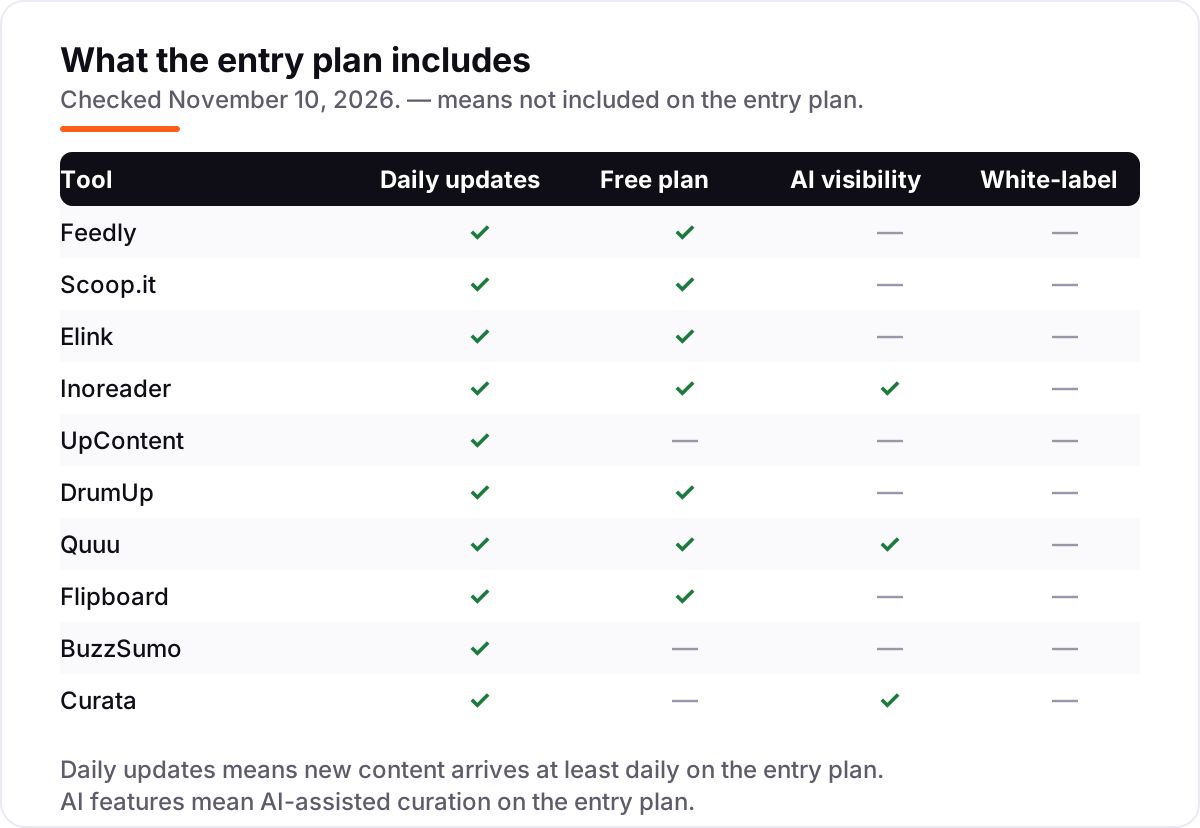
Three costs sit outside every number above. First, the scheduler: Feedly, Inoreader, UpContent and Quuu do not publish social posts on their own, so add a scheduler subscription unless you already pay for one. Second, the second profile or topic: Quuu charges per profile, and UpContent Sharer covers one topic area, so a wider brief costs more. Third, the step-up tier: Feedly AI needs Pro+, Scoop.it newsletters need Plus, and BuzzSumo outreach needs PR & Comms. Price the tier you will actually use, not the entry price.
Know the difference: content curation vs content aggregation
The confusion in this category is between collecting articles and curating them. Aggregation is automatic: a reader pulls every new post from the feeds you follow into one pile. Curation is a choice: a person, or a trained filter, picks the articles worth sharing and adds context — a comment, a headline, a place in a newsletter. Feedly and Inoreader are aggregators first; Scoop.it, UpContent, Quuu and Curata add the selection step, which is what makes them curation tools rather than readers.
There is a second confusion: curation vs creation. Curated content is other people's work, shared with credit; it fills a calendar cheaply but builds no authority of its own. Created content is original, and it is what search engines and AI answers quote. The tools in this list handle the first job. A team that only curates will have a busy feed and a thin site — pair curation with original posts, and use the curated articles to find the topics worth writing about.
A third distinction is the destination. A tool that ends in a private feed, like Feedly or Flipboard, helps one person stay informed. A tool that ends in a public page, a newsletter or a social queue, like Elink, Scoop.it or DrumUp, is a marketing tool. The price follows the destination, not the gathering: publishing and analytics cost more than reading.
Quick comparison: tool type by need
| Buyer | Best pick | Why |
|---|---|---|
| Most small marketing teams | Feedly | Cheapest paid reader at $8/month, 1,000 feeds with search and notes |
| Publishable topic pages | Scoop.it | Curated content becomes a branded page, from $14.99/month |
| Pages, newsletters and embeds | Elink | Links become a visual page or newsletter, from $15/month |
| Power readers with many sources | Inoreader | Rules, filters and monitoring feeds, from $9.99/month |
| Social sharing at scale | UpContent | Filtered article streams built for a scheduler, from $15/month |
| Curation plus scheduling, cheap | DrumUp | Suggestions and scheduling in one plan, from $15/month |
| Hand-checked suggestions | Quuu | People review the feed before it reaches your queue, from $19.99/month |
| Free personal curation | Magazine-style collections, free with no paid tier | |
| Finding what already performs | BuzzSumo | Most-shared articles and journalist data, from $199/month |
| Enterprise curation with analytics | Curata | Machine-learning curation tied to pipeline, custom quote |
Mistakes to avoid
- Buying a reader when you need a publisher. Feedly and Flipboard gather brilliantly, but neither publishes a newsletter or a social queue on its own. Pick the destination first.
- Budgeting on the entry price alone. Feedly AI needs Pro+, Scoop.it newsletters need Plus, and BuzzSumo outreach needs PR & Comms — the feature you want is often one tier up.
- Paying per profile without counting profiles. Quuu charges $19.99 a month per profile, so three profiles cost about $60 a month, not $20.
- Trusting a directory price. Scoop.it, UpContent and DrumUp prices in this list are vendor-supplied via G2, not read on the vendors' own pricing pages — always check the vendor page before you pay.
- Curating without creating. A feed full of other people's articles fills the calendar but builds no authority. Pair curation with original posts on the topics the curated articles prove people care about.
How we chose
We checked each vendor's own pricing page on November 10, 2026 and recorded the starting price exactly as shown, including the annual-billing figure where the page lists one, and we ranked the tools by fit for the most common buyer — a small marketing team curating articles for social media and a newsletter — not by brand size. Three prices could not be read on the vendors' own pricing pages, so they are disclosed as vendor-supplied via G2: Scoop.it at $14.99 a month, UpContent at $15 a month and DrumUp at $15 a month. Curata publishes no starting price, so it is listed as a custom quote. Ratings are shown only where a fresh G2 page gave a clear score and review count on November 10, 2026: Scoop.it, UpContent, DrumUp, BuzzSumo and Curata. Feedly, Elink, Inoreader, Quuu and Flipboard carry no rating here because their G2 pages were stale, conflicting or covered a different product, and we would rather show no rating than a stale or estimated one. Pocket is not in this list: Mozilla shut it down on July 8, 2025, so it is no longer sold. No vendor paid for a place in this list, and none of the links here are affiliate links.
What to do next
Start with the free plan or trial of your top pick and run one real week of curation through it: your feeds, your topics, your social queue. Check that the suggestions are relevant, that publishing takes minutes rather than an hour, and that the team actually opens the tool every day. If the curation is sorted but new customers are not finding you, our monthly SEO service handles the visibility side. Once your tools are in place, find out what's holding your rankings back.
Your stack only works if people find you
SerpAstra fixes what keeps your site off page one and makes it easy for AI assistants to recommend.
Get a free audit→Sources we checked (15)
- Feedly pricing — feedly.com/i/pro and Feedly support docs (checked November 10, 2026)
- Scoop.it pricing (vendor-supplied via G2) — g2.com/products/scoop-it/pricing (checked November 10, 2026)
- Scoop.it on G2 — 4.6/5, 28 reviews (checked November 10, 2026)
- Elink pricing — elink.io and blog.elink.io (checked November 10, 2026)
- Inoreader pricing — inoreader.com (checked November 10, 2026)
- UpContent pricing (vendor-supplied via G2) — g2.com/products/upcontent/pricing (checked November 10, 2026)
- UpContent on G2 — 4.4/5, 293 reviews (checked November 10, 2026)
- DrumUp pricing (vendor-supplied via G2) — g2.com/products/drumup/reviews (checked November 10, 2026)
- DrumUp on G2 — 4.1/5, 15 reviews (checked November 10, 2026)
- Quuu pricing — quuu.co (checked November 10, 2026)
- Flipboard — flipboard.com (checked November 10, 2026)
- BuzzSumo pricing — buzzsumo.com (checked November 10, 2026)
- BuzzSumo on G2 — 4.5/5, 107 reviews (checked November 10, 2026)
- Curata — curata.com (checked November 10, 2026)
- Curata on G2 — 4.5/5, 42 reviews (checked November 10, 2026)
Shamim
Founder of SerpAstra
A full-stack SEO and digital marketer who spends most days on Local SEO for dental practices, AI search visibility and lead generation.
Frequently asked questions
What is the best content curation tool in 2026?
Feedly is the best fit for most buyers: the cheapest paid reader here at $8/month, covering 1,000 feeds with search, notes and highlights. Scoop.it is the better pick when curated content must be published as topic pages, and Inoreader wins for power readers who want rules and filters.
How much do content curation tools cost?
Entry prices run from $0 to $199 a month. Flipboard is free, Feedly starts at $8/month, Inoreader at $9.99/month, and Scoop.it, Elink, UpContent and DrumUp at $14.99–$19.99/month. BuzzSumo starts at $199/month for one user, and Curata sells by custom quote only.
Is there a free content curation tool?
Yes. Flipboard is completely free for readers, with no paid tier. Feedly, Elink, Inoreader, DrumUp and Quuu all have free plans too, though the free tiers cap feeds, posts or accounts. A free plan works for personal curation; marketing teams usually need a paid plan for publishing and analytics.
What is the difference between content curation and content creation?
Curation is finding, selecting and sharing other people's content with your own context; creation is writing or producing original content yourself. The tools in this list curate — they gather and organise articles — while creation needs a writing or design tool. Most teams do both: curate to fill the calendar, create to stand out.
Can I use Feedly to schedule social media posts?
No. Feedly gathers, sorts and saves articles, but it does not schedule or publish social posts. Pair it with a scheduler such as Buffer, or pick DrumUp, which combines content suggestions with scheduling from $15/month. UpContent and Quuu also send their suggestions to a connected scheduler.
What should I check before paying for a content curation tool?
Four things: where the curated content ends up, how many sources or profiles the plan covers, whether the price is monthly or annual billing, and whether publishing, analytics or AI features need a higher tier. Feedly's AI needs Pro+, and Scoop.it's newsletters need Plus — the entry plan is rarely the whole story.
Free SEO and AI visibility audit
Find out what is holding your rankings back
Send us your site. Within 2 business days you get a written audit, an AI visibility check and a short fix list ranked by impact. Free, with no contract attached.
Request my free audit→Related guides
 Digital Marketing & Ads10 Best Content Marketing Software in 2026, Compared10 best content marketing software tools compared on price, planning, optimization and publishing, with starting prices and the right pick for every team size.Read guide →
 Email, SMS & Social Media7 Best Social Media Management Tools in 2026 (Free and Paid, Compared)Compare the 7 best social media management tools on price, free plans, scheduling and inbox features, with every price checked November 6, 2026.Read guide →
 Digital Marketing & Ads7 Best Email Marketing Platforms for Newsletters in 2026, Compared7 best email marketing platforms for newsletters compared on price, free plans and monetization. Prices checked on vendor pricing pages, November 4, 2026.Read guide →