
10 Best Content Management Tools in 2026 (Free and Paid, Compared)
Compare the 10 best content management tools on price, free plans and fit for blogs, teams and enterprises, with prices checked November 10, 2026.
 Shamim Mia, Founder, SerpAstraLast verified November 10, 202612 min read
We compare pricing pages, documentation and public reviews. We never accept payment for rankings.

Key takeaways
- WordPress is the cheapest hosted start at $4/month billed annually (Personal, first term); Webflow Premium is $25/month billed annually and Ghost Starter is $15/month billed annually.
- Headless tools suit developer-led teams: Sanity from $15/month per seat, Storyblok from $99/month and Strapi Cloud from $29/month per project.
- The single most important buying factor is who edits the content: if marketers publish alone, pick a visual editor; if developers build the front end, pick a headless CMS.
- Drupal and Joomla cost $0 in licence fees, but you pay for hosting, setup and maintenance instead — free software is not a free website.
- Contentful's $300/month Lite price was read on its own pricing page on November 10, 2026; the other prices below come from independent October-November 2026 reads of each vendor's pricing page.
On this page
Quick comparison
| Tool | Best for | Starting price | Free plan |
|---|---|---|---|
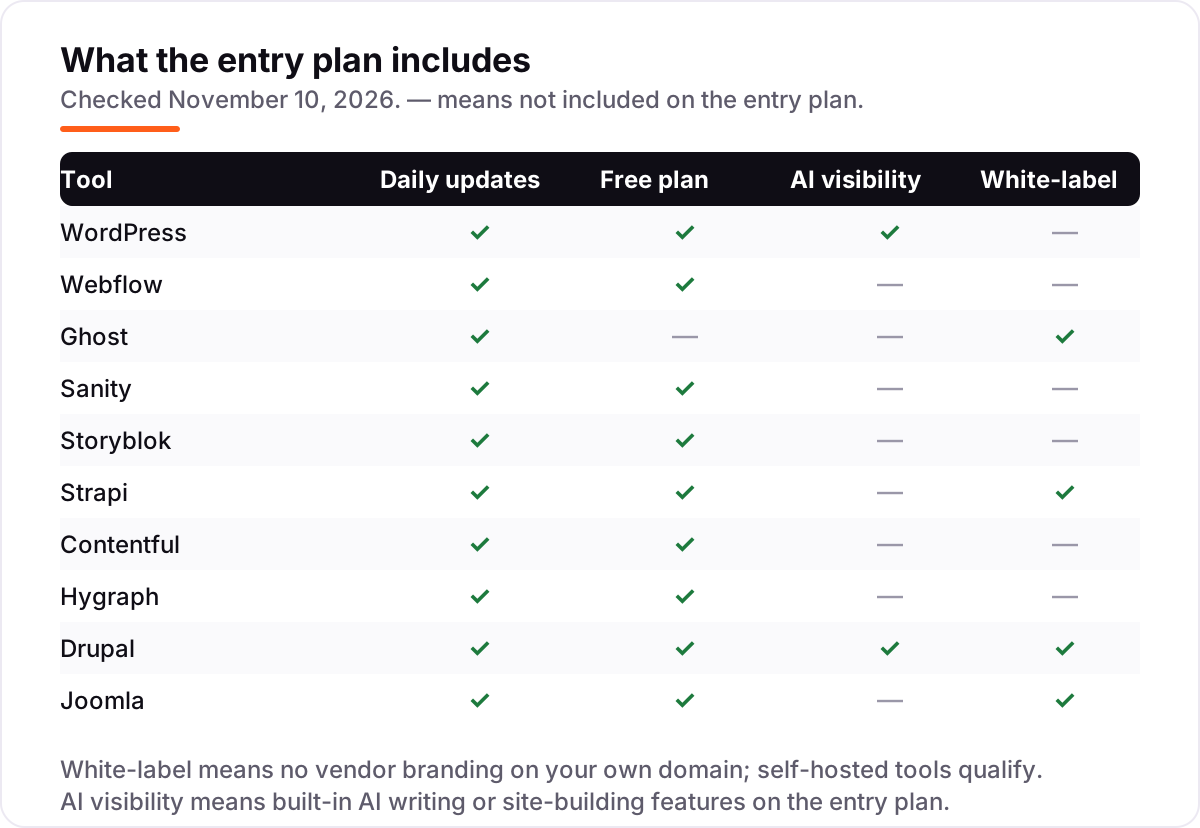
| WordPress | Bloggers, small businesses and publishers who want the largest plugin and theme ecosystem for the lowest hosted price | $9/mo | Yes (free plan) |
| Webflow | Design-led teams and agencies that want a visual builder plus a real CMS for blogs and marketing sites | $39/mo | Yes (Starter) |
| Ghost | Solo publishers and newsletter writers who want a fast blog with built-in memberships | $18/mo | No (14-day trial) |
| Sanity | Developer-led teams building content-driven apps and sites on a modern JavaScript stack | $15/mo per seat | Yes (free plan) |
| Storyblok | Marketing teams that want a visual editor on a headless CMS without waiting on developers | $99/mo | Yes (Starter) |
| Strapi | Developers who want a free open-source CMS they can self-host, with managed cloud hosting as an option | $29/mo | Yes (self-hosted) |
| Contentful | Larger content teams that need structured content, multiple locales and enterprise governance | $300/mo | Yes (free plan) |
| Hygraph | GraphQL-first teams that want federated content from several sources in one API | $299/mo | Yes (Hobby) |
| Drupal | Large organisations and government sites that need strict governance, multilingual content and deep customisation | Free | Yes (free) |
| Joomla | Community portals, membership sites and multilingual sites on a zero software budget | Free | Yes (free) |
Make one of these tools?
We re-check this list every quarter. Send a correction, request a review, or ask about a clearly labeled sponsored spot.
Request a listingThe best content management tools

WordPress
Best for: Bloggers, small businesses and publishers who want the largest plugin and theme ecosystem for the lowest hosted price
WordPress is the default choice for most buyers because it does almost everything and costs almost nothing to start. The hosted WordPress.com Personal plan costs $4 a month billed annually for the first term, and it includes a custom domain, 6 GB of storage and plugin installation, a feature that only reached every paid plan in April 2026. The plugin and theme ecosystem is far larger than any rival's.
The catch is upkeep. WordPress sites need updates, backups and occasional plugin fixes, and the $4 figure is a first-term price: Personal renews at $5 a month, and monthly billing costs $9. The free WordPress.org software is the same code without hosting, so a team with a developer can self-host and pay only for a server.
What we like
- Largest plugin and theme ecosystem of any CMS, with plugins available on every paid plan since April 2026
- Personal plan includes a custom domain, 6 GB storage and no ads for visitors
- The WordPress.org software itself is free to self-host, so you are never locked into one host
Watch out for
- The $4 annual figure is a first-term price; Personal renews at $5 a month, and monthly billing costs $9
- Plugin and theme costs add up, and keeping the site fast and secure needs regular updates

Webflow
Best for: Design-led teams and agencies that want a visual builder plus a real CMS for blogs and marketing sites
Webflow is the pick when design matters as much as content. The Premium Site plan costs $25 a month billed annually and adds the full Webflow CMS with 20,000 items and 40 collections, plus site search and 50 GB of bandwidth. You design the site visually and the blog runs on the same platform, with no plugins to update.
The price to watch is the second bill. Editing seats cost extra: $15 a month for a limited seat and $39 for a full seat, billed yearly, and the cheaper Basic plan has no CMS at all. A five-person team pays $300 a year for the site plan plus $720 a year for four limited seats.
What we like
- Visual designer with a real CMS: 20,000 CMS items and 40 collections on Premium
- Premium includes site search, 50 GB bandwidth and code components
- No plugins to update; hosting, security and the CMS come from one vendor
Watch out for
- Basic at $15 a month has no CMS at all, so a blog or content site must pay $25 a month billed annually
- Editing seats are a separate bill: $15 a month for a limited seat and $39 for a full seat, billed yearly

Ghost
Best for: Solo publishers and newsletter writers who want a fast blog with built-in memberships
Ghost is a publishing tool first and a CMS second, and that focus shows. Starter costs $15 a month billed annually for 1,000 members, one staff user and one newsletter, with hosting, updates, backups and email delivery included. The editor is clean, the sites are fast, and Ghost takes 0% of your subscription revenue.
The limit is monetisation. Starter cannot sell paid subscriptions or use custom themes, so anyone charging readers starts on Publisher at $29 a month billed annually. Prices also rise with member count above 1,000. Choose Ghost for a blog or newsletter; choose WordPress when the site needs more than publishing.
What we like
- Publishing, email newsletters and paid memberships in one tool, with 0% platform fee on member revenue
- Very fast out of the box, with a clean editor and no plugin maintenance
- The software is open source and free to self-host if you outgrow Ghost(Pro)
Watch out for
- Starter cannot sell paid subscriptions or use custom themes; monetising starts on Publisher at $29 a month billed annually
- The price rises with member count above 1,000, so a growing list costs more

Sanity
Best for: Developer-led teams building content-driven apps and sites on a modern JavaScript stack
Sanity is the best-reviewed tool in this list at 4.7 out of 5 on G2, and the free plan is genuinely usable: 20 seats, 10,000 documents and 1M CDN requests a month. Content is structured data served through an API, so the same content can feed a website, an app and any other channel.
The catch is that the free plan allows public datasets only, so anything that should not be world-readable needs Growth at $15 a month per occupied seat. A five-editor team pays $75 a month, and usage overages stack on top. Pick Sanity when developers lead the project and content must feed more than one front end.
What we like
- Highest G2 score in this list at 4.7 out of 5, with reviewers praising flexibility and customisation
- Generous free plan: 20 seats, 10,000 documents and 1M CDN requests a month
- Real-time collaboration and schema-as-code suit developer-led teams
Watch out for
- Growth is billed per occupied seat at $15 a month, so the bill grows with every editor you add
- Single sign-on, custom roles and the audit trail need the custom-priced Enterprise plan

Storyblok
Best for: Marketing teams that want a visual editor on a headless CMS without waiting on developers
Storyblok solves the usual headless problem: editors normally need a developer to see what a page will look like. Its visual editor lets marketers assemble pages on the live site while developers keep a standard front end. Growth costs $99 a month with 5 seats included, 1M API requests and 400 GB of traffic.
The limits are seats and assets. Starter covers one seat, so a team of two already pays, and Growth caps assets at 2,500 with no self-serve way to add more. A 45-day trial of Growth Plus is available. Choose Storyblok when marketers must publish without waiting on developers.
What we like
- Strongest visual editor among the headless tools here: marketers assemble pages on the live site
- Component-based content model keeps pages consistent across the site
- Free Starter plan is genuinely usable for a personal project or proof of concept
Watch out for
- Starter is limited to 1 seat and 2 locales, so real team production starts at $99 a month
- Growth caps assets at 2,500 with no self-serve add-on, so asset-heavy sites are pushed up a tier

Strapi
Best for: Developers who want a free open-source CMS they can self-host, with managed cloud hosting as an option
Strapi is the open-source headless CMS in this list, and the Community edition is free to self-host with no feature limits — you pay only for your own server. Strapi Cloud Developer costs $29 a month per project and adds hosted infrastructure, a built-in email provider and real-time logs. Pricing is flat per project, not per seat.
The trade-off is that self-hosting means you own the upkeep: updates, backups and server costs are yours. Cloud Pro at $99 a month per project adds more seats and entry limits. Pick Strapi when developers want full control of the code and the data, with a managed option when the team grows.
What we like
- Open source under the MIT licence: the Community edition is free to self-host with no feature limits
- Content-type builder and REST and GraphQL APIs out of the box, with a large plugin ecosystem
- Flat per-project cloud pricing, so adding editors does not raise the hosting bill
Watch out for
- Cloud hosting starts at $29 a month per project, and the self-hosted route needs your own server and upkeep
- Advanced customisation has a learning curve, especially around plugins and complex content types
Contentful
Best for: Larger content teams that need structured content, multiple locales and enterprise governance
Contentful is the enterprise headless CMS in this list. Lite costs $300 a month for 20 users, 3 locales, 1M API calls and 100 GB of CDN bandwidth, with scheduled publishing and live collaboration included. Content is modelled once and served to a website, an app or any other channel from the same source.
The price to watch is the space. Lite includes only a Starter Space of 10,000 records; a larger Lite Space costs another $850 a month on top, so a Lite plan with the extra space starts at $1,150 a month. Salesforce completed its acquisition of Contentful in September 2026, with no published price change since.
What we like
- Flexible content modelling with structured content that serves websites, apps and any channel from one source
- Live preview, scheduled publishing and live collaboration on the Lite plan
- Enterprise tier adds unlimited API calls, up to 99.99% uptime SLA and dedicated support
Watch out for
- The jump from the free plan to Lite at $300 a month is the steepest first step in this list
- Lite includes only a Starter Space of 10,000 records; a larger Lite Space costs another $850 a month

Hygraph
Best for: GraphQL-first teams that want federated content from several sources in one API
Hygraph, formerly GraphCMS, is built around GraphQL from the ground up. Its standout feature is content federation: it pulls content and data from external sources into one API, so a team can unify content that lives in several systems. The free Hobby plan covers 1,000 entries, 500,000 API calls and 3 seats.
The cliff is the step to Growth: $299 a month, or $199 billed annually, with no tier in between. Growth includes only 1M API operations a month, and overages bill at $20 per extra million, so a build-heavy site can add a bill close to the base fee. Choose Hygraph when GraphQL and federation are the deciding factors.
What we like
- GraphQL-native from the ground up, with content federation that pulls in data from external sources
- Free Hobby plan is usable for real projects: 1,000 entries, 500,000 API calls and 3 seats
- Live preview and 100,000 AI tokens included on the free plan
Watch out for
- No tier between the free Hobby plan and Growth at $299 a month, or $199 billed annually
- Growth includes only 1M API operations, with overages at $20 per extra million, so build-heavy sites pay more

Drupal
Best for: Large organisations and government sites that need strict governance, multilingual content and deep customisation
Drupal is the governance pick in this list. The software is free under the GPL: no licence fee, no per-seat charges and no annual fee, with more than 50,000 modules available. It supports over 100 languages in core and is built for complex content architecture, granular permissions and high-traffic sites.
Drupal CMS 2.0, released in January 2026, makes it friendlier for marketers: a visual Canvas builder, site templates and AI page generation come preinstalled. The real cost is people, not licences — hosting, development and maintenance. Pick Drupal when governance, multilingual content and scale matter most.
What we like
- Free under the GPL with no licence fee, no per-seat charges and no annual fee
- Drupal CMS 2.0 (January 2026) adds a visual Canvas builder, site templates and AI page generation
- Supports 100+ languages in core and scales to very large, high-traffic sites
Watch out for
- Needs developers to build, host and maintain it; there is no vendor support line or uptime SLA on the free software
- The interface and learning curve are steeper than on the hosted tools in this list

Joomla
Best for: Community portals, membership sites and multilingual sites on a zero software budget
Joomla is the community-site pick in this list. The core software is free under the GPL forever, with no subscription fees or usage limits, and it powers close to 2 million active websites. Built-in access control suits membership sites and community portals, and 70+ language packs cover multilingual content.
The ecosystem is the limit: over 8,000 extensions is a lot, but it is far fewer than WordPress offers, and fewer developers work with Joomla. Paid extensions and templates can also get expensive. Choose Joomla for a community or member site on a zero software budget.
What we like
- Free under the GPL forever, with no subscription fees, watermarks or usage limits on the core software
- Strong built-in multilingual support with 70+ language packs and access control for member sites
- Over 8,000 extensions in the Joomla Extensions Directory
Watch out for
- Smaller ecosystem than WordPress, so fewer themes and extensions and fewer developers to hire
- Paid extensions and templates can get expensive, and the admin interface feels dated next to newer tools
The best content management tools do one job well: they let a team publish, organise and update content without rebuilding the website each time. We ranked the ten tools below by fit for the most common buyer — a small business or content team picking its first serious CMS — starting with the cheapest hosted options, then the headless tools for developer-led teams, and ending with the free open-source platforms. Every price was checked on November 10, 2026.
How to choose the best content management tools
- Start with who edits the content. If marketers publish alone, pick a visual editor like WordPress, Webflow or Storyblok. If developers build the front end, a headless CMS like Sanity or Strapi fits better.
- Work out the pricing unit first. WordPress charges per site, Sanity per seat, Strapi per project and Contentful per plan plus per space. The unit, not the headline price, decides what a five-person team actually pays.
- Check the free plan's real limits. Sanity's free plan allows public datasets only, Storyblok's covers one seat, and Contentful's caps API calls at 100,000 a month. A free plan that blocks your real work is not free.
- Count the second bill. Webflow charges separately for editing seats, Contentful charges $850 a month for a larger space, and the open-source tools need hosting, setup and maintenance.
- Try publishing on the trial. Draft a page, add an image, schedule it and publish it. If that flow feels clumsy to you, it will feel clumsy to your whole team.
A CMS also needs to be found, not just filled with content. Our guide to the best CMS for SEO compares how these platforms perform in search, and before you publish new pages, run your titles through the free SERP snippet preview tool — it shows exactly how the title and description will look in Google. If the content is sorted but the site is not ranking, our monthly SEO service handles the visibility side.
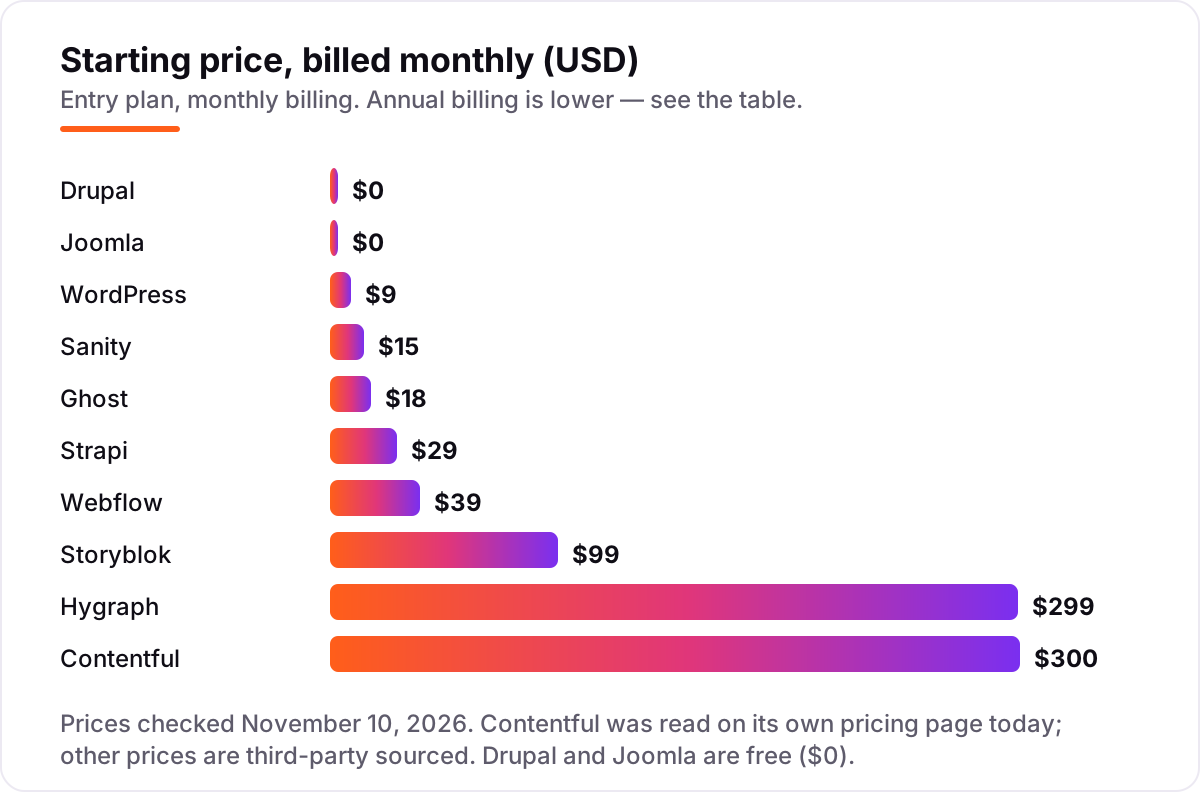
Content management tools pricing: what you will actually pay
Take a five-person team running one blog and marketing site for a year, paying the list prices. The subscription totals are $0 for Drupal and Joomla (licence only — hosting is extra), $48 for WordPress.com Personal billed annually, $180 for Ghost Starter billed annually, $348 for Strapi Cloud Developer, $300 for the Webflow Premium site plan billed annually, $900 for Sanity Growth at $15 a month per occupied seat, $1,089 for Storyblok Growth billed annually, $2,388 for Hygraph Growth billed annually, and $3,600 for Contentful Lite.
Two costs sit outside those numbers. First, Webflow editing seats: the site plan covers the site, not the editors, so four limited seats at $15 a month add $720 a year, taking Webflow to $1,020 for this team. Second, Contentful's space: Lite includes only a Starter Space of 10,000 records, and a larger Lite Space costs another $850 a month, or $10,200 a year. Third, the open-source tools need a server and someone to run it — the licence is $0, but the website is not.
Annual billing cuts the bill on most tools here: WordPress Personal drops from $108 a year on monthly billing to $48, Ghost Starter from $216 to $180, Storyblok Growth from $1,188 to $1,089, and Hygraph Growth from $3,588 to $2,388. Webflow Premium drops from $468 to $300 a year, before seats. Sanity, Strapi Cloud and Contentful publish no annual discount, so the monthly figure is the whole story.
Know the difference: a traditional CMS vs a headless CMS
The biggest buyer confusion in this category is between a traditional CMS and a headless CMS. A traditional CMS — WordPress, Webflow, Ghost, Drupal and Joomla — manages the content and renders the website in one system: you write a page, press publish, and the site shows it. A headless CMS — Sanity, Storyblok, Strapi, Contentful and Hygraph — stores the content only and delivers it through an API, so developers build the front end separately and the same content can feed a website, an app and any other channel.
Neither model is better in itself. A traditional CMS is faster to launch and easier for non-developers, because the editing and the website are one product. A headless CMS is the right call when content must appear in more than one place, or when developers want full control of the front end. The mistake is buying a headless CMS for a single blog with no developers: you pay for flexibility you will never use, and every small change waits on a developer.
There is a second, quieter confusion: hosted versus self-hosted. WordPress.com, Webflow, Ghost(Pro) and the headless SaaS tools are hosted — the vendor runs the servers. WordPress.org, Drupal, Joomla and Strapi Community are self-hosted — the software is free, but you provide the hosting, the updates and the backups. Hosted is simpler; self-hosted is cheaper in licence fees and gives you full control of the code and the data.
Quick comparison: tool type by need
| Buyer | Best pick | Why |
|---|---|---|
| Small business or blog on a budget | WordPress | Cheapest hosted start at $4/month billed annually, largest ecosystem |
| Design-led team or agency | Webflow | Visual builder plus a real CMS, Premium is $25/month billed annually |
| Solo publisher or newsletter writer | Ghost | Blog, newsletter and memberships in one tool, from $15/month billed annually |
| Developer-led team, content as data | Sanity | 4.7 out of 5 on G2, free plan covers 20 seats |
| Marketing team that needs a visual editor | Storyblok | Visual editor on a headless CMS, Growth is $99/month |
| Developers who want open source | Strapi | Free to self-host, Cloud Developer is $29/month per project |
| Large team, structured content | Contentful | Strongest content modelling, Lite is $300/month |
| GraphQL-first team | Hygraph | GraphQL-native with content federation, Growth is $199/month billed annually |
| Large organisation, strict governance | Drupal | Free licence, 100+ languages, enterprise-grade permissions |
| Community or member site, zero budget | Joomla | Free licence, built-in access control, 8,000 extensions |
Mistakes to avoid
- Comparing monthly prices without checking billing. The annual price is usually 15–40% lower, and a few tools have no annual option at all.
- Ignoring what the price counts. Sanity charges per seat, Strapi per project and Contentful per space. A five-person team pays $75 a month on Sanity Growth but $300 on Contentful Lite for the same five people.
- Calling a free plan free for production. Sanity's free plan allows public datasets only, and Storyblok's covers one seat. Check the limits against your real team before you build on a free plan.
- Buying a headless CMS with no developers. A headless CMS needs someone to build and maintain the front end. Without a developer, a traditional CMS ships faster and costs less.
- Forgetting the second bill. Webflow seats, Contentful spaces and Hygraph overages all sit outside the headline price. Price the tool for your actual team size and traffic before comparing headline prices.
How we chose
We checked each vendor's own pricing page and recorded the starting price exactly as shown, including the annual-billing figure where the page lists one, and we ranked the tools by fit for the most common buyer — a small business or content team picking its first serious CMS — not by brand size. Contentful's $300 Lite price was read on Contentful's own pricing page on November 10, 2026. The WordPress.com, Webflow, Ghost, Sanity, Storyblok, Strapi and Hygraph prices are third-party sourced: they come from independent October–November 2026 reads of each vendor's pricing page, because the vendor pages did not load for a direct read today, and the Sanity and Strapi vendor pages returned errors. Ratings are shown only where a fresh G2 page gave a clear score and review count on November 10, 2026: Webflow, Ghost, Sanity, Storyblok and Strapi. WordPress, Contentful, Drupal, Joomla and Hygraph carry no rating here because their G2 pages gave conflicting scores and counts across pages or had no fresh copy, and we would rather show no rating than a stale or estimated one. No vendor paid for a place in this list, and none of the links here are affiliate links.
What to do next
Start with the decision path above: work out who edits the content, count your team, and decide traditional or headless. Then take the free plan or trial of your top pick and publish a real page through it — draft it, add an image, schedule it and publish it. If that flow feels smooth and the price fits your team size, you have your tool. Once your tools are in place, find out what's holding your rankings back.
Your stack only works if people find you
SerpAstra fixes what keeps your site off page one and makes it easy for AI assistants to recommend.
Get a free audit→Sources we checked (15)
- WordPress.com pricing — wordpress.com/pricing (third-party read of vendor page, October-November 2026)
- Webflow pricing — webflow.com/pricing (third-party read of vendor page, October 2026)
- Ghost pricing — ghost.org/pricing (third-party read of vendor page, October 2026)
- Sanity pricing — sanity.io/pricing (third-party read of vendor page, September-October 2026)
- Storyblok pricing — storyblok.com/pricing (third-party read of vendor page, September-October 2026)
- Strapi pricing — strapi.io/pricing (vendor-supplied via G2, November 2026)
- Contentful pricing — contentful.com/pricing (checked November 10, 2026)
- Hygraph pricing — hygraph.com/pricing (third-party read of vendor page, November 2026)
- Drupal — drupal.org (free open-source software, checked November 10, 2026)
- Joomla — joomla.org (free open-source software, checked November 10, 2026)
- Webflow on G2 — 4.4/5, 995 reviews (checked November 10, 2026)
- Ghost on G2 — 4.0/5, 40 reviews (checked November 10, 2026)
- Sanity on G2 — 4.7/5, 966 reviews (checked November 10, 2026)
- Storyblok on G2 — 4.5/5, 633 reviews (checked November 10, 2026)
- Strapi on G2 — 4.5/5, 207 reviews (checked November 10, 2026)
Shamim
Founder of SerpAstra
A full-stack SEO and digital marketer who spends most days on Local SEO for dental practices, AI search visibility and lead generation.
Frequently asked questions
What is the best content management tool in 2026?
WordPress is the best fit for most buyers: the largest plugin ecosystem and a hosted start at $4 a month billed annually. Webflow suits design-led teams at $25 a month billed annually, and Sanity is the best-reviewed headless option at 4.7 out of 5 on G2. The right pick depends on who edits the content.
How much does a content management tool cost?
From $0 to $300 a month at the entry level. Drupal and Joomla are free open-source software, WordPress.com Personal starts at $9 a month billed monthly, Ghost at $18, Strapi Cloud at $29 and Contentful Lite at $300. Always add hosting, seats and add-ons: the headline price is rarely the whole bill.
Is there a free content management tool?
Yes, several. Drupal, Joomla and the WordPress.org software are free to download and self-host, and WordPress.com, Sanity, Storyblok, Strapi, Contentful and Hygraph all have free plans. Free plans cap seats, records or API calls, so a production site with a team usually needs a paid plan.
What is the difference between a traditional CMS and a headless CMS?
A traditional CMS like WordPress or Drupal manages content and renders the website in one system. A headless CMS like Sanity, Contentful or Storyblok stores content only and delivers it through an API, so developers build the front end separately. Headless suits teams feeding several channels; traditional suits teams publishing one website.
WordPress or Webflow — which should I choose?
Choose WordPress for the widest plugin choice and the lowest price, starting at $4 a month billed annually. Choose Webflow when design control matters most and you want hosting, security and the CMS from one vendor, from $25 a month billed annually. Webflow also charges separately for editing seats, which WordPress does not.
Can I switch content management tools later?
Yes, but plan the move for a quiet week. Export all pages, posts, media, user accounts and URLs from the old tool, then import them and test redirects before going live. Headless tools make this easier, since the content is already structured, while a traditional CMS migration often needs a developer to rebuild templates.
Free SEO and AI visibility audit
Find out what is holding your rankings back
Send us your site. Within 2 business days you get a written audit, an AI visibility check and a short fix list ranked by impact. Free, with no contract attached.
Request my free audit→Related guides
 SEO & AI SearchBest CMS for SEO in 2026: 8 Options Ranked and Reviewed8 best CMS for SEO compared with real 2026 prices, free plans and SEO controls. WordPress, Webflow, Shopify and more, ranked by fit for a small business site.Read guide →
 SEO & AI Search12 Best Blogging Platforms for SEO in 2026 (Pros, Cons and Pricing)Compare the best blogging platform for SEO for your budget: 12 platforms ranked on price, SEO controls and ownership, from free WordPress to Ghost and Webflow.Read guide →
 SEO & AI Search9 Best WordPress SEO Plugins in 2026 (Free and Paid, Compared)The 9 best WordPress SEO plugins compared on price, free plans, AI help and schema, for bloggers and small businesses. Prices checked November 2, 2026.Read guide →